AC Heat BUICK LUCERNE 2011 Owner's Guide
[x] Cancel search | Manufacturer: BUICK, Model Year: 2011, Model line: LUCERNE, Model: BUICK LUCERNE 2011Pages: 450, PDF Size: 3.63 MB
Page 157 of 450
Black plate (1,1)Buick Lucerne Owner Manual - 2011
Section 4 Instrument Panel
Instrument Panel Overview. . . . . . . . . . . . . . . . . . . . . . . .4-3
Hazard Warning Flashers . . . . . . . . . . . . . . . . . . . . . . . 4-3
Horn . . . . . . . . . . . . . . . . . . . . . . . . . . . . . . . . . . . . . . . . . . . . 4-3
Tilt Wheel . . . . . . . . . . . . . . . . . . . . . . . . . . . . . . . . . . . . . . . 4-3
Power Tilt Wheel and Telescopic Steering Column . . . . . . . . . . . . . . . . . . . . . . . . . . . . . . . . . . . . . . . 4-4
Heated Steering Wheel . . . . . . . . . . . . . . . . . . . . . . . . . 4-4
Turn Signal/Multifunction Lever . . . . . . . . . . . . . . . . . . 4-4
Turn and Lane-Change Signals . . . . . . . . . . . . . . . . . 4-5
Headlamp High/Low-Beam Changer . . . . . . . . . . . . 4-5
Flash-to-Pass . . . . . . . . . . . . . . . . . . . . . . . . . . . . . . . . . . . 4-5
Windshield Wipers . . . . . . . . . . . . . . . . . . . . . . . . . . . . . . 4-6
Windshield Washer . . . . . . . . . . . . . . . . . . . . . . . . . . . . . 4-7
Cruise Control . . . . . . . . . . . . . . . . . . . . . . . . . . . . . . . . . . 4-7
Exterior Lamps . . . . . . . . . . . . . . . . . . . . . . . . . . . . . . . . 4-10
Wiper Activated Headlamps . . . . . . . . . . . . . . . . . . . . 4-11
Headlamps on Reminder . . . . . . . . . . . . . . . . . . . . . . . 4-11
Daytime Running Lamps (DRL) . . . . . . . . . . . . . . . . 4-11
Fog Lamps . . . . . . . . . . . . . . . . . . . . . . . . . . . . . . . . . . . . 4-12
Cornering Lamps . . . . . . . . . . . . . . . . . . . . . . . . . . . . . . 4-12
Exterior Lighting Battery Saver . . . . . . . . . . . . . . . . . 4-12
Instrument Panel Brightness . . . . . . . . . . . . . . . . . . . 4-12
Courtesy Lamps . . . . . . . . . . . . . . . . . . . . . . . . . . . . . . . 4-13
Entry Lighting . . . . . . . . . . . . . . . . . . . . . . . . . . . . . . . . . . 4-13
Delayed Entry Lighting . . . . . . . . . . . . . . . . . . . . . . . . . 4-13
Theater Dimming . . . . . . . . . . . . . . . . . . . . . . . . . . . . . . 4-13 Delayed Exit Lighting . . . . . . . . . . . . . . . . . . . . . . . . . . 4-13
Perimeter Lighting . . . . . . . . . . . . . . . . . . . . . . . . . . . . . 4-13
Front Reading Lamps . . . . . . . . . . . . . . . . . . . . . . . . . . 4-13
Electric Power Management . . . . . . . . . . . . . . . . . . . 4-14
Inadvertent Power Battery Saver . . . . . . . . . . . . . . . 4-14
Battery Run-Down Protection . . . . . . . . . . . . . . . . . . 4-15
Accessory Power Outlet(s) . . . . . . . . . . . . . . . . . . . . . 4-15
Ashtray(s) . . . . . . . . . . . . . . . . . . . . . . . . . . . . . . . . . . . . . 4-16
Climate Controls . . . . . . . . . . . . . . . . . . . . . . . . . . . . . . . . . . 4-16
Climate Control System . . . . . . . . . . . . . . . . . . . . . . . . 4-16
Dual Automatic Climate Control System . . . . . . . 4-20
Outlet Adjustment . . . . . . . . . . . . . . . . . . . . . . . . . . . . . . 4-25
Passenger Compartment Air Filter . . . . . . . . . . . . . 4-25
Warning Lights, Gauges, and Indicators . . . . . . . .4-27
Instrument Panel Cluster . . . . . . . . . . . . . . . . . . . . . . . 4-28
Speedometer and Odometer . . . . . . . . . . . . . . . . . . . 4-29
Trip Odometer . . . . . . . . . . . . . . . . . . . . . . . . . . . . . . . . . 4-29
Tachometer . . . . . . . . . . . . . . . . . . . . . . . . . . . . . . . . . . . . 4-29
Safety Belt Reminders . . . . . . . . . . . . . . . . . . . . . . . . . 4-29
Airbag Readiness Light . . . . . . . . . . . . . . . . . . . . . . . . 4-30
Passenger Airbag Status Indicator . . . . . . . . . . . . . 4-31
Charging System Light . . . . . . . . . . . . . . . . . . . . . . . . 4-32
Brake System Warning Light . . . . . . . . . . . . . . . . . . . 4-32
Antilock Brake System (ABS) Warning Light . . . 4-33
Traction Control System (TCS) Warning Light . . . . . . . . . . . . . . . . . . . . . . . . . . . . . . . . . . . . . . . . . 4-34
4-1
Page 160 of 450
Black plate (4,1)Buick Lucerne Owner Manual - 2011
Power Tilt Wheel and Telescopic
Steering Column
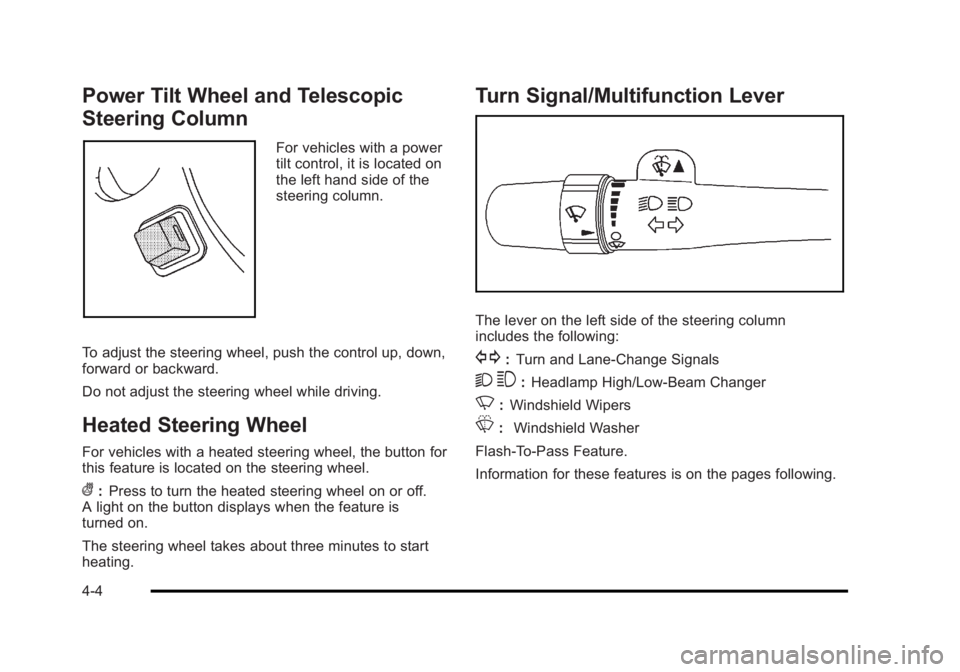
For vehicles with a power
tilt control, it is located on
the left hand side of the
steering column.
To adjust the steering wheel, push the control up, down,
forward or backward.
Do not adjust the steering wheel while driving.
Heated Steering Wheel
For vehicles with a heated steering wheel, the button for
this feature is located on the steering wheel.
(: Press to turn the heated steering wheel on or off.
A light on the button displays when the feature is
turned on.
The steering wheel takes about three minutes to start
heating.
Turn Signal/Multifunction Lever
The lever on the left side of the steering column
includes the following:
G: Turn and Lane-Change Signals
2 3:Headlamp High/Low-Beam Changer
N: Windshield Wipers
L: Windshield Washer
Flash-To-Pass Feature.
Information for these features is on the pages following.
4-4
Page 169 of 450
Black plate (13,1)Buick Lucerne Owner Manual - 2011
Courtesy Lamps
When any door is opened, several lamps turn on
making it easier for you to enter and exit the vehicle.
Turn the instrument panel brightness control completely
clockwise to manually turn on these lamps.
Entry Lighting
If it is dark enough outside when you press the unlock
button on the remote keyless entry transmitter, the
interior courtesy lamps will turn on and stay on for about
40 seconds. The lamps can be turned off immediately
by pressing the lock button on the remote keyless entry
transmitter, turning the ignition key to ON/RUN or
activating the power door locks.
Delayed Entry Lighting
The interior lamps will turn on if you open the door
when it is dark enough outside. When you close the
door with the ignition off, the interior lamps will stay on
for up to 25 seconds or until the ignition is turned to an
on position. When the lamps turn off as a result of the
25 second timer or the ignition switch being turned
on, the lighting will deactivate by way of the theater
dimming effect. Locking the doors will override the
delayed entry lighting feature and the lamps will turn off
right away.
Theater Dimming
This feature allows for a three to five second fade out of
the courtesy lamps instead of immediate turn off.
Delayed Exit Lighting
If it is dark enough outside when you remove the key
from the ignition, the interior lamps will turn on and
stay on for about 25 seconds. This will give you time
to find the door pull handle or lock switches. Once the
key is inserted into the ignition, the exit lighting will be
cancelled and the lighting will fade out.
Perimeter Lighting
If it is dark enough outside when the unlock button on
the remote keyless entry transmitter is pressed, the
DRL, parking lamps and back-up lamps will come on.
This feature can be programmed on for various
amounts of time in seconds for each transmitter.
SeeDIC Vehicle Customization
on page 4‑58for
information on programming.
Front Reading Lamps
The front reading lamps are located on the headliner.
Press the button near each lamp to turn them on or off.
4-13
Page 170 of 450
Black plate (14,1)Buick Lucerne Owner Manual - 2011
Electric Power Management
The vehicle has Electric Power Management (EPM) that
estimates the battery's temperature and state of charge.
It then adjusts the voltage for best performance and
extended life of the battery.
When the battery's state of charge is low, the voltage
is raised slightly to quickly bring the charge back up.
When the state of charge is high, the voltage is lowered
slightly to prevent overcharging. If the vehicle has a
voltmeter gauge or a voltage display on the Driver
Information Center (DIC), you may see the voltage
move up or down. This is normal. If there is a problem,
an alert will be displayed.
The battery can be discharged at idle if the electrical
loads are very high. This is true for all vehicles. This is
because the generator (alternator) may not be spinning
fast enough at idle to produce all the power that is
needed for very high electrical loads.
A high electrical load occurs when several of the
following are on, such as: headlamps, high beams,
fog lamps, rear window defogger, climate control fan at
high speed, heated seats, engine cooling fans, trailer
loads, and loads plugged into accessory power outlets.EPM works to prevent excessive discharge of the
battery. It does this by balancing the generator's output
and the vehicle's electrical needs. It can increase
engine idle speed to generate more power, whenever
needed. It can temporarily reduce the power demands
of some accessories.
Normally, these actions occur in steps or levels,
without being noticeable. In rare cases at the highest
levels of corrective action, this action may be noticeable
to the driver. If so, a Driver Information Center (DIC)
message might be displayed, such as BATTERY
SAVER ACTIVE, BATTERY VOLTAGE LOW, or
LOW BATTERY. If this message is displayed, it is
recommended that the driver reduce the electrical
loads as much as possible. See DIC Warnings and
Messages on page 4‑49.
Inadvertent Power Battery Saver
This feature is designed to protect your vehicle's
battery against drainage from the interior lamps,
or garage door opener. When the ignition is turned
off, the power to these features will automatically turn
off after 10 minutes. Power will be restored for an
additional 10 minutes if any door is opened, the trunk
is opened or the courtesy lamp switch is turned on.
4-14
Page 172 of 450
Black plate (16,1)Buick Lucerne Owner Manual - 2011
When adding electrical equipment, be sure to follow
the proper installation instructions included with the
equipment. SeeAdd-On Electrical Equipment
on
page 6‑107.
Notice: Hanging heavy equipment from the power
outlet can cause damage not covered by the vehicle
warranty. The power outlets are designed for
accessory power plugs only, such as cell phone
charge cords.
Ashtray(s)
Notice: If papers, pins, or other flammable items are
put in the ashtray, hot cigarettes or other smoking
materials could ignite them and possibly damage
the vehicle. Never put flammable items in the
ashtray.
For vehicles without the floor console, pull the tray
located below the climate controls to reveal the ashtray.
The ashtray can be removed by pulling on the ledge
located at the top of the ashtray.
The vehicles with a full floor console do not have an
ashtray. There is a storage bin below the climate control
system. For more information, see Front Storage Area
on page 3‑49.
Climate Controls
Climate Control System
The heating, cooling, and ventilation for the vehicle can
be controlled with this system.
For vehicles with the remote start feature, when
activated, the climate control system heats or cools the
inside of the vehicle with the settings used before the
vehicle was turned off. The heated seats, if the vehicle
has them, and the rear window defogger will also be
turned on when it is cold outside. The cooled seat
setting is not activated during a remote start. Normal
operation of the system will return after the key is
turned to the ON/RUN position. See Remote Keyless
Entry (RKE) System Operation
on page 3‑4for more
information.
4-16
Page 175 of 450
Black plate (19,1)Buick Lucerne Owner Manual - 2011
Rear Window Defogger
The rear window defogger uses a warming grid to
remove fog from the rear window.
<(Rear Window Defogger):Press to turn the rear
window defogger on or off. An indicator light below the
button comes on to show that the rear window defogger
is on. Be sure to clear as much snow from the rear
window as possible.
The rear window defogger only works when the
ignition is in ON/RUN. The rear window defogger stays
on for about 20 minutes after the button is pressed if
traveling at slow speeds. At higher vehicle speeds, the
rear defogger may stay on continuously. If turned on
again, the defogger only runs for about 10 minutes
before turning off. The defogger can be turned off by
pressing the button again, by turning the ignition to
ACC/ACCESSORY or ON/RUN, or by turning off the
engine. If the vehicle has heated outside rearview mirrors, the
mirrors heat to help clear fog or frost from the surface
of the mirror when the rear window defogger is on.
See
Outside Heated Mirrors
on page 3‑34for more
information.
Notice: Do not use anything sharp on the inside of
the rear window. If you do, you could cut or damage
the warming grid, and the repairs would not be
covered by the vehicle warranty. Do not attach a
temporary vehicle license, tape, a decal, or anything
similar to the defogger grid.
4-19
Page 176 of 450
Black plate (20,1)Buick Lucerne Owner Manual - 2011
Dual Automatic Climate Control
System
The heating, cooling, and ventilation for the vehicle can
be controlled with this system.
For vehicles with the remote start feature and it is
activated, the climate control system heats or cools the
inside of the vehicle, with the settings used before the
vehicle was turned off. The heated seats, if the vehicle
has them, and the rear window defogger will be turned
on by the climate control system when it is cold outside.
The cooled seat setting is not activated during a remote
start. Normal operation of the system will return after
the key is turned to the ON/RUN position. SeeRemote
Keyless Entry (RKE) System Operation
on page 3‑4for more information.
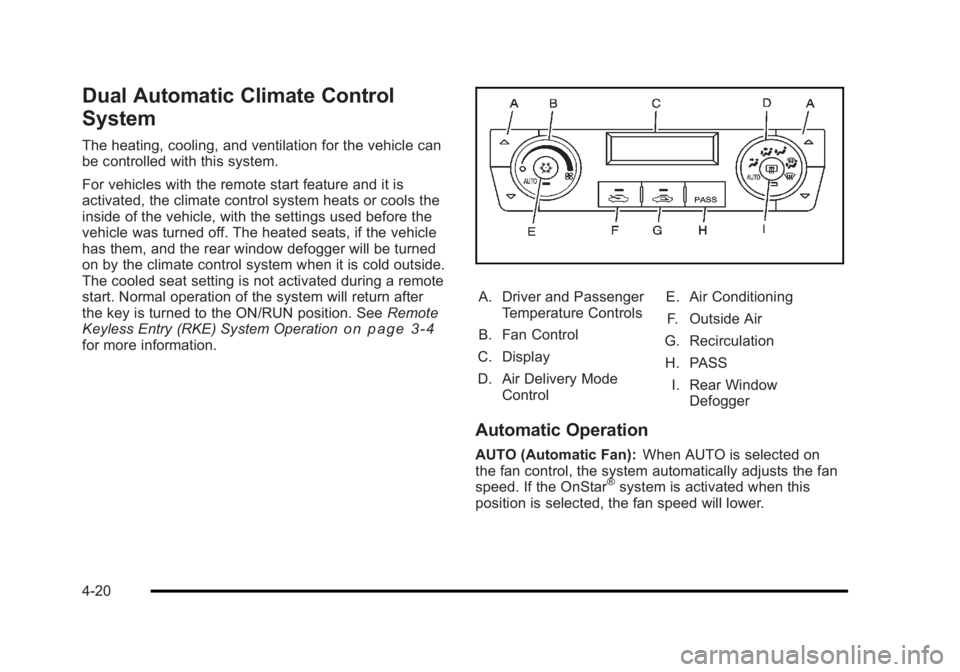
A. Driver and Passenger
Temperature Controls
B. Fan Control
C. Display
D. Air Delivery Mode Control E. Air Conditioning
F. Outside Air
G. Recirculation
H. PASS I. Rear Window Defogger
Automatic Operation
AUTO (Automatic Fan): When AUTO is selected on
the fan control, the system automatically adjusts the fan
speed. If the OnStar
®system is activated when this
position is selected, the fan speed will lower.
4-20
Page 177 of 450
Black plate (21,1)Buick Lucerne Owner Manual - 2011
AUTO (Automatic Mode)
1. Turn the fan control to AUTO.
2. Turn the mode control to AUTO.
3. Adjust the temperature to a comfortable settingbetween 68°F (21°C) and 78°F (26°C).
Choosing the coldest or warmest temperature
setting will not cause the system to heat or cool
any faster. In cold weather, the system starts at
reduced fan speeds to avoid blowing cold air
into the vehicle until warmer air is available. The
system will start out blowing air to the floor, but
may change modes automatically as the vehicle
warms up to maintain the chosen temperature
setting. The length of time needed to warm the
interior depends on the outside temperature.
4. Wait a few minutes for the system to automatically regulate. Then adjust the temperature as
necessary to find your comfort setting.
Do not cover the solar sensor located in the center of
the instrument panel, near the windshield. For more
information on the solar sensor, see “Sensors”later in
this section.
After the vehicle is started, the display shows the
interior temperature settings. When the ENG/MET (English/metric) button on the
Driver Information Center (DIC) is pressed, the display
shows readings in Fahrenheit or Celsius. Use the
ENG/MET button to toggle between the readings.
AUTO (Automatic Air Conditioning):
If AUTO is
selected on the fan or mode control, the system
automatically controls the air conditioning compressor.
The A/C compressor runs automatically even at cool
outside temperatures in order to dehumidify the air. The
A/C indicator light is lit when the system is operating
automatically. Press the A/C button on the fan control to
turn off the A/C. To clear windows better in defog or
defrost modes, the A/C compressor runs automatically
in damp cool conditions.
h(Auto Recirculation): If AUTO is selected on
either the fan or mode control, the system automatically
controls the supply of fresh outside air or recirculates
the interior air to cool the car faster. The indicator light
on the recirculation button will light whenever the
system switches to recirculation. You may force outside
air by pressing the outside air button. The next time
AUTO fan or mode is selected, it will reset back to
AUTO operation.
4-21
Page 180 of 450
Black plate (24,1)Buick Lucerne Owner Manual - 2011
There is also an interior temperature sensor located
next to the steering wheel that measures the
temperature of the air inside the vehicle.
There is also an exterior temperature sensor located
behind the front grille. This sensor reads the outside air
temperature and helps maintain the temperature inside
the vehicle. Any cover on the front of the vehicle could
cause a false temperature reading to display.
In order to prevent false temperature readings at
startup, the displayed temperature will not change
until the following occurs:
.Vehicle speed is above 10 mph (16 km/h) for
five minutes.
.Vehicle speed is above 32 mph (51 km/h) for
two and a half minutes.
The climate control system uses the information from
these sensors to maintain your comfort setting by
adjusting the outlet temperature, fan speed, and the
air delivery mode. The system may also supply cooler
air to the side of the vehicle facing the sun. The
recirculation mode will also be used as needed to
maintain cool outlet temperatures.
Rear Window Defogger
The rear window defogger uses a warming grid to
remove fog or frost from the rear window.
<(Rear Defogger): Press to turn the rear window
defogger on or off. An indicator light below the button
comes on to show that the rear window defogger is on.
Be sure to clear as much snow from the rear window as
possible.
The rear window defogger only works when the ignition
is in ON/RUN. The rear window defogger stays on for
about 20 minutes after the button is pressed if the
vehicle is traveling at slower vehicle speeds. At higher
vehicle speeds the rear window defogger may stay on
continuously. If turned on again, the defogger only runs
for about 10 minutes before turning off. The defogger
can be turned off by pressing the button again, by
turning the ignition to ACC/ACCESSORY or ON/RUN,
or by turning off the engine.
The heated outside rearview mirrors will heat to help
clear fog or frost from the surface of the mirror when
the rear window defogger is on. See Outside Heated
Mirrors
on page 3‑34for more information.
Notice: Do not use a razor blade or sharp object
to clear the inside rear window. Do not adhere
anything to the defogger grid lines in the rear glass.
These actions may damage the rear defogger.
Repairs would not be covered by your warranty.
4-24
Page 192 of 450
Black plate (36,1)Buick Lucerne Owner Manual - 2011
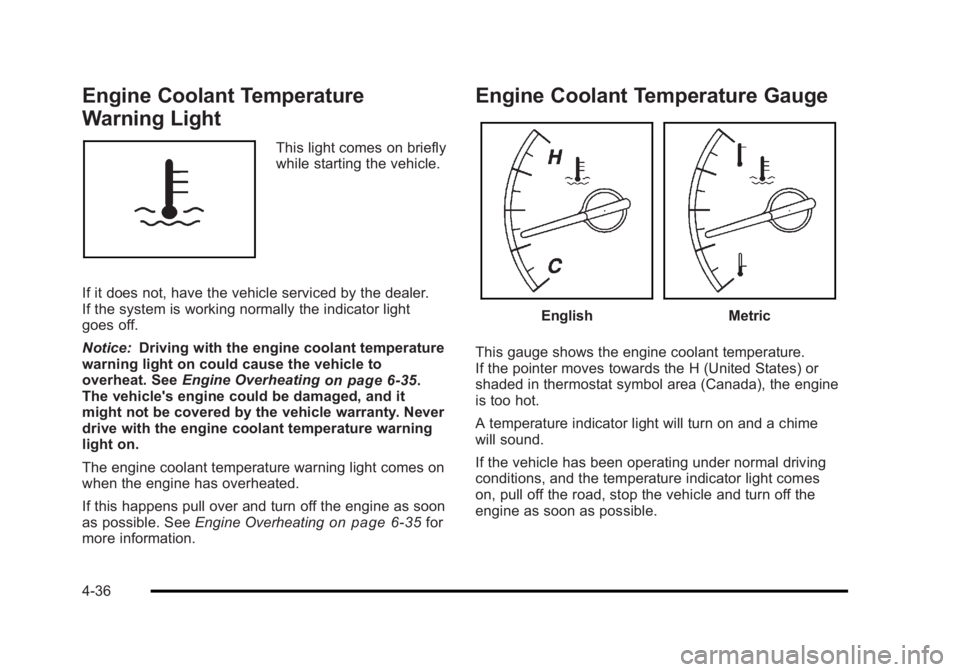
Engine Coolant Temperature
Warning Light
This light comes on briefly
while starting the vehicle.
If it does not, have the vehicle serviced by the dealer.
If the system is working normally the indicator light
goes off.
Notice: Driving with the engine coolant temperature
warning light on could cause the vehicle to
overheat. See Engine Overheating
on page 6‑35.
The vehicle's engine could be damaged, and it
might not be covered by the vehicle warranty. Never
drive with the engine coolant temperature warning
light on.
The engine coolant temperature warning light comes on
when the engine has overheated.
If this happens pull over and turn off the engine as soon
as possible. See Engine Overheating
on page 6‑35for
more information.
Engine Coolant Temperature Gauge
EnglishMetric
This gauge shows the engine coolant temperature.
If the pointer moves towards the H (United States) or
shaded in thermostat symbol area (Canada), the engine
is too hot.
A temperature indicator light will turn on and a chime
will sound.
If the vehicle has been operating under normal driving
conditions, and the temperature indicator light comes
on, pull off the road, stop the vehicle and turn off the
engine as soon as possible.
4-36