lock BUICK LUCERNE 2011 Workshop Manual
[x] Cancel search | Manufacturer: BUICK, Model Year: 2011, Model line: LUCERNE, Model: BUICK LUCERNE 2011Pages: 450, PDF Size: 3.63 MB
Page 157 of 450
Black plate (1,1)Buick Lucerne Owner Manual - 2011
Section 4 Instrument Panel
Instrument Panel Overview. . . . . . . . . . . . . . . . . . . . . . . .4-3
Hazard Warning Flashers . . . . . . . . . . . . . . . . . . . . . . . 4-3
Horn . . . . . . . . . . . . . . . . . . . . . . . . . . . . . . . . . . . . . . . . . . . . 4-3
Tilt Wheel . . . . . . . . . . . . . . . . . . . . . . . . . . . . . . . . . . . . . . . 4-3
Power Tilt Wheel and Telescopic Steering Column . . . . . . . . . . . . . . . . . . . . . . . . . . . . . . . . . . . . . . . 4-4
Heated Steering Wheel . . . . . . . . . . . . . . . . . . . . . . . . . 4-4
Turn Signal/Multifunction Lever . . . . . . . . . . . . . . . . . . 4-4
Turn and Lane-Change Signals . . . . . . . . . . . . . . . . . 4-5
Headlamp High/Low-Beam Changer . . . . . . . . . . . . 4-5
Flash-to-Pass . . . . . . . . . . . . . . . . . . . . . . . . . . . . . . . . . . . 4-5
Windshield Wipers . . . . . . . . . . . . . . . . . . . . . . . . . . . . . . 4-6
Windshield Washer . . . . . . . . . . . . . . . . . . . . . . . . . . . . . 4-7
Cruise Control . . . . . . . . . . . . . . . . . . . . . . . . . . . . . . . . . . 4-7
Exterior Lamps . . . . . . . . . . . . . . . . . . . . . . . . . . . . . . . . 4-10
Wiper Activated Headlamps . . . . . . . . . . . . . . . . . . . . 4-11
Headlamps on Reminder . . . . . . . . . . . . . . . . . . . . . . . 4-11
Daytime Running Lamps (DRL) . . . . . . . . . . . . . . . . 4-11
Fog Lamps . . . . . . . . . . . . . . . . . . . . . . . . . . . . . . . . . . . . 4-12
Cornering Lamps . . . . . . . . . . . . . . . . . . . . . . . . . . . . . . 4-12
Exterior Lighting Battery Saver . . . . . . . . . . . . . . . . . 4-12
Instrument Panel Brightness . . . . . . . . . . . . . . . . . . . 4-12
Courtesy Lamps . . . . . . . . . . . . . . . . . . . . . . . . . . . . . . . 4-13
Entry Lighting . . . . . . . . . . . . . . . . . . . . . . . . . . . . . . . . . . 4-13
Delayed Entry Lighting . . . . . . . . . . . . . . . . . . . . . . . . . 4-13
Theater Dimming . . . . . . . . . . . . . . . . . . . . . . . . . . . . . . 4-13 Delayed Exit Lighting . . . . . . . . . . . . . . . . . . . . . . . . . . 4-13
Perimeter Lighting . . . . . . . . . . . . . . . . . . . . . . . . . . . . . 4-13
Front Reading Lamps . . . . . . . . . . . . . . . . . . . . . . . . . . 4-13
Electric Power Management . . . . . . . . . . . . . . . . . . . 4-14
Inadvertent Power Battery Saver . . . . . . . . . . . . . . . 4-14
Battery Run-Down Protection . . . . . . . . . . . . . . . . . . 4-15
Accessory Power Outlet(s) . . . . . . . . . . . . . . . . . . . . . 4-15
Ashtray(s) . . . . . . . . . . . . . . . . . . . . . . . . . . . . . . . . . . . . . 4-16
Climate Controls . . . . . . . . . . . . . . . . . . . . . . . . . . . . . . . . . . 4-16
Climate Control System . . . . . . . . . . . . . . . . . . . . . . . . 4-16
Dual Automatic Climate Control System . . . . . . . 4-20
Outlet Adjustment . . . . . . . . . . . . . . . . . . . . . . . . . . . . . . 4-25
Passenger Compartment Air Filter . . . . . . . . . . . . . 4-25
Warning Lights, Gauges, and Indicators . . . . . . . .4-27
Instrument Panel Cluster . . . . . . . . . . . . . . . . . . . . . . . 4-28
Speedometer and Odometer . . . . . . . . . . . . . . . . . . . 4-29
Trip Odometer . . . . . . . . . . . . . . . . . . . . . . . . . . . . . . . . . 4-29
Tachometer . . . . . . . . . . . . . . . . . . . . . . . . . . . . . . . . . . . . 4-29
Safety Belt Reminders . . . . . . . . . . . . . . . . . . . . . . . . . 4-29
Airbag Readiness Light . . . . . . . . . . . . . . . . . . . . . . . . 4-30
Passenger Airbag Status Indicator . . . . . . . . . . . . . 4-31
Charging System Light . . . . . . . . . . . . . . . . . . . . . . . . 4-32
Brake System Warning Light . . . . . . . . . . . . . . . . . . . 4-32
Antilock Brake System (ABS) Warning Light . . . 4-33
Traction Control System (TCS) Warning Light . . . . . . . . . . . . . . . . . . . . . . . . . . . . . . . . . . . . . . . . . 4-34
4-1
Page 158 of 450
Black plate (2,1)Buick Lucerne Owner Manual - 2011
Section 4 Instrument Panel
StabiliTrak®Indicator Light . . . . . . . . . . . . . . . . . . . . . 4-34
Lane Departure Warning (LDW) Light . . . . . . . . . . 4-35
Engine Coolant Temperature Warning Light . . . . 4-36
Engine Coolant Temperature Gauge . . . . . . . . . . . 4-36
Tire Pressure Light . . . . . . . . . . . . . . . . . . . . . . . . . . . . 4-37
Malfunction Indicator Lamp . . . . . . . . . . . . . . . . . . . . 4-37
Oil Pressure Light . . . . . . . . . . . . . . . . . . . . . . . . . . . . . 4-40
Security Light . . . . . . . . . . . . . . . . . . . . . . . . . . . . . . . . . . 4-40
Front Fog Lamp Light . . . . . . . . . . . . . . . . . . . . . . . . . . 4-40
Cruise Control Light . . . . . . . . . . . . . . . . . . . . . . . . . . . 4-41
Highbeam On Light . . . . . . . . . . . . . . . . . . . . . . . . . . . . 4-41
Fuel Gauge . . . . . . . . . . . . . . . . . . . . . . . . . . . . . . . . . . . . 4-41
Driver Information Center (DIC) . . . . . . . . . . . . . . . . . .4-42
DIC Operation and Displays . . . . . . . . . . . . . . . . . . . 4-42
DIC Compass . . . . . . . . . . . . . . . . . . . . . . . . . . . . . . . . . . 4-47
DIC Warnings and Messages . . . . . . . . . . . . . . . . . . 4-49
DIC Vehicle Customization . . . . . . . . . . . . . . . . . . . . 4-58 Audio System(s)
. . . . . . . . . . . . . . . . . . . . . . . . . . . . . . . . . . 4-67
Setting the Clock . . . . . . . . . . . . . . . . . . . . . . . . . . . . . . 4-68
Radio(s) . . . . . . . . . . . . . . . . . . . . . . . . . . . . . . . . . . . . . . . 4-69
Using an MP3 . . . . . . . . . . . . . . . . . . . . . . . . . . . . . . . . . 4-78
XM Radio Messages . . . . . . . . . . . . . . . . . . . . . . . . . . . 4-84
Navigation/Radio System . . . . . . . . . . . . . . . . . . . . . . 4-85
Bluetooth
®. . . . . . . . . . . . . . . . . . . . . . . . . . . . . . . . . . . . . 4-86
Theft-Deterrent Feature . . . . . . . . . . . . . . . . . . . . . . . . 4-94
Audio Steering Wheel Controls . . . . . . . . . . . . . . . . 4-94
Radio Reception . . . . . . . . . . . . . . . . . . . . . . . . . . . . . . . 4-97
Backglass Antenna . . . . . . . . . . . . . . . . . . . . . . . . . . . . 4-97
XM™ Satellite Radio Antenna System . . . . . . . . . 4-98
4-2
Page 159 of 450
Black plate (3,1)Buick Lucerne Owner Manual - 2011
Instrument Panel Overview
Hazard Warning Flashers
The hazard warning flashers let you warn others that
you have a problem.
The hazard warning flasher button is located in the
center of the instrument panel above the radio.
|:Press to make the front and rear turn signal lamps
flash on and off. Press the button again to turn the
flashers off.
When the hazard warning flashers are on, the turn
signals will not work.
Horn
Press near or on the horn symbols on the steering
wheel pad to sound the horn.
Tilt Wheel
The tilt lever is located
on the left side of the
steering column.
To adjust the steering wheel: 1. Hold the wheel and pull the lever toward you.
2. Move the steering wheel up or down.
3. Release the lever to lock the wheel in place.
Do not adjust the steering wheel while driving.
4-3
Page 163 of 450
Black plate (7,1)Buick Lucerne Owner Manual - 2011
Windshield Washer
{WARNING:
In freezing weather, do not use the washer until
the windshield is warmed. Otherwise the washer
fluid can form ice on the windshield, blocking your
vision.
J(Washer Fluid):Press and release this paddle,
located at the top of the turn signal/multifunction lever,
to spray washer fluid on the windshield. The wipers will
clear the windshield and either stop or return to the
preset speed. For more washer cycles, press and hold
the paddle.
Cruise Control
With cruise control, you can maintain a speed of about
40 km/h (25 mph) or more without keeping your foot on
the accelerator. Cruise control does not work at speeds
below about 40 km/h (25 mph).
{WARNING:
Cruise control can be dangerous where you
cannot drive safely at a steady speed. So, do not
use the cruise control on winding roads or in
heavy traffic.
Cruise control can be dangerous on slippery
roads. On such roads, fast changes in tire traction
can cause excessive wheel slip, and you could
lose control. Do not use cruise control on slippery
roads.
If your vehicle has the Traction Control System (TCS)
and the cruise control is on, TCS will begin to limit
wheel spin and the cruise control automatically turns off.
See Traction Control System (TCS)
on page 5‑6.
When road conditions allow you to safely use it again,
the cruise control can be turned back on.
4-7
Page 167 of 450
Black plate (11,1)Buick Lucerne Owner Manual - 2011
Wiper Activated Headlamps
This feature activates the headlamps and parking lamps
after the windshield wipers are turned on and have
completed eight wipe cycles within four minutes.
When the ignition is turned to LOCK/OFF, the
wiper-activated headlamps immediately turn off. The
wiper-activated headlamps also turn off if the windshield
wipers are turned off.
Headlamps on Reminder
If you leave the exterior lamp buttons for the headlamps
or parking lamps on, remove the key from the ignition
and open the driver's door, you will hear a continuous
warning chime. The chime will turn off when the lamps
are turned off.
Daytime Running Lamps (DRL)
Daytime Running Lamps (DRL) can make it easier for
others to see the front of your vehicle during the day.
Fully functional daytime running lamps are required on
all vehicles first sold in Canada.
A light sensor on top of the instrument panel monitors
the exterior light level for the operation of DRL, so be
sure it is not covered.The DRL system makes the low-beam headlamps turn
on at reduced brightness in daylight when the following
conditions are met:
.The engine is running.
.The exterior lamp button for the headlamps is off.
When the DRL are on, only the low-beam headlamps
will be on. The parking lamps, taillamps, sidemarker
and other lamps will not be on.
When it is dark enough outside, the low-beam
headlamps will come on. The other lamps that turn on
with the headlamps will also turn on. When it is bright
enough outside, the regular lamps will go off, and the
low-beam headlamps change to the reduced brightness
of DRL.
To turn off all exterior lighting at night when the vehicle
is parked, turn the exterior lamp control to the off
position. See Exterior Lamps
on page 4‑10for more
information.
The regular headlamp system should be turned on
when needed.
4-11
Page 168 of 450
Black plate (12,1)Buick Lucerne Owner Manual - 2011
Fog Lamps
The fog lamps button is on the exterior lamps control to
the left of the steering column.
#(Fog Lamps):Press to turn the fog lamps on or off.
A light comes on in the instrument panel cluster when
the fog lamps are in use. See Instrument Panel Cluster
on page 4‑28. The ignition must be in the ON/RUN
position for the fog lamps to work.
The fog lamps will go off when the headlamps are
changed to high-beam.
Some localities have laws that require the headlamps to
be on along with the fog lamps.
Cornering Lamps
For vehicles with this feature, the cornering lamps come
on when: the headlamps or parking lamps are on, the
vehicle is not in P (Park), and you signal a turn with the
turn signal/multifunction lever. They provide more light
for cornering.
Exterior Lighting Battery Saver
If the exterior lamp button has been left on, the exterior
lamps will turn off about 10 minutes after the ignition is
turned to LOCK/OFF and a door has been opened. This
protects against draining the battery if the headlamps or
parking lamps are accidentally left on. If the lamps need
to be left on for more than 10 minutes, use the exterior
lamp control to turn the lamps back on after the ignition
is turned to LOCK/OFF and any door is opened.
Instrument Panel Brightness
D (Instrument Panel Brightness): This feature
controls the brightness of the instrument panel lights.
The knob for this control is located next to the exterior
lamps control.
Push the knob in and release when it pops out. Turn
the knob clockwise to increase the brightness of the
instrument panel lights and counter clockwise to
decrease the brightness. Turning the knob completely
clockwise to the detent will turn on the courtesy lamps.
4-12
Page 169 of 450
Black plate (13,1)Buick Lucerne Owner Manual - 2011
Courtesy Lamps
When any door is opened, several lamps turn on
making it easier for you to enter and exit the vehicle.
Turn the instrument panel brightness control completely
clockwise to manually turn on these lamps.
Entry Lighting
If it is dark enough outside when you press the unlock
button on the remote keyless entry transmitter, the
interior courtesy lamps will turn on and stay on for about
40 seconds. The lamps can be turned off immediately
by pressing the lock button on the remote keyless entry
transmitter, turning the ignition key to ON/RUN or
activating the power door locks.
Delayed Entry Lighting
The interior lamps will turn on if you open the door
when it is dark enough outside. When you close the
door with the ignition off, the interior lamps will stay on
for up to 25 seconds or until the ignition is turned to an
on position. When the lamps turn off as a result of the
25 second timer or the ignition switch being turned
on, the lighting will deactivate by way of the theater
dimming effect. Locking the doors will override the
delayed entry lighting feature and the lamps will turn off
right away.
Theater Dimming
This feature allows for a three to five second fade out of
the courtesy lamps instead of immediate turn off.
Delayed Exit Lighting
If it is dark enough outside when you remove the key
from the ignition, the interior lamps will turn on and
stay on for about 25 seconds. This will give you time
to find the door pull handle or lock switches. Once the
key is inserted into the ignition, the exit lighting will be
cancelled and the lighting will fade out.
Perimeter Lighting
If it is dark enough outside when the unlock button on
the remote keyless entry transmitter is pressed, the
DRL, parking lamps and back-up lamps will come on.
This feature can be programmed on for various
amounts of time in seconds for each transmitter.
SeeDIC Vehicle Customization
on page 4‑58for
information on programming.
Front Reading Lamps
The front reading lamps are located on the headliner.
Press the button near each lamp to turn them on or off.
4-13
Page 173 of 450
Black plate (17,1)Buick Lucerne Owner Manual - 2011
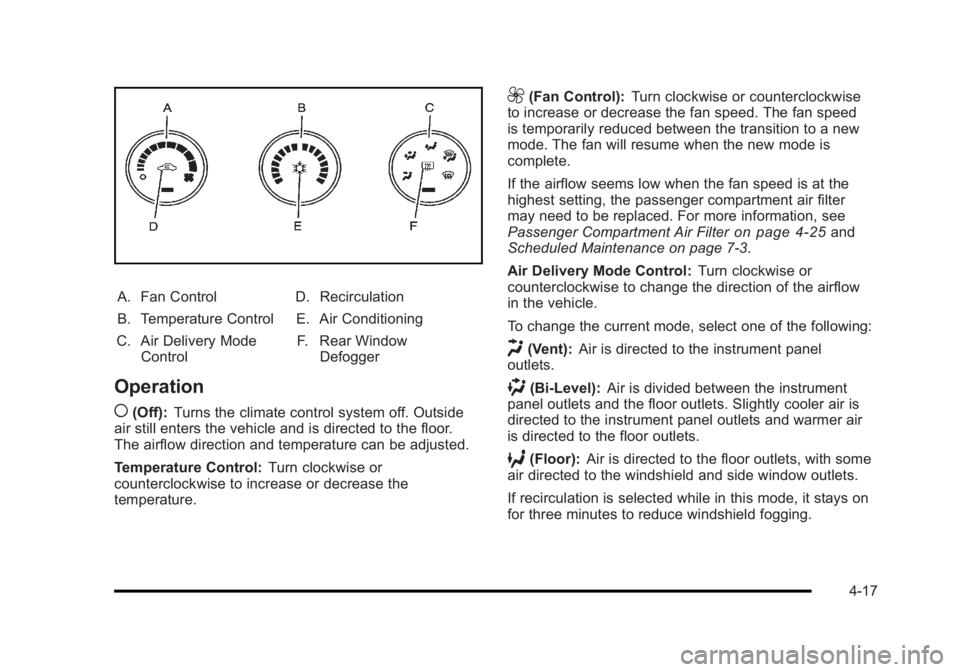
A. Fan Control
B. Temperature Control
C. Air Delivery Mode Control D. Recirculation
E. Air Conditioning F. Rear Window Defogger
Operation
(
(Off): Turns the climate control system off. Outside
air still enters the vehicle and is directed to the floor.
The airflow direction and temperature can be adjusted.
Temperature Control: Turn clockwise or
counterclockwise to increase or decrease the
temperature.
9(Fan Control): Turn clockwise or counterclockwise
to increase or decrease the fan speed. The fan speed
is temporarily reduced between the transition to a new
mode. The fan will resume when the new mode is
complete.
If the airflow seems low when the fan speed is at the
highest setting, the passenger compartment air filter
may need to be replaced. For more information, see
Passenger Compartment Air Filter
on page 4‑25and
Scheduled Maintenance on page 7‑3.
Air Delivery Mode Control: Turn clockwise or
counterclockwise to change the direction of the airflow
in the vehicle.
To change the current mode, select one of the following:
H(Vent): Air is directed to the instrument panel
outlets.
)(Bi-Level): Air is divided between the instrument
panel outlets and the floor outlets. Slightly cooler air is
directed to the instrument panel outlets and warmer air
is directed to the floor outlets.
6(Floor): Air is directed to the floor outlets, with some
air directed to the windshield and side window outlets.
If recirculation is selected while in this mode, it stays on
for three minutes to reduce windshield fogging.
4-17
Page 178 of 450
Black plate (22,1)Buick Lucerne Owner Manual - 2011
Manual Operation
9(Off):Turns the climate control system off. Outside
air still enters the vehicle and is directed to the floor.
The airflow direction and temperature can be adjusted.
If the temperature is adjusted while the system is off,
the display will light to show the current settings.
w x(Driver Temperature Controls): Press these
buttons next to the fan control to increase or decrease
the temperature inside the vehicle.
w x(Passenger Temperature Controls): Press
these buttons next to the mode control to increase or
decrease the temperature for the front passenger. If the
passenger climate control system is off, pressing one of
these buttons turns it on.
9(Fan Control): Turn clockwise or counterclockwise
to increase or decrease the fan speed. Turning this
control completely counterclockwise turns on the
automatic fan operation.
If the airflow seems low when the fan speed is at the
highest setting, the passenger compartment air filter
may need to be replaced. For more information, see
Passenger Compartment Air Filter
on page 4‑25and
Scheduled Maintenance on page 7‑3.
Air Delivery Mode Control: Turn clockwise or
counterclockwise to change the direction of the airflow
in the vehicle. To change the current mode, select one of the following:
F(Vent):
Air is directed to the instrument panel outlets.
*(Bi-Level): Air is divided between the instrument
panel outlets and the floor outlets. In automatic
operation, cooler air is directed to the upper outlets
and warmer air to the floor outlets.
7(Floor): Air is directed to the floor outlets, with some
air directed to the windshield and side window outlets.
If recirculation is selected while in this mode, it stays on
for three minutes to reduce windshield fogging.
W(Floor/Defog): This mode clears the windows of fog
or moisture. Air is directed to the floor outlets, with
some air directed to the windshield and side window
outlets. The system turns off recirculation and runs the
air-conditioning compressor unless the outside
temperature is at or below freezing. The recirculation
mode cannot be selected while in the floor/defog mode.
0(Defrost): This mode removes fog or frost from
the windshield more quickly. Air is directed to the
windshield and the side window outlets. The system
automatically turns off recirculation and runs the
air-conditioning compressor, unless the outside
temperature is at or below freezing. Recirculation
cannot be selected while in the defrost mode.
4-22
Page 181 of 450
Black plate (25,1)Buick Lucerne Owner Manual - 2011
Outlet Adjustment
Use the levers, located in the middle of the front
outlets, to change the direction of the airflow. Use the
thumbwheel located between the outlets to turn them on
and off.
If the vehicle has rear seat outlets, adjust the direction
of the airflow using the lever in the center of each outlet.
Operation Tips
.Clear away any ice, snow, or leaves from the air
inlets at the base of the windshield that could block
the flow of air into the vehicle.
.Use of non-GM approved hood deflectors can
adversely affect the performance of the system.
.Keep the path under the front seats clear of
objects to help circulate the air inside the vehicle
better.
Passenger Compartment Air Filter
Outside air is routed through a passenger compartment
air filter before entering the vehicle. This filter removes
certain particles from the air, including pollen and dust
particles. The filter should be replaced as part of routine
scheduled maintenance. SeeScheduled Maintenance
on page 7‑3for when to replace the filter. The access panel for the passenger compartment air
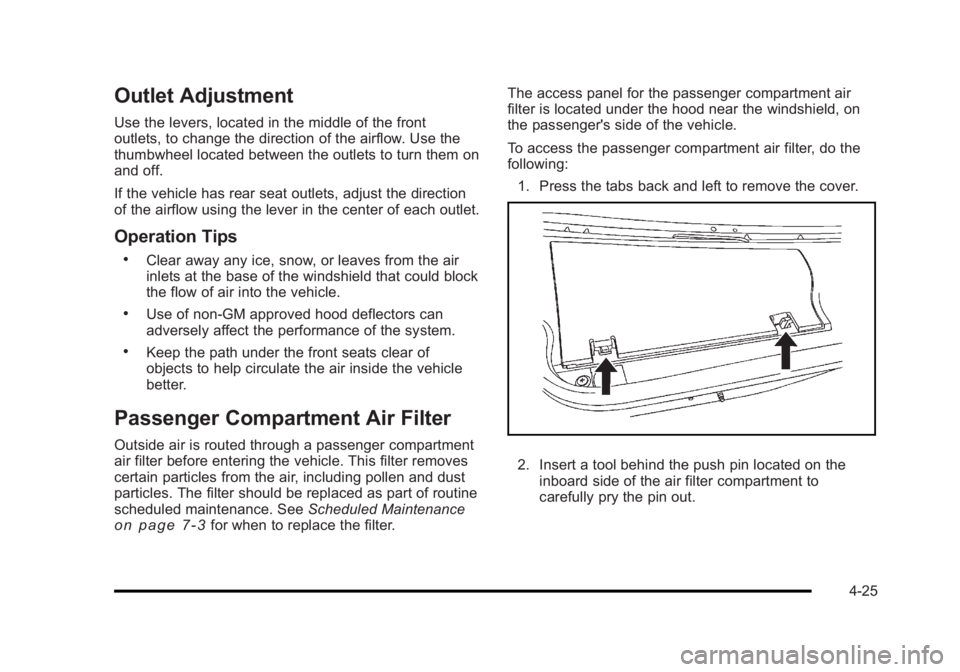
filter is located under the hood near the windshield, on
the passenger's side of the vehicle.
To access the passenger compartment air filter, do the
following:
1. Press the tabs back and left to remove the cover.
2. Insert a tool behind the push pin located on the inboard side of the air filter compartment to
carefully pry the pin out.
4-25