lock BUICK LUCERNE 2011 User Guide
[x] Cancel search | Manufacturer: BUICK, Model Year: 2011, Model line: LUCERNE, Model: BUICK LUCERNE 2011Pages: 450, PDF Size: 3.63 MB
Page 31 of 450
Black plate (25,1)Buick Lucerne Owner Manual - 2011
Crisis Assist, Stolen Vehicle Assistance, Vehicle
Diagnostics, Remote Door Unlock, Roadside
Assistance, Turn‐by‐Turn Navigation and Hands‐Free
Calling are available on most vehicles. Not all OnStar
services are available on all vehicles. For more
information see the OnStar Owner's Guide or visit
www.onstar.com (U.S.) or www.onstar.ca (Canada),
contact OnStar at 1-888-4-ONSTAR (1‐888‐466‐7827)
or TTY 1‐877‐248‐2080, or push
Qto speak with an
OnStar Advisor 24 hours a day, 7 days a week.
For a full description of OnStar services and system
limitations, see the OnStar Owner's Guide in the
glove box.
OnStar service is subject to the OnStar Terms and
Conditions included in the OnStar Glove Box Kit.
OnStar service requires wireless communication
networks and the Global Positioning System (GPS)
satellite network. Not all OnStar services are available
everywhere or on all vehicles at all times. OnStar service can’t work unless your vehicle is
in a place where OnStar has an agreement with a
wireless service provider for service in that area, and
the wireless service provider has coverage, network
capacity, reception, and technology compatible with
OnStar service. Service involving location information
about your vehicle can’t work unless GPS signals are
available, unobstructed, and compatible with the OnStar
hardware. The vehicle has to have a working electrical
system and adequate battery power for the OnStar
equipment to operate. OnStar service may not work if
the OnStar equipment isn’t properly installed or you
haven’t maintained it and your vehicle is in good
working order and in compliance with all government
regulations. If you try to add, connect, or modify any
equipment or software in your vehicle, OnStar service
may not work. Other problems OnStar can’t control may
prevent service to you, such as hills, tall buildings,
tunnels, weather, electrical system design and
architecture of your vehicle, damage to important parts
of your vehicle in a crash, or wireless phone network
congestion or jamming.
See
Radio Frequency Statement
on page 8‑18for information regarding Part 15 of the Federal
Communications Commission (FCC) rules and Industry
Canada Standards RSS-210/220/310.
1-25
Page 35 of 450
Black plate (3,1)Buick Lucerne Owner Manual - 2011
Pull the head restraint up to raise it. To lower the head
restraint, press the button, located on the top of the
seatback, and push the restraint down.
Push down on the head restraint after the button is
released to make sure that it is locked in place.
The head restraints are not designed to be removed.
Front Seats
Power Seats
To adjust a power seat:
.Move the seat forward or rearward by sliding the
control forward or rearward.
.Raise or lower the front or rear part of the seat
cushion by moving the front or rear of the control
up or down.
.Raise or lower the entire seat by moving the entire
control up or down.
2-3
Page 39 of 450
Black plate (7,1)Buick Lucerne Owner Manual - 2011
Memory Seat and Mirrors
On vehicles with the memory feature, the controls on
the driver door are used to program and recall memory
settings for the driver seat, outside mirrors, and the
power steering column, if the vehicle has this feature.
1:Saves and recalls for driver 1.
2: Saves and recalls for driver 2.
S(Easy Exit Positions): Recalls the easy exit driver
seat and power steering column positions.
Storing Memory Positions
To save into memory:
1. Adjust the driver seat, seatback recliner, lumbar, both outside mirrors, and the power steering
column, if equipped.
2. Press and hold “1”until two beeps sound.
3. Repeat for a second driver position using “2.”To recall the memory positions, press and release
“1”
or “2.” The vehicle must be in P (Park). A single beep
will sound. The seat, outside mirrors, and power
steering column, if equipped, will move to the positions
previously stored for the identified driver.
Memory Remote Recall
The memory feature can recall the driver seat, outside
mirrors, and power steering column, if equipped, to
stored positions when entering the vehicle.
To activate memory remote recall, unlock the driver
door with the Remote Keyless Entry (RKE) transmitter.
The driver seat, outside mirrors, and power steering
column will move to the memory positions associated
with the transmitter used to unlock the vehicle.
The automatic recall feature can be turned on or off
using the vehicle customization menu. See “Memory
Seat Recall” underDIC Vehicle Customization
on
page 4‑58for more information.
2-7
Page 40 of 450
Black plate (8,1)Buick Lucerne Owner Manual - 2011
To stop recall movement, press one of the memory or
power mirror buttons, power seat controls, or the power
steering column switch.
If something has blocked the driver seat and/or steering
column while recalling a memory position, the recall
may stop. Remove the obstruction; then press and hold
the appropriate manual control for the memory item
that is not recalling for two seconds. Try recalling the
memory position again by pressing the appropriate
memory button. If the memory position is still not
recalling, see your dealer for service.
Easy Exit Positions
The easy exit feature can move the driver seat rearward
and the power steering column, if equipped, up and
forward to allow extra room to exit the vehicle.
S:Press to recall the easy exit positions. The vehicle
must be in P (Park). If the easy exit feature is programmed on in the vehicle
customization menu, automatic driver seat and power
steering column movement occur when the ignition key
is removed.
A single beep sounds. The driver seat will move back
and the power steering column, if equipped, moves up
and forward.
If something has blocked the driver seat while recalling
the exit position, the recall may stop. Remove the
obstruction; then press and hold the power seat control
rearward for two seconds. Try recalling the exit position
again. If the exit position is still not recalling, see your
dealer for service.
See
“Easy Exit Recall” and“Easy Exit Setup” under
DIC Vehicle Customization
on page 4‑58for more
information.
2-8
Page 42 of 450

Black plate (10,1)Buick Lucerne Owner Manual - 2011
Manual Reclining Seatbacks
{WARNING:
You can lose control of the vehicle if you try to
adjust a manual driver seat while the vehicle is
moving. The sudden movement could startle and
confuse you, or make you push a pedal when you
do not want to. Adjust the driver seat only when
the vehicle is not moving.
{WARNING:
If either seatback is not locked, it could move
forward in a sudden stop or crash. That could
cause injury to the person sitting there. Always
push and pull on the seatbacks to be sure they
are locked.
To recline the seatback:1. Lift the lever.
2. Move the seatback to the desired position, and then release the lever to lock the seatback in
place.
3. Push and pull on the seatback to make sure it is locked.
2-10
Page 43 of 450
Black plate (11,1)Buick Lucerne Owner Manual - 2011
To return the seatback to the upright position:1. Lift the lever fully without applying pressure to the seatback, and the seatback will return to the
upright position.
2. Push and pull on the seatback to make sure it is locked.
Power Reclining Seatbacks
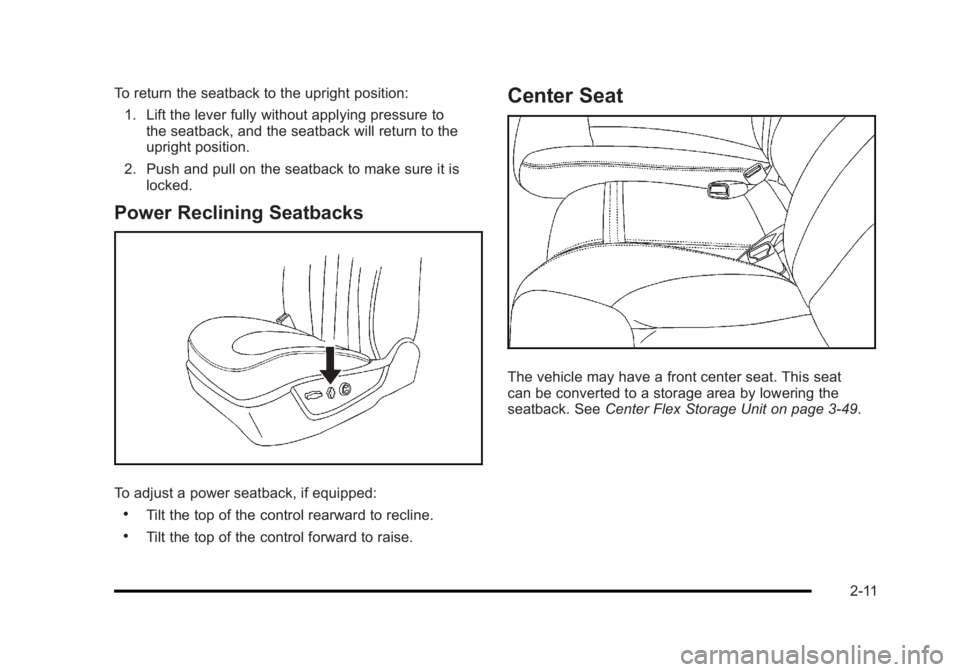
To adjust a power seatback, if equipped:
.Tilt the top of the control rearward to recline.
.Tilt the top of the control forward to raise.
Center Seat
The vehicle may have a front center seat. This seat
can be converted to a storage area by lowering the
seatback. See Center Flex Storage Unit on page 3‑49.
2-11
Page 50 of 450
Black plate (18,1)Buick Lucerne Owner Manual - 2011
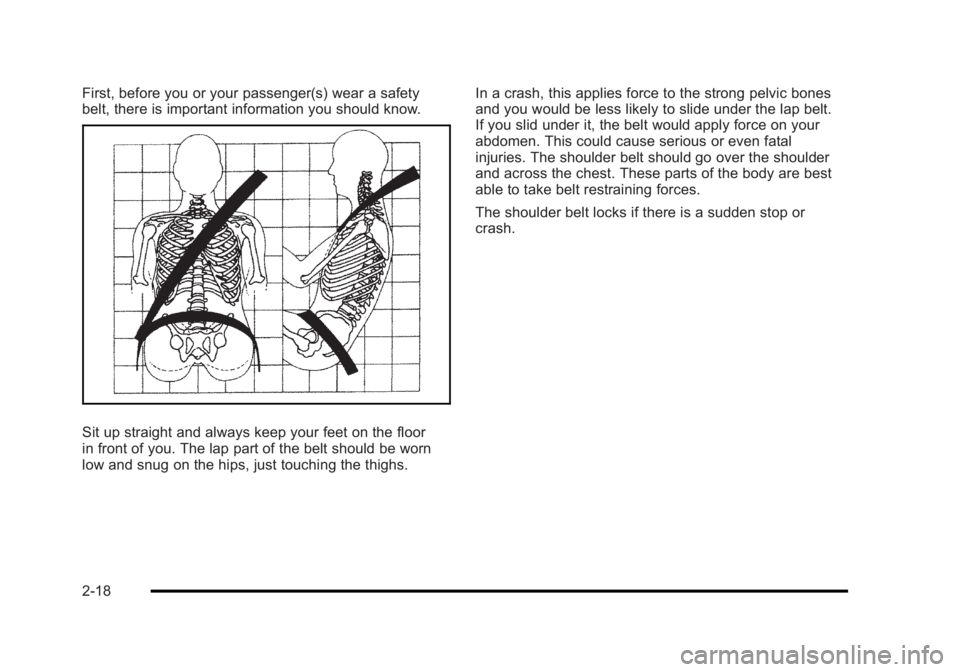
First, before you or your passenger(s) wear a safety
belt, there is important information you should know.
Sit up straight and always keep your feet on the floor
in front of you. The lap part of the belt should be worn
low and snug on the hips, just touching the thighs.In a crash, this applies force to the strong pelvic bones
and you would be less likely to slide under the lap belt.
If you slid under it, the belt would apply force on your
abdomen. This could cause serious or even fatal
injuries. The shoulder belt should go over the shoulder
and across the chest. These parts of the body are best
able to take belt restraining forces.
The shoulder belt locks if there is a sudden stop or
crash.
2-18
Page 58 of 450
Black plate (26,1)Buick Lucerne Owner Manual - 2011
Lap-Shoulder Belt
All seating positions in the vehicle have a lap-shoulder
except for the center front passenger position
(if equipped), which has a lap belt. SeeLap Belt
on
page 2‑32for more information.
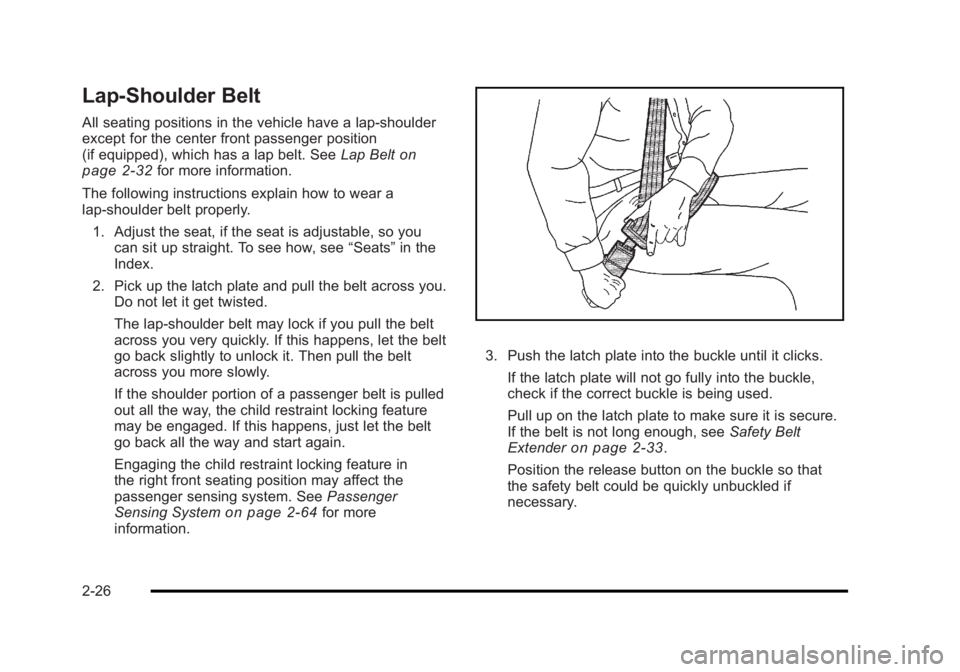
The following instructions explain how to wear a
lap-shoulder belt properly. 1. Adjust the seat, if the seat is adjustable, so you can sit up straight. To see how, see “Seats”in the
Index.
2. Pick up the latch plate and pull the belt across you. Do not let it get twisted.
The lap-shoulder belt may lock if you pull the belt
across you very quickly. If this happens, let the belt
go back slightly to unlock it. Then pull the belt
across you more slowly.
If the shoulder portion of a passenger belt is pulled
out all the way, the child restraint locking feature
may be engaged. If this happens, just let the belt
go back all the way and start again.
Engaging the child restraint locking feature in
the right front seating position may affect the
passenger sensing system. See Passenger
Sensing System
on page 2‑64for more
information.
3. Push the latch plate into the buckle until it clicks.
If the latch plate will not go fully into the buckle,
check if the correct buckle is being used.
Pull up on the latch plate to make sure it is secure.
If the belt is not long enough, see Safety Belt
Extender
on page 2‑33.
Position the release button on the buckle so that
the safety belt could be quickly unbuckled if
necessary.
2-26
Page 60 of 450
Black plate (28,1)Buick Lucerne Owner Manual - 2011
Shoulder Belt Height Adjuster
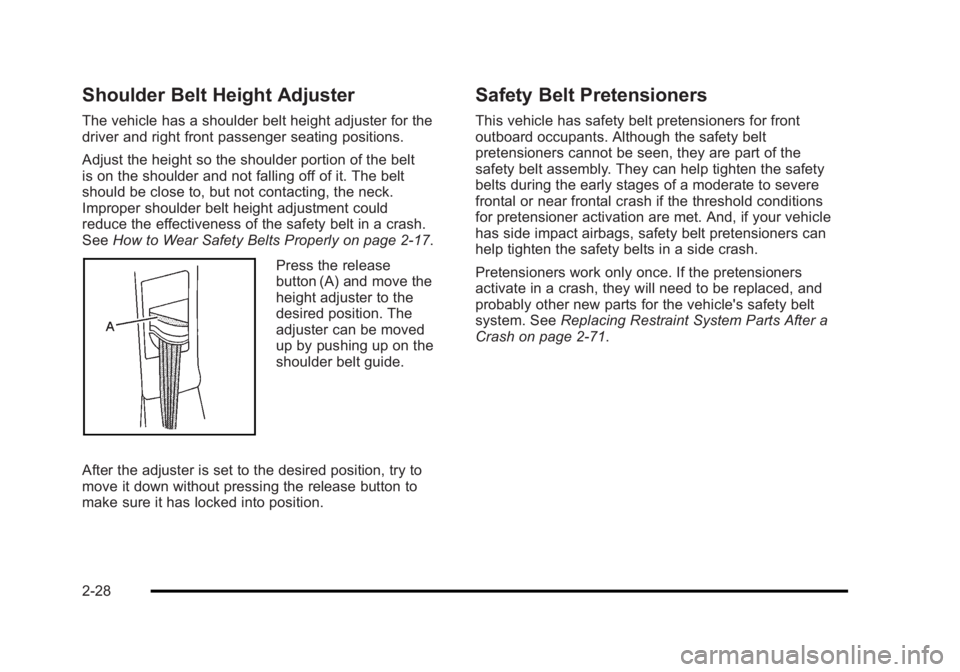
The vehicle has a shoulder belt height adjuster for the
driver and right front passenger seating positions.
Adjust the height so the shoulder portion of the belt
is on the shoulder and not falling off of it. The belt
should be close to, but not contacting, the neck.
Improper shoulder belt height adjustment could
reduce the effectiveness of the safety belt in a crash.
SeeHow to Wear Safety Belts Properly on page 2‑17.
Press the release
button (A) and move the
height adjuster to the
desired position. The
adjuster can be moved
up by pushing up on the
shoulder belt guide.
After the adjuster is set to the desired position, try to
move it down without pressing the release button to
make sure it has locked into position.
Safety Belt Pretensioners
This vehicle has safety belt pretensioners for front
outboard occupants. Although the safety belt
pretensioners cannot be seen, they are part of the
safety belt assembly. They can help tighten the safety
belts during the early stages of a moderate to severe
frontal or near frontal crash if the threshold conditions
for pretensioner activation are met. And, if your vehicle
has side impact airbags, safety belt pretensioners can
help tighten the safety belts in a side crash.
Pretensioners work only once. If the pretensioners
activate in a crash, they will need to be replaced, and
probably other new parts for the vehicle's safety belt
system. See Replacing Restraint System Parts After a
Crash on page 2‑71.
2-28
Page 78 of 450
Black plate (46,1)Buick Lucerne Owner Manual - 2011
According to accident statistics, children and infants
are safer when properly restrained in a child restraint
system or infant restraint system secured in a rear
seating position. SeeWhere to Put the Restraint
on
page 2‑41for additional information.
Securing a Child Restraint Designed for the
LATCH System
{WARNING:
If a LATCH-type child restraint is not attached to
anchors, the child restraint will not be able to
protect the child correctly. In a crash, the child
could be seriously injured or killed. Install a
LATCH-type child restraint properly using the
anchors, or use the vehicle safety belts to secure
the restraint, following the instructions that came
with the child restraint and the instructions in this
manual.
{WARNING:
Do not attach more than one child restraint to a
single anchor. Attaching more than one child
restraint to a single anchor could cause the
anchor or attachment to come loose or even
break during a crash. A child or others could be
injured. To reduce the risk of serious or fatal
injuries during a crash, attach only one child
restraint per anchor.
{WARNING:
Children can be seriously injured or strangled if a
shoulder belt is wrapped around their neck and
the safety belt continues to tighten. Buckle any
unused safety belts behind the child restraint so
children cannot reach them. Pull the shoulder
belt all the way out of the retractor to set the lock,
if the vehicle has one, after the child restraint has
been installed.
2-46