battery BUICK PARK AVENUE 1997 User Guide
[x] Cancel search | Manufacturer: BUICK, Model Year: 1997, Model line: PARK AVENUE, Model: BUICK PARK AVENUE 1997Pages: 420, PDF Size: 21.93 MB
Page 147 of 420
Coolant Temperature: Press the GAGES button until
COOLANT TEMP appears in the display. If there are no
problems detected with the temperature, COOLANT
TEMP NORMAL will appear
in the display. If the
temperature is too high, COOLANT TEMP HOT will
appear in the display. If you see the COOLANT TEMP
HOT message, your engine is overheated. You should
pull off the road, stop your vehicle and turn off your
engine as soon as possible. This manual explains what to
do. See “Engine Overheating” in the Index.
Battery Volts: Press the GAGES button until the
display shows BATTERY STATE.
If the voltage is
normal the display will show BATTERY STATE
NORMAL.
If the voltage drops below 10.5 volts, the
display will show BATTERY STATE LOW. If the
voltage is above
16 volts, the display will show
BATTERY STATE HIGH. If the display shows the high
or low message, you need to have your battery checked.
Oil Life Index: Press the GAGES button until OIL
LIFE INDEX appears in the display. The OIL LIFE
INDEX NORMAL display will show an estimate of
the oil’s remaining useful life. When the oil life index
is less than
lo%, the display will show OIL LIFE INDEX CHANGE
OIL. When you have the oil
changed according to the maintenance schedule (see
“Maintenance Schedule” in the Index), you will have
to reset the oil life index. To do this, press and hold the
RESET button for more than five seconds while the oil
life index is being displayed on the DIC. The oil life
will change to
100%.
Tire Pressure Status: Press the GAGES button
until TIRE PRESSURE appears in the display.
TIRE
PRESSURE NORMAL is displayed when the Check
Tire Pressure System believes your vehicle’s tire
pressures are normal. If a potential tire pressure
problem is detected, the display will show TIRE
PRESSURE LOW: CHECK TIRES.
If you see the
TIRE PRESSURE LOW: CHECK TIRES message, you
should stop as soon as you can and check all your tires
for damage. (If a tire is flat, see “If a Tire Goes Flat”
in
the Index.) Also check the tire pressure in all four tires
as soon as you can. See “Inflation
- Tire Pressure” and
“Check Tire Pressure System”
in the Index.
There are times when you will have to reset (calibrate)
the Check Tire Pressure System. See “Check Tire
Pressure System” in the Index.
2-87
ProCarManuals.com
Page 182 of 420
P SCAN: When you press P SCAN while playing a CD,
you will hear the first few seconds of each track on a
disc. Press
P SCAN again to stop on a CD. The CD
will mute while scanning.
Theft-Deterrent Feature
THEFTLOCK" is designed to discourage theft of your
radio. It works by using a secret code to disable all radio
functions whenever battery power is removed.
If THEFTLOCK is active, the THEFTLOCK indicator
will flash when the ignition is off.
The THEFTLOCK feature for the radio may be used or
ignored. If ignored, the system plays normally and the
radio is not protected by the feature. If
THEFTLOCK
is activated, your radio will not operate if stolen.
When THEFTLOCK is activated, the radio will display
LOC to indicate a locked condition anytime battery
power is removed. If your battery loses power for any
reason, you must unlock the radio with the secret code
before
it will operate.
Activating the Theft-Deterrent Feature
The instructions which follow, explain how to enter your
secret code to activate the THEFTLOCK system. It is
recommended that you read through all nine steps
before starting the procedure. NOTE:
If
you allow more than 15 seconds to elapse
between any steps, the radio automatically reverts to
time and you must start the procedure over at Step
4.
1.
2.
3.
4.
5.
6.
7.
8.
9.
Write down any three or four-digit number from
000 to 1999 and keep it in a safe place separate from
the vehicle.
Turn the ignition to ACCESSORY or RUN.
Turn the radio
off.
Press the 1 and 4 buttons together. Hold them down
until
--- shows on the display. Next you will use the
secret code number which you have written down.
Press MIN and
000
Press MIN again to
with your code.
Press HRS to make
with your code. will
appear on the display.
make the last two digits agree
the first one or two digits agree
Press AM-FM after you have confirmed that the
code matches the secret code you have written down.
The display will show REP to let you know that you
need to repeat Steps
5 through 7 to confirm your
secret code.
Press AM-FM and this time the display will show
SEC to let you know that your radio is secure.
3-30
ProCarManuals.com
Page 183 of 420
Unlocking the Theft-Deterrent Feature After a
Power
Loss
Enter your secret code as follows; pause no more than
15 seconds between steps:
1. LOC appears when the ignition is on.
2. Press MIN and 000 will appear on the display.
3. Press MIN again to make the last two digits agree
4. Press HRS to make the first one or two digits agree
with
your code.
with your code.
5. Press AM-FM after you have confirmed that the
code matches the secret code you have written down.
The display will show SEC, indicating the radio is
now operable and secure.
If you enter the wrong code eight times, INOP will appear
on the display. You will have to wait an hour with the
ignition on before you can try again. When you
try again,
you will
only have three more chances (eight tries per
chance) to enter the correct code before INOP appears.
If you lose or forget your code, contact your dealer.
Disabling the Theft-Deterrent Feature
1. Turn the ignition to ACCESSORY or RUN.
2. Turn the radio off.
3. Press the 1 and 4 buttons together. Hold them down
until SEC shows on the display.
4. Press MIN and 000 will appear on the display.
5. Press MIN again to make the last two digits agree
6. Press HRS to make the first one or two digits agree
with your
code.
with your code.
7. Press AM-FM after you have confirmed that the
code matches the secret code you have written down.
The display will show
---, indicating that the radio is
no longer secured.
If the code entered is incorrect, SEC will appear on the
display. The radio will remain secured until the correct
code is entered.
When battery power
is removed and later applied to a
secured radio, the radio won’t turn on and LOC will
appear on the display.
To unlock
a secured radio see “Unlocking the
Theft-Deterrent Feature After a Power Loss” earlier in
this section.
Enter your secret code as follows; pause no more than
15 seconds between steps:
3-31
ProCarManuals.com
Page 218 of 420
Run your engine only as long as you must. This saves
fuel. When you run the engine, make it go a little faster
than just idle. That
is, push the accelerator slightly. This
uses less fuel for the heat that you get and
it keeps the
battery charged. You will need a well-charged battery to
restart the vehicle, and possibly for signaling later on
with your headlamps. Let the heater run for awhile.
Then, shut the engine off and close the window almost
all the way to preserve the heat. Start the engine again
and repeat this only when you feel really uncomfortable
from the cold. But
do it as little as possible. Preserve the
fuel as long as you can. To help keep warm, you can get
out of the vehicle and do some fairly vigorous exercises
every half hour or
so until help comes.
Loading Your Vehicle
‘ OCCUPANTS
VEHICLE CAP. WT.
TIRE-LOADING
INFORMATION
FRT. CTR. RR.
TOTAL LBS. KG
MAX. LOADING & GVWR SAME AS VEHICLE
CAPACITY WEIGHT XXX COLD TIRE
TIRE SIZE SPEED PRESSURE RTG
PSI/KPa
FRT.
RR.
SPA.
IF TIRES ARE HOT, ADD 4PSli28KPa
SEE OWNER’S MANUAL FOR ADDITIONAL
INFORMATION
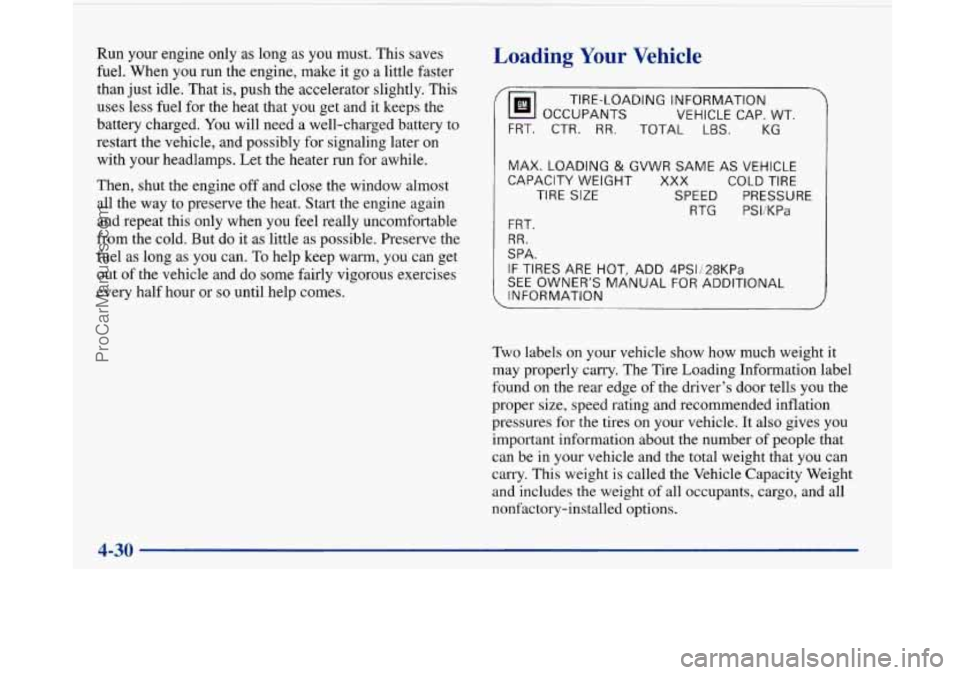
Two labels on your vehicle show how much weight it
may properly carry. The Tire Loading Information label
found on the rear edge of the driver’s door tells you the
proper size, speed rating and recommended inflation
pressures for the tires on your vehicle.
It also gives you
important information about the number of people that
can be in your vehicle and the total weight that you can
carry. This weight is called the Vehicle Capacity Weight
and includes the weight of all occupants, cargo, and all
nonfactory-installed options.
ProCarManuals.com
Page 231 of 420
Jump Starting
If your battery has run down, you may want to use
another vehicle and some jumper cables to start your
Buick. But please follow the steps in this part to do
it safely.
A CAUTION:
Batteries can hurt you. They can be dangerous
because:
They contain acid that can burn you.
0 They contain gas that can explode or ignite.
They contain enough electricity to
If you don’t follow these steps exactly, some or all
of these things can hurt you.
burn
you.
1. Check the other vehicle. It must have a 12-volt
battery with a negative ground system.
1 NOTICE:
If the other system isn’t a 12-volt system with a
negative ground, both vehicles can be damaged.
2. Get the vehicles close enough so the jumper cables
can reach, but be sure the vehicles aren’t touching
each other. If they are, it could cause a ground
connection you don’t want. You wouldn’t be able to
start your Buick, and the bad grounding could
damage the electrical systems.
To avoid the possibility of the vehicles rolling, set
the parking brake firmly on both vehicles involved.
Put an automatic transaxle
in PARK (P) before
setting the parking brake.
5-3
ProCarManuals.com
Page 232 of 420
3. Turn off the ignition on both vehicles. Turn off the
radios and all lamps that aren’t needed. This will
avoid
sparks and help save both batteries. It could
save your radio
!
NOTICE:
If you leave your radio on, it could be badly
damaged. The repairs wouldn’t be covered by
your warranty.
4. Open the hoods and locate the batteries.
A CAUTION:
An electric fan can start up even when the engine
is not running and can injure you. Keep hands,
clothing and tools away from any underhood
electric fan.
5. Find the positive (+) and negative (-) terminals on
each battery.
A CAUTION:
Using a match near a battery can cause battery
gas to explode, People have been hurt doing this,
and some have been blinded, Use a flashlight if
you need more light.
Be sure the battery has enough water. You don’t
need
to add water to the Delco Freedom@ battery
installed in every new
GM vehicle. But if a
battery has filler caps, be sure the right amount
of fluid is there.
If it is low, add water to take care
of
that first. If you don’t, explosive gas could
be present.
’ Battery fluid contains acid that can burn you.
Don’t get
it on you. If you accidentally get it in
your eyes or on your skin, flush the place with
water and get medical help immediately.
5-4
ProCarManuals.com
Page 233 of 420
6. Check that the jumper cables don’t have loose or
missing insulation. If they do, you could get a shock
and the vehicles could be damaged.
Before you connect the cables, here are some basic
things you should know. Positive
(+) will go to
positive
(+) and negative (-) will go to negative (-)
or a metal engine part. Don’t connect positive (+) to
negative
(-) or you’ll get a short that would damage
the battery and maybe other parts, too.
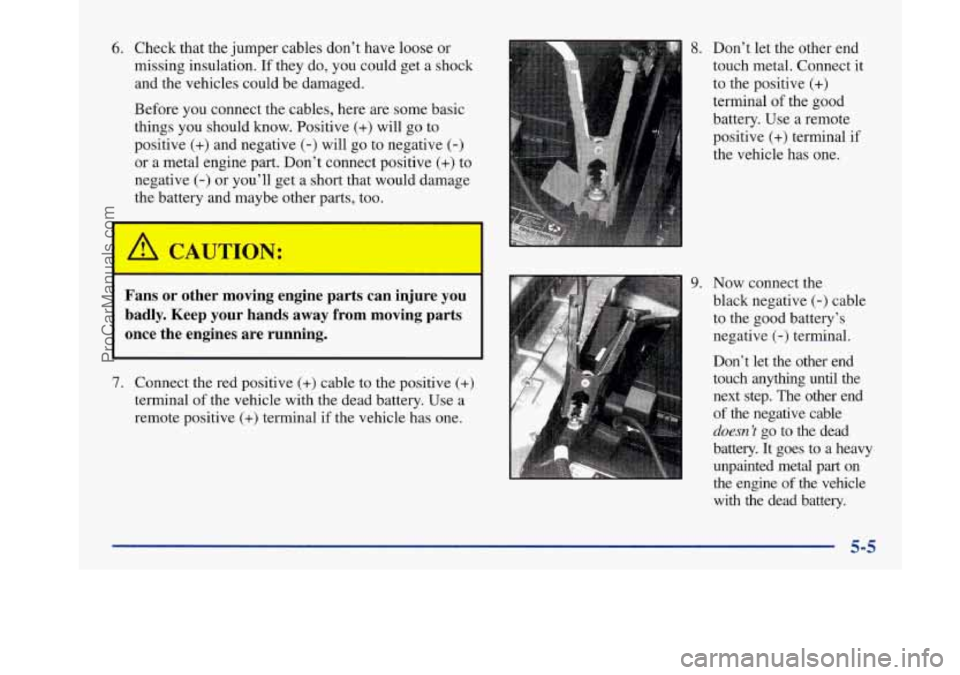
8. Don’t let the other end
touch metal. Connect it
to the positive
(+)
terminal of the good
battery. Use a remote
positive
(+) terminal if
the vehicle has one.
9. Now connect the
Fans or other moving engine parts can injure you black negative (-) cable
badly. Keep your hands away from moving parts to the good battery’s
once the engines are running. negative (-) terminal.
Don’t let the other end
7. Connect the red positive (+) cable to the positive (+) touch any-thmg until the
terminal of the vehicle with the dead battery. Use a next step. The other end
remote positive
(+) terminal if the vehicle has one. of the negative cable
doesn’t go to the dead
battery.
It goes to a heavy
unpainted metal part on
the engine
of the vehicle
with the dead battery.
5-5
ProCarManuals.com
Page 234 of 420
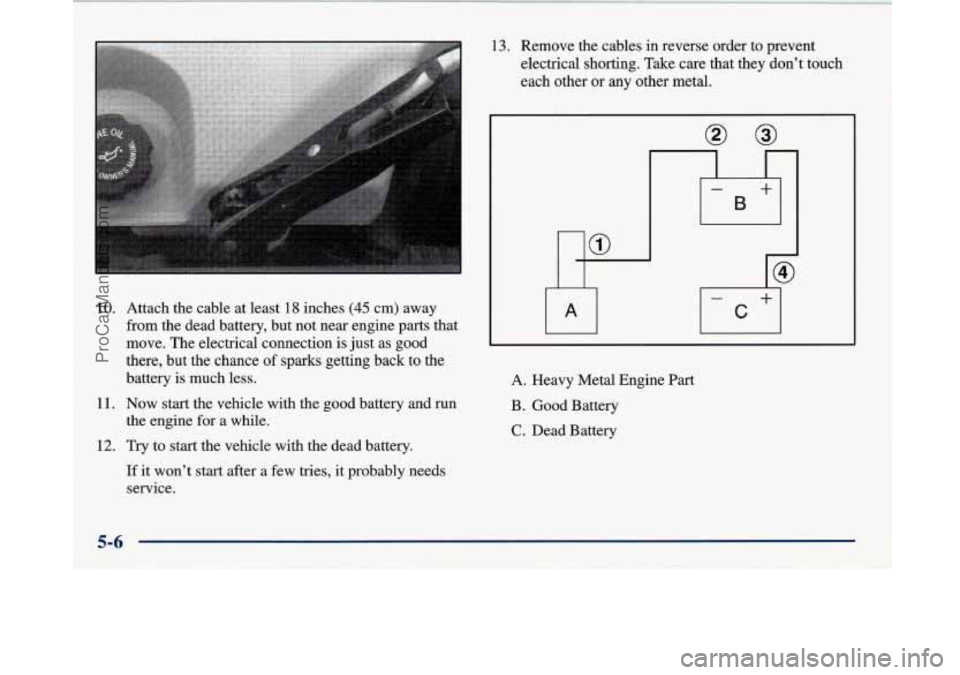
10. Attach the cable at least 18 inches (45 cm) away
from the dead battery, but not near engine parts that
move. The electrical connection is just as good
there, but the chance
of sparks getting back to the
battery is much less.
11. Now start the vehicle with the good battery and run
12. Try to start the vehicle with the dead battery.
the engine for a
while.
If it won’t start after a few tries, it probably needs
service.
13. Remove the cables in reverse order to prevent
electrical shorting. Take care that they don’t touch
each other or any other metal.
A. Heavy Metal Engine Part
B. Good Battery
C. Dead Battery
5-6
ProCarManuals.com
Page 265 of 420
Section 6 Service and Appearance Care
Here you will find information about the care of your Buick. This section begins with service and fuel information,
and then it shows how to check important fluid and lubricant levels. There is also technical information about your
vehicle, and a part devoted to its appearance care.
6-2
6-3
6-9
6-12
6- 17
6-20
6-2
1
6-24
6-28
6-29
6-30
6-34
6-34
6-46
6-47 Service
Fuel Checking Things Under the
Hood
Engine Oil
Air Cleaner Supercharger Oil
Automatic Transaxle Fluid
Engine Coolant Radiator Pressure Cap
Windshield Washer Fluid
Brakes
Battery
Bulb Replacement
Windshield Wiper Blade Replacement
Tires 6-56
6-57
6-6
1
6-64
6-64
6-65
6-66
6-67
6-73
6-75 6-76
6-77
6-77
6-78
6-78 Appearance
Care
Cleaning the Inside
of Your Buick
Cleaning the Outside of Your Buick
Underbody Maintenance
Chemical Paint Spotting
Appearance Care Materials Chart
Vehicle Identification Number (VIN)
Electrical System
Removing the Rear Seat Cushion
Replacement Bulbs Capacities and Specifications
Air Conditioning Refrigerants
Engine Specifications Vehicle Dimensions
Normal Maintenance Replacement Parts
ProCarManuals.com
Page 298 of 420
Battery
Every new Buick has a Delco Freedom@ battery. You
never have to add water to one of these. When it’s time
for
a new battery, we recommend a Delco Freedom
battery. Get one that has the replacement number shown
on the original battery’s label.
Vehicle Storage
If you’re not going to drive your vehicle for 25 days
or more, take off the black, negative
(-) cable from
the battery. This will help keep your battery from
running down. Contact
your dealer to learn how to prepare your vehicle
for longer storage periods.
Also, for your audio system, see “Theft-Deterrent
Feature” in the Index.
Bulb Replacement
The following procedure tells you how to replace your
headlamp bulbs.
Halogen Bulbs
A CAUTION:
A CAUTION: Halogen bulbs have pressurized gas inside and
can burst if you drop or scratch the bulb.
You or
Batteries have acid that can burn
you and gas others could be injured. Be sure to read and
that can explode.
You can be badly hurt if you follow the instructions on the bulb package.
aren’t careful. See “Jump Starting” in the Index
for tips on working around
a battery without
getting hurt.
6-34
ProCarManuals.com