low beam BUICK PARK AVENUE 1997 Owners Manual
[x] Cancel search | Manufacturer: BUICK, Model Year: 1997, Model line: PARK AVENUE, Model: BUICK PARK AVENUE 1997Pages: 420, PDF Size: 21.93 MB
Page 94 of 420
Horn
Nearly the entire surface of the center pad of the
steering wheel is an active horn switch. Press anywhere
on the pad to sound the horn.
Tilt Wheel
A tilt steering wheel allows
you to adjust the steering
wheel before you drive.
You can also raise it to the highest level to give your
legs more room when you exit and enter the vehicle.
To tilt the wheel, hold the steering wheel and pull the
lever toward you. Move the steering wheel to a
comfortable position, then release the lever to lock the
wheel in place.
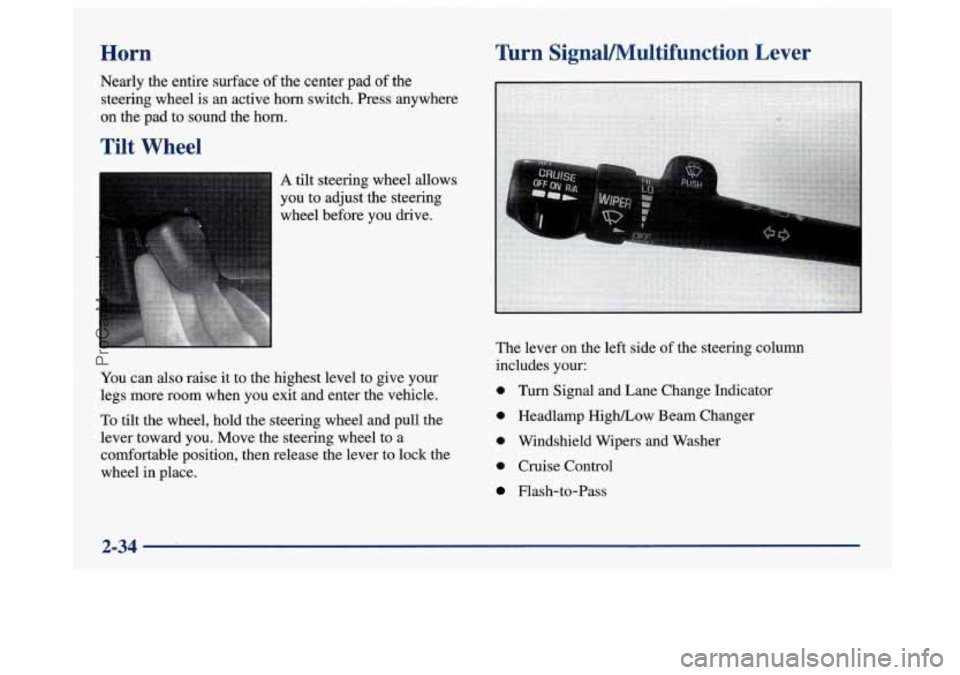
'hrn SignaVMultifunction Lever
The lever on the left side of the steering column
includes your:
0 Turn Signal and Lane Change Indicator
0 Headlamp High/Low Beam Changer
0 Windshield Wipers and Washer
0 Cruise Control
Flash-to-Pass
2-34
ProCarManuals.com
Page 96 of 420
If a bulb is burned out, replace it to help avoid an
accident. If the arrows don’t go on at all when you
signal a turn, check the fuse (see “Fuses and Circuit
Breakers” in the Index) and for burned-out bulbs.
If you have a trailer towing option with added wiring
for the trailer lamps, the signal indicator will flash even
if
a turn signal bulb is burned out. Check the front
and rear turn signal lamps regularly to make sure
they
are working. Note: You do not need to add a
different flasher.
’hrn Signal On Chime
If your turn signal is left on for more than 3/4 of a mile
(1.2 km), a chime will sound at each flash of the turn
signal. To turn off the chime, move the turn signal lever
to the off position.
Headlamp High/Low Beam Changer
To change the headlamps from low beam to high or high to
low, pull the turn signal lever toward you, then release it.
Flash-To-Pass Feature
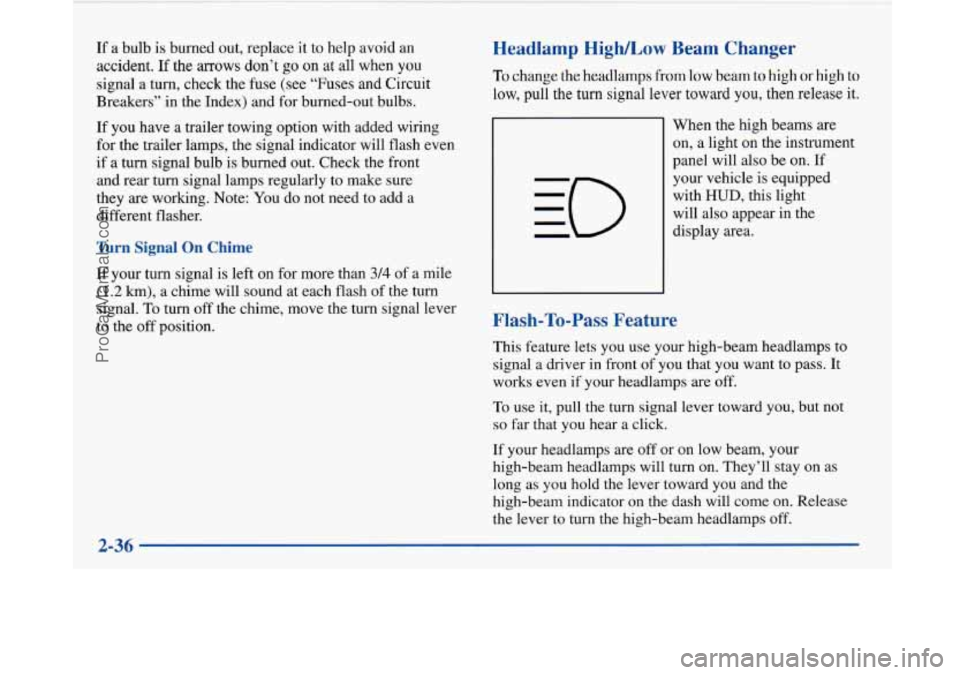
When the high beams are
on, a light on the instrument
panel will also be on. If
your vehicle is equipped
with
HUD, this light
will also appear in the
display area.
This feature lets you use your high-beam headlamps to
signal a driver in front
of you that you want to pass. It
works even if your headlamps are off.
To use it, pull the turn signal lever toward you, but not
so far that you hear a click.
If your headlamps are off or on low beam, your
high-beam headlamps will turn on. They’ll stay on as
long as you hold the lever toward you and the
high-beam indicator on the dash will come on. Release
the lever to turn the high-beam headlamps off.
ProCarManuals.com
Page 105 of 420
Daytime Running 1 .rmps
Daytime Running Lamps (vrCL) can make it easier for
others to see the front of your vehicle during the day.
DRL can be helpful in many different driving
conditions, but they can be especially helpful in the
short periods after dawn and before sunset.
A light sensor on top of the instrument panel monitors
the exterior light level for the operation of DRL and
twilight sentinel,
so be sure it isn’t covered.
The
DRL system will make your high-beam headlamps
come on at reduced brightness in daylight when:
0 The ignition is on,
0 The headlamp switch is off and
0 The transaxle is not in PARK (P).
When DRL are on, only your high-beam headlamps will
be on. The parking lamps, taillamps, sidemarker and
other lamps won’t be on. Your instrument panel won’t
be lit up either. When
it’s dark enough outside, your high-beam
headlamps will change to low-beam headlamps at full
brightness. The other lamps that turn on with your
headlamps will also
turn on. When it’s bright enough
outside, the regular lamps will turn
off, and your
high-beam headlamps change to the reduced brightness
of DRL.
To idle your vehicle with the DRL off, shift the
transaxle into PARK
(P). The DRL will stay off until
you shift out of PARK
(P).
To turn off all exterior lighting at night when you are
parked, turn off the headlamps and move the twilight
sentinel control to the left into the detent in the slider
control. When released, the control will return to the
Twilight Sentinel minimum delay position and the lights
will turn
off.
As with any vehicle, you should turn on the regular
headlamp system when you need it.
Cornering Lamps
The cornering lamps are designed to come on when you
signal a turn. This will provide more light for cornering
at night.
ProCarManuals.com
Page 107 of 420
Theater Dimming
This feature allows for a three to five-second fade out of
the courtesy lamps instead
of immediate turn off.
Delayed Exit Lighting
With this feature, the interior lamps will come on for
25 seconds after you remove the key from the ignition.
This will give you time to find the door pull handle or
lock switches.
Illuminated Entry System
When you open either front door or press the UNLOCK
button on the remote keyless entry transmitter, the
lamps inside your vehicle will turn on. These lamps
will turn
off after about 40 seconds. These lamps will
also turn
off if you start the engine or activate the power
door locks.
Perimeter Lighting
When the UNLOCK button on the Remote Keyless
Entry transmitter is pressed, the daytime running lamps
(high-beams at reduced intensity), parking lamps and
back-up lamps will come on if it is dark enough outside
according to the twilight sentinel. This feature
will only be activated when the security
feedback feature is programmed to be in modes
1, 3 or 5
on the transmitter. Modes 0,2 and 4 do not respond with
exterior lights flashing when unlocking the vehicle
so
perimeter lighting will not be active.
This feature can be prograrnmed'on or off for
each transmitter.
To turn the feature
off
1. Press and hold the door lock switch on the door
throughout this procedure. All doors will lock.
2. Press the instant alarm button on the transmitter to
enter the programming mode. Perimeter lighting
remains on at this time and the horn will chirp
two times.
3. Press the instant alarm button on the key transmitter
again. Perimeter lighting is disabled and the horn
will chirp one time.
4. Release the door lock switch. The perimeter lighting
feature is now off.
NOTE: Pressing the UNLOCK button repeatedly may
cause the back-up lamps to turn on.
2-47
ProCarManuals.com
Page 142 of 420
Head-Up Display (HUD)
(If Equipped)
If the HUD image is too bright, or too high in
your field
of view, it may take you more time to
see things you need to see when it's dark outside,
Be sure to keep the
HUD image dim and placed
low in your field
of view.
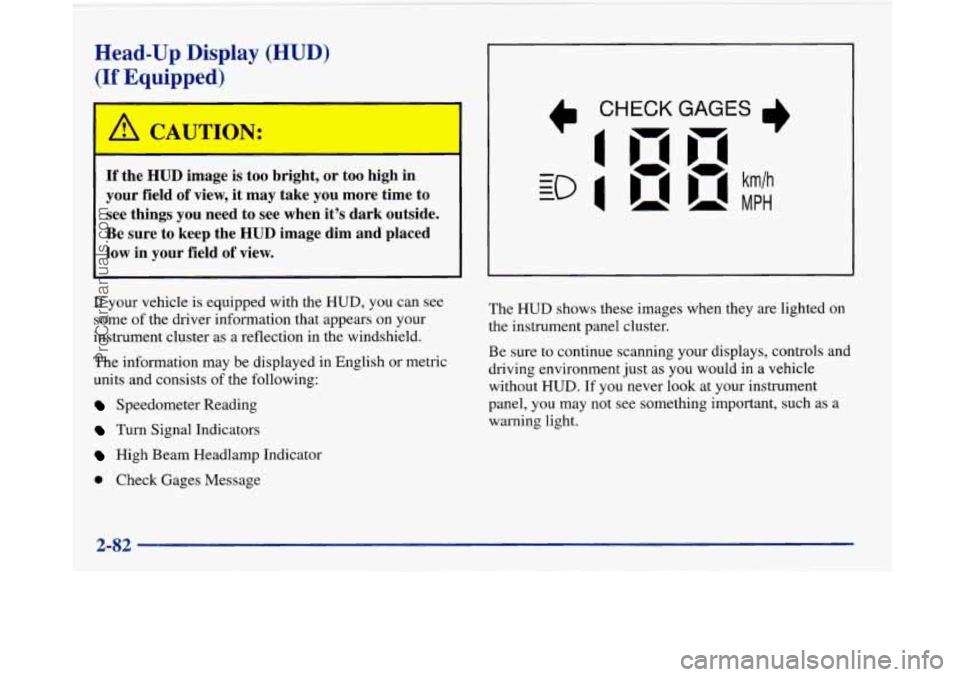
If your vehicle is equipped with the HUD, you can see
some of the driver information that appears on your
instrument cluster as a reflection in the windshield.
The information may be displayed
in English or metric
units and consists of the following:
Speedometer Reading
Turn Signal Indicators
High Beam Headlamp Indicator
Check Gages Message The
HUD shows these images
when they are lighted on
the instrument panel cluster.
Be sure to continue scanning your displays, controls and
driving environment just as you would in a vehicle
without
HUD. If you never look at your instrument
panel, you may not see something important, such as a
warning light.
2-82
ProCarManuals.com
Page 152 of 420
Perimeter Lighting
When the UNLOCK button on the transmitter is
pressed, the
DRL lamps (high-beams at reduced
intensity), parking lamps and back-up lamps will turn on
if it is dark enough according to the twilight sentinel.
You can control activation of this feature by choosing
OFF or ON when the PERIMETER LIGHTS choice is
displayed on the DIC. Make your choice by pressing the
ENGMET button and record your choice by pressing
the RESET button.
Memory Seat Recall
NOTE: If you want to choose PERIMETER
LIGHTS ON, you must also choose LIGHTS for
UNLOCK FEEDBACK while making the security
feedback choices.
For more information on this feature, see “Perimeter
Lighting” in the Index. This feature recalls the position
of your seat.
You can program this feature to be active by choosing
ON when the SEAT RECALL choice appears, or
inactive by choosing
OFF when the SEAT RECALL
choice appears on the DIC. Make your choices by
pressing the ENGMET button and store them to
memory by then pressing the RESET button.
You can also program this feature to recall your memory
seat position or the exit seat position.
Memory Position: Choose ON when the SEAT
RECALL choice appears, and then choose MEMORY
when the RECALL POSITION choice appears.
Exit Position: Choose ON when the SEAT RECALL
choice appears, and then choose EXIT when the
RECALL POSITION choice appears and your seat
will move all the way down and back for easy exit.
The seat will also move when you enter the vehicle
after unlocking
it with a Remote Keyless Entry
transmitter. This will allow for easy entry as well.
For more information on this feature, see “Memory Seats” in the Index.
2-92
ProCarManuals.com
Page 205 of 420
Night Vision
No one can see as well at night as in the daytime. But as
we get older these differences increase.
A 50-year-old
driver may require at least twice as much light to see the
same thing at night as a 20-year-old.
What you do in the daytime can also affect your night
vision. For example, if you spend the day in bright
sunshine you are wise to wear sunglasses. Your eyes
will have less trouble adjusting to night. But if you’re
driving, don’t wear sunglasses at night. They may cut
down
on glare from headlamps, but they also make a lot
of things invisible.
You can be temporarily blinded by approaching
headlamps. It can take a second or two, or even several
seconds, for your eyes to readjust to the dark. When
you are faced with severe glare (as from a driver who
doesn’t lower the high beams, or a vehicle with
misaimed headlamps), slow down a little. Avoid
staring directly into the approaching headlamps. Keep your windshield and all the glass
on your vehicle
clean
-- inside and out. Glare at night is made much
worse by dirt on the glass. Even the inside of the glass
can build up a film caused by dust. Dirty glass makes
lights dazzle and flash more than clean glass would,
making the pupils of your eyes contract repeatedly.
Remember that your headlamps light up far less of a
roadway when you are in a turn or curve. Keep your
eyes moving; that way, it’s easier to pick out dimly
lighted objects. Just as your headlamps should be
checked regularly for proper aim,
so should your eyes
be examined regularly. Some drivers suffer from night
blindness
-- the inability to see in dim light -- and
aren’t even aware of it.
ProCarManuals.com
Page 237 of 420
Front Towing
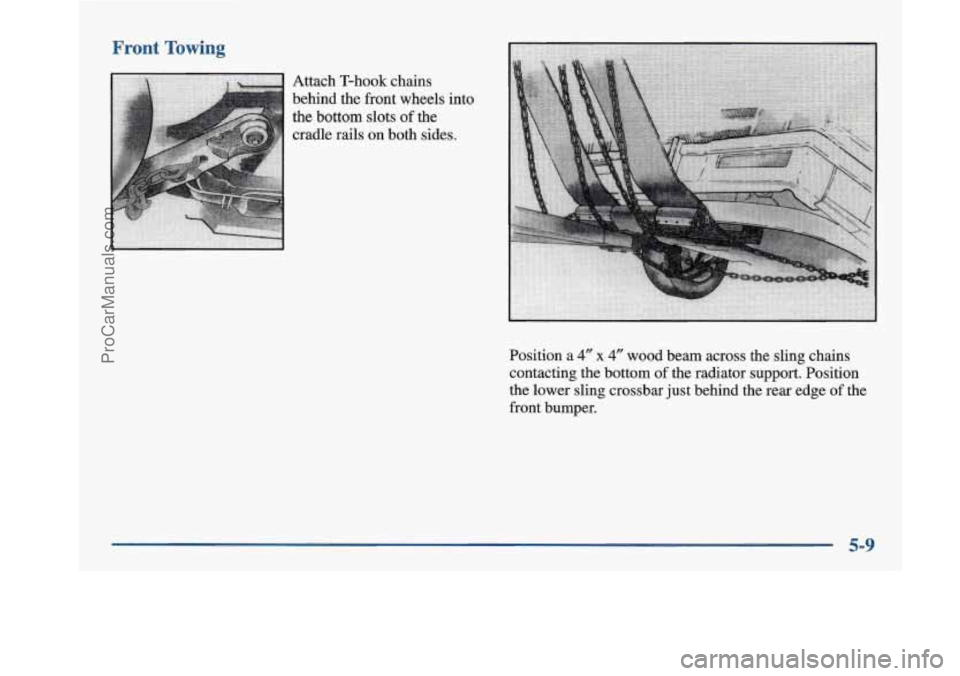
Attach T-hook chains
behind the front wheels into
the bottom slots
of the
cradle rails on both sides.
Position a
4" x 4" wood beam across the sling chains
contacting the bottom
of the radiator support. Position
the lower sling crossbar just behind the rear edge of the
front bumper.
5-9
ProCarManuals.com
Page 334 of 420
I !
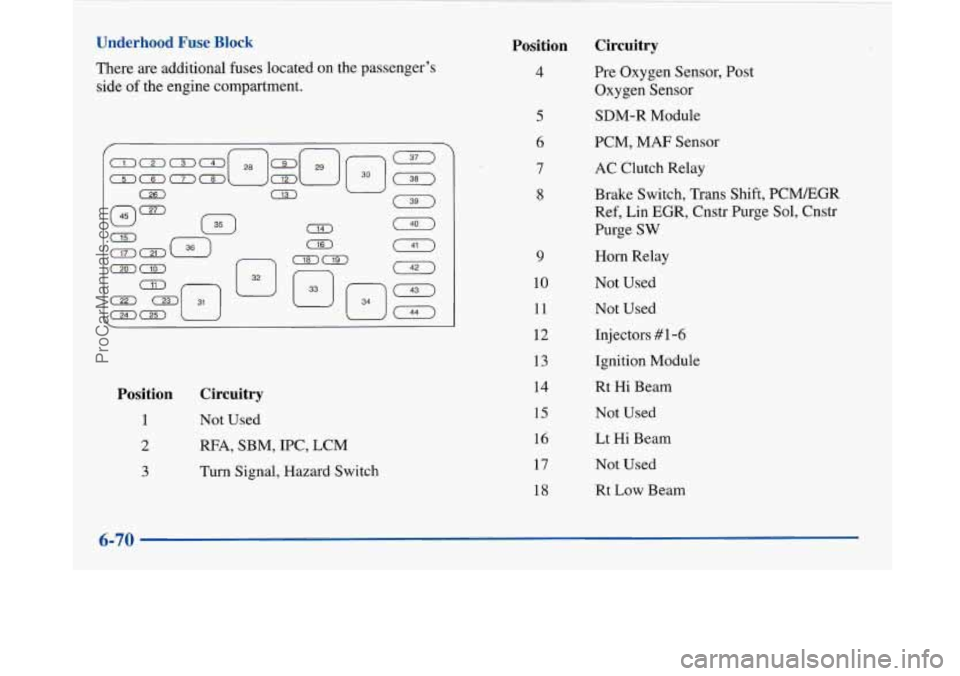
Underhood Fuse Block
There are additional fuses located on the passenger’s
side
of the engine compartment.
Position
1
2
3
Circuitry
Not Used
RFA, SBM, IPC, LCM
Turn Signal, Hazard Switch
Position Circuitry
4
9
10
11
12
13
14
15
16
17
1s Pre Oxygen Sensor,
Post
Oxygen Sensor
SDM-R Module
PCM, MAF Sensor
AC Clutch Relay
Brake Switch, Trans Shift, PCMEGR
Ref, Lin EGR, Cnstr Purge Sol, Cnstr
Purge
SW
Horn Relay
Not Used Not Used
Injectors #1-6
Ignition Module
Rt Hi Beam
Not Used
Lt Hi Beam
Not Used
Rt Low Beam
6-70
ProCarManuals.com
Page 335 of 420
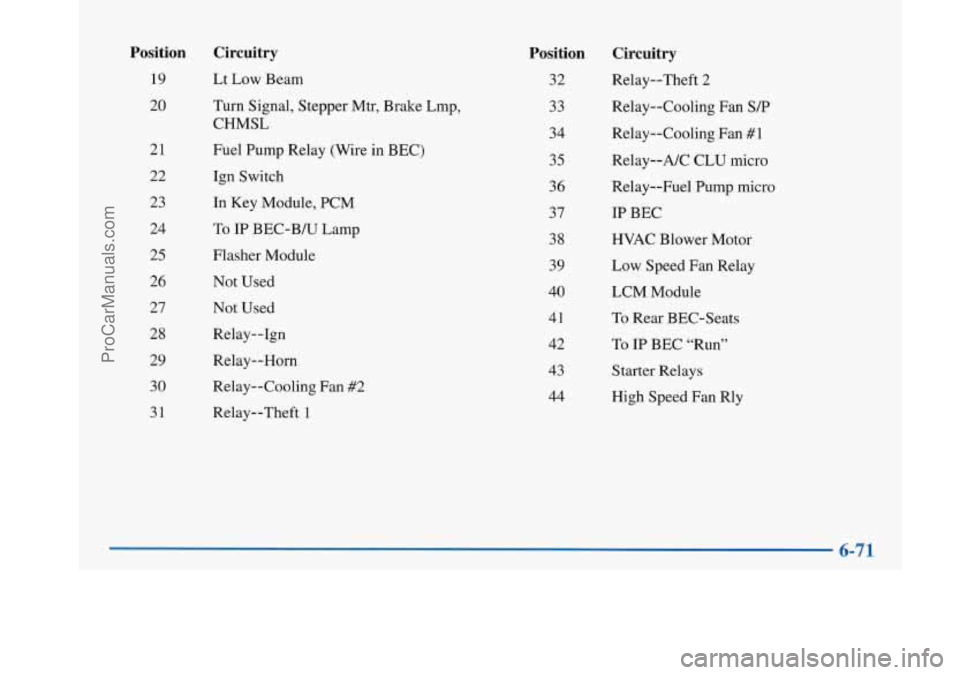
Position
19
20
21
22 23
24
25
26 27
28
29 30
31
Circuitry
Lt Low Beam
Turn Signal, Stepper Mtr, Brake Lmp,
CHMSL
Fuel Pump Relay (Wire in BEC)
Ign Switch
In Key Module, PCM
To
IP BEC-B/U Lamp
Flasher Module Not Used
Not Used
Relay--1gn
Relay--Horn
Relay--Cooling Fan #2
Relay--Theft 1
Position
32
33
34
35
36 37
38
39
40
41
42
43
44
Circuitry
Relay--Theft 2
Relay--Cooling Fan
S/P
Relay--Cooling Fan #1
Relay--A/C CLU micro
Relay--Fuel Pump micro
IP BEC
HVAC Blower Motor
Low Speed Fan Relay
LCM Module
To Rear BEC-Seats
To
IP BEC “Run”
Starter Relays
High Speed Fan Rly
ProCarManuals.com