light BUICK PARK AVENUE 2003 Workshop Manual
[x] Cancel search | Manufacturer: BUICK, Model Year: 2003, Model line: PARK AVENUE, Model: BUICK PARK AVENUE 2003Pages: 372, PDF Size: 2.8 MB
Page 153 of 372
Security Light
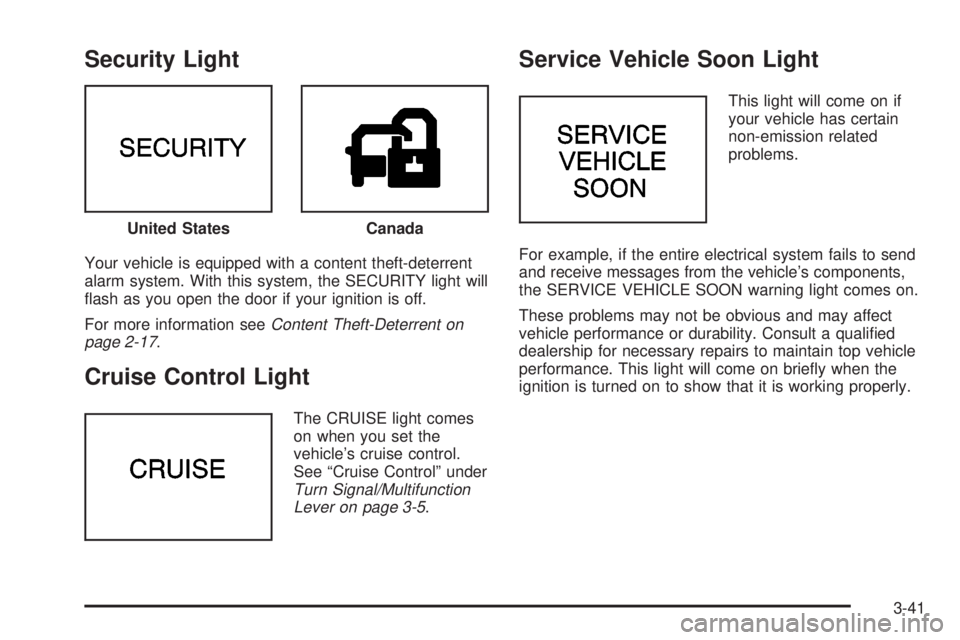
Your vehicle is equipped with a content theft-deterrent
alarm system. With this system, the SECURITY light will
¯ash as you open the door if your ignition is off.
For more information see
Content Theft-Deterrent on
page 2-17.
Cruise Control Light
The CRUISE light comes
on when you set the
vehicle's cruise control.
See ªCruise Controlº under
Turn Signal/Multifunction
Lever on page 3-5.
Service Vehicle Soon Light
This light will come on if
your vehicle has certain
non-emission related
problems.
For example, if the entire electrical system fails to send
and receive messages from the vehicle's components,
the SERVICE VEHICLE SOON warning light comes on.
These problems may not be obvious and may affect
vehicle performance or durability. Consult a quali®ed
dealership for necessary repairs to maintain top vehicle
performance. This light will come on brie¯y when the
ignition is turned on to show that it is working properly. United States
Canada
3-41
Page 154 of 372
Fuel Gage
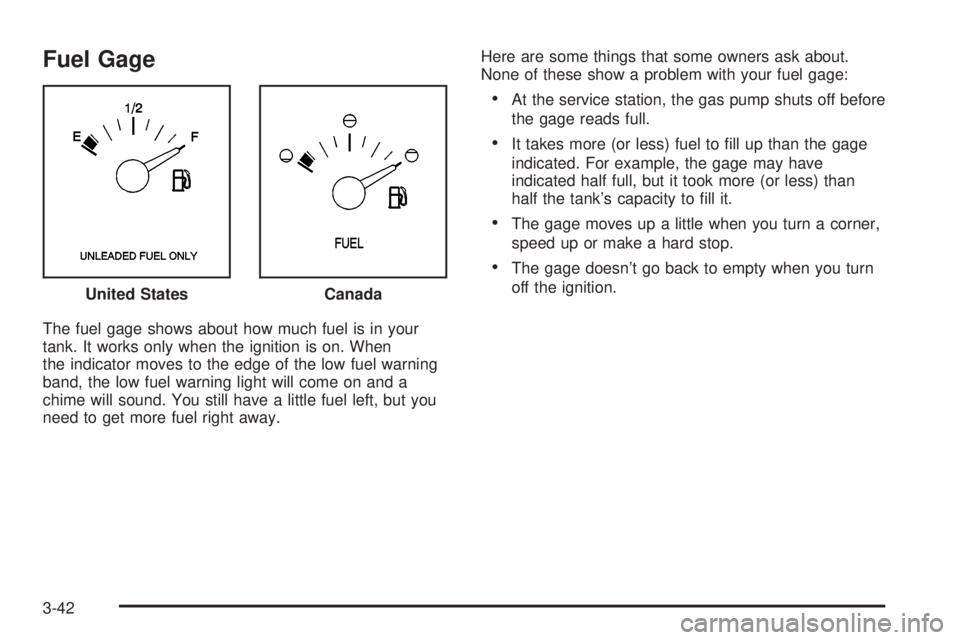
The fuel gage shows about how much fuel is in your
tank. It works only when the ignition is on. When
the indicator moves to the edge of the low fuel warning
band, the low fuel warning light will come on and a
chime will sound. You still have a little fuel left, but you
need to get more fuel right away.Here are some things that some owners ask about.
None of these show a problem with your fuel gage:
·At the service station, the gas pump shuts off before
the gage reads full.
·It takes more (or less) fuel to ®ll up than the gage
indicated. For example, the gage may have
indicated half full, but it took more (or less) than
half the tank's capacity to ®ll it.
·The gage moves up a little when you turn a corner,
speed up or make a hard stop.
·The gage doesn't go back to empty when you turn
off the ignition.
United States
Canada
3-42
Page 159 of 372
After you press the unlock button on your transmitter
with the ignition in RUN, the DIC will automatically
display the identi®ed driver number. The vehicle
will recall the personal choice settings that were last
made to correspond to your transmitter, including your
radio and climate control settings. See
Climate
Controls Personalization on page 3-28.
If you unlock the vehicle using your door key instead of
your transmitter, the DIC will not change drivers and
will recall the information from the last transmitter used
or the last driver using one of the MEMORY buttons.
If this happens and you were not the last driver of
the vehicle, simply press your correct driver number on
the appropriate MEMORY button or press the unlock
button on your transmitter.
The DIC can be used to program the following personal
choice features available with your vehicle:
·Memory Seat Recall
·Programmable Automatic Door Locks
·Security Feedback
·Delayed Locking
·Perimeter Lighting
·Outside Curb View Assist Mirror
·Window Lock OutSee the following steps for personalization programming
instructions.
1. Turn the ignition on and keep the transaxle in
PARK (P).
2. Inform the DIC which driver you are by pressing the
unlock button on your transmitter or the appropriate
memory seat control.
3. Press and hold the ENG/MET button for ®ve
seconds. WELCOME TO BUICK OPTION
FEATURE will appear in the display.
The next display will be your driver number and the
message ARMREST BUTTON CHANGES
DRIVER #. Follow the instructions in the display.
You are now in the selection mode and the DIC is
ready to program your personal choices in
memory.
The selections you make for the personal choice
features will be saved after the display reads
FEATURE OPTION SELECTION DONE.
Each feature that can be personalized will appear in
the display. Once you have made a selection for
a feature, the DIC will move on to the next personal
choice feature.
3-47
Page 160 of 372
4. Scroll through the following messages and feature
options:
·PARALLEL PARK ± OFF/ON
·AUTO DOOR LOCKS ± OFF/ON
·UNLOCK IN PARK ± OFF/ON
·WHICH DOORS ± ALL/DRIVER
·DELAYED LOCKING ± OFF/ON
·LOCK FEEDBACK ± OFF/ON
·LOCK FEEDBACK ± LIGHTS/LIGHTS + HORN
·UNLOCK FEEDBACK ± OFF/LIGHTS
·PERIMETER LIGHTS ± OFF/ON
·SEAT RECALL ± OFF/ON
·RECALL POSITION ± MEMORY/EXIT
·WINDOW LOCKOUT ± ALL PASS/REAR
If you would like to exit the selection mode without
moving through each of the personal choice features,
simply press a different button on the DIC or turn off the
ignition. However, personal choices you made may
not be retained.
If you happen to move past a selection you would like to
make a personal choice for, press the unlock button on
your transmitter or press the appropriate driver number
on the seat control. This will return you to the beginning of
the option feature programming mode.
A description of each feature programmable through the
DIC follows.
Outside Curb View Assist Mirror
The outside curb view assist mirror, which tilts the
passenger mirror while the vehicle is in REVERSE (R),
can be made active or inactive through the DIC.
When PARALLEL PARK-OFF-ON appears on the
display, use the ENG/MET button to toggle the arrow
between OFF and ON. When you have made your
choice, press the RESET button to record your
selection. For more information on this feature, see
Outside Curb View Assist Mirror on page 2-36.
Programmable Automatic Door Locks
The automatic door lock modes, when shifting in and out
of PARK (P), can be changed through the DIC. You
can change these modes using different selections from
the following DIC displays:
·AUTO DOOR LOCKS Ð OFF/ON
·UNLOCK IN PARK ÐOFF/ON
If you choose OFF for AUTO DOOR LOCKS, your door
locks will operate normally with no automatic feature.
If you choose ON for AUTO DOOR LOCKS, and ON for
UNLOCK IN PARK, your doors will lock every time
you shift out of PARK (P), and the doors will unlock
every time you stop and shift into PARK (P).
3-48
Page 161 of 372
If you choose ON for AUTO DOOR LOCKS, and OFF
for UNLOCK IN PARK, your door locks will lock
every time you shift out of PARK (P), and there will be
no automatic door unlock when shifting back into
PARK (P).
When you choose ON for UNLOCK in PARK, the DIC
will display WHICH DOORS-ALL/DRIVER. You have the
choice of unlocking all doors, or just the driver's door.
To change modes, do the following:
1. Move the arrow on the display between ON and
OFF by pressing the ENG/MET button.
2. Once you have made your selection, press the
RESET button and your choice will be retained
in memory.
See
Programmable Automatic Door Locks on page 2-11for more information about this feature.
Delayed Locking
The delayed locking feature, which delays the actual
locking of the vehicle, can be made active or inactive
through the DIC. When DELAYED LOCKING-OFF-ON
appears on the display, use the ENG/MET button to
toggle the arrow between OFF and ON. When you have
made your choice, press the RESET button to record
your selection.
For more information on this feature, see
Delayed
Locking on page 2-10.
Security Feedback
By choosing different combinations of these selections,
you can choose the type of transmitter activated
feedback you receive when locking and unlocking your
vehicle with your transmitter. Each time you make a
selection by pressing the ENG/MET button, press
the RESET button to record your choice.
·LOCK FEEDBACK ± OFF/ON
·LOCK FEEDBACK ± LIGHTS/LIGHTS + HORN
·UNLOCK FEEDBACK ± OFF/LIGHTS
If you choose ON for LOCK FEEDBACK you will also
need to choose LIGHTS or LIGHTS + HORN.
You can select the following modes:
·If you choose OFF for LOCK FEEDBACK and OFF
for UNLOCK FEEDBACK, you will receive no
security feedback when locking or unlocking your
vehicle.
·If you choose OFF for LOCK FEEDBACK and
LIGHTS for UNLOCK FEEDBACK, you will receive
no security feedback when locking your vehicle
and the exterior lamps will ¯ash when unlocking
your vehicle.
3-49
Page 162 of 372
·If you choose LIGHTS for LOCK FEEDBACK and
OFF for UNLOCK FEEDBACK, your exterior
lamps will ¯ash when locking your vehicle and you
will receive no security feedback when unlocking
your vehicle.
·If you choose LIGHTS for LOCK FEEDBACK and
LIGHTS for UNLOCK FEEDBACK, your exterior
lamps will ¯ash when locking and unlocking
your vehicle.
·If you choose LIGHTS + HORN for LOCK
FEEDBACK and OFF for UNLOCK FEEDBACK,
your exterior lamps will ¯ash and the horn will chirp
when locking your vehicle and you will receive
no security feedback when unlocking your vehicle.
·If you choose LIGHTS + HORN for LOCK
FEEDBACK and LIGHTS for UNLOCK FEEDBACK,
your exterior lamps will ¯ash and the horn will
chirp when locking your vehicle and your exterior
lamps will ¯ash when unlocking your vehicle.
For more information on this feature, see ªSecurity
Feedbackº under
Remote Keyless Entry System
Operation on page 2-5.
Perimeter Lighting
When the button with the unlock symbol on the
transmitter is pressed, the DRL lamps (high-beams at
reduced intensity), parking lamps and back-up lamps will
turn on if it is dark enough according to the Twilight
Sentinel
ž.
You can control activation of this feature by choosing
OFF or ON when the PERIMETER LIGHTS choice
is displayed on the DIC. Make your choice by pressing
the ENG/MET button and record your choice by
pressing the RESET button.
If you want to choose PERIMETER LIGHTS ON, you
must also choose LIGHTS for UNLOCK FEEDBACK
while making the security feedback choices.
For more information on this feature, see ªPerimeter
Lightingº under
Exterior Lamps on page 3-12.
Memory Seat Recall
This feature recalls the position of your seat. When this
feature is active, the memory seat and mirror positions
will be recalled for the identi®ed driver when the remote
keyless entry transmitter is used to enter the vehicle.
You can program this feature to be active by choosing
ON when the SEAT RECALL choice appears, or
inactive by choosing OFF when the SEAT RECALL
choice appears on the DIC.
3-50
Page 164 of 372
Your audio system has been designed to operate easily
and to give years of listening pleasure. You will get
the most enjoyment out of it if you acquaint yourself with
it ®rst. Figure out which radio you have in your vehicle,
®nd out what your audio system can do and how to
operate all of its controls to be sure you're getting the
most out of the advanced engineering that went into it.
Your vehicle may have a feature called Retained
Accessory Power (RAP). With RAP, you can play your
audio system even after the ignition is turned off.
See ªRetained Accessory Power (RAP)º under
Ignition
Positions on page 2-21.
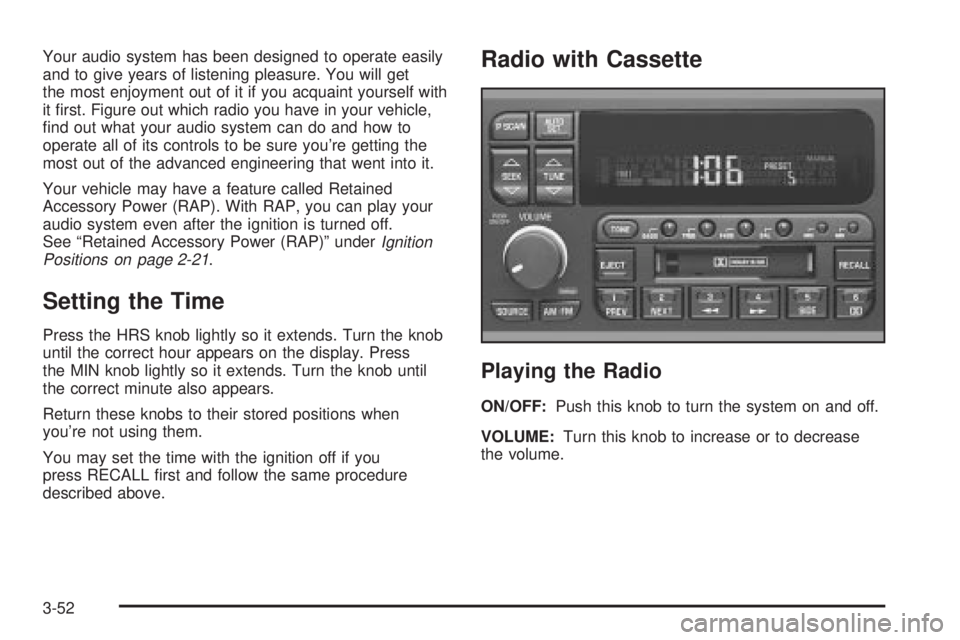
Setting the Time
Press the HRS knob lightly so it extends. Turn the knob
until the correct hour appears on the display. Press
the MIN knob lightly so it extends. Turn the knob until
the correct minute also appears.
Return these knobs to their stored positions when
you're not using them.
You may set the time with the ignition off if you
press RECALL ®rst and follow the same procedure
described above.
Radio with Cassette
Playing the Radio
ON/OFF:Push this knob to turn the system on and off.
VOLUME:Turn this knob to increase or to decrease
the volume.
3-52
Page 166 of 372
Setting the Tone (Bass/Treble)
BASS:Press this knob lightly so it extends. Turn the
knob to increase or to decrease bass.
TREB (Treble):Press this knob lightly so it extends.
Turn the knob to increase or to decrease treble. If
a station is weak or noisy, you may want to decrease
the treble.
Return these knobs to their stored positions when
you're not using them.
TONE:Press this button to choose bass and treble
equalization settings designed for country/western, jazz,
talk, pop, and classical stations.
To return the bass and treble to the manual mode,
press either TONE, BASS, or TREB until MANUAL
appears. See ªSetting Preset Stationsº listed previously
to program the auto tone feature.
Adjusting the Speakers (Balance/Fade)
BAL (Balance):Press this knob lightly so it extends.
Turn the knob to move the sound toward the left or the
right speakers. The middle position balances the
sound between the speakers.FADE:Press this knob lightly so it extends. Turn the
knob to move the sound toward the front or the
rear speakers. The middle position balances the sound
between the speakers.
Return these knobs to their stored positions when
you're not using them.
Playing a Cassette Tape
The longer side with the tape visible should face to the
right. If the ignition and the radio are on, the tape
can be inserted and will begin playing. If you hear
nothing or hear a garbled sound, the tape may not be in
squarely. Press EJECT to remove the tape and start
over.
While the tape is playing, use the VOLUME, SEEK,
FADE, BAL, BASS and TREB controls just as you do for
the radio. Other controls may have different functions
when a tape is inserted. The display will show an arrow
to show which side of the tape is playing.
If you want to insert a tape while the ignition or radio is
off, ®rst press EJECT or RECALL. Cassette tape
adapter kits for portable compact disc players will work
in your cassette tape player.
Your tape bias is set automatically.
3-54
Page 170 of 372
Setting the Tone (Bass/Treble)
BASS:Press this knob lightly so it extends. Turn the
knob to increase or to decrease bass.
TREB (Treble):Press this knob lightly so it extends.
Turn the knob to increase or to decrease treble. If
a station is weak or noisy, you may want to decrease
the treble.
Return these knobs to their stored positions when
you're not using them.
TONE:Press this button to choose bass and treble
equalization settings designed for country/western, jazz,
talk, pop and classical stations.
To return the bass and treble to the manual mode,
press either TONE until MANUAL appears or press and
release the BASS or TREB knob and turn it until the
display goes blank. See ªSetting Preset Stationsº listed
previously to program the auto tone feature.
Adjusting the Speakers (Balance/Fade)
BAL (Balance):Press this knob lightly so it extends.
Turn the knob to move the sound toward the left or the
right speakers. The middle position balances the
sound between the speakers.FADE:Press this knob lightly so it extends. Turn the
knob to move the sound toward the front or the
rear speakers. The middle position balances the sound
between the speakers.
Return these knobs to their stored positions when
you're not using them.
Playing a Cassette Tape
The longer side with the tape visible should face to the
right. If the ignition and the radio are on, the tape
can be inserted and will begin playing. If you hear
nothing or hear a garbled sound, the tape may not be
in squarely. Press EJECT to remove the tape and
start over.
While the tape is playing, use the VOLUME, SEEK,
FADE, BAL, BASS and TREB controls just as you do for
the radio. Other controls may have different functions
when a tape is inserted. The display will show an arrow
to show which side of the tape is playing.
If you want to insert a tape while the ignition or radio is
off, ®rst press EJECT or RECALL.
Your tape bias is set automatically.
3-58
Page 181 of 372
Care of Your Cassette Tape Player
A tape player that is not cleaned regularly can cause
reduced sound quality, ruined cassettes or a damaged
mechanism. Cassette tapes should be stored in their
cases away from contaminants, direct sunlight and
extreme heat. If they aren't, they may not operate
properly or may cause failure of the tape player.
Your tape player should be cleaned regularly after every
50 hours of use. Your radio may display CLN to
indicate that you have used your tape player for
50 hours without resetting the tape clean timer. If this
message appears on the display, your cassette
tape player needs to be cleaned. It will still play tapes,
but you should clean it as soon as possible to
prevent damage to your tapes and player. If you notice
a reduction in sound quality, try a known good
cassette to see if the tape or the tape player is at fault.
If this other cassette has no improvement in sound
quality, clean the tape player.
For best results, use a scrubbing action, non-abrasive
cleaning cassette with pads which scrub the tape
head as the hubs of the cleaner cassette turn. The
recommended cleaning cassette is available through
your dealership.The cut tape detection feature of your cassette tape
player may identify the cleaning cassette as a damaged
tape, in error. If the cleaning cassette ejects, insert
the cassette at least three times to ensure thorough
cleaning.
You may also choose a non-scrubbing action, wet-type
cleaner which uses a cassette with a fabric belt to
clean the tape head. This type of cleaning cassette will
not eject on its own. A non-scrubbing action cleaner
may not clean as thoroughly as the scrubbing type
cleaner. The use of a non-scrubbing action, dry-type
cleaning cassette is not recommended.
After you clean the player, press and hold the EJECT
button for ®ve seconds to reset the CLN indicator.
The radio will display --- to show the indicator was reset.
Cassettes are subject to wear and the sound quality
may degrade over time. Always make sure the cassette
tape is in good condition before you have your tape
player serviced.
3-69