rear view mirror BUICK RAINIER 2005 User Guide
[x] Cancel search | Manufacturer: BUICK, Model Year: 2005, Model line: RAINIER, Model: BUICK RAINIER 2005Pages: 452, PDF Size: 2.6 MB
Page 105 of 452
Manual Rearview Mirror with
OnStar
®, Compass, and
Temperature Display
The vehicle may have a manual rearview mirror with
OnStar®and an eight-point compass and temperature
display located in the upper right.
Control buttons for the OnStar
®system are at the
bottom of the mirror. See your GM dealer for more
information about the OnStar
®system. Also, see
OnStar®System on page 2-40for more information
about the services OnStar®provides.
When cleaning the mirror, use a paper towel or similar
material dampened with glass cleaner. Do not spray
glass cleaner directly on the mirror as that may cause
the liquid cleaner to enter the mirror housing.
Mirror Operation
While sitting in a comfortable position, adjust the
rearview mirror so you can see clearly behind your
vehicle. Grip it in the center and move it up or down and
side to side. The day/night control, located at the
bottom of the mirror, adjusts the mirror to reduce
headlamp glare from behind during evening or dark
conditions. Push the control for daytime use; pull it for
night use.
Temperature and Compass Display
O
(On/Off):Press this button to turn the compass and
temperature display on or off. The compass display, can
show a maximum of two characters. For example, NE is
displayed for north-east.
When the ignition and the compass/temperature
feature are on, character boxes will appear for about
two seconds. After two seconds, the mirror will display
the direction the vehicle is facing and the outside
temperature.
To set the temperature in Fahrenheit or Celsius, do the
following:
1. Press and hold the on/off button until either a
ashing F or C appears.
2. Press the button again to change the display to the
desired unit of measurement. After about four
seconds of inactivity, the new unit will be locked in
and the compass/temperature display will return.
Compass Calibration
When on, the compass automatically calibrates as the
vehicle is driven. If, after two seconds, the display does
not show a compass direction, N for North, for example,
there may be a strong magnetic eld interfering with the
compass. Such interference may be caused by a
magnetic antenna mount, magnetic note pad holder, or a
similar magnetic item. If the letter C should ever appear in
the compass window, the compass may need calibration.
2-37
Page 108 of 452
Outside Convex Mirror
{CAUTION:
A convex mirror can make things (like other
vehicles) look farther away than they really are.
If you cut too sharply into the right or left lane,
you could hit a vehicle. Check your inside
mirror or glance over your shoulder before
changing lanes.
The passenger’s outside mirror is convex. A convex
mirror’s surface is curved so more can be seen from the
driver’s seat.
Outside Heated Mirrors
If the vehicle has this feature, when the rear window
defogger is turned on, the driver’s and passenger’s
outside rearview mirrors also heat to help clear them of
ice, snow, and condensation. SeeDual Automatic
Climate Control System on page 3-19for more
information.
OnStar®System
OnStar®uses global positioning system (GPS) satellite
technology, wireless communications, and call centers
to provide you with a wide range of safety, security,
information, and convenience services.
A complete OnStar
®user’s guide and the terms and
conditions of the OnStar®Subscription Service
Agreement are included in the vehicle’s glove box
literature. For more information, visit www.onstar.com or
www.onstarcanada.com. Contact OnStar
®at
1-888-4-ONSTAR (1-888-466-7827), or press the
OnStar
®button to speak to an OnStar®advisor 24 hours
a day, 7 days a week.
Terms and conditions of the Subscription Service
Agreement can be found at www.onstar.com or
www.onstarcanada.com.
OnStar®Services
For new vehicles equipped with OnStar®, the Safe and
Sound Plan is included for the rst year. You can
extend this plan beyond the rst year, or upgrade to the
Directions and Connections Plan to meet your needs.
For more information, press the OnStar
®button to speak
with an advisor.
2-40
Page 127 of 452
Turn Signal/Multifunction Lever
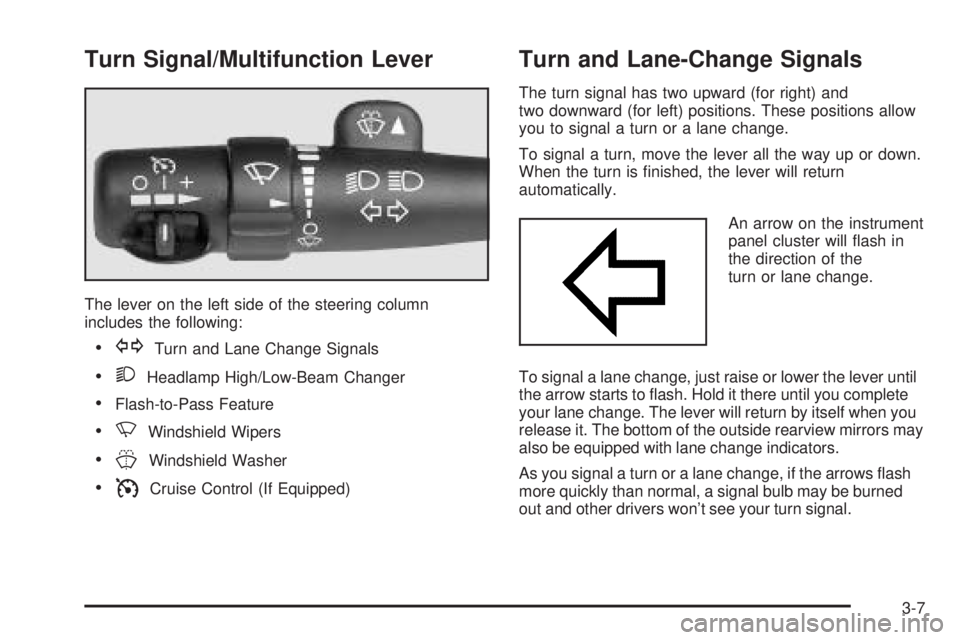
The lever on the left side of the steering column
includes the following:
GTurn and Lane Change Signals
2Headlamp High/Low-Beam Changer
Flash-to-Pass Feature
NWindshield Wipers
JWindshield Washer
ICruise Control (If Equipped)
Turn and Lane-Change Signals
The turn signal has two upward (for right) and
two downward (for left) positions. These positions allow
you to signal a turn or a lane change.
To signal a turn, move the lever all the way up or down.
When the turn is nished, the lever will return
automatically.
An arrow on the instrument
panel cluster will ash in
the direction of the
turn or lane change.
To signal a lane change, just raise or lower the lever until
the arrow starts to ash. Hold it there until you complete
your lane change. The lever will return by itself when you
release it. The bottom of the outside rearview mirrors may
also be equipped with lane change indicators.
As you signal a turn or a lane change, if the arrows ash
more quickly than normal, a signal bulb may be burned
out and other drivers won’t see your turn signal.
3-7
Page 129 of 452
Windshield Wipers
8(Mist):For a single wiping cycle, turn the band to
mist. Hold it there until the wipers start. Then let go.
The wipers will stop after one wipe. If you want
more wipes, hold the band on mist longer.
9(Off):To stop the wipers, move the band to off.
N(Windshield Wipers):Turn the band to control the
windshield wipers.
You can set the wiper speed for a long or short delay
between wipes. This can be very useful in light rain
or snow. Turn the band to choose the delay time. The
closer to the top of the lever, the shorter the delay.
For steady wiping at low speed, turn the band away from
you to the rst solid band past the delay settings. For
high-speed wiping, turn the band further, to the second
solid band past the delay settings. To stop the wipers,
move the band to off.
Be sure to clear ice and snow from the wiper blades
before using them. If they’re frozen to the windshield,
carefully loosen or thaw them. If your blades do become
worn or damaged, get new blades or blade inserts.
Rainsense™ Wipers
Your vehicle may be equipped with
Rainsense™ windshield wipers. When active, these
wipers are able to detect moisture on the windshield and
automatically turn on the wipers.
The moisture sensor is located next to the inside
rearview mirror and is mounted on the windshield.
To turn on the Rainsense™ feature, the wipers must be
set to one of the ve delay settings on the multifunction
lever. Each of the ve settings adjusts the sensitivity
of the rainsensor. For more wipes, select the higher
settings; for fewer wipes, select the lower settings
located closer to off on the multifunction lever.
The rainsensor will automatically control the frequency
of the wipes from off to high speed according to the
weather conditions. The wipers can be left in a
rainsense mode even when it is not raining.
Notice:If you do not turn off the windshield wipers
when driving through an automatic car wash, you
could damage the wipers. Always turn off the
windshield wipers before entering an automatic
car wash.
3-9
Page 150 of 452
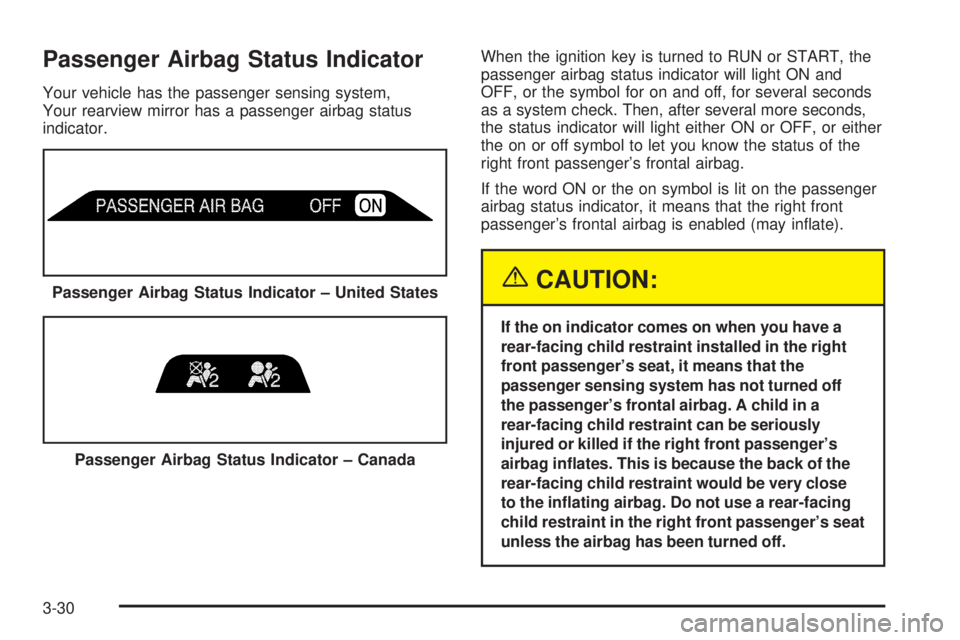
Passenger Airbag Status Indicator
Your vehicle has the passenger sensing system,
Your rearview mirror has a passenger airbag status
indicator.When the ignition key is turned to RUN or START, the
passenger airbag status indicator will light ON and
OFF, or the symbol for on and off, for several seconds
as a system check. Then, after several more seconds,
the status indicator will light either ON or OFF, or either
the on or off symbol to let you know the status of the
right front passenger’s frontal airbag.
If the word ON or the on symbol is lit on the passenger
airbag status indicator, it means that the right front
passenger’s frontal airbag is enabled (may inate).
{CAUTION:
If the on indicator comes on when you have a
rear-facing child restraint installed in the right
front passenger’s seat, it means that the
passenger sensing system has not turned off
the passenger’s frontal airbag. A child in a
rear-facing child restraint can be seriously
injured or killed if the right front passenger’s
airbag inates. This is because the back of the
rear-facing child restraint would be very close
to the inating airbag. Do not use a rear-facing
child restraint in the right front passenger’s seat
unless the airbag has been turned off. Passenger Airbag Status Indicator – United States
Passenger Airbag Status Indicator – Canada
3-30
Page 167 of 452
DIC Warnings and Messages
Messages are displayed on the DIC to notify the driver
that the status of the vehicle has changed and that
some action may be needed by the driver to correct the
condition. More than one message may appear at
one time. They will appear one behind the other. Some
messages may not require immediate action but you
should press the trip stem to acknowledge that you
received the message and clear it from the display.
Pressing any of the DIC steering wheel buttons — trip
information, fuel information, customization or select
button — will also acknowledge any warnings or service
messages. Some messages cannot be cleared from
the display because they are more urgent. These
messages require action before they can be removed
from the DIC display. The following are the possible
messages that can be displayed and some information
about them.
BATTERY NOT CHARGING
If the battery is not charging during operation, this
message will appear on the DIC. Driving with this
problem could drain your battery. Have the electrical
system checked by your GM dealer as soon as possible.
SeeVoltmeter Gage on page 3-32. Press the select
button to acknowledge this message and clear it from
the DIC display.
CHECK WASHER FLUID
If the washer uid level is low, this message will appear
on the DIC. Adding washer uid will clear the message.
SeeWindshield Washer Fluid on page 5-36. Press
the select button to acknowledge this message and clear
it from the DIC display.
CURB VIEW ACTIVATED
The CURB VIEW ACTIVATED message is displayed
when the passenger outside rearview mirror moves into
the curb view position. SeeOutside Curb View Assist
Mirror on page 2-39for more information.
DRIVER DOOR AJAR
If the driver’s door is not fully closed, this message will
appear on the display and you will hear a chime.
Stop and turn off the vehicle, check the door for
obstacles, and close the door again. Check to see if the
message still appears on the DIC. Press the select
button to acknowledge this message and clear it from
the DIC display.
3-47
Page 446 of 452
Locking Rear Axle............................................ 4-9
Lockout Protection..........................................2-12
Locks
Delayed Locking........................................... 2-9
Door........................................................... 2-7
Lockout Protection.......................................2-12
Power Door.................................................. 2-8
Programmable Automatic Door Locks............... 2-9
Rear Door Security Locks.............................2-12
Loss of Control...............................................4-14
Low Fuel Warning Light...................................3-42
Luggage Carrier..............................................2-47
Lumbar
Power Controls............................................. 1-2
M
Maintenance Schedule
Additional Required Services........................... 6-6
At Each Fuel Fill........................................... 6-9
At Least Once a Month.................................. 6-9
At Least Once a Year..................................6-10
Introduction.................................................. 6-2
Maintenance Footnotes.................................. 6-7
Maintenance Record....................................6-15
Maintenance Requirements............................. 6-2
Normal Maintenance Replacement Parts.........6-14
Owner Checks and Services........................... 6-9
Recommended Fluids and Lubricants.............6-12Maintenance Schedule (cont.)
Scheduled Maintenance................................. 6-4
Using Your................................................... 6-2
Your Vehicle and the Environment................... 6-2
Malfunction Indicator Light................................3-35
Memory Seat.................................................2-51
Message
DIC Warnings and Messages........................3-47
Mirrors
Manual Rearview Mirror................................2-30
Manual Rearview Mirror with Compass...........2-30
Manual Rearview Mirror with Compass
and Temperature..............................2-35, 3-28
Manual Rearview Mirror with OnStar
®.............2-30
Manual Rearview Mirror with OnStar®
and Compass..........................................2-33
Manual Rearview Mirror with OnStar®,
Compass, and Temperature Display............2-37
Outside Convex Mirror.................................2-40
Outside Curb View Assist Mirror....................2-39
Outside Heated Mirrors................................2-40
Outside Power Mirror...................................2-39
MyGMLink.com................................................ 7-3
N
Navigation/Radio System................................3-119
New Vehicle Break-In......................................2-18
Normal Maintenance Replacement Parts............6-14
8
Page 448 of 452
Q
Questions and Answers About Safety Belts.........1-11
R
Radiator Pressure Cap....................................5-27
Radios..........................................................3-56
Care of Your Cassette Tape Player...............3-123
Care of Your CD and DVD Player................3-124
Care of Your CDs and DVDs.......................3-124
Navigation/Radio System.............................3-119
Radio with Cassette and CD.........................3-81
Radio with CD....................................3-57, 3-67
Radio with Six-Disc CD................................3-95
Rear Seat Audio........................................3-120
Setting the Time..........................................3-56
Theft-Deterrent..........................................3-121
Understanding Reception............................3-122
Rainsense™ Wipers.......................................... 3-9
Reading Lamps..............................................3-17
Rear Axle......................................................5-46
Locking........................................................ 4-9
Rear Climate Control System............................3-24
Rear Door Security Locks................................2-12
Rear Floor Storage Lid....................................2-48
Rear Safety Belt Comfort Guides......................1-23
Rear Seat Audio (RSA)..................................3-120Rear Seat Entertainment System.....................3-109
Rear Seat Operation......................................... 1-5
Rear Seat Passengers, Safety Belts..................1-20
Rearview Mirror with Compass..........................2-30
Rearview Mirror with Compass
and Temperature.................................2-35, 3-28
Rearview Mirror with OnStar®...........................2-30
Rearview Mirror with OnStar®and Compass.......2-33
Rearview Mirror with OnStar®, Compass, and
Temperature Display....................................2-37
Rearview Mirrors.............................................2-30
Reclining Seatbacks, Power............................... 1-4
Recommended Fluids and Lubricants.................6-12
Recreational Vehicle Towing.............................4-50
Reduced Engine Power Light............................3-40
Remote Keyless Entry System............................ 2-4
Remote Keyless Entry System, Operation............ 2-5
Removing the Flat Tire and Installing the
Spare Tire..................................................5-72
Removing the Spare Tire and Tools...................5-70
Replacement Bulbs.........................................5-50
Reporting Safety Defects
Canadian Government..................................7-10
General Motors...........................................7-11
United States Government............................7-10
Restraint System Check
Checking Your Restraint Systems...................1-61
Replacing Restraint System Parts
After a Crash..........................................1-62
10