AUX BUICK RAINIER 2006 User Guide
[x] Cancel search | Manufacturer: BUICK, Model Year: 2006, Model line: RAINIER, Model: BUICK RAINIER 2006Pages: 470, PDF Size: 2.72 MB
Page 244 of 470
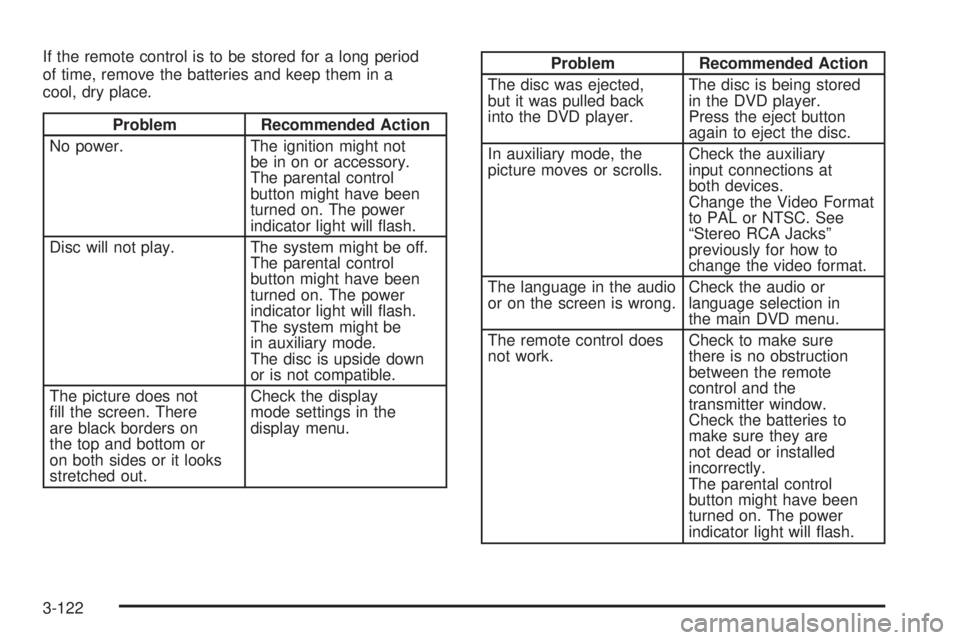
If the remote control is to be stored for a long period
of time, remove the batteries and keep them in a
cool, dry place.
Problem Recommended Action
No power. The ignition might not
be in on or accessory.
The parental control
button might have been
turned on. The power
indicator light will ash.
Disc will not play. The system might be off.
The parental control
button might have been
turned on. The power
indicator light will ash.
The system might be
in auxiliary mode.
The disc is upside down
or is not compatible.
The picture does not
ll the screen. There
are black borders on
the top and bottom or
on both sides or it looks
stretched out.Check the display
mode settings in the
display menu.
Problem Recommended Action
The disc was ejected,
but it was pulled back
into the DVD player.The disc is being stored
in the DVD player.
Press the eject button
again to eject the disc.
In auxiliary mode, the
picture moves or scrolls.Check the auxiliary
input connections at
both devices.
Change the Video Format
to PAL or NTSC. See
“Stereo RCA Jacks”
previously for how to
change the video format.
The language in the audio
or on the screen is wrong.Check the audio or
language selection in
the main DVD menu.
The remote control does
not work.Check to make sure
there is no obstruction
between the remote
control and the
transmitter window.
Check the batteries to
make sure they are
not dead or installed
incorrectly.
The parental control
button might have been
turned on. The power
indicator light will ash.
3-122
Page 245 of 470
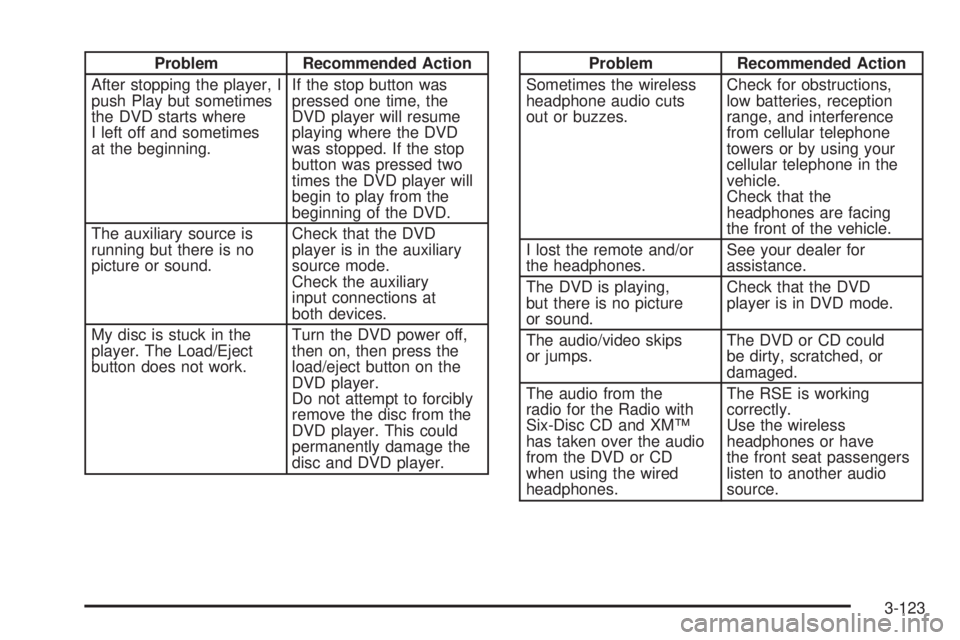
Problem Recommended Action
After stopping the player, I
push Play but sometimes
the DVD starts where
I left off and sometimes
at the beginning.If the stop button was
pressed one time, the
DVD player will resume
playing where the DVD
was stopped. If the stop
button was pressed two
times the DVD player will
begin to play from the
beginning of the DVD.
The auxiliary source is
running but there is no
picture or sound.Check that the DVD
player is in the auxiliary
source mode.
Check the auxiliary
input connections at
both devices.
My disc is stuck in the
player. The Load/Eject
button does not work.Turn the DVD power off,
then on, then press the
load/eject button on the
DVD player.
Do not attempt to forcibly
remove the disc from the
DVD player. This could
permanently damage the
disc and DVD player.Problem Recommended Action
Sometimes the wireless
headphone audio cuts
out or buzzes.Check for obstructions,
low batteries, reception
range, and interference
from cellular telephone
towers or by using your
cellular telephone in the
vehicle.
Check that the
headphones are facing
the front of the vehicle.
I lost the remote and/or
the headphones.See your dealer for
assistance.
The DVD is playing,
but there is no picture
or sound.Check that the DVD
player is in DVD mode.
The audio/video skips
or jumps.The DVD or CD could
be dirty, scratched, or
damaged.
The audio from the
radio for the Radio with
Six-Disc CD and XM™
has taken over the audio
from the DVD or CD
when using the wired
headphones.The RSE is working
correctly.
Use the wireless
headphones or have
the front seat passengers
listen to another audio
source.
3-123
Page 420 of 470
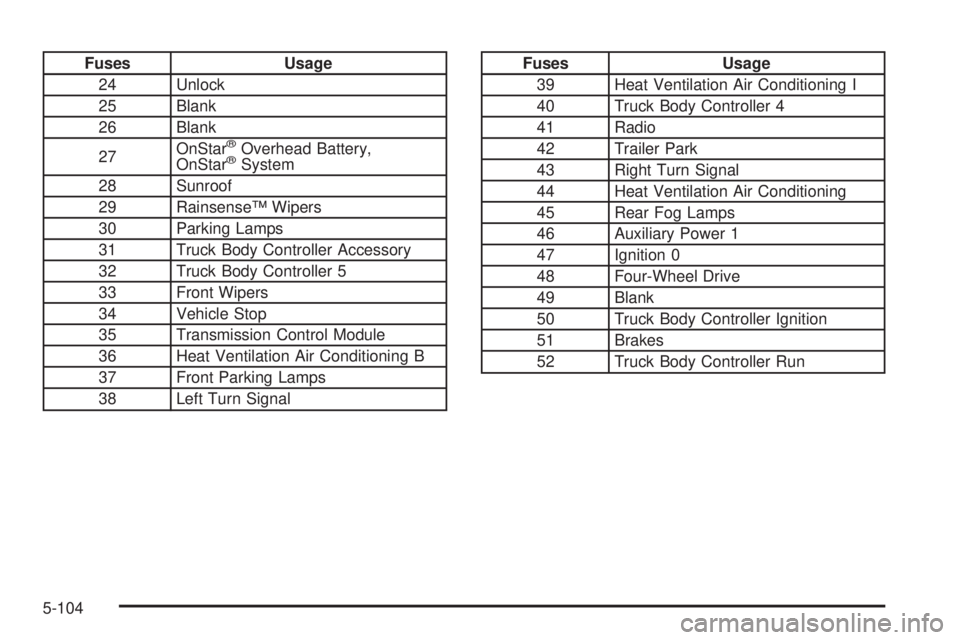
Fuses Usage
24 Unlock
25 Blank
26 Blank
27OnStar
®Overhead Battery,
OnStar®System
28 Sunroof
29 Rainsense™ Wipers
30 Parking Lamps
31 Truck Body Controller Accessory
32 Truck Body Controller 5
33 Front Wipers
34 Vehicle Stop
35 Transmission Control Module
36 Heat Ventilation Air Conditioning B
37 Front Parking Lamps
38 Left Turn Signal
Fuses Usage
39 Heat Ventilation Air Conditioning I
40 Truck Body Controller 4
41 Radio
42 Trailer Park
43 Right Turn Signal
44 Heat Ventilation Air Conditioning
45 Rear Fog Lamps
46 Auxiliary Power 1
47 Ignition 0
48 Four-Wheel Drive
49 Blank
50 Truck Body Controller Ignition
51 Brakes
52 Truck Body Controller Run
5-104