ECO mode BUICK RAINIER 2006 User Guide
[x] Cancel search | Manufacturer: BUICK, Model Year: 2006, Model line: RAINIER, Model: BUICK RAINIER 2006Pages: 470, PDF Size: 2.72 MB
Page 142 of 470
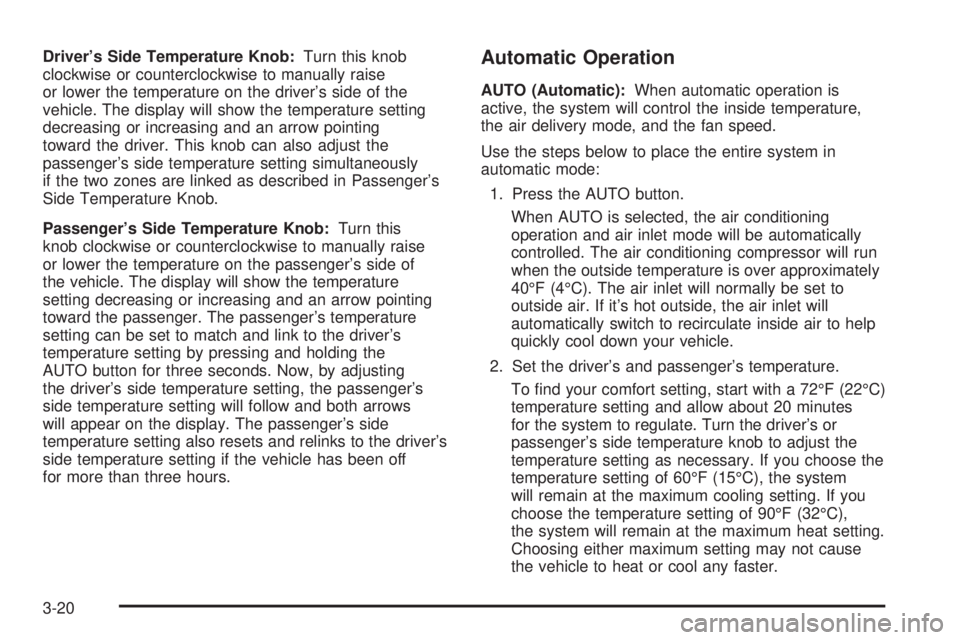
Driver’s Side Temperature Knob:Turn this knob
clockwise or counterclockwise to manually raise
or lower the temperature on the driver’s side of the
vehicle. The display will show the temperature setting
decreasing or increasing and an arrow pointing
toward the driver. This knob can also adjust the
passenger’s side temperature setting simultaneously
if the two zones are linked as described in Passenger’s
Side Temperature Knob.
Passenger’s Side Temperature Knob:Turn this
knob clockwise or counterclockwise to manually raise
or lower the temperature on the passenger’s side of
the vehicle. The display will show the temperature
setting decreasing or increasing and an arrow pointing
toward the passenger. The passenger’s temperature
setting can be set to match and link to the driver’s
temperature setting by pressing and holding the
AUTO button for three seconds. Now, by adjusting
the driver’s side temperature setting, the passenger’s
side temperature setting will follow and both arrows
will appear on the display. The passenger’s side
temperature setting also resets and relinks to the driver’s
side temperature setting if the vehicle has been off
for more than three hours.Automatic Operation
AUTO (Automatic):When automatic operation is
active, the system will control the inside temperature,
the air delivery mode, and the fan speed.
Use the steps below to place the entire system in
automatic mode:
1. Press the AUTO button.
When AUTO is selected, the air conditioning
operation and air inlet mode will be automatically
controlled. The air conditioning compressor will run
when the outside temperature is over approximately
40°F (4°C). The air inlet will normally be set to
outside air. If it’s hot outside, the air inlet will
automatically switch to recirculate inside air to help
quickly cool down your vehicle.
2. Set the driver’s and passenger’s temperature.
To nd your comfort setting, start with a 72°F (22°C)
temperature setting and allow about 20 minutes
for the system to regulate. Turn the driver’s or
passenger’s side temperature knob to adjust the
temperature setting as necessary. If you choose the
temperature setting of 60°F (15°C), the system
will remain at the maximum cooling setting. If you
choose the temperature setting of 90°F (32°C),
the system will remain at the maximum heat setting.
Choosing either maximum setting may not cause
the vehicle to heat or cool any faster.
3-20
Page 143 of 470
Manual Operation
To change the current setting, select one of the
following:
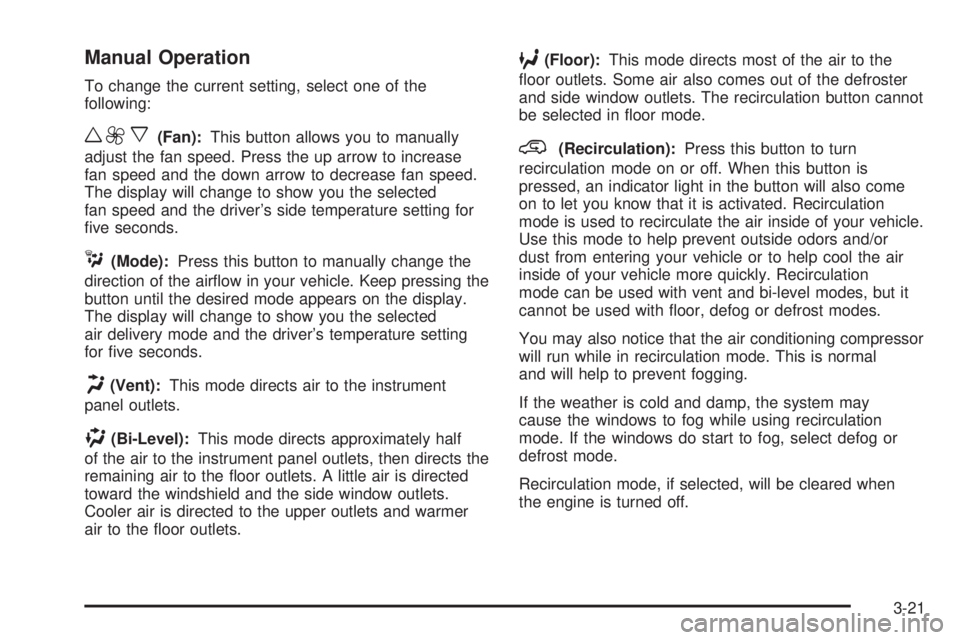
w9x(Fan):This button allows you to manually
adjust the fan speed. Press the up arrow to increase
fan speed and the down arrow to decrease fan speed.
The display will change to show you the selected
fan speed and the driver’s side temperature setting for
ve seconds.
C(Mode):Press this button to manually change the
direction of the airow in your vehicle. Keep pressing the
button until the desired mode appears on the display.
The display will change to show you the selected
air delivery mode and the driver’s temperature setting
for ve seconds.
H(Vent):This mode directs air to the instrument
panel outlets.
)(Bi-Level):This mode directs approximately half
of the air to the instrument panel outlets, then directs the
remaining air to the oor outlets. A little air is directed
toward the windshield and the side window outlets.
Cooler air is directed to the upper outlets and warmer
air to the oor outlets.
6(Floor):This mode directs most of the air to the
oor outlets. Some air also comes out of the defroster
and side window outlets. The recirculation button cannot
be selected in oor mode.
@(Recirculation):Press this button to turn
recirculation mode on or off. When this button is
pressed, an indicator light in the button will also come
on to let you know that it is activated. Recirculation
mode is used to recirculate the air inside of your vehicle.
Use this mode to help prevent outside odors and/or
dust from entering your vehicle or to help cool the air
inside of your vehicle more quickly. Recirculation
mode can be used with vent and bi-level modes, but it
cannot be used with oor, defog or defrost modes.
You may also notice that the air conditioning compressor
will run while in recirculation mode. This is normal
and will help to prevent fogging.
If the weather is cold and damp, the system may
cause the windows to fog while using recirculation
mode. If the windows do start to fog, select defog or
defrost mode.
Recirculation mode, if selected, will be cleared when
the engine is turned off.
3-21
Page 161 of 470

{CAUTION:
Do not keep driving if the oil pressure is low.
If you do, your engine can become so hot that
it catches re. You or others could be burned.
Check your oil as soon as possible and have
your vehicle serviced.
Notice:Lack of proper engine oil maintenance
may damage the engine. The repairs would not
be covered by your warranty. Always follow
the maintenance schedule in this manual for
changing engine oil.
Security Light
This light will come on
briey when you turn the
key toward START.The light will stay on until the engine starts. If the light
ashes, the Passlock
®system has entered a tamper
mode. If the vehicle fails to start, seePasslock®
on page 2-17.
If the light comes on continuously while driving and
stays on, there may be a problem with the Passlock
®
system. Your vehicle will not be protected by Passlock®,
and you should see your dealer.
Also, seeContent Theft-Deterrent on page 2-15for
additional information regarding the security light.
Cruise Control Light
If equipped, the cruise
control light appears
whenever you set your
cruise control.
SeeCruise Control on page 3-11for more information.
3-39
Page 166 of 470
DIC Operation and Displays
The DIC comes on when the ignition is on. After a
short delay the DIC will display the information that
was last displayed before the engine was turned off.
If a problem is detected, a warning message will appear
on the display. Pressing the trip stem will acknowledge
any warning or service messages. Pressing any of
the DIC steering wheel buttons — trip information,
fuel information, customization, or select button — will
also acknowledge any warnings or service messages.
You should take any message that appears on the
display seriously and remember that clearing the
message will only make the message disappear,
not correct the problem.
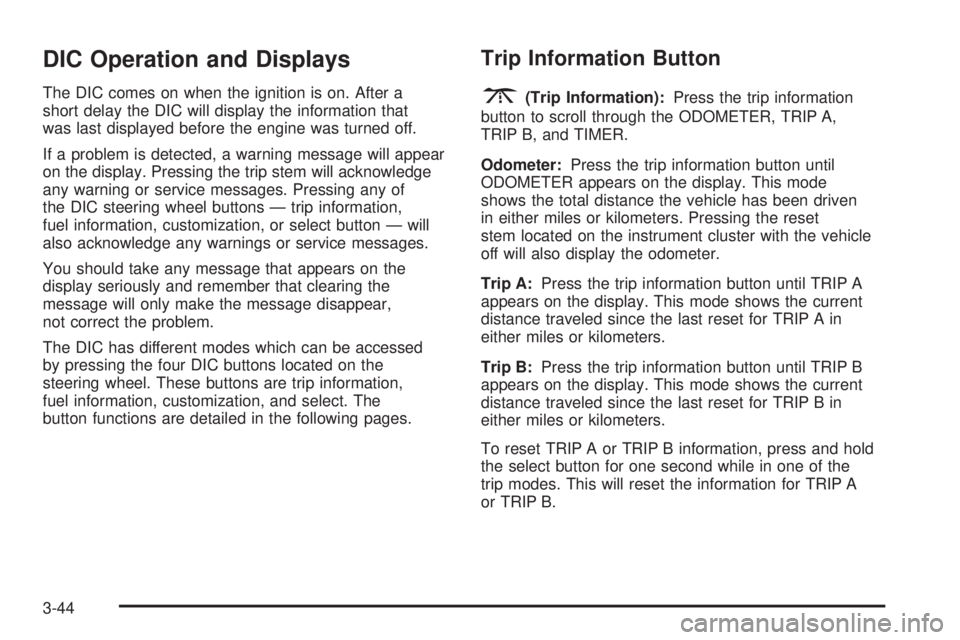
The DIC has different modes which can be accessed
by pressing the four DIC buttons located on the
steering wheel. These buttons are trip information,
fuel information, customization, and select. The
button functions are detailed in the following pages.
Trip Information Button
3
(Trip Information):Press the trip information
button to scroll through the ODOMETER, TRIP A,
TRIP B, and TIMER.
Odometer:Press the trip information button until
ODOMETER appears on the display. This mode
shows the total distance the vehicle has been driven
in either miles or kilometers. Pressing the reset
stem located on the instrument cluster with the vehicle
off will also display the odometer.
Trip A:Press the trip information button until TRIP A
appears on the display. This mode shows the current
distance traveled since the last reset for TRIP A in
either miles or kilometers.
Trip B:Press the trip information button until TRIP B
appears on the display. This mode shows the current
distance traveled since the last reset for TRIP B in
either miles or kilometers.
To reset TRIP A or TRIP B information, press and hold
the select button for one second while in one of the
trip modes. This will reset the information for TRIP A
or TRIP B.
3-44
Page 167 of 470
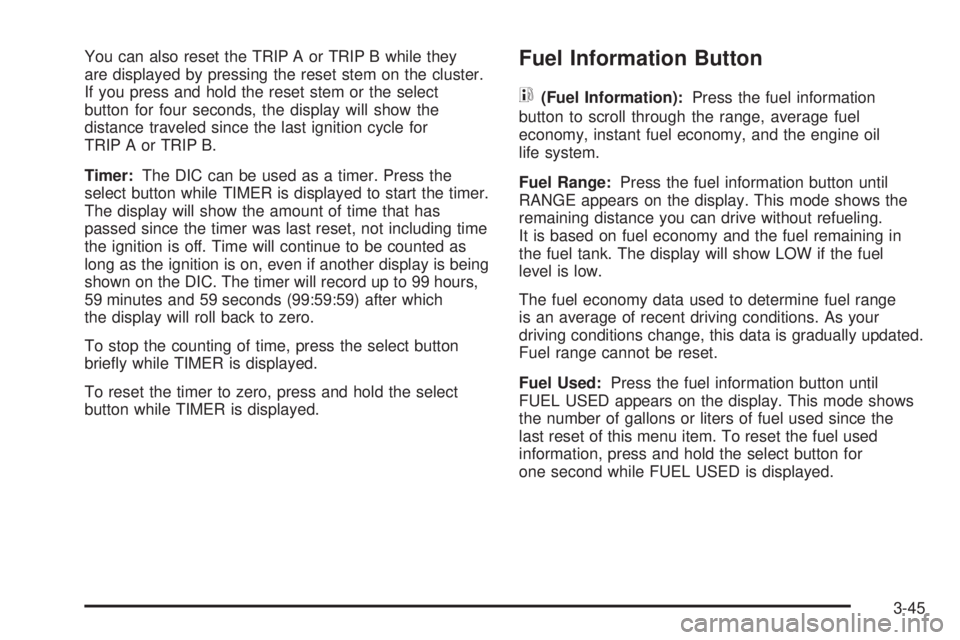
You can also reset the TRIP A or TRIP B while they
are displayed by pressing the reset stem on the cluster.
If you press and hold the reset stem or the select
button for four seconds, the display will show the
distance traveled since the last ignition cycle for
TRIP A or TRIP B.
Timer:The DIC can be used as a timer. Press the
select button while TIMER is displayed to start the timer.
The display will show the amount of time that has
passed since the timer was last reset, not including time
the ignition is off. Time will continue to be counted as
long as the ignition is on, even if another display is being
shown on the DIC. The timer will record up to 99 hours,
59 minutes and 59 seconds (99:59:59) after which
the display will roll back to zero.
To stop the counting of time, press the select button
briey while TIMER is displayed.
To reset the timer to zero, press and hold the select
button while TIMER is displayed.Fuel Information Button
t
(Fuel Information):Press the fuel information
button to scroll through the range, average fuel
economy, instant fuel economy, and the engine oil
life system.
Fuel Range:Press the fuel information button until
RANGE appears on the display. This mode shows the
remaining distance you can drive without refueling.
It is based on fuel economy and the fuel remaining in
the fuel tank. The display will show LOW if the fuel
level is low.
The fuel economy data used to determine fuel range
is an average of recent driving conditions. As your
driving conditions change, this data is gradually updated.
Fuel range cannot be reset.
Fuel Used:Press the fuel information button until
FUEL USED appears on the display. This mode shows
the number of gallons or liters of fuel used since the
last reset of this menu item. To reset the fuel used
information, press and hold the select button for
one second while FUEL USED is displayed.
3-45
Page 168 of 470
Average Fuel Economy:Press the fuel information
button until AVG. ECON appears on the display.
This mode shows how many miles per gallon (MPG),
liters per 100 kilometers (L/100 km), or kilometers
per liter (km/L) your vehicle is getting based on current
and past driving conditions.
Press and hold the select button for one second while
AVG. ECON is displayed to reset the average fuel
economy. Average fuel economy will then be calculated
starting from that point. If the average fuel economy
is not reset, it will be continually updated each time
you drive.
Engine Oil Life System:Press the fuel information
button until ENGINE OIL LIFE appears on the display.
The engine oil life system shows an estimate of the
oil’s remaining useful life. It will show 100% when the
system is reset after an oil change. It will alert you
to change your oil on a schedule consistent with your
driving conditions.
Always reset the engine oil life system after an oil
change. To reset the engine oil life system, see
Engine Oil Life System on page 5-18.In addition to the engine oil life system monitoring
the oil life, additional maintenance is recommended
in the Maintenance Schedule in this manual.
SeeEngine Oil on page 5-15andScheduled
Maintenance on page 6-4.
Customization Button
4
(Customization):Press the customization button to
access the VEHICLE SETTINGS menu and customize
the settings to your vehicle. SeeDIC Vehicle
Customization on page 3-52for more information.
Select Button
r
(Select):Press the select button to reset certain
DIC functions, turn off or acknowledge messages
on the DIC display, and set your customization settings.
For example, this button will allow you to reset the
trip odometers, turn off the FUEL LEVEL LOW message,
and enables you to scroll through and select the
language in which the DIC information will appear.
3-46
Page 173 of 470

STABILITRAK OFF
The STABILITRAK OFF message will be displayed
when you press the StabiliTrak®button for more than
ve seconds or when stability control has been
automatically disabled. The StabiliTrak
®button is
located on the transmission shift handle. To limit wheel
spin and realize the full benets of the stability
enhancement system, you should normally leave
StabiliTrak
®on. However, you should turn StabiliTrak®
off if your vehicle gets stuck in sand, mud, ice, or
snow and you want to rock your vehicle to attempt to
free it, or if you are driving in extreme off-road conditions
and require more wheel spin. SeeIf Your Vehicle is
Stuck in Sand, Mud, Ice or Snow on page 4-44. To turn
the StabiliTrak
®system back on, press the StabiliTrak®
button again.
The message may be displayed if the brake system
warning light is on. SeeBrake System Warning Light
on page 3-33.
The message will turn off as soon as the conditions
that caused the message to be displayed are no
longer present.
TIGHTEN FUEL CAP
If the vehicle’s fuel cap is not tightened properly, this
message may appear on the DIC and a chime will
sound. Fully reinstall the fuel cap. SeeFilling the Tank
on page 5-8. The diagnostic system can determine
if the fuel cap has been left off or improperly installed.
A loose or missing fuel cap will allow fuel to evaporate
into the atmosphere. The DIC message will remain
on until the message is cancelled with the return button
on the steering wheel. The DIC message will also be
cancelled if the ignition is turned off.
The DIC message and the Service Engine Soon light
may come on again during a second trip if the fuel cap
is still not tightened properly. SeeMalfunction Indicator
Lamp on page 3-36for more information.
TRACTION CONTROL OFF
The TRACTION CONTROL OFF message will be
displayed when you momentarily press the StabiliTrak®
button located on the transmission shift handle. In
this mode, stability control and the brake-traction control
are functional. Engine speed management will be
modied and the driven wheels can spin more freely.
For more details on this mode, seeStabiliTrak
®System
on page 4-9.
3-51
Page 179 of 470
Language
Press the customization button until LANGUAGE:
ENGLISH appears in the display. To select your
preference for display language, press the select
button while LANGUAGE: ENGLISH is displayed on
the DIC. Pressing the select button will scroll through
the following languages:
ENGLISH (default)
FRANCAIS (French)
ESPANOL (Spanish)
Choose one of the available options and press the
customization button while it is displayed on the DIC to
select it and move on to the next feature.
If you accidentally choose a language that you do not
want or understand, press and hold the customization
button and the trip information button at the same
time. The DIC will begin scrolling through the languages
in their particular language. English will be in English,
Francais will be in French, and Espanol will be in
Spanish. When you see the language that you would
like, release both buttons. The DIC will then display
the information in the language you chose.
You can also scroll through the different languages by
pressing and holding the trip reset stem for four seconds,
as long as you are in the odometer mode.
Units
Press the customization button until UNITS: U.S.
(ENGLISH) appears in the display. To select English
or metric, press the select button while UNITS:
U.S. (ENGLISH) is displayed on the DIC. Pressing the
select button will scroll through the following choices:
UNITS: U.S. (ENGLISH) (default)
UNITS: METRIC (km/L)
UNITS: METRIC (L/100 km)
If U.S. (ENGLISH) is chosen, all information will be
displayed in English units. For example, distance will
be displayed in miles (mi) and fuel economy in miles
per gallon (MPG). If METRIC (km/L) is chosen, all
information will be displayed in metric units. For
example, distance will be displayed in kilometers (km)
and fuel economy in kilometers per liter (km/L).
If METRIC (L/100 km) is chosen, all information will
be displayed in metric units. For example, distance will
be displayed in kilometers (km) and fuel economy in
liters per 100 kilometers (L/100 km).
Choose one of the available options and press the
customization button while it is displayed on the DIC
to select it and exit out of the customizable options.
3-57
Page 186 of 470
Finding a Program Type (PTY) Station
(RDS and XM™)
To select and nd a desired PTY perform the following:
1. Press the TYPE button to activate program type
select mode. TYPE and a PTY will appear on
the display.
2. Turn the TYPE knob or press and release the
TYPE button to select a PTY.
3. Once the desired PTY is displayed, press and
release either the TYPE or the SEEK arrows to
select and to take you to the PTY’s rst station.
4. To go to another station within that PTY, press the
TYPE button then, press either the TYPE or the
SEEK arrows once.
5. Press either the TYPE or the SEEK arrows twice
to exit program type select mode.
If the radio cannot nd the desired program type,
NONE will appear on the display and the radio will
return to the last station you were listening to.SCAN:Scan the stations within a PTY by performing
the following:
1. Press the TYPE button to activate program type
select mode. TYPE and the last selected PTY will
appear on the display.
2. Turn the TYPE knob or press and release the
TYPE button to select a PTY.
3. Once the desired PTY is displayed, press and
hold either the TYPE or the SCAN arrows for
two seconds, and the radio will begin scanning
the stations in the PTY.
4. Press either the TYPE or the SCAN arrows to
stop scanning.
BAND (Alternate Frequency):Alternate frequency
allows the radio to switch to a stronger station with the
same program type. To turn alternate frequency on,
press and hold BAND for two seconds. AF ON will
appear on the display. The radio may switch to stations
with a stronger frequency.
To turn alternate frequency off, press and hold BAND
again for two seconds. AF OFF will appear on the
display. The radio will not switch to other stations.
This function does not apply for XM™ Satellite
Radio Service.
3-64
Page 187 of 470
Setting Preset PTYs (RDS Only)
These buttons have factory PTY presets. Up to 12 PTYs
(six FM1 and six FM2), can be programmed on
the six numbered pushbuttons, by performing the
following steps:
1. Press BAND to select FM1 or FM2.
2. Press the TYPE button to activate program type
select mode. TYPE and the last selected PTY
will appear on the display.
3. Turn the TYPE knob or press and release the
TYPE button to select a PTY.
4. Press and hold one of the six numbered
pushbuttons until you hear a beep. Whenever
that numbered pushbutton is pressed (while
in program type mode), the PTY that was set
will return.
5. Repeat the steps for each pushbutton.
RDS Messages
INFO (Information):If the current station has a
message, the information symbol will appear on the
display. Press this button to see the message. The
message may display the artist, song title, call in
phone numbers, etc.If the entire message is not displayed, parts of the
message will appear every three seconds. To scroll
through the message, press and release the INFO
button. A new group of words will appear on the display
after every press of the button. Once the complete
message has been displayed, the information symbol
will disappear from the display until another new
message is received. The last message can be
displayed by pressing the INFO button. You can view
the last message until a new message is received
or a different station is tuned to.
Radio Messages
CAL ERR (Calibration Error):The audio system
has been calibrated for your vehicle from the factory.
If CAL ERR appears on the display, it means that
the radio has not been congured properly for the
vehicle and must be returned to your GM dealer
for service.
LOCKED:This message is displayed when the
THEFTLOCK
®system has locked up. Take the vehicle
to your GM dealer for service.
If any error occurs repeatedly, or if an error cannot
be corrected, contact your GM dealer.
3-65