instrument cluster BUICK RAINIER 2006 User Guide
[x] Cancel search | Manufacturer: BUICK, Model Year: 2006, Model line: RAINIER, Model: BUICK RAINIER 2006Pages: 470, PDF Size: 2.72 MB
Page 149 of 470
Speedometer and Odometer
Your speedometer lets you see your speed in both
miles per hour (mph) and kilometers per hour (km/h).
Your odometer shows how far your vehicle has
been driven, in either miles (used in the United States)
or kilometers (used in Canada).
The odometer mileage can be checked without the
vehicle running. Simply press the trip stem located on
the instrument panel cluster.
You may wonder what happens if your vehicle needs
a new odometer installed. The new one will be set to
the correct mileage total of the old odometer.
Trip Odometer
The trip odometer can tell you how far your vehicle
has been driven since you last set the trip odometer
to zero.
Your vehicle’s odometer works together with the Driver
Information Center (DIC). You can set a Trip A and
Trip B odometer. See “Trip Information” underDIC
Operation and Displays on page 3-44.
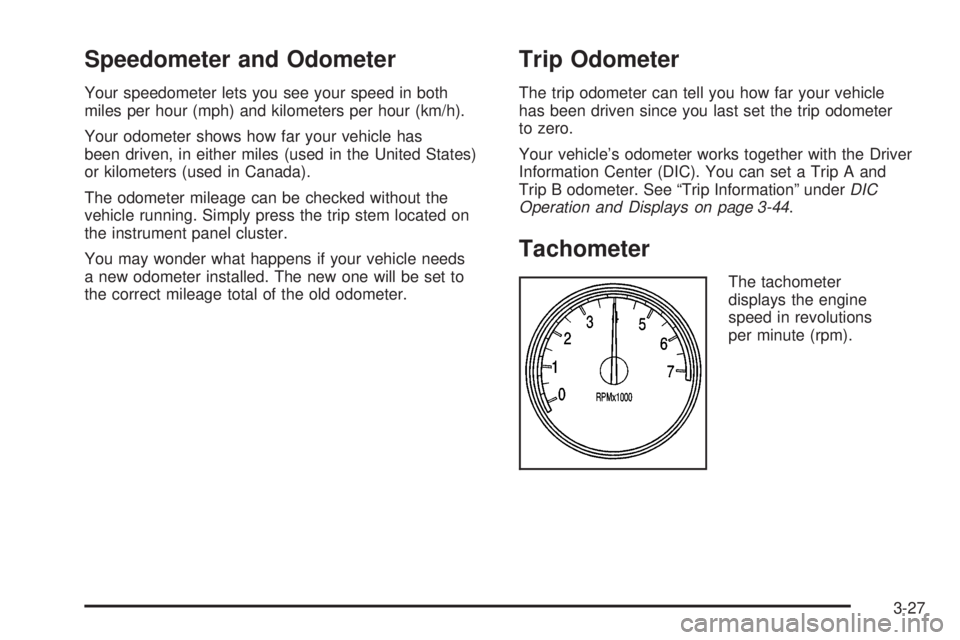
Tachometer
The tachometer
displays the engine
speed in revolutions
per minute (rpm).
3-27
Page 165 of 470
Driver Information Center (DIC)
The Driver Information Center (DIC) display is located
on the instrument panel cluster, below the speedometer.
If your vehicle has DIC buttons, they are located on
the steering wheel. The DIC can display information
such as the trip odometer, fuel economy, customization
features, and warning/status messages.
If your vehicle does not have DIC steering wheel
buttons, you will not have all of the features listed.
Scroll through the odometer and trip odometer by
pressing the trip odometer reset stem located on the
instrument panel cluster. Turn off, or acknowledge,
DIC messages by pressing the trip odometer reset
stem. SeeSpeedometer and Odometer on page 3-27
for information on features for vehicles without
DIC buttons.
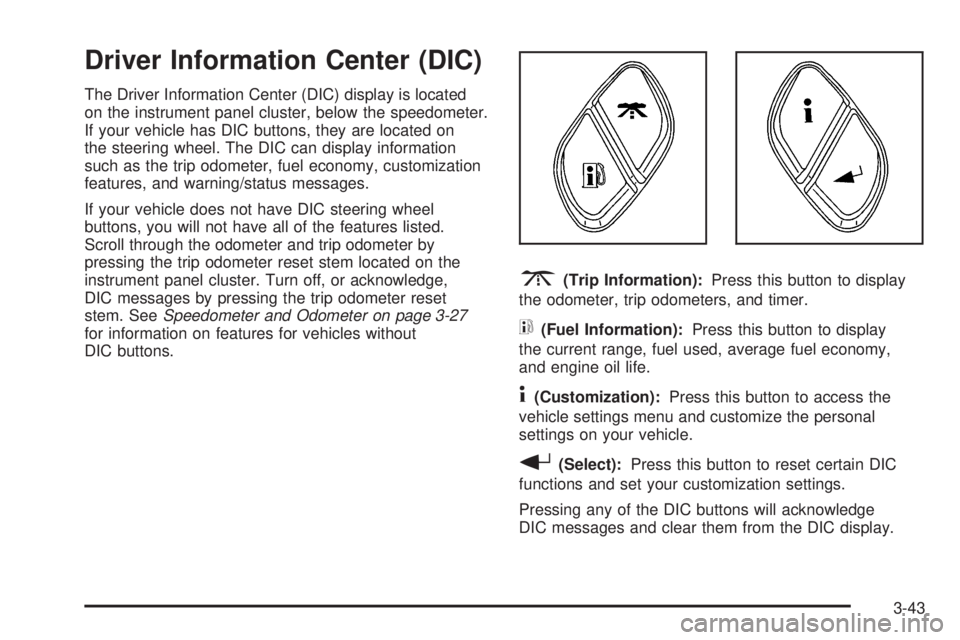
3(Trip Information):Press this button to display
the odometer, trip odometers, and timer.
t(Fuel Information):Press this button to display
the current range, fuel used, average fuel economy,
and engine oil life.
4(Customization):Press this button to access the
vehicle settings menu and customize the personal
settings on your vehicle.
r(Select):Press this button to reset certain DIC
functions and set your customization settings.
Pressing any of the DIC buttons will acknowledge
DIC messages and clear them from the DIC display.
3-43
Page 166 of 470
DIC Operation and Displays
The DIC comes on when the ignition is on. After a
short delay the DIC will display the information that
was last displayed before the engine was turned off.
If a problem is detected, a warning message will appear
on the display. Pressing the trip stem will acknowledge
any warning or service messages. Pressing any of
the DIC steering wheel buttons — trip information,
fuel information, customization, or select button — will
also acknowledge any warnings or service messages.
You should take any message that appears on the
display seriously and remember that clearing the
message will only make the message disappear,
not correct the problem.
The DIC has different modes which can be accessed
by pressing the four DIC buttons located on the
steering wheel. These buttons are trip information,
fuel information, customization, and select. The
button functions are detailed in the following pages.
Trip Information Button
3
(Trip Information):Press the trip information
button to scroll through the ODOMETER, TRIP A,
TRIP B, and TIMER.
Odometer:Press the trip information button until
ODOMETER appears on the display. This mode
shows the total distance the vehicle has been driven
in either miles or kilometers. Pressing the reset
stem located on the instrument cluster with the vehicle
off will also display the odometer.
Trip A:Press the trip information button until TRIP A
appears on the display. This mode shows the current
distance traveled since the last reset for TRIP A in
either miles or kilometers.
Trip B:Press the trip information button until TRIP B
appears on the display. This mode shows the current
distance traveled since the last reset for TRIP B in
either miles or kilometers.
To reset TRIP A or TRIP B information, press and hold
the select button for one second while in one of the
trip modes. This will reset the information for TRIP A
or TRIP B.
3-44
Page 169 of 470
DIC Warnings and Messages
Messages are displayed on the DIC to notify the driver
that the status of the vehicle has changed and that
some action may be needed by the driver to correct
the condition. More than one message may appear at
one time. They will appear one after the other. Some
messages may not require immediate action, but
you should press the trip stem on the instrument panel
cluster to acknowledge that you received the message
and to clear it from the display. Pressing any of
the DIC steering wheel buttons — trip information, fuel
information, customization, or select button — will
also acknowledge any warnings or service messages.
Some messages cannot be cleared from the display
because they are more urgent. These messages require
action before they can be removed from the DIC
display. The following are the possible messages that
can be displayed and some information about them.
BATTERY NOT CHARGING
If the battery is not charging during operation, this
message will appear on the DIC. Driving with this
problem could drain your battery. Have the electrical
system checked by your GM dealer as soon as possible.
SeeVoltmeter Gage on page 3-32. Press the select
button to acknowledge this message and clear it from
the DIC display.
CHANGE ENGINE OIL
This message is displayed when the engine oil needs
to be changed and service is required for your vehicle.
SeeScheduled Maintenance on page 6-4andEngine
Oil on page 5-15for more information. Also seeEngine
Oil Life System on page 5-18for information on how
to reset the message. This message will clear itself after
10 seconds until the next ignition cycle.
CHECK WASHER FLUID
If the washer uid level is low, this message will appear
on the DIC. Adding washer uid to the windshield
washer uid reservoir will clear the message. See
Windshield Washer Fluid on page 5-35. Press the select
button to acknowledge this message and clear it from
the DIC display.
CURB VIEW ACTIVATED
The CURB VIEW ACTIVATED message is displayed
when the passenger outside rearview mirror moves into
the curb view position. SeeOutside Curb View Assist
Mirror on page 2-40for more information.
3-47
Page 170 of 470
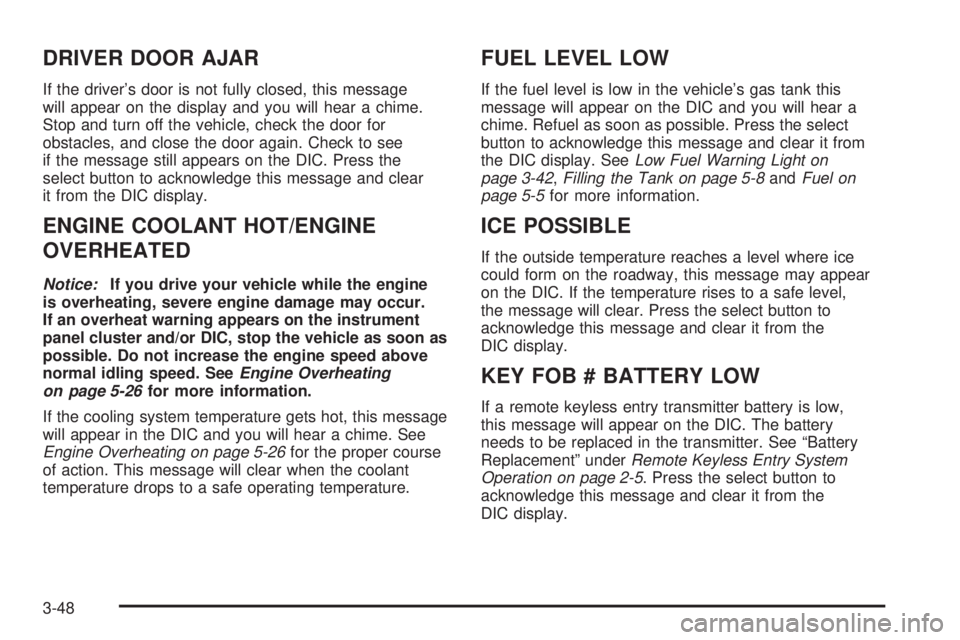
DRIVER DOOR AJAR
If the driver’s door is not fully closed, this message
will appear on the display and you will hear a chime.
Stop and turn off the vehicle, check the door for
obstacles, and close the door again. Check to see
if the message still appears on the DIC. Press the
select button to acknowledge this message and clear
it from the DIC display.
ENGINE COOLANT HOT/ENGINE
OVERHEATED
Notice:If you drive your vehicle while the engine
is overheating, severe engine damage may occur.
If an overheat warning appears on the instrument
panel cluster and/or DIC, stop the vehicle as soon as
possible. Do not increase the engine speed above
normal idling speed. SeeEngine Overheating
on page 5-26for more information.
If the cooling system temperature gets hot, this message
will appear in the DIC and you will hear a chime. See
Engine Overheating on page 5-26for the proper course
of action. This message will clear when the coolant
temperature drops to a safe operating temperature.
FUEL LEVEL LOW
If the fuel level is low in the vehicle’s gas tank this
message will appear on the DIC and you will hear a
chime. Refuel as soon as possible. Press the select
button to acknowledge this message and clear it from
the DIC display. SeeLow Fuel Warning Light on
page 3-42,Filling the Tank on page 5-8andFuel on
page 5-5for more information.
ICE POSSIBLE
If the outside temperature reaches a level where ice
could form on the roadway, this message may appear
on the DIC. If the temperature rises to a safe level,
the message will clear. Press the select button to
acknowledge this message and clear it from the
DIC display.
KEY FOB # BATTERY LOW
If a remote keyless entry transmitter battery is low,
this message will appear on the DIC. The battery
needs to be replaced in the transmitter. See “Battery
Replacement” underRemote Keyless Entry System
Operation on page 2-5. Press the select button to
acknowledge this message and clear it from the
DIC display.
3-48
Page 263 of 470
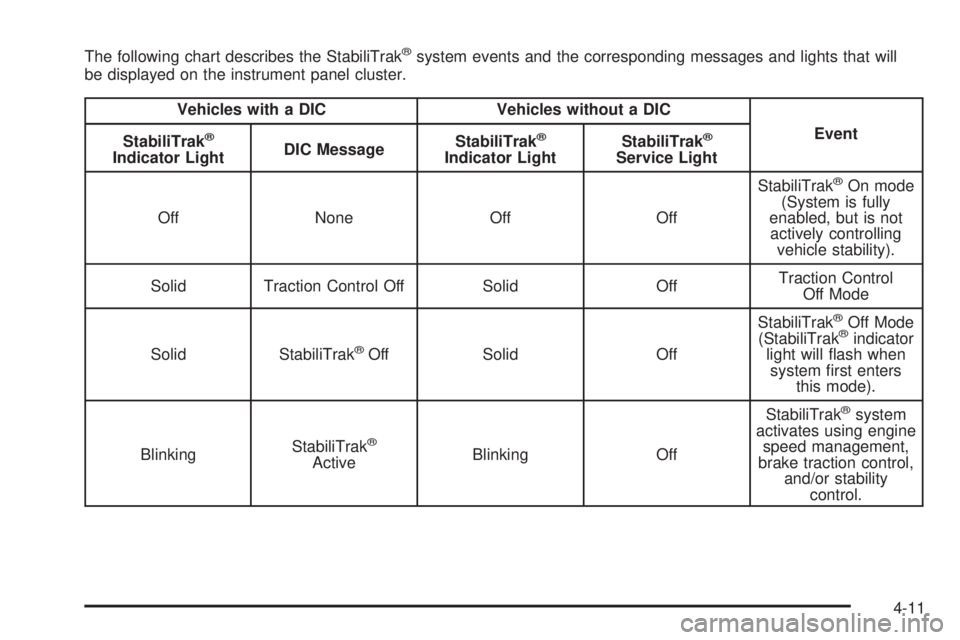
The following chart describes the StabiliTrak®system events and the corresponding messages and lights that will
be displayed on the instrument panel cluster.
Vehicles with a DIC Vehicles without a DIC
Event
StabiliTrak
®
Indicator LightDIC MessageStabiliTrak
®
Indicator LightStabiliTrak
®
Service Light
Off None Off OffStabiliTrak
®On mode
(System is fully
enabled, but is not
actively controlling
vehicle stability).
Solid Traction Control Off Solid OffTraction Control
Off Mode
Solid StabiliTrak
®Off Solid OffStabiliTrak
®Off Mode
(StabiliTrak®indicator
light will ash when
system rst enters
this mode).
BlinkingStabiliTrak
®
ActiveBlinking OffStabiliTrak
®system
activates using engine
speed management,
brake traction control,
and/or stability
control.
4-11
Page 414 of 470
Fuses Usage
5 Driver’s Side High-Beam Headlamp
6 Driver’s Side Low-Beam Headlamp
7 Rear Window Washer
8 Automatic Transfer Case
9 Windshield Washer
10 Powertrain Control Module B
11 Fog Lamps
12 Stoplamp
13 Cigarette Lighter
14 Not Used
15 Electric Adjustable Pedal
16 Truck Body Controller, Ignition 1
17 Crank
18 Airbag
19 Trailer Electric Brake
20 Cooling Fan
21 Horn
22 Ignition E
23 Electronic Throttle ControlFuses Usage
24Instrument Panel Cluster, Driver
Information Center
25 Automatic Shift Lock Control System
26 Engine 1
27 Back-Up
28 Powertrain Control Module 1
29 Oxygen Sensor
30 Air Conditioning
31 Truck Body Controller
32 Trailer
33 Anti-lock Brakes (ABS)
34 Ignition A
35 Blower Motor
36 Ignition B
50 Passenger’s Side Trailer Turn
51 Driver’s Side Trailer Turn
52 Hazard Flashers
53 Headlamp Driver Module
54 Air Injection Reactor (AIR) Solenoid
56 Air Injection Reactor (AIR) Pump
5-98
Page 417 of 470
Fuses Usage
6 Driver’s Side Low-Beam Headlamp
7 Rear Window Washer
8 Automatic Transfer Case
9 Windshield Washer
10 Powertrain Control Module B
11 Fog Lamps
12 Stoplamp
13 Cigarette Lighter
14 Ignition Coils
15 Canister Vent
16 Truck Body Controller, Ignition 1
17 Crank
18 Airbag
19 Trailer Electric Brake
20 Cooling Fan
21 Horn
22 Ignition E
23 Electronic Throttle Control
24Instrument Panel Cluster, Driver
Information Center
25 Automatic Shift Lock Control System
26 Engine 1Fuses Usage
27 Back-Up
28 Powertrain Control Module 1
29 Powertrain
30 Air Conditioning
31 Injector Bank A
32 Trailer
33 Anti-lock Brakes (ABS)
34 Ignition A
35 Blower Motor
36 Ignition B
50 Passenger’s Side Trailer Turn
51 Driver’s Side Trailer Turn
52 Hazard Flashers
53 Transmission
54 Oxygen Sensor Bank B
55 Oxygen Sensor Bank A
56 Injector Bank B
57 Headlamp Driver Module
58 Truck Body Controller 1
59 Electric Adjustable Pedal
61Vehicle Stability Enhancement
System (StabiliTrak
®)
5-101
Page 462 of 470
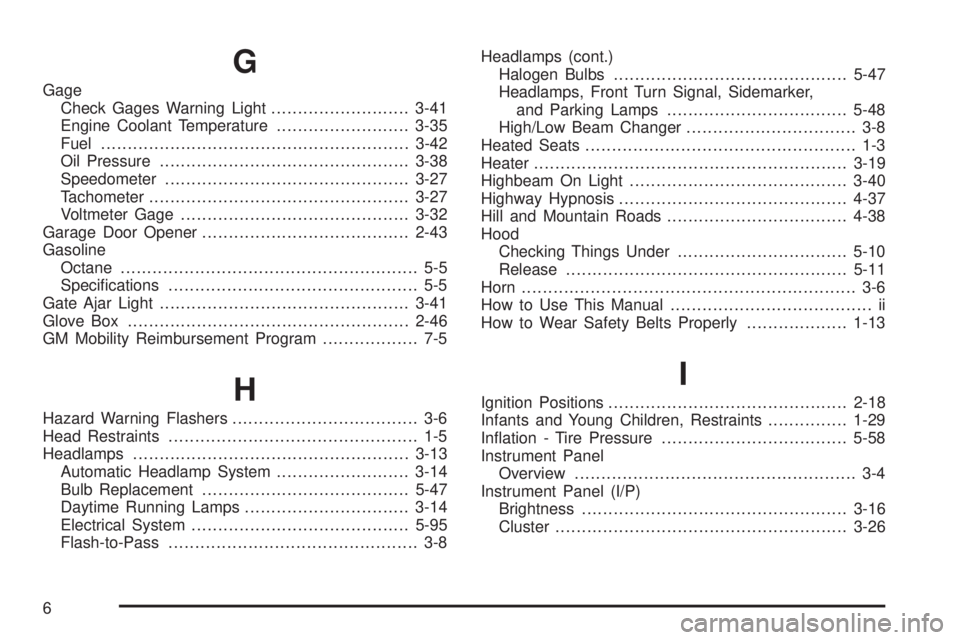
G
Gage
Check Gages Warning Light..........................3-41
Engine Coolant Temperature.........................3-35
Fuel..........................................................3-42
Oil Pressure...............................................3-38
Speedometer..............................................3-27
Tachometer.................................................3-27
Voltmeter Gage...........................................3-32
Garage Door Opener.......................................2-43
Gasoline
Octane........................................................ 5-5
Specications............................................... 5-5
Gate Ajar Light...............................................3-41
Glove Box.....................................................2-46
GM Mobility Reimbursement Program.................. 7-5
H
Hazard Warning Flashers................................... 3-6
Head Restraints............................................... 1-5
Headlamps....................................................3-13
Automatic Headlamp System.........................3-14
Bulb Replacement.......................................5-47
Daytime Running Lamps...............................3-14
Electrical System.........................................5-95
Flash-to-Pass............................................... 3-8Headlamps (cont.)
Halogen Bulbs............................................5-47
Headlamps, Front Turn Signal, Sidemarker,
and Parking Lamps..................................5-48
High/Low Beam Changer................................ 3-8
Heated Seats................................................... 1-3
Heater...........................................................3-19
Highbeam On Light.........................................3-40
Highway Hypnosis...........................................4-37
Hill and Mountain Roads..................................4-38
Hood
Checking Things Under................................5-10
Release.....................................................5-11
Horn............................................................... 3-6
How to Use This Manual...................................... ii
How to Wear Safety Belts Properly...................1-13
I
Ignition Positions.............................................2-18
Infants and Young Children, Restraints...............1-29
Ination - Tire Pressure...................................5-58
Instrument Panel
Overview..................................................... 3-4
Instrument Panel (I/P)
Brightness..................................................3-16
Cluster.......................................................3-26
6