remote control BUICK RAINIER 2006 User Guide
[x] Cancel search | Manufacturer: BUICK, Model Year: 2006, Model line: RAINIER, Model: BUICK RAINIER 2006Pages: 470, PDF Size: 2.72 MB
Page 242 of 470
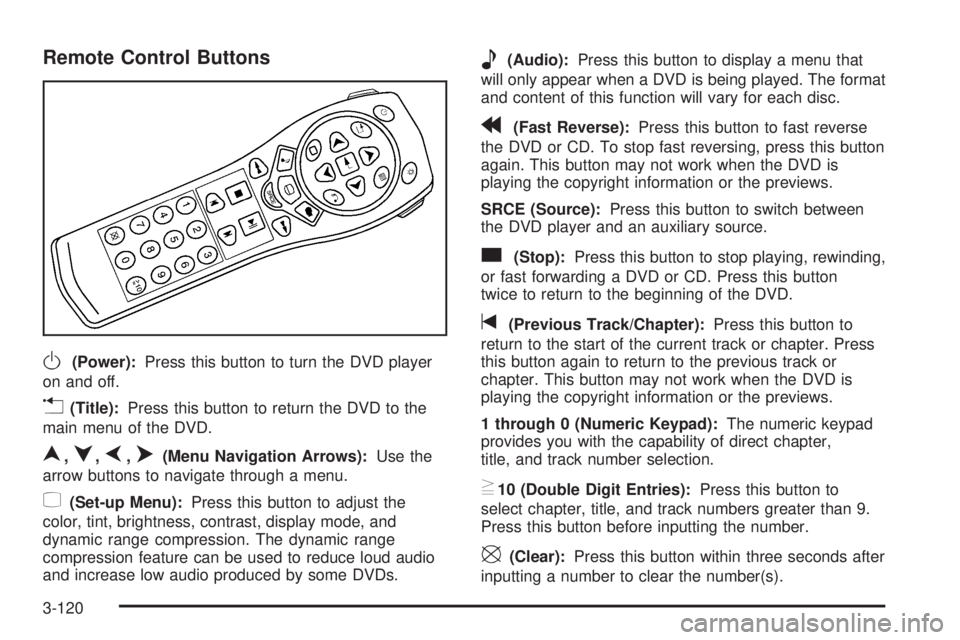
Remote Control Buttons
O(Power):Press this button to turn the DVD player
on and off.
v(Title):Press this button to return the DVD to the
main menu of the DVD.
n,q,p,o(Menu Navigation Arrows):Use the
arrow buttons to navigate through a menu.
z(Set-up Menu):Press this button to adjust the
color, tint, brightness, contrast, display mode, and
dynamic range compression. The dynamic range
compression feature can be used to reduce loud audio
and increase low audio produced by some DVDs.
e(Audio):Press this button to display a menu that
will only appear when a DVD is being played. The format
and content of this function will vary for each disc.
r(Fast Reverse):Press this button to fast reverse
the DVD or CD. To stop fast reversing, press this button
again. This button may not work when the DVD is
playing the copyright information or the previews.
SRCE (Source):Press this button to switch between
the DVD player and an auxiliary source.
c(Stop):Press this button to stop playing, rewinding,
or fast forwarding a DVD or CD. Press this button
twice to return to the beginning of the DVD.
t(Previous Track/Chapter):Press this button to
return to the start of the current track or chapter. Press
this button again to return to the previous track or
chapter. This button may not work when the DVD is
playing the copyright information or the previews.
1 through 0 (Numeric Keypad):The numeric keypad
provides you with the capability of direct chapter,
title, and track number selection.
}10 (Double Digit Entries):Press this button to
select chapter, title, and track numbers greater than 9.
Press this button before inputting the number.
\(Clear):Press this button within three seconds after
inputting a number to clear the number(s).
3-120
Page 243 of 470
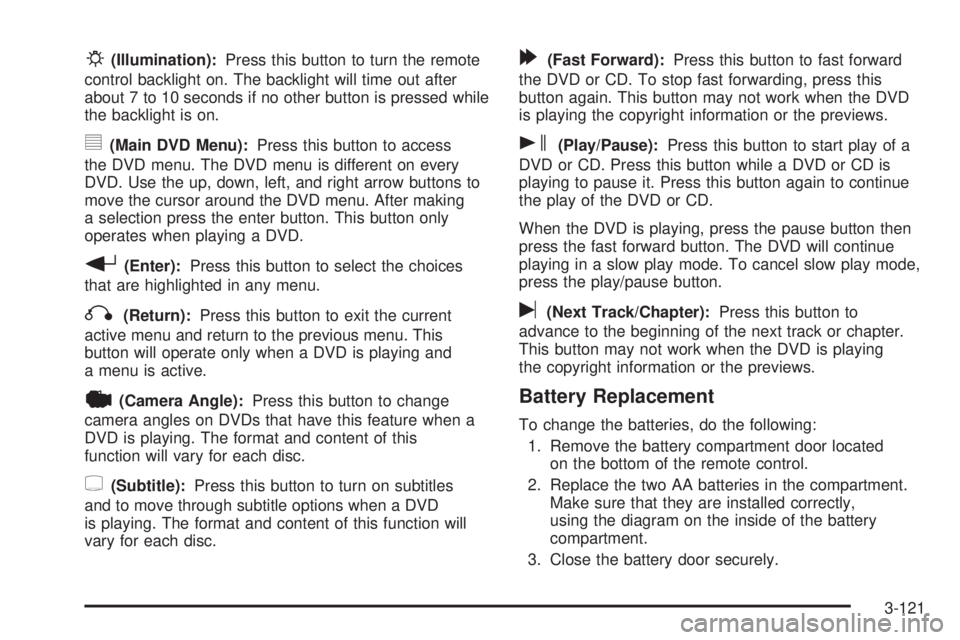
P(Illumination):Press this button to turn the remote
control backlight on. The backlight will time out after
about 7 to 10 seconds if no other button is pressed while
the backlight is on.
y(Main DVD Menu):Press this button to access
the DVD menu. The DVD menu is different on every
DVD. Use the up, down, left, and right arrow buttons to
move the cursor around the DVD menu. After making
a selection press the enter button. This button only
operates when playing a DVD.
r(Enter):Press this button to select the choices
that are highlighted in any menu.
q(Return):Press this button to exit the current
active menu and return to the previous menu. This
button will operate only when a DVD is playing and
a menu is active.
|(Camera Angle):Press this button to change
camera angles on DVDs that have this feature when a
DVD is playing. The format and content of this
function will vary for each disc.
{(Subtitle):Press this button to turn on subtitles
and to move through subtitle options when a DVD
is playing. The format and content of this function will
vary for each disc.
[(Fast Forward):Press this button to fast forward
the DVD or CD. To stop fast forwarding, press this
button again. This button may not work when the DVD
is playing the copyright information or the previews.
s(Play/Pause):Press this button to start play of a
DVD or CD. Press this button while a DVD or CD is
playing to pause it. Press this button again to continue
the play of the DVD or CD.
When the DVD is playing, press the pause button then
press the fast forward button. The DVD will continue
playing in a slow play mode. To cancel slow play mode,
press the play/pause button.
u(Next Track/Chapter):Press this button to
advance to the beginning of the next track or chapter.
This button may not work when the DVD is playing
the copyright information or the previews.
Battery Replacement
To change the batteries, do the following:
1. Remove the battery compartment door located
on the bottom of the remote control.
2. Replace the two AA batteries in the compartment.
Make sure that they are installed correctly,
using the diagram on the inside of the battery
compartment.
3. Close the battery door securely.
3-121
Page 244 of 470
If the remote control is to be stored for a long period
of time, remove the batteries and keep them in a
cool, dry place.
Problem Recommended Action
No power. The ignition might not
be in on or accessory.
The parental control
button might have been
turned on. The power
indicator light will ash.
Disc will not play. The system might be off.
The parental control
button might have been
turned on. The power
indicator light will ash.
The system might be
in auxiliary mode.
The disc is upside down
or is not compatible.
The picture does not
ll the screen. There
are black borders on
the top and bottom or
on both sides or it looks
stretched out.Check the display
mode settings in the
display menu.
Problem Recommended Action
The disc was ejected,
but it was pulled back
into the DVD player.The disc is being stored
in the DVD player.
Press the eject button
again to eject the disc.
In auxiliary mode, the
picture moves or scrolls.Check the auxiliary
input connections at
both devices.
Change the Video Format
to PAL or NTSC. See
“Stereo RCA Jacks”
previously for how to
change the video format.
The language in the audio
or on the screen is wrong.Check the audio or
language selection in
the main DVD menu.
The remote control does
not work.Check to make sure
there is no obstruction
between the remote
control and the
transmitter window.
Check the batteries to
make sure they are
not dead or installed
incorrectly.
The parental control
button might have been
turned on. The power
indicator light will ash.
3-122
Page 246 of 470
DVD Messages
The following errors may be displayed on the video
screen:
Disc Format Error:This message will be displayed if a
disc is inserted upside down, if the disc is not readable,
or if the format is not compatible with the DVD player.
Load/Eject Error:This message will be displayed if
the disc is not properly loaded or ejected.
Disc Play Error:This message will be displayed if
the DVD player cannot play the disc. Scratched
or damaged discs will cause this error.
Region Code Error:This message will be displayed
if the region code of the DVD is not compatible with the
region code of the DVD player.
No Disc:This message will be displayed if any of the
buttons on the DVD faceplate or remote control are
pressed and no disc is present in the DVD player.
DVD Distortion
There may be an experience with audio distortion in the
wireless headphones when operating cellular phones,
scanners, CB radios, Global Positioning Systems
(GPS)*, two-way radios, mobile fax, or walkie talkies.It may be necessary to turn off the DVD player when
operating one of these devices in or near the vehicle.
* Excludes the OnStar
®System.
Cleaning the Video Screen
Pour some isopropyl or rubbing alcohol on a clean
cloth and gently wipe the video screen. Do not spray
directly onto the screen and do not press too hard or
too long on the video screen.
Rear Seat Audio (RSA)
This feature allows rear seat passengers to listen to any
of the sources: radio, cassette tapes, CDs, or DVDs.
However, the rear seat passengers can only control
the sources that the front seat passengers are not
listening to. For example, rear seat passengers may
listen to and control cassette tapes, CDs, or DVDs
through the headphones while the driver listens to
the radio through the front speakers. The rear seat
passengers have control of the volume for each set
of headphones.
The front seat audio controls always have priority over
the RSA controls. If the front seat passengers switch the
source for the main radio to a remote source, the RSA
will not be able to control the source. You can operate
the rear seat audio when the main radio is off.
3-124
Page 272 of 470
Traveling to Remote Areas
It makes sense to plan your trip, especially when going
to a remote area. Know the terrain and plan your
route. You are much less likely to get bad surprises.
Get accurate maps of trails and terrain. Try to learn of
any blocked or closed roads.
It is also a good idea to travel with at least one other
vehicle. If something happens to one of them, the other
can help quickly.
Getting Familiar with Off-Road Driving
It is a good idea to practice in an area that is safe
and close to home before you go into the wilderness.
Off-road driving does require some new and different
driving skills. Here is what we mean.
Tune your senses to different kinds of signals. Your
eyes, for example, need to constantly sweep the terrain
for unexpected obstacles. Your ears need to listen
for unusual tire or engine sounds. With your arms,
hands, feet, and body, you will need to respond to
vibrations and vehicle bounce.Controlling your vehicle is the key to successful off-road
driving. One of the best ways to control your vehicle
is to control your speed. Here are some things to keep
in mind. At higher speeds:
You approach things faster and you have less time
to scan the terrain for obstacles.
You have less time to react.
You have more vehicle bounce when you drive over
obstacles.
You will need more distance for braking, especially
since you are on an unpaved surface.
{CAUTION:
When you are driving off-road, bouncing and
quick changes in direction can easily throw
you out of position. This could cause you to
lose control and crash. So, whether you are
driving on or off the road, you and your
passengers should wear safety belts.
4-20
Page 466 of 470
Q
Questions and Answers About Safety Belts.........1-12
R
Radiator Pressure Cap....................................5-26
Radios..........................................................3-58
Care of Your Cassette Tape Player...............3-128
Care of Your CD and DVD Player................3-129
Care of Your CDs and DVDs.......................3-129
Navigation/Radio System, see Navigation
Manual.................................................3-113
Radio with Cassette and CD.........................3-85
Radio with CD....................................3-60, 3-70
Radio with Six-Disc CD................................3-99
Rear Seat Audio........................................3-124
Setting the Time..........................................3-59
Theft-Deterrent..........................................3-126
Understanding Reception............................3-127
Rainsense™ Wipers.......................................... 3-9
Reading Lamps..............................................3-17
Rear Axle......................................................5-45
Locking........................................................ 4-8
Rear Climate Control System............................3-24
Rear Door Security Locks................................2-11
Rear Floor Storage Lid....................................2-48
Rear Safety Belt Comfort Guides......................1-23Rear Seat Audio (RSA)..................................3-124
Rear Seat Entertainment System.....................3-113
Rear Seat Operation......................................... 1-6
Rear Seat Passengers, Safety Belts..................1-20
Rear Windshield Washer/Wiper.........................3-10
Rearview Mirror, Automatic Dimming with
Compass....................................................2-35
Rearview Mirror, Automatic Dimming with
Compass and Temperature Display................2-37
Rearview Mirror, Automatic Dimming with
OnStar
®and Compass.................................2-31
Rearview Mirror, Automatic Dimming with
OnStar
®, Compass and Temperature Display . . . 2-33
Rearview Mirror with OnStar®...........................2-29
Rearview Mirror with OnStar®, Compass,
and Temperature Display..............................2-29
Rearview Mirrors.............................................2-29
Reclining Seatbacks, Power............................... 1-4
Recommended Fluids and Lubricants.................6-12
Recreational Vehicle Towing.............................4-50
Reduced Engine Power Light............................3-40
Remote Keyless Entry System............................ 2-4
Remote Keyless Entry System, Operation............ 2-5
Removing the Flat Tire and Installing the
Spare Tire..................................................5-74
Removing the Spare Tire and Tools...................5-72
Replacement Bulbs.........................................5-49
Replacement, Windshield.................................5-50
10
Page 469 of 470
Tires (cont.)
Ination - Tire Pressure................................5-58
Inator, Accessory.......................................5-68
Inspection and Rotation................................5-60
Installing the Spare Tire................................5-74
Removing the Flat Tire.................................5-74
Removing the Spare Tire and Tools...............5-72
Secondary Latch System..............................5-80
Spare Tire..................................................5-85
Storing a Flat or Spare Tire and Tools............5-82
Tire Sidewall Labeling..................................5-53
Tire Terminology and Denitions....................5-56
Uniform Tire Quality Grading.........................5-64
Wheel Alignment and Tire Balance.................5-65
Wheel Replacement.....................................5-66
When It Is Time for New Tires......................5-61
Towing
Recreational Vehicle.....................................4-50
Towing a Trailer..........................................4-52
Your Vehicle...............................................4-50
Traction
StabiliTrak
®System....................................... 4-9
Transmission
Fluid, Automatic...........................................5-21
Transmission Operation, Automatic....................2-22
Trip Odometer................................................3-27
Turn and Lane-Change Signals.......................... 3-7
Turn Signal/Multifunction Lever........................... 3-7
U
Understanding Radio Reception.......................3-127
Uniform Tire Quality Grading............................5-64
Universal Home Remote System.......................2-43
Operation...................................................2-43
V
Vehicle
Control........................................................ 4-5
Damage Warnings........................................... iv
Loading......................................................4-45
Symbols......................................................... iv
Vehicle Customization, DIC..............................3-52
Vehicle Data Collection and Event Data
Recorders.................................................... 7-9
Vehicle Identication
Number (VIN).............................................5-94
Service Parts Identication Label...................5-94
Vehicle Personalization....................................2-51
Memory Seat..............................................2-51
Ventilation Adjustment......................................3-23
Visors...........................................................2-15
Voltmeter Gage..............................................3-32
13