remote control BUICK RAINIER 2006 Owner's Manual
[x] Cancel search | Manufacturer: BUICK, Model Year: 2006, Model line: RAINIER, Model: BUICK RAINIER 2006Pages: 470, PDF Size: 2.72 MB
Page 1 of 470
Seats and Restraint Systems........................... 1-1
Front Seats
............................................... 1-2
Rear Seats
............................................... 1-6
Safety Belts
.............................................. 1-8
Child Restraints
.......................................1-26
Airbag System
.........................................1-48
Restraint System Check
............................1-62
Features and Controls..................................... 2-1
Keys
........................................................ 2-3
Doors and Locks
....................................... 2-7
Windows
.................................................2-13
Theft-Deterrent Systems
............................2-15
Starting and Operating Your Vehicle
...........2-17
Mirrors
....................................................2-29
OnStar
®System
......................................2-41
Universal Home Remote System
................2-43
Storage Areas
.........................................2-46
Sunroof
..................................................2-50
Vehicle Personalization
.............................2-51
Instrument Panel............................................. 3-1
Instrument Panel Overview
.......................... 3-4
Climate Controls
......................................3-19
Warning Lights, Gages, and Indicators
........3-25
Driver Information Center (DIC)
..................3-43
Audio System(s)
.......................................3-58Driving Your Vehicle....................................... 4-1
Your Driving, the Road, and Your Vehicle
..... 4-2
Towing
...................................................4-50
Service and Appearance Care.......................... 5-1
Service
..................................................... 5-3
Fuel
......................................................... 5-5
Checking Things Under the Hood
...............5-10
All-Wheel Drive
........................................5-45
Rear Axle
...............................................5-45
Front Axle
...............................................5-46
Bulb Replacement
....................................5-47
Windshield Replacement
...........................5-50
Windshield Wiper Blade Replacement
.........5-50
Tires
......................................................5-52
Appearance Care
.....................................5-85
Vehicle Identication
.................................5-94
Electrical System
......................................5-94
Capacities and Specications
...................5-105
Maintenance Schedule..................................... 6-1
Maintenance Schedule
................................ 6-2
Customer Assistance and Information.............. 7-1
Customer Assistance and Information
........... 7-2
Reporting Safety Defects
...........................7-13
Index................................................................ 1
2006 Buick Rainier Owner ManualM
Page 71 of 470
Keys...............................................................2-3
Remote Keyless Entry System.........................2-4
Remote Keyless Entry System Operation...........2-5
Doors and Locks.............................................2-7
Door Locks....................................................2-7
Power Door Locks..........................................2-8
Delayed Locking.............................................2-8
Programmable Automatic Door Locks................2-9
Rear Door Security Locks..............................2-11
Lockout Protection........................................2-11
Liftgate/Liftglass............................................2-12
Windows........................................................2-13
Power Windows............................................2-14
Sun Visors...................................................2-15
Theft-Deterrent Systems..................................2-15
Content Theft-Deterrent.................................2-15
Passlock
®....................................................2-17
Starting and Operating Your Vehicle................2-17
New Vehicle Break-In....................................2-17
Ignition Positions..........................................2-18
Retained Accessory Power (RAP)...................2-18Starting the Engine.......................................2-19
Adjustable Throttle and Brake Pedal................2-20
Engine Coolant Heater..................................2-20
Displacement on Demand™ (DoD™)...............2-21
Automatic Transmission Operation...................2-22
Parking Brake..............................................2-24
Shifting Into Park (P).....................................2-25
Shifting Out of Park (P).................................2-26
Parking Over Things That Burn.......................2-27
Engine Exhaust............................................2-27
Running the Engine While Parked...................2-28
Mirrors...........................................................2-29
Manual Rearview Mirror.................................2-29
Manual Rearview Mirror with OnStar
®..............2-29
Manual Rearview Mirror with OnStar®,
Compass, and Temperature Display.............2-29
Automatic Dimming Rearview Mirror with
OnStar
®and Compass...............................2-31
Automatic Dimming Rearview Mirror with
OnStar
®, Compass and Temperature
Display....................................................2-33
Section 2 Features and Controls
2-1
Page 72 of 470

Automatic Dimming Rearview Mirror with
Compass.................................................2-35
Automatic Dimming Rearview Mirror with
Compass and Temperature Display..............2-37
Outside Power Mirror....................................2-39
Outside Curb View Assist Mirror.....................2-40
Outside Convex Mirror...................................2-40
Outside Heated Mirrors..................................2-40
OnStar
®System.............................................2-41
Universal Home Remote System......................2-43
Universal Home Remote System Operation......2-43Storage Areas................................................2-46
Glove Box...................................................2-46
Overhead Console........................................2-47
Center Console Storage Area.........................2-47
Luggage Carrier...........................................2-47
Rear Floor Storage Lid..................................2-48
Convenience Net..........................................2-49
Cargo Cover................................................2-49
Cargo Tie Downs..........................................2-50
Sunroof.........................................................2-50
Vehicle Personalization...................................2-51
Memory Seat...............................................2-51
Section 2 Features and Controls
2-2
Page 82 of 470

Liftgate/Liftglass
{CAUTION:
It can be dangerous to drive with the liftgate or
liftglass open because carbon monoxide (CO)
gas can come into your vehicle. You cannot
see or smell CO. It can cause
unconsciousness and even death. If you must
drive with the liftgate open or if electrical
wiring or other cable connections must pass
through the seal between the body and the
liftgate or liftglass:
Make sure all other windows are shut.
Turn the fan on your climate control
system to its highest speed and select the
control setting that will force outside air
into your vehicle. See “Climate Control
System” in the Index.
If you have air outlets on or under the
instrument panel, open them all the way.
SeeEngine Exhaust on page 2-27.
Liftgate Release
To unlock the liftgate, use the power door lock switch or
the remote keyless entry transmitter. SeeRemote
Keyless Entry System Operation on page 2-5. The
liftglass will also unlock when the liftgate is unlocked.
Press the button on the liftglass to open it. To open the
entire liftgate, lift the handle located in the center of
the liftgate. When the liftgate is opened, the liftglass will
lock after a short delay.
Emergency Release for Opening
Liftgate
1. Remove the trim plug, located on the inside of the
liftgate in the center, to expose the access hole in
the trim panel.
2. Use a tool to reach through the access hole in the
trim panel.
3. Pry the left release lever up to the unlock position.
Pry the right release lever up to unlatch the liftgate.
4. Reinstall the trim plug.
2-12
Page 117 of 470
Overhead Console
Your vehicle may have this feature. The overhead
console may include reading lamps, a Universal Home
Remote and a sunroof switch. SeeSunroof on
page 2-50andUniversal Home Remote System on
page 2-43for more information.
Center Console Storage Area
If equipped, squeeze the front lever while lifting the top
to open it.
Your vehicle’s console will be equipped with cupholders
located on the front and rear of the storage compartment.
The console may also contain one or more of the
following components:
Rear Seat Audio Controls
Rear Seat Accessory Power Outlets
Rear Climate Control
If your vehicle has the center armrest compartment,
lift the cover by pulling up on the latch handle located
underneath the front edge of the armrest.
Luggage Carrier
{CAUTION:
If you try to carry something on top of your
vehicle that is longer or wider than the luggage
carrier — like paneling, plywood, a mattress
and so forth — the wind can catch it as you
drive along. This can cause you to lose
control. What you are carrying could be
violently torn off, and this could cause you or
other drivers to have a collision, and of course
damage your vehicle. You may be able to carry
something like this inside. But, never carry
something longer or wider than the luggage
carrier on top of your vehicle.
A luggage carrier allows you to load things on top of
your vehicle. The luggage carrier has side rails attached
to the roof, sliding crossrails (if equipped) and places
to use for tying things down. These let you load
some other things on top of your vehicle, as long as
they are not wider or longer than the luggage carrier.
2-47
Page 235 of 470
Navigation/Radio System
Your vehicle may have a navigation radio system.
The navigation system has built-in features intended
to minimize driver distraction. Technology alone,
no matter how advanced, can never replace your
own judgment. See the navigation system manual for
some tips to help you reduce distractions while driving.
Rear Seat Entertainment System
Your vehicle may have a DVD Rear Seat Entertainment
(RSE) system. The RSE system includes a DVD
player, a video display screen, two sets of wireless
headphones, and a remote control.
Parental Control
This button is located behind the video screen. Press
this button while a DVD or CD is playing to freeze
the video and mute the audio. The video screen will
display Parental Control ON and the power indicator
light on the DVD player will ash. It will also disable all
other button operations from the remote control and
the DVD player, with the exception of the eject button.
Press this button again to restore operation of the
DVD player.This button may also be used to turn the DVD player
power on and automatically resume play if the ignition
is in RUN, ACCESSORY, or if RAP is active.
Before You Drive
The RSE system is for rear seat passengers only.
The driver cannot safely view the video screen while
driving and should not try to do so.
Headphones
The RSE system includes two sets of wireless
headphones.
Each set of headphones has an ON/OFF control.
An indicator light will illuminate on the headphones
when they are on. If the light does not illuminate, the
batteries may need to be replaced. See “Battery
Replacement” following for more information.
Each set of headphones has a volume knob. To adjust
the volume, adjust this knob.
The transmitters are located below the video display
screen. The headphones will shut off automatically
if they lose the signal from the system after about
four minutes to save battery power. The signal may
be lost if the system is turned off or if the headphones
are out of range of the transmitters.
3-113
Page 237 of 470
To use the auxiliary inputs on the RSE system, connect
an external auxiliary device to the color-coded RCA
jacks and turn both the auxiliary device and the
RSE system power on. If the RSE system had been
previously in the DVD player mode, pressing the SRCE
button on the faceplate or the remote control will
switch the RSE system between the auxiliary device
and the DVD player.
How to Change the Video Format when
in the Auxiliary Mode
The auxiliary input video format is preset to NTSC.
In some countries, the video format may be in the
PAL system. To change the video format, perform
the following:
1. Press the display menu button.
2. Press the down arrow button to highlight the
Video Format option.
3. Press the enter button to select Video Format.
4. Press the right or left arrow button to select
the desired video format.
5. Press the enter button to accept the change.
Audio Output
Audio from the DVD player or auxiliary inputs may be
heard through the following possible sources:
Wireless Headphones
Vehicle Speakers
Vehicle wired headphone jacks on the Rear Seat
Audio system (if equipped)
The RSE system will always transmit the audio signal
by infrared to the wireless headphones, if there is audio
available. See “Headphones” previously for more
information.
The RSE system is capable of outputting audio to
the vehicle speakers by using the radio. The RSE
system may be selected as an audio source on the radio
if the RSE system power is on. Once the RSE system
is selected as an audio source on the radio, adjust
the speaker volume on the radio, if necessary. If the
RSE system power is not on, the RSE system will
not be an available source on the radio. Refer to the
radio information for the radio that your vehicle has
for more information.
The RSE system is capable of outputting audio to the
wired headphone jacks on the rear seat audio system
(if equipped). The RSE system may be selected as
an audio source on the rear seat audio system if
the RSE system power is on. Refer toRear Seat Audio
(RSA) on page 3-124for more information.
3-115
Page 238 of 470
Video Screen
The video screen is located in the overhead console.
To use the video screen, push forward on the release
latch and the screen will fold down. Adjust the screen’s
position as desired. When the video screen is not in
use, push it up into its latched position.
The DVD player and display will continue to operate
when the screen is in the up or the down position. The
video screen contains the transmitters for the wireless
headphones and the remote control. If the screen
is in the closed position, the signals will not be available
for the operation of the headphones or the remote
control.
Notice:Avoid directly touching the video screen,
as damage may occur. See “Cleaning the Video
Screen” later in this section for more information.
DVD Player
The DVD player is located in the overhead console.
The DVD player can be controlled by the buttons on
the DVD player and/or by the buttons on the remote
control. See “Remote Control” later in this section
for more information.The DVD player power may be turned on when the
ignition is in RUN, ACCESSORY, or when Retained
Accessory Power (RAP) is active.
The RSE system DVD player is only compatible with
DVDs of the appropriate region code for the country
that the vehicle was sold in. The DVD region code
is printed on the jacket of most DVDs.
Standard audio CDs, CD-R, CD-RW, Video CD and
Photo CD/CD-R media are fully supported by this
DVD player. DVD-R and DVD-RW media is supported
if formatted as DVD-Video. DVD+R and DVD+RW media
may or may not be supported by the DVD player. The
DVD player does not support DVD-RAM, DVD-ROM,
and DVD Audio media. An error message will appear
on the display if this type of media is inserted into
the DVD player.
When using the wired headphones, not included,
if the front seat passengers play a CD in the Radio
with Six-Disc CD (if equipped) or use XM™ Satellite
Radio Service (if equipped), you will hear the audio
for these sources, instead of the DVD or CD that
is currently playing through the RSE.
If an error message appears on the video screen,
see “DVD Messages” later in this section.
3-116
Page 240 of 470
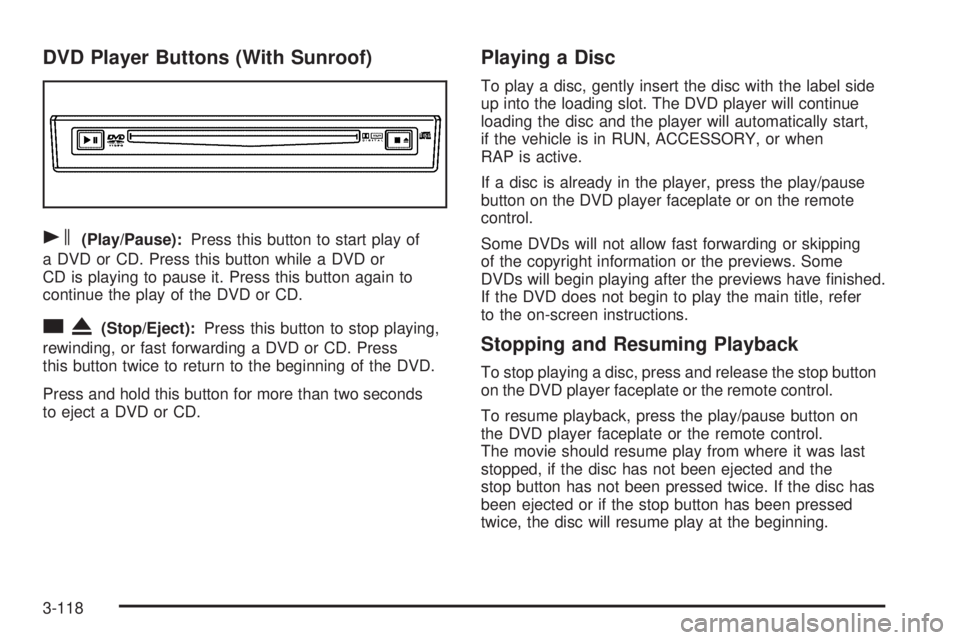
DVD Player Buttons (With Sunroof)
s(Play/Pause):Press this button to start play of
a DVD or CD. Press this button while a DVD or
CD is playing to pause it. Press this button again to
continue the play of the DVD or CD.
cX(Stop/Eject):Press this button to stop playing,
rewinding, or fast forwarding a DVD or CD. Press
this button twice to return to the beginning of the DVD.
Press and hold this button for more than two seconds
to eject a DVD or CD.
Playing a Disc
To play a disc, gently insert the disc with the label side
up into the loading slot. The DVD player will continue
loading the disc and the player will automatically start,
if the vehicle is in RUN, ACCESSORY, or when
RAP is active.
If a disc is already in the player, press the play/pause
button on the DVD player faceplate or on the remote
control.
Some DVDs will not allow fast forwarding or skipping
of the copyright information or the previews. Some
DVDs will begin playing after the previews have nished.
If the DVD does not begin to play the main title, refer
to the on-screen instructions.
Stopping and Resuming Playback
To stop playing a disc, press and release the stop button
on the DVD player faceplate or the remote control.
To resume playback, press the play/pause button on
the DVD player faceplate or the remote control.
The movie should resume play from where it was last
stopped, if the disc has not been ejected and the
stop button has not been pressed twice. If the disc has
been ejected or if the stop button has been pressed
twice, the disc will resume play at the beginning.
3-118
Page 241 of 470
Ejecting a Disc
(DVD Player without Sunroof)
Press the eject button on the DVD player faceplate
to eject the disc. There is not an eject button on
the remote control.
If a disc is ejected from the player, but is not removed,
the DVD player will reload the disc after a short
period of time. The disc will be stored in the DVD
player. The DVD player will not resume play of the
disc automatically.
Ejecting a Disc
(DVD Player with Sunroof)
Press and hold the stop/eject button for more than
two seconds on the DVD player faceplate to eject the
disc. There is not an eject button on the remote control.
If a disc is ejected from the player, but is not removed,
the DVD player will reload the disc after a short period
of time. The disc will be stored in the DVD player.
The DVD player will not resume play of the disc
automatically.
Remote Control
To use the remote control, aim it at the transmitter
window below the video screen and press the desired
button. Direct sunlight or very bright light may affect the
ability of the RSE system to receive signals from the
remote control. If the remote control does not seem to
be working, the batteries may need to be replaced.
See “Battery Replacement” later in this section.
Objects blocking the line of sight may also affect the
function of the remote control.
Notice:Storing the remote control in a hot area or
in direct sunlight may damage it, and the repairs
will not be covered by your warranty. Keep the
remote control stored in a cool, dry place.
To extend the life of the batteries, the remote control
does not have a press and hold feature.
3-119