instrument panel BUICK RAINIER 2006 Owner's Guide
[x] Cancel search | Manufacturer: BUICK, Model Year: 2006, Model line: RAINIER, Model: BUICK RAINIER 2006Pages: 470, PDF Size: 2.72 MB
Page 169 of 470
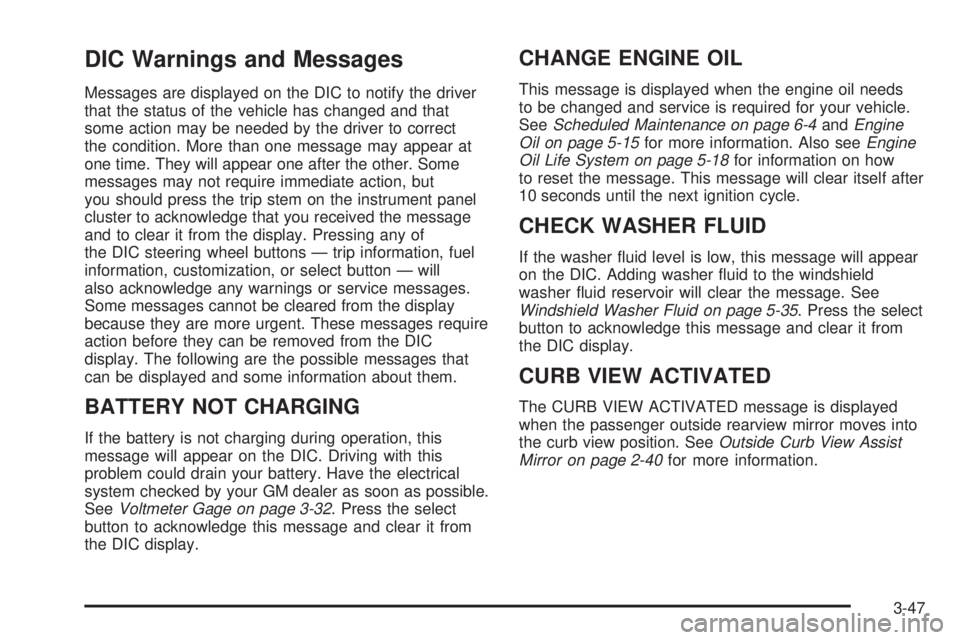
DIC Warnings and Messages
Messages are displayed on the DIC to notify the driver
that the status of the vehicle has changed and that
some action may be needed by the driver to correct
the condition. More than one message may appear at
one time. They will appear one after the other. Some
messages may not require immediate action, but
you should press the trip stem on the instrument panel
cluster to acknowledge that you received the message
and to clear it from the display. Pressing any of
the DIC steering wheel buttons — trip information, fuel
information, customization, or select button — will
also acknowledge any warnings or service messages.
Some messages cannot be cleared from the display
because they are more urgent. These messages require
action before they can be removed from the DIC
display. The following are the possible messages that
can be displayed and some information about them.
BATTERY NOT CHARGING
If the battery is not charging during operation, this
message will appear on the DIC. Driving with this
problem could drain your battery. Have the electrical
system checked by your GM dealer as soon as possible.
SeeVoltmeter Gage on page 3-32. Press the select
button to acknowledge this message and clear it from
the DIC display.
CHANGE ENGINE OIL
This message is displayed when the engine oil needs
to be changed and service is required for your vehicle.
SeeScheduled Maintenance on page 6-4andEngine
Oil on page 5-15for more information. Also seeEngine
Oil Life System on page 5-18for information on how
to reset the message. This message will clear itself after
10 seconds until the next ignition cycle.
CHECK WASHER FLUID
If the washer uid level is low, this message will appear
on the DIC. Adding washer uid to the windshield
washer uid reservoir will clear the message. See
Windshield Washer Fluid on page 5-35. Press the select
button to acknowledge this message and clear it from
the DIC display.
CURB VIEW ACTIVATED
The CURB VIEW ACTIVATED message is displayed
when the passenger outside rearview mirror moves into
the curb view position. SeeOutside Curb View Assist
Mirror on page 2-40for more information.
3-47
Page 170 of 470
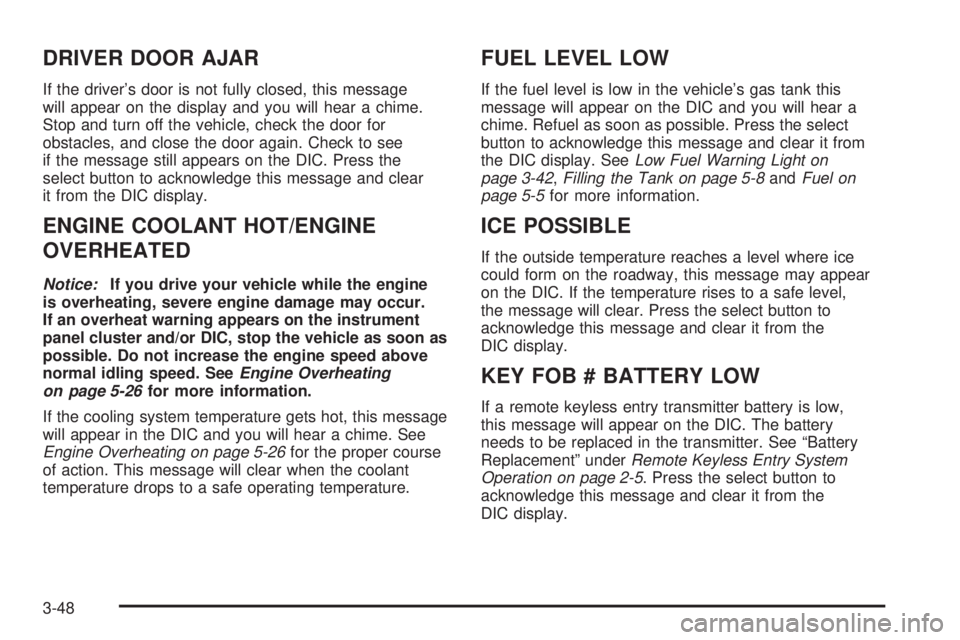
DRIVER DOOR AJAR
If the driver’s door is not fully closed, this message
will appear on the display and you will hear a chime.
Stop and turn off the vehicle, check the door for
obstacles, and close the door again. Check to see
if the message still appears on the DIC. Press the
select button to acknowledge this message and clear
it from the DIC display.
ENGINE COOLANT HOT/ENGINE
OVERHEATED
Notice:If you drive your vehicle while the engine
is overheating, severe engine damage may occur.
If an overheat warning appears on the instrument
panel cluster and/or DIC, stop the vehicle as soon as
possible. Do not increase the engine speed above
normal idling speed. SeeEngine Overheating
on page 5-26for more information.
If the cooling system temperature gets hot, this message
will appear in the DIC and you will hear a chime. See
Engine Overheating on page 5-26for the proper course
of action. This message will clear when the coolant
temperature drops to a safe operating temperature.
FUEL LEVEL LOW
If the fuel level is low in the vehicle’s gas tank this
message will appear on the DIC and you will hear a
chime. Refuel as soon as possible. Press the select
button to acknowledge this message and clear it from
the DIC display. SeeLow Fuel Warning Light on
page 3-42,Filling the Tank on page 5-8andFuel on
page 5-5for more information.
ICE POSSIBLE
If the outside temperature reaches a level where ice
could form on the roadway, this message may appear
on the DIC. If the temperature rises to a safe level,
the message will clear. Press the select button to
acknowledge this message and clear it from the
DIC display.
KEY FOB # BATTERY LOW
If a remote keyless entry transmitter battery is low,
this message will appear on the DIC. The battery
needs to be replaced in the transmitter. See “Battery
Replacement” underRemote Keyless Entry System
Operation on page 2-5. Press the select button to
acknowledge this message and clear it from the
DIC display.
3-48
Page 263 of 470
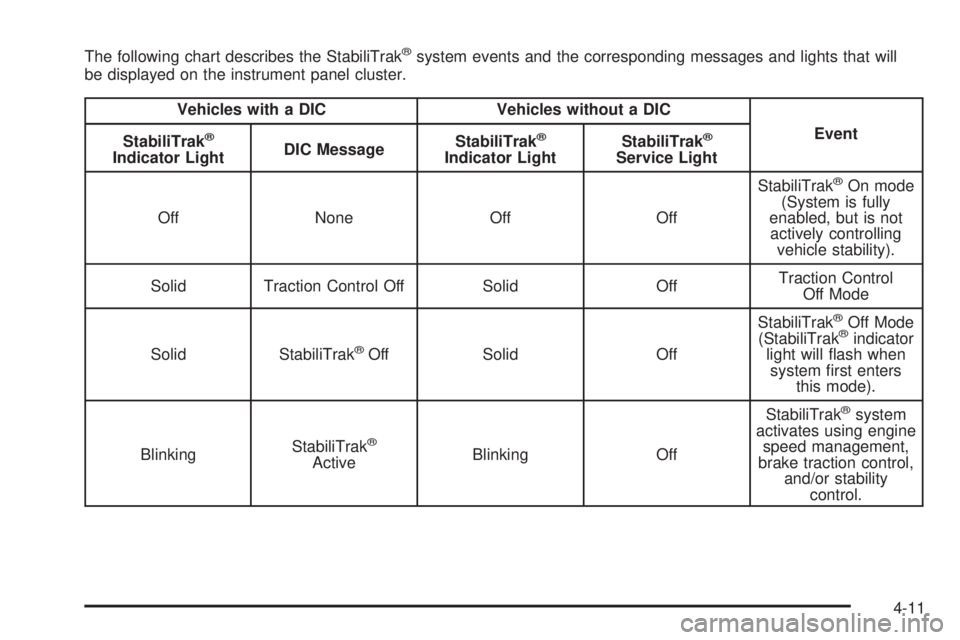
The following chart describes the StabiliTrak®system events and the corresponding messages and lights that will
be displayed on the instrument panel cluster.
Vehicles with a DIC Vehicles without a DIC
Event
StabiliTrak
®
Indicator LightDIC MessageStabiliTrak
®
Indicator LightStabiliTrak
®
Service Light
Off None Off OffStabiliTrak
®On mode
(System is fully
enabled, but is not
actively controlling
vehicle stability).
Solid Traction Control Off Solid OffTraction Control
Off Mode
Solid StabiliTrak
®Off Solid OffStabiliTrak
®Off Mode
(StabiliTrak®indicator
light will ash when
system rst enters
this mode).
BlinkingStabiliTrak
®
ActiveBlinking OffStabiliTrak
®system
activates using engine
speed management,
brake traction control,
and/or stability
control.
4-11
Page 312 of 470
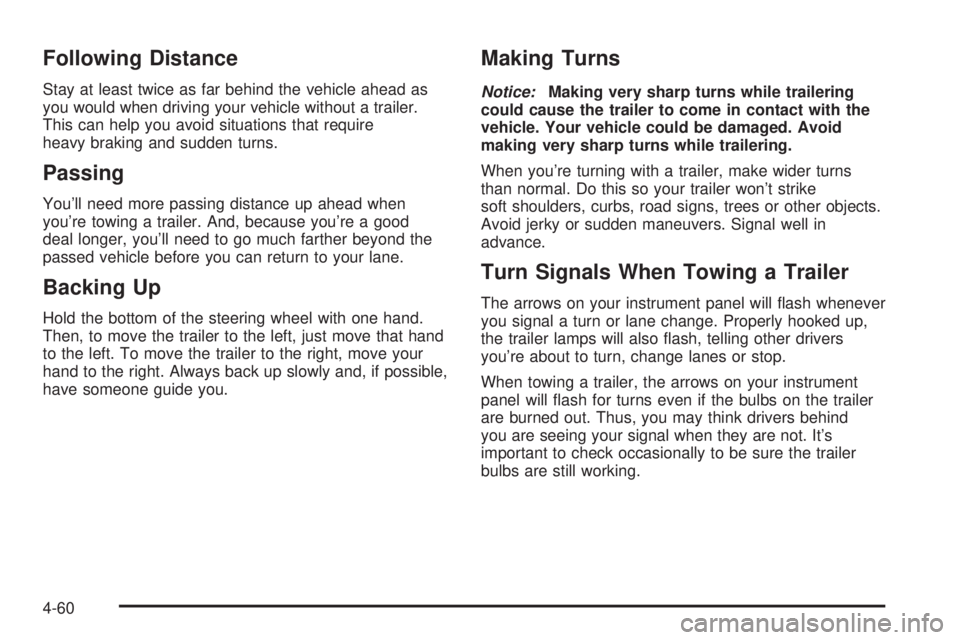
Following Distance
Stay at least twice as far behind the vehicle ahead as
you would when driving your vehicle without a trailer.
This can help you avoid situations that require
heavy braking and sudden turns.
Passing
You’ll need more passing distance up ahead when
you’re towing a trailer. And, because you’re a good
deal longer, you’ll need to go much farther beyond the
passed vehicle before you can return to your lane.
Backing Up
Hold the bottom of the steering wheel with one hand.
Then, to move the trailer to the left, just move that hand
to the left. To move the trailer to the right, move your
hand to the right. Always back up slowly and, if possible,
have someone guide you.
Making Turns
Notice:Making very sharp turns while trailering
could cause the trailer to come in contact with the
vehicle. Your vehicle could be damaged. Avoid
making very sharp turns while trailering.
When you’re turning with a trailer, make wider turns
than normal. Do this so your trailer won’t strike
soft shoulders, curbs, road signs, trees or other objects.
Avoid jerky or sudden maneuvers. Signal well in
advance.
Turn Signals When Towing a Trailer
The arrows on your instrument panel will ash whenever
you signal a turn or lane change. Properly hooked up,
the trailer lamps will also ash, telling other drivers
you’re about to turn, change lanes or stop.
When towing a trailer, the arrows on your instrument
panel will ash for turns even if the bulbs on the trailer
are burned out. Thus, you may think drivers behind
you are seeing your signal when they are not. It’s
important to check occasionally to be sure the trailer
bulbs are still working.
4-60
Page 315 of 470
Trailer Wiring Harness
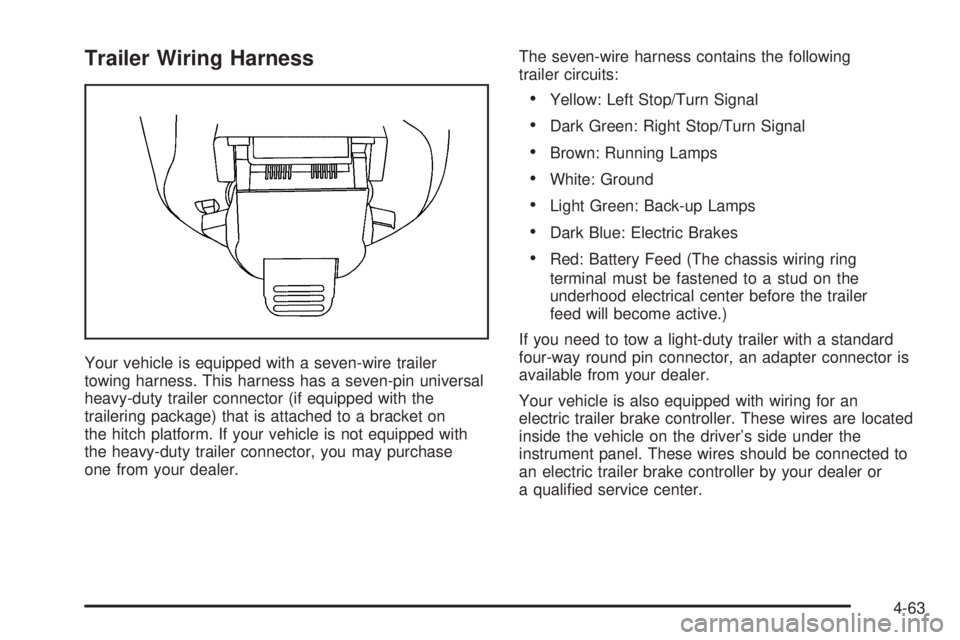
Your vehicle is equipped with a seven-wire trailer
towing harness. This harness has a seven-pin universal
heavy-duty trailer connector (if equipped with the
trailering package) that is attached to a bracket on
the hitch platform. If your vehicle is not equipped with
the heavy-duty trailer connector, you may purchase
one from your dealer.The seven-wire harness contains the following
trailer circuits:
Yellow: Left Stop/Turn Signal
Dark Green: Right Stop/Turn Signal
Brown: Running Lamps
White: Ground
Light Green: Back-up Lamps
Dark Blue: Electric Brakes
Red: Battery Feed (The chassis wiring ring
terminal must be fastened to a stud on the
underhood electrical center before the trailer
feed will become active.)
If you need to tow a light-duty trailer with a standard
four-way round pin connector, an adapter connector is
available from your dealer.
Your vehicle is also equipped with wiring for an
electric trailer brake controller. These wires are located
inside the vehicle on the driver’s side under the
instrument panel. These wires should be connected to
an electric trailer brake controller by your dealer or
a qualied service center.
4-63
Page 318 of 470
Tire Inspection and Rotation...........................5-60
When It Is Time for New Tires.......................5-61
Buying New Tires.........................................5-62
Different Size Tires and Wheels......................5-63
Uniform Tire Quality Grading..........................5-64
Wheel Alignment and Tire Balance..................5-65
Wheel Replacement......................................5-66
Tire Chains..................................................5-67
Accessory Inator.........................................5-68
If a Tire Goes Flat........................................5-69
Changing a Flat Tire.....................................5-70
Removing the Spare Tire and Tools................5-72
Removing the Flat Tire and Installing
the Spare Tire..........................................5-74
Secondary Latch System...............................5-80
Storing a Flat or Spare Tire and Tools............5-82
Spare Tire...................................................5-85
Appearance Care............................................5-85
Cleaning the Inside of Your Vehicle.................5-85
Fabric/Carpet...............................................5-87
Leather.......................................................5-87
Instrument Panel, Vinyl, and Other
Plastic Surfaces........................................5-88
Care of Safety Belts......................................5-88Washing Your Vehicle...................................5-88
Cleaning Exterior Lamps/Lenses.....................5-89
Finish Care..................................................5-89
Windshield, Backglass, and Wiper Blades.........5-90
Aluminum Wheels.........................................5-90
Tires...........................................................5-91
Sheet Metal Damage.....................................5-91
Finish Damage.............................................5-92
Underbody Maintenance................................5-92
Chemical Paint Spotting.................................5-92
Vehicle Care/Appearance Materials..................5-93
Vehicle Identication......................................5-94
Vehicle Identication Number (VIN).................5-94
Service Parts Identication Label.....................5-94
Electrical System............................................5-94
Add-On Electrical Equipment..........................5-94
Headlamps..................................................5-95
Windshield Wiper Fuses................................5-95
Power Windows and Other Power Options.......5-95
Fuses and Circuit Breakers............................5-95
Engine Compartment Fuse Block....................5-96
Rear Underseat Fuse Block..........................5-102
Capacities and Specications........................5-105
Section 5 Service and Appearance Care
5-2
Page 325 of 470
{CAUTION:
If you spill fuel and then something ignites it,
you could be badly burned. Fuel can spray out
on you if you open the fuel cap too quickly.
This spray can happen if your tank is nearly
full, and is more likely in hot weather. Open
the fuel cap slowly and wait for any hiss noise
to stop. Then unscrew the cap all the way.
Be careful not to spill fuel. Do not top off or overll the
tank and wait a few seconds after you have nished
pumping before removing the nozzle. Clean fuel
from painted surfaces as soon as possible. See
Washing Your Vehicle on page 5-88.
When replacing the fuel cap, turn it clockwise until
it clicks. Make sure the cap is fully installed. The
diagnostic system can determine if the fuel cap has
been left off or improperly installed. This would allow
fuel to evaporate into the atmosphere. SeeMalfunction
Indicator Lamp on page 3-36.There may also be a light that comes on in the
instrument panel to let you know if your gas cap is
not properly installed. SeeCheck Gas Cap Light
on page 3-42for more information.
{CAUTION:
If a re starts while you are refueling, do not
remove the nozzle. Shut off the ow of fuel
by shutting off the pump or by notifying the
station attendant. Leave the area immediately.
Notice:If you need a new fuel cap, be sure to get
the right type. Your dealer can get one for you.
If you get the wrong type, it may not t properly.
This may cause your malfunction indicator lamp to
light and may damage your fuel tank and emissions
system. SeeMalfunction Indicator Lamp on
page 3-36.
5-9
Page 327 of 470
Hood Release
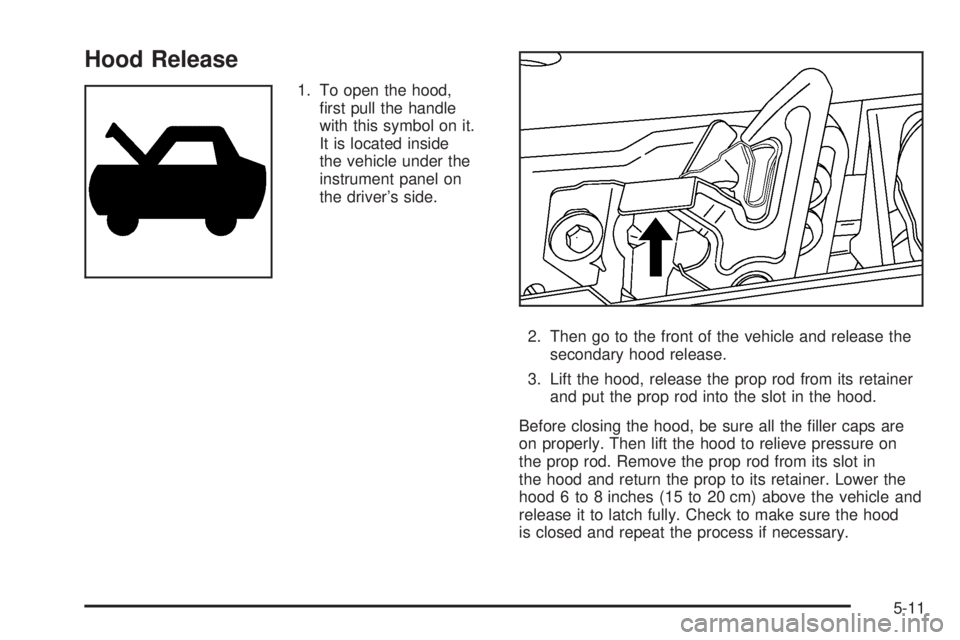
1. To open the hood,
rst pull the handle
with this symbol on it.
It is located inside
the vehicle under the
instrument panel on
the driver’s side.
2. Then go to the front of the vehicle and release the
secondary hood release.
3. Lift the hood, release the prop rod from its retainer
and put the prop rod into the slot in the hood.
Before closing the hood, be sure all the ller caps are
on properly. Then lift the hood to relieve pressure on
the prop rod. Remove the prop rod from its slot in
the hood and return the prop to its retainer. Lower the
hood 6 to 8 inches (15 to 20 cm) above the vehicle and
release it to latch fully. Check to make sure the hood
is closed and repeat the process if necessary.
5-11
Page 342 of 470
Adding Coolant
If you need more coolant, add the proper DEX-COOL®
coolant mixture at the coolant recovery tank.
{CAUTION:
Turning the radiator pressure cap when the
engine and radiator are hot can allow steam and
scalding liquids to blow out and burn you badly.
With the coolant recovery tank, you will almost
never have to add coolant at the radiator.
Never turn the radiator pressure cap — even a
little — when the engine and radiator are hot.
Add coolant mixture at the recovery tank, but be careful
not to spill it.
{CAUTION:
You can be burned if you spill coolant on hot
engine parts. Coolant contains ethylene glycol,
and it will burn if the engine parts are hot
enough. Do not spill coolant on a hot engine.Occasionally check the coolant level in the radiator.
For information on how to add coolant to the radiator,
seeCooling System on page 5-28.
Radiator Pressure Cap
Notice:If the pressure cap is not tightly installed,
coolant loss and possible engine damage may
occur. Be sure the cap is properly and tightly
secured.
SeeEngine Compartment Overview on page 5-12for
information on location.
Engine Overheating
You will nd a coolant temperature gage on your
vehicle’s instrument panel. SeeEngine Coolant
Temperature Gage on page 3-35for more information.
If your vehicle has a Driver Information Center (DIC),
the display will show an Engine Coolant Hot/Engine
Overheated message. SeeDIC Warnings and Messages
on page 3-47for more information.
5-26
Page 404 of 470
Instrument Panel, Vinyl, and
Other Plastic Surfaces
A soft cloth dampened with water may be used to
remove dust. If a more thorough cleaning is necessary,
a clean soft cloth dampened with a mild soap solution
can be used to gently remove dust and dirt. Never
use spot lifters or removers on plastic surfaces. Many
commercial cleaners and coatings that are sold to
preserve and protect soft plastic surfaces may
permanently change the appearance and feel of your
interior and are not recommended. Do not use silicone
or wax-based products, or those containing organic
solvents to clean your vehicle’s interior because
they can alter the appearance by increasing the gloss
in a non-uniform manner.
Some commercial products may increase gloss on your
instrument panel. The increase in gloss may cause
annoying reections in the windshield and even make
it difficult to see through the windshield under certain
conditions.
Care of Safety Belts
Keep belts clean and dry.
{CAUTION:
Do not bleach or dye safety belts. If you do,
it may severely weaken them. In a crash,
they might not be able to provide adequate
protection. Clean safety belts only with mild
soap and lukewarm water.
Washing Your Vehicle
The paint nish on the vehicle provides beauty, depth
of color, gloss retention, and durability.
The best way to preserve the vehicle’s nish is to
keep it clean by washing it often with lukewarm or
cold water.
5-88