ABS BUICK RAINIER 2007 User Guide
[x] Cancel search | Manufacturer: BUICK, Model Year: 2007, Model line: RAINIER, Model: BUICK RAINIER 2007Pages: 534, PDF Size: 2.87 MB
Page 435 of 534
4. Press and release the switch to turn the air
inator on. The indicator light will remain on
when the inator is running.
The system has an internal clock to prevent
the system from overheating. The system
will allow about ve minutes of running time,
then the compressor will stop. The indicator
light will then begin to ash. When the indicator
is off, the inator can be started again by
pressing the switch. If the compressor is still
hot, it may only run for a short time before
shutting off again.
5. Press and release the switch to turn the
inator off.
Place the inator kit tools in the pouch and store it
in its proper location. Remove the inator hose
from the outlet during loading and unloading. Load
leveling will not function with the inator hose
attached to the inator outlet. SeeElectronically
Controlled Air Suspension System on page 337for
more information.
To reinstall the cover, line up the tabs at the back
of the cover, put it in place and latch the tabs.If the indicator light on the accessory inator
ashes continuously, it could indicate that there is
a malfunction in the air suspension system.
SeeElectronically Controlled Air Suspension
System on page 337for more information.
If a Tire Goes Flat
It is unusual for a tire to blowout while you are
driving, especially if you maintain your vehicle’s
tires properly. If air goes out of a tire, it is
much more likely to leak out slowly. But if you
should ever have a blowout, here are a few tips
about what to expect and what to do:
If a front tire fails, the at tire will create a drag
that pulls the vehicle toward that side. Take your
foot off the accelerator pedal and grip the
steering wheel rmly. Steer to maintain lane
position, and then gently brake to a stop well out
of the traffic lane.
435
Page 455 of 534
Fabric/Carpet
Use a vacuum cleaner with a soft brush
attachment frequently to remove dust and loose
dirt. A canister vacuum with a beater bar in
the nozzle may only be used on oor carpet and
carpeted oor mats. For soils, always try to remove
them rst with plain water or club soda. Before
cleaning, gently remove as much of the soil
as possible using one of the following techniques:
For liquids: gently blot the remaining soil
with a paper towel. Allow the soil to absorb into
the paper towel until no more can be
removed.
For solid dry soils: remove as much as
possible and then vacuum.
To clean, use the following instructions:
1. Saturate a lint-free, clean white cloth with
water or club soda.
2. Wring the cloth to remove excess moisture.3. Start on the outside edge of the soil and
gently rub toward the center. Continue
cleaning, using a clean area of the cloth each
time it becomes soiled.
4. Continue to gently rub the soiled area until the
cleaning cloth remains clean.
5. If the soil is not completely removed, use a
mild soap solution and repeat the cleaning
process that was used with plain water.
If any of the soil remains, a commercial fabric
cleaner or spot lifter may be necessary. When a
commercial upholstery cleaner or spot lifter is to be
used, test a small hidden area for colorfastness
rst. If the locally cleaned area gives any
impression that a ring formation may result, clean
the entire surface.
After the cleaning process has been completed, a
paper towel can be used to blot excess moisture
from the fabric or carpet.
455
Page 465 of 534
Fuses and Circuit Breakers
The wiring circuits in your vehicle are protected
from short circuits by a combination of fuses
and circuit breakers. This greatly reduces
the chance of res caused by electrical problems.
Look at the silver-colored band inside the fuse.
If the band is broken or melted, replace the fuse.
Be sure you replace a bad fuse with a new
one of the identical size and rating.
If you ever have a problem on the road and
don’t have a spare fuse, you can borrow one
that has the same amperage. Just pick some
feature of your vehicle that you can get
along without — like the radio or cigarette
lighter — and use its fuse, if it is the correct
amperage. Replace it as soon as you can.
Engine Compartment Fuse Block
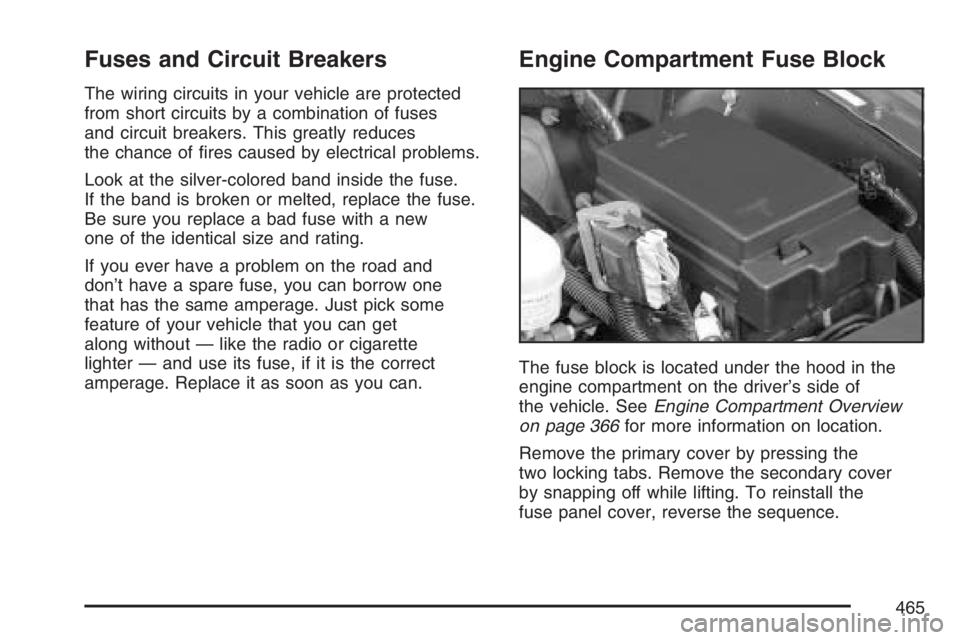
The fuse block is located under the hood in the
engine compartment on the driver’s side of
the vehicle. SeeEngine Compartment Overview
on page 366for more information on location.
Remove the primary cover by pressing the
two locking tabs. Remove the secondary cover
by snapping off while lifting. To reinstall the
fuse panel cover, reverse the sequence.
465
Page 467 of 534
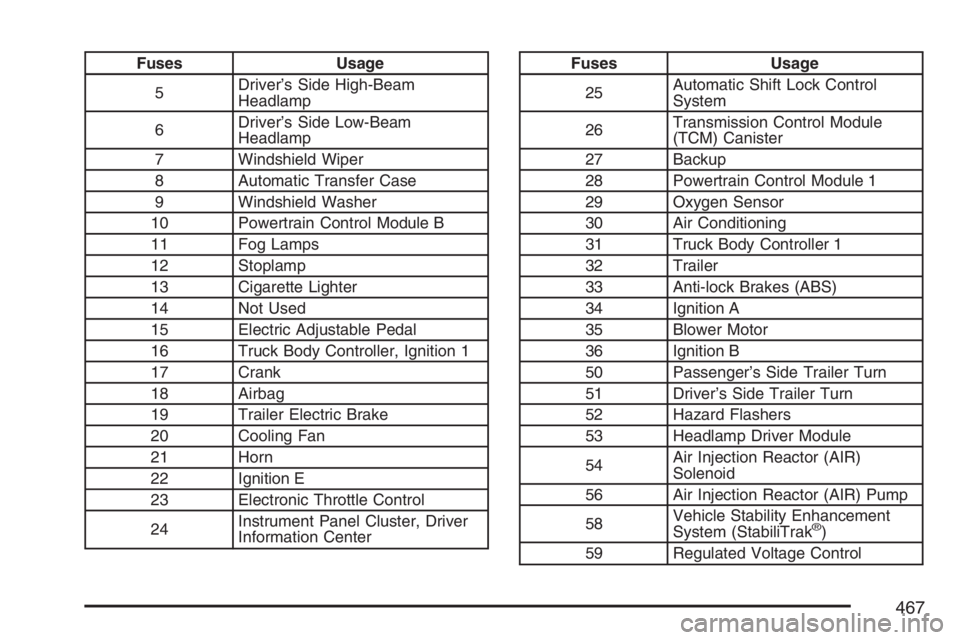
Fuses Usage
5Driver’s Side High-Beam
Headlamp
6Driver’s Side Low-Beam
Headlamp
7 Windshield Wiper
8 Automatic Transfer Case
9 Windshield Washer
10 Powertrain Control Module B
11 Fog Lamps
12 Stoplamp
13 Cigarette Lighter
14 Not Used
15 Electric Adjustable Pedal
16 Truck Body Controller, Ignition 1
17 Crank
18 Airbag
19 Trailer Electric Brake
20 Cooling Fan
21 Horn
22 Ignition E
23 Electronic Throttle Control
24Instrument Panel Cluster, Driver
Information CenterFuses Usage
25Automatic Shift Lock Control
System
26Transmission Control Module
(TCM) Canister
27 Backup
28 Powertrain Control Module 1
29 Oxygen Sensor
30 Air Conditioning
31 Truck Body Controller 1
32 Trailer
33 Anti-lock Brakes (ABS)
34 Ignition A
35 Blower Motor
36 Ignition B
50 Passenger’s Side Trailer Turn
51 Driver’s Side Trailer Turn
52 Hazard Flashers
53 Headlamp Driver Module
54Air Injection Reactor (AIR)
Solenoid
56 Air Injection Reactor (AIR) Pump
58Vehicle Stability Enhancement
System (StabiliTrak
®)
59 Regulated Voltage Control
467
Page 470 of 534
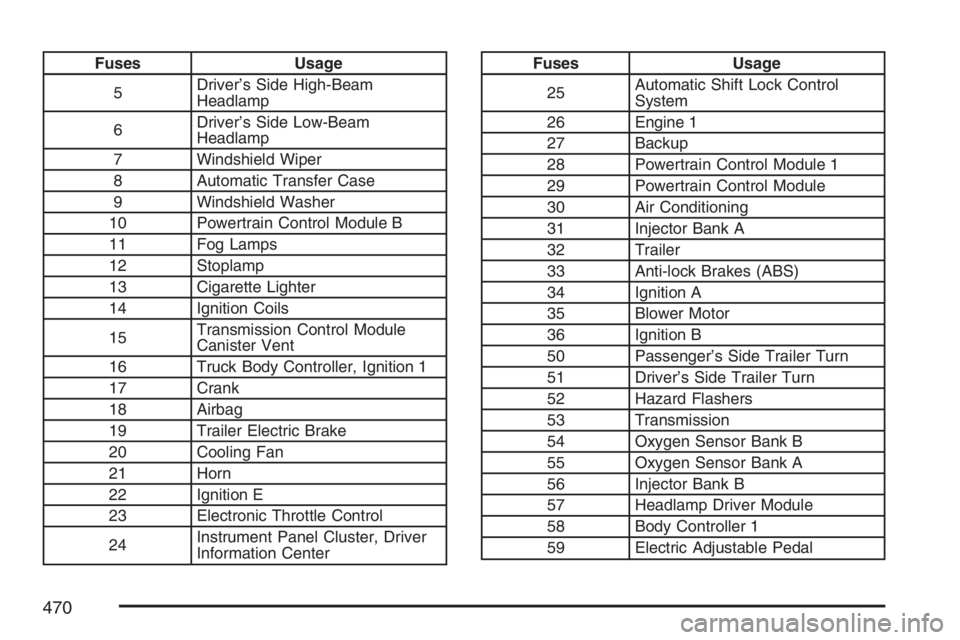
Fuses Usage
5Driver’s Side High-Beam
Headlamp
6Driver’s Side Low-Beam
Headlamp
7 Windshield Wiper
8 Automatic Transfer Case
9 Windshield Washer
10 Powertrain Control Module B
11 Fog Lamps
12 Stoplamp
13 Cigarette Lighter
14 Ignition Coils
15Transmission Control Module
Canister Vent
16 Truck Body Controller, Ignition 1
17 Crank
18 Airbag
19 Trailer Electric Brake
20 Cooling Fan
21 Horn
22 Ignition E
23 Electronic Throttle Control
24Instrument Panel Cluster, Driver
Information CenterFuses Usage
25Automatic Shift Lock Control
System
26 Engine 1
27 Backup
28 Powertrain Control Module 1
29 Powertrain Control Module
30 Air Conditioning
31 Injector Bank A
32 Trailer
33 Anti-lock Brakes (ABS)
34 Ignition A
35 Blower Motor
36 Ignition B
50 Passenger’s Side Trailer Turn
51 Driver’s Side Trailer Turn
52 Hazard Flashers
53 Transmission
54 Oxygen Sensor Bank B
55 Oxygen Sensor Bank A
56 Injector Bank B
57 Headlamp Driver Module
58 Body Controller 1
59 Electric Adjustable Pedal
470
Page 519 of 534
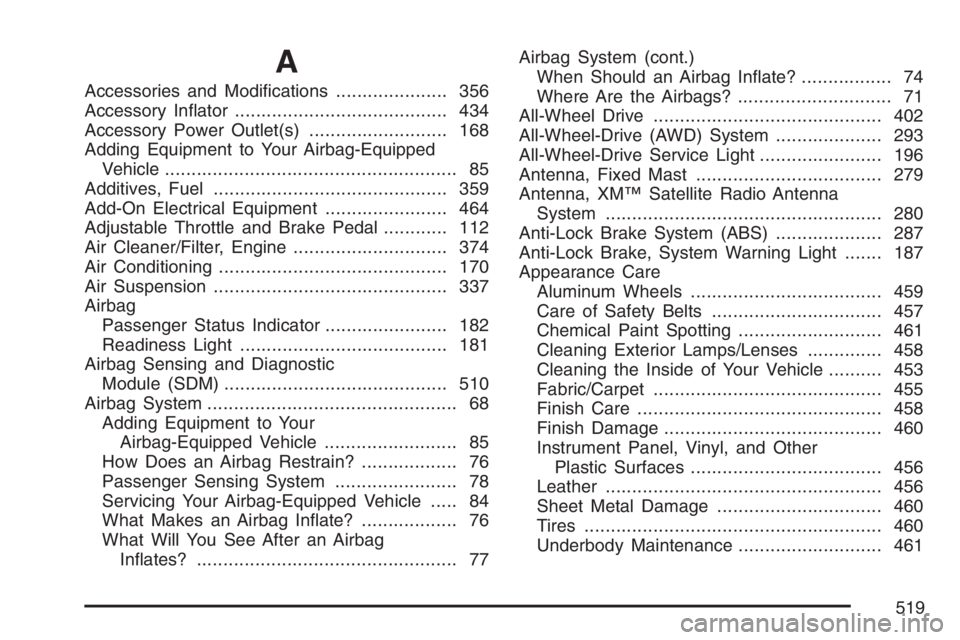
A
Accessories and Modications..................... 356
Accessory Inator........................................ 434
Accessory Power Outlet(s).......................... 168
Adding Equipment to Your Airbag-Equipped
Vehicle....................................................... 85
Additives, Fuel............................................ 359
Add-On Electrical Equipment....................... 464
Adjustable Throttle and Brake Pedal............ 112
Air Cleaner/Filter, Engine............................. 374
Air Conditioning........................................... 170
Air Suspension............................................ 337
Airbag
Passenger Status Indicator....................... 182
Readiness Light....................................... 181
Airbag Sensing and Diagnostic
Module (SDM).......................................... 510
Airbag System............................................... 68
Adding Equipment to Your
Airbag-Equipped Vehicle......................... 85
How Does an Airbag Restrain?.................. 76
Passenger Sensing System....................... 78
Servicing Your Airbag-Equipped Vehicle..... 84
What Makes an Airbag Inate?.................. 76
What Will You See After an Airbag
Inates?................................................. 77Airbag System (cont.)
When Should an Airbag Inate?................. 74
Where Are the Airbags?............................. 71
All-Wheel Drive........................................... 402
All-Wheel-Drive (AWD) System.................... 293
All-Wheel-Drive Service Light....................... 196
Antenna, Fixed Mast................................... 279
Antenna, XM™ Satellite Radio Antenna
System.................................................... 280
Anti-Lock Brake System (ABS).................... 287
Anti-Lock Brake, System Warning Light....... 187
Appearance Care
Aluminum Wheels.................................... 459
Care of Safety Belts................................ 457
Chemical Paint Spotting........................... 461
Cleaning Exterior Lamps/Lenses.............. 458
Cleaning the Inside of Your Vehicle.......... 453
Fabric/Carpet........................................... 455
Finish Care.............................................. 458
Finish Damage......................................... 460
Instrument Panel, Vinyl, and Other
Plastic Surfaces.................................... 456
Leather.................................................... 456
Sheet Metal Damage............................... 460
Tires........................................................ 460
Underbody Maintenance........................... 461
519
Page 520 of 534
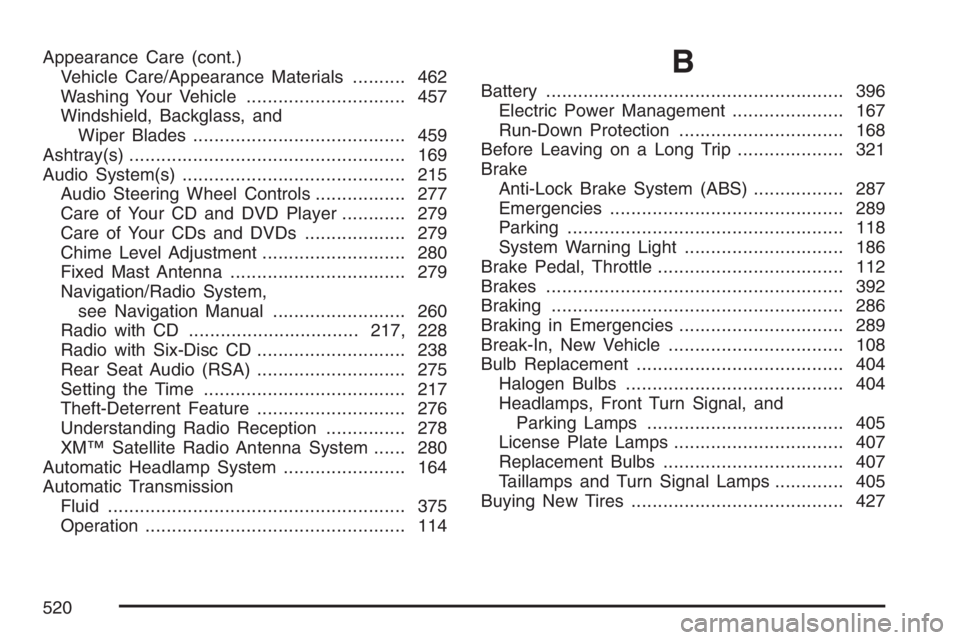
Appearance Care (cont.)
Vehicle Care/Appearance Materials.......... 462
Washing Your Vehicle.............................. 457
Windshield, Backglass, and
Wiper Blades........................................ 459
Ashtray(s).................................................... 169
Audio System(s).......................................... 215
Audio Steering Wheel Controls................. 277
Care of Your CD and DVD Player............ 279
Care of Your CDs and DVDs................... 279
Chime Level Adjustment........................... 280
Fixed Mast Antenna................................. 279
Navigation/Radio System,
see Navigation Manual......................... 260
Radio with CD................................217, 228
Radio with Six-Disc CD............................ 238
Rear Seat Audio (RSA)............................ 275
Setting the Time...................................... 217
Theft-Deterrent Feature............................ 276
Understanding Radio Reception............... 278
XM™ Satellite Radio Antenna System...... 280
Automatic Headlamp System....................... 164
Automatic Transmission
Fluid........................................................ 375
Operation................................................. 114B
Battery........................................................ 396
Electric Power Management..................... 167
Run-Down Protection............................... 168
Before Leaving on a Long Trip.................... 321
Brake
Anti-Lock Brake System (ABS)................. 287
Emergencies............................................ 289
Parking.................................................... 118
System Warning Light.............................. 186
Brake Pedal, Throttle................................... 112
Brakes........................................................ 392
Braking....................................................... 286
Braking in Emergencies............................... 289
Break-In, New Vehicle................................. 108
Bulb Replacement....................................... 404
Halogen Bulbs......................................... 404
Headlamps, Front Turn Signal, and
Parking Lamps..................................... 405
License Plate Lamps................................ 407
Replacement Bulbs.................................. 407
Taillamps and Turn Signal Lamps............. 405
Buying New Tires........................................ 427
520