seats BUICK RANDEZVOUS 2003 User Guide
[x] Cancel search | Manufacturer: BUICK, Model Year: 2003, Model line: RANDEZVOUS, Model: BUICK RANDEZVOUS 2003Pages: 432, PDF Size: 2.75 MB
Page 25 of 432

Safety Belts
Safety Belts: They Are for Everyone
This part of the manual tells you how to use safety
belts properly. It also tells you some things you should
not do with safety belts.
{CAUTION:
Don’t let anyone ride where he or she can’t
wear a safety belt properly. If you are in a
crashand you’re not wearing a safety belt,
your injuries can be muchworse. You can hit
things inside the vehicle or be ejected from it.
You can be seriously injured or killed. In the
same crash, you might not be, if you are
buckled up. Always fasten your safety belt,
and check that your passengers’ belts are
fastened properly too.
{CAUTION:
It is extremely dangerous to ride in a cargo
area, inside or outside of a vehicle. In a
collision, people riding in these areas are more
likely to be seriously injured or killed. Do not
allow people to ride in any area of your vehicle
that is not equipped with seats and safety
belts. Be sure everyone in your vehicle is in a
seat and using a safety belt properly.
Your vehicle has a light
that comes on as a
reminder to buckle up. See
Safety Belt Reminder
Light on page 3-37.
In most states and in all Canadian provinces, the law
says to wear safety belts. Here’s why:They work.
You never know if you’ll be in a crash. If you do have a
crash, you don’t know if it will be a bad one.
1-19
2003 - Rendezvous OM
Page 30 of 432

Q:If I’m a good driver, and I never drive far from
home, why should I wear safety belts?
A:You may be an excellent driver, but if you’re in an
accident–even one that isn’t your fault–you and
your passengers can be hurt. Being a good
driver doesn’t protect you from things beyond your
control, such as bad drivers.
Most accidents occur within 25 miles (40 km) of
home. And the greatest number of serious injuries
and deaths occur at speeds of less than 40 mph
(65 km/h).
Safety belts are for everyone.
How to Wear Safety Belts Properly
This part is only for people of adult size.
Be aware that there are special things to know about
safety belts and children. And there are different
rules for smaller children and babies. If a child will be
riding in your vehicle, seeOlder Children on page 1-45
orInfants and Young Children on page 1-47. Follow
those rules for everyone’s protection.
First, you’ll want to know which restraint systems your
vehicle has.
We’ll start with the driver position.
Driver Position
This part describes the driver’s restraint system.
Lap-Shoulder Belt
The driver has a lap-shoulder belt. Here’s how to wear it
properly.
1. Close and lock the door.
2. Adjust the seat so you can sit up straight. To see
how, see“Seats”in the Index.
1-24
2003 - Rendezvous OM
Page 46 of 432
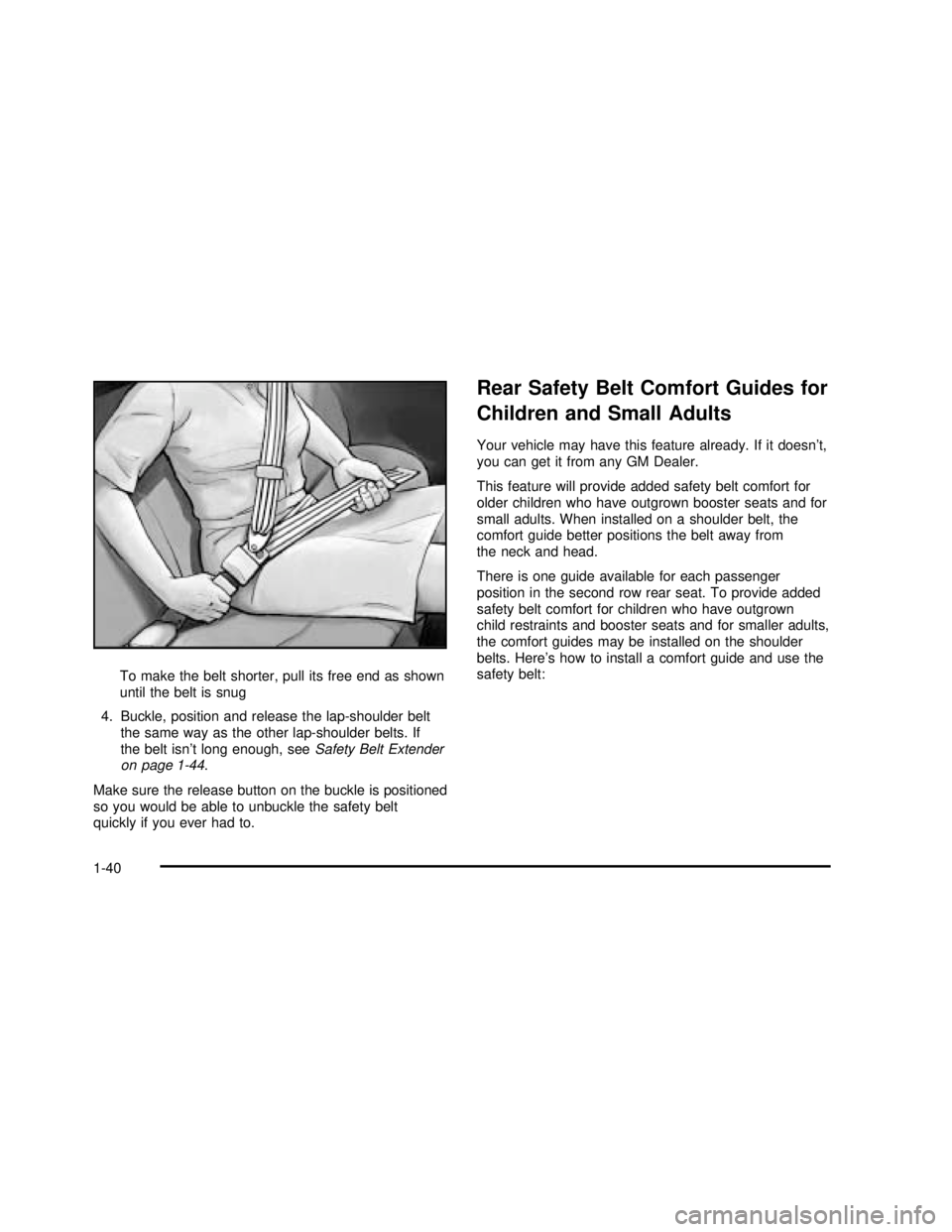
To make the belt shorter, pull its free end as shown
until the belt is snug
4. Buckle, position and release the lap-shoulder belt
the same way as the other lap-shoulder belts. If
the belt isn’t long enough, seeSafety Belt Extender
on page 1-44.
Make sure the release button on the buckle is positioned
so you would be able to unbuckle the safety belt
quickly if you ever had to.
Rear Safety Belt Comfort Guides for
Children and Small Adults
Your vehicle may have this feature already. If it doesn’t,
you can get it from any GM Dealer.
This feature will provide added safety belt comfort for
older children who have outgrown booster seats and for
small adults. When installed on a shoulder belt, the
comfort guide better positions the belt away from
the neck and head.
There is one guide available for each passenger
position in the second row rear seat. To provide added
safety belt comfort for children who have outgrown
child restraints and booster seats and for smaller adults,
the comfort guides may be installed on the shoulder
belts. Here’s how to install a comfort guide and use the
safety belt:
1-40
2003 - Rendezvous OM
Page 51 of 432

Child Restraints
Older Children
Older children who have outgrown booster seats should
wear the vehicle’s safety belts.
Q:What is the proper way to wear safety belts?
A:If possible, an older child should wear a
lap-shoulder belt and get the additional restraint a
shoulder belt can provide. The shoulder belt
should not cross the face or neck. The lap belt
shouldfit snugly below the hips, just touching the
top of the thighs. It should never be worn over
the abdomen, which could cause severe or even
fatal internal injuries in a crash.
Accident statistics show that children are safer if they
are restrained in the rear seat.
In a crash, children who are not buckled up can strike
other people who are buckled up, or can be thrown
out of the vehicle. Older children need to use safety
belts properly.
1-45
2003 - Rendezvous OM
Page 58 of 432

A forward-facing child seat (C-E) provides restraint for
the child’s body with the harness and also sometimes
with surfaces such as T-shaped or shelf-like shields.A booster seat (F-G) is a child restraint designed to
improve thefit of the vehicle’s safety belt system. Some
booster seats have a shoulder belt positioner, and
some high-back booster seats have afive-point harness.
A booster seat can also help a child to see out the
window.
1-52
2003 - Rendezvous OM
Page 63 of 432

Your vehicle has top strap anchors already installed for
the rear seating positions. An anchor bar for a top strap is
located at the rear of the seat cushion for each second
row outboard seating position. The anchor bar for the
center position bench seat is located on thefloor behind
the second row seats. If the vehicle has the extended rear
convenience center, you need to remove a plastic plug
and look under the convenience center tofind the anchor
bar for the center position bench seat.If the vehicle has a third row seat and the seatback is
upright, there is an anchor strap located between the third
row seatback and cushion to anchor the child restraint for
the second row center position bench seat. Second Row Center Position BenchSeat without
Third Row Seat
Second Row Center Position BenchSeat withThird
Row Seat
1-57
2003 - Rendezvous OM
Page 121 of 432

Reprogramming a Single HomeLink®
Button
To program a device to HomeLink®using a HomeLink®
button previously trained, follow these steps:
1. Press and hold the desired HomeLink
®button.
Do not release the button.
2. The indicator light will begin toflash after
20 seconds. While still holding the HomeLink
®
button, proceed with Step 2 under“Programming
HomeLink®.”
Resetting Defaults
To reset HomeLink®to default settings do the following:
1. Hold down the two outside buttons for about
20 seconds until the indicator light begins toflash.
2. Continue to hold both buttons until the HomeLink
®
indicator light turns off.
3. Release both buttons.
For questions or comments, contact HomeLink
®at
1-800-355-3515, or on the internet at
www.homelink.com.
Storage Areas
Glove Box
If the glove box has a lock, put your key into the lock
and turn the key counterclockwise. To open the
glovebox, pull the latch release.
The glove box door has a detent to prevent the door
from lowering too far. Open the glove box until the door
is partway open, then pull the door down if you need
it fully opened.
To close the glove box, the door must be pushed up
past the detent. To lock the glovebox, put your key into
the lock and turn the key clockwise.
Cupholder(s)
There are two cupholders located in thefloor console.
The cupholders have liners that remove for larger
beverage items. Remove the liners by lifting them out.
Your vehicle has cupholders located in the rear seat
armrests if it has a split folding rear seat. If your vehicle
has captain’s chairs, there are cupholders on the
sides of the seats. If your vehicle has a stowable seat,
there are cupholders in the center of the seat.
2-37
2003 - Rendezvous OM
Page 136 of 432

Memory Seat
If your vehicle has this
feature, the controls are
located on the driver’s door
panel and are used to
store and recall the driver’s
seat position and outside
rearview mirror position.
To store a seat position, do the following:
1. Adjust the driver’s seat and the outside rearview
mirrors to the position you would like for driving.
2. Press and hold memory button 1 for more than
three seconds.
A double beep will sound when the memory seat and
mirror position have been stored.
To store the seat and outside rearview mirror positions
for a second driver, follow the previous steps, but
press button 2 instead.
To recall your stored positions, your vehicle must be in
PARK (P). Push and release the memory button
(1 or 2) corresponding to the desired driving position.The seat and the outside rearview mirrors will move to
the position previously stored for the identified driver.
You will hear one beep.
To store an exit position for each driver, do the following:
1. Move the seat to the desired exit position.
2. Hold the button with the exit symbol, located below
the memory buttons, for more than three seconds.
The exit position stored will be for the most recently
selected driving position (1 or 2). A double beep
will sound when the exit position is stored.
To use the exit feature, your vehicle must be in
PARK (P). Push and release the button with the exit
symbol and the seat will move to the exit position stored
for the most recently selected driver. You will hear
one beep.
To stop recall movement of the seat at any time, press
one of the three memory buttons or one of the power
seat controls located on the outboard side of the
driver’s seat.
If your vehicle is equipped with a Driver Information
Center (DIC), you can use it to program certain functions
of the memory seats. SeeDIC Vehicle Personalization
on page 3-57.
2-52
2003 - Rendezvous OM
Page 154 of 432

Instrument Panel Switchbank
There is an instrument panel switchbank located below
the comfort controls. It contains switches or blanks
that will vary with the options that are on your vehicle.
The switches you may have are:
•Rear Window Wiper/Washer
•Liftgate Release
•Traction Disable
•Park Aid Disable
•Heated Seats (driver’s and passenger’s)
For more information, see each of these features in the
Index.
Head-Up Display (HUD)
{CAUTION:
If the HUD image is too bright, or too high in
your field of view, it may take you more time to
see things you need to see when it’s dark
outside. Be sure to keep the HUD image dim
and placed low in your field of view.If your vehicle has the HUD, it can display the
speedometer reading in English or metric. The current
radio station, CD number and/or track number or
tape may also be displayed and will appear as an image
focused out toward the front of your vehicle.
The HUD is capable of displaying English or French.
SeeDIC Controls and Displays on page 3-55to change
the display from English to metric.
The Head-Up Display also displays the following lights
and messages when they appear on the instrument
panel cluster:
•Turn Signal Indicators
•High-Beam Indicator
•Low-Fuel Warning Message
See each of these features in the Index for more
information.
The Head-Up Display also displays a CHECK GAGES
icon. The following messages could appear on the
instrument panel cluster when CHECK GAGES appears:
•Engine Coolant Temperature Warning
•Low Oil Pressure
•Charging System Indicator
•Low Brake Fluid Warning
3-18
2003 - Rendezvous OM
Page 161 of 432

)(Bi-Level):This mode directs half of the air to the
instrument panel outlets, then directs the remaining
air to thefloor outlets. Cooler air is directed to the upper
outlets and warmer air to thefloor outlets.
6(Floor):This mode directs most of the air to the
floor outlets. Use this mode to send air to the rear of the
vehicle. Keep the area under the front seats free of
objects that could obstruct airflow to the rear of
the vehicle.
The right knob can also be used to select defog or
defrost mode. For more information, see“Defogging and
Defrosting”later in this section.
9(Fan):Turn the left knob clockwise or
counterclockwise to increase or decrease the fan speed.
Turn the knob to 0 to turn off the fan. The fan must
be turned on for the air conditioning compressor
to operate.
@(Recirculation):This mode keeps outside air
from coming in the vehicle. It can be used to prevent
outside air and odors from entering your vehicle or help
heat or cool the air inside your vehicle more quickly.
Press this button to turn the recirculation mode on or off.
When the button is pressed, an indicator light will
come on. The air-conditioning compressor also comes
on. The recirculation mode can be used with vent
and bi-level modes, but it cannot be used withfloor,
defog, defrost or outside air modes.Temperature Control:Turn the center knob clockwise
or counterclockwise to increase or decrease the air
temperature inside your vehicle.
#A/C (Air Conditioning):Press this button to turn
the air-conditioning system on or off. When A/C is
pressed, an indicator light in the button will come on to
let you know that air conditioning is activated.
You may notice a slight change in engine performance
when the air-conditioning compressor shuts off and
turns on again. This is normal. The system is designed
to make adjustments to help with fuel economy while
still maintaining the selected temperature.
On hot days, open the windows to let hot inside air
escape; then close them. This helps to reduce the time
it takes for your vehicle to cool down. It also helps
the system to operate more efficiently.
For quick cool down on hot days, do the following:
1. Select the vent mode.
2. Select the coolest temperature.
3. Select the highest fan speed.
4. Select A/C.
5. Select the recirculation mode.
Using these settings together for long periods of time
may cause the air inside of your vehicle to become too
dry. To prevent this from happening, after the air
inside of your vehicle has cooled, turn the recirculation
mode off.
3-25
2003 - Rendezvous OM