instrument panel BUICK RANDEZVOUS 2003 Owner's Guide
[x] Cancel search | Manufacturer: BUICK, Model Year: 2003, Model line: RANDEZVOUS, Model: BUICK RANDEZVOUS 2003Pages: 432, PDF Size: 2.75 MB
Page 144 of 432

Turn Signal On Chime
If either turn signal is left on for more than 3/4 mile
(1.2 km), a chime will sound to let the driver know to turn
it off.
If you need to leave the signal on for more than 3/4 mile
(1.2 km), turn off the signal and then turn it back on.
Headlamp High/Low-Beam Changer
To change the headlamps from low to high, push the
turn signal lever away from you. Then release it.
To change the headlamps from high to low, pull the
lever toward you.
When the high beams are
on, this light, on the
instrument panel cluster
and the HUD display,
will also be on.
Flash-to-Pass
When the headlamps are off, pull the lever toward you
to momentarily switch on the high beams (to signal
that you are going to pass). When you release the lever,
they will turn off.
Windshield Wipers
You control the windshield wipers by turning the band
marked WIPER.
MIST:For a single wiping cycle, turn the band to MIST.
Hold it there until the wipers start, then let go. The
wipers will stop after one cycle. If you want more cycles,
hold the band on MIST longer.
Delay:For delayed wiping cycles, you can set the
wiper speed for a long or short delay between wipes.
This can be very useful in light rain or snow. Turn
the band to choose the delay time. The closer to LO,
the shorter the delay time.
LO:For steady wiping cycles at low speed, turn the
band away from you to the LO position.
HI:For high-speed wiping, turn the band away from
you to the HI position.
OFF:To stop the wipers, turn the band to OFF.
Remember that damaged wiper blades may prevent you
from seeing well enough to drive safely. To avoid
damage, be sure to clear ice and snow from the wiper
blades before using them. If they’re frozen to the
windshield, carefully loosen or thaw them. If your blades
do become damaged, get new blades or blade inserts.
Heavy snow or ice can overload your wipers. A
circuit breaker will stop them until the motor cools. Clear
away snow or ice to prevent an overload.
3-8
2003 - Rendezvous OM
Page 145 of 432

Windshield Washer
To wash your windshield, push and hold the paddle with
the windshield washer symbol. The washers and
wipers will operate. When you release the paddle, the
washers will stop, and the wipers will continue to operate
for two cycles, unless your wipers were already on. In
that case, the wipers will resume the wiper speed
you selected earlier.
{CAUTION:
In freezing weather, don’t use your washer
until the windshield is warmed. Otherwise the
washer fluid can form ice on the windshield,
blocking your vision.
Rear Window Washer/Wiper
The rear window
washer/wiper switch is
located in the instrument
panel switchbank.
Push the wiper symbol on the top of the switch to turn
on the intermittent wiper. To turn off the wiper, gently
push the bottom of the switch.
To wash and wipe the rear window, push in the washer
symbol on the bottom of the switch. Washerfluid will
spray as long as the switch is held in. When the switch
is released, the wiper will continue to cycle three
more times. There is only one washerfluid reservoir for
the front and rear windshield wipers. SeeWindshield
Washer Fluid on page 5-32.
To wash the rear window while the rear wiper is already
on, push the bottom of the switch. Push in the top of
the switch to continue the intermittent wiper cycle after
the washing cycle is completed.
3-9
2003 - Rendezvous OM
Page 147 of 432

4. Take your foot off the accelerator pedal.
The CRUISE light on the instrument panel will illuminate
when the cruise control is engaged.
Resuming a Set Speed
Suppose you set your cruise control at a desired speed
and then you apply the brake. This, of course, shuts
off the cruise control. But you don’t need to reset
it. Once you’re going about 25 mph (40 km/h) or more,
you can move the cruise control switch from ON to
R/A (resume/accelerate) briefly.
You’ll go right back up to your chosen speed and
stay there.
If you hold the switch at R/A, the vehicle will keep going
faster until you release the switch or apply the brake. So
unless you want to go faster, don’t hold the switch at R/A.
Increasing Speed While Using Cruise
Control
There are two ways to go to a higher speed:
•Use the accelerator pedal to get to the higher
speed. Push the SET button at the end of the lever,
then release the button and the accelerator pedal.
You’ll now cruise at the higher speed.
•Move the cruise switch from ON to R/A. Hold it
there until you get up to the speed you want,
and then release the switch. (To increase your
speed in very small amounts, move the switch to
R/A briefly and then release it. Each time you
do this, your vehicle will go about 1 mph (1.6 km/h)
faster.)
The accelerate feature will work whether or not you
have set an initial cruise control speed.
Reducing Speed While Using Cruise
Control
There are two ways to reduce speed while using cruise
control:
•Push in the SET button at the end of the lever until
you reach the lower speed you want, then release it.
•To slow down in very small amounts, push the SET
button briefly. Each time you do this, you’ll go about
1 mph (1.6 km/h) slower. United States
Canada
3-11
2003 - Rendezvous OM
Page 148 of 432

Passing Another Vehicle While Using
Cruise Control
Use the accelerator pedal to increase your speed.
When you take your foot off the pedal, your vehicle will
slow down to the cruise control speed you set earlier.
Using Cruise Control on Hills
How well your cruise control will work on hills depends
upon your speed, load and the steepness of the
hills. When going up steep hills, you may have to step
on the accelerator pedal to maintain your speed.
When going downhill, you may have to brake or shift to
a lower gear to keep your speed down. Of course,
applying the brake takes you out of cruise control. Many
driversfind this to be too much trouble and don’t use
cruise control on steep hills.
Ending Cruise Control
There are two ways to turn off the cruise control:
•Step lightly on the brake pedal, or
•move the cruise switch to OFF.
Erasing Speed Memory
When you turn off the cruise control or the ignition, your
cruise control set speed memory is erased.
Exterior Lamps
The control on the left side
of the steering column
operates the exterior
lamps.
The exterior lamp control has three positions:
AUTO (Automatic Headlamp Control/Off):Turning
the control to this position will activate the automatic
headlamps when it is dark enough outside and turn off
all lamps and lights during the day except for the
Daytime Running Lamps (DRL).
<(Parking Lamps):Turning the control to this
position turns on the parking lamps together with the
following:
•Taillamps
•Instrument Panel Lights
3-12
2003 - Rendezvous OM
Page 149 of 432

5(Headlamps):Turning the control to this position
turns on the headlamps together with the previously
listed lamps and lights.
Lamps on Reminder
If the driver’s door is opened and you turn the ignition to
OFF while leaving the lamps on, you will hear a
warning chime.
Daytime Running Lamps (DRL)
Daytime Running Lamps (DRL) can make it easier for
others to see the front of your vehicle during the
day. DRL can be helpful in many different driving
conditions, but they can be especially helpful in the short
periods after dawn and before sunset. Fully functional
daytime running lamps are required on all vehicles
first sold in Canada.
A light sensor on top of the instrument panel makes the
DRL work, so be sure it isn’t covered. The DRL
system will make your reduced intensity high-beam
headlamps come on in daylight when:
•The ignition is on,
•the exterior lamps control is in AUTO, and
•the shift lever is not in PARK (P).When the DRL are on, only your reduced intensity
high-beam headlamps will be on. Your instrument panel
won’t be lit up.
When it’s dark enough outside, the exterior lamps will
come on automatically. When it’s bright enough outside,
the exterior lamps will go out and the DRL will turn
on. Of course, you may still turn on the headlamps any
time you need to.
As with any vehicle, you should turn on the regular
headlamp system when you need it.
Automatic Headlamp System
When the exterior lamps control is turned to AUTO, the
headlamps and parking lamps will come on
automatically when it is dark enough outside.
The lamps will come on automatically if:
•It is dark enough outside,
•the ignition is in ON,
•the parking brake is released, and
•the exterior lamps control is in the AUTO position.
3-13
2003 - Rendezvous OM
Page 150 of 432
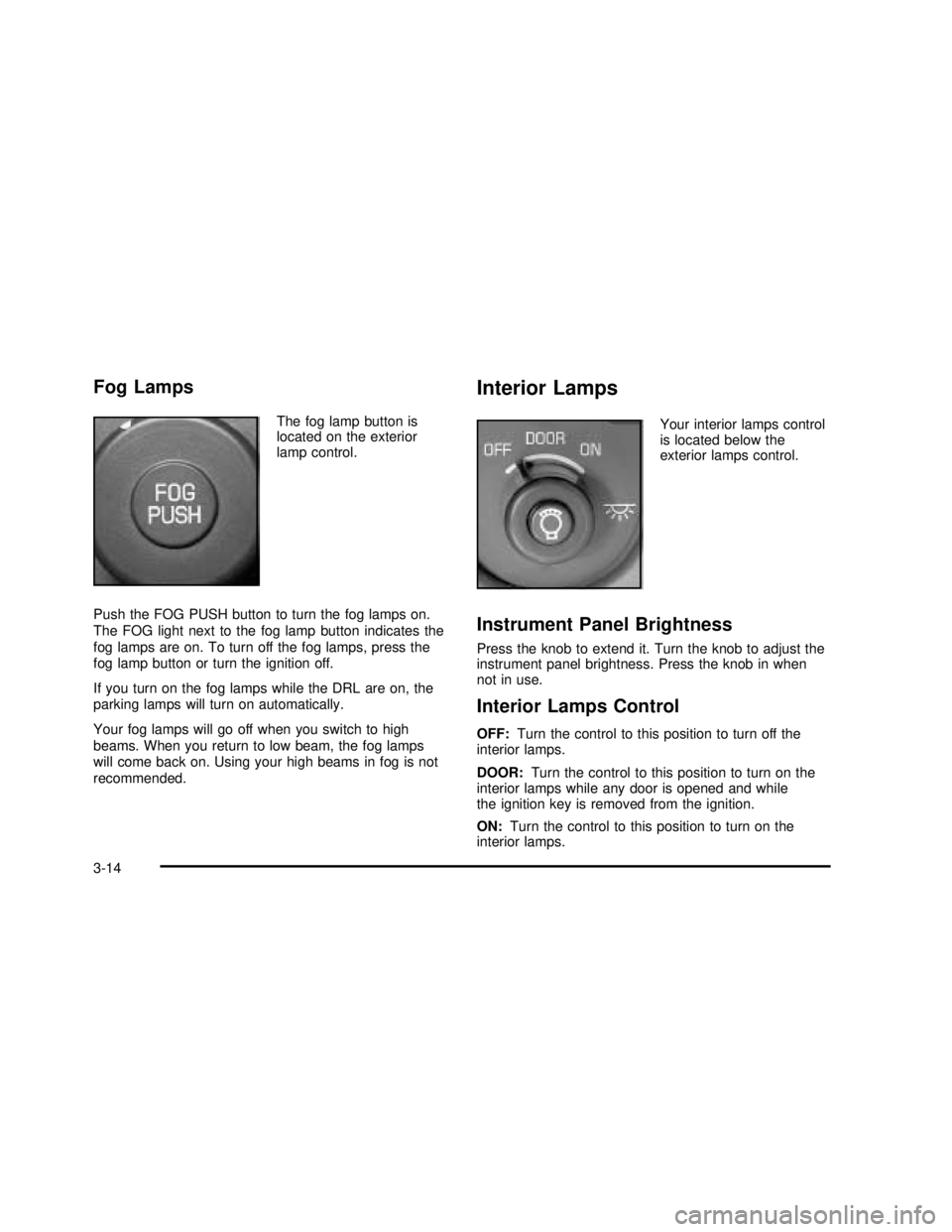
Fog Lamps
The fog lamp button is
located on the exterior
lamp control.
Push the FOG PUSH button to turn the fog lamps on.
The FOG light next to the fog lamp button indicates the
fog lamps are on. To turn off the fog lamps, press the
fog lamp button or turn the ignition off.
If you turn on the fog lamps while the DRL are on, the
parking lamps will turn on automatically.
Your fog lamps will go off when you switch to high
beams. When you return to low beam, the fog lamps
will come back on. Using your high beams in fog is not
recommended.
Interior Lamps
Your interior lamps control
is located below the
exterior lamps control.
Instrument Panel Brightness
Press the knob to extend it. Turn the knob to adjust the
instrument panel brightness. Press the knob in when
not in use.
Interior Lamps Control
OFF:Turn the control to this position to turn off the
interior lamps.
DOOR:Turn the control to this position to turn on the
interior lamps while any door is opened and while
the ignition key is removed from the ignition.
ON:Turn the control to this position to turn on the
interior lamps.
3-14
2003 - Rendezvous OM
Page 154 of 432

Instrument Panel Switchbank
There is an instrument panel switchbank located below
the comfort controls. It contains switches or blanks
that will vary with the options that are on your vehicle.
The switches you may have are:
•Rear Window Wiper/Washer
•Liftgate Release
•Traction Disable
•Park Aid Disable
•Heated Seats (driver’s and passenger’s)
For more information, see each of these features in the
Index.
Head-Up Display (HUD)
{CAUTION:
If the HUD image is too bright, or too high in
your field of view, it may take you more time to
see things you need to see when it’s dark
outside. Be sure to keep the HUD image dim
and placed low in your field of view.If your vehicle has the HUD, it can display the
speedometer reading in English or metric. The current
radio station, CD number and/or track number or
tape may also be displayed and will appear as an image
focused out toward the front of your vehicle.
The HUD is capable of displaying English or French.
SeeDIC Controls and Displays on page 3-55to change
the display from English to metric.
The Head-Up Display also displays the following lights
and messages when they appear on the instrument
panel cluster:
•Turn Signal Indicators
•High-Beam Indicator
•Low-Fuel Warning Message
See each of these features in the Index for more
information.
The Head-Up Display also displays a CHECK GAGES
icon. The following messages could appear on the
instrument panel cluster when CHECK GAGES appears:
•Engine Coolant Temperature Warning
•Low Oil Pressure
•Charging System Indicator
•Low Brake Fluid Warning
3-18
2003 - Rendezvous OM
Page 155 of 432

See each of these messages in the Index for more
information.
Under warning conditions, the CHECK GAGES icon will
illuminate in the HUD. Look at the instrument panel
cluster for more information.
Notice:Although the HUD image appears to be
near the front of the vehicle, do not use it as
a parking aid. The HUD was not designed for that
purpose. If you try to use it as such, you may
misjudge the distance and damage your vehicle.The HUD controls are
located to the left of the
steering wheel on the
instrument panel.
When the HUD is on, the speedometer reading will
always be displayed. The current radio station, cassette
tape or CD number and track number will only be
displayed for three seconds after the radio, tape or CD
track status changes. This will happen whenever
one of the radio controls is pressed, either on the radio
or on the audio steering wheel controls (if equipped).
3-19
2003 - Rendezvous OM
Page 158 of 432

URPA can be turned off by
pressing the rear park aid
disable switch located
in the instrument panel
switchbank. When
the system is disabled an
indicator light will glow
on the switch. You will not
see any lights on the
rear display if the switch is
in the off position.
How the System Works
Unless disabled, the URPA will turn on automatically
when the shift lever is moved into REVERSE (R). When
the system turns on, the three lights on the display
will illuminate for one and a half seconds to let you know
that the system is working. If your vehicle is moving in
REVERSE (R) at a speed greater than 3 mph (5 km/h),
the red light willflash to remind you that the system
does not work at speed greater than 3 mph (5 km/h).If an object is detected at a REVERSE (R) speed of
less than 3 mph (5 km/h), one of the following will occur:
Description English Metric
amber light 5 ft. 1.5 m
amber/amber lights 40 in. 1.0 m
amber/amber/red lights &
continuous chime20 in. 0.5 m
amber/amber/red lights
flashing & continuous
chime1 ft 0.3 m
A chime will sound thefirst time an object is detected
between 20 inches (0.5 m) and 5 feet (1.5 m) away.
URPA cannot detect objects that are above liftgate level.
In order for the rear sensors to recognize an object, it
must be within detection range behind the vehicle.
When the System Does Not Seem to Work
Properly
The light mayflash red when the vehicle is in
REVERSE (R) if the ultrasonic sensors are not kept
clean. So be sure to keep your rear bumper free of mud,
dirt, snow, ice and slush. Other conditions that may
affect system performance include things like the
vibrations from a jackhammer or the compression of air
brakes on a very large truck. If after cleaning the
3-22
2003 - Rendezvous OM
Page 160 of 432

Ashtrays and Cigarette Lighter
The ashtray is located on thefloor console closest to
the instrument panel. Lift the lid to expose the ashtray.
The ashtray removes by lifting it up.
The cigarette lighter is located on thefloor console in
the cell phone storage compartment closest to the
driver’s seat. Lift the lid to expose the cigarette lighter.
To use the lighter, push it in all the way and let go.
When it’s ready, it will pop back out by itself.
Notice:Don’t hold a cigarette lighter in with your
hand while it is heating. If you do, it won’t be able to
back away from the heating element when it’s
ready. That can make it overheat, damaging the
lighter and the heating element.
Notice:Don’t put papers or otherflammable
items into your ashtrays. Hot cigarettes or other
smoking materials could ignite them, causing
a damagingfire.
Climate Controls
Climate Control System
With this system you can control the heating, cooling
and ventilation for your vehicle.
Operation
Turn the right knob clockwise or counterclockwise to
direct the airflow inside of your vehicle.
To change the current mode, select one of the following:
H(Vent):This mode directs air to the instrument
panel outlets.
3-24
2003 - Rendezvous OM