battery BUICK RANDEZVOUS 2004 Owner's Guide
[x] Cancel search | Manufacturer: BUICK, Model Year: 2004, Model line: RANDEZVOUS, Model: BUICK RANDEZVOUS 2004Pages: 486, PDF Size: 3.18 MB
Page 366 of 486
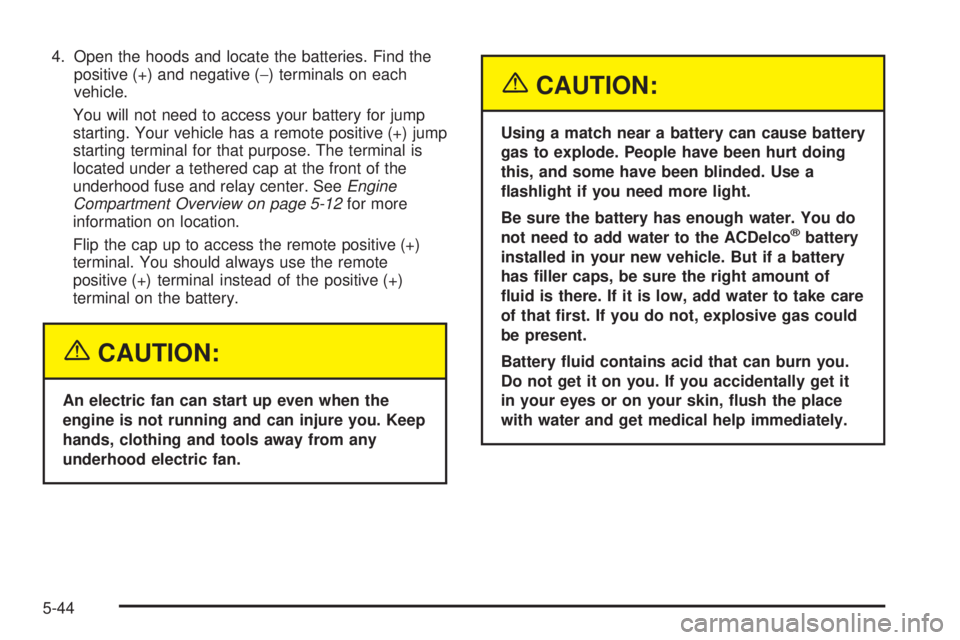
4. Open the hoods and locate the batteries. Find the
positive (+) and negative (−) terminals on each
vehicle.
You will not need to access your battery for jump
starting. Your vehicle has a remote positive (+) jump
starting terminal for that purpose. The terminal is
located under a tethered cap at the front of the
underhood fuse and relay center. SeeEngine
Compartment Overview on page 5-12for more
information on location.
Flip the cap up to access the remote positive (+)
terminal. You should always use the remote
positive (+) terminal instead of the positive (+)
terminal on the battery.
{CAUTION:
An electric fan can start up even when the
engine is not running and can injure you. Keep
hands, clothing and tools away from any
underhood electric fan.
{CAUTION:
Using a match near a battery can cause battery
gas to explode. People have been hurt doing
this, and some have been blinded. Use a
ashlight if you need more light.
Be sure the battery has enough water. You do
not need to add water to the ACDelco
®battery
installed in your new vehicle. But if a battery
has ller caps, be sure the right amount of
uid is there. If it is low, add water to take care
of that rst. If you do not, explosive gas could
be present.
Battery uid contains acid that can burn you.
Do not get it on you. If you accidentally get it
in your eyes or on your skin, ush the place
with water and get medical help immediately.
5-44
Page 367 of 486
{CAUTION:
Fans or other moving engine parts can injure
you badly. Keep your hands away from moving
parts once the engine is running.
5. Check that the jumper cables don’t have loose or
missing insulation. If they do, you could get a
shock. The vehicles could be damaged too.
Before you connect the cables, here are some
basic things you should know. Positive (+) will go to
positive (+) or to a remote positive (+) terminal if
the vehicle has one. Negative (−) will go to a heavy,
unpainted metal engine part or to a remote
negative (−) terminal if the vehicle has one.
Don’t connect positive (+) to negative (−) or you’ll
get a short that would damage the battery and
maybe other parts too. And don’t connect the
negative (−) cable to the negative (−) terminal on
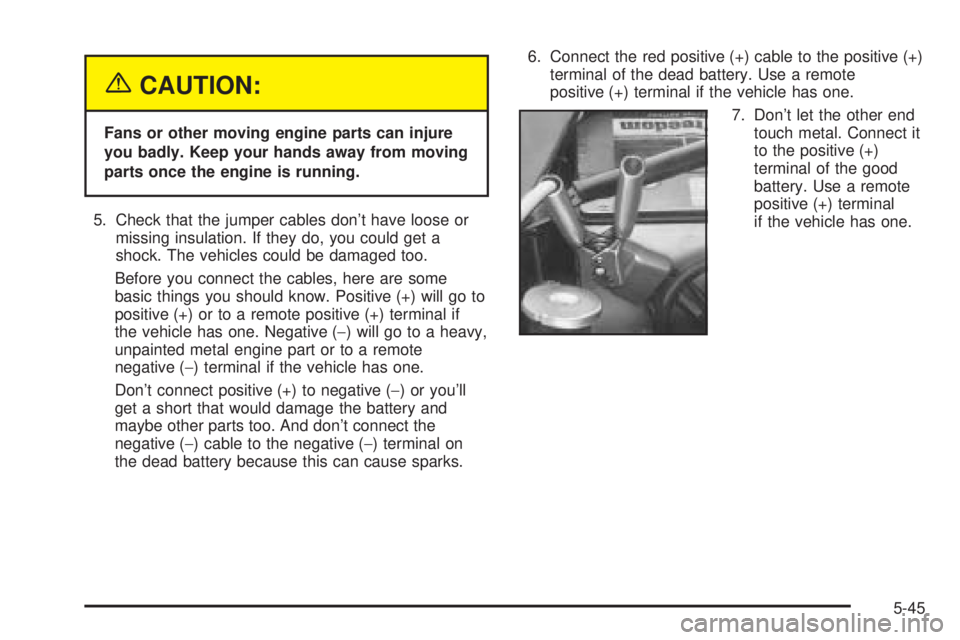
the dead battery because this can cause sparks.6. Connect the red positive (+) cable to the positive (+)
terminal of the dead battery. Use a remote
positive (+) terminal if the vehicle has one.
7. Don’t let the other end
touch metal. Connect it
to the positive (+)
terminal of the good
battery. Use a remote
positive (+) terminal
if the vehicle has one.
5-45
Page 368 of 486

8. Now connect the black
negative (−) cable to
the negative (−)
terminal of the good
battery. Use a remote
negative (−) terminal
if the vehicle has one.Don’t let the other end touch anything until the next
step. The other end of the negative (−) cabledoesn’t
go to the dead battery. It goes to a heavy, unpainted
metal engine part or to a remote negative (−)
terminal on the vehicle with the dead battery.
9. Connect the other end
of the negative (−)
cable at least 18 inches
(45 cm) away from
the dead battery, but
not near engine
parts that move. The
electrical connection is
just as good there,
and the chance
of sparks getting back
to the battery is
much less.
10. Now start the vehicle with the good battery and run
the engine for a while.
11. Try to start the vehicle that had the dead battery. If
it won’t start after a few tries, it probably needs
service.
5-46
Page 369 of 486
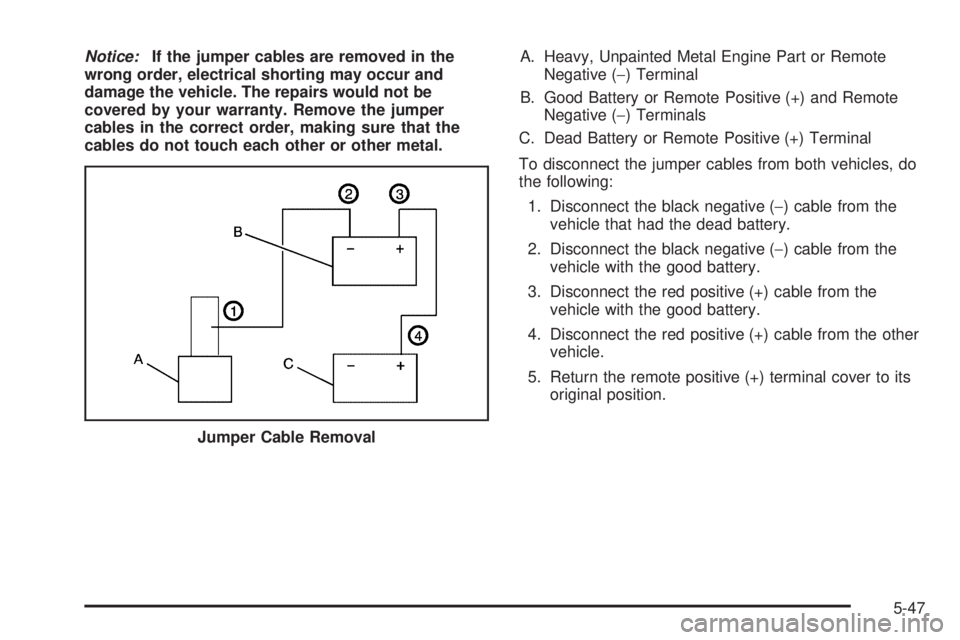
Notice:If the jumper cables are removed in the
wrong order, electrical shorting may occur and
damage the vehicle. The repairs would not be
covered by your warranty. Remove the jumper
cables in the correct order, making sure that the
cables do not touch each other or other metal.A. Heavy, Unpainted Metal Engine Part or Remote
Negative (−) Terminal
B. Good Battery or Remote Positive (+) and Remote
Negative (−) Terminals
C. Dead Battery or Remote Positive (+) Terminal
To disconnect the jumper cables from both vehicles, do
the following:
1. Disconnect the black negative (−) cable from the
vehicle that had the dead battery.
2. Disconnect the black negative (−) cable from the
vehicle with the good battery.
3. Disconnect the red positive (+) cable from the
vehicle with the good battery.
4. Disconnect the red positive (+) cable from the other
vehicle.
5. Return the remote positive (+) terminal cover to its
original position.
Jumper Cable Removal
5-47
Page 435 of 486
Fuse Usage
1 Fuel Pump
2 Air Conditioning Compressor Clutch
3 Horn
4Engine Controls-Emissions and
Sensors
5Power Control Module
(PCM)-Battery Power
6Anti-Lock Brakes (ABS) Control
Module
7 Transaxle Solenoids
9Anti-lock Brake System (ABS)
Solenoid Valves
10 Oxygen Sensors-Emissions Control
11 Injectors
13 Engine Controls
14 Daytime Running Lamps (DRL)
15 Passenger’s Low-Beam Headlamp
17 Driver’s Low-Beam Headlamp
18 Driver’s High-Beam Headlamp
19 Ignition Switch Battery PowerFuse Usage
20 Parking Lamps-Front and Rear
23 Passenger’s High-Beam Headlamp
24 Vent Solenoids
25 DVD
26 Front Fog Lamps
27Ignition Relay, Neutral Start Switch,
Powertrain Control Module (PCM)
28 Body Control Module-Battery Power
29S Band, Remote Digital Radio
Receiver
30 All-Wheel Drive (AWD) Module
31 Cruise Control
32 Front Power Outlets/Lights, OnStar
®
33Automatic Transaxle Shift Lock
Control System
35 Starter Solenoid Battery Fuse
36 Anti-lock Brake System (ABS) Motor
39 Engine Cooling Fan
40 Engine Cooling Fan
5-113
Page 436 of 486
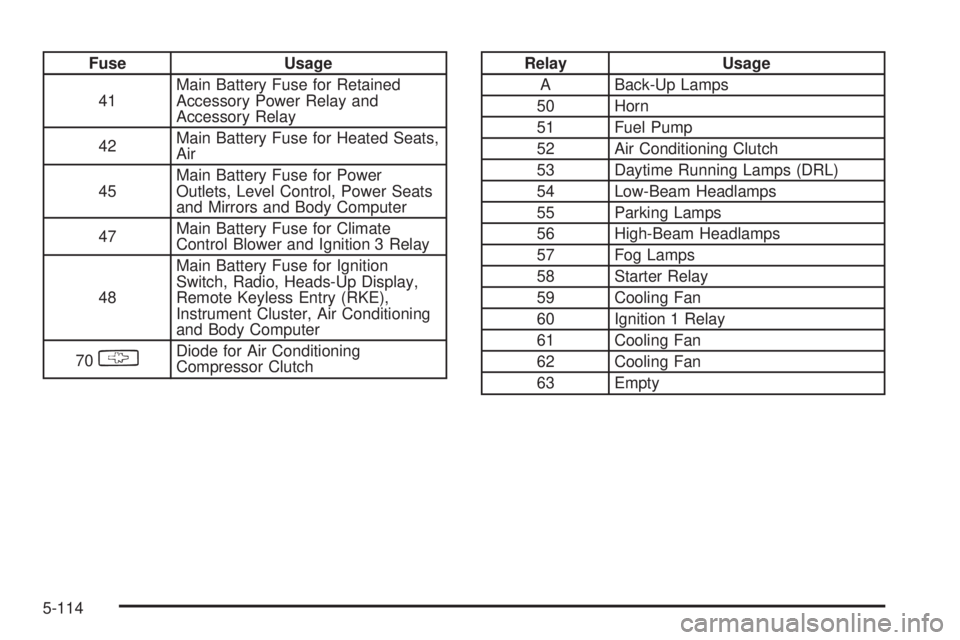
Fuse Usage
41Main Battery Fuse for Retained
Accessory Power Relay and
Accessory Relay
42Main Battery Fuse for Heated Seats,
Air
45Main Battery Fuse for Power
Outlets, Level Control, Power Seats
and Mirrors and Body Computer
47Main Battery Fuse for Climate
Control Blower and Ignition 3 Relay
48Main Battery Fuse for Ignition
Switch, Radio, Heads-Up Display,
Remote Keyless Entry (RKE),
Instrument Cluster, Air Conditioning
and Body Computer
70
§Diode for Air Conditioning
Compressor Clutch
Relay Usage
A Back-Up Lamps
50 Horn
51 Fuel Pump
52 Air Conditioning Clutch
53 Daytime Running Lamps (DRL)
54 Low-Beam Headlamps
55 Parking Lamps
56 High-Beam Headlamps
57 Fog Lamps
58 Starter Relay
59 Cooling Fan
60 Ignition 1 Relay
61 Cooling Fan
62 Cooling Fan
63 Empty
5-114
Page 470 of 486
Audio System(s) (cont.)
Radio with Six-Disc CD................................3-98
Rear Seat Audio (RSA)...............................3-126
Setting the Time..........................................3-73
Theft-Deterrent Feature...............................3-128
Understanding Radio Reception...................3-130
XM™ Satellite Radio Antenna System...........3-132
Auto Door Lock/Unlock....................................3-67
Automatic Headlamp System............................3-15
Automatic Level Control...................................4-42
Automatic Operation........................................3-35
Automatic Transaxle
Fluid..........................................................5-21
Operation...................................................2-23
B
Backing Up....................................................4-48
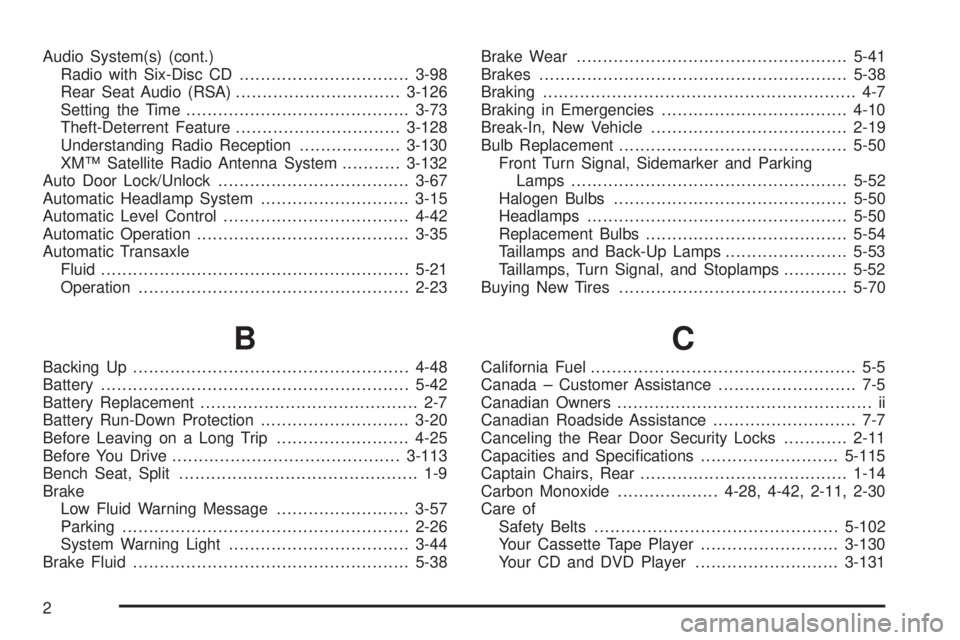
Battery..........................................................5-42
Battery Replacement......................................... 2-7
Battery Run-Down Protection............................3-20
Before Leaving on a Long Trip.........................4-25
Before You Drive...........................................3-113
Bench Seat, Split............................................. 1-9
Brake
Low Fluid Warning Message.........................3-57
Parking......................................................2-26
System Warning Light..................................3-44
Brake Fluid....................................................5-38Brake Wear...................................................5-41
Brakes..........................................................5-38
Braking........................................................... 4-7
Braking in Emergencies...................................4-10
Break-In, New Vehicle.....................................2-19
Bulb Replacement...........................................5-50
Front Turn Signal, Sidemarker and Parking
Lamps....................................................5-52
Halogen Bulbs............................................5-50
Headlamps.................................................5-50
Replacement Bulbs......................................5-54
Taillamps and Back-Up Lamps.......................5-53
Taillamps, Turn Signal, and Stoplamps............5-52
Buying New Tires...........................................5-70
C
California Fuel.................................................. 5-5
Canada – Customer Assistance.......................... 7-5
Canadian Owners................................................ ii
Canadian Roadside Assistance........................... 7-7
Canceling the Rear Door Security Locks............2-11
Capacities and Specications..........................5-115
Captain Chairs, Rear.......................................1-14
Carbon Monoxide...................4-28, 4-42, 2-11, 2-30
Care of
Safety Belts..............................................5-102
Your Cassette Tape Player..........................3-130
Your CD and DVD Player...........................3-131
2
Page 473 of 486
Door (cont.)
Programmable Automatic Door Locks.............2-10
Rear Door Security Locks.............................2-10
Driver
Four-Way Manual Seat.................................. 1-3
Position, Safety Belt.....................................1-28
Driver Behavior................................................ 4-2
Driver Information Center (DIC).........................3-60
DIC Controls and Displays............................3-62
DIC Vehicle Personalization..........................3-64
Driving
At Night.....................................................4-18
City...........................................................4-23
Defensive..................................................... 4-3
Drunken....................................................... 4-4
Environment................................................. 4-2
Freeway.....................................................4-24
Hill and Mountain Roads..............................4-26
In Rain and on Wet Roads...........................4-20
Winter........................................................4-28
Driving On Grades..........................................4-49
Driving on Snow or Ice....................................4-29
Driving Through Deep Standing Water...............4-22
Driving Through Flowing Water.........................4-22
Driving with a Trailer.......................................4-47
Dual Automatic Climate Control System.............3-35
Dual Climate Control System............................3-32DVD
Cleaning Your DVD Player..........................3-131
Distortion..................................................3-129
Rear Seat Entertainment System..................3-113
DVD Messages.............................................3-119
DVD Player..................................................3-116
E
Electrical System
Add-On Equipment.....................................5-108
Fuses and Circuit Breakers.........................5-109
Headlamp Wiring.......................................5-108
Power Windows and Other Power Options....5-109
Windshield Wiper Fuses.............................5-109
Emissions Inspection and Maintenance
Programs...................................................3-49
Engine
Air Cleaner/Filter.........................................5-19
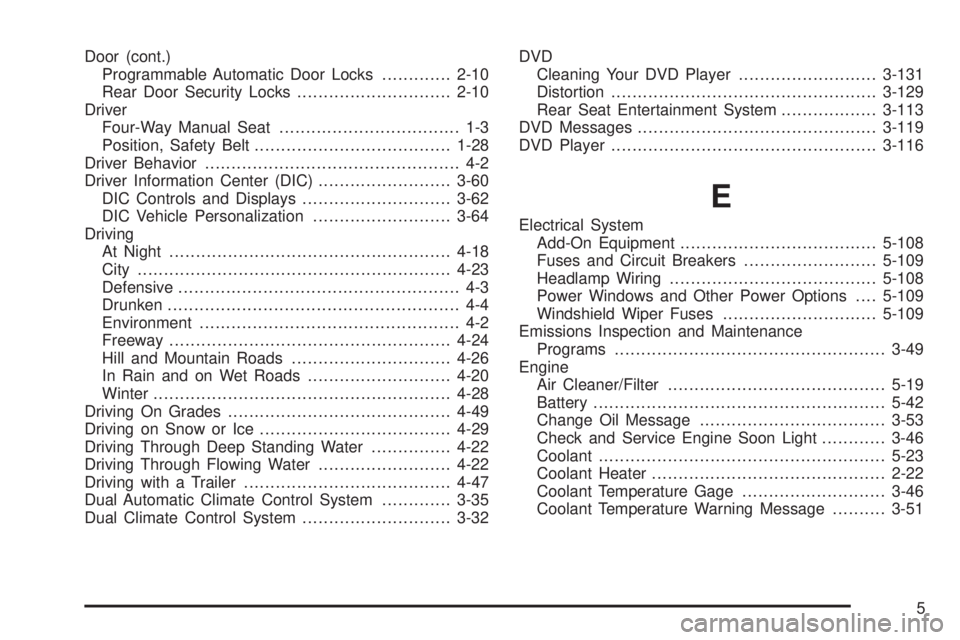
Battery.......................................................5-42
Change Oil Message...................................3-53
Check and Service Engine Soon Light............3-46
Coolant......................................................5-23
Coolant Heater............................................2-22
Coolant Temperature Gage...........................3-46
Coolant Temperature Warning Message..........3-51
5
Page 478 of 486
Maintenance Schedule (cont.)
Maintenance Footnotes.................................. 6-7
Maintenance Record....................................6-14
Maintenance Requirements............................. 6-2
Normal Maintenance Replacement Parts.........6-13
Owner Checks and Services........................... 6-8
Recommended Fluids and Lubricants.............6-12
Scheduled Maintenance................................. 6-4
Using Your................................................... 6-2
Your Vehicle and the Environment................... 6-2
Maintenance When Trailer Towing.....................4-50
Making Turns.................................................4-48
Malfunction Indicator Light................................3-46
Manual Lumbar Controls.................................... 1-5
Manual Operation...........................................3-36
Manual Passenger Seat.................................... 1-3
Matching Transmitter(s) to Your Vehicle............... 2-6
Memory Seat.................................................2-49
Message
All-Wheel Drive Disable Warning....................3-55
Center.......................................................3-50
Change Engine Oil......................................3-53
Charging System Indicator............................3-52
Door Ajar Warning.......................................3-54
Engine Coolant Temperature Warning.............3-51
Highbeam Out Warning................................3-59Message (cont.)
Low Brake Fluid Warning..............................3-57
Low Fuel Warning.......................................3-56
Low Oil Pressure.........................................3-52
Low Tire .....................................................3-54
Low Washer Fluid Warning...........................3-56
Park Lamp Warning.....................................3-59
PASS-Key
®III Security.................................3-55
Program Mode............................................3-58
Rear Hatch Ajar Warning..............................3-54
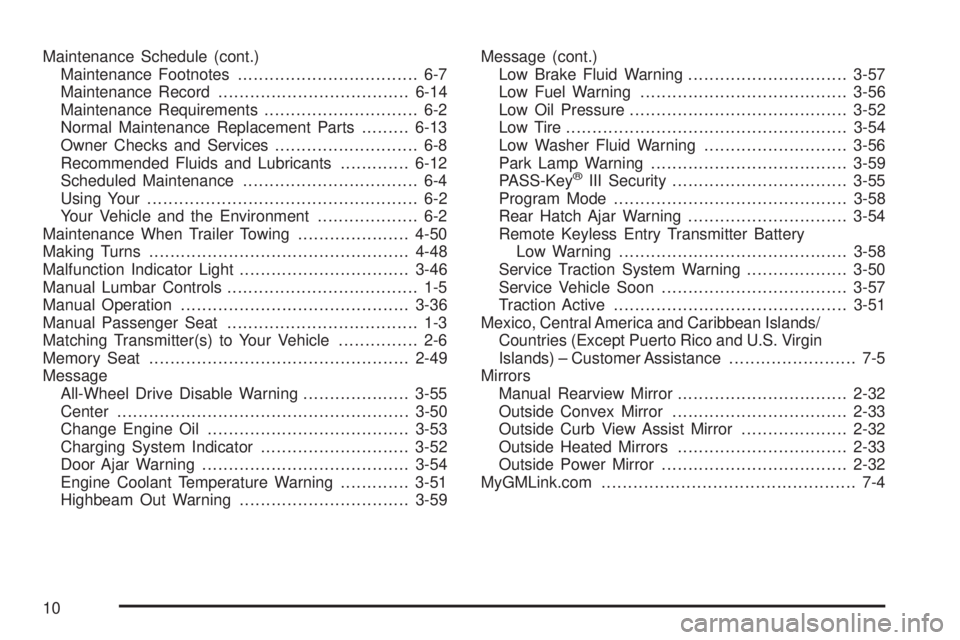
Remote Keyless Entry Transmitter Battery
Low Warning...........................................3-58
Service Traction System Warning...................3-50
Service Vehicle Soon...................................3-57
Traction Active............................................3-51
Mexico, Central America and Caribbean Islands/
Countries (Except Puerto Rico and U.S. Virgin
Islands) – Customer Assistance........................ 7-5
Mirrors
Manual Rearview Mirror................................2-32
Outside Convex Mirror.................................2-33
Outside Curb View Assist Mirror....................2-32
Outside Heated Mirrors................................2-33
Outside Power Mirror...................................2-32
MyGMLink.com................................................ 7-4
10
Page 481 of 486
Rear Seat Operation......................................... 1-9
Rear Seat Outside Passenger Positions.............1-38
Rear Seat Passengers, Safety Belts..................1-38
Rear Storage Area..........................................2-40
Rear Window Defogger...................3-31, 3-34, 3-38
Rearview Mirrors.............................................2-32
Reclining Seatbacks.......................................... 1-6
Recommended Fluids and Lubricants.................6-12
Recreational Vehicle Towing.............................4-34
Remote Alarm.................................................. 2-6
Remote Control.............................................3-119
Remote Door Unlock.......................................3-69
Remote Keyless Entry System............................ 2-4
Remote Keyless Entry System Operation............. 2-5
Remote Keyless Entry Transmitter Battery Low
Warning Message........................................3-58
Removing the Captain’s Chairs.........................1-15
Removing the Extended Rear Convenience
Center.......................................................2-45
Removing the Flat Tire and Installing
the Spare Tire.............................................5-87
Removing the Rear Convenience Center on
Vehicles with the Third Row Stowable Seat.....2-46
Removing the Spare Tire and Tools...................5-78
Removing the Split Bench Seat........................1-10
Removing the Stowable Seat............................1-19
Replacement Bulbs.........................................5-54
Replacing Brake System Parts..........................5-42
Replacing Restraint System Parts After a Crash.....1-83Replacing the Captain’s Chairs.........................1-16
Replacing the Extended Rear Convenience
Center.......................................................2-45
Replacing the Rear Convenience Center on
Vehicles with the Third Row Stowable Seat.....2-47
Replacing the Split Bench Seat.........................1-12
Replacing the Stowable Seat............................1-20
Reporting Safety Defects
Canadian Government..................................7-11
General Motors...........................................7-11
United States Government............................7-11
Reprogramming a Single HomeLink
®Button.......2-38
Resetting Defaults...........................................2-38
Restraint System Check
Checking Your Restraint Systems...................1-82
Replacing Restraint System Parts After
a Crash..................................................1-83
Restraint Systems
Checking....................................................1-82
Replacing Parts...........................................1-83
Retained Accessory Power (RAP)......................2-21
Retro-Active Reset..........................................3-42
Right Front Passenger Position, Safety Belts......1-37
Roadside
Assistance Program....................................... 7-6
Rocking Your Vehicle To Get It Out...................4-33
Roof Rack System..........................................2-41
Routing, Engine Drive Belt...............................6-13
Running Your Engine While You Are Parked.......2-31
13