oil change BUICK RANDEZVOUS 2004 Owner's Manual
[x] Cancel search | Manufacturer: BUICK, Model Year: 2004, Model line: RANDEZVOUS, Model: BUICK RANDEZVOUS 2004Pages: 486, PDF Size: 3.18 MB
Page 141 of 486
Instrument Panel Overview...............................3-4
Hazard Warning Flashers................................3-6
Other Warning Devices...................................3-7
Horn.............................................................3-7
Tilt Wheel.....................................................3-7
Turn Signal/Multifunction Lever.........................3-8
Exterior Lamps.............................................3-14
Interior Lamps..............................................3-16
Instrument Panel Switchbank..........................3-21
Head-Up Display (HUD).................................3-21
Ultrasonic Rear Parking Assist (URPA)..............3-24
Accessory Power Outlets...............................3-27
Ashtrays and Cigarette Lighter........................3-28
Climate Controls............................................3-28
Climate Control System.................................3-28
Dual Climate Control System..........................3-32
Dual Automatic Climate Control System...........3-35
Outlet Adjustment.........................................3-38
Warning Lights, Gages and Indicators.............3-39
Instrument Panel Cluster................................3-40
Speedometer and Odometer...........................3-41
Tachometer.................................................3-42
Safety Belt Reminder Light.............................3-43Air Bag Readiness Light................................3-43
Brake System Warning Light..........................3-44
Anti-Lock Brake System Warning Light.............3-45
Traction Control System (TCS) Warning Light . . .3-45
Engine Coolant Temperature Gage..................3-46
Malfunction Indicator Lamp.............................3-46
Fuel Gage...................................................3-49
Message Center.............................................3-50
Service Traction System Warning Message......3-50
Traction Active Message................................3-51
Engine Coolant Temperature Warning
Message..................................................3-51
Charging System Indicator Message................3-52
Low Oil Pressure Message............................3-52
Change Engine Oil Message..........................3-53
Low Tire Message........................................3-54
Door Ajar Warning Message...........................3-54
Rear Hatch Ajar Warning Message..................3-54
PASS-Key
®III Security Message....................3-55
All-Wheel Drive Disable Warning Message.......3-55
Low Washer Fluid Warning Message...............3-56
Low Fuel Warning Message...........................3-56
Low Brake Fluid Warning Message.................3-57
Section 3 Instrument Panel
3-1
Page 193 of 486
When the engine is running and this message appears,
the engine oil level may be too low. There may also
be another problem causing low oil pressure.
{CAUTION:
Do not keep driving if the oil pressure is low. If
you do, your engine can become so hot that it
catches re. You or others could be burned.
Check your oil as soon as possible and have
your vehicle serviced.
Notice:Lack of proper engine oil maintenance may
damage the engine. The repairs would not be
covered by your warranty. Always follow the
maintenance schedule in this manual for changing
engine oil.
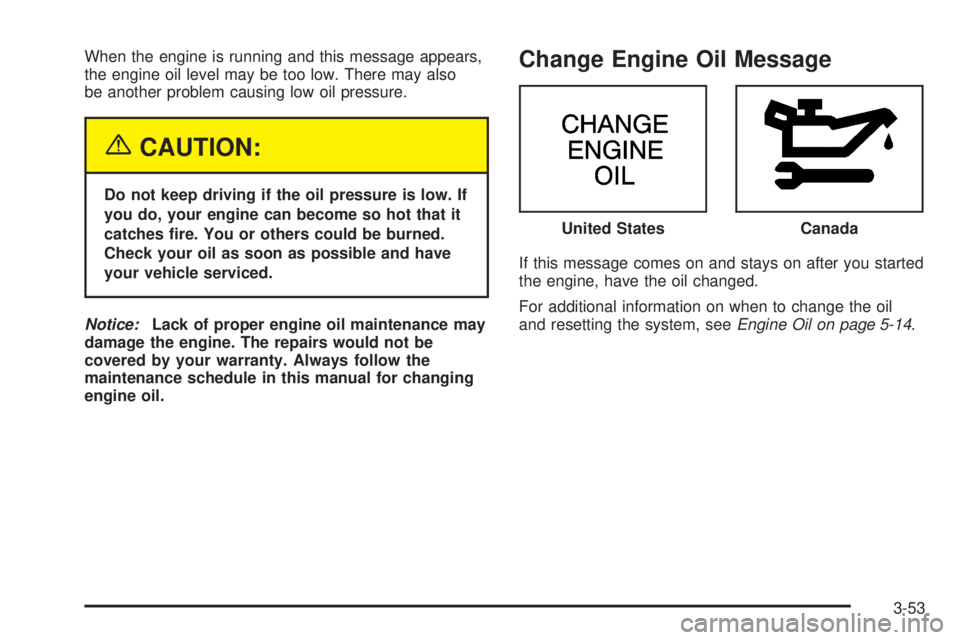
Change Engine Oil Message
If this message comes on and stays on after you started
the engine, have the oil changed.
For additional information on when to change the oil
and resetting the system, seeEngine Oil on page 5-14. United States
Canada
3-53
Page 203 of 486
FUEL USED:The fuel used display will show you how
much fuel has been used since the last time it was
reset. To reset the fuel used to zero, press and hold the
SET button while the fuel used is displayed on the
DIC and until the display goes to zero.
AVG SPEED (Average Speed):The average speed
display will show your average speed from when
you rst started your vehicle. To reset the average
speed, press and hold the SET button while the average
speed is displayed on the DIC and until the speed
resets to your current speed.
OIL LIFE LEFT HOLD SET TO RESET:This message
displays the current percentage of the GM Oil Life
System. Be careful not to reset this display other than
when the oil has been changed. See “How to Reset the
System” underEngine Oil on page 5-14for more
information.TIRE PRESSURE:The check tire pressure system can
alert you to a large change in the pressure of one
tire. You must begin driving before the system will detect
a low tire pressure. SeeCheck Tire Pressure System
on page 5-65.
USE SET TO SELECT ENGLISH METRIC:You can
use this display to select English or metric. Press
the SET button to toggle between English or metric. The
DIC, the odometer, the trip odometer and head-up
display will change. A Canadian odometer and
trip odometer will remain in metric units only.
OFF:No driver information will be displayed in this
mode. If the DIC is left in this mode for more than three
seconds, the display will turn off. Press the MODE
button to start the DIC.
3-63
Page 340 of 486

When to Change Engine Oil
(GM Oil Life System)
Your vehicle has a computer system that lets you know
when to change the engine oil and lter. This is based on
engine revolutions and engine temperature, and not on
mileage. Based on driving conditions, the mileage at
which an oil change will be indicated can vary
considerably. For the oil life system to work properly, you
must reset the system every time the oil is changed.
When the system has calculated that oil life has been
diminished, it will indicate that an oil change is necessary.
A CHANGE ENGINE OIL message will come on. Change
your oil as soon as possible within the next two times you
stop for fuel. It is possible that, if you are driving under the
best conditions, the oil life system may not indicate that
an oil change is necessary for over a year. However, your
engine oil and lter must be changed at least once a year
and at this time the system must be reset. Your dealer
has GM-trained service people who will perform this work
using genuine GM parts and reset the system. It is also
important to check your oil regularly and keep it at the
proper level.
If the system is ever reset accidentally, you must
change your oil at 3,000 miles (5 000 km) since your
last oil change. Remember to reset the oil life system
whenever the oil is changed.
How to Reset the CHANGE ENGINE OIL
Message
The GM Oil Life System calculates when to change
your engine oil and lter based on vehicle use. Anytime
your oil is changed, reset the system so it can
calculate when the next oil change is required. If a
situation occurs where you change your oil prior to a
CHANGE ENGINE OIL message being turned on, reset
the system.
If your vehicle does not have the optional Driver
Information Center (DIC), do the following:
1. Turn the ignition to ON, with the engine off.
2. Fully press and release the accelerator pedal slowly
three times within ve seconds.
3. Turn the key to OFF.
If the CHANGE ENGINE OIL message comes back
on when you start your vehicle, the engine oil life
system has not reset. Repeat the procedure.
5-18
Page 341 of 486
If your vehicle has the optional DIC, do the following:
1. Turn the ignition to ON, with the engine off.
2. Press the MODE button until the DIC reads OIL
LIFE LEFT/HOLD SET TO RESET.
3. Press and hold the SET button until 100% is
displayed.
You will hear three chimes and the CHANGE
ENGINE OIL message will go off.
4. Turn the key to OFF.
If the CHANGE ENGINE OIL message comes back on
when you start your vehicle, the engine oil life system
has not reset. Repeat the procedure.
What to Do with Used Oil
Used engine oil contains certain elements that may be
unhealthy for your skin and could even cause cancer.
Do not let used oil stay on your skin for very long. Clean
your skin and nails with soap and water, or a good
hand cleaner. Wash or properly dispose of clothing or
rags containing used engine oil. See the manufacturer’s
warnings about the use and disposal of oil products.Used oil can be a threat to the environment. If you
change your own oil, be sure to drain all the oil from the
lter before disposal. Never dispose of oil by putting it in
the trash, pouring it on the ground, into sewers, or into
streams or bodies of water. Instead, recycle it by taking it
to a place that collects used oil. If you have a problem
properly disposing of your used oil, ask your dealer, a
service station or a local recycling center for help.
Engine Air Cleaner/Filter
SeeEngine Compartment Overview on page 5-12for
the location of the engine air cleaner/lter.
When to Inspect the Engine Air
Cleaner/Filter
Inspect the air cleaner/lter at every oil change and
replace it at the rst oil change after 25,000 miles
(40 000 km). SeeScheduled Maintenance on page 6-4
for more information.
5-19
Page 343 of 486
Automatic Transaxle Fluid
When to Check and Change Automatic
Transaxle Fluid
A good time to check your automatic transaxle uid
level is when the engine oil is changed.
Change both the uid and lter every 50,000 miles
(83 000 km) if the vehicle is mainly driven under one or
more of these conditions:
In heavy city traffic where the outside temperature
regularly reaches 90°F (32°C) or higher
In hilly or mountainous terrain
When doing frequent trailer towing
Uses such as found in taxi, police or delivery
service
If you do not use your vehicle under any of these
conditions, change the uid and lter at 100,000 miles
(166 000 km). SeeScheduled Maintenance on page 6-4
for more information.
How to Check Automatic Transaxle
Fluid
Because this operation can be a little difficult, you may
choose to have this done at the dealership service
department.
If you do it yourself, be sure to follow all the instructions
here, or you could get a false reading on the dipstick.
Notice:Too much or too little uid can damage the
transaxle. Too much can mean that some of the uid
could come out and fall on hot engine or exhaust
system parts, starting a re. Too little uid could
cause the transaxle to overheat. Be sure to get an
accurate reading if you check the transaxle uid.
Wait at least 30 minutes before checking the transaxle
uid level if you have been driving:
When outside temperatures are above 90°F (32°C)
At high speed for quite a while
In heavy traffic, especially in hot weather
To get the right reading, the uid should be at normal
operating temperature, which is 180°F to 200°F
(82°C to 93°C).
Get the vehicle warmed up by driving about 15 miles
(24 km) when outside temperatures are above 50°F
(10°C). If it is colder than 50°F (10°C), you may have to
drive longer.
5-21
Page 348 of 486

Engine Overheating
You will nd an engine coolant temperature gage on
your vehicle’s instrument panel. SeeEngine Coolant
Temperature Gage on page 3-46. You also have
an engine coolant temperature warning message on
your instrument panel. SeeEngine Coolant Temperature
Warning Message on page 3-51.
Overheated Engine Protection
Operating Mode
This emergency operating mode allows your vehicle to
be driven to a safe place in an emergency situation.
If an overheated engine condition exists, an overheatprotection mode which alternates ring groups of
cylinders helps prevent engine damage. In this mode,
you will notice a signicant loss in power and engine
performance. The temperature gage will indicate
an overheat condition exists. Driving extended miles
(km) and/or towing a trailer in the overheat protection
mode should be avoided.
Notice:After driving in the overheated engine
protection operating mode, to avoid engine damage,
allow the engine to cool before attempting any repair.
The engine oil will be severely degraded. Repair the
cause of coolant loss, change the oil and reset the oil
life system. See “Engine Oil” in the Index.
5-26
Page 411 of 486

4. Attach the folding
wrench to the jack, and
turn the wrench
clockwise to raise the
jack head 3 inches
(7.6 cm).
5. Raise the vehicle by turning the folding wrench
clockwise in the jack. Raise the vehicle far
enough off the ground so that there is enough room
for the spare tire to t under the wheel well.
6. Remove all the wheel nuts and take off the at tire.
7. Remove any rust or dirt
from the wheel bolts,
mounting surfaces
and spare wheel.
{CAUTION:
Rust or dirt on the wheel, or on the parts to
which it is fastened, can make the wheel nuts
become loose after a time. The wheel could
come off and cause an accident. When you
change a wheel, remove any rust or dirt from
the places where the wheel attaches to the
vehicle. In an emergency, you can use a cloth
or a paper towel to do this; but be sure to use
a scraper or wire brush later, if you need to, to
get all the rust or dirt off.
{CAUTION:
Never use oil or grease on studs or nuts. If
you do, the nuts might come loose. Your wheel
could fall off, causing a serious accident.
5-89
Page 440 of 486

Maintenance Schedule
Introduction
Important: Keep engine oil at the proper level and
change as recommended.
Have you purchased the GM Protection Plan? The Plan
supplements your new vehicle warranties. See your
Warranty and Owner Assistance booklet or your dealer
for details.
Maintenance Requirements
Notice:Maintenance intervals, checks, inspections,
replacement parts and recommended uids and
lubricants as prescribed in this manual are necessary
to keep your vehicle in good working condition. Any
damage caused by failure to follow scheduled
maintenance may not be covered by warranty.
Your Vehicle and the Environment
Proper vehicle maintenance not only helps to keep your
vehicle in good working condition, but also helps the
environment. All recommended maintenance is
important. Improper vehicle maintenance can even
affect the quality of the air we breathe. Improper uid
levels or the wrong tire ination can increase the level of
emissions from your vehicle. To help protect our
environment, and to keep your vehicle in good condition,
be sure to maintain your vehicle properly.
Using Your Maintenance Schedule
We at General Motors want to help you keep your
vehicle in good working condition. But we do not know
exactly how you will drive it. You may drive very
short distances only a few times a week. Or you may
drive long distances all the time in very hot, dusty
weather. You may use your vehicle in making deliveries.
Or you may drive it to work, to do errands or in many
other ways.
Because of all the different ways people use their
vehicles, maintenance needs vary. You may need more
frequent checks and replacements. So please read
the following and note how you drive. If you have any
questions on how to keep your vehicle in good condition,
see your GM Goodwrench dealer.
6-2
Page 442 of 486
Scheduled Maintenance
When the CHANGE ENGINE OIL message comes on,
it means that service is required for your vehicle.
Have your vehicle serviced as soon as possible within
the next 600 miles (1 000 km). It is possible that,
if you are driving under the best conditions, the engine
oil life system may not indicate that vehicle service
is necessary for over a year. However, your engine oil
and lter must be changed at least once a year
and at this time the system must be reset. Your
GM Goodwrench dealer has GM-trained service
technicians who will perform this work using genuine
GM parts and reset the system.
If the engine oil life system is ever reset accidentally,
you must service your vehicle within 3,000 miles
(5 000 km) since your last service. Remember to reset
the oil life system whenever the oil is changed. See
Engine Oil on page 5-14for information on the Engine
Oil Life System and resetting the system.When the CHANGE ENGINE OIL message appears,
certain services, checks and inspections are required.
Required services are described in the following for
“MaintenanceI” and “MaintenanceII.” Generally,
it is recommended that your rst service be
MaintenanceI, your second service be MaintenanceII
and that you alternate MaintenanceIand MaintenanceII
thereafter. However, in some cases, MaintenanceII
may be required more often.
MaintenanceI— Use MaintenanceIif the CHANGE
ENGINE OIL message comes on within ten months
since vehicle was purchased or MaintenanceII
was performed.
MaintenanceII— Use MaintenanceIIif the previous
service performed was MaintenanceI. Always use
MaintenanceIIwhenever the message comes on ten
months or more since the last service or if the message
has not come on at all for one year.
6-4