air condition BUICK RANDEZVOUS 2005 User Guide
[x] Cancel search | Manufacturer: BUICK, Model Year: 2005, Model line: RANDEZVOUS, Model: BUICK RANDEZVOUS 2005Pages: 480, PDF Size: 2.96 MB
Page 185 of 480

Notice:If you keep driving your vehicle with this
light on, after awhile, your emission controls
may not work as well, your fuel economy may not
be as good, and your engine may not run as
smoothly. This could lead to costly repairs that may
not be covered by your warranty.
Notice:Modications made to the engine,
transaxle, exhaust, intake, or fuel system of your
vehicle or the replacement of the original tires with
other than those of the same Tire Performance
Criteria (TPC) can affect your vehicle’s emission
controls and may cause this light to come on.
Modications to these systems could lead to costly
repairs not covered by your warranty. This may
also result in a failure to pass a required Emission
Inspection/Maintenance test.
This light should come on, as a check to show you it is
working, when the ignition is on and the engine is
not running. If the light does not come on, have it
repaired. This light will also come on during a
malfunction in one of two ways:
Light Flashing— A misre condition has been
detected. A misre increases vehicle emissions and
may damage the emission control system on your
vehicle. Diagnosis and service may be required.
Light On Steady— An emission control system
malfunction has been detected on your vehicle.
Diagnosis and service may be required.
If the Light Is Flashing
The following may prevent more serious damage to
your vehicle:
Reducing vehicle speed
Avoiding hard accelerations
Avoiding steep uphill grades
If you are towing a trailer, reduce the amount of
cargo being hauled as soon as it is possible
If the light stops ashing and remains on steady, see “If
the Light Is On Steady” following.
If the light continues to ash, when it is safe to do so,
stop the vehicle. Find a safe place to park your vehicle.
Turn the key off, wait at least 10 seconds and restart
the engine. If the light remains on steady, see “If
the Light Is On Steady” following. If the light is still
ashing, follow the previous steps, and see your dealer
for service as soon as possible.
3-47
Page 191 of 480

Charging System Indicator Message
The charging system
battery symbol will come
on in the message
center when you turn on
the ignition as a check
to show you it is working.
It will remain on as long as the engine is not running. It
should go out once the engine is running. If it stays
on, or comes on while you are driving, you may have a
problem with the charging system. It could indicate
that you have problems with a generator drive belt, or
another electrical problem. Have it checked right
away. Driving while this indicator appears in the
message center could drain your battery.
If you must drive a short distance with the message on,
be certain to turn off all your accessories, such as
the radio and air conditioner.
Reduced Engine Power Message
If your vehicle has this feature, this message will appear
in the message center when a noticeable reduction in
the vehicle’s engine performance is detected. This
message will also appear when your vehicle is in
overheated engine protection operating mode. See
Engine Overheating on page 5-28for more information.
If this message comes on and stays on, see your dealer.
United StatesCanada
3-53
Page 221 of 480

XM™ Radio Messages
Radio Display
MessageCondition Action Required
XL (Explicit Language
Channels)XL on the radio display,
after the channel name,
indicates content with
explicit language.These channels, or any others, can be blocked at a
customer’s request, by calling 1-800-852-XMXM (9696).
Updating Updating encryption
codeThe encryption code in the receiver is being updated, and
no action is required. This process should take no longer
than 30 seconds.
No Signal Loss of signal The system is functioning correctly, but the vehicle is in a
location that is blocking the XM signal. When you move into
an open area, the signal should return.
Loading XM Acquiring channel audio
(after 4 second delay)The audio system is acquiring and processing audio and
text data. No action is needed. This message should
disappear shortly.
CH Off Air Channel not in service This channel is not currently in service. Tune to another
channel.
CH Unavail Channel no longer
availableThis previously assigned channel is no longer assigned.
Tune to another station. If this station was one of the
presets, choose another station for that preset button.
No Info Artist Name/Feature not
availableNo artist information is available at this time on this channel.
The system is working properly.
3-83
Page 232 of 480

XM™ Radio Messages
Radio Display
MessageCondition Action Required
XL (Explicit Language
Channels)XL on the radio display,
after the channel name,
indicates content with
explicit language.These channels, or any others, can be blocked at a
customer’s request, by calling 1-800-852-XMXM (9696).
Updating Updating encryption
codeThe encryption code in the receiver is being updated, and
no action is required. This process should take no longer
than 30 seconds.
No Signal Loss of signal The system is functioning correctly, but the vehicle is in a
location that is blocking the XM signal. When you move into
an open area, the signal should return.
Loading XM Acquiring channel audio
(after 4 second delay)The audio system is acquiring and processing audio and text
data. No action is needed. This message should disappear
shortly.
CH Off Air Channel not in service This channel is not currently in service. Tune to another
channel.
CH Unavail Channel no longer
availableThis previously assigned channel is no longer assigned.
Tune to another station. If this station was one of the
presets, choose another station for that preset button.
No Info Artist Name/Feature not
availableNo artist information is available at this time on this channel.
The system is working properly.
No Info Song/Program Title not
availableNo song title information is available at this time on this
channel. The system is working properly.
3-94
Page 246 of 480
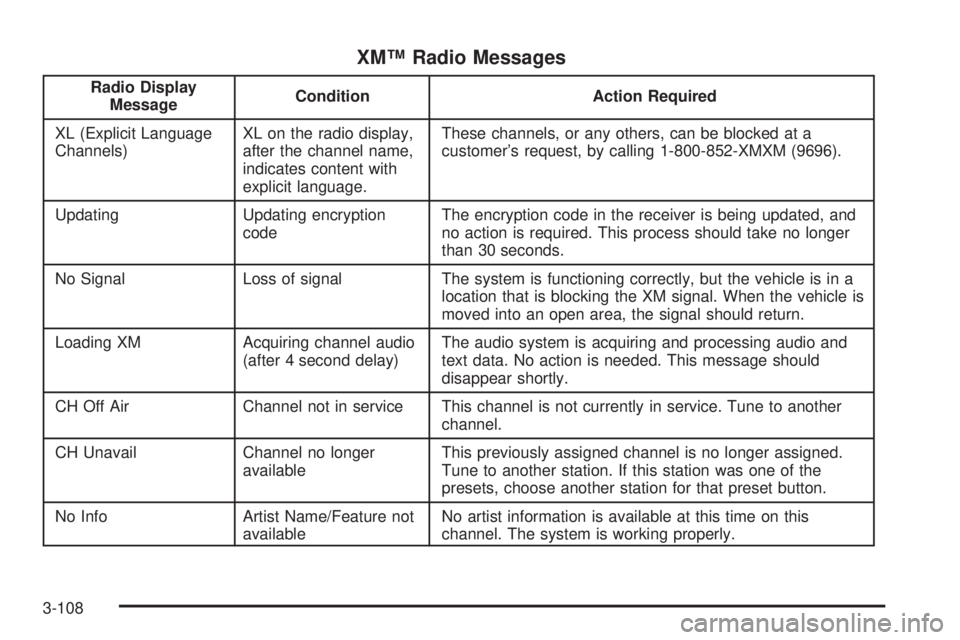
XM™ Radio Messages
Radio Display
MessageCondition Action Required
XL (Explicit Language
Channels)XL on the radio display,
after the channel name,
indicates content with
explicit language.These channels, or any others, can be blocked at a
customer’s request, by calling 1-800-852-XMXM (9696).
Updating Updating encryption
codeThe encryption code in the receiver is being updated, and
no action is required. This process should take no longer
than 30 seconds.
No Signal Loss of signal The system is functioning correctly, but the vehicle is in a
location that is blocking the XM signal. When the vehicle is
moved into an open area, the signal should return.
Loading XM Acquiring channel audio
(after 4 second delay)The audio system is acquiring and processing audio and
text data. No action is needed. This message should
disappear shortly.
CH Off Air Channel not in service This channel is not currently in service. Tune to another
channel.
CH Unavail Channel no longer
availableThis previously assigned channel is no longer assigned.
Tune to another station. If this station was one of the
presets, choose another station for that preset button.
No Info Artist Name/Feature not
availableNo artist information is available at this time on this
channel. The system is working properly.
3-108
Page 326 of 480

California Fuel
If your vehicle is certied to meet California Emission
Standards (see the underhood emission control label), it
is designed to operate on fuels that meet California
specications. If this fuel is not available in states
adopting California emissions standards, your vehicle
will operate satisfactorily on fuels meeting federal
specications, but emission control system performance
may be affected. The malfunction indicator lamp may
turn on and your vehicle may fail a smog-check test. See
Malfunction Indicator Lamp on page 3-46. If this
occurs, return to your authorized GM dealer for
diagnosis. If it is determined that the condition is caused
by the type of fuel used, repairs may not be covered
by your warranty.
Additives
To provide cleaner air, all gasolines in the United States
are now required to contain additives that will help
prevent engine and fuel system deposits from forming,
allowing your emission control system to work properly.
In most cases, you should not have to add anything to
your fuel. However, some gasolines contain only the
minimum amount of additive required to meet U.S.
Environmental Protection Agency regulations. General
Motors recommends that you buy gasolines that are
advertised to help keep fuel injectors and intake valves
clean. If your vehicle experiences problems due to dirty
injectors or valves, try a different brand of gasoline. Also,
your GM dealer has additives that will help correct and
prevent most deposit-related problems.
5-6
Page 341 of 480

Used oil can be a threat to the environment. If you
change your own oil, be sure to drain all the oil from the
lter before disposal. Never dispose of oil by putting it in
the trash, pouring it on the ground, into sewers, or into
streams or bodies of water. Instead, recycle it by taking it
to a place that collects used oil. If you have a problem
properly disposing of your used oil, ask your dealer, a
service station or a local recycling center for help.
Engine Air Cleaner/Filter
SeeEngine Compartment Overview on page 5-12for
the location of the engine air cleaner/lter.
When to Inspect the Engine Air
Cleaner/Filter
Inspect the air cleaner/lter at the MaintenanceII
intervals and replace at the rst oil change after
50,000 miles (83 000 km). SeeScheduled Maintenance
on page 6-4for more information. If you are driving
in dusty/dirty conditions, inspect the lter at each engine
oil change.
How to Inspect the Engine Air
Cleaner/Filter
To inspect the air cleaner/lter, remove the lter from
the vehicle and lightly shake the lter to release
loose dust and dirt. If the lter remains caked with dirt, a
new lter is required.
To inspect or replace the air cleaner/lter, do the
following:
1. Remove the two clamps on the duct.
2. Remove the duct.
3400 V6 engine shown, 3.6 L V6 engine similar
5-21
Page 342 of 480

3. Unlatch the two hooks on top of the engine air
cleaner/lter housing.
4. Inspect or replace the engine air cleaner/lter.
5. Align the tabs located on the bottom of the panel
with the slots at the bottom of the housing.
6. Latch the hooks to secure the panel in place. If the
panel moves easily, check that the tabs are seated
correctly in the slots.
7. Put the duct back on and reinstall the clamps.
{CAUTION:
Operating the engine with the air cleaner/lter
off can cause you or others to be burned. The
air cleaner not only cleans the air; it helps to
stop ame if the engine backres. If it is not
there and the engine backres, you could be
burned. Do not drive with it off, and be
careful working on the engine with the air
cleaner/lter off.Notice:If the air cleaner/lter is off, a backre can
cause a damaging engine re. And, dirt can
easily get into your engine, which will damage it.
Always have the air cleaner/lter in place when you
are driving.
Automatic Transaxle Fluid
When to Check and Change Automatic
Transaxle Fluid
A good time to check your automatic transaxle uid
level is when the engine oil is changed.
Change both the uid and lter every 50,000 miles
(83 000 km) if the vehicle is mainly driven under one or
more of these conditions:
In heavy city traffic where the outside temperature
regularly reaches 90°F (32°C) or higher.
In hilly or mountainous terrain.
When doing frequent trailer towing.
Uses such as found in taxi, police or delivery
service.
If you do not use your vehicle under any of these
conditions, change the uid and lter at 100,000 miles
(166 000 km). SeeScheduled Maintenance on page 6-4
for more information.
5-22
Page 349 of 480
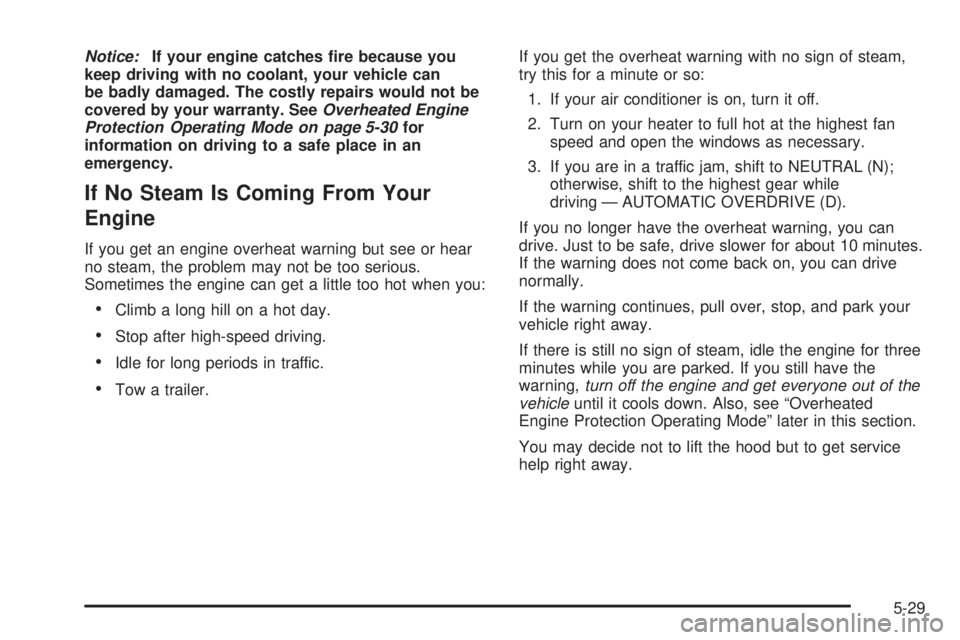
Notice:If your engine catches re because you
keep driving with no coolant, your vehicle can
be badly damaged. The costly repairs would not be
covered by your warranty. SeeOverheated Engine
Protection Operating Mode on page 5-30for
information on driving to a safe place in an
emergency.
If No Steam Is Coming From Your
Engine
If you get an engine overheat warning but see or hear
no steam, the problem may not be too serious.
Sometimes the engine can get a little too hot when you:
Climb a long hill on a hot day.
Stop after high-speed driving.
Idle for long periods in traffic.
Tow a trailer.If you get the overheat warning with no sign of steam,
try this for a minute or so:
1. If your air conditioner is on, turn it off.
2. Turn on your heater to full hot at the highest fan
speed and open the windows as necessary.
3. If you are in a traffic jam, shift to NEUTRAL (N);
otherwise, shift to the highest gear while
driving — AUTOMATIC OVERDRIVE (D).
If you no longer have the overheat warning, you can
drive. Just to be safe, drive slower for about 10 minutes.
If the warning does not come back on, you can drive
normally.
If the warning continues, pull over, stop, and park your
vehicle right away.
If there is still no sign of steam, idle the engine for three
minutes while you are parked. If you still have the
warning,turn off the engine and get everyone out of the
vehicleuntil it cools down. Also, see “Overheated
Engine Protection Operating Mode” later in this section.
You may decide not to lift the hood but to get service
help right away.
5-29
Page 350 of 480
Overheated Engine Protection
Operating Mode
This emergency operating mode allows your vehicle to
be driven to a safe place in an emergency situation.
If an overheated engine condition exists, an overheat
protection mode which alternates ring groups of
cylinders helps prevent engine damage. In this mode,
you will notice a signicant loss in power and engine
performance. If your vehicle is equipped with the
3.6L V6 engine, the reduced engine power message
along with the engine coolant temperature warning
message will come on to indicate the vehicle has
entered overheated engine protection operating mode.
The temperature gage will also indicate an overheat
condition exists. Driving extended miles (km) and/or
towing a trailer in the overheat protection mode should
be avoided.
Notice:After driving in the overheated engine
protection operating mode, to avoid engine damage,
allow the engine to cool before attempting any
repair. The engine oil will be severely degraded.
Repair the cause of coolant loss, change the oil and
reset the oil life system. SeeEngine Oil on
page 5-16.
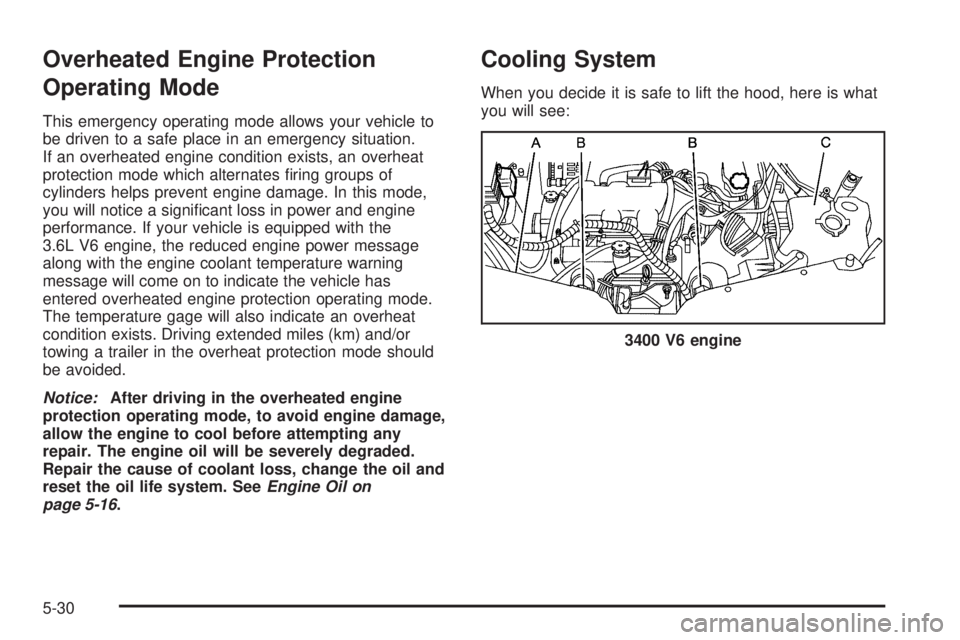
Cooling System
When you decide it is safe to lift the hood, here is what
you will see:
3400 V6 engine
5-30