battery BUICK RANDEZVOUS 2007 Owner's Guide
[x] Cancel search | Manufacturer: BUICK, Model Year: 2007, Model line: RANDEZVOUS, Model: BUICK RANDEZVOUS 2007Pages: 528, PDF Size: 2.99 MB
Page 285 of 528
Remote Control
To use the remote control, aim it at the transmitter
window below the video screen and press the
desired button. Direct sunlight or very bright light
may affect the ability of the transmitter to
receive signals from the remote control. If the
remote control does not seem to be working, the
batteries may need to be replaced. See “Battery
Replacement” later in this section. Objects blocking
the line of sight will affect the function of the
remote control.
Notice:Storing the remote control in a hot
area or in direct sunlight may damage it,
and the repairs will not be covered by your
warranty. Keep the remote control stored in a
cool, dry place.
To extend the life of the batteries, the remote
control does not have a press and hold feature.
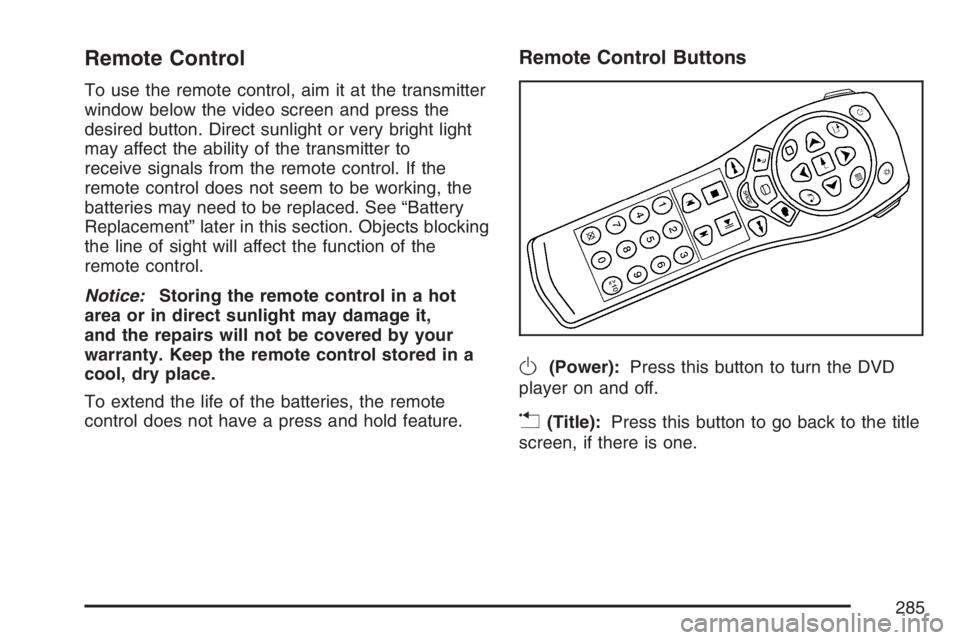
Remote Control Buttons
O(Power):Press this button to turn the DVD
player on and off.
v(Title):Press this button to go back to the title
screen, if there is one.
285
Page 288 of 528
Setup Menu
To access the setup menu, ensure that a DVD is
in the player and the video is stopped. Press
the main menu button. Once the menu is activated,
use the directional arrows and the enter button
to navigate the screen.
The setup menu allows the user to select default
preferences for Menu Language, Subtitle
Language, Audio Language, TV Aspect, TV Mode,
and Dynamic Range Compression.
Not all DVDs support all the feature defaults in the
setup menus. In the event a particular feature is
not supported, defaults will be provided by
the DVD media.
Exit the setup menu by pressing the return button
on the remote control or the DVD player. If
changes are made to the system setup defaults,
the disc will resume play from the beginning
and not where it previously left off.
Battery Replacement
To change the remote control batteries, do the
following:
1. Unclip the battery door located on the back of
the remote control.
2. Replace the two AA batteries in the
compartment. Make sure that they are
installed correctly, using the diagram on the
inside of the battery compartment.
3. Close the battery door.
If the remote control is to be stored for a long
period of time, remove the batteries and keep them
in a cool, dry place.
288
Page 296 of 528

Theft-Deterrent Feature
THEFTLOCK®is designed to discourage theft of
your vehicle’s radio. It works by using a secret
code to disable all radio functions whenever
battery power is removed and the radio is placed
in a different vehicle. This feature requires no
user input to be activated. The radio is
automatically armed when it is put into the vehicle
for the rst time.
When the ignition is turned off, the blinking red
light indicates that THEFTLOCK
®is armed.
If THEFTLOCK
®is activated, the radio will not
operate if stolen. The radio will display LOCKED
and a red LED indicator light will come on
above the key symbol to indicate a locked
condition. If this occurs, the radio will need to be
returned to your GM dealer.
Audio Steering Wheel Controls
If your vehicle has this feature, some audio
controls can be adjusted at the steering wheel.
They include the following:
SOURCE:When listening to the radio, press this
button to play a cassette tape, CD, or a DVD
(if equipped). If a cassette tape, and CD, and/or
DVD are loaded, the system will go to the
tape play rst. The inactive tape, CD, or DVD will
remain safely inside the player for future
listening.
MUTE:Press this button to silence the system.
Press it again, or any other radio button, to turn the
sound on.
296
Page 330 of 528

You can run the engine to keep warm, but be
careful.
{CAUTION:
Snow can trap exhaust gases under your
vehicle. This can cause deadly CO
(carbon monoxide) gas to get inside. CO
could overcome you and kill you. You
cannot see it or smell it, so you might not
know it is in your vehicle. Clear away
snow from around the base of your
vehicle, especially any that is blocking
your exhaust pipe. And check around
again from time to time to be sure snow
does not collect there.
Open a window just a little on the side of
the vehicle that is away from the wind.
This will help keep CO out.
Run your engine only as long as you must. This
saves fuel. When you run the engine, make it go a
little faster than just idle. That is, push the
accelerator slightly. This uses less fuel for the
heat that you get and it keeps the battery charged.
330
Page 331 of 528

You will need a well-charged battery to restart the
vehicle, and possibly for signaling later on with
your headlamps. Let the heater run for a while.
Then, shut the engine off and close the window
almost all the way to preserve the heat. Start
the engine again and repeat this only when you
feel really uncomfortable from the cold. But do it as
little as possible. Preserve the fuel as long as
you can. To help keep warm, you can get out of
the vehicle and do some fairly vigorous exercises
every half hour or so until help comes.
If Your Vehicle is Stuck in Sand,
Mud, Ice, or Snow
In order to free your vehicle when it is stuck, you
will need to spin the wheels, but you do not
want to spin your wheels too fast. The method
known as rocking can help you get out when you
are stuck, but you must use caution.
{CAUTION:
If you let your vehicle’s tires spin at high
speed, they can explode, and you or
others could be injured. And, the
transaxle or other parts of the vehicle can
overheat. That could cause an engine
compartment re or other damage. When
you are stuck, spin the wheels as little as
possible. Do not spin the wheels above
35 mph (55 km/h) as shown on the
speedometer.
Notice:Spinning the wheels can destroy parts
of your vehicle as well as the tires. If you
spin the wheels too fast while shifting
the transaxle back and forth, you can destroy
the transaxle. SeeRocking Your Vehicle to
Get It Out on page 332.
For information about using tire chains on your
vehicle, seeTire Chains on page 424.
331
Page 351 of 528
Service........................................................ 354
Accessories and Modications................... 354
California Proposition 65 Warning.............. 355
Doing Your Own Service Work.................. 355
Adding Equipment to the Outside of Your
Vehicle................................................... 356
Fuel............................................................. 356
Gasoline Octane........................................ 356
Gasoline Specications.............................. 356
California Fuel........................................... 357
Additives................................................... 357
Fuels in Foreign Countries........................ 358
Filling the Tank......................................... 359
Filling a Portable Fuel Container............... 361
Checking Things Under the Hood.............. 362
Hood Release........................................... 363
Engine Compartment Overview.................. 364
Engine Oil................................................. 365
Engine Oil Life System.............................. 368
Engine Air Cleaner/Filter............................ 370Automatic Transaxle Fluid......................... 372
Engine Coolant.......................................... 375
Radiator Pressure Cap.............................. 378
Engine Overheating................................... 378
Overheated Engine Protection
Operating Mode..................................... 380
Cooling System......................................... 381
Power Steering Fluid ................................. 387
Windshield Washer Fluid........................... 388
Brakes...................................................... 389
Battery...................................................... 393
Jump Starting............................................ 394
Bulb Replacement....................................... 399
Halogen Bulbs........................................... 399
Headlamps, Front Turn Signal,
Sidemarker, and Parking Lamps............. 399
Taillamps, Turn Signal, and Stoplamps...... 401
Taillamps and Back-Up Lamps.................. 402
Replacement Bulbs................................... 404
Windshield Replacement............................ 404
Section 5 Service and Appearance Care
351
Page 393 of 528
Battery
Your vehicle has a maintenance free battery.
When it is time for a new battery, get one that has
the replacement number shown on the original
battery’s label. We recommend an ACDelco
®
replacement battery. SeeEngine Compartment
Overview on page 364for battery location.
Warning:Battery posts, terminals, and related
accessories contain lead and lead compounds,
chemicals known to the State of California
to cause cancer and reproductive harm. Wash
hands after handling.
Vehicle Storage
If you are not going to drive your vehicle for 25 days
or more, remove the black, negative (−) cable from
the battery. This will help keep your battery from
running down.
{CAUTION:
Batteries have acid that can burn you and
gas that can explode. You can be badly
hurt if you are not careful. SeeJump
Starting on page 394for tips on working
around a battery without getting hurt.
Also, for your audio system, seeTheft-Deterrent
Feature on page 296.
393
Page 394 of 528

Jump Starting
If your vehicle’s battery has run down, you may
want to use another vehicle and some jumper
cables to start your vehicle. Be sure to use
the following steps to do it safely.
{CAUTION:
Batteries can hurt you. They can be
dangerous because:
They contain acid that can burn you.
They contain gas that can explode or
ignite.
They contain enough electricity to
burn you.
If you do not follow these steps exactly,
some or all of these things can hurt you.
Notice:Ignoring these steps could result in
costly damage to your vehicle that would
not be covered by your warranty.Trying to start your vehicle by pushing or
pulling it will not work, and it could damage
your vehicle.
1. Check the other vehicle. It must have a
12-volt battery with a negative ground system.
Notice:If the other vehicle’s system is not a
12-volt system with a negative ground, both
vehicles can be damaged. Only use vehicles
with 12-volt systems with negative grounds to
jump start your vehicle.
2. Get the vehicles close enough so the jumper
cables can reach, but be sure the vehicles are
not touching each other. If they are, it could
cause a ground connection you do not want.
You would not be able to start your vehicle, and
the bad grounding could damage the electrical
systems.
To avoid the possibility of the vehicles rolling,
set the parking brake rmly on both vehicles
involved in the jump starting procedure. Put an
automatic transaxle in PARK (P) or a manual
transaxle in NEUTRAL before setting the
parking brake.
394
Page 395 of 528

Notice:If you leave your radio or other
accessories on during the jump starting
procedure, they could be damaged. The repairs
would not be covered by your warranty. Always
turn off your radio and other accessories when
jump starting your vehicle.
3. Turn off the ignition on both vehicles. Unplug
unnecessary accessories plugged into the
cigarette lighter or the accessory power
outlet(s). Turn off the radios and all lamps that
are not needed. This will avoid sparks and help
save both batteries. And it could save the radio!
4. Open the hood on the other vehicle and locate
the positive (+) and negative (−) terminal
locations on that vehicle.
You will not need to access your battery for
jump starting. Your vehicle has a remote
positive (+) jump starting terminal for that
purpose. The terminal is located under a
tethered cap at the front of the underhood fuse
block. SeeEngine Compartment Overview on
page 364for more information on location.Squeeze the tabs and
swing the cap out of the
way to access the
remote positive (+)
terminal.
You should always use the remote positive (+)
terminal instead of the positive (+) terminal
on the battery.
{CAUTION:
An electric fan can start up even when the
engine is not running and can injure you.
Keep hands, clothing and tools away from
any underhood electric fan.
3.5L V6 Engine
395
Page 396 of 528

{CAUTION:
Using a match near a battery can cause
battery gas to explode. People have been
hurt doing this, and some have been
blinded. Use a ashlight if you need
more light.
Be sure the battery has enough water. You
do not need to add water to the battery
installed in your new vehicle. But if a
battery has ller caps, be sure the right
amount of uid is there. If it is low, add
water to take care of that rst. If you do
not, explosive gas could be present.
Battery uid contains acid that can
burn you. Do not get it on you. If you
accidentally get it in your eyes or on your
skin, ush the place with water and get
medical help immediately.
{CAUTION:
Fans or other moving engine parts can
injure you badly. Keep your hands away
from moving parts once the engine is
running.
5. Check that the jumper cables do not have
loose or missing insulation. If they do, you
could get a shock. The vehicles could
be damaged too.
Before you connect the cables, here are some
basic things you should know. Positive (+) will
go to positive (+) or to a remote positive (+)
terminal if the vehicle has one. Negative (−) will
go to a heavy, unpainted metal engine part or to
a remote negative (−) terminal if the vehicle
has one.
396