battery BUICK RANDEZVOUS 2007 User Guide
[x] Cancel search | Manufacturer: BUICK, Model Year: 2007, Model line: RANDEZVOUS, Model: BUICK RANDEZVOUS 2007Pages: 528, PDF Size: 2.99 MB
Page 171 of 528

Instrument Panel Overview........................ 174
Hazard Warning Flashers.......................... 176
Other Warning Devices............................. 176
Horn.......................................................... 176
Tilt Wheel.................................................. 177
Turn Signal/Multifunction Lever.................. 177
Turn and Lane-Change Signals................. 178
Headlamp High/Low-Beam Changer.......... 179
Flash-to-Pass............................................ 179
Windshield Wipers..................................... 179
Windshield Washer.................................... 180
Rear Window Wiper/Washer...................... 180
Cruise Control........................................... 181
Exterior Lamps.......................................... 185
Daytime Running Lamps (DRL)................. 186
Automatic Headlamp System..................... 187
Fog Lamps................................................ 187
Interior Lamps........................................... 188
Instrument Panel Brightness...................... 188
Interior Lamps Control............................... 188
Headlamp Exit Delay................................. 189
Entry Lighting............................................ 189
Delayed Lighting........................................ 190
Exit Lighting.............................................. 190
Perimeter Lighting..................................... 191Front Reading Lamps................................ 191
Rear Reading Lamps................................ 191
Cargo Lamp.............................................. 192
Battery Run-Down Protection..................... 192
Instrument Panel Switchbank..................... 192
Head-Up Display (HUD)............................ 193
Ultrasonic Rear Parking Assist (URPA)...... 196
Accessory Power Outlet(s)........................ 199
Ashtray(s) and Cigarette Lighter................ 200
Climate Controls......................................... 200
Climate Control System............................. 200
Dual Climate Control System..................... 203
Dual Automatic Climate Control System.... 206
Outlet Adjustment...................................... 210
Warning Lights, Gages, and Indicators..... 211
Instrument Panel Cluster........................... 212
Speedometer and Odometer...................... 213
Trip Odometer........................................... 213
Tachometer............................................... 214
Safety Belt Reminder Light........................ 215
Airbag Readiness Light............................. 215
Passenger Airbag Status Indicator............. 217
Brake System Warning Light..................... 219
Anti-Lock Brake System Warning Light...... 220
Section 3 Instrument Panel
171
Page 172 of 528

Traction Control System (TCS) Warning
Light...................................................... 220
Engine Coolant Temperature Gage............ 221
Malfunction Indicator Lamp........................ 222
Fuel Gage................................................. 225
Message Center.......................................... 225
Passenger Seatbelt Reminder Message..... 226
Service Traction System Warning
Message................................................ 226
Traction Active Message........................... 227
Engine Coolant Temperature Warning
Message................................................ 227
Charging System Indicator Message.......... 228
Reduced Engine Power Message.............. 228
Low Oil Pressure Message........................ 229
Change Engine Oil Message..................... 230
Door Ajar Warning Message...................... 230
Rear Hatch Ajar Warning Message............ 230
Check Gas Cap Message......................... 231
PASS-Key
®III Security Message............... 231
Low Washer Fluid Warning Message......... 231
Low Fuel Warning Message...................... 232
Low Brake Fluid Warning Message........... 232
Service Vehicle Soon Message................. 233Program Mode Message........................... 233
Remote Keyless Entry Transmitter Battery
Low Warning Message........................... 234
Parking Lamp Warning Message............... 234
Highbeam Out Warning Message.............. 235
Driver Information Center (DIC).................. 235
DIC Controls and Displays........................ 236
DIC Compass............................................ 238
DIC Vehicle Personalization....................... 240
Audio System(s)......................................... 250
Setting the Time........................................ 252
Radio with CD........................................... 252
Radio with Six-Disc CD............................. 262
XM Radio Messages................................. 276
Navigation/Radio System........................... 277
Rear Seat Entertainment System............... 277
Rear Seat Audio (RSA)............................. 293
Theft-Deterrent Feature............................. 296
Audio Steering Wheel Controls.................. 296
Radio Reception........................................ 297
Care of Your CDs and DVDs.................... 298
Care of the CD and DVD Player............... 298
Fixed Mast Antenna.................................. 299
XM™ Satellite Radio Antenna System....... 299
Section 3 Instrument Panel
172
Page 192 of 528
Cargo Lamp
The cargo lamp is located in the rear of the
vehicle, above the liftgate opening. It comes on
automatically each time you open the doors, if the
interior lamp control is in the DOOR position.
There are two reading lamps located on the cargo
lamp. To turn either reading lamp on or off,
press the button located next to the lamp.
Battery Run-Down Protection
Your vehicle has a feature to help prevent you
from draining the battery, in case you accidentally
leave the interior or exterior lamps on. If the
interior lamps are left on while the ignition is in
OFF, they will automatically turn off after
10 minutes. If the exterior lamps are left on while
the ignition is in OFF with all doors and the
liftgate closed, they will automatically turn off after
10 minutes.
If your vehicle has less than 14 miles (24 km) on
the odometer, the battery saver will turn off
the lamps after only three minutes.If the interior lamps are turned off as a result of
the battery saver feature, they may be turned back
on by turning the interior lamp control to OFF
and then back to ON. The battery saver will not
turn the interior lamps off automatically after doing
this. They will have to be turned off manually.
Instrument Panel Switchbank
There is an instrument panel switchbank located
below the climate controls. It contains switches
or blanks that will vary with the options that are on
your vehicle.
The switches you may have are:
Rear Window Wiper/Washer. SeeWindshield
Washer on page 180.
Traction Disable. SeeTraction Control System
(TCS) on page 310.
Park Aid Disable. SeeUltrasonic Rear Parking
Assist (URPA) on page 196.
Heated Seats. SeeHeated Seats on page 11.
192
Page 199 of 528

Accessory Power Outlet(s)
With accessory power outlets you can plug in
electrical equipment such as a cellular telephone
or CB radio.
There is one front power outlet/cigarette lighter
located on the oor console in the cell phone
storage compartment.
There are also two rear power outlets. One is
located in the rear of the oor console below the
vents. The other is located in the rear of the vehicle
on the driver’s side behind the access door.
Pull the cover down to use an accessory power
outlet. When not in use, always cover the
accessory power outlets with the protective cap.
Notice:Leaving electrical equipment on
for extended periods will drain the battery.
Always turn off electrical equipment when not
in use and do not plug in equipment that
exceeds the maximum amperage rating of
20 amperes.
Certain electrical accessories may not be
compatible with the accessory power outlet and
could result in blown vehicle or adapter fuses.If you experience a problem, see your dealer for
additional information on the accessory power
outlets.
Notice:Adding any electrical equipment to
your vehicle may damage it or keep other
components from working as they should.
The repairs would not be covered by your
warranty. Do not use equipment exceeding
maximum amperage rating of 20 amperes.
Check with your dealer before adding electrical
equipment.
When adding electrical equipment, be sure to
follow the proper installation instructions included
with the equipment.
Notice:Improper use of the power outlet can
cause damage not covered by your warranty.
Do not hang any type of accessory or
accessory bracket from the plug because the
power outlets are designed for accessory
power plugs only.
199
Page 225 of 528

This can happen if you have recently replaced your
battery or if your battery has run down. The
diagnostic system is designed to evaluate critical
emission control systems during normal driving.
This may take several days of routine driving. If you
have done this and your vehicle still does not pass
the inspection for lack of OBD system readiness,
your dealer can prepare the vehicle for inspection.
Fuel Gage
When the indicator nears empty, you still have a
little fuel left, but you should get more soon.If your fuel is low, the warning message in the
message center will come on. SeeLow Fuel
Warning Message on page 232.
Your fuel gage tells you about how much fuel you
have left when the ignition is on.
Here are four things that some owners ask about.
All these things are normal and do not indicate
that anything is wrong with the fuel gage.
At the gas station, the gas pump shuts off
before the gage reads full.
It takes a little more (or less) fuel to ll up
than the gage reads. For example, the
gage reads half full, but it took more (or less)
than half of the tank’s capacity to ll it.
The gage pointer may move while cornering,
braking or speeding up.
The gage may not indicate empty when the
ignition is turned off.
Message Center
The message center is located at the top of the
instrument panel cluster in between the tachometer
and speedometer. It gives you important safety
and maintenance facts.
United StatesCanada
225
Page 228 of 528

Charging System Indicator Message
The charging system
battery symbol will
come on in the message
center when you turn
on the ignition as
a check to show you it
is working.
It will remain on as long as the engine is not
running. It should go out once the engine
is running. If it stays on, or comes on while you
are driving, you may have a problem with the
charging system. It could indicate that you have
problems with a generator drive belt, or another
electrical problem. Have it checked right away.
Driving while this indicator appears in the message
center could drain your battery.
If you must drive a short distance with the
message on, be certain to turn off all your
accessories, such as the radio and air conditioner.
Reduced Engine Power Message
If your vehicle has this feature, this message will
appear in the message center when a noticeable
reduction in the vehicle’s engine performance
is detected. This message will also appear when
your vehicle is in overheated engine protection
operating mode. SeeEngine Overheating on
page 378for more information.
If this message comes on and stays on, see your
dealer.
United StatesCanada
228
Page 234 of 528
Remote Keyless Entry Transmitter
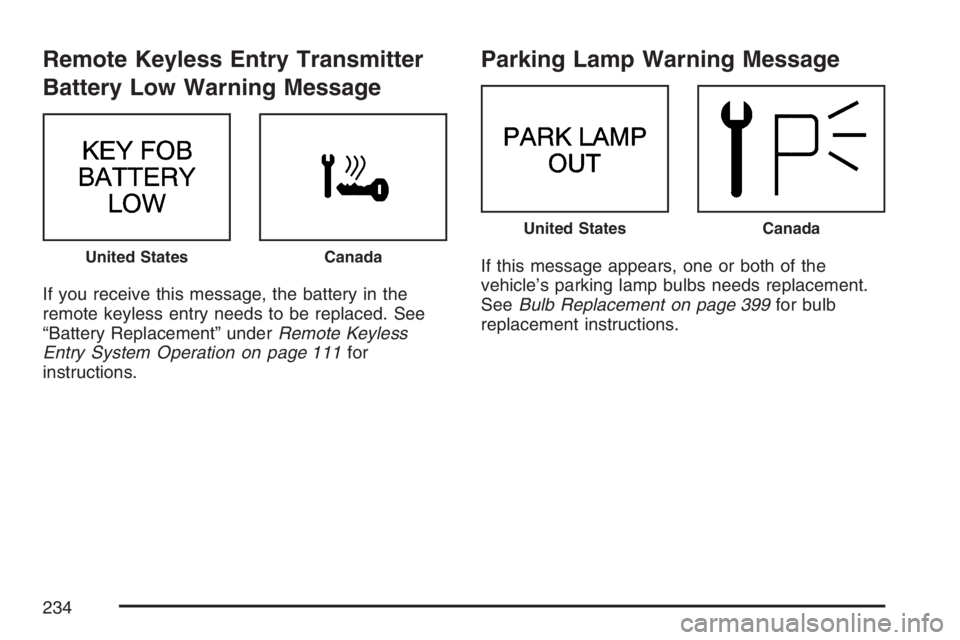
Battery Low Warning Message
If you receive this message, the battery in the
remote keyless entry needs to be replaced. See
“Battery Replacement” underRemote Keyless
Entry System Operation on page 111for
instructions.
Parking Lamp Warning Message
If this message appears, one or both of the
vehicle’s parking lamp bulbs needs replacement.
SeeBulb Replacement on page 399for bulb
replacement instructions.United StatesCanada
United StatesCanada
234
Page 240 of 528

DIC Vehicle Personalization
The DIC is used to program the choices of
two drivers. The drivers are recognized as
DRIVER 1 or DRIVER 2 in the DIC display. You
will let the DIC know which driver you are by using
your Remote Keyless Entry (RKE) transmitter.
Each RKE transmitter was pre-programmed
to belong to DRIVER 1 or DRIVER 2 and the
corresponding numbers, 1 or 2, appear on
the back of the transmitters. Each transmitter may
be programmed differently for each driver’s
preferences (lights, doors, horn, or activate the
programmed radio stations for driver 1 or driver 2)
using your RKE transmitter.
After you press the LOCK button on your RKE
transmitter and the ignition key is in ON, the DIC
will display the identied driver number. The
vehicle will also recall the vehicle customization
features that were last programmed to correspond
to your RKE transmitter.
If you unlock your vehicle using your key instead
of your RKE transmitter, the DIC will not change
drivers and your vehicle will recall the information
from the last transmitter used.If your vehicle does not have a DIC, you do not
have available the vehicle customization features
using the RKE transmitter.
Entering Programming Mode
To program features, your vehicle must be in the
programming mode. Do the following:
1. Turn the ignition key to ON with the vehicle in
PARK (P).
To avoid excessive drain on the battery, it is
recommended that the headlamps are
turned off.
2. Press and release the MODE button, scrolling
through the DIC messages, until
PERSONALIZATION PRESS SET TO BEGIN
is displayed.
3. Press the SET button and TO SELECT
DRIVER PRESS REMOTE LOCK will appear.
Press the LOCK button on the Remote Keyless
Entry (RKE) transmitter. This identies which
RKE transmitter is being programmed by
displaying PERSONALIZATION FOR
DRIVER 1 or DRIVER 2.
240
Page 278 of 528
Parental Control
This button is located behind the video screen,
next to the auxiliary jacks, near the driver of
the vehicle. Press this button while a DVD or CD
is playing to freeze the video and mute the
audio. The video screen will display Parental
Control On and the power indicator light on the
DVD player will ash. It will also disable all
other button operations from the remote control
and the DVD player, with the exception of the eject
button. The driver will then be able to gain the
attention of the rear seat passengers. Press this
button again to restore normal operation of
the DVD player and remote control.
This button may also be used to turn the DVD
player power on and automatically resume play if
the vehicle is in an enabled power mode.
Before You Drive
The RSE is designed for rear seat passengers
only. The driver cannot safely view the video
screen while driving and should not try to do so.The DVD system is designed to be inoperable when
the vehicle is exposed to extremely low or high
temperatures, in order to protect the system from
damage. Operate the DVD system under normal or
comfortable cabin temperature ranges.
Headphones
The RSE system includes two sets of wireless
headphones.
The wireless headphones have an ON/OFF switch
and a volume control. To use the headphones,
turn the switch to ON. An indicator light on
the headphones will illuminate. If the light does not
illuminate, the batteries may need to be replaced.
See “Battery Replacement” later in this section
for more information. Switch the headphones
to OFF when not in use.
The transmitters are located below the overhead
RSE control panel. The headphones will shut
off automatically to save the battery power if the
DVD system is shut off, or if the headphones
are out of range of the transmitters for more than
three minutes. If you move too far forward or
step out of the vehicle, the headphones will lose
the audio signal.
278
Page 280 of 528
Battery Replacement
To change the batteries, do the following:
1. Loosen the screw on the battery compartment
door located on the left side of the headphone
earpiece.
2. Replace the two AAA batteries in the
compartment. Make sure that they are
installed correctly using the diagram on the
inside of the battery compartment.
3. Tighten the screw on the battery
compartment door.
If the headphones are to be stored for a long
period of time, remove the batteries, and keep
them in a cool, dry place.
Stereo RCA Jacks
The RCA jacks are located behind the video
screen on the DVD console. The RCA jacks allow
audio and video signals to be connected from
an auxiliary device such as a camcorder or a video
game unit to the RSE. The yellow RCA jack is
used for video inputs, the red RCA jack for right
audio inputs, and the white RCA jack for left audio
inputs. The system requires standard RCA
cables, not included, to connect the auxiliary
device to the RCA jacks. Refer to the
manufacturer’s instructions for proper usage.
To use the auxiliary audio and video inputs,
connect an external auxiliary device such as a
camcorder to the RCA jacks and turn on both the
auxiliary device power and the power on the
front of the RSE player.
If a disc is present when the RSE power is turned
on, the player will automatically begin playing
the disc and the user will need to press the SRCE
button on the remote control or on the DVD
player faceplate to switch the system between the
DVD player and the auxiliary device. See “DVD
Player” and “Remote Control” later in this section
for more information.
280