stop start BUICK REGAL 1997 Owners Manual
[x] Cancel search | Manufacturer: BUICK, Model Year: 1997, Model line: REGAL, Model: BUICK REGAL 1997Pages: 422, PDF Size: 21.34 MB
Page 94 of 422
New Vehicle “Break-In” Ignition
Positions
NOTICE:
Your modern Buick doesn’t need an elaborate
“break-in.” But
it will perform better in the long
run
if you follow these guidelines:
0
0
0
Don’t drive at any one speed -- fast or
slow
-- for the first 500 miles (805 km).
Don’t make full-throttle starts.
Avoid making hard stops for the first
200 miles (322 km) or so. During this time
your new brake linings aren’t yet broken
in. Hard stops with new linings can mean
premature wear and earlier replacement.
Follow this breaking-in guideline every
time
you get new brake linings.
Don’t tow a trailer during break-in. See
“Towing a Trailer”
in the Index for more
information.
A 1.
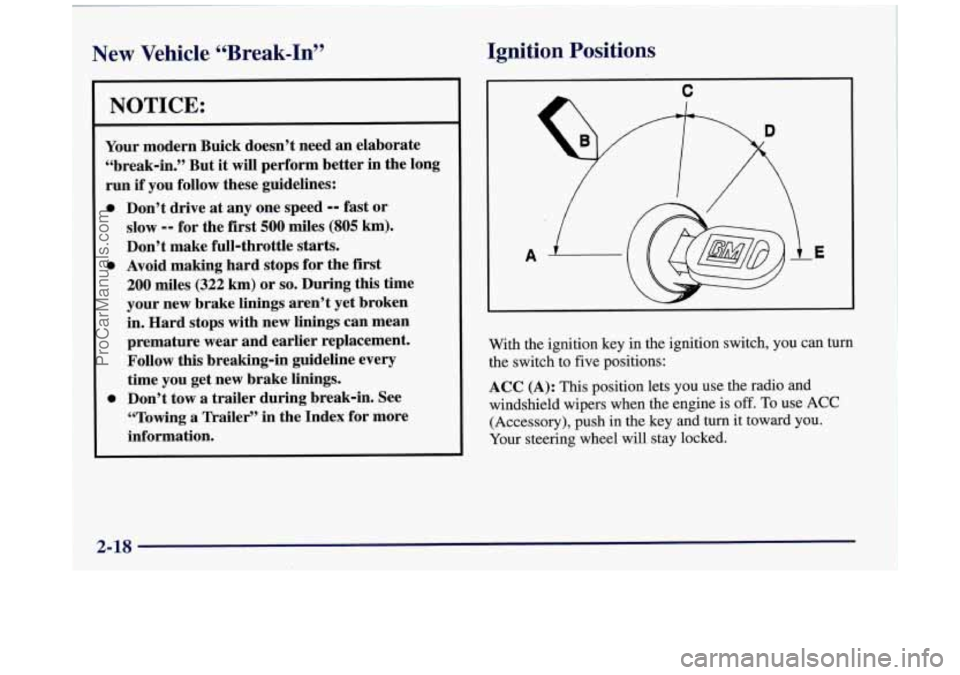
With the ignition key in the ignition switch, you can turn
the switch to five positions:
ACC (A): This position lets you use the radio and
windshield wipers when the engine is
off. To use ACC
(Accessory), push in the key and turn it toward you.
Your steering wheel will stay locked.
2-18
ProCarManuals.com
Page 96 of 422
Starting Your Engine
Move your shift lever to PARK (P) or NEUTRAL (N).
Your engine won’t start in any other position -- that’s a
safety feature. To restart when you’re already moving,
use NEUTRAL
(N) only.
NOTICE:
Don’t try to shift to PARK (P) if your Buick
is moving. If you do, you could damage the
transaxle. Shift to PARK
(P) only when your
vehicle
is stopped.
1. Without pushing the accelerator pedal, turn your
ignition key to START. When the engine starts, let
go of the key. The idle speed will go down as your
engine gets warm.
NOTICE:
I
Holding your key in START for longer than
15 seconds at a time will cause your battery to
be drained much sooner. And the excessive heat
can damage your starter motor.
.
2. If it doesn’t start right away, hold your key in
START for about three to five seconds at a time
until your engine starts. Wait about
15 seconds
between each try to help avoid draining your battery.
3. If your engine still won’t start (or starts but then
stops), it could be flooded with too much gasoline.
Try pushing your accelerator pedal all the way to
the floor and holding
it there as you hold the key in
START for about three seconds. If the vehicle starts
briefly but then stops again, do the same thing, but
this time keep the pedal down for five
or six seconds.
This clears
the extra gasoline from the engine.
After waiting about
15 seconds, repeat the normal
starting procedure.
ProCarManuals.com
Page 100 of 422
Make sure the shift lever is fully into PARK (P)
range before starting the engine. Yoyr Buick has a
brake-transaxle shift interlock. You must fully apply
your regular brakes before you can shift from PARK
(P)
when the ignition is in RUN. If you cannot shift out of
PARK (P), ease pressure on the shift lever by pushing it
all the way into PARK (P) while keeping the brake pedal
pushed down. Release the shift lever button. Then move the shift lever out of PARK
(P). See “Shifting Out of
PARK
(P)” in the Index.
REVERSE (R): Use this gear to back up.
NOTICE:
Shifting to REVERSE (R) while your vehicle is
moving forward could damage your transaxle.
Shift to REVERSE (R) only after your vehicle
is stopped.
To rock your vehicle back and forth to get out of snow,
ice or sand without damaging your transaxle, see
“Stuck: In Sand,
Mud, Ice or Snow” in the Index.
NEUTRAL (N): In this position, your engine doesn’t
connect with the wheels. To restart when you’re
already moving, use NEUTRAL (N) only.
Also, use
NEUTRAL (N) when your vehicle is being towed.
Shifting out of PARK (P) or NEUTRAL (N) while
your engine
is “racing” (running at high speed)
is dangerous. Unless your foot is firmly on the
brake pedal, your vehicle could move very
rapidly.
You could lose control and hit people
or objects. Don’t shift out of PARK
(P) or
NEUTRAL
(N) while your engine is racing.
NOTICE:
Damage to your transaxle caused by shifting out
of PARK
(P) or NEUTRAL (N) with the engine
racing isn’t covered
by your warranty.
2-24
ProCarManuals.com
Page 113 of 422
Windshield Wipers
-!
..
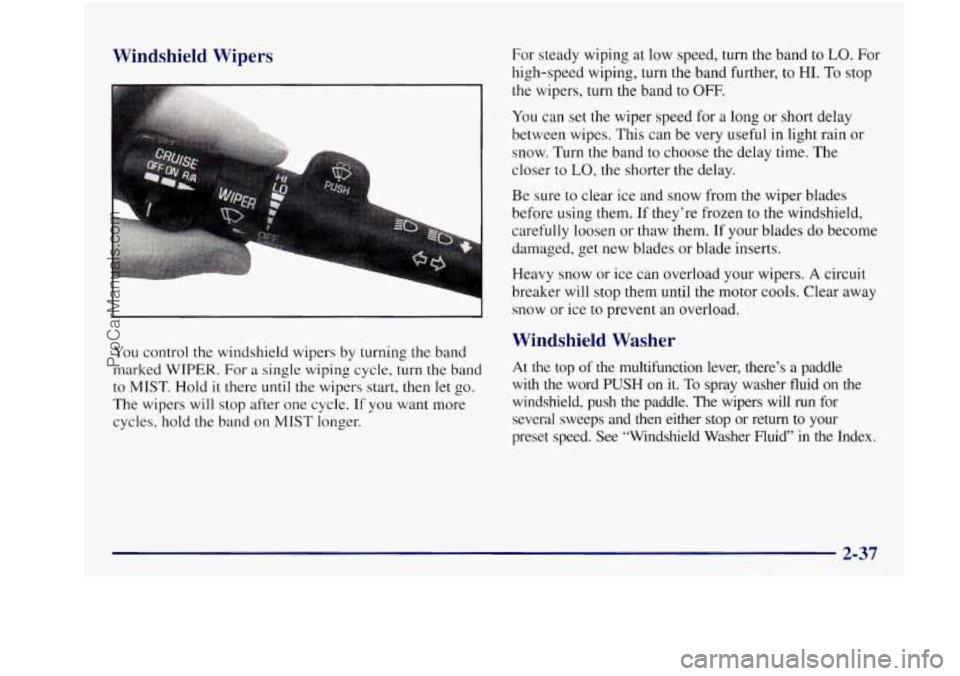
You control the windshield wipers by turning the band
marked
WIPER. For a single wiping cycle, turn the band
to
MIST. Hold it there until the wipers start, then let go.
The wipers will stop after one cycle.
If you want more
cycles, hold the band
on MIST longer. For steady wiping at low
speed, turn the band to
LO. For
high-speed wiping, turn the band further, to HI. To stop
the wipers, turn the band
to OFF.
You can set the wiper speed for a long or short delay
between wipes. This can be very useful in light rain or
snow. Turn the band
to choose the delay time. The
closer to
LO, the shorter the delay.
Be sure to clear ice and snow from the wiper blades
before using them, If they’re frozen to the windshield,
carefully loosen
or thaw them. If your blades do become
damaged, get new blades or blade inserts.
Heavy snow or ice can overload your wipers.
A circuit
breaker will stop them until the motor cools. Clear away
snow or ice to prevent an overload.
Windshield Washer
At the top of the multifunction lever, there’s a paddle
with the word PUSH on it. To spray washer fluid on the
windshield, push the paddle. The wipers will
run for
several sweeps and then either stop or return
to your
preset speed. See “Windshield Washer Fluid” in the Index.
ProCarManuals.com
Page 126 of 422
Pass-through Trunk (If Equipped) Convenience Net (If Equipped)
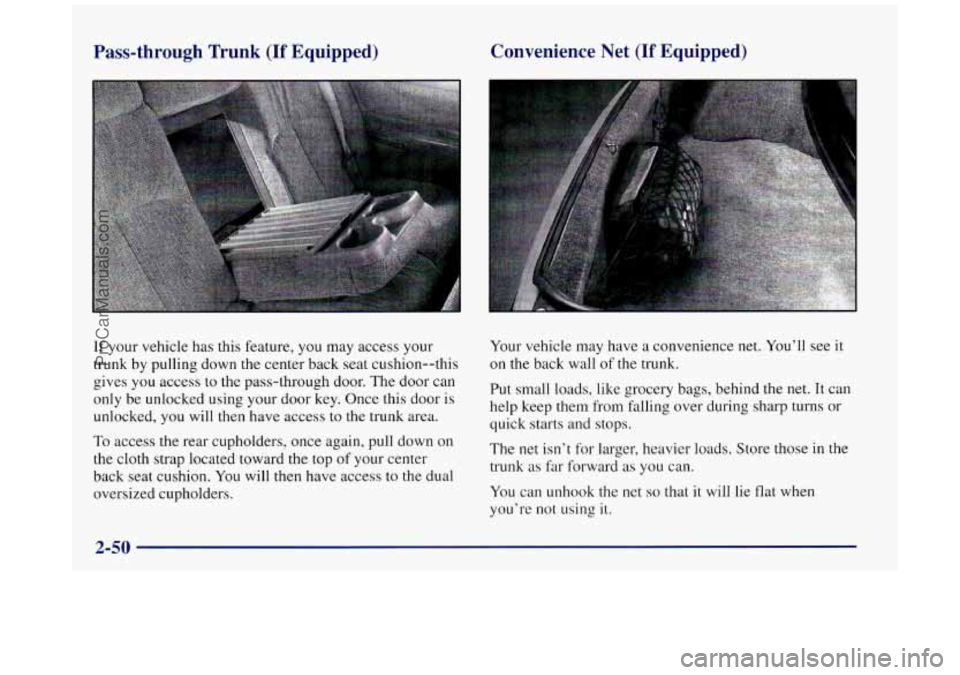
If your vehicle has this feature,
you may access your
trunk by pulling down the center back seat cushion--this
gives
you access to the pass-through door. The door can
only be unlocked using your door key. Once this door
is
unlocked, you will then have access to the trunk area.
To access
the rear cupholders, once again, pull down on
the cloth strap located toward the top
of your center
back seat cushion. You will then have access to the dual
oversized cupholders. Your
vehicle may have
a convenience net. You’ll see it
on the back wall of the trunk.
Put small loads, like grocery bags, behind
the net. It can
help keep them from falling over during sharp turns or
quick starts and stops.
The net isn’t for larger, heavier loads. Store those in the
trunk
as far forward as you can.
You can unhook the net
so that it will lie flat when
you’re
not using it.
2-50
ProCarManuals.com
Page 138 of 422
Anti-Lock Brake System Warning Light
ANTI -
LOCK
With the anti-lock brake
system, this light will
come
on when you start
your engine and it will
stay on for three seconds.
That’s normal.
If the light flashes when you’re driving, you don’t have
anti-lock brakes and there could be a problem with your
regular brakes. Pull off the road and stop carefully.
You
may notice that the pedal is harder to push. Or, the pedal
may go closer to the floor.
It may take longer to stop.
Have the vehicle towed for service. (See “Towing Your
Vehicle” in the Index.)
Your regular brake system may not be working
properly if the anti-lock brake system warning
light is flashing. Driving with the anti-lock
brake system warning light flashing can lead
to an accident. After you’ve pulled off the road
and stopped carefully, have the vehicle towed
for service.
I
If the anti-lock brake system warning light stays on
longer than normal after you’ve started your engine, turn
the ignition off. Or, if the light comes on and stays on
when you’re driving, stop as soon as possible and turn
the ignition off. Then start the engine again to reset the
system. If the light still stays on, or comes on again
while you’re driving, your Buick needs service. If the
light
is on but not flashing and the regular brake system
warning light isn’t on, you still have brakes, but you
don’t have anti-lock brakes.
The anti-lock brake system warning light should come
on briefly when
you turn the ignition key to RUN. If the
light doesn’t come
on then, have it fixed so it will be
ready to warn
you if there is a problem.
2-62
ProCarManuals.com
Page 143 of 422
Tire Pressure Monitor Light
LOW
TI RE
The tire pressure monitor
system can alert you to
a
large change in the pressure
in
one tire. The system
won’t alert you before you
drive that a tire is low or
flat. Each time you start
your Buick, you must drive
10 to
20 miles (15 to 30 km)
before the system will
work properly.
After you’ve driven
10 to 20 miles (15 to 30 km), the
LOW TIRE light will come on if the pressure in one tire
becomes at least 10 psi
(69 kPa) higher or lower than the
other three tires. The tire pressure monitor system
detects differences in tire rotation speeds that are caused
by changes in tire pressure. It will not alert you
if the
pressure in more than one tire is low or high or
if the
system is not calibrated properly.
The system can alert
you about a low tire
-- but it doesn’t measure tire
pressure, and it doesn’t replace normal tire maintenance.
See “Tires’’
in the Index.
When the LOW TIRE light comes
on, you should stop
as soon as you can and check all your tires for damage. (If
a tire
is flat, see “If a Tire Goes Flat” in the Index.)
Also, check the tire pressure in all four tires as soon
as
you can. (See “Inflation - Tire Pressure” in the Index.)
The
LOW TIRE light will
stay on until you turn off
the ignition or press the red
RESET button, which is
located inside your
instrument panel fuse block.
(It’s the first button in
the
top row of the fuse block.)
Don’t press the RESET button without first checking
and adjusting the pressure in all four tires.
If you press
the button when the tire pressure is incorrect,
the check
tire pressure system will not work properly
and may
not alert you when a tire is low.
Any time
you adjust the tire pressure, you’ll need to
calibrate the check tire pressure system.
You’ll also neea
to calibrate the system whenever you buy new tires,
have tires repaired or rotate your tires.
ProCarManuals.com
Page 146 of 422

NOTICE:
If you keep driving your vehicle with this light
on, after a while, your emission controls may not
work as well, your fuel economy may not be as
good and your engine may not run as smoothly.
This could lead
to costly repairs that may not be
covered by your warranty.
This light should come on, as a check to show you it is
working, when the ignition is on and the engine is not
running.
If the light doesn’t come on, have it repaired.
This light will also come on during a malfunction in one
of two ways:
0
0
Light Flashing -- A misfire condition has been
detected.
A misfire increases vehicle emissions and
may damage the emission control system on your
vehicle. Dealer or qualified service center diagnosis
and service is required.
Light On Steady -- An emission control system
malfunction has been detected on your vehicle.
Dealer or qualified service center diagnosis and
service may be required.
If the Light Is Flashing
The following may prevent more serious damage to
your vehicle:
Reducing vehicle speed.
0 Avoiding hard accelerations.
0 Avoiding steep uphill grades.
0 If you are towing a trailer, reduce the amount of
cargo being hauled as soon as it is possible.
If the light stops flashing and remains on steady, see “If
the Light Is On Steady” following.
If the light continues to flash, when
it is safe to do so,
stop the vehicle. Find a safe place to park your vehicle.
Turn the key off, wait at least 10 seconds and restart the
engine. If the light remains on steady, see “If the Light
Is On Steady” following. If the light is still flashing,
follow the previous steps, and drive the vehicle to your
dealer or qualified service center for service.
2-70
ProCarManuals.com
Page 172 of 422
PUSHBUTTONS: The six numbered pushbuttons let
you return to your favorite stations. You can set up to
18 stations (six AM, six FMl and six FM2). Just:
1. Turn the radio on.
2. Press AM-FM to select the band.
3. Tune in the desired station.
4. Press and hold one of the six numbered buttons. The
sound will mute. When it returns, release the button.
Whenever you press that numbered button, the
station you set will return.
5. Repeat the steps for each pushbutton.
P SCAN: Press this button to listen to each of your
preset stations for
a few seconds. The radio will go to
the first preset station, stop for
a few seconds, then go
on to the next preset station. Press P SCAN again to stop
scanning.
The radio will not stop at a preset if the station
is weak.
Setting the Tone
BASS: Press this knob lightly so it extends. Turn the
knob to increase or decrease bass.
TREB: Press this knob lightly so it extends. Turn the
knob to increase or decrease treble.
If a station is weak
or noisy, you may want to decrease the treble.
Push these knobs back into their stored positions when
you’re not using them.
Adjusting the Speakers
BAL: Turn the control behind the upper knob to move
the sound to the
left or right speakers. The middle
position balances the sound between the speakers.
FADE: Turn the control behind the lower knob to move
the sound to
the front or rear speakers. The middle
position balances the sound between the speakers.
Playing a Cassette Tape
The longer side with the tape visible should face to the
right.
If the ignition and the radio are on, the tape can be
inserted and will begin playing.
If you hear nothing or
hear a garbled sound, the tape may not be in squarely.
Press
EJECT to remove the tape and start over.
3-16
ProCarManuals.com
Page 181 of 422
E20: It is dirty, scratched or wet.
E20: There’s too much moisture in the air. (Wait
about an hour and try again.)
If any error occurs repeatedly or if an error can’t be
corrected, please contact your dealer. If your radio
displays an error number, write it down and provide it to
your dealer when reporting the problem.
PREV (1): Press this button to go to the start of the
current track if more than eight seconds have played.
If
you hold the button or press it more than once, the
player will continue moving back through the disc. The
sound will mute while seeking.
NEXT (2): Press this button to go to the next track. If
you hold the button or press it more than once, the
player will continue moving forward through
the disc.
The sound will mute while seeking.
The
SEEK down and up arrows will also find the
previous and
next selections on the disc.
44 (3): Press and hold this button to quickly reverse
within a track. You will hear sound.
.. (4): Press and hold this button to quickly advance
within a track.
You will hear sound.
RAND (6): Press this button to hear the tracks in
random, rather than sequential, order. Press RAND
again to turn off random play.
RECALL: Press this button to see which track is
playing. Press it again within five seconds
to see how
long
it has been playing. To change what is normally
shown
on the display (track or elapsed time), press the
button until
you see the display you want, then hold the
button until the display flashes.
AM-FM: Press this button to play the radio when a disc
is in the player.
SOURCE: Press this button to change to the disc
function when the radio is on. When a disc is inserted,
the disc will play until you press AM-FM. Then the disc
will stop playing and the radio will play. Press
SOURCE
again to play a disc again. CD PLAY will show on
the display.
EJECT: Press this button to remove the disc. The radio
will play.
If you turn
off the ignition or radio with a disc in the
player, it will stay in the player. When
you turn on the
ignition or system, the disc will start playing where
it
stopped, if it was the last-selected audio source. If you
leave a compact disc
in the player while listening to the
radio, it may become warm.
3-25
-.
_.
ProCarManuals.com