ignition BUICK REGAL 2004 Workshop Manual
[x] Cancel search | Manufacturer: BUICK, Model Year: 2004, Model line: REGAL, Model: BUICK REGAL 2004Pages: 354, PDF Size: 4.16 MB
Page 157 of 354
CLEAN PLAYER:If this message appears on the
display, the cassette tape player needs to be cleaned. It
will still play tapes, but you should clean it as soon as
possible to prevent damage to the tapes and player. See
Care of Your Cassette Tape Player on page 3-63.
If any error occurs repeatedly or if an error cannot be
corrected, contact your dealer. If your radio displays an
error number, write it down and provide it to your
dealer when reporting the problem.
CD Adapter Kits
It is possible to use a portable CD player with your
cassette tape player after activating the bypass feature
on your tape player.
To activate the bypass feature, use the following steps:
1. Turn the ignition on.
2. Turn the radio off.
3. Insert the adapter into the cassette slot.
4. Press and hold the CD TAPE button until READY
appears on the display.
The override feature will remain active until the eject
button is pressed.
Playing a CD
Insert a CD partway into the slot, label side up. The
player will pull it in. The CD should begin playing. If you
want to insert a CD while the ignition or the radio is
off, rst press the eject button or DISP.
If you turn off the ignition or radio with a CD in the
player, it will stay in the player. When you turn on the
ignition or system, the CD will start playing where
it stopped, if it was the last selected audio source.
As each new track start to play, the track number will
appear on the display.
The CD player can play the smaller 8 cm single CDs
with an adapter ring. Full-size CDs and the smaller CDs
are loaded in the same manner.
If playing a CD-R the sound quality may be reduced
due to CD-R quality, the method of recording, the quality
of the music that has been recorded, and the way the
CD-R has been handled. You may experience an
increase in skipping, difficulty in nding tracks, and/or
difficulty in loading and ejecting. If these problems occur
try a known good CD.
Do not add paper labels to CDs, they could get caught
in the CD player.
Do not play 3 inch CDs without a standard adapter CD.
If an error appears on the display, see “CD Messages”
later in this section.
3-59
Page 158 of 354
1s(Reverse):Press and hold this pushbutton to
reverse quickly within a track. You will hear sound at a
reduced volume. Release this pushbutton to play
the passage.
2
\(Forward):Press and hold this pushbutton to
advance quickly within a track. You will hear sound at a
reduced volume. Release this pushbutton to play the
passage.
4 RDM (Random):Press this pushbutton to hear the
tracks in random, rather than sequential, order.
Press RDM again to turn off random play.
DISP (Display):Press this button to see which track is
playing. Press it again within ve seconds to see
how long it has been playing. To change the default on
the display (track or elapsed time), press this button
until you see the display you want, then hold the button
until the display ashes. The selected display will
now be the default.
©SEEK¨:Press the left arrow to go to the start of
the current track if more than eight seconds have played.
If you hold the button or press it more than once, the
player will continue moving backward through the CD.Press the right arrow to go to the next track. If you hold
the button or press it more than once, the player will
continue moving forward through the CD.
To scan tracks, press and hold either SEEK arrow for two
seconds until SCAN appears on the display. You will hear
a beep. The CD will go to the next track, play for a few
seconds, then go on to the next track. The sound will
mute and SCAN and the track number will appear on the
display. The CD will only scan forward. Press either
SEEK arrow again to stop scanning.
BAND:Press this button to listen to the radio when a
cassette tape or CD is playing. The inactive cassette or
CD will remain safely inside the radio for future
listening.
CD TAPE:Press this button to play a cassette tape or
a CD when listening to the radio.
Z(Eject):Press this button to eject a tape. Eject
may be activated with either the ignition or radio off. CDs
may be loaded with the ignition or radio off if you
press this button rst.
3-60
Page 159 of 354
CD Messages
CHECK CD:If this message appears on the radio
display, it could be for one of the following reasons:
It is very hot. When the temperature returns to
normal, the CD should play.
You are driving on a very rough road. When the
road becomes smooth, the CD should play.
The CD is dirty, scratched, wet, or upside down.
The air is very humid. If so, wait about an hour and
try again.
There may have been a problem while burning
the CD.
The label may be caught in the CD player.
If the CD is not playing correctly, for any other reason,
try a known good CD.
If any error occurs repeatedly or if an error cannot be
corrected, contact your dealer. If your radio displays an
error message, write it down and provide it to your
dealer when reporting the problem.
Theft-Deterrent Feature
THEFTLOCK®is designed to discourage theft of your
radio. It works by using a secret code to disable all radio
functions whenever battery power is removed and the
radio is placed in a different vehicle. This feature
requires no user input to be activated. It is automatically
armed when it is put into the vehicle for the rst time.
When the ignition is turned off, the blinking red light
indicates that THEFTLOCK
®is armed.
If THEFTLOCK
®is activated, your radio will not operate
if stolen. The radio will display LOCKED and a red
LED indicator light will come on above the key symbol
to indicate a locked condition. If this occurs, the radio will
need to be returned to the dealer.
3-61
Page 187 of 354
Know how to go down hills. The most important
thing to know is this: let your engine do some of
the slowing down. Shift to a lower gear when you go
down a steep or long hill.
{CAUTION:
If you do not shift down, your brakes could get
so hot that they would not work well. You
would then have poor braking or even none
going down a hill. You could crash. Shift down
to let your engine assist your brakes on a
steep downhill slope.
{CAUTION:
Coasting downhill in NEUTRAL (N) or with the
ignition off is dangerous. Your brakes will have
to do all the work of slowing down. They could
CAUTION: (Continued)
CAUTION: (Continued)
get so hot that they would not work well. You
would then have poor braking or even none
going down a hill. You could crash. Always
have your engine running and your vehicle in
gear when you go downhill.
Know how to go uphill. You may want to shift down
to a lower gear. The lower gears help cool your
engine and transaxle, and you can climb the
hill better.
Stay in your own lane when driving on two-lane
roads in hills or mountains. Do not swing wide
or cut across the center of the road. Drive at speeds
that let you stay in your own lane.
As you go over the top of a hill, be alert. There
could be something in your lane, like a stalled car or
an accident.
You may see highway signs on mountains that
warn of special problems. Examples are long
grades, passing or no-passing zones, a falling rocks
area or winding roads. Be alert to these and take
appropriate action.
4-25
Page 194 of 354
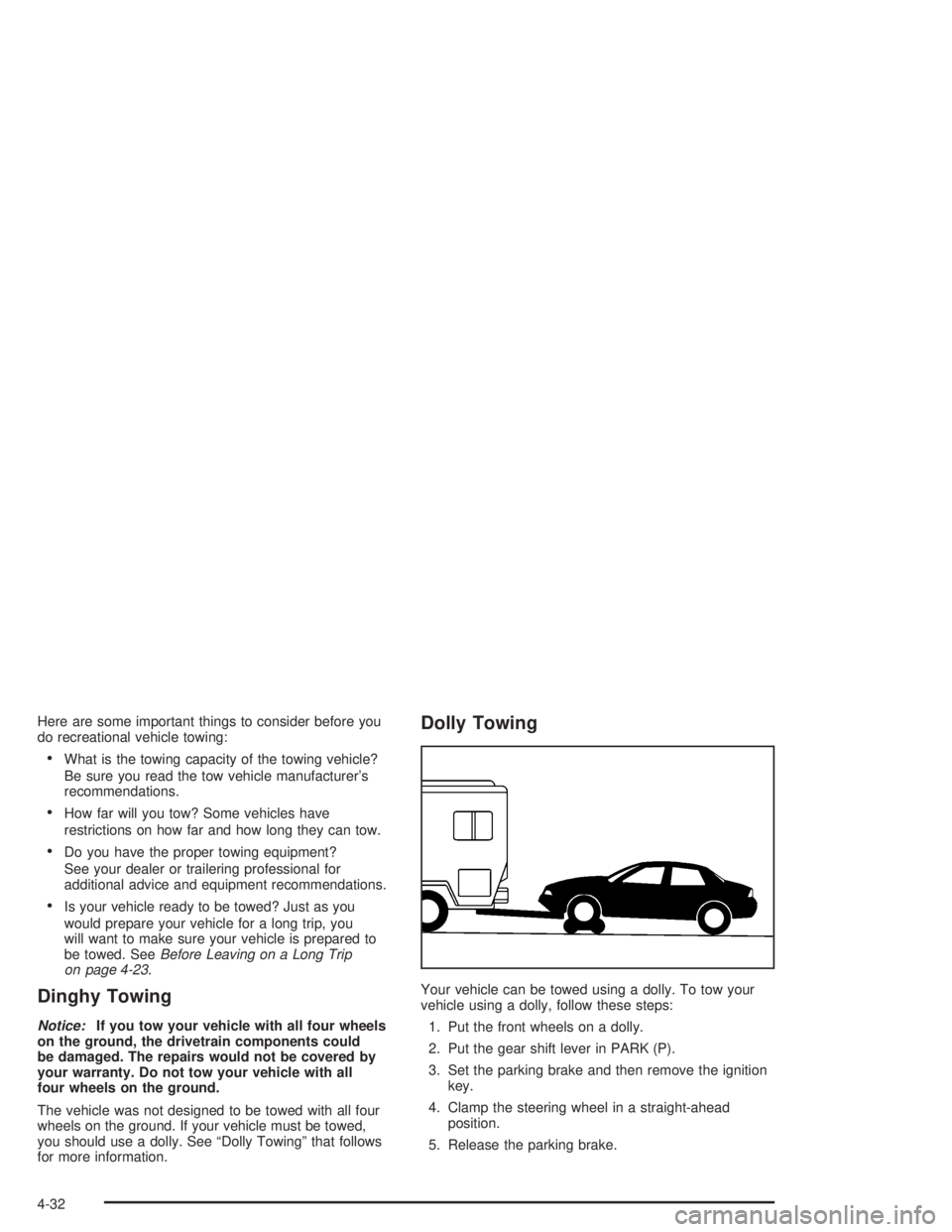
Here are some important things to consider before you
do recreational vehicle towing:
What is the towing capacity of the towing vehicle?
Be sure you read the tow vehicle manufacturer’s
recommendations.
How far will you tow? Some vehicles have
restrictions on how far and how long they can tow.
Do you have the proper towing equipment?
See your dealer or trailering professional for
additional advice and equipment recommendations.
Is your vehicle ready to be towed? Just as you
would prepare your vehicle for a long trip, you
will want to make sure your vehicle is prepared to
be towed. SeeBefore Leaving on a Long Trip
on page 4-23.
Dinghy Towing
Notice:If you tow your vehicle with all four wheels
on the ground, the drivetrain components could
be damaged. The repairs would not be covered by
your warranty. Do not tow your vehicle with all
four wheels on the ground.
The vehicle was not designed to be towed with all four
wheels on the ground. If your vehicle must be towed,
you should use a dolly. See “Dolly Towing” that follows
for more information.
Dolly Towing
Your vehicle can be towed using a dolly. To tow your
vehicle using a dolly, follow these steps:
1. Put the front wheels on a dolly.
2. Put the gear shift lever in PARK (P).
3. Set the parking brake and then remove the ignition
key.
4. Clamp the steering wheel in a straight-ahead
position.
5. Release the parking brake.
4-32
Page 228 of 354
When to Change Engine Oil
(GM Oil Life System™)
Your vehicle has a computer system that lets you know
when to change the engine oil and lter. This is
based on engine revolutions and engine temperature,
and not on mileage. Based on driving conditions,
the mileage at which an oil change will be indicated can
vary considerably. For the oil life system to work
properly, you must reset the system every time the oil is
changed.
When the system has calculated that oil life has been
diminished, it will indicate that an oil change is
necessary. A CHANGE OIL SOON light will come on.
Change your oil as soon as possible within the next two
times you stop for fuel. It is possible that, if you are
driving under the best conditions, the oil life system may
not indicate that an oil change is necessary for over a
year. However, your engine oil and lter must be
changed at least once a year and at this time the system
must be reset. Your dealer has GM-trained service
people who will perform this work using genuine GM
parts and reset the system. It is also important to check
your oil regularly and keep it at the proper level.
If the system is ever reset accidentally, you must change
your oil at 3,000 miles (5 000 km) since your last oil
change. Remember to reset the oil life system whenever
the oil is changed.
How to Reset the CHANGE OIL
SOON Light
The GM Oil Life System calculates when to change
your engine oil and lter based on vehicle use. Anytime
your oil is changed, reset the system so it can
calculate when the next oil change is required. If a
situation occurs where you change your oil prior to a
CHANGE OIL SOON light being turned on, reset
the system.
After changing the engine oil, reset the system by
performing the following steps:
1. With the engine off, turn the ignition key to RUN.
2. Fully press and release the accelerator pedal slowly
three times within ve seconds.
If the CHANGE OIL SOON light ashes, the system
is resetting.
3. Turn the key to OFF, then start the vehicle. The oil
life will change to 100 percent.
If the CHANGE OIL SOON light comes back on when
you start your vehicle, the oil life system has not
reset. Repeat the procedure.
If you have a Driver Information Center, the system may
be reset by pressing the DIC RESET button for ve
seconds while viewing the oil life display on the
DIC. SeeDriver Information Center (DIC) on page 3-42.
5-20
Page 254 of 354
Replacing Brake System Parts
The braking system on a vehicle is complex. Its many
parts have to be of top quality and work well together if
the vehicle is to have really good braking. Your
vehicle was designed and tested with top-quality GM
brake parts. When you replace parts of your braking
system — for example, when your brake linings
wear down and you need new ones put in — be sure
you get new approved GM replacement parts. If you do
not, your brakes may no longer work properly. For
example, if someone puts in brake linings that are wrong
for your vehicle, the balance between your front and
rear brakes can change — for the worse. The braking
performance you have come to expect can change
in many other ways if someone puts in the wrong
replacement brake parts.
Battery
Your new vehicle comes with a maintenance free
ACDelco®battery. When it is time for a new battery, get
one that has the replacement number shown on the
original battery’s label. We recommend an ACDelco
®
battery. SeeEngine Compartment Overview on
page 5-12for battery location.
Warning:Battery posts, terminals and related
accessories contain lead and lead compounds,
chemicals known to the State of California to cause
cancer and reproductive harm. Wash hands after
handling.If your battery has a very low charge or is dead, you
may not be able to remove the ignition key from
the ignition switch or shift out of PARK (P). Refer to
Shifting Out of Park (P) on page 2-27.
Vehicle Storage
If you are not going to drive your vehicle for 25 days or
more, remove the black, negative (−) cable from the
battery. This will help keep your battery from
running down.
{CAUTION:
Batteries have acid that can burn you and gas
that can explode. You can be badly hurt if you
are not careful. SeeJump Starting on
page 5-47for tips on working around a battery
without getting hurt.
Contact your dealer to learn how to prepare your
vehicle for longer storage periods.
Also, for your audio system, seeTheft-Deterrent
Feature on page 3-61.
5-46
Page 255 of 354
Jump Starting
If the battery has run down, you may want to use
another vehicle and some jumper cables to start the
vehicle. Be sure to follow the steps below to do it safely.
{CAUTION:
Batteries can hurt you. They can be dangerous
because:
They contain acid that can burn you.
They contain gas that can explode or
ignite.
They contain enough electricity to
burn you.
If you do not follow these steps exactly, some
or all of these things can hurt you.
Notice:Ignoring these steps could result in costly
damage to your vehicle that would not be covered
by your warranty.
Trying to start your vehicle by pushing or pulling it
will not work, and it could damage your vehicle.
1. Check the other vehicle. It must have a 12-volt
battery with a negative ground system.Notice:If the other vehicle’s system is not a 12-volt
system with a negative ground, both vehicles can
be damaged. Only use vehicles with 12-volt systems
with negative grounds to jump start your vehicle.
2. Get the vehicles close enough so the jumper cables
can reach, but be sure the vehicles are not touching
each other. If they are, it could cause a ground
connection you do not want. You would not be able
to start your vehicle, and the bad grounding
could damage the electrical systems.
To avoid the possibility of the vehicles rolling, set
the parking brake rmly on both vehicles involved in
the jump start procedure. Put an automatic
transaxle in PARK (P) or a manual transaxle in
NEUTRAL (N) before setting the parking brake.
Notice:If you leave your radio or other accessories
on during the jump starting procedure, they could
be damaged. The repairs would not be covered
by your warranty. Always turn off your radio and
other accessories when jump starting your vehicle.
3. Turn off the ignition on both vehicles. Unplug
unnecessary accessories plugged into the cigarette
lighter or in the auxiliary power outlet. Turn off
the radio and all lamps that are not needed. This
will avoid sparks and help save both batteries. And
it could save the radio!
5-47
Page 268 of 354
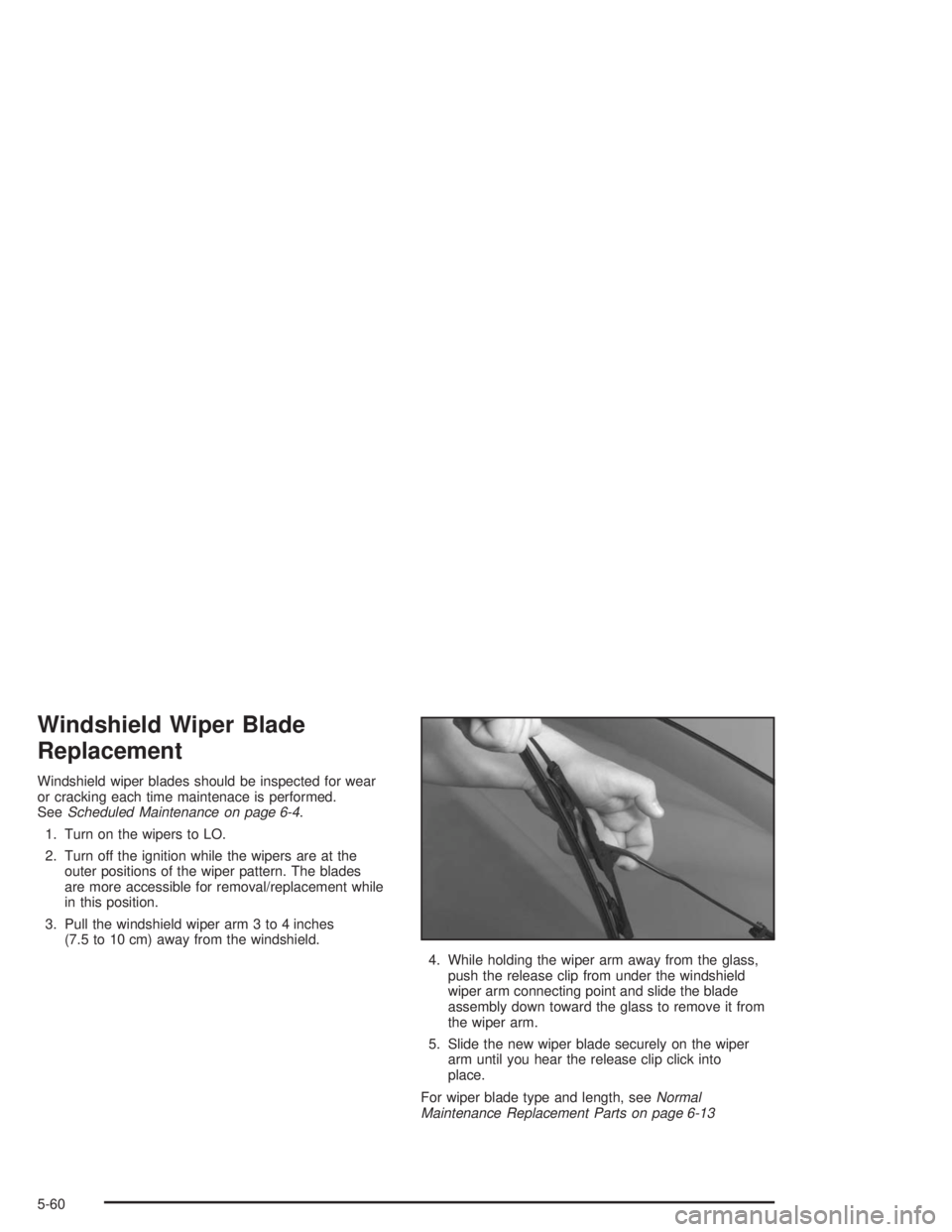
Windshield Wiper Blade
Replacement
Windshield wiper blades should be inspected for wear
or cracking each time maintenace is performed.
SeeScheduled Maintenance on page 6-4.
1. Turn on the wipers to LO.
2. Turn off the ignition while the wipers are at the
outer positions of the wiper pattern. The blades
are more accessible for removal/replacement while
in this position.
3. Pull the windshield wiper arm 3 to 4 inches
(7.5 to 10 cm) away from the windshield.
4. While holding the wiper arm away from the glass,
push the release clip from under the windshield
wiper arm connecting point and slide the blade
assembly down toward the glass to remove it from
the wiper arm.
5. Slide the new wiper blade securely on the wiper
arm until you hear the release clip click into
place.
For wiper blade type and length, seeNormal
Maintenance Replacement Parts on page 6-13
5-60
Page 278 of 354
Detection thresholds may be higher and detection times
may be longer on rough roads, curves and at high
speeds. The system is not capable of ination differences
at speeds greater than 70 mph (110 km/h).
The tire ination monitor system will not alert you if the
pressure in more than one tire is low, if the system
is not properly calibrated, or if the vehicle is moving
faster than 70 mph (110 km/h).
The LOW TIRE light will stay on while the ignition is on,
until the system is reset
Do not reset the tire ination monitor system without
rst correcting the cause of the problem and checking
and adjusting the pressure in all four tires. If the
system is reset when the tire pressures are incorrect, it
will not function properly and may not alert you when
a tire is low.
Any time a tire’s pressure is adjusted, the tires are
rotated, or one or more tires is repaired or replaced, the
tire ination monitor system will need to be reset. The
system also needs to be reset when new tires are
purchased and if the vehicle’s battery has been
disconnected.To reset the system:
1. Turn the ignition to RUN.
2. Remove the passenger’s side instrument panel
cover to get to the fuse block.
3. Press and hold the RESET button in the fuse block
for about ve seconds.
4. The LOW TIRE light will come on and ash three
times. Then it will go off. If the light does not go
off, see your dealer for service.
Tire Inspection and Rotation
Tires should be rotated every 5,000 to 8,000 miles
(8 000 to 13 000 km).
Any time you notice unusual wear, rotate your tires as
soon as possible and check wheel alignment. Also
check for damaged tires or wheels. SeeWhen It Is Time
for New Tires on page 5-72andWheel Replacement
on page 5-75for more information.
The purpose of regular rotation is to achieve more
uniform wear for all tires on the vehicle. The rst rotation
is the most important. SeeScheduled Maintenance
on page 6-4for scheduled rotation intervals.
5-70