climate control BUICK REGAL 2011 User Guide
[x] Cancel search | Manufacturer: BUICK, Model Year: 2011, Model line: REGAL, Model: BUICK REGAL 2011Pages: 368, PDF Size: 5.35 MB
Page 140 of 368
Black plate (32,1)Buick Regal Owner Manual - 2011
5-32 Instruments and Controls
Climate and Air Quality
Select the Climate and Air Quality
menu and the following will be
displayed:
.Auto Fan Speed
.Air Conditioning Mode
.Auto Area Zone Temp
.Auto Defog
.Auto Rear Defog
Auto Fan Speed
This allows selection of the
automatic fan speed to run lower or
higher than normal.
Press the
Zknob when Auto
Fan Speed is highlighted to open
the menu. Turn the knob to highlight
High, Medium, or Low. Press the
knob to confirm the selection and
move back to the last menu. Air Conditioning Mode
This allows selection of automatic
start of the air conditioning upon
vehicle start. Selecting On indicates
the air conditioning will be on when
the vehicle is started. Selecting Off
turns the air conditioning off each
time the vehicle is started. Last
Setting will resume the last setting
when the vehicle was shut off.
Press the
Zknob when Air
Conditioning Mode is highlighted.
Turn the knob to highlight On, Off,
or Last Setting. Press the knob to
confirm the selection and go back to
the last menu.
Auto Area Zone Temp
This allows selection of the number
of zones of temperature control
upon vehicle start. Selecting Single
Zone automatically resets the
passenger temperature setting the
same as the driver's for every vehicle start. The air conditioning
system will operate using only the
driver's setting until the passenger
temperature setting is changed.
Selecting Dual Zone or Last Setting
will keep the passenger temperature
adjustment separate from the
driver's setting all the time.
Press the
Zknob when Auto
Area Zone Temp is highlighted. Turn
the knob to highlight Single Zone,
Dual Zone, or Last Setting. Press
the knob to confirm the selection
and go back to the last menu.
Auto Defog
This allows the auto defog to be
turned on or off on dual zone
climate control systems.
Press the
Zknob when Auto
Defog is highlighted to select On or
Off. Turn the knob to confirm the
selection and move back to the
last menu.
Page 185 of 368
Black plate (1,1)Buick Regal Owner Manual - 2011
Climate Controls 8-1
Climate Controls
Climate Control Systems
Dual Automatic Climate ControlSystem . . . . . . . . . . . . . . . . . . . . . . 8-1
Air Vents
Air Vents . . . . . . . . . . . . . . . . . . . . . . 8-4
Maintenance
Passenger Compartment AirFilter . . . . . . . . . . . . . . . . . . . . . . . . . 8-4
Climate Control Systems
Dual Automatic Climate Control System
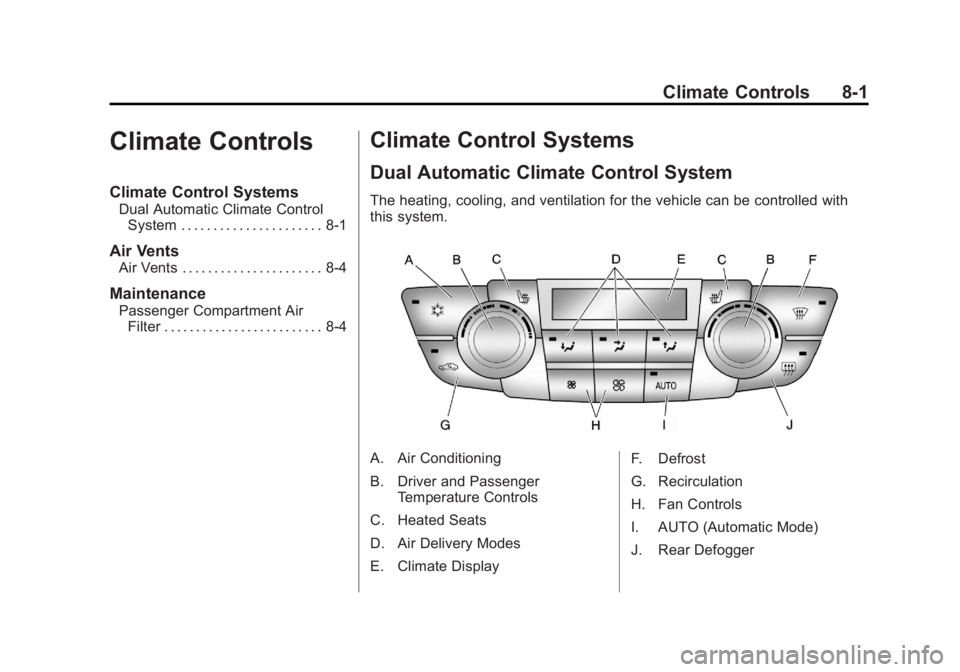
The heating, cooling, and ventilation for the vehicle can be controlled with
this system.
A. Air Conditioning
B. Driver and Passenger
Temperature Controls
C. Heated Seats
D. Air Delivery Modes
E. Climate Display F. Defrost
G. Recirculation
H. Fan Controls
I. AUTO (Automatic Mode)
J. Rear Defogger
Page 186 of 368
Black plate (2,1)Buick Regal Owner Manual - 2011
8-2 Climate Controls
Automatic Operation
The system automatically controls
the fan speed, air delivery, air
conditioning, and recirculation in
order to heat or cool the vehicle to
the desired temperature.
When the indicator light is on, the
system is in full automatic operation.
If the air delivery mode or fan
setting is manually adjusted, the
auto indicator turns off and displays
will show the selected settings.
To place the system in
automatic mode:
1. Press AUTO.
2. Set the temperature. Allowthe system time to stabilize.
Then adjust the temperature as
needed for best comfort.
English units can be changed to
metric units through the Driver
Information Center (DIC). See
Vehicle Personalization on
page 5‑31. Manual Operation
Driver and Passenger
Temperature Control:
The
temperature can be adjusted
separately for the driver and
passenger.
Turn the knob clockwise or
counterclockwise to increase or
decrease the driver or passenger
temperature setting.
Fan Control: Press the left
fan button to decrease the
fan speed. Press the right fan
button to increase the fan speed.
The selected fan speed is indicated
by the number of segments shown
in the display.
Pressing the left fan button longer
turns the fan off.
Press AUTO to return to automatic
operation. Air Delivery Modes:
Press[,Y,
or
8to change the direction of the
airflow. An indicator light comes on
in the selected mode button.
Changing the mode cancels the
automatic operation and the system
goes into manual mode. Press
AUTO to return to automatic
operation.
[(Floor): Air is directed to the
floor outlets.
Y(Vent): Air is directed to the
instrument panel outlets.
8(Upper): Air is directed to the
windshield outlets.
0(Defrost): Press to clear the
windshield of fog or frost more
quickly. Air is directed to the
windshield.
#(Air Conditioning): Press to
turn the automatic air conditioning
on or off. If the fan is turned off or
the outside temperature falls below
freezing, the air conditioner will
not run.
Page 187 of 368

Black plate (3,1)Buick Regal Owner Manual - 2011
Climate Controls 8-3
Press AUTO to return to automatic
operation and the air conditioner
runs as needed. When the indicator
light is on, the air conditioner runs
automatically to cool the air inside
the vehicle or to dry the air needed
to defog the windshield faster.
h(Recirculation):Press to turn
on recirculation. An indicator light
comes on. Air is recirculated to
quickly cool the inside of the vehicle
or prevent outside air and odors
from entering.
Rear Window Defogger
=(Rear Window Defogger):
Press to turn the rear window
defogger on or off.
The rear window defogger
turns off automatically after about
10 minutes. If turned on again, it
runs for about five minutes before
turning off. At higher speeds, the
rear window defogger may stay on
continuously. For vehicles with heated outside
rearview mirrors, they turn on with
the rear window defogger and help
to clear fog or frost from the surface
of the mirror. See
Heated Mirrors on
page 2‑11.
Notice: Do not try to clear frost
or other material from the inside
of the front windshield and rear
window with a razor blade or
anything else that is sharp. This
may damage the rear window
defogger grid and affect your
radio's ability to pick up stations
clearly. The repairs wouldn't be
covered by your warranty.
Sensors
The solar sensor located on top of
the instrument panel near the
windshield monitors the solar heat.
The climate control system
uses the sensor information to
adjust the temperature, fan speed,
recirculation, and air delivery mode
for best comfort.
If the sensor is covered, the
automatic climate control system
may not work properly.
Page 188 of 368
Black plate (4,1)Buick Regal Owner Manual - 2011
8-4 Climate Controls
Air Vents
Use the louvers located on the air
vents to change the direction of the
airflow.
To open a vent, move the
thumbwheel to | . To close the vent,
move the thumbwheel to
9.
Operation Tips
.Keep all outlets open whenever
possible for best system
performance.
.Keep the paths under all seats
clear of objects to help circulate
the air inside the vehicle more
effectively.
.Use of non-GM approved hood
deflectors can adversely affect
the performance of the system.
Maintenance
Passenger Compartment
Air Filter
The filter removes dust, pollen, and
other airborne irritants from outside
air that is pulled into the vehicle.
The filter should be replaced as part
of routine scheduled maintenance.
See Scheduled Maintenance on
page 11‑2 for replacement intervals.
To find out what type of filter to use,
see Maintenance Replacement
Parts on page 11‑8.
The passenger compartment air
filter can be accessed by removing
the entire glove box.
1. Open the passenger side door. Remove the end cover located
on the side of the instrument
panel in the top right corner.
Remove the screw affixed to the
side of the glove box. 2. Open the glove box door and
remove the attached screws
from around the glove box.
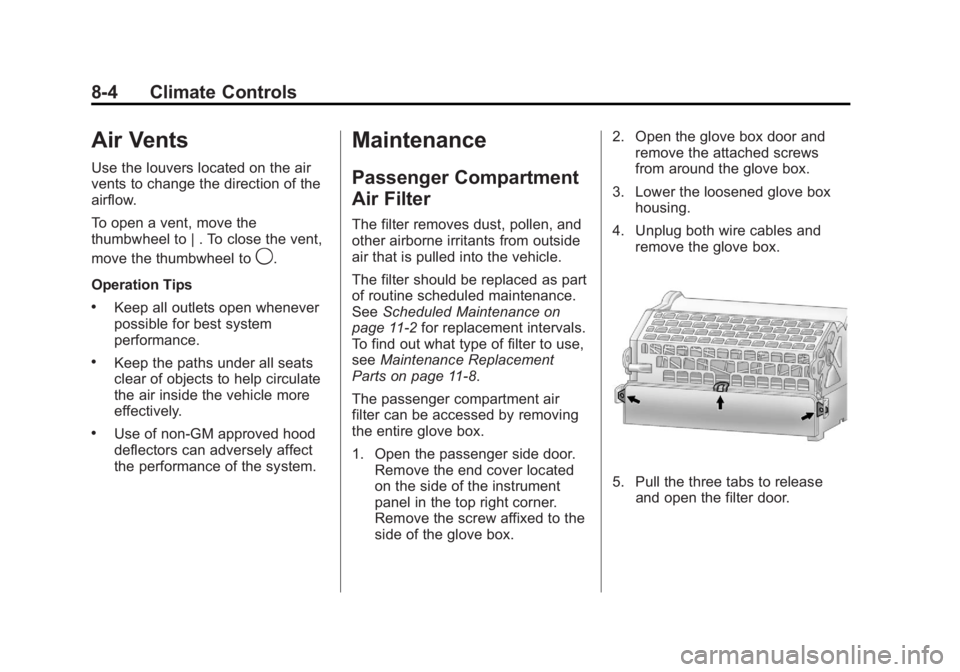
3. Lower the loosened glove box housing.
4. Unplug both wire cables and remove the glove box.
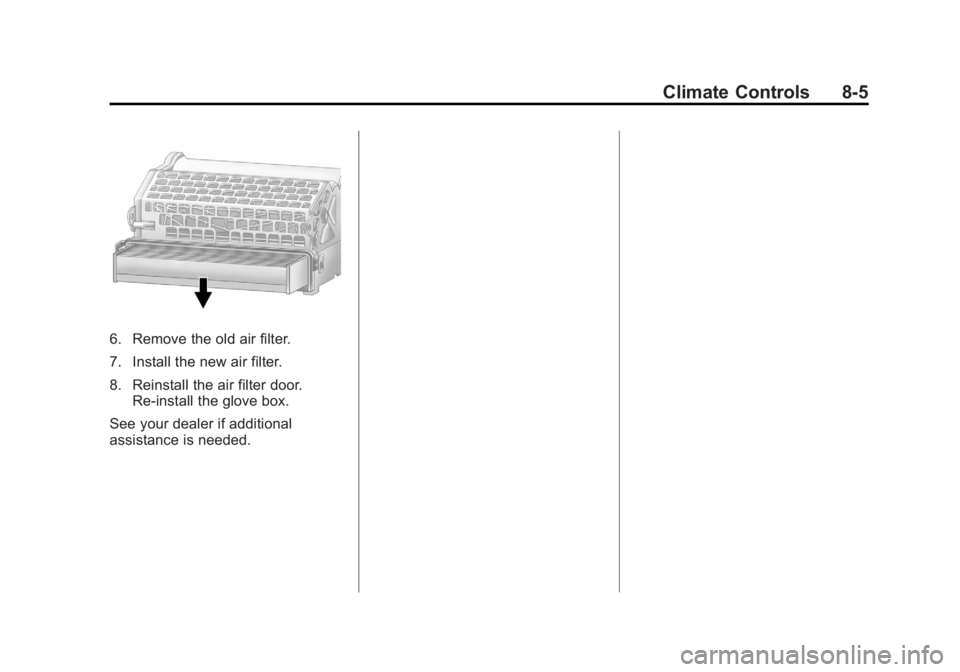
5. Pull the three tabs to releaseand open the filter door.
Page 189 of 368
Black plate (5,1)Buick Regal Owner Manual - 2011
Climate Controls 8-5
6. Remove the old air filter.
7. Install the new air filter.
8. Reinstall the air filter door.Re‐install the glove box.
See your dealer if additional
assistance is needed.
Page 190 of 368

Black plate (6,1)Buick Regal Owner Manual - 2011
8-6 Climate Controls
2NOTES
Page 200 of 368
Black plate (10,1)Buick Regal Owner Manual - 2011
9-10 Driving and Operating
Blizzard Conditions
Being stuck in snow can be a
serious situation. Stay with the
vehicle unless there is help nearby.
If possible, use theRoadside
Assistance Program on page 13‑5.
To get help and keep everyone in
the vehicle safe:
.Turn on the hazard warning
flashers.
.Tie a red cloth to an outside
mirror.
{WARNING
Snow can trap engine exhaust
under the vehicle. This may
cause exhaust gases to get
inside. Engine exhaust contains
Carbon Monoxide (CO) which
cannot be seen or smelled. It can
cause unconsciousness and even
death.
(Continued)
WARNING (Continued)
If the vehicle is stuck in the snow:
.Clear away snow from around
the base of your vehicle,
especially any that is blocking
the exhaust pipe.
.Check again from time to
time to be sure snow does
not collect there.
.Open a window about 5 cm
(2 in) on the side of the
vehicle that is away from the
wind to bring in fresh air.
.Fully open the air outlets on
or under the instrument
panel.
.Adjust the climate control
system to a setting that
circulates the air inside
the vehicle and set the fan
speed to the highest setting.
See Climate Control System
in the Index.(Continued)
WARNING (Continued)
For more information about
carbon monoxide, see Engine
Exhaust on page 9‑24.
Snow can trap exhaust gases
under your vehicle. This can
cause deadly CO (Carbon
Monoxide) gas to get inside. CO
could overcome you and kill you.
You cannot see it or smell it, so
you might not know it is in your
vehicle. Clear away snow from
around the base of your vehicle,
especially any that is blocking the
exhaust.
Run the engine for short periods
only as needed to keep warm, but
be careful.
Page 300 of 368
Black plate (60,1)Buick Regal Owner Manual - 2011
10-60 Vehicle Care
All Passenger Car Tires Must
Conform to Federal Safety
Requirements In Addition To
These Grades.
Treadwear
The treadwear grade is a
comparative rating based on
the wear rate of the tire when
tested under controlled
conditions on a specified
government test course.
For example, a tire graded
150 would wear one and a half
(1½) times as well on the
government course as a tire
graded 100. The relative
performance of tires depends
upon the actual conditions of
their use, however, and may
depart significantly from the
norm due to variations in
driving habits, service practices
and differences in road
characteristics and climate.Traction
–AA, A, B, C
The traction grades, from
highest to lowest, are AA, A, B,
and C. Those grades represent
the tire's ability to stop on wet
pavement as measured under
controlled conditions on
specified government test
surfaces of asphalt and
concrete. A tire marked C may
have poor traction performance.
Warning: The traction grade
assigned to this tire is based on
straight-ahead braking traction
tests, and does not include
acceleration, cornering,
hydroplaning, or peak traction
characteristics.
Temperature –A, B, C
The temperature grades
are A (the highest), B, and C,
representing the tire's resistance
to the generation of heat and its
ability to dissipate heat when tested under controlled
conditions on a specified indoor
laboratory test wheel. Sustained
high temperature can cause the
material of the tire to degenerate
and reduce tire life, and
excessive temperature can
lead to sudden tire failure. The
grade C corresponds to a level
of performance which all
passenger car tires must meet
under the Federal Motor Safety
Standard No. 109. Grades B and
A represent higher levels of
performance on the laboratory
test wheel than the minimum
required by law. Warning: The
temperature grade for this tire is
established for a tire that is
properly inflated and not
overloaded. Excessive speed,
underinflation, or excessive
loading, either separately or in
combination, can cause heat
buildup and possible tire failure.
Page 358 of 368

Black plate (2,1)Buick Regal Owner Manual - 2011
i-2 INDEX
Brakes . . . . . . . . . . . . . . . . . . . . . . . . 10-25Antilock . . . . . . . . . . . . . . . . . . . . . . . 9-30
Assist . . . . . . . . . . . . . . . . . . . . . . . . . 9-33
Fluid . . . . . . . . . . . . . . . . . . . . . . . . 10-26
Parking . . . . . . . . . . . . . . . . . . . . . . . 9-31
System Messages . . . . . . . . . . . . 5-26
Braking . . . . . . . . . . . . . . . . . . . . . . . . . 9-3
Break-In, New Vehicle . . . . . . . . . 9-16
Bulb Replacement . . . . . . . . . . . . 10-34
Fog Lamps . . . . . . . . . . . . . 10-32, 6-4
Halogen Bulbs . . . . . . . . . . . . . . 10-31
Headlamp Aiming . . . . . . . . . . . 10-30
Headlamps . . . . . . . . . . . . . . . . . 10-31
Headlamps, Front TurnSignal, and Parking
Lamps . . . . . . . . . . . . . . . . . . . . 10-31
License Plate Lamps . . . . . . . 10-34
Taillamps, Turn Signal, Stoplamps, and
Back-up Lamps . . . . . . . . . . . 10-33
Buying New Tires . . . . . . . . . . . . . 10-57C
Calibration . . . . . . . . . . . . . . . . . . . . . . 5-4
California
Fuel Requirements . . . . . . . . . . . 9-45
Perchlorate MaterialsRequirements . . . . . . . . . . . . . . . 10-3
Warning . . . . . . . . . . . . . . . . . . . . . . 10-3
Canadian Vehicle Owners . . . . . . . . iii
Capacities and Specifications . . . . . . . . . . . . . . . . 12-2
Carbon Monoxide
Engine Exhaust . . . . . . . . . . . . . . . 9-24
Trunk . . . . . . . . . . . . . . . . . . . . . . . . . . 2-7
Winter Driving . . . . . . . . . . . . . . . . . 9-9
Cargo Net . . . . . . . . . . . . . . . . . . . . . . 4-3
Cautions, Danger, and Warnings . . . . . . . . . . . . . . . . . . . . . . . . iii
CD Player . . . . . . . . . . . . . . . . . . . . . 7-14
Center Console Storage . . . . . . . . 4-2
Chains, Tire . . . . . . . . . . . . . . . . . . 10-62
Charging System Light . . . . . . . . 5-13
Check Engine Light . . . . . . . . . . . . . . . . . . 5-13
IgnitionTransmission Lock . . . . . . . . 10-29 Child Restraints
Infants and Young
Children . . . . . . . . . . . . . . . . . . . . . 3-43
Lower Anchors and Tethers for Children . . . . . . . . . 3-49
Older Children . . . . . . . . . . . . . . . . 3-40
Securing . . . . . . . . . . . . . . . . 3-57, 3-59
Systems . . . . . . . . . . . . . . . . . . . . . . 3-45
Circuit Breakers . . . . . . . . . . . . . . 10-36
Cleaning Exterior Care . . . . . . . . . . . . . . . 10-77
Interior Care . . . . . . . . . . . . . . . . 10-80
Climate Control Systems Dual Automatic . . . . . . . . . . . . . . . . 8-1
Clock . . . . . . . . . . . . . . . . . . . . . . . . . . . 5-5
Cluster, Instrument . . . . . . . . . . . . . 5-8
Clutch, Hydraulic . . . . . . . . . . . . . 10-14
Collision Damage Repair . . . . . . 13-9
Compact Spare Tire . . . . . . . . . . 10-69
Compass . . . . . . . . . . . . . . . . . . . . . . . 5-4 Messages . . . . . . . . . . . . . . . . . . . . 5-26
Control of a Vehicle . . . . . . . . . . . . . 9-3
Convenience Net . . . . . . . . . . . . . . . 4-3
Convex Mirrors . . . . . . . . . . . . . . . . 2-10