Instrument panel BUICK REGAL 2011 Owner's Guide
[x] Cancel search | Manufacturer: BUICK, Model Year: 2011, Model line: REGAL, Model: BUICK REGAL 2011Pages: 368, PDF Size: 5.35 MB
Page 105 of 368
Black plate (1,1)Buick Regal Owner Manual - 2011
Storage 4-1
Storage
Storage Compartments
Instrument Panel Storage . . . . . 4-1
Glove Box . . . . . . . . . . . . . . . . . . . . 4-1
Cupholders . . . . . . . . . . . . . . . . . . . 4-2
Rear Storage . . . . . . . . . . . . . . . . . 4-2
Center Console Storage . . . . . . 4-2
Additional Storage Features
Cargo Net . . . . . . . . . . . . . . . . . . . . . 4-3
Convenience Net . . . . . . . . . . . . . 4-3
Storage
Compartments
Instrument Panel Storage
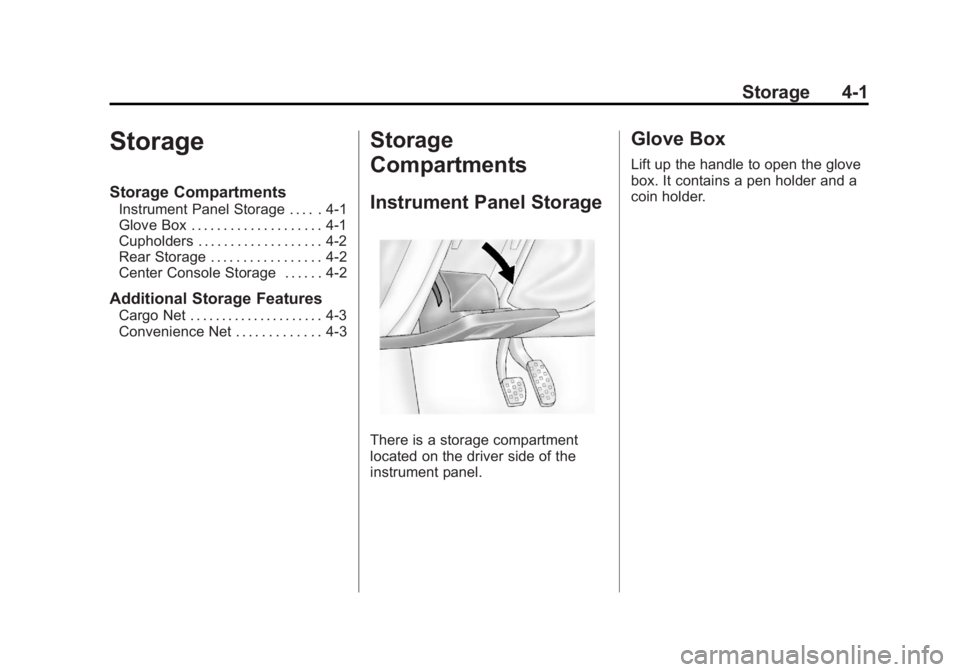
There is a storage compartment
located on the driver side of the
instrument panel.
Glove Box
Lift up the handle to open the glove
box. It contains a pen holder and a
coin holder.
Page 119 of 368

Black plate (11,1)Buick Regal Owner Manual - 2011
Instruments and Controls 5-11
Safety Belt Reminders
Driver Safety Belt Reminder
Light
There is a driver safety belt
reminder light on the instrument
panel cluster.
When the engine is started this light
begins to flash and a chime comes
on for several seconds to remind
the driver to fasten their safety belt.
The light also stays on if the driver
remains unbuckled.
This cycle repeats if the driver is
unbuckled while the vehicle is
moving.
If the driver safety belt is already
buckled, neither the light nor the
chime comes on.
Passenger Safety Belt
Reminder Light
There is a passenger safety belt
reminder light located on the center
console.
When the engine is started this light
begins to flash and a chime comes
on for several seconds to remind
the passenger to fasten their safety
belt. The light also stays on if the
passenger remains unbuckled.
This cycle repeats if the passenger
is unbuckled while the vehicle is
moving.
If the passenger safety belt is
buckled, neither the chime nor the
light comes on.The front passenger safety belt
warning light and chime may turn on
if an object is put on the seat such
as a briefcase, handbag, grocery
bag, laptop, or other electronic
device. To turn off the warning light
and/or chime, remove the object
from the seat or buckle the
safety belt.
Airbag Readiness Light
This light shows if there is an
electrical problem. The system
check includes the airbag sensor,
the pretensioners, the airbag
modules, the wiring, and the crash
sensing and diagnostic module.
For more information on the airbag
system, see
Airbag System on
page 3‑27.
Page 120 of 368
Black plate (12,1)Buick Regal Owner Manual - 2011
5-12 Instruments and Controls
The airbag readiness light comes on
and stays on for several seconds
when the vehicle is started. Then
the light goes out.
{WARNING
If the airbag readiness light stays
on after the vehicle is started or
comes on while driving, it means
the airbag system might not be
working properly. The airbags in
the vehicle might not inflate in a
crash, or they could even inflate
without a crash. To help avoid
injury, have the vehicle serviced
right away.
Passenger Airbag Status
Indicator
The vehicle has a passenger
sensing system. SeePassenger
Sensing System on page 3‑34
for important safety information.
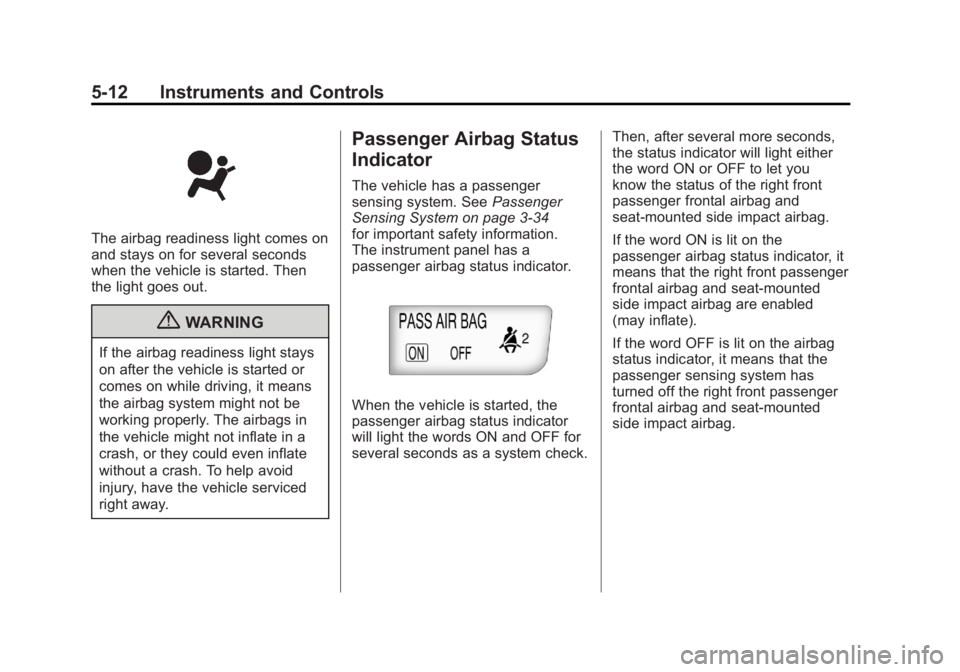
The instrument panel has a
passenger airbag status indicator.
When the vehicle is started, the
passenger airbag status indicator
will light the words ON and OFF for
several seconds as a system check. Then, after several more seconds,
the status indicator will light either
the word ON or OFF to let you
know the status of the right front
passenger frontal airbag and
seat‐mounted side impact airbag.
If the word ON is lit on the
passenger airbag status indicator, it
means that the right front passenger
frontal airbag and seat‐mounted
side impact airbag are enabled
(may inflate).
If the word OFF is lit on the airbag
status indicator, it means that the
passenger sensing system has
turned off the right front passenger
frontal airbag and seat-mounted
side impact airbag.
Page 123 of 368

Black plate (15,1)Buick Regal Owner Manual - 2011
Instruments and Controls 5-15
.Check that the electrical system
is not wet. The system could be
wet if the vehicle was driven
through a deep puddle of water.
The condition is usually
corrected when the electrical
system dries out. A few driving
trips should turn the light off.
.Check that good quality fuel is
used. Poor fuel quality causes
the engine not to run as
efficiently as designed and may
cause: stalling after start-up,
stalling when the vehicle is
changed into gear, misfiring,
hesitation on acceleration,
or stumbling on acceleration.
These conditions might go away
once the engine is warmed up.
If one or more of these
conditions occurs, change the
fuel brand used. It will require at
least one full tank of the proper
fuel to turn the light off.
SeeRecommended Fuel on
page 9‑44. If none of the above have made
the light turn off, have your dealer
check the vehicle. The dealer
has the proper test equipment
and diagnostic tools to fix any
mechanical or electrical problems
that might have developed.Emissions Inspection and
Maintenance Programs
Some state/provincial and local
governments may have programs
to inspect the on-vehicle emission
control equipment. For the
inspection, the emission system
test equipment is connected
to the vehicle’s Data Link
Connector (DLC).
The DLC is under the instrument
panel near the steering wheel. See
your dealer if assistance is needed. The vehicle may not pass
inspection if:
.The malfunction indicator lamp is
on with the engine running, or if
the light does not come on when
the ignition is turned to ON/RUN
while the engine is off.
.The critical emission control
systems have not been
completely diagnosed by the
system. This can happen if
the battery has recently been
replaced or if the battery has run
down. The diagnostic system
evaluates critical emission
control systems during
normal driving. This can take
several days of routine driving.
If this has been done and the
vehicle still does not pass the
inspection, your dealer can
prepare the vehicle for
inspection.
Page 130 of 368
Black plate (22,1)Buick Regal Owner Manual - 2011
5-22 Instruments and Controls
Cruise Control Light
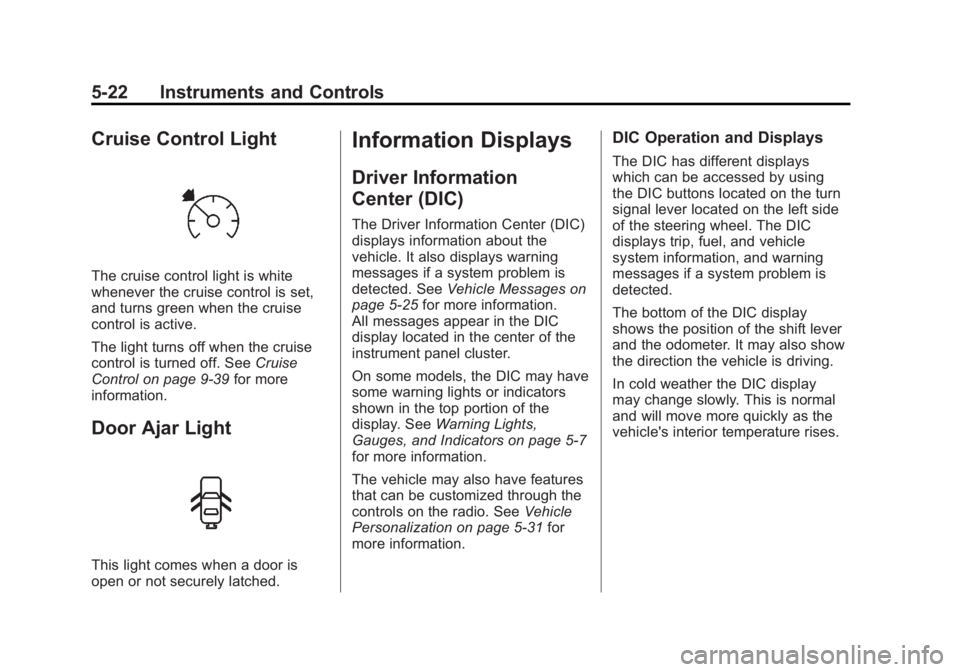
The cruise control light is white
whenever the cruise control is set,
and turns green when the cruise
control is active.
The light turns off when the cruise
control is turned off. SeeCruise
Control on page 9‑39 for more
information.
Door Ajar Light
This light comes when a door is
open or not securely latched.
Information Displays
Driver Information
Center (DIC)
The Driver Information Center (DIC)
displays information about the
vehicle. It also displays warning
messages if a system problem is
detected. See Vehicle Messages on
page 5‑25 for more information.
All messages appear in the DIC
display located in the center of the
instrument panel cluster.
On some models, the DIC may have
some warning lights or indicators
shown in the top portion of the
display. See Warning Lights,
Gauges, and Indicators on page 5‑7
for more information.
The vehicle may also have features
that can be customized through the
controls on the radio. See Vehicle
Personalization on page 5‑31 for
more information.
DIC Operation and Displays
The DIC has different displays
which can be accessed by using
the DIC buttons located on the turn
signal lever located on the left side
of the steering wheel. The DIC
displays trip, fuel, and vehicle
system information, and warning
messages if a system problem is
detected.
The bottom of the DIC display
shows the position of the shift lever
and the odometer. It may also show
the direction the vehicle is driving.
In cold weather the DIC display
may change slowly. This is normal
and will move more quickly as the
vehicle's interior temperature rises.
Page 145 of 368
Black plate (1,1)Buick Regal Owner Manual - 2011
Lighting 6-1
Lighting
Exterior Lighting
Exterior Lamp Controls . . . . . . . . 6-1
Exterior Lamps OffReminder . . . . . . . . . . . . . . . . . . . . 6-2
Headlamp High/Low-Beam Changer . . . . . . . . . . . . . . . . . . . . . 6-2
Flash-to-Pass . . . . . . . . . . . . . . . . . 6-2
Daytime Running Lamps (DRL) . . . . . . . . . . . . . . . . 6-2
Automatic Headlamp System . . . . . . . . . . . . . . . . . . . . . . 6-3
Hazard Warning Flashers . . . . . 6-3
Turn and Lane-Change Signals . . . . . . . . . . . . . . . . . . . . . . 6-3
Fog Lamps . . . . . . . . . . . . . . . . . . . . 6-4
Interior Lighting
Instrument Panel Illumination Control . . . . . . . . . . . . . . . . . . . . . . 6-4
Dome Lamps . . . . . . . . . . . . . . . . . 6-5
Reading Lamps . . . . . . . . . . . . . . . 6-5
Lighting Features
Entry Lighting . . . . . . . . . . . . . . . . . 6-6
Exit Lighting . . . . . . . . . . . . . . . . . . . 6-6
Battery Power Protection . . . . . . 6-6
Exterior Lighting
Exterior Lamp Controls
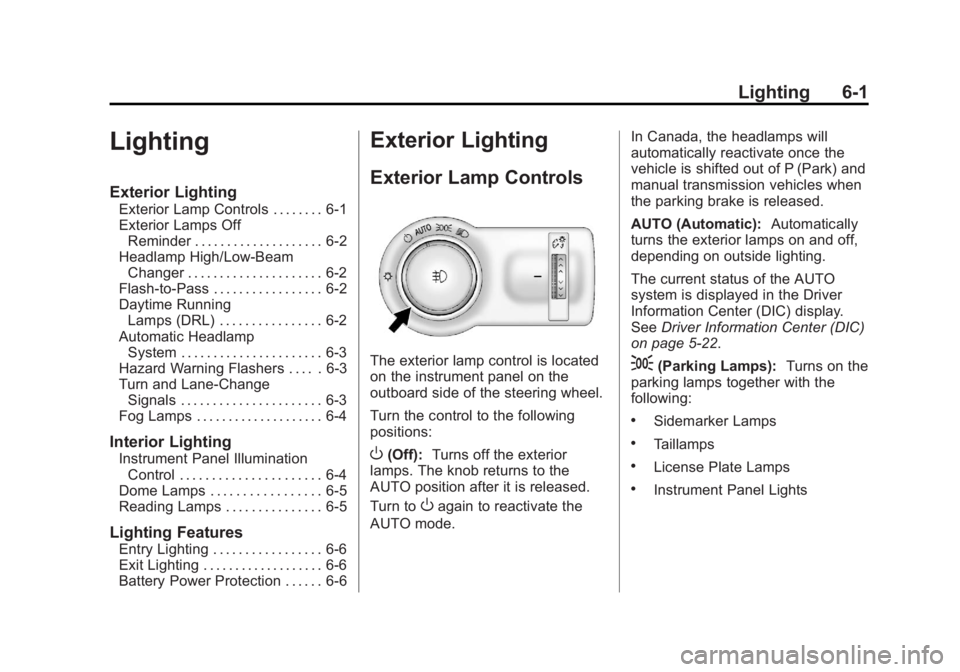
The exterior lamp control is located
on the instrument panel on the
outboard side of the steering wheel.
Turn the control to the following
positions:
O(Off): Turns off the exterior
lamps. The knob returns to the
AUTO position after it is released.
Turn to
Oagain to reactivate the
AUTO mode. In Canada, the headlamps will
automatically reactivate once the
vehicle is shifted out of P (Park) and
manual transmission vehicles when
the parking brake is released.
AUTO (Automatic):
Automatically
turns the exterior lamps on and off,
depending on outside lighting.
The current status of the AUTO
system is displayed in the Driver
Information Center (DIC) display.
See Driver Information Center (DIC)
on page 5‑22.
;(Parking Lamps): Turns on the
parking lamps together with the
following:
.Sidemarker Lamps
.Taillamps
.License Plate Lamps
.Instrument Panel Lights
Page 146 of 368

Black plate (2,1)Buick Regal Owner Manual - 2011
6-2 Lighting
2(Headlamps):Turns on the
headlamps together with the
following:
.Sidemarker Lamps
.Taillamps
.License Plate Lamps
.Instrument Panel Lights
.Parking Lamps
Exterior Lamps Off
Reminder
A warning chime sounds if the driver
door is opened while the ignition is
off and the exterior lamps are on.
Headlamp High/
Low-Beam Changer
2 3
Headlamp High/Low‐Beam
Changer: Push the turn signal/lane
change lever away from you and
release, to turn the high beams on.
To return to low beams, push the
lever again or pull it toward you and
release.
This indicator light turns on in the
instrument panel cluster when the
high‐beam headlamps are on.
Flash-to-Pass
To flash the high beams, pull the
turn signal/lane change lever toward
you, and release.
Daytime Running
Lamps (DRL)
Daytime Running Lamps (DRL) can
make it easier for others to see the
front of your vehicle during the day.
Fully functional daytime running
lamps are required on all vehicles
first sold in Canada. The DRL system turns on the
low-beam headlamps at a reduced
brightness. For vehicles with High
Intensity Discharge (HID)
headlamps, the dedicated DRL will
come on when all of the following
conditions are met:
.The engine is running.
.The exterior lamp band is
in AUTO.
.The light sensor determines it is
daytime.
When the DRL are on, the
low-beam headlamps will be on.
The taillamps, sidemarker lamps,
instrument panel lights, and other
lamps will not be on.
The DRL turn off when the
headlamps are turned to
Oor the
ignition is off.
Page 147 of 368

Black plate (3,1)Buick Regal Owner Manual - 2011
Lighting 6-3
Automatic Headlamp
System
When the exterior lamp control is
set to AUTO and it is dark enough
outside, the headlamps come on
automatically.
There is a light sensor located on
top of the instrument panel. Do not
cover the sensor. Otherwise the
headlamps will come on when they
are not needed.
The system may also turn on the
headlamps when driving through a
parking garage or tunnel.When it is bright enough outside,
the headlamps will turn off or may
change to daytime running
lamps (DRL).
The automatic headlamp system
turns off when the exterior lamp
control is turned to
Oor the ignition
is off.
Hazard Warning Flashers
|Hazard Warning Flasher:
Press this button located on the
instrument panel above the audio system, to make the front and rear
turn signal lamps flash on and off.
Press again to turn the flashers off.
The hazard warning flashers turn on
automatically if the airbags deploy.
Turn and Lane-Change
Signals
Move the lever all the way up or
down to signal a turn.
An arrow on the instrument panel
cluster flashes in the direction of the
turn or lane change.
Raise or lower the lever until the
arrow starts to flash to signal a lane
change. Hold it there until the lane
change is completed. If the lever is
briefly pressed and released, the
turn signal flashes three times.
Page 148 of 368

Black plate (4,1)Buick Regal Owner Manual - 2011
6-4 Lighting
The turn and lane‐change signal
can be turned off manually by
moving the lever back to its original
position.
If after signaling a turn or lane
change, the arrow flashes rapidly or
does not come on, a signal bulb
might be burned out.
Have the bulbs replaced. If the bulb
is not burned out, check the fuse.
SeeFuses and Circuit Breakers on
page 10‑36.Fog Lamps
To turn on the fog lamps, the ignition
and the headlamps or parking lamps
must be on.
If the fog lamps are turned on while
the exterior lamp switch is in the
AUTO position, the headlamps
come on automatically.
#: Press to turn on or off. An
indicator light on the instrument
panel cluster comes on when the
fog lamps are on.
Some localities have laws that
require the headlamps to be on
along with the fog lamps.
Interior Lighting
Instrument Panel
Illumination Control
The brightness of the instrument
panel lighting and steering wheel
controls can be adjusted.
D: Move and hold the
thumbwheel up or down to brighten
or dim the lights.
Page 186 of 368
Black plate (2,1)Buick Regal Owner Manual - 2011
8-2 Climate Controls
Automatic Operation
The system automatically controls
the fan speed, air delivery, air
conditioning, and recirculation in
order to heat or cool the vehicle to
the desired temperature.
When the indicator light is on, the
system is in full automatic operation.
If the air delivery mode or fan
setting is manually adjusted, the
auto indicator turns off and displays
will show the selected settings.
To place the system in
automatic mode:
1. Press AUTO.
2. Set the temperature. Allowthe system time to stabilize.
Then adjust the temperature as
needed for best comfort.
English units can be changed to
metric units through the Driver
Information Center (DIC). See
Vehicle Personalization on
page 5‑31. Manual Operation
Driver and Passenger
Temperature Control:
The
temperature can be adjusted
separately for the driver and
passenger.
Turn the knob clockwise or
counterclockwise to increase or
decrease the driver or passenger
temperature setting.
Fan Control: Press the left
fan button to decrease the
fan speed. Press the right fan
button to increase the fan speed.
The selected fan speed is indicated
by the number of segments shown
in the display.
Pressing the left fan button longer
turns the fan off.
Press AUTO to return to automatic
operation. Air Delivery Modes:
Press[,Y,
or
8to change the direction of the
airflow. An indicator light comes on
in the selected mode button.
Changing the mode cancels the
automatic operation and the system
goes into manual mode. Press
AUTO to return to automatic
operation.
[(Floor): Air is directed to the
floor outlets.
Y(Vent): Air is directed to the
instrument panel outlets.
8(Upper): Air is directed to the
windshield outlets.
0(Defrost): Press to clear the
windshield of fog or frost more
quickly. Air is directed to the
windshield.
#(Air Conditioning): Press to
turn the automatic air conditioning
on or off. If the fan is turned off or
the outside temperature falls below
freezing, the air conditioner will
not run.