light BUICK REGAL 2011 Workshop Manual
[x] Cancel search | Manufacturer: BUICK, Model Year: 2011, Model line: REGAL, Model: BUICK REGAL 2011Pages: 368, PDF Size: 5.35 MB
Page 147 of 368

Black plate (3,1)Buick Regal Owner Manual - 2011
Lighting 6-3
Automatic Headlamp
System
When the exterior lamp control is
set to AUTO and it is dark enough
outside, the headlamps come on
automatically.
There is a light sensor located on
top of the instrument panel. Do not
cover the sensor. Otherwise the
headlamps will come on when they
are not needed.
The system may also turn on the
headlamps when driving through a
parking garage or tunnel.When it is bright enough outside,
the headlamps will turn off or may
change to daytime running
lamps (DRL).
The automatic headlamp system
turns off when the exterior lamp
control is turned to
Oor the ignition
is off.
Hazard Warning Flashers
|Hazard Warning Flasher:
Press this button located on the
instrument panel above the audio system, to make the front and rear
turn signal lamps flash on and off.
Press again to turn the flashers off.
The hazard warning flashers turn on
automatically if the airbags deploy.
Turn and Lane-Change
Signals
Move the lever all the way up or
down to signal a turn.
An arrow on the instrument panel
cluster flashes in the direction of the
turn or lane change.
Raise or lower the lever until the
arrow starts to flash to signal a lane
change. Hold it there until the lane
change is completed. If the lever is
briefly pressed and released, the
turn signal flashes three times.
Page 148 of 368

Black plate (4,1)Buick Regal Owner Manual - 2011
6-4 Lighting
The turn and lane‐change signal
can be turned off manually by
moving the lever back to its original
position.
If after signaling a turn or lane
change, the arrow flashes rapidly or
does not come on, a signal bulb
might be burned out.
Have the bulbs replaced. If the bulb
is not burned out, check the fuse.
SeeFuses and Circuit Breakers on
page 10‑36.Fog Lamps
To turn on the fog lamps, the ignition
and the headlamps or parking lamps
must be on.
If the fog lamps are turned on while
the exterior lamp switch is in the
AUTO position, the headlamps
come on automatically.
#: Press to turn on or off. An
indicator light on the instrument
panel cluster comes on when the
fog lamps are on.
Some localities have laws that
require the headlamps to be on
along with the fog lamps.
Interior Lighting
Instrument Panel
Illumination Control
The brightness of the instrument
panel lighting and steering wheel
controls can be adjusted.
D: Move and hold the
thumbwheel up or down to brighten
or dim the lights.
Page 149 of 368
Black plate (5,1)Buick Regal Owner Manual - 2011
Lighting 6-5
Dome Lamps
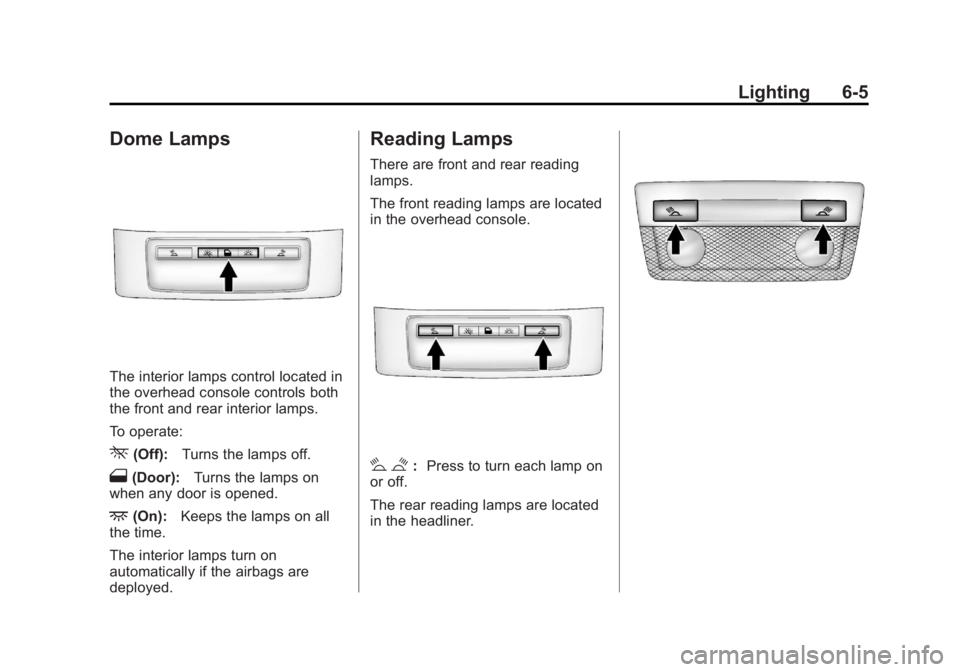
The interior lamps control located in
the overhead console controls both
the front and rear interior lamps.
To operate:
*(Off):Turns the lamps off.
1(Door): Turns the lamps on
when any door is opened.
+(On): Keeps the lamps on all
the time.
The interior lamps turn on
automatically if the airbags are
deployed.
Reading Lamps
There are front and rear reading
lamps.
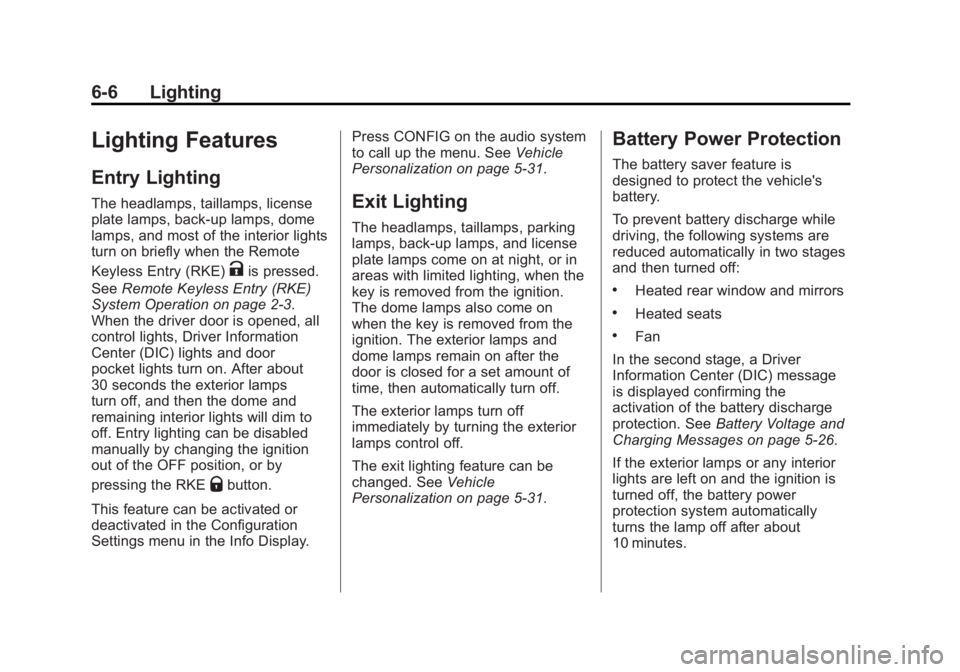
The front reading lamps are located
in the overhead console.
# $: Press to turn each lamp on
or off.
The rear reading lamps are located
in the headliner.
Page 150 of 368
Black plate (6,1)Buick Regal Owner Manual - 2011
6-6 Lighting
Lighting Features
Entry Lighting
The headlamps, taillamps, license
plate lamps, back‐up lamps, dome
lamps, and most of the interior lights
turn on briefly when the Remote
Keyless Entry (RKE)
Kis pressed.
See Remote Keyless Entry (RKE)
System Operation on page 2‑3.
When the driver door is opened, all
control lights, Driver Information
Center (DIC) lights and door
pocket lights turn on. After about
30 seconds the exterior lamps
turn off, and then the dome and
remaining interior lights will dim to
off. Entry lighting can be disabled
manually by changing the ignition
out of the OFF position, or by
pressing the RKE
Qbutton.
This feature can be activated or
deactivated in the Configuration
Settings menu in the Info Display. Press CONFIG on the audio system
to call up the menu. See
Vehicle
Personalization on page 5‑31.
Exit Lighting
The headlamps, taillamps, parking
lamps, back‐up lamps, and license
plate lamps come on at night, or in
areas with limited lighting, when the
key is removed from the ignition.
The dome lamps also come on
when the key is removed from the
ignition. The exterior lamps and
dome lamps remain on after the
door is closed for a set amount of
time, then automatically turn off.
The exterior lamps turn off
immediately by turning the exterior
lamps control off.
The exit lighting feature can be
changed. See Vehicle
Personalization on page 5‑31.
Battery Power Protection
The battery saver feature is
designed to protect the vehicle's
battery.
To prevent battery discharge while
driving, the following systems are
reduced automatically in two stages
and then turned off:
.Heated rear window and mirrors
.Heated seats
.Fan
In the second stage, a Driver
Information Center (DIC) message
is displayed confirming the
activation of the battery discharge
protection. See Battery Voltage and
Charging Messages on page 5‑26.
If the exterior lamps or any interior
lights are left on and the ignition is
turned off, the battery power
protection system automatically
turns the lamp off after about
10 minutes.
Page 153 of 368
Black plate (3,1)Buick Regal Owner Manual - 2011
Infotainment System 7-3
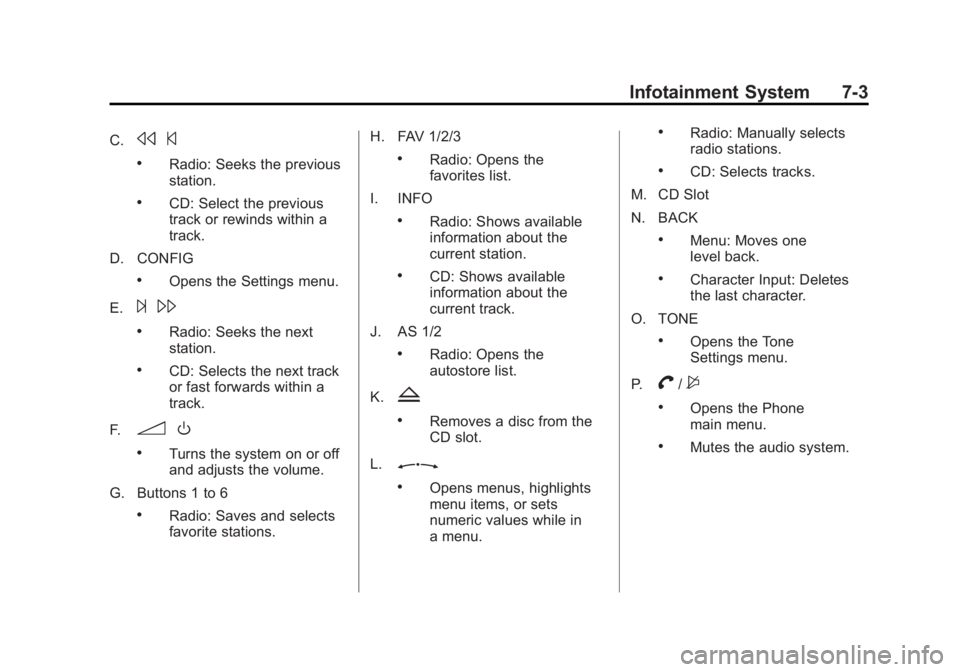
C.s©
.Radio: Seeks the previous
station.
.CD: Select the previous
track or rewinds within a
track.
D. CONFIG
.Opens the Settings menu.
E.
¨ \
.Radio: Seeks the next
station.
.CD: Selects the next track
or fast forwards within a
track.
F.
3 O
.Turns the system on or off
and adjusts the volume.
G. Buttons 1 to 6
.Radio: Saves and selects
favorite stations. H. FAV 1/2/3
.Radio: Opens the
favorites list.
I. INFO
.Radio: Shows available
information about the
current station.
.CD: Shows available
information about the
current track.
J. AS 1/2
.Radio: Opens the
autostore list.
K.
Z
.Removes a disc from the
CD slot.
L.
Z
.Opens menus, highlights
menu items, or sets
numeric values while in
a menu.
.Radio: Manually selects
radio stations.
.CD: Selects tracks.
M. CD Slot
N. BACK
.Menu: Moves one
level back.
.Character Input: Deletes
the last character.
O. TONE
.Opens the Tone
Settings menu.
P.
V/$
.Opens the Phone
main menu.
.Mutes the audio system.
Page 154 of 368
Black plate (4,1)Buick Regal Owner Manual - 2011
7-4 Infotainment System
Operation
Controls
The infotainment system is operated
by using the pushbuttons,
multifunction knobs, menus shown
on the display, and steering wheel
controls, if equipped.
Turning the System On or Off
3O(Volume/Power): Press to
turn the system on and off.
Automatic Switch‐Off
If the infotainment system has been
turned on after the ignition is turned
off, the system will turn off
automatically after 10 minutes.
Volume Control
3 O(Volume/Power): Turn to
adjust the volume.
V/$(Phone/Mute): For vehicles
with OnStar®, press and holdV/$
to mute the infotainment system. To
cancel mute, press and hold
V/$
again, or turn the3 Oknob. For vehicles without OnStar
®, pressV/$to mute the infotainment
system. To cancel mute, press
V/
$again, or turn the3 Oknob.
Menu System
Controls
The
Zknob and the BACK
button are used to navigate the
menu system.
Z(Menu/Select): Press to:
.Enter the menu system.
.Select or activate the highlighted
menu option.
.Confirm a set value.
.Turn a system setting on or off.
Turn to:
.Highlight a menu option.
.Select a value. BACK:
Press to:
.Exit a menu.
.Return from a submenu screen
to the previous menu screen.
.Delete the last character in a
sequence.
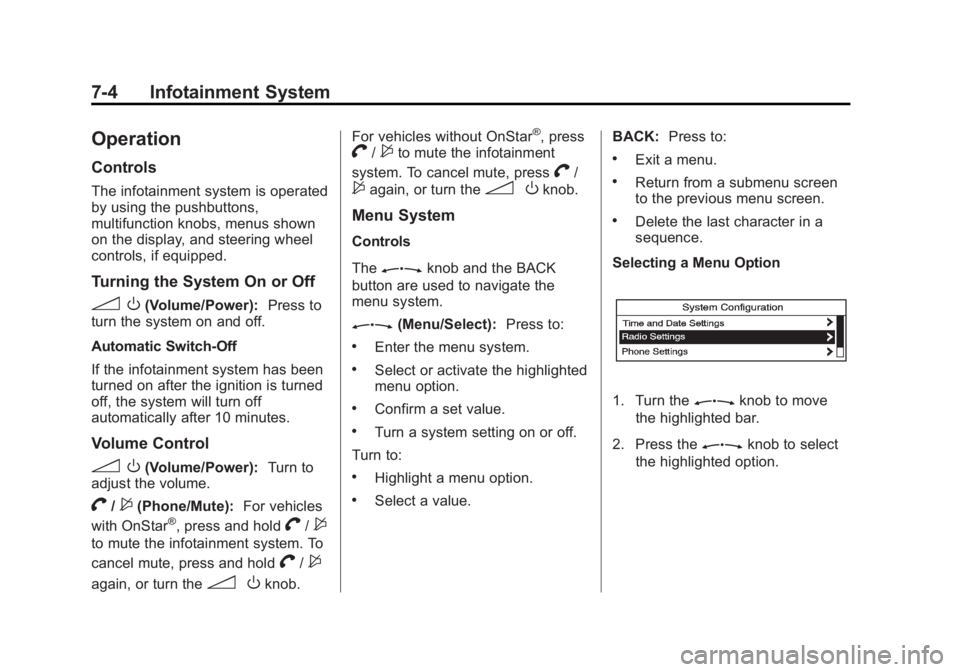
Selecting a Menu Option
1. Turn theZknob to move
the highlighted bar.
2. Press the
Zknob to select
the highlighted option.
Page 155 of 368

Black plate (5,1)Buick Regal Owner Manual - 2011
Infotainment System 7-5
Submenus
An arrow on the right‐hand edge of
the menu indicates that it has a
submenu with other options.
Activating a Setting
1. Turn theZknob to highlight
the setting.
2. Press the
Zknob to
activate the setting. Setting a Value
1. Turn theZknob to change
the current value of the setting.
2. Press the
Zknob to confirm
the setting.
Turning a Function On or Off
1. Turn theZknob to highlight
the function.
2. Press the
Zknob to turn the
function on or off. Entering a Character Sequence
1. Turn theZknob to highlight
the character.
2. Press the
Zknob to select
the character.
Press the BACK button to delete the
last character in the sequence or
press and hold to delete the entire
character sequence.
Audio Settings
The audio settings can be set for
each radio band and each audio
player source.
To quickly reset an audio setting
value to 0:
1. Press the TONE button.
2. Select the audio setting.
Page 160 of 368
Black plate (10,1)Buick Regal Owner Manual - 2011
7-10 Infotainment System
Satellite Radio
Vehicles with an XM™Satellite
Radio tuner and a valid XM Satellite
Radio subscription can receive XM
programming.
XM Satellite Radio Service
XM is a satellite radio service based
in the 48 contiguous United States
and 10 Canadian provinces. XM
Satellite Radio has a wide variety of
programming and commercial-free
music, coast to coast, and in
digital-quality sound. A service fee
is required to receive the XM
service. If XM Service needs to be
reactivated, the radio will display
"No Subscription Please Renew" on
channel XM1. For more information,
contact XM at www.xmradio.com or
call 1-800-929-2100 in the U.S. and
www.xmradio.ca or call
1-877-438-9677 in Canada.
Control Buttons
The buttons used to control the XM
radio are:
RADIO/BAND: Press to turn the
radio on and choose between AM,
FM, and XM™, if equipped.
Z(Menu/Select): Turn to
search for channels and press to
navigate the available menus.
INFO: Press to display additional
information that may be available
about the current song.
s ©/¨\:Press to go to the
previous or next channel.
FAV 1/2/3: Press to open the
favorites list and select favorite
pages.
Buttons 1 to 6: Press to select
preset stations.
Selecting the XM Band
Press the RADIO/BAND button to
choose between the AM, FM, and
XM bands. The last channel played
in that band begins to play when
that band is selected.
XM Categories
XM channels are organized in
categories.
Removing or Adding Categories
Channels in a category that have
been removed can still be accessed
by using the
s ©or¨\
buttons, or theZknob.
To add or remove categories:
1. Press the CONFIG button.
2. Select Radio Settings.
3. Select XM Categories.
4. Turn the
Zknob to highlight
the category.
5. Press the
Zknob to remove
or add the category.
Page 161 of 368
Black plate (11,1)Buick Regal Owner Manual - 2011
Infotainment System 7-11
Selecting an XM Channel
XM channels can be selected by
station lists or category lists.
Selecting a Channel by
Station List
XM channels can be selected by
using
s©,¨\, or the
Zknob.
To select an XM channel using
s
©
or¨ \, do one of the following:
.Press and releases ©or¨
\
to go to the previous or next
channel.
.Press and holds ©or¨\
to scroll through the previous or
next channels until the channel
is reached. To select an XM channel using the
Zknob:
1. Turn the
Zknob to highlight
an XM channel.
2. Press the
Zknob to select
the channel, or leave the
channel highlighted.
To select an XM channel using
the menu:
1. Press the
Zknob.
2. Select XM Stations List.
3. Select the channel.
Selecting a Channel by Category
1. Press the
Zknob.
2. Select XM Category List. A list of all programming types available
displays.
3. Select the programming type.
4. Select the channel.
Storing an XM Channel as a
Favorite
Channels from all bands can be
stored in any order in the favorites
pages.
Up to six channels can be stored in
each favorites page and the number
of available favorites pages can
be set.
Storing a Channel as a Favorite
To store the channel to a position in
the list, press and hold the
corresponding 1 to 6 button until the
channel can be heard again.
Retrieving Channels
Press the FAV button to open a
favorites page or to change to
another favorites page. Briefly press
one of the 1 to 6 buttons to retrieve
the channel.
Page 164 of 368

Black plate (14,1)Buick Regal Owner Manual - 2011
7-14 Infotainment System
If a cellular telephone antenna
needs to be attached to the glass,
make sure that the grid lines for the
AM-FM antenna are not damaged.
There is enough space between the
grid lines to attach a cellular
telephone antenna without
interfering with radio reception.
Notice:Using a razor blade or
sharp object to clear the inside
rear window can damage the rear
window antenna and/or the rear
window defogger. Repairs would
not be covered by the vehicle
warranty. Do not clear the inside
rear window with sharp objects. Notice:
Do not apply aftermarket
glass tinting with metallic film.
The metallic film in some tinting
materials will interfere with or
distort the incoming radio
reception. Any damage caused to
your backglass antenna due to
metallic tinting materials will not
be covered by the vehicle
warranty.
Satellite Radio Antenna
For vehicles with XM satellite radio
service, the antenna is located on
the roof of the vehicle. Keep the
antenna clear of obstructions for
clear radio reception.
Audio Players
CD Player
The CD player can play audio CDs
and MP3 CDs.
The CD player will not play
8 cm (3 in) CDs.
Care of CDs
Sound quality can be reduced due
to disc quality, recording method,
quality of the music recorded, and
disc handling. Handle discs carefully
and store them in their original
cases or other protective cases
away from direct sunlight and dust.
If the bottom surface of a disc is
damaged, the disc may not play
properly or at all. Do not touch the
bottom surface of a disc while
handling it; this could damage the
surface. Pick up discs by grasping
the outer edges or the edge of the
hole and the outer edge.