audio BUICK REGAL 2012 Owner's Guide
[x] Cancel search | Manufacturer: BUICK, Model Year: 2012, Model line: REGAL, Model: BUICK REGAL 2012Pages: 440, PDF Size: 6.22 MB
Page 210 of 440
Black plate (46,1)Buick Regal Owner Manual - 2012
7-46 Infotainment System
.To ignore the incoming call, no
action is required.
.Press$/ito disconnect the
current call and switch to the call
on hold.
Three‐Way Calling
Three‐way calling must be
supported on the cell phone and
enabled by the wireless service
carrier.
1. While on a call, press
b/g.
2. Say “Three‐way call.”
3. Use the dial or call command to dial the number of the third party
to be called.
4. Once the call is connected, press
b/gto link all callers
together.
Ending a Call
Press$/ito end a call.
Muting a Call
During a call, all sounds from inside
the vehicle can be muted so that the
person on the other end of the call
cannot hear them.
To mute a call, press
b/g, and
then say “Mute Call.”
To cancel mute, press
b/g, and
then say “Un‐mute Call.”
Transferring a Call
Audio can be transferred between
the Bluetooth system and the cell
phone.
The cell phone must be paired and
connected with the Bluetooth
system before a call can be
transferred. The connection process
can take up to two minutes after the
ignition is turned to ON/RUN. To Transfer Audio from the
Bluetooth System to a Cell Phone
During a call with the audio in the
vehicle:
1. Press
b/g.
2. Say “Transfer Call.”
To Transfer Audio to the Bluetooth
System from a Cell Phone
During a call with the audio on the
cell phone, press
b/g. The audio
transfers to the vehicle. If the audio
does not transfer to the vehicle, use
the audio transfer feature on the cell
phone. See your cell phone
manufacturer's user guide for more
information.
Voice Pass-Thru
Voice pass‐thru allows access to the
voice recognition commands on the
cell phone. See your cell phone
manufacturer's user guide to see if
the cell phone supports this feature.
Page 241 of 440
Black plate (19,1)Buick Regal Owner Manual - 2012
Driving and Operating 9-19
With the ignition off, pressing the
button one time without the brake
pedal applied will place the ignition
system in ACC/ACCESSORY.
The ignition will switch from ACC/
ACCESSORY to OFF after
five minutes to prevent battery
run down.
ON/RUN/START (Green LED
Light):This mode is for driving and
starting. With the ignition off, and
the brake pedal applied, pressing
the button once will place the
ignition system in ON/RUN/START.
Once engine cranking begins,
release the button. Engine cranking
will continue until the engine starts.
See Starting the Engine on
page 9‑19 for more information. The
ignition will then remain in ON/RUN.
Service Only Mode
This power mode is available for
service and diagnostics, and to
verify the proper operation of the
malfunction indicator lamp as may
be required for emission inspection
purposes. With the vehicle off, and the brake pedal not applied,
pressing and holding the button for
more than five seconds will place
the vehicle in Service Only Mode.
The instruments and audio systems
will operate as they do in ON/RUN,
but the vehicle will not be able to be
driven. The engine will not start in
Service Only Mode. Push the button
again to turn the vehicle off.
Starting the Engine
Place the transmission in the
proper gear.
Automatic Transmission
Move the shift lever to P (Park) or
N (Neutral). The engine will not start
in any other position. To restart the
vehicle when it is already moving,
use N (Neutral) only.
Notice:
Do not try to shift to
P (Park) if the vehicle is moving.
If you do, you could damage the
transmission. Shift to P (Park)
only when the vehicle is stopped. Notice:
The engine is designed to
work with the electronics in the
vehicle. If you add electrical parts
or accessories, you could change
the way the engine operates.
Before adding electrical
equipment, check with your
dealer. If you do not, the engine
might not perform properly. Any
resulting damage would not be
covered by the vehicle warranty.
Manual Transmission
The shift lever should be in
N (Neutral) and the parking brake
engaged. Hold the clutch pedal
down to the floor and start the
engine. The vehicle will not start if
the clutch pedal is not all the
way down.
Starting Procedure (Key Access)
1. With your foot off the accelerator
pedal, turn the ignition key to
START. When the engine starts,
let go of the ignition.
Page 246 of 440
Black plate (24,1)Buick Regal Owner Manual - 2012
9-24 Driving and Operating
To Use the Engine Coolant
Heater
1. Turn off the engine.
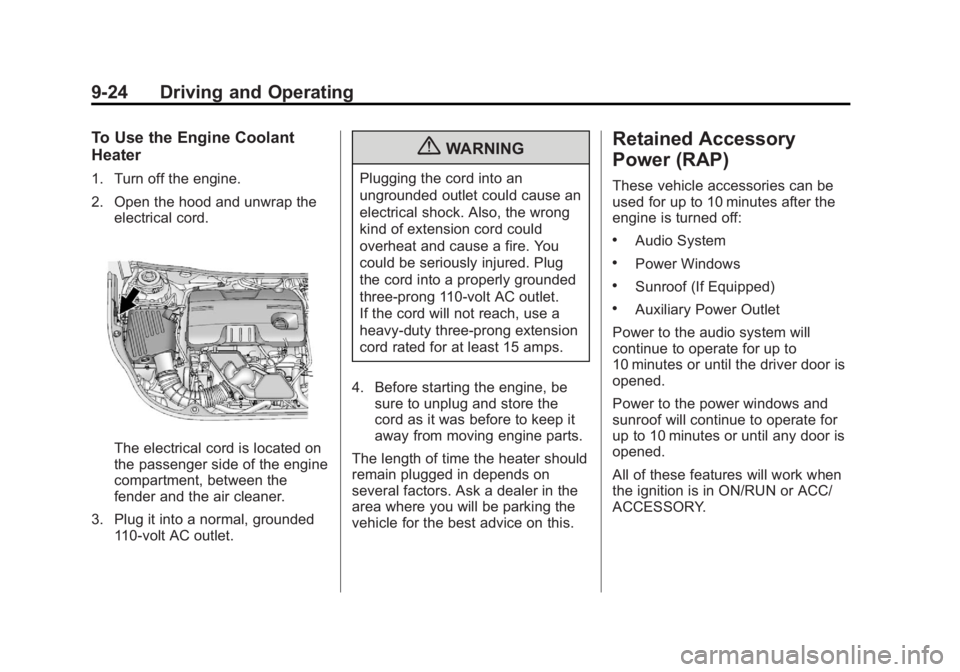
2. Open the hood and unwrap theelectrical cord.
The electrical cord is located on
the passenger side of the engine
compartment, between the
fender and the air cleaner.
3. Plug it into a normal, grounded 110-volt AC outlet.
{WARNING
Plugging the cord into an
ungrounded outlet could cause an
electrical shock. Also, the wrong
kind of extension cord could
overheat and cause a fire. You
could be seriously injured. Plug
the cord into a properly grounded
three-prong 110-volt AC outlet.
If the cord will not reach, use a
heavy-duty three-prong extension
cord rated for at least 15 amps.
4. Before starting the engine, be sure to unplug and store the
cord as it was before to keep it
away from moving engine parts.
The length of time the heater should
remain plugged in depends on
several factors. Ask a dealer in the
area where you will be parking the
vehicle for the best advice on this.
Retained Accessory
Power (RAP)
These vehicle accessories can be
used for up to 10 minutes after the
engine is turned off:
.Audio System
.Power Windows
.Sunroof (If Equipped)
.Auxiliary Power Outlet
Power to the audio system will
continue to operate for up to
10 minutes or until the driver door is
opened.
Power to the power windows and
sunroof will continue to operate for
up to 10 minutes or until any door is
opened.
All of these features will work when
the ignition is in ON/RUN or ACC/
ACCESSORY.
Page 429 of 440
Black plate (1,1)Buick Regal Owner Manual - 2012
INDEX i-1
A
Accessories andModifications . . . . . . . . . . . . . . . . . 10-3
Accessory Power . . . . . . . . . . . . . . 9-24
Add-On Electrical Equipment . . . . . . . . . . . . . . . . . . . 9-52
Additional Information,
OnStar
®. . . . . . . . . . . . . . . . . . . . . . 14-5
Adjustments Lumbar, Front Seats . . . . . . . . . . . 3-5
Air Cleaner/Filter, Engine . . . . . 10-15
Air Filter, Passenger
Compartment . . . . . . . . . . . . . . . . . 8-8
Air Intake . . . . . . . . . . . . . . . . . . . . . . . 8-8
Air Vents . . . . . . . . . . . . . . . . . . . . . . . 8-7
Airbag System Check . . . . . . . . . . . . . . . . . . . . . . . . 3-33
How Does an AirbagRestrain? . . . . . . . . . . . . . . . . . . . 3-26
Passenger Sensing
System . . . . . . . . . . . . . . . . . . . . . . 3-27
What Makes an Airbag Inflate? . . . . . . . . . . . . . . . . . . . . . . 3-25 Airbag System (cont'd)
What Will You See after an
Airbag Inflates? . . . . . . . . . . . . . 3-26
When Should an Airbag
Inflate? . . . . . . . . . . . . . . . . . . . . . . 3-24
Where Are the Airbags? . . . . . . 3-23
Airbags Adding Equipment to theVehicle . . . . . . . . . . . . . . . . . . . . . . 3-32
Passenger Status Indicator . . . 5-14
Readiness Light . . . . . . . . . . . . . . 5-14
Servicing Airbag-Equipped Vehicles . . . . . . . . . . . . . . . . . . . . . 3-32
System Check . . . . . . . . . . . . . . . . 3-21
Alarm System Anti-theft . . . . . . . . . . . . . . . . . . . . . . 2-12
All-Season Tires . . . . . . . . . . . . . . 10-45
AM-FM Radio . . . . . . . . . . . . . . . . . . 7-14
Antenna Satellite Radio . . . . . . . . . . . . . . . . 7-24
Anti-theft Alarm System . . . . . . . . . . . . . . . . 2-12
Alarm System Messages . . . . . 5-33 Antilock Brake
System (ABS) . . . . . . . . . . . . . . . . 9-33
Warning Light . . . . . . . . . . . . . . . . . 5-19
Appearance Care Exterior . . . . . . . . . . . . . . . . . . . . . 10-98
Interior . . . . . . . . . . . . . . . . . . . . . 10-101
Assistance Program,
Roadside . . . . . . . . . . . . . . . 13-7, 13-9
Audio Players . . . . . . . . . . . . . . . . . 7-24 CD . . . . . . . . . . . . . . . . . . . . . . . . . . . 7-24
MP3 . . . . . . . . . . . . . . . . . . . . . . . . . . 7-27
Audio System Backglass Antenna . . . . . . . . . . . 7-23
Radio Reception . . . . . . . . . . . . . . 7-23
Theft-Deterrent Feature . . . . . . . . 7-2
Automatic
Headlamp System . . . . . . . . . . . . . 6-2
Transmission . . . . . . . . . . . . . . . . . 9-28
Transmission Fluid . . . . . . . . . 10-14
Automatic Transmission Manual Mode . . . . . . . . . . . . . . . . . 9-31
Shift Lock Control
Function Check . . . . . . . . . . . 10-31
Auxiliary Devices . . . . . . . . . . . . . . . . . . . . . . . 7-29