light BUICK REGAL 2012 Repair Manual
[x] Cancel search | Manufacturer: BUICK, Model Year: 2012, Model line: REGAL, Model: BUICK REGAL 2012Pages: 440, PDF Size: 6.22 MB
Page 161 of 440
Black plate (3,1)Buick Regal Owner Manual - 2012
Lighting 6-3
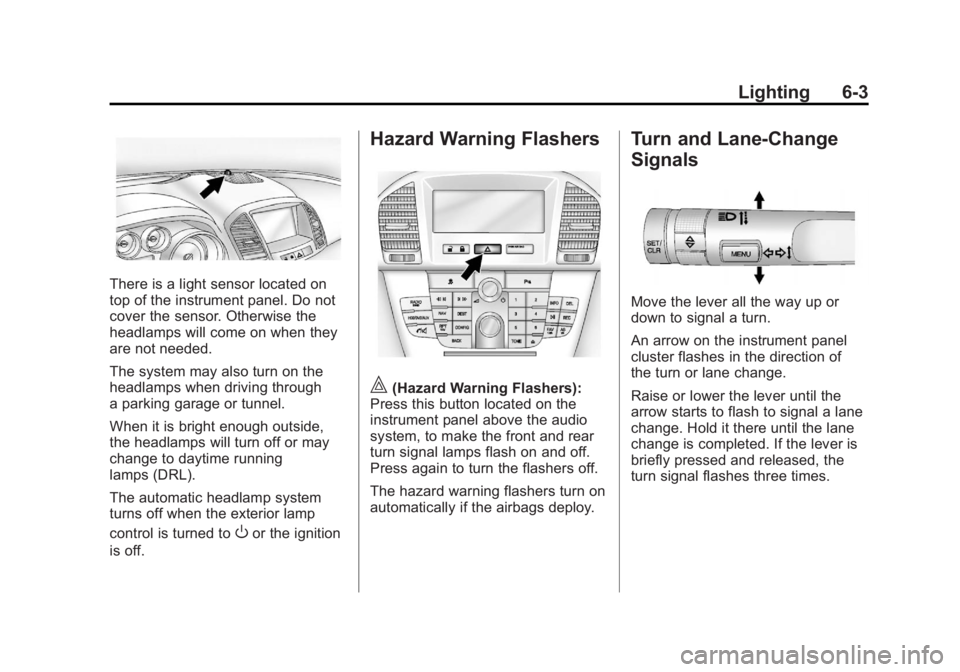
There is a light sensor located on
top of the instrument panel. Do not
cover the sensor. Otherwise the
headlamps will come on when they
are not needed.
The system may also turn on the
headlamps when driving through
a parking garage or tunnel.
When it is bright enough outside,
the headlamps will turn off or may
change to daytime running
lamps (DRL).
The automatic headlamp system
turns off when the exterior lamp
control is turned to
Oor the ignition
is off.
Hazard Warning Flashers
|(Hazard Warning Flashers):
Press this button located on the
instrument panel above the audio
system, to make the front and rear
turn signal lamps flash on and off.
Press again to turn the flashers off.
The hazard warning flashers turn on
automatically if the airbags deploy.
Turn and Lane-Change
Signals
Move the lever all the way up or
down to signal a turn.
An arrow on the instrument panel
cluster flashes in the direction of
the turn or lane change.
Raise or lower the lever until the
arrow starts to flash to signal a lane
change. Hold it there until the lane
change is completed. If the lever is
briefly pressed and released, the
turn signal flashes three times.
Page 162 of 440
Black plate (4,1)Buick Regal Owner Manual - 2012
6-4 Lighting
The turn and lane‐change signal
can be turned off manually by
moving the lever back to its original
position.
If after signaling a turn or lane
change, the arrow flashes rapidly or
does not come on, a signal bulb
might be burned out.
Replace any burned out bulbs. If the
bulb is not burned out, check the
fuse. SeeFuses and Circuit
Breakers on page 10‑38.Fog Lamps
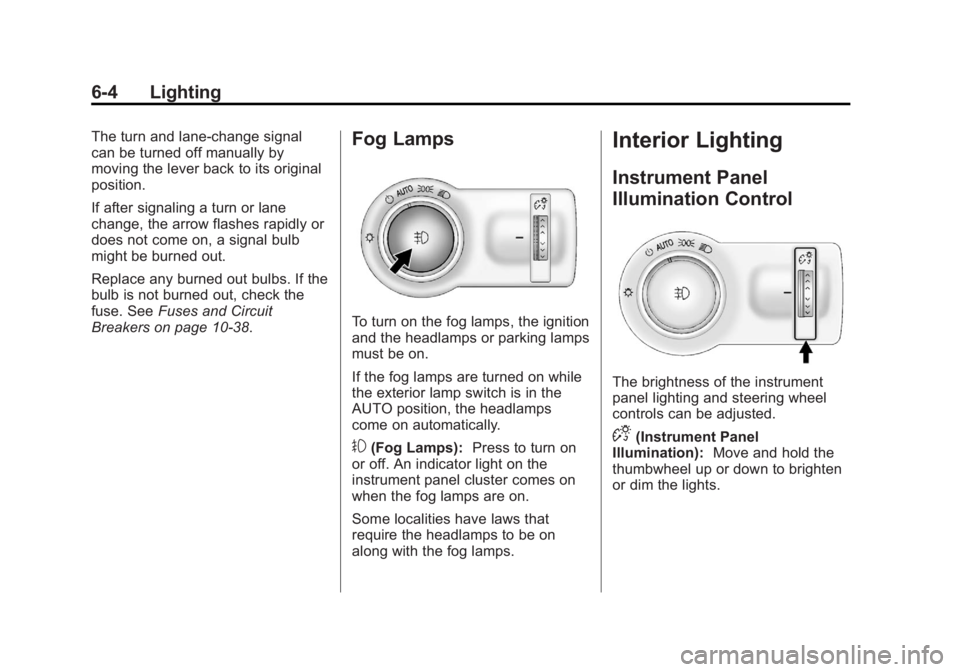
To turn on the fog lamps, the ignition
and the headlamps or parking lamps
must be on.
If the fog lamps are turned on while
the exterior lamp switch is in the
AUTO position, the headlamps
come on automatically.
#(Fog Lamps): Press to turn on
or off. An indicator light on the
instrument panel cluster comes on
when the fog lamps are on.
Some localities have laws that
require the headlamps to be on
along with the fog lamps.
Interior Lighting
Instrument Panel
Illumination Control
The brightness of the instrument
panel lighting and steering wheel
controls can be adjusted.
D(Instrument Panel
Illumination): Move and hold the
thumbwheel up or down to brighten
or dim the lights.
Page 163 of 440
Black plate (5,1)Buick Regal Owner Manual - 2012
Lighting 6-5
Dome Lamps
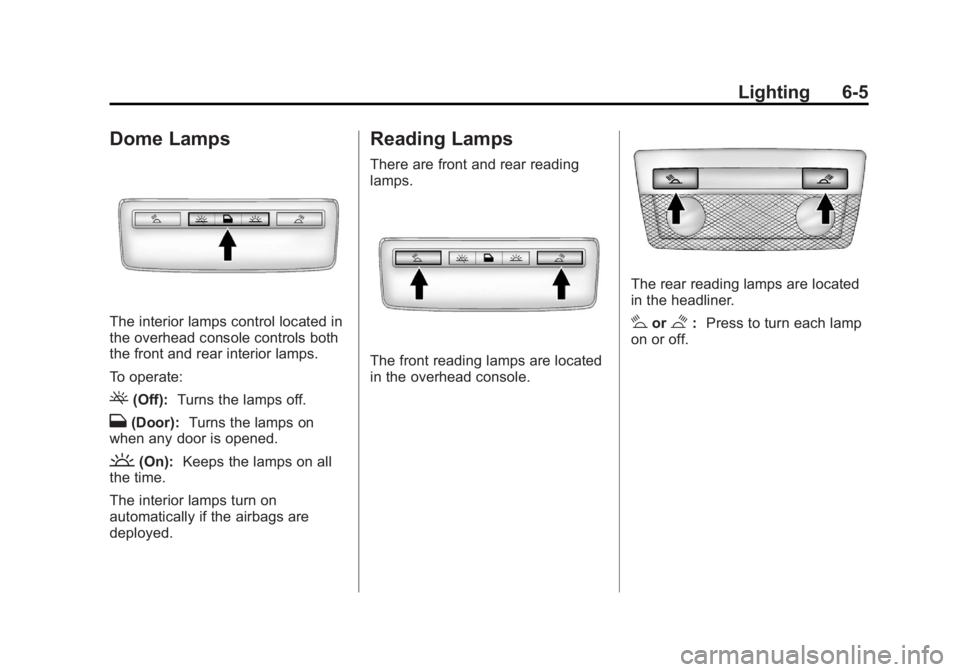
The interior lamps control located in
the overhead console controls both
the front and rear interior lamps.
To operate:
((Off):Turns the lamps off.
H(Door): Turns the lamps on
when any door is opened.
'(On): Keeps the lamps on all
the time.
The interior lamps turn on
automatically if the airbags are
deployed.
Reading Lamps
There are front and rear reading
lamps.
The front reading lamps are located
in the overhead console.
The rear reading lamps are located
in the headliner.
#or$: Press to turn each lamp
on or off.
Page 164 of 440
Black plate (6,1)Buick Regal Owner Manual - 2012
6-6 Lighting
Lighting Features
Entry Lighting
The headlamps, taillamps, license
plate lamps, back‐up lamps, dome
lamps, and most of the interior lights
turn on briefly when
Kis pressed
on the Remote Keyless Entry (RKE)
transmitter. See Remote Keyless
Entry (RKE) System Operation on
page 2‑3. When the driver door is
opened, all control lights, Driver
Information Center (DIC) lights, and
door pocket lights turn on. After
about 30 seconds the exterior lamps
turn off, and then the dome lamps
and remaining interior lights will dim
to off. Entry lighting can be disabled
manually by changing the ignition
out of the OFF position, or by
pressing
Qon the Remote Keyless
Entry (RKE) transmitter.
This feature can be changed. See
Vehicle Personalization on
page 5‑35.
Exit Lighting
The headlamps, taillamps, parking
lamps, back‐up lamps, and license
plate lamps come on at night, or in
areas with limited lighting, when the
key is removed from the ignition.
The dome lamps also come on
when the key is removed from the
ignition. The exterior lights and
dome lamps remain on after the
door is closed for a set amount of
time, then automatically turn off.
For vehicles with keyless access,
the exterior lights and dome lamps
automatically turn on when a door is
opened after the ignition is turned
off. See Ignition Positions (Key
Access) on page 9‑15 orIgnition
Positions (Keyless Access) on
page 9‑17.
The exterior lights turn off
immediately by turning the
exterior lamps control off.
This feature can be changed.
See Vehicle Personalization on
page 5‑35.
Battery Power Protection
The battery saver feature is
designed to protect the vehicle's
battery.
To prevent battery discharge while
driving, the following systems are
reduced automatically in two stages
and then turned off:
.Heated rear window and mirrors
.Heated seats
.Fan
In the second stage, a Driver
Information Center (DIC) message
is displayed confirming the
activation of the battery discharge
protection. See Battery Voltage and
Charging Messages on page 5‑29.
If the exterior lamps or any interior
lights are left on and the ignition is
turned off, the battery power
protection system automatically
turns the lamp off after about
10 minutes.
Page 168 of 440
Black plate (4,1)Buick Regal Owner Manual - 2012
7-4 Infotainment System
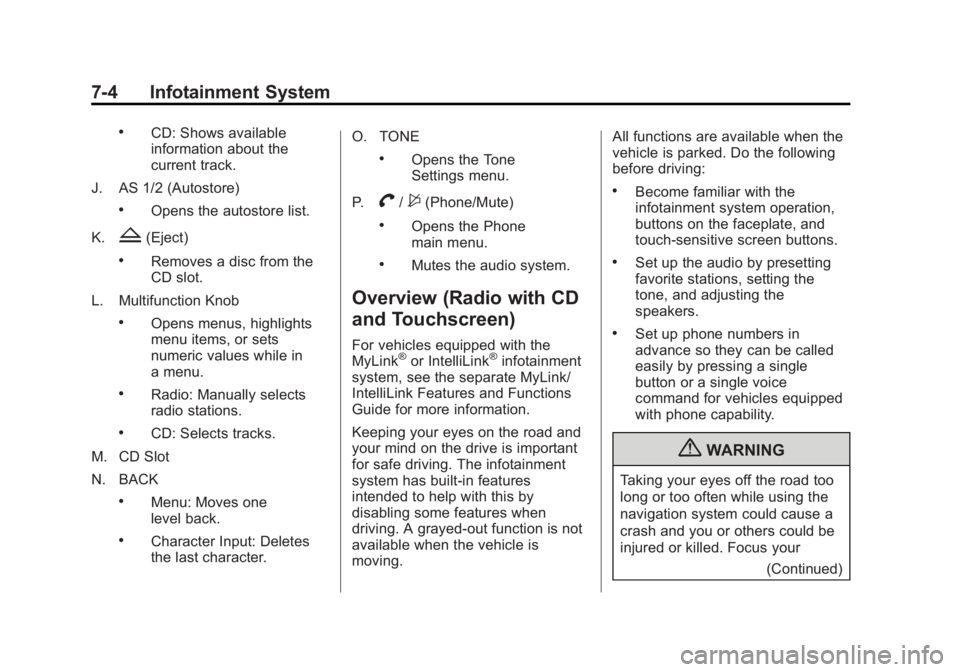
.CD: Shows available
information about the
current track.
J. AS 1/2 (Autostore)
.Opens the autostore list.
K.
Z(Eject)
.Removes a disc from the
CD slot.
L. Multifunction Knob
.Opens menus, highlights
menu items, or sets
numeric values while in
a menu.
.Radio: Manually selects
radio stations.
.CD: Selects tracks.
M. CD Slot
N. BACK
.Menu: Moves one
level back.
.Character Input: Deletes
the last character. O. TONE
.Opens the Tone
Settings menu.
P.
V/$(Phone/Mute)
.Opens the Phone
main menu.
.Mutes the audio system.
Overview (Radio with CD
and Touchscreen)
For vehicles equipped with the
MyLink®or IntelliLink®infotainment
system, see the separate MyLink/
IntelliLink Features and Functions
Guide for more information.
Keeping your eyes on the road and
your mind on the drive is important
for safe driving. The infotainment
system has built-in features
intended to help with this by
disabling some features when
driving. A grayed-out function is not
available when the vehicle is
moving. All functions are available when the
vehicle is parked. Do the following
before driving:
.Become familiar with the
infotainment system operation,
buttons on the faceplate, and
touch-sensitive screen buttons.
.Set up the audio by presetting
favorite stations, setting the
tone, and adjusting the
speakers.
.Set up phone numbers in
advance so they can be called
easily by pressing a single
button or a single voice
command for vehicles equipped
with phone capability.
{WARNING
Taking your eyes off the road too
long or too often while using the
navigation system could cause a
crash and you or others could be
injured or killed. Focus your
(Continued)
Page 170 of 440
Black plate (6,1)Buick Regal Owner Manual - 2012
7-6 Infotainment System
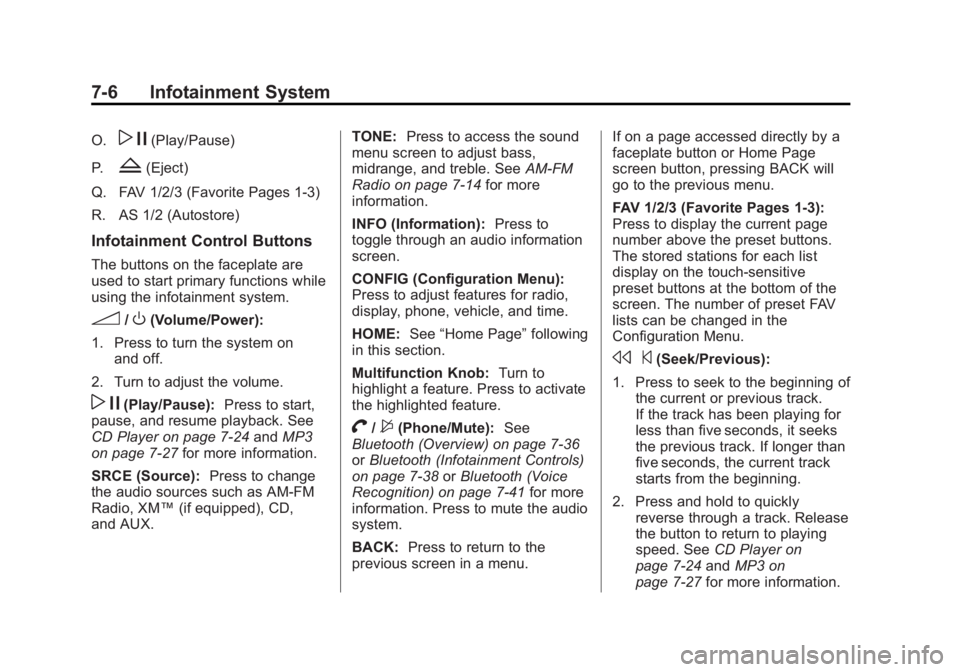
O.w j(Play/Pause)
P.
Z(Eject)
Q. FAV 1/2/3 (Favorite Pages 1-3)
R. AS 1/2 (Autostore)
Infotainment Control Buttons
The buttons on the faceplate are
used to start primary functions while
using the infotainment system.
3/O(Volume/Power):
1. Press to turn the system on and off.
2. Turn to adjust the volume.
w j(Play/Pause): Press to start,
pause, and resume playback. See
CD Player on page 7‑24 andMP3
on page 7‑27 for more information.
SRCE (Source): Press to change
the audio sources such as AM-FM
Radio, XM™ (if equipped), CD,
and AUX. TONE:
Press to access the sound
menu screen to adjust bass,
midrange, and treble. See AM-FM
Radio on page 7‑14 for more
information.
INFO (Information): Press to
toggle through an audio information
screen.
CONFIG (Configuration Menu):
Press to adjust features for radio,
display, phone, vehicle, and time.
HOME: See“Home Page” following
in this section.
Multifunction Knob: Turn to
highlight a feature. Press to activate
the highlighted feature.
V/$(Phone/Mute): See
Bluetooth (Overview) on page 7‑36
or Bluetooth (Infotainment Controls)
on page 7‑38 orBluetooth (Voice
Recognition) on page 7‑41 for more
information. Press to mute the audio
system.
BACK: Press to return to the
previous screen in a menu. If on a page accessed directly by a
faceplate button or Home Page
screen button, pressing BACK will
go to the previous menu.
FAV 1/2/3 (Favorite Pages 1-3):
Press to display the current page
number above the preset buttons.
The stored stations for each list
display on the touch-sensitive
preset buttons at the bottom of the
screen. The number of preset FAV
lists can be changed in the
Configuration Menu.
s
©(Seek/Previous):
1. Press to seek to the beginning of the current or previous track.
If the track has been playing for
less than five seconds, it seeks
the previous track. If longer than
five seconds, the current track
starts from the beginning.
2. Press and hold to quickly reverse through a track. Release
the button to return to playing
speed. See CD Player on
page 7‑24 andMP3 on
page 7‑27 for more information.
Page 171 of 440
Black plate (7,1)Buick Regal Owner Manual - 2012
Infotainment System 7-7
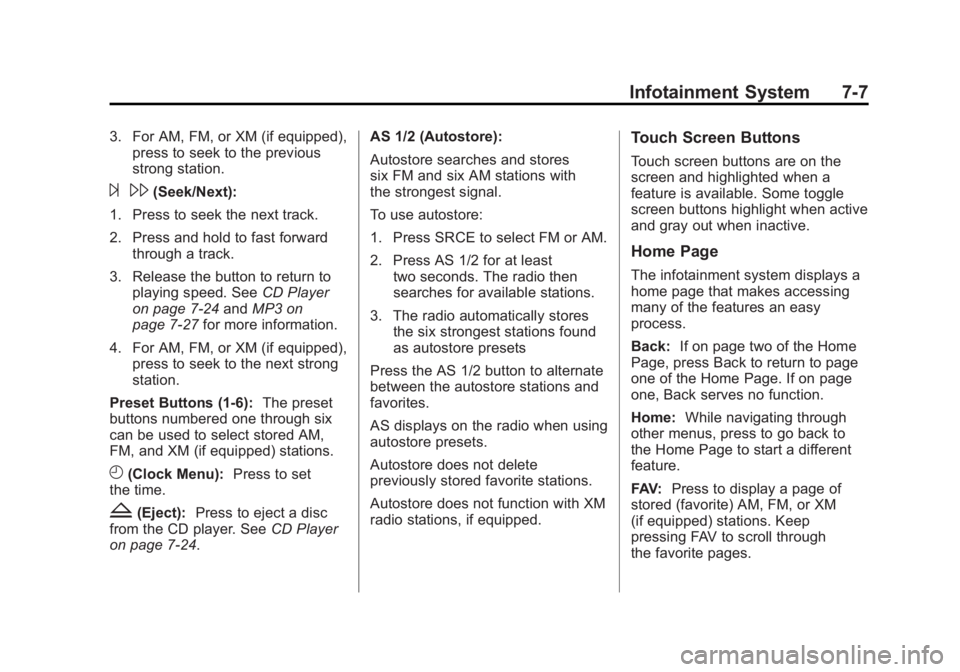
3. For AM, FM, or XM (if equipped),press to seek to the previous
strong station.
¨\(Seek/Next):
1. Press to seek the next track.
2. Press and hold to fast forward through a track.
3. Release the button to return to playing speed. See CD Player
on page 7‑24 andMP3 on
page 7‑27 for more information.
4. For AM, FM, or XM (if equipped), press to seek to the next strong
station.
Preset Buttons (1-6): The preset
buttons numbered one through six
can be used to select stored AM,
FM, and XM (if equipped) stations.
H(Clock Menu): Press to set
the time.
Z(Eject): Press to eject a disc
from the CD player. See CD Player
on page 7‑24. AS 1/2 (Autostore):
Autostore searches and stores
six FM and six AM stations with
the strongest signal.
To use autostore:
1. Press SRCE to select FM or AM.
2. Press AS 1/2 for at least
two seconds. The radio then
searches for available stations.
3. The radio automatically stores the six strongest stations found
as autostore presets
Press the AS 1/2 button to alternate
between the autostore stations and
favorites.
AS displays on the radio when using
autostore presets.
Autostore does not delete
previously stored favorite stations.
Autostore does not function with XM
radio stations, if equipped.
Touch Screen Buttons
Touch screen buttons are on the
screen and highlighted when a
feature is available. Some toggle
screen buttons highlight when active
and gray out when inactive.
Home Page
The infotainment system displays a
home page that makes accessing
many of the features an easy
process.
Back: If on page two of the Home
Page, press Back to return to page
one of the Home Page. If on page
one, Back serves no function.
Home: While navigating through
other menus, press to go back to
the Home Page to start a different
feature.
FAV: Press to display a page of
stored (favorite) AM, FM, or XM
(if equipped) stations. Keep
pressing FAV to scroll through
the favorite pages.
Page 174 of 440
Black plate (10,1)Buick Regal Owner Manual - 2012
7-10 Infotainment System
Radio Favorites:Press to select
the number of FAV pages to be
used in the system.
Add/Remove XM Categories:
Press to customize which available
XM Categories are used and
displayed in the system.
Phone Settings
See Bluetooth (Overview) on
page 7‑36 orBluetooth
(Infotainment Controls) on
page 7‑38 orBluetooth (Voice
Recognition) on page 7‑41 in the
“Phone” section for more
information on phone settings.
Vehicle Settings
See Vehicle Personalization on
page 5‑35 for more information.
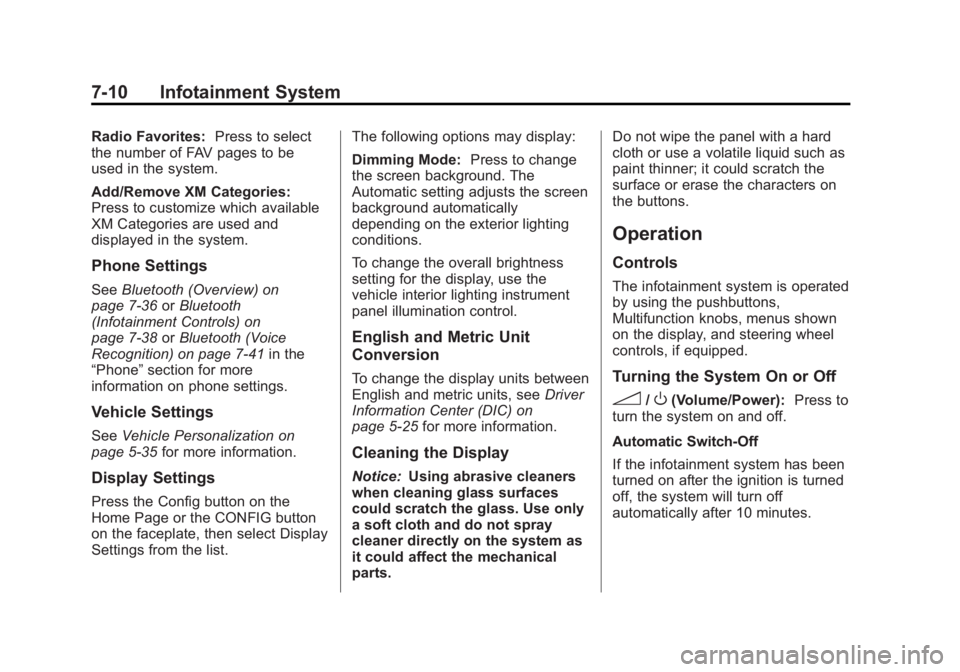
Display Settings
Press the Config button on the
Home Page or the CONFIG button
on the faceplate, then select Display
Settings from the list. The following options may display:
Dimming Mode:
Press to change
the screen background. The
Automatic setting adjusts the screen
background automatically
depending on the exterior lighting
conditions.
To change the overall brightness
setting for the display, use the
vehicle interior lighting instrument
panel illumination control.
English and Metric Unit
Conversion
To change the display units between
English and metric units, see Driver
Information Center (DIC) on
page 5‑25 for more information.
Cleaning the Display
Notice:Using abrasive cleaners
when cleaning glass surfaces
could scratch the glass. Use only
a soft cloth and do not spray
cleaner directly on the system as
it could affect the mechanical
parts. Do not wipe the panel with a hard
cloth or use a volatile liquid such as
paint thinner; it could scratch the
surface or erase the characters on
the buttons.
Operation
Controls
The infotainment system is operated
by using the pushbuttons,
Multifunction knobs, menus shown
on the display, and steering wheel
controls, if equipped.
Turning the System On or Off
3/O(Volume/Power):
Press to
turn the system on and off.
Automatic Switch‐Off
If the infotainment system has been
turned on after the ignition is turned
off, the system will turn off
automatically after 10 minutes.
Page 175 of 440
Black plate (11,1)Buick Regal Owner Manual - 2012
Infotainment System 7-11
Volume Control
3/O(Volume/Power):Turn to
adjust the volume.
V/$(Phone/Mute): For vehicles
with OnStar, press and hold
V/$
to mute the infotainment system. To
cancel mute, press and hold
V/$
again, or turn the3/Oknob.
For vehicles without OnStar, press
V/$to mute the infotainment
system. To cancel mute, press
V/
$again, or turn the3/Oknob.
Menu System
Controls
The Multifunction knob and the
BACK button are used to navigate
the menu system.
Multifunction Knob: Press to:
.Enter the menu system.
.Select or activate the highlighted
menu option.
.Confirm a set value.
.Turn a system setting on or off.
Turn to:
.Highlight a menu option.
.Select a value.
BACK: Press to:
.Exit a menu.
.Return from a submenu screen
to the previous menu screen.
.Delete the last character in a
sequence.
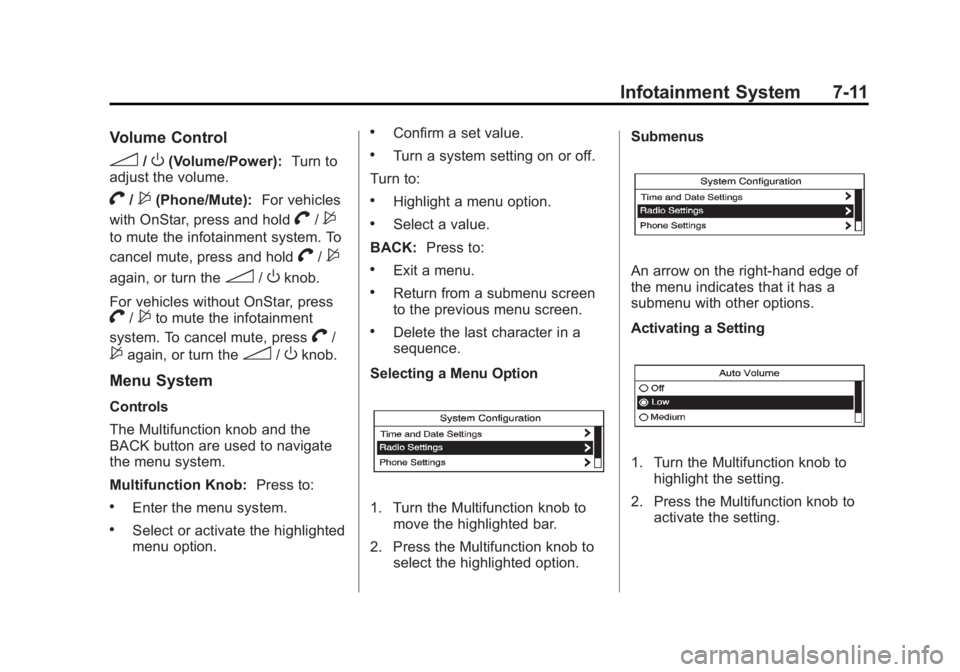
Selecting a Menu Option
1. Turn the Multifunction knob to move the highlighted bar.
2. Press the Multifunction knob to select the highlighted option. Submenus
An arrow on the right‐hand edge of
the menu indicates that it has a
submenu with other options.
Activating a Setting
1. Turn the Multifunction knob to
highlight the setting.
2. Press the Multifunction knob to activate the setting.
Page 176 of 440
Black plate (12,1)Buick Regal Owner Manual - 2012
7-12 Infotainment System
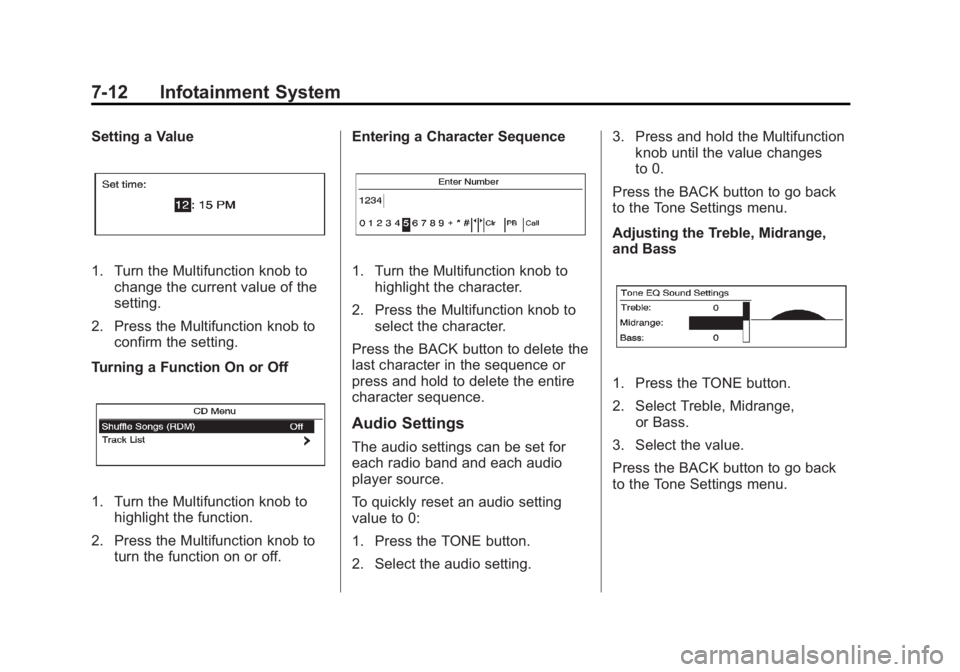
Setting a Value
1. Turn the Multifunction knob tochange the current value of the
setting.
2. Press the Multifunction knob to confirm the setting.
Turning a Function On or Off
1. Turn the Multifunction knob to highlight the function.
2. Press the Multifunction knob to turn the function on or off. Entering a Character Sequence
1. Turn the Multifunction knob to
highlight the character.
2. Press the Multifunction knob to select the character.
Press the BACK button to delete the
last character in the sequence or
press and hold to delete the entire
character sequence.
Audio Settings
The audio settings can be set for
each radio band and each audio
player source.
To quickly reset an audio setting
value to 0:
1. Press the TONE button.
2. Select the audio setting. 3. Press and hold the Multifunction
knob until the value changes
to 0.
Press the BACK button to go back
to the Tone Settings menu.
Adjusting the Treble, Midrange,
and Bass
1. Press the TONE button.
2. Select Treble, Midrange, or Bass.
3. Select the value.
Press the BACK button to go back
to the Tone Settings menu.