auto start BUICK REGAL 2012 Owner's Manual
[x] Cancel search | Manufacturer: BUICK, Model Year: 2012, Model line: REGAL, Model: BUICK REGAL 2012Pages: 440, PDF Size: 6.22 MB
Page 2 of 440
Black plate (2,1)Buick Regal Owner Manual - 2012
2012 Buick Regal Owner ManualM
Driving and Operating. . . . . . . . 9-1
Driving Information . . . . . . . . . . . . . 9-2
Starting and Operating . . . . . . . 9-15
Engine Exhaust . . . . . . . . . . . . . . 9-27
Automatic Transmission . . . . . . 9-28
Manual Transmission . . . . . . . . . 9-32
Brakes . . . . . . . . . . . . . . . . . . . . . . . 9-33
Ride Control Systems . . . . . . . . 9-37
Cruise Control . . . . . . . . . . . . . . . . 9-42
Object Detection Systems . . . . 9-44
Fuel . . . . . . . . . . . . . . . . . . . . . . . . . . 9-46
Towing . . . . . . . . . . . . . . . . . . . . . . . 9-52
Conversions and Add-Ons . . . 9-52 Vehicle Care
. . . . . . . . . . . . . . . . . 10-1
General Information . . . . . . . . . . 10-2
Vehicle Checks . . . . . . . . . . . . . . . 10-4
Headlamp Aiming . . . . . . . . . . . 10-33
Bulb Replacement . . . . . . . . . . 10-33
Electrical System . . . . . . . . . . . . 10-37
Wheels and Tires . . . . . . . . . . . 10-44
Jump Starting . . . . . . . . . . . . . . . 10-89
Towing . . . . . . . . . . . . . . . . . . . . . . 10-95
Appearance Care . . . . . . . . . . . 10-98
Service and Maintenance . . . 11-1
General Information . . . . . . . . . . 11-1
Maintenance Schedule . . . . . . . 11-3
Special Application
Services . . . . . . . . . . . . . . . . . . . . 11-9
Additional Maintenance
and Care . . . . . . . . . . . . . . . . . . . . 11-9
Recommended Fluids, Lubricants, and Parts . . . . . . 11-13
Maintenance Records . . . . . . . 11-16 Technical Data
. . . . . . . . . . . . . . . 12-1
Vehicle Identification . . . . . . . . . 12-1
Vehicle Data . . . . . . . . . . . . . . . . . . 12-2
Customer Information . . . . . . . 13-1
Customer Information . . . . . . . . 13-1
Reporting Safety Defects . . . . 13-17
Vehicle Data Recording and
Privacy . . . . . . . . . . . . . . . . . . . . 13-18
OnStar . . . . . . . . . . . . . . . . . . . . . . . 14-1
OnStar Overview . . . . . . . . . . . . . 14-1
OnStar Services . . . . . . . . . . . . . . 14-2
OnStar Additional Information . . . . . . . . . . . . . . . . . . 14-5
Index . . . . . . . . . . . . . . . . . . . . . i-1
Page 7 of 440
Black plate (1,1)Buick Regal Owner Manual - 2012
In Brief 1-1
In Brief
Instrument Panel
Instrument Panel . . . . . . . . . . . . . . 1-2
Initial Drive Information
Initial Drive Information . . . . . . . . 1-4
Remote Keyless Entry (RKE)System . . . . . . . . . . . . . . . . . . . . . . 1-4
Remote Vehicle Start . . . . . . . . . 1-5
Door Locks . . . . . . . . . . . . . . . . . . . 1-5
Trunk Release . . . . . . . . . . . . . . . . 1-6
Windows . . . . . . . . . . . . . . . . . . . . . . 1-6
Seat Adjustment . . . . . . . . . . . . . . 1-7
Heated Seats . . . . . . . . . . . . . . . . . 1-8
Head Restraint Adjustment . . . . 1-8
Safety Belts . . . . . . . . . . . . . . . . . . . 1-9
Passenger Sensing System . . . 1-9
Mirror Adjustment . . . . . . . . . . . . . 1-9
Steering Wheel Adjustment . . . . . . . . . . . . . . . . . 1-10
Interior Lighting . . . . . . . . . . . . . . 1-10
Exterior Lighting . . . . . . . . . . . . . 1-11
Windshield Wiper/Washer . . . . 1-12
Climate Controls . . . . . . . . . . . . . 1-13
Transmission . . . . . . . . . . . . . . . . 1-15
Vehicle Features
Radio(s) . . . . . . . . . . . . . . . . . . . . . 1-16
Satellite Radio . . . . . . . . . . . . . . . 1-17
Portable Audio Devices . . . . . . 1-17
Bluetooth
®. . . . . . . . . . . . . . . . . . . 1-18
Steering Wheel Controls . . . . . 1-18
Cruise Control . . . . . . . . . . . . . . . 1-19
Navigation System . . . . . . . . . . . 1-19
Driver Information
Center (DIC) . . . . . . . . . . . . . . . 1-19
Vehicle Personalization . . . . . . 1-20
Ultrasonic Parking Assist . . . . 1-20
Power Outlets . . . . . . . . . . . . . . . 1-20
Sunroof . . . . . . . . . . . . . . . . . . . . . . 1-21
eAssist Features
eAssist®Overview . . . . . . . . . . . 1-21
High Voltage Safety
Information . . . . . . . . . . . . . . . . . 1-22
Driver Efficiency Gauge . . . . . . 1-23
Automatic Engine Start/Stop Feature . . . . . . . . . . . . . . . . . . . . . 1-23
Regenerative Braking . . . . . . . . 1-23
Battery . . . . . . . . . . . . . . . . . . . . . . . 1-24
Service . . . . . . . . . . . . . . . . . . . . . . 1-24
Performance and Maintenance
Traction Control System (TCS) . . . . . . . . . . . . . . 1-24
StabiliTrak
®System . . . . . . . . . 1-24
Tire Pressure Monitor . . . . . . . . 1-25
Tire Sealant and Compressor Kit . . . . . . . . . . . . . 1-25
Engine Oil Life System . . . . . . 1-26
Fuel E85 (85% Ethanol) . . . . . 1-26
Driving for Better Fuel Economy . . . . . . . . . . . . . . . . . . . 1-26
Roadside Assistance Program . . . . . . . . . . . . . . . . . . . . 1-26
OnStar
®. . . . . . . . . . . . . . . . . . . . . 1-27
Page 10 of 440
Black plate (4,1)Buick Regal Owner Manual - 2012
1-4 In Brief
T.Steering Wheel Adjustment on
page 5‑2.
U. Ignition Positions (Key Access)
on page 9‑15 orIgnition
Positions (Keyless Access) on
page 9‑17.
V. Heated Front Seats on
page 3‑7.
W. Storage Compartment.
X. Shift Lever. See Automatic
Transmission on page 9‑28 or
Manual Transmission on
page 9‑32.
Y. Climate Control Systems on
page 8‑1 (If Equipped) or Dual
Automatic Climate Control
System on page 8‑3
(If Equipped).Initial Drive
Information
This section provides a brief
overview about some of the
important features that may or may
not be on your specific vehicle.
For more detailed information, refer
to each of the features which can be
found later in this owner manual.
Remote Keyless Entry
(RKE) System
The Remote Keyless Entry (RKE)
transmitter will work up to 20 m
(65 ft) away from the vehicle. On
vehicles with remote start the
distance will be greater.
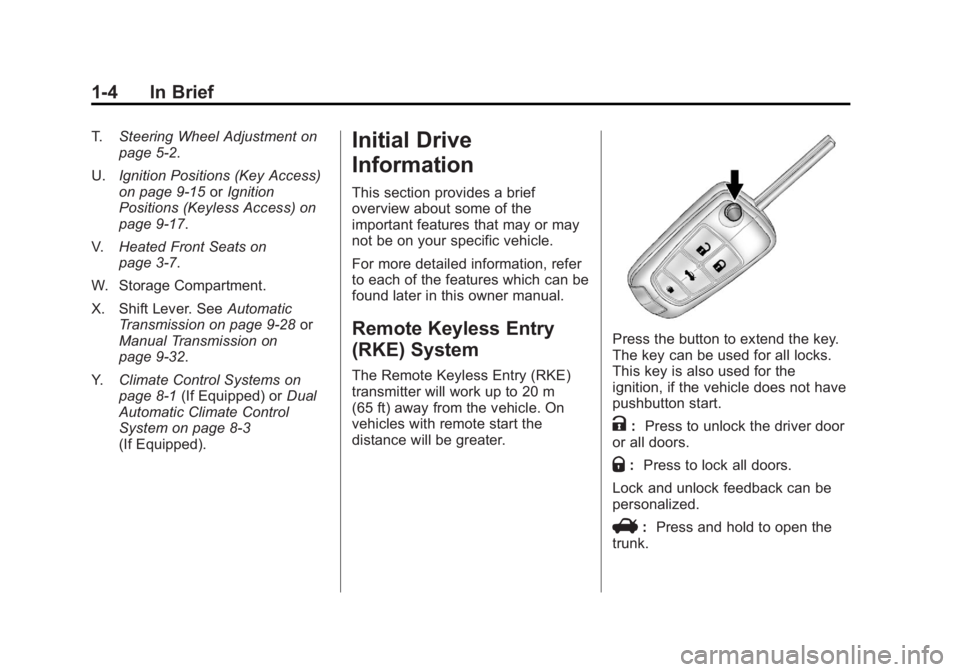
Press the button to extend the key.
The key can be used for all locks.
This key is also used for the
ignition, if the vehicle does not have
pushbutton start.
K: Press to unlock the driver door
or all doors.
Q: Press to lock all doors.
Lock and unlock feedback can be
personalized.
V: Press and hold to open the
trunk.
Page 27 of 440
Black plate (21,1)Buick Regal Owner Manual - 2012
In Brief 1-21
Sunroof
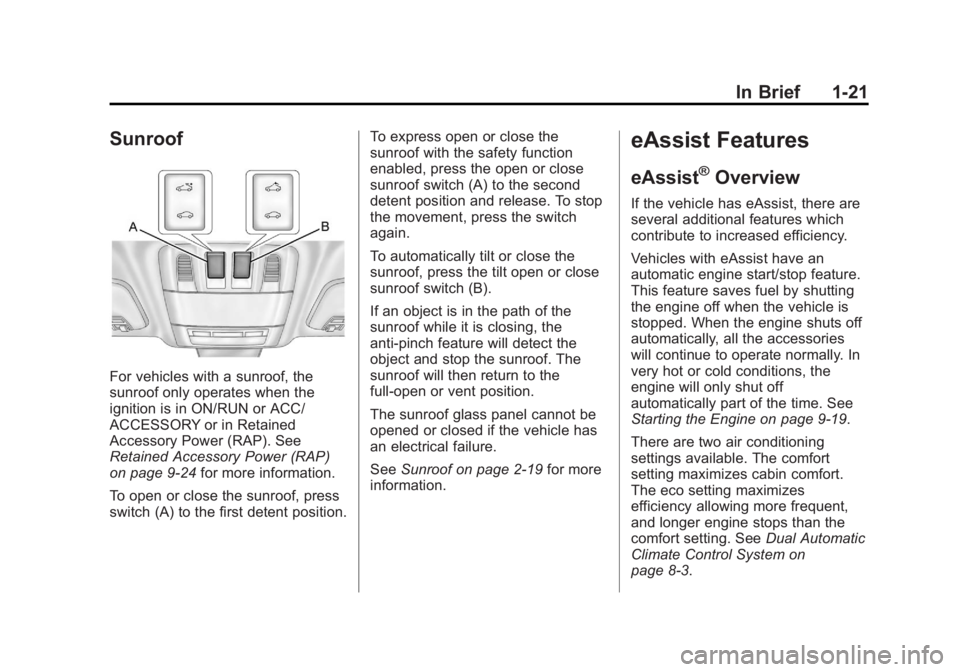
For vehicles with a sunroof, the
sunroof only operates when the
ignition is in ON/RUN or ACC/
ACCESSORY or in Retained
Accessory Power (RAP). See
Retained Accessory Power (RAP)
on page 9‑24for more information.
To open or close the sunroof, press
switch (A) to the first detent position. To express open or close the
sunroof with the safety function
enabled, press the open or close
sunroof switch (A) to the second
detent position and release. To stop
the movement, press the switch
again.
To automatically tilt or close the
sunroof, press the tilt open or close
sunroof switch (B).
If an object is in the path of the
sunroof while it is closing, the
anti-pinch feature will detect the
object and stop the sunroof. The
sunroof will then return to the
full-open or vent position.
The sunroof glass panel cannot be
opened or closed if the vehicle has
an electrical failure.
See
Sunroof on page 2‑19 for more
information.
eAssist Features
eAssist®Overview
If the vehicle has eAssist, there are
several additional features which
contribute to increased efficiency.
Vehicles with eAssist have an
automatic engine start/stop feature.
This feature saves fuel by shutting
the engine off when the vehicle is
stopped. When the engine shuts off
automatically, all the accessories
will continue to operate normally. In
very hot or cold conditions, the
engine will only shut off
automatically part of the time. See
Starting the Engine on page 9‑19.
There are two air conditioning
settings available. The comfort
setting maximizes cabin comfort.
The eco setting maximizes
efficiency allowing more frequent,
and longer engine stops than the
comfort setting. See Dual Automatic
Climate Control System on
page 8‑3.
Page 28 of 440
Black plate (22,1)Buick Regal Owner Manual - 2012
1-22 In Brief
This vehicle has a Hill Start Assist
(HSA) feature, which may be useful
when the vehicle is stopped on a
grade. SeeHill Start Assist (HSA)
on page 9‑37.
Vehicles with eAssist have a slightly
different instrument cluster, which
includes an efficiency gauge, and
an AUTO STOP indicator on the
tachometer. See Instrument Cluster
on page 5‑9. There is also a Power
Flow Gauge in the Driver
Information Center (DIC). See
Driver Information Center (DIC) on
page 5‑25.
The eAssist system uses a high
voltage battery, which is cooled with
air drawn from the vehicle interior.
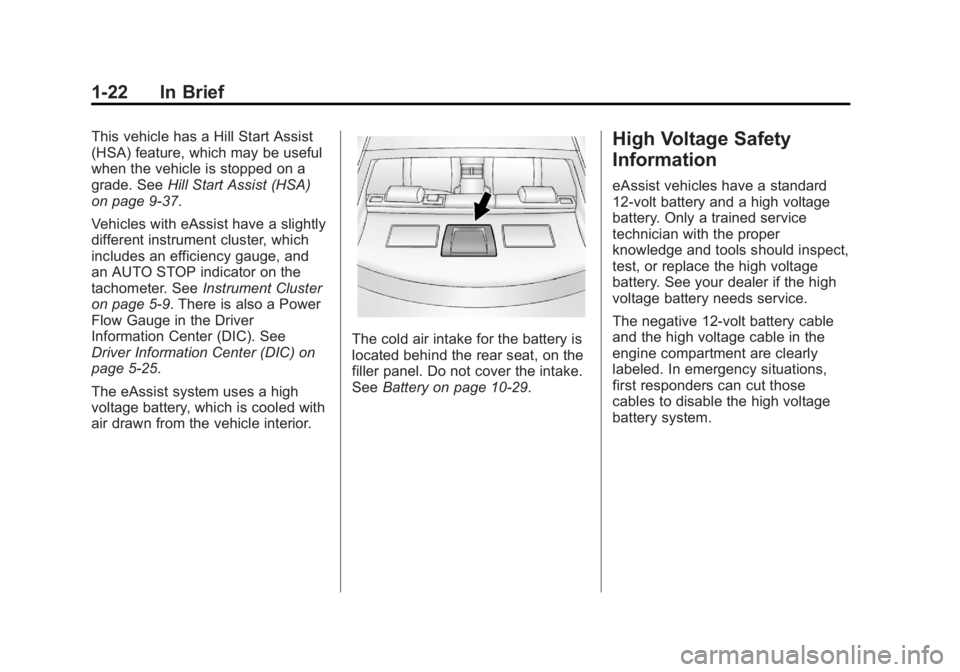
The cold air intake for the battery is
located behind the rear seat, on the
filler panel. Do not cover the intake.
See Battery on page 10‑29.
High Voltage Safety
Information
eAssist vehicles have a standard
12-volt battery and a high voltage
battery. Only a trained service
technician with the proper
knowledge and tools should inspect,
test, or replace the high voltage
battery. See your dealer if the high
voltage battery needs service.
The negative 12-volt battery cable
and the high voltage cable in the
engine compartment are clearly
labeled. In emergency situations,
first responders can cut those
cables to disable the high voltage
battery system.
Page 29 of 440
Black plate (23,1)Buick Regal Owner Manual - 2012
In Brief 1-23
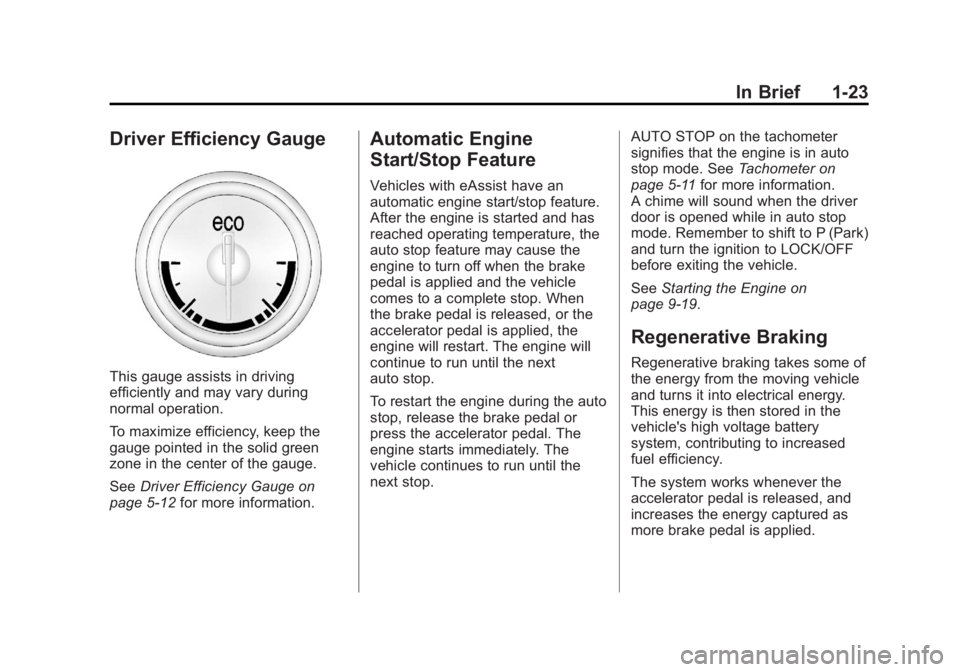
Driver Efficiency Gauge
This gauge assists in driving
efficiently and may vary during
normal operation.
To maximize efficiency, keep the
gauge pointed in the solid green
zone in the center of the gauge.
SeeDriver Efficiency Gauge on
page 5‑12 for more information.
Automatic Engine
Start/Stop Feature
Vehicles with eAssist have an
automatic engine start/stop feature.
After the engine is started and has
reached operating temperature, the
auto stop feature may cause the
engine to turn off when the brake
pedal is applied and the vehicle
comes to a complete stop. When
the brake pedal is released, or the
accelerator pedal is applied, the
engine will restart. The engine will
continue to run until the next
auto stop.
To restart the engine during the auto
stop, release the brake pedal or
press the accelerator pedal. The
engine starts immediately. The
vehicle continues to run until the
next stop. AUTO STOP on the tachometer
signifies that the engine is in auto
stop mode. See
Tachometer on
page 5‑11 for more information.
A chime will sound when the driver
door is opened while in auto stop
mode. Remember to shift to P (Park)
and turn the ignition to LOCK/OFF
before exiting the vehicle.
See Starting the Engine on
page 9‑19.
Regenerative Braking
Regenerative braking takes some of
the energy from the moving vehicle
and turns it into electrical energy.
This energy is then stored in the
vehicle's high voltage battery
system, contributing to increased
fuel efficiency.
The system works whenever the
accelerator pedal is released, and
increases the energy captured as
more brake pedal is applied.
Page 30 of 440
Black plate (24,1)Buick Regal Owner Manual - 2012
1-24 In Brief
Battery
This vehicle has a standard 12‐volt
battery. Refer to the replacement
number on the original battery label
when a new standard 12‐volt battery
is needed.
eAssist vehicles also have a high
voltage battery. Only a trained
service technician with the proper
knowledge and tools should inspect,
test, or replace the high voltage
battery. See your dealer if the high
voltage battery needs service. See
Battery on page 10‑29.
Service
Never try to do your own service on
eAssist components. You can be
injured and the vehicle can be
damaged if you try to do your own
service work. Service and repair of
these high voltage components
should only be performed by a
trained service technician with the
proper knowledge and tools. See
Doing Your Own Service Work on
page 10‑4.
Performance and
Maintenance
Traction Control
System (TCS)
The vehicle may have a traction
control system that limits wheel slip.
The system turns on automatically
every time the vehicle is started.
.To turn off traction control, press
and release the TCS/StabiliTrak
button, located on the instrument
panel.
iilluminates and the
appropriate DIC message is
displayed. See Ride Control
System Messages on page 5‑33.
.Press and release the TCS/
StabiliTrak button again to turn
on traction control.
For more information, see Traction
Control System (TCS) on
page 9‑37.
StabiliTrak®System
The StabiliTrak system assists with
directional control of the vehicle in
difficult driving conditions. The
system turns on automatically every
time the vehicle is started.
.To turn off both traction control
and StabiliTrak, press and hold
the TCS/StabiliTrak button,
located on the instrument panel,
until
iandgilluminate in the
instrument cluster and the
appropriate DIC message is
displayed. See Ride Control
System Messages on page 5‑33.
.Press and release the TCS/
StabiliTrak button to turn on both
systems.
For more information, see
StabiliTrak
®System on page 9‑39.
Page 35 of 440
Black plate (1,1)Buick Regal Owner Manual - 2012
Keys, Doors, and Windows 2-1
Keys, Doors, and
Windows
Keys and Locks
Keys . . . . . . . . . . . . . . . . . . . . . . . . . . 2-2
Remote Keyless Entry (RKE)System . . . . . . . . . . . . . . . . . . . . . . 2-3
Remote Keyless Entry (RKE) System Operation . . . . . . . . . . . 2-3
Remote Vehicle Start . . . . . . . . . 2-8
Door Locks . . . . . . . . . . . . . . . . . . . 2-9
Power Door Locks . . . . . . . . . . . 2-10
Safety Locks . . . . . . . . . . . . . . . . . 2-10
Doors
Trunk . . . . . . . . . . . . . . . . . . . . . . . . 2-11
Vehicle Security
Vehicle Security . . . . . . . . . . . . . . 2-12
Anti-theft Alarm System . . . . . . 2-12
Immobilizer . . . . . . . . . . . . . . . . . . 2-13
Immobilizer Operation (Key Access) . . . . . . . . . . . . . . . 2-13
Immobilizer Operation (Keyless Access) . . . . . . . . . . . 2-14
Exterior Mirrors
Convex Mirrors . . . . . . . . . . . . . . 2-15
Power Mirrors . . . . . . . . . . . . . . . . 2-15
Folding Mirrors . . . . . . . . . . . . . . . 2-15
Heated Mirrors . . . . . . . . . . . . . . . 2-15
Interior Mirrors
Automatic Dimming RearviewMirror . . . . . . . . . . . . . . . . . . . . . . . 2-16
Windows
Windows . . . . . . . . . . . . . . . . . . . . . 2-16
Power Windows . . . . . . . . . . . . . 2-17
Sun Visors . . . . . . . . . . . . . . . . . . . 2-18
Roof
Sunroof . . . . . . . . . . . . . . . . . . . . . . 2-19
Page 38 of 440
Black plate (4,1)Buick Regal Owner Manual - 2012
2-4 Keys, Doors, and Windows
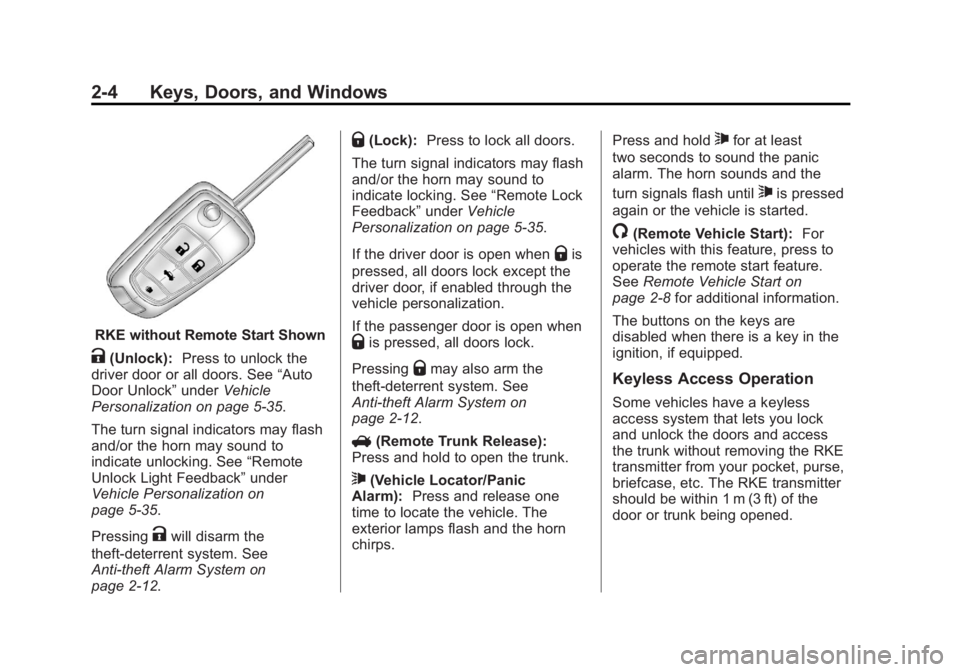
RKE without Remote Start Shown
K(Unlock):Press to unlock the
driver door or all doors. See “Auto
Door Unlock” underVehicle
Personalization on page 5‑35.
The turn signal indicators may flash
and/or the horn may sound to
indicate unlocking. See “Remote
Unlock Light Feedback” under
Vehicle Personalization on
page 5‑35.
Pressing
Kwill disarm the
theft-deterrent system. See
Anti-theft Alarm System on
page 2‑12.
Q(Lock): Press to lock all doors.
The turn signal indicators may flash
and/or the horn may sound to
indicate locking. See “Remote Lock
Feedback” underVehicle
Personalization on page 5‑35.
If the driver door is open when
Qis
pressed, all doors lock except the
driver door, if enabled through the
vehicle personalization.
If the passenger door is open when
Qis pressed, all doors lock.
Pressing
Qmay also arm the
theft-deterrent system. See
Anti-theft Alarm System on
page 2‑12.
V (Remote Trunk Release):
Press and hold to open the trunk.
7(Vehicle Locator/Panic
Alarm): Press and release one
time to locate the vehicle. The
exterior lamps flash and the horn
chirps. Press and hold
7for at least
two seconds to sound the panic
alarm. The horn sounds and the
turn signals flash until
7is pressed
again or the vehicle is started.
/(Remote Vehicle Start): For
vehicles with this feature, press to
operate the remote start feature.
See Remote Vehicle Start on
page 2‑8 for additional information.
The buttons on the keys are
disabled when there is a key in the
ignition, if equipped.
Keyless Access Operation
Some vehicles have a keyless
access system that lets you lock
and unlock the doors and access
the trunk without removing the RKE
transmitter from your pocket, purse,
briefcase, etc. The RKE transmitter
should be within 1 m (3 ft) of the
door or trunk being opened.
Page 42 of 440
Black plate (8,1)Buick Regal Owner Manual - 2012
2-8 Keys, Doors, and Windows
Remote Vehicle Start
The vehicle may have this feature
that allows you to start the engine
from outside the vehicle.
/(Remote Vehicle Start):This
button will be on the RKE
transmitter if the vehicle has
remote start.
Vehicles with an automatic climate
control system will default to a
heating or cooling mode depending
on the outside temperature during a
remote start. A vehicle without
automatic climate control will default
to the last used heating or cooling
mode. Once the key is turned to
ON/RUN, the climate control system
will turn on at the setting the vehicle
was last set to. If the vehicle has
heated seats, they may come on
during a remote start. See Heated
Front Seats on page 3‑7 for more
information.
Laws in some local communities
may restrict the use of remote
starters. For example, some laws
require a person using remote start to have the vehicle in view. Check
local regulations for any
requirements.
There are other conditions that can
affect the performance of the
transmitter. See
Remote Keyless
Entry (RKE) System on page 2‑3 for
additional information.
Starting the Vehicle
To start the engine using the remote
start feature:
1. Aim the RKE transmitter at the vehicle.
2. Press and release
Q.
3. Immediately after completing Step 2, press and hold
/until
the turn signal lamps flash, or for
about two seconds if the vehicle
is not in view.
When the engine starts, the parking
lamps will turn on and remain on as
long as the engine is running. The
doors will be locked and the climate
control system may come on. The engine will continue to run for
10 minutes. Repeat the steps for a
10-minute time extension. Remote
start can be extended only once.
Start the vehicle before driving.
Extending Engine Run Time
For a 10-minute extension, repeat
Steps 1 through 3 while the engine
is still running. The remote start can
be extended once.
When the remote start is extended,
the second 10 minutes will start
immediately.
For example, if the engine has been
running for five minutes, and
10 minutes are added, the engine
will run for a total of 15 minutes.
A maximum of two remote starts,
or a single start with an extension,
is allowed between ignition cycles.
The vehicle's ignition must be
turned on and then back off before
the remote start procedure can be
used again.