turn signal BUICK REGAL 2012 Owner's Manual
[x] Cancel search | Manufacturer: BUICK, Model Year: 2012, Model line: REGAL, Model: BUICK REGAL 2012Pages: 440, PDF Size: 6.22 MB
Page 9 of 440
Black plate (3,1)Buick Regal Owner Manual - 2012
In Brief 1-3
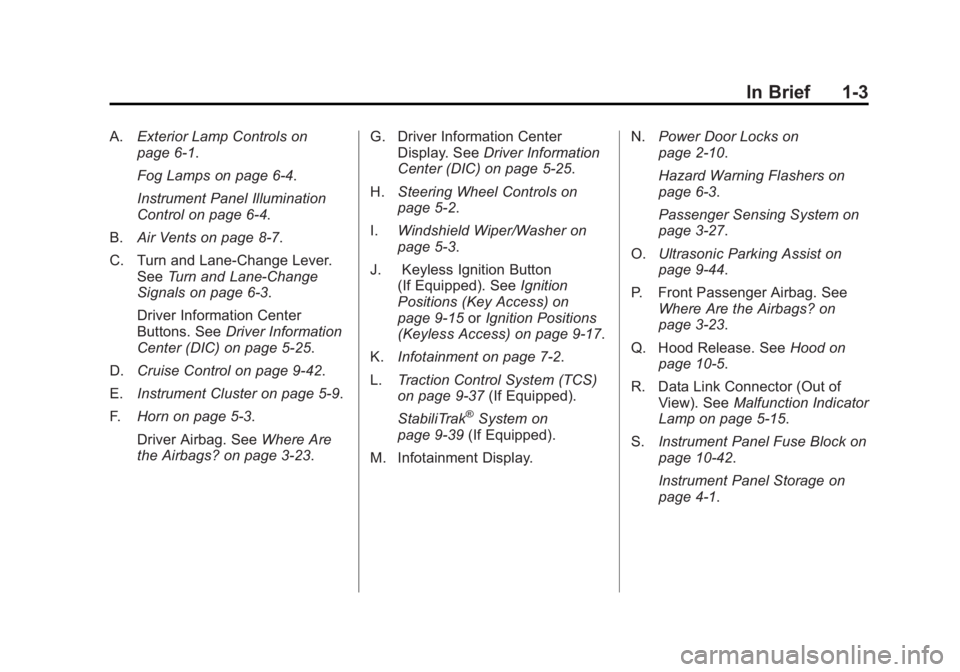
A.Exterior Lamp Controls on
page 6‑1.
Fog Lamps on page 6‑4.
Instrument Panel Illumination
Control on page 6‑4.
B. Air Vents on page 8‑7.
C. Turn and Lane‐Change Lever. See Turn and Lane-Change
Signals on page 6‑3.
Driver Information Center
Buttons. See Driver Information
Center (DIC) on page 5‑25.
D. Cruise Control on page 9‑42.
E. Instrument Cluster on page 5‑9.
F. Horn on page 5‑3.
Driver Airbag. See Where Are
the Airbags? on page 3‑23. G. Driver Information Center
Display. See Driver Information
Center (DIC) on page 5‑25.
H. Steering Wheel Controls on
page 5‑2.
I. Windshield Wiper/Washer on
page 5‑3.
J. Keyless Ignition Button (If Equipped). See Ignition
Positions (Key Access) on
page 9‑15 orIgnition Positions
(Keyless Access) on page 9‑17.
K. Infotainment on page 7‑2.
L. Traction Control System (TCS)
on page 9‑37 (If Equipped).
StabiliTrak
®System on
page 9‑39 (If Equipped).
M. Infotainment Display. N.
Power Door Locks on
page 2‑10.
Hazard Warning Flashers on
page 6‑3.
Passenger Sensing System on
page 3‑27.
O. Ultrasonic Parking Assist on
page 9‑44.
P. Front Passenger Airbag. See Where Are the Airbags? on
page 3‑23.
Q. Hood Release. See Hood on
page 10‑5.
R. Data Link Connector (Out of View). See Malfunction Indicator
Lamp on page 5‑15.
S. Instrument Panel Fuse Block on
page 10‑42.
Instrument Panel Storage on
page 4‑1.
Page 11 of 440
Black plate (5,1)Buick Regal Owner Manual - 2012
In Brief 1-5
7:Press and release one time to
locate the vehicle. Press and hold
for at least two seconds to sound
the panic alarm. Press again to
cancel the panic alarm.
See Keys on page 2‑2 andRemote
Keyless Entry (RKE) System
Operation on page 2‑3.
Remote Vehicle Start
For vehicles with this feature, the
engine can be started from outside
the vehicle.
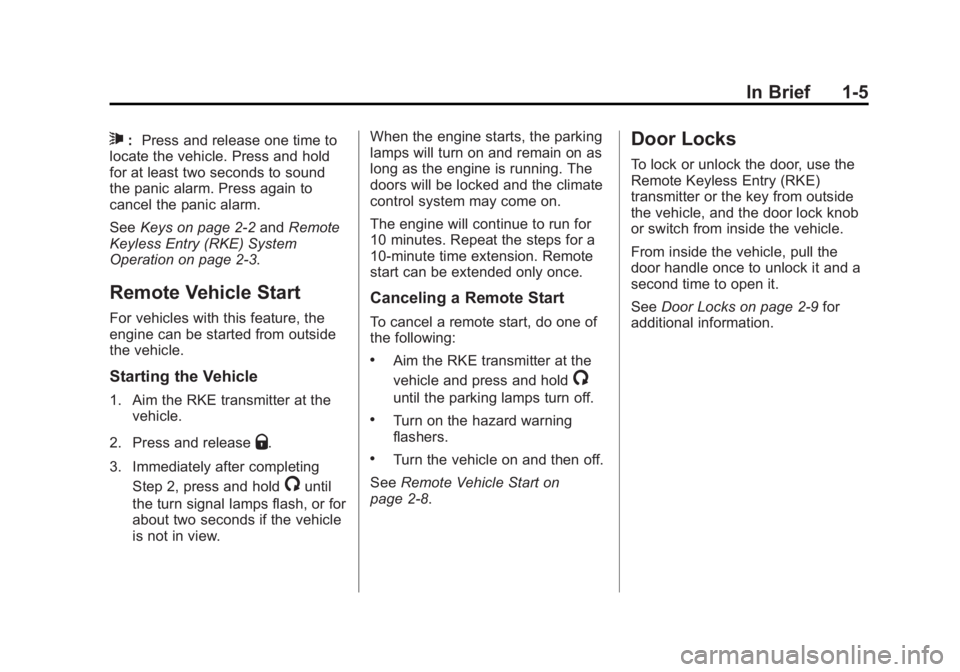
Starting the Vehicle
1. Aim the RKE transmitter at the vehicle.
2. Press and release
Q.
3. Immediately after completing Step 2, press and hold
/until
the turn signal lamps flash, or for
about two seconds if the vehicle
is not in view. When the engine starts, the parking
lamps will turn on and remain on as
long as the engine is running. The
doors will be locked and the climate
control system may come on.
The engine will continue to run for
10 minutes. Repeat the steps for a
10-minute time extension. Remote
start can be extended only once.
Canceling a Remote Start
To cancel a remote start, do one of
the following:
.Aim the RKE transmitter at the
vehicle and press and hold
/
until the parking lamps turn off.
.Turn on the hazard warning
flashers.
.Turn the vehicle on and then off.
See Remote Vehicle Start on
page 2‑8.
Door Locks
To lock or unlock the door, use the
Remote Keyless Entry (RKE)
transmitter or the key from outside
the vehicle, and the door lock knob
or switch from inside the vehicle.
From inside the vehicle, pull the
door handle once to unlock it and a
second time to open it.
See Door Locks on page 2‑9 for
additional information.
Page 25 of 440
Black plate (19,1)Buick Regal Owner Manual - 2012
In Brief 1-19
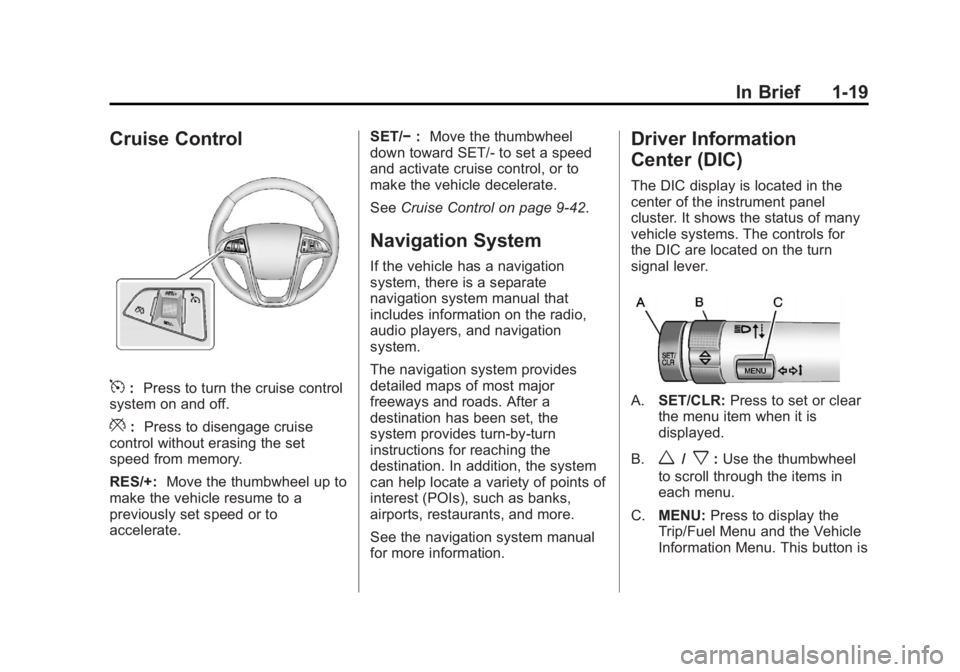
Cruise Control
5:Press to turn the cruise control
system on and off.
*: Press to disengage cruise
control without erasing the set
speed from memory.
RES/+: Move the thumbwheel up to
make the vehicle resume to a
previously set speed or to
accelerate. SET/−
:Move the thumbwheel
down toward SET/- to set a speed
and activate cruise control, or to
make the vehicle decelerate.
See Cruise Control on page 9‑42.
Navigation System
If the vehicle has a navigation
system, there is a separate
navigation system manual that
includes information on the radio,
audio players, and navigation
system.
The navigation system provides
detailed maps of most major
freeways and roads. After a
destination has been set, the
system provides turn-by-turn
instructions for reaching the
destination. In addition, the system
can help locate a variety of points of
interest (POIs), such as banks,
airports, restaurants, and more.
See the navigation system manual
for more information.
Driver Information
Center (DIC)
The DIC display is located in the
center of the instrument panel
cluster. It shows the status of many
vehicle systems. The controls for
the DIC are located on the turn
signal lever.
A.SET/CLR: Press to set or clear
the menu item when it is
displayed.
B.
w/x: Use the thumbwheel
to scroll through the items in
each menu.
C. MENU: Press to display the
Trip/Fuel Menu and the Vehicle
Information Menu. This button is
Page 32 of 440
Black plate (26,1)Buick Regal Owner Manual - 2012
1-26 In Brief
Engine Oil Life System
The engine oil life system calculates
engine oil life based on vehicle use
and displays the CHANGE ENGINE
OIL SOON message when it is time
to change the engine oil and filter.
The oil life system should be reset
to 100% only following an oil
change.
Resetting the Oil Life System
1. Turn the ignition to ON/RUN withthe engine off.
2. Press the DIC MENU button on the turn signal lever to enter the
Vehicle Information Menu. Use
the thumbwheel to scroll through
the menu items until you reach
REMAINING OIL LIFE.
3. Press the SET/CLR button to reset the oil life at 100%.
4. Turn the ignition to LOCK/OFF.
See Engine Oil Life System on
page 10‑13.
Fuel E85 (85% Ethanol)
Vehicles that have a FlexFuel badge
and a yellow fuel cap can use either
unleaded gasoline or ethanol fuel
containing up to 85% ethanol (E85).
See Fuel E85 (85% Ethanol) on
page 9‑49. For all other vehicles,
use only the unleaded gasoline
described under Recommended
Fuel on page 9‑47.
Driving for Better Fuel
Economy
Driving habits can affect fuel
mileage. Here are some driving tips
to get the best fuel economy
possible.
.Avoid fast starts and accelerate
smoothly.
.Brake gradually and avoid
abrupt stops.
.Avoid idling the engine for long
periods of time.
.When road and weather
conditions are appropriate, use
cruise control.
.Always follow posted speed
limits or drive more slowly when
conditions require.
.Keep vehicle tires properly
inflated.
.Combine several trips into a
single trip.
.Replace the vehicle's tires with
the same TPC Spec number
molded into the tire's sidewall
near the size.
.Follow recommended scheduled
maintenance.
Roadside Assistance
Program
U.S.: 1-800-252-1112
TTY Users (U.S.): 1-888-889-2438
Canada: 1-800-268-6800
Mexico: 01-800-466-0818
Page 38 of 440
Black plate (4,1)Buick Regal Owner Manual - 2012
2-4 Keys, Doors, and Windows
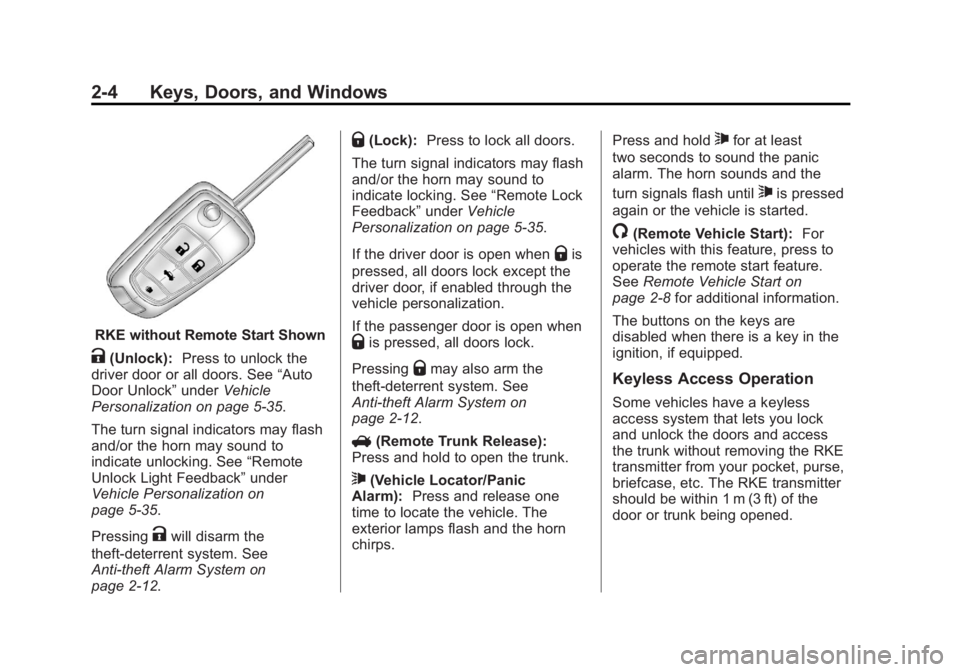
RKE without Remote Start Shown
K(Unlock):Press to unlock the
driver door or all doors. See “Auto
Door Unlock” underVehicle
Personalization on page 5‑35.
The turn signal indicators may flash
and/or the horn may sound to
indicate unlocking. See “Remote
Unlock Light Feedback” under
Vehicle Personalization on
page 5‑35.
Pressing
Kwill disarm the
theft-deterrent system. See
Anti-theft Alarm System on
page 2‑12.
Q(Lock): Press to lock all doors.
The turn signal indicators may flash
and/or the horn may sound to
indicate locking. See “Remote Lock
Feedback” underVehicle
Personalization on page 5‑35.
If the driver door is open when
Qis
pressed, all doors lock except the
driver door, if enabled through the
vehicle personalization.
If the passenger door is open when
Qis pressed, all doors lock.
Pressing
Qmay also arm the
theft-deterrent system. See
Anti-theft Alarm System on
page 2‑12.
V (Remote Trunk Release):
Press and hold to open the trunk.
7(Vehicle Locator/Panic
Alarm): Press and release one
time to locate the vehicle. The
exterior lamps flash and the horn
chirps. Press and hold
7for at least
two seconds to sound the panic
alarm. The horn sounds and the
turn signals flash until
7is pressed
again or the vehicle is started.
/(Remote Vehicle Start): For
vehicles with this feature, press to
operate the remote start feature.
See Remote Vehicle Start on
page 2‑8 for additional information.
The buttons on the keys are
disabled when there is a key in the
ignition, if equipped.
Keyless Access Operation
Some vehicles have a keyless
access system that lets you lock
and unlock the doors and access
the trunk without removing the RKE
transmitter from your pocket, purse,
briefcase, etc. The RKE transmitter
should be within 1 m (3 ft) of the
door or trunk being opened.
Page 42 of 440
Black plate (8,1)Buick Regal Owner Manual - 2012
2-8 Keys, Doors, and Windows
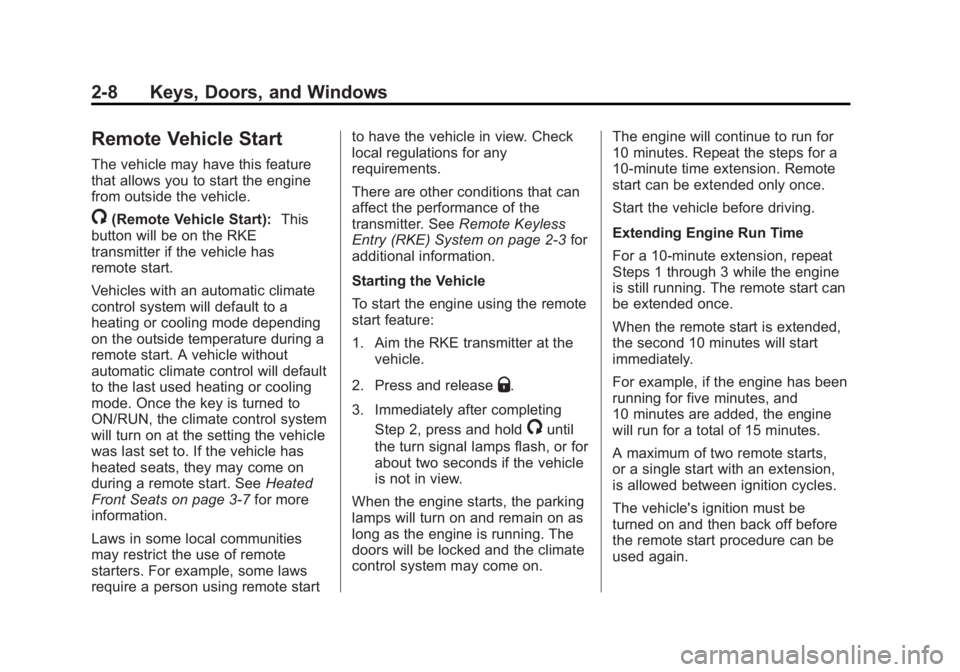
Remote Vehicle Start
The vehicle may have this feature
that allows you to start the engine
from outside the vehicle.
/(Remote Vehicle Start):This
button will be on the RKE
transmitter if the vehicle has
remote start.
Vehicles with an automatic climate
control system will default to a
heating or cooling mode depending
on the outside temperature during a
remote start. A vehicle without
automatic climate control will default
to the last used heating or cooling
mode. Once the key is turned to
ON/RUN, the climate control system
will turn on at the setting the vehicle
was last set to. If the vehicle has
heated seats, they may come on
during a remote start. See Heated
Front Seats on page 3‑7 for more
information.
Laws in some local communities
may restrict the use of remote
starters. For example, some laws
require a person using remote start to have the vehicle in view. Check
local regulations for any
requirements.
There are other conditions that can
affect the performance of the
transmitter. See
Remote Keyless
Entry (RKE) System on page 2‑3 for
additional information.
Starting the Vehicle
To start the engine using the remote
start feature:
1. Aim the RKE transmitter at the vehicle.
2. Press and release
Q.
3. Immediately after completing Step 2, press and hold
/until
the turn signal lamps flash, or for
about two seconds if the vehicle
is not in view.
When the engine starts, the parking
lamps will turn on and remain on as
long as the engine is running. The
doors will be locked and the climate
control system may come on. The engine will continue to run for
10 minutes. Repeat the steps for a
10-minute time extension. Remote
start can be extended only once.
Start the vehicle before driving.
Extending Engine Run Time
For a 10-minute extension, repeat
Steps 1 through 3 while the engine
is still running. The remote start can
be extended once.
When the remote start is extended,
the second 10 minutes will start
immediately.
For example, if the engine has been
running for five minutes, and
10 minutes are added, the engine
will run for a total of 15 minutes.
A maximum of two remote starts,
or a single start with an extension,
is allowed between ignition cycles.
The vehicle's ignition must be
turned on and then back off before
the remote start procedure can be
used again.
Page 119 of 440
Black plate (5,1)Buick Regal Owner Manual - 2012
Instruments and Controls 5-5
Compass
There is a compass display in the
Driver Information Center (DIC). The
compass receives its heading and
other information from the Global
Positioning System (GPS) antenna,
StabiliTrak, and vehicle speed
information.
Avoid covering the GPS antenna for
long periods of time with objects
that may interfere with the antenna's
ability to receive a satellite signal.
SeeBackglass Antenna on
page 7‑23 andSatellite Radio
Antenna on page 7‑24 for the
location of the vehicle's antennas.
The compass system is designed to
operate for a certain number of
miles or degrees of turn before
needing a signal from the GPS
satellites. When the compass
display shows CAL, drive the
vehicle for a short distance in an
open area where it can receive a
GPS signal. The compass system
will automatically determine when
the GPS signal is restored and provide a heading again. See
Compass Messages on page 5‑30
for more information on the
messages that may be displayed for
the compass.
Clock
The infotainment system controls
are used to access the time and
date settings through the menu
system. See
Operation on
page 7‑10 for information about how
to use the menu system.
Setting the Clock (Radio
with CD)
Setting the Time and Date
1. Press the CONFIG button and select Time and Date Settings.
2. Select Set Time or Set Date.
3. Turn the Multifunction knob to adjust the highlighted value.
4. Press the Multifunction knob to select the next value. 5. To save the time and return to
the Time Settings menu, press
the BACK button at any time or
press the Multifunction knob
after adjusting the minutes.
Setting the 12/24 Hour Format
1. Press the CONFIG button and select Time and Date Settings.
2. Highlight 12/24 HR Format.
3. Press the Multifunction knob to select the 12 hour or 24 hour
display format.
Setting the Month and Day Format
1. Press the CONFIG button and select Time and Date Settings.
2. Highlight Month & Day format.
3. Press the Multifunction knob to select the DD/MM/YYYY
(day/month/year), MM/DD/YYYY
(month/day/year), or YYYY/MM/
DD (year/month/day) display
format.
Page 140 of 440
Black plate (26,1)Buick Regal Owner Manual - 2012
5-26 Instruments and Controls
DIC Operation and Displays
The DIC has different displays
which can be accessed by using the
DIC buttons on the turn signal lever,
located on the left side of the
steering wheel. The DIC displays
trip, fuel, and vehicle system
information, and warning messages
if a system problem is detected.
The bottom of the DIC display
shows the position of the shift lever
and the odometer. It may also show
the direction the vehicle is driving.
In cold weather the DIC display may
change slowly. This is normal and
will move more quickly as the
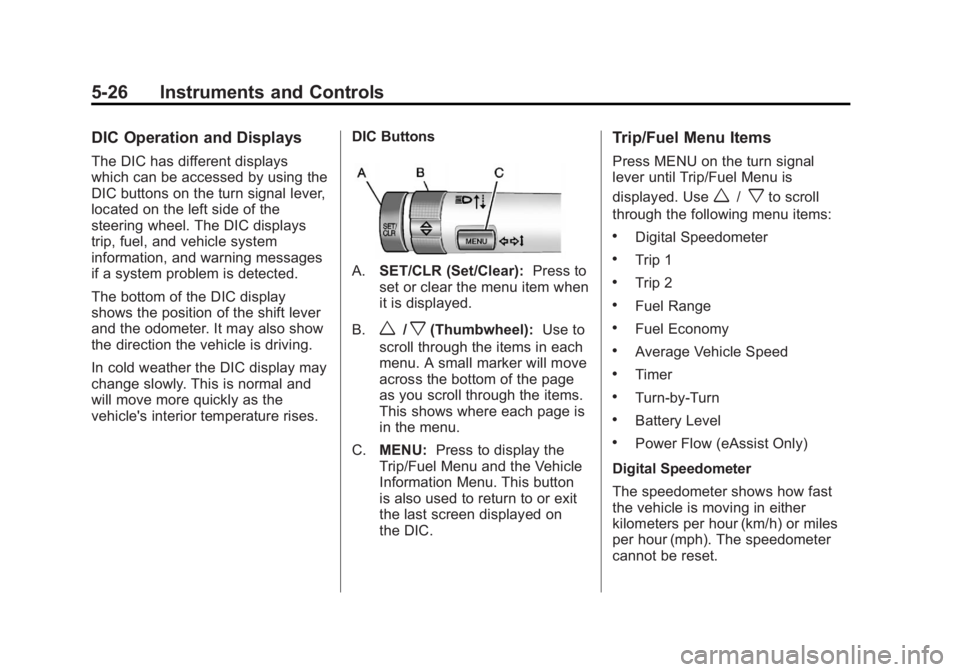
vehicle's interior temperature rises.DIC Buttons
A.
SET/CLR (Set/Clear): Press to
set or clear the menu item when
it is displayed.
B.
w/x(Thumbwheel): Use to
scroll through the items in each
menu. A small marker will move
across the bottom of the page
as you scroll through the items.
This shows where each page is
in the menu.
C. MENU: Press to display the
Trip/Fuel Menu and the Vehicle
Information Menu. This button
is also used to return to or exit
the last screen displayed on
the DIC.
Trip/Fuel Menu Items
Press MENU on the turn signal
lever until Trip/Fuel Menu is
displayed. Use
w/xto scroll
through the following menu items:
.Digital Speedometer
.Trip 1
.Trip 2
.Fuel Range
.Fuel Economy
.Average Vehicle Speed
.Timer
.Turn-by-Turn
.Battery Level
.Power Flow (eAssist Only)
Digital Speedometer
The speedometer shows how fast
the vehicle is moving in either
kilometers per hour (km/h) or miles
per hour (mph). The speedometer
cannot be reset.
Page 142 of 440
Black plate (28,1)Buick Regal Owner Manual - 2012
5-28 Instruments and Controls
Battery Level
This display, available on some
vehicles, shows the current battery
voltage. If the voltage is in the
normal range, the value will display.
For example, the display may read
Battery Voltage 15.0 Volts. The
vehicle's charging system regulates
voltage based on the state of the
battery. The battery voltage can
fluctuate while viewing this
information on the DIC. This is
normal.
Power Flow (eAssist Only)
This display shows the operating
mode of the eAssist system and the
high voltage battery charge level.
The animation indicates the
direction of energy flow.Vehicle Information Menu
Items
Press MENU on the turn signal
lever until Vehicle Information Menu
is displayed. Use
w/xto scroll
through the following menu items:
.Unit
.Tire Pressure
.Remaining Oil Life
.Jump Start (eAssist Only)
Unit
Move
w/xto switch between
metric or US when the Unit display
is active. Press SET/CLR to confirm
the setting. This will change the
displays on the cluster and DIC to
either metric or English (US)
measurements.
Tire Pressure
The display will show a vehicle with
the approximate pressures of all
four tires. Tire pressure is displayed
in either kilopascal (kPa) or pounds
per square inch (psi). See TirePressure Monitor System on
page 10‑55
andTire Pressure
Monitor Operation on page 10‑55 for
more information.
Remaining Oil Life
This display shows an estimate of
the oil's remaining useful life.
If REMAINING OIL LIFE 99% is
displayed, that means 99% of the
current oil life remains.
When the remaining oil life is low,
the CHANGE ENGINE OIL SOON
message will appear on the display.
See Engine Oil Messages on
page 5‑31. The oil should be
changed as soon as possible. See
Engine Oil on page 10‑11. In
addition to the Engine Oil Life
System monitoring the oil life,
additional maintenance is
recommended in the Maintenance
Schedule in this manual. See
Maintenance Schedule on
page 11‑3 for more information.
Remember, the Remaining Oil Life
display must be reset after each oil
change. It will not reset itself. Also,
Page 152 of 440
Black plate (38,1)Buick Regal Owner Manual - 2012
5-38 Instruments and Controls
Exit Lighting
This allows the selection of how
long the exterior lamps stay on
when leaving the vehicle when it is
dark outside.
Press the Multifunction knob when
Exit Lighting is highlighted. Turn the
knob to select Off, 30 Seconds,
1 Minute, or 2 Minutes. Press the
knob to confirm and go back to the
last menu.
Power Door Locks
Select Power Door Locks and the
following will be displayed:
.Unlocked Door Anti Lock Out
.Auto Door Unlock
.Delayed Door Lock
Unlocked Door Anti Lock Out
When on, this feature will keep the
driver door from locking when the
door is open. If Off is selected, the
Delayed Door Lock menu will be
available and the door will lock as
programmed through this menu. Press the Multifunction knob when
Unlocked Door Anti Lock Out is
highlighted to select On or Off. Turn
the knob to confirm and go back to
the last menu.
Auto Door Unlock
This allows selection of which doors
will automatically unlock when the
vehicle is shifted into P (Park).
Press the Multifunction knob when
Auto Door Unlock is highlighted.
Turn the knob to select All Doors,
Driver Door, or Off. Press the knob
to confirm and go back to the
last menu.
Delayed Door Lock
When on, this feature will delay
the locking of the doors until
five seconds after the last door is
closed. You will hear three chimes
to signal delayed locking is in use.
Press either the power door lock
button or
Qon the RKE transmitter
twice to override the delayed locking
feature and immediately lock all of
the doors.
Press the Multifunction knob when
Delayed Door Lock is highlighted to
select On or Off. Press BACK to
return to the last menu.
Remote Lock/Unlock/Start
Select Remote Lock/Unlock/Start
and the following will be displayed:
.Remote Unlock Light Feedback
.Remote Lock Feedback
.Remote Door Unlock
Remote Unlock Light Feedback
When on, the exterior lamps will
flash when unlocking the vehicle
with the RKE transmitter.
Press the Multifunction knob when
Remote Unlock Light Feedback is
highlighted to select On or Off. Turn
the knob to confirm and go back to
the last menu.