climate control BUICK REGAL 2013 User Guide
[x] Cancel search | Manufacturer: BUICK, Model Year: 2013, Model line: REGAL, Model: BUICK REGAL 2013Pages: 412, PDF Size: 6.06 MB
Page 39 of 412
Black plate (9,1)Buick Regal Owner Manual - 2013 - crc - 11/5/12
Keys, Doors, and Windows 2-9
3. Immediately after completingStep 2, press and hold
/for at
least two seconds or until the
turn signal lamps flash. The turn
signal lamps flashing confirms
the request to remote start the
vehicle has been received.
When the engine starts, the parking
lamps will turn on and remain on as
long as the engine is running. The
doors will be locked and the climate
control system may come on.
The engine will continue to run for
10 minutes. Repeat the steps for a
10-minute time extension. Remote
start can be extended only once.
Start the vehicle before driving.
Extending Engine Run Time
For a 10-minute extension, repeat
Steps 1–3 while the engine is still
running. The remote start can be
extended once.
When the remote start is extended,
the second 10 minutes will start
immediately. For example, if the engine has been
running for five minutes, and
10 minutes are added, the engine
will run for a total of 15 minutes.
A maximum of two remote starts,
or a single start with an extension,
is allowed between ignition cycles.
The vehicle's ignition must be
turned on and then back off before
the remote start procedure can be
used again.
Canceling a Remote Start
To cancel a remote start, do one of
the following:
.Aim the RKE transmitter at the
vehicle and press and hold
/
until the parking lamps turn off.
.Turn on the hazard warning
flashers.
.Turn the vehicle on and then off.
Conditions in Which Remote Start
Will Not Work
The remote vehicle start feature will
not operate if:
.The key is in the ignition (key
access) or if the key is in the
vehicle (keyless access).
.The hood is not closed.
.The hazard warning flashers
are on.
.The malfunction indicator lamp
is on.
.The engine coolant temperature
is too high.
.The oil pressure is low.
.Two remote vehicle starts, or a
single remote start with an
extension, have already
been used.
.The vehicle is not in P (Park).
Page 42 of 412
Black plate (12,1)Buick Regal Owner Manual - 2013 - crc - 11/5/12
2-12 Keys, Doors, and Windows
WARNING (Continued)
.Adjust the climate control
system to a setting that
brings in only outside air and
set the fan speed to the
highest setting. See“Climate
Control Systems” in the
Index.
.If the vehicle has a power
liftgate, disable the power
liftgate function.
For more information about
carbon monoxide, see Engine
Exhaust on page 9‑26.
Trunk Release
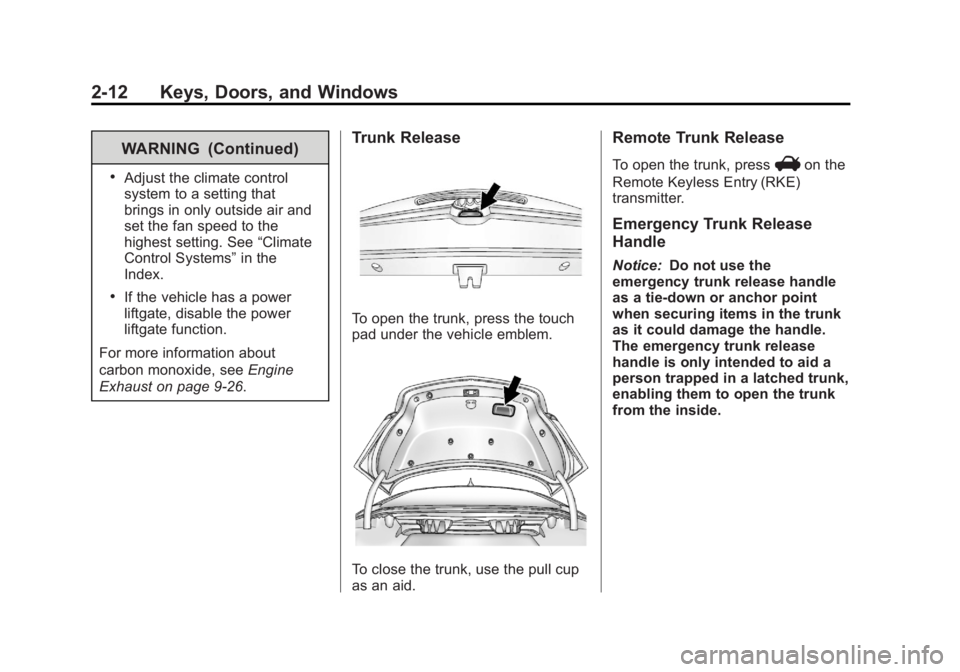
To open the trunk, press the touch
pad under the vehicle emblem.
To close the trunk, use the pull cup
as an aid.
Remote Trunk Release
To open the trunk, pressVon the
Remote Keyless Entry (RKE)
transmitter.
Emergency Trunk Release
Handle
Notice: Do not use the
emergency trunk release handle
as a tie-down or anchor point
when securing items in the trunk
as it could damage the handle.
The emergency trunk release
handle is only intended to aid a
person trapped in a latched trunk,
enabling them to open the trunk
from the inside.
Page 46 of 412
Black plate (16,1)Buick Regal Owner Manual - 2013 - crc - 11/5/12
2-16 Keys, Doors, and Windows
Power Mirrors
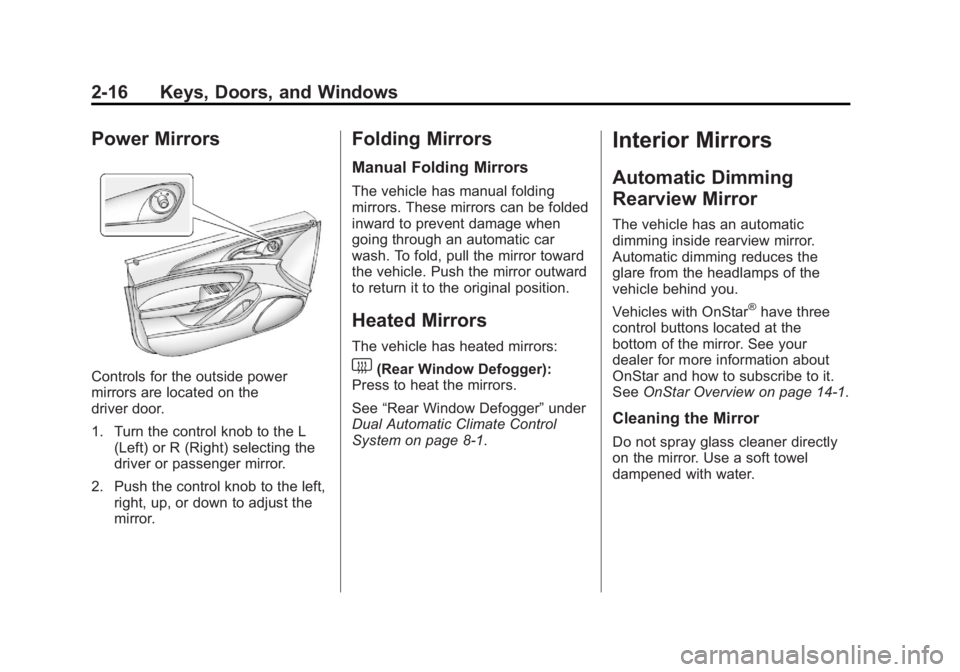
Controls for the outside power
mirrors are located on the
driver door.
1. Turn the control knob to the L(Left) or R (Right) selecting the
driver or passenger mirror.
2. Push the control knob to the left, right, up, or down to adjust the
mirror.
Folding Mirrors
Manual Folding Mirrors
The vehicle has manual folding
mirrors. These mirrors can be folded
inward to prevent damage when
going through an automatic car
wash. To fold, pull the mirror toward
the vehicle. Push the mirror outward
to return it to the original position.
Heated Mirrors
The vehicle has heated mirrors:
1(Rear Window Defogger):
Press to heat the mirrors.
See “Rear Window Defogger” under
Dual Automatic Climate Control
System on page 8‑1.
Interior Mirrors
Automatic Dimming
Rearview Mirror
The vehicle has an automatic
dimming inside rearview mirror.
Automatic dimming reduces the
glare from the headlamps of the
vehicle behind you.
Vehicles with OnStar
®have three
control buttons located at the
bottom of the mirror. See your
dealer for more information about
OnStar and how to subscribe to it.
See OnStar Overview on page 14‑1.
Cleaning the Mirror
Do not spray glass cleaner directly
on the mirror. Use a soft towel
dampened with water.
Page 56 of 412
Black plate (6,1)Buick Regal Owner Manual - 2013 - crc - 11/5/12
3-6 Seats and Restraints
2. Push and pull on the seatback tomake sure it is locked.
Power Reclining Seatbacks
To adjust a power seatback,
if equipped:
.Tilt the top of the control
rearward to recline.
.Tilt the top of the control forward
to raise.
Heated Front Seats
{WARNING
If you cannot feel temperature
change or pain to the skin, the
seat heater may cause burns. To
reduce the risk of burns, people
with such a condition should use
care when using the seat heater,
especially for long periods of
time. Do not place anything on
the seat that insulates against
heat, such as a blanket, cushion,
cover, or similar item. This may
cause the seat heater to
overheat. An overheated seat
heater may cause a burn or may
damage the seat.
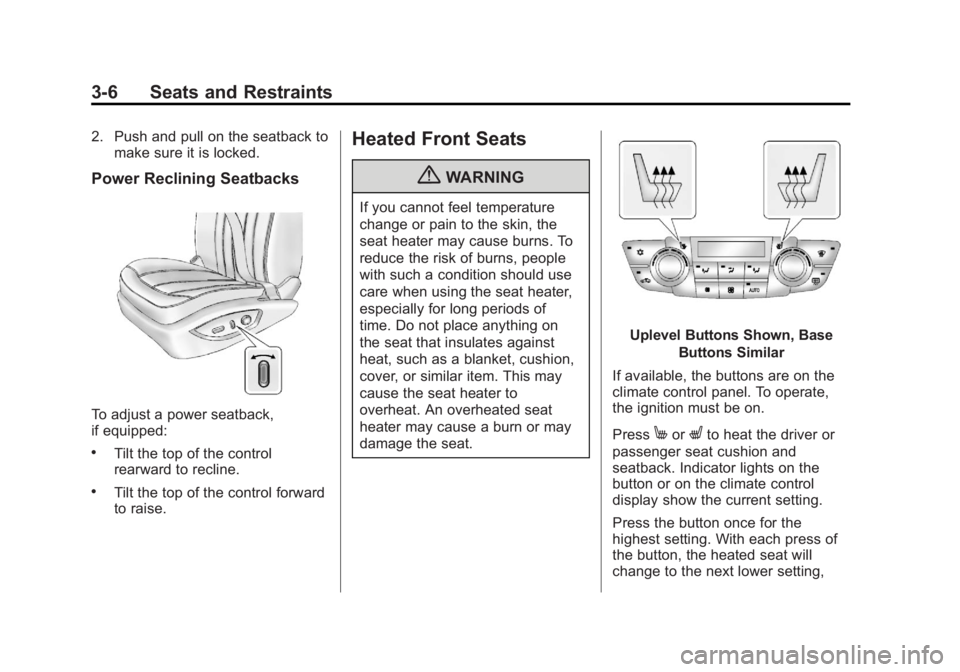
Uplevel Buttons Shown, Base
Buttons Similar
If available, the buttons are on the
climate control panel. To operate,
the ignition must be on.
Press
MorLto heat the driver or
passenger seat cushion and
seatback. Indicator lights on the
button or on the climate control
display show the current setting.
Press the button once for the
highest setting. With each press of
the button, the heated seat will
change to the next lower setting,
Page 139 of 412
Black plate (35,1)Buick Regal Owner Manual - 2013 - crc - 11/5/12
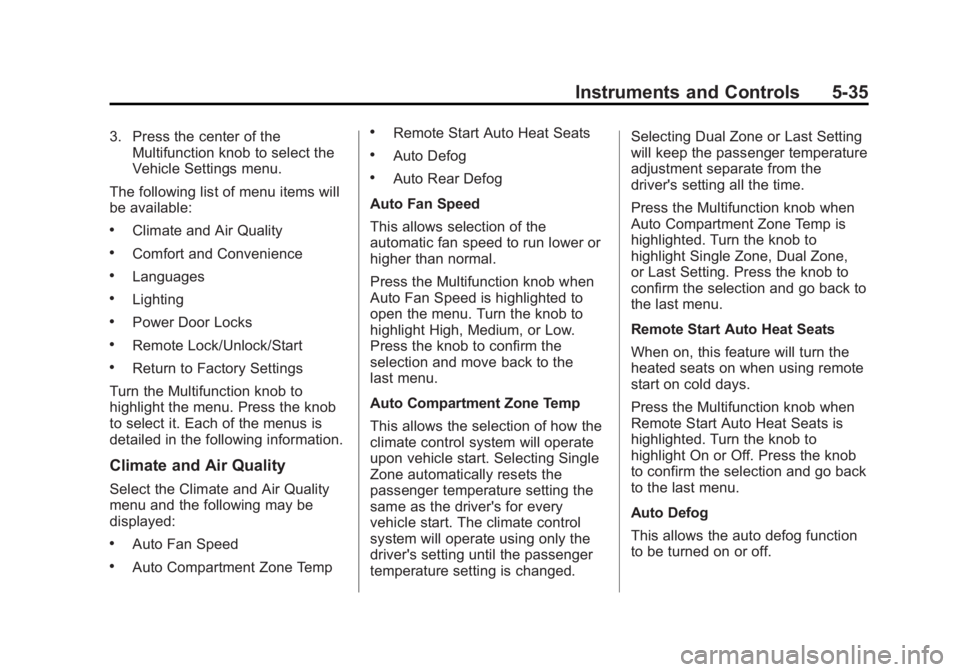
Instruments and Controls 5-35
3. Press the center of theMultifunction knob to select the
Vehicle Settings menu.
The following list of menu items will
be available:
.Climate and Air Quality
.Comfort and Convenience
.Languages
.Lighting
.Power Door Locks
.Remote Lock/Unlock/Start
.Return to Factory Settings
Turn the Multifunction knob to
highlight the menu. Press the knob
to select it. Each of the menus is
detailed in the following information.
Climate and Air Quality
Select the Climate and Air Quality
menu and the following may be
displayed:
.Auto Fan Speed
.Auto Compartment Zone Temp
.Remote Start Auto Heat Seats
.Auto Defog
.Auto Rear Defog
Auto Fan Speed
This allows selection of the
automatic fan speed to run lower or
higher than normal.
Press the Multifunction knob when
Auto Fan Speed is highlighted to
open the menu. Turn the knob to
highlight High, Medium, or Low.
Press the knob to confirm the
selection and move back to the
last menu.
Auto Compartment Zone Temp
This allows the selection of how the
climate control system will operate
upon vehicle start. Selecting Single
Zone automatically resets the
passenger temperature setting the
same as the driver's for every
vehicle start. The climate control
system will operate using only the
driver's setting until the passenger
temperature setting is changed. Selecting Dual Zone or Last Setting
will keep the passenger temperature
adjustment separate from the
driver's setting all the time.
Press the Multifunction knob when
Auto Compartment Zone Temp is
highlighted. Turn the knob to
highlight Single Zone, Dual Zone,
or Last Setting. Press the knob to
confirm the selection and go back to
the last menu.
Remote Start Auto Heat Seats
When on, this feature will turn the
heated seats on when using remote
start on cold days.
Press the Multifunction knob when
Remote Start Auto Heat Seats is
highlighted. Turn the knob to
highlight On or Off. Press the knob
to confirm the selection and go back
to the last menu.
Auto Defog
This allows the auto defog function
to be turned on or off.
Page 191 of 412
Black plate (1,1)Buick Regal Owner Manual - 2013 - crc - 11/5/12
Climate Controls 8-1
Climate Controls
Climate Control Systems
Dual Automatic Climate ControlSystem . . . . . . . . . . . . . . . . . . . . . . 8-1
Air Vents
Air Vents . . . . . . . . . . . . . . . . . . . . . . 8-6
Maintenance
Air Intake . . . . . . . . . . . . . . . . . . . . . 8-6
Passenger Compartment AirFilter . . . . . . . . . . . . . . . . . . . . . . . . . 8-6
Service . . . . . . . . . . . . . . . . . . . . . . . 8-6
Climate Control Systems
Dual Automatic Climate Control System
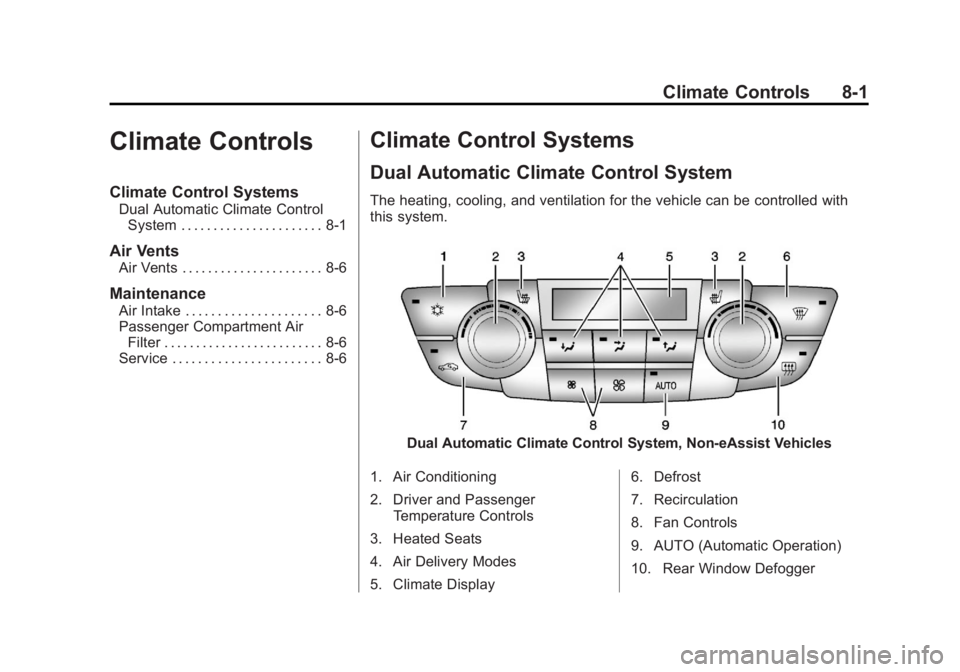
The heating, cooling, and ventilation for the vehicle can be controlled with
this system.
Dual Automatic Climate Control System, Non-eAssist Vehicles
1. Air Conditioning
2. Driver and Passenger Temperature Controls
3. Heated Seats
4. Air Delivery Modes
5. Climate Display 6. Defrost
7. Recirculation
8. Fan Controls
9. AUTO (Automatic Operation)
10. Rear Window Defogger
Page 192 of 412
Black plate (2,1)Buick Regal Owner Manual - 2013 - crc - 11/5/12
8-2 Climate Controls
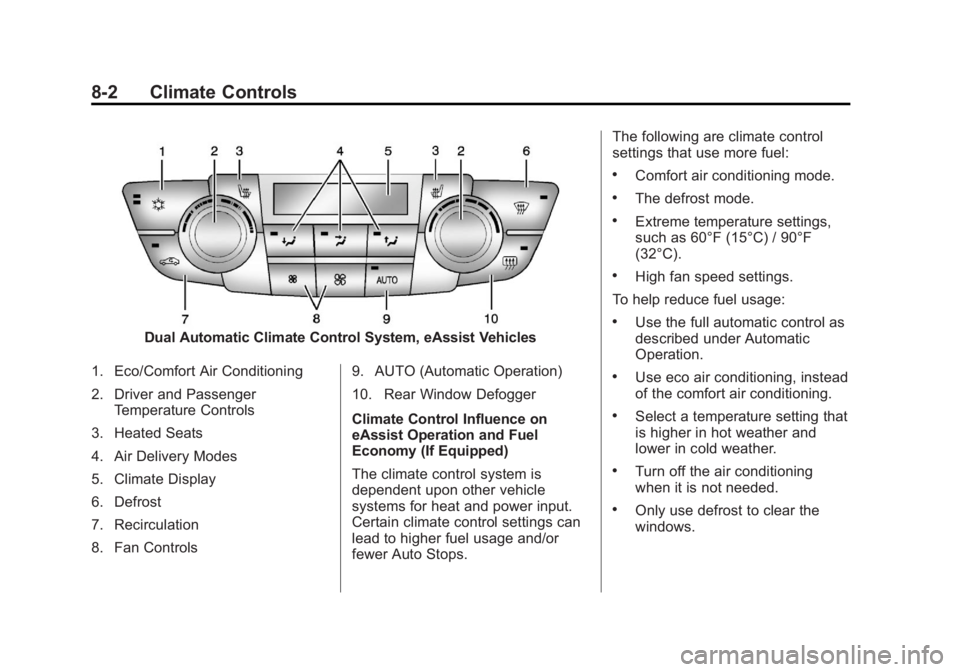
Dual Automatic Climate Control System, eAssist Vehicles
1. Eco/Comfort Air Conditioning
2. Driver and Passenger Temperature Controls
3. Heated Seats
4. Air Delivery Modes
5. Climate Display
6. Defrost
7. Recirculation
8. Fan Controls 9. AUTO (Automatic Operation)
10. Rear Window Defogger
Climate Control Influence on
eAssist Operation and Fuel
Economy (If Equipped)
The climate control system is
dependent upon other vehicle
systems for heat and power input.
Certain climate control settings can
lead to higher fuel usage and/or
fewer Auto Stops.The following are climate control
settings that use more fuel:
.Comfort air conditioning mode.
.The defrost mode.
.Extreme temperature settings,
such as 60°F (15°C) / 90°F
(32°C).
.High fan speed settings.
To help reduce fuel usage:
.Use the full automatic control as
described under Automatic
Operation.
.Use eco air conditioning, instead
of the comfort air conditioning.
.Select a temperature setting that
is higher in hot weather and
lower in cold weather.
.Turn off the air conditioning
when it is not needed.
.Only use defrost to clear the
windows.
Page 193 of 412
Black plate (3,1)Buick Regal Owner Manual - 2013 - crc - 11/5/12
Climate Controls 8-3
Automatic Operation
The system automatically controls
the fan speed, air delivery, air
conditioning, and recirculation in
order to heat or cool the vehicle to
the desired temperature.
When the indicator light is on, the
system is in full automatic operation.
If the air delivery mode or fan
setting is manually adjusted, the
auto indicator turns off and displays
will show the selected settings.
To place the system in
automatic mode:
1. Press AUTO.
2. Set the temperature. Allow thesystem time to stabilize. Then
adjust the temperature as
needed for best comfort.
To improve fuel efficiency and to
cool the vehicle faster, recirculation
may be automatically selected in
warm weather. The recirculation
light will not come on. Press
hto
select recirculation; press it again to
select outside air. English units can be changed to
metric units through the Driver
Information Center (DIC). See
Driver Information Center (DIC) on
page 5‑24.
Manual Operation
Driver and Passenger
Temperature Control:
The
temperature can be adjusted
separately for the driver and
passenger.
Turn the knob clockwise or
counterclockwise to increase or
decrease the driver or passenger
temperature setting.
Fan Control: Press the left fan
button to decrease the fan speed.
Press the right fan button to
increase the fan speed. The
selected fan speed is indicated by
the number of segments shown in
the display.
Pressing the left fan button longer
turns the fan off.
Press AUTO to return to automatic
operation. Air Delivery Modes:
Press
[,Y,
or
8to change the direction of the
airflow. An indicator light comes on
in the selected mode button.
Changing the mode cancels the
automatic operation and the system
goes into manual mode. Press
AUTO to return to automatic
operation.
[(Floor): Air is directed to the
floor outlets.
Y(Vent): Air is directed to the
instrument panel outlets.
8(Upper): Air is directed to the
windshield outlets.
0(Defrost): Press to clear the
windshield of fog or frost more
quickly. Air is directed to the
windshield.
For best results, clear all snow and
ice from the windshield before
defrosting.
Page 194 of 412
Black plate (4,1)Buick Regal Owner Manual - 2013 - crc - 11/5/12
8-4 Climate Controls
For eAssist vehicles, auto stops can
occur in defrost mode. In this mode,
the auto stops are shorter and less
frequent than other air delivery
modes to prevent flash fogging.
#(Comfort Air Conditioning):
Press to turn the air conditioning on
or off. The button indicator light
turns blue when the a/c is on. If the
fan is turned off or the outside
temperature falls below freezing, the
air conditioner will not run.
Press AUTO to return to automatic
operation and the air conditioner
runs as needed. When the indicator
light is on, the air conditioner runs
automatically to cool the air inside
the vehicle or to dry the air needed
to defog the windshield faster.
For eAssist vehicles, an auto stop
may occur if the climate control
system determines the a/c
compressor can be shut off and still
maintain comfort levels with minimal
windshield fogging.
#(Eco Air Conditioning, If
Equipped): Press
#to turn on the
eco air conditioning. The button
indicator light turns green when eco
a/c is on. This setting balances fuel
economy and air conditioning
comfort. In warm weather
conditions, auto stops may occur
more frequently and the vehicle
interior may be warmer as
compared to the comfort air
conditioning. This setting allows
higher humidity inside the vehicle
and window fogging before the
engine restarts.
Pressing the
0button during an
auto stop may restart the engine to
prevent window fogging. To reach
comfort levels quickly during an
auto stop, the engine will restart if:
.The air conditioner is off and
AUTO, Eco
#, or Comfort#is
selected.
.The climate control power is
turned on and the system is set
to AUTO, Eco
#, or Comfort
#mode.
.The temperature control is
adjusted cooler by more than
0.5°C (1°F).
h(Recirculation): Press to turn
on recirculation. An indicator light
comes on. Air is recirculated to
quickly cool the inside of the vehicle
or prevent outside air and odors
from entering.
Auto Defog: The climate control
system may have a sensor to
automatically detect high humidity
inside the vehicle. When high
humidity is detected, the climate
control system may adjust to
outside air supply and turn on the
air conditioner. The fan speed may
slightly increase to help prevent
fogging. If the climate control
system does not detect possible
window fogging, it returns to normal
operation. For eAssist vehicles,
when this mode is in use auto stops
Page 195 of 412
Black plate (5,1)Buick Regal Owner Manual - 2013 - crc - 11/5/12
Climate Controls 8-5
are shorter and less frequent. To
turn Auto Defog off or on, see
“Climate and Air Quality”under
Vehicle Personalization on
page 5‑34.
Rear Window Defogger
=(Rear Window Defogger):
Press to turn the rear window
defogger on or off.
The rear window defogger turns off
automatically after about
10 minutes. If turned on again, it
runs for about five minutes before
turning off. At higher speeds, the
rear window defogger may stay on
continuously.
For vehicles with heated outside
rearview mirrors, they turn on with
the rear window defogger and help
to clear fog or frost from the surface
of the mirror. See Heated Mirrors on
page 2‑16. Notice:
Do not try to clear frost
or other material from the inside
of the front windshield and rear
window with a razor blade or
anything else that is sharp. This
may damage the rear window
defogger grid and affect the
radio's ability to pick up stations
clearly. The repairs would not be
covered by the vehicle warranty.
Remote Start Climate Control
Operation (If Equipped): For
vehicles with the remote start
feature, the climate control system
may run when the vehicle is started
remotely. The system uses the
driver ’s previous settings to heat or
cool the inside of the vehicle. The
rear defog may come on during
remote start based on cold ambient
conditions. If the vehicle has heated
seats, they may come on during a
remote start. The heated seat
indicator lights do not come on
during a remote start. See Remote
Vehicle Start on page 2‑8 and
Heated Front Seats on page 3‑6.
Sensors
The solar sensor on top of the
instrument panel near the
windshield monitors the solar heat.
The climate control system uses the
sensor information to adjust the
temperature, fan speed,
recirculation, and air delivery mode
for best comfort.
If the sensor is covered, the dual
automatic climate control system
may not work properly.