reset BUICK REGAL 2013 User Guide
[x] Cancel search | Manufacturer: BUICK, Model Year: 2013, Model line: REGAL, Model: BUICK REGAL 2013Pages: 412, PDF Size: 6.06 MB
Page 139 of 412
Black plate (35,1)Buick Regal Owner Manual - 2013 - crc - 11/5/12
Instruments and Controls 5-35
3. Press the center of theMultifunction knob to select the
Vehicle Settings menu.
The following list of menu items will
be available:
.Climate and Air Quality
.Comfort and Convenience
.Languages
.Lighting
.Power Door Locks
.Remote Lock/Unlock/Start
.Return to Factory Settings
Turn the Multifunction knob to
highlight the menu. Press the knob
to select it. Each of the menus is
detailed in the following information.
Climate and Air Quality
Select the Climate and Air Quality
menu and the following may be
displayed:
.Auto Fan Speed
.Auto Compartment Zone Temp
.Remote Start Auto Heat Seats
.Auto Defog
.Auto Rear Defog
Auto Fan Speed
This allows selection of the
automatic fan speed to run lower or
higher than normal.
Press the Multifunction knob when
Auto Fan Speed is highlighted to
open the menu. Turn the knob to
highlight High, Medium, or Low.
Press the knob to confirm the
selection and move back to the
last menu.
Auto Compartment Zone Temp
This allows the selection of how the
climate control system will operate
upon vehicle start. Selecting Single
Zone automatically resets the
passenger temperature setting the
same as the driver's for every
vehicle start. The climate control
system will operate using only the
driver's setting until the passenger
temperature setting is changed. Selecting Dual Zone or Last Setting
will keep the passenger temperature
adjustment separate from the
driver's setting all the time.
Press the Multifunction knob when
Auto Compartment Zone Temp is
highlighted. Turn the knob to
highlight Single Zone, Dual Zone,
or Last Setting. Press the knob to
confirm the selection and go back to
the last menu.
Remote Start Auto Heat Seats
When on, this feature will turn the
heated seats on when using remote
start on cold days.
Press the Multifunction knob when
Remote Start Auto Heat Seats is
highlighted. Turn the knob to
highlight On or Off. Press the knob
to confirm the selection and go back
to the last menu.
Auto Defog
This allows the auto defog function
to be turned on or off.
Page 154 of 412
Black plate (2,1)Buick Regal Owner Manual - 2013 - crc - 11/5/12
7-2 Infotainment System
To minimize taking your eyes off the
road while driving, do the following
while the vehicle is parked:
.Become familiar with the
operation and controls of the
audio system.
.Set up the tone, speaker
adjustments, and preset radio
stations.
For more information, see Defensive
Driving on page 9‑3.
Notice: Contact your dealer
before adding any equipment.
Adding audio or communication
equipment could interfere with
the operation of the engine, radio,
or other systems, and could
damage them. Follow federal
rules covering mobile radio and
telephone equipment. The vehicle has Retained
Accessory Power (RAP). With RAP,
the audio system can be played
even after the ignition is turned off.
See
Retained Accessory Power
(RAP) on page 9‑23.
The vehicle may have a base radio
that is included in this manual. See
the separate infotainment manual
for information on the connective
radio and the navigation system,
audio players, phone, and voice
recognition. There is also
information on settings and
downloadable applications (if
equipped).
Theft-Deterrent Feature
The theft-deterrent feature works by
learning a portion of the Vehicle
Identification Number (VIN) to the
infotainment system. The
infotainment system does not
operate if it is stolen or moved to a
different vehicle.
Overview
Keeping your eyes on the road and
your mind on the drive is important
for safe driving. The infotainment
system has built-in features
intended to help with this by
disabling some features when
driving. A grayed-out function is not
available when the vehicle is
moving.
All functions are available when the
vehicle is parked. Do the following
before driving:
.Become familiar with the
infotainment system operation,
buttons on the faceplate, and
touch-sensitive screen buttons.
.Set up the audio by presetting
favorite stations, setting the
tone, and adjusting the
speakers.
Page 156 of 412
Black plate (4,1)Buick Regal Owner Manual - 2013 - crc - 11/5/12
7-4 Infotainment System
3.s©(Previous/Reverse)
.CD, USB, Bluetooth Audio:
Press to seek to the
beginning of the current or
previous track.
.CD, USB, Bluetooth Audio:
Press and hold to quickly
reverse through a track.
Release the button to return
to playing speed. See CD
Player on page 7‑15 or
Auxiliary Devices on
page 7‑18.
.AM, FM, XM (if equipped):
Press to seek to the
previous strong station.
4. CONFIG (Configuration Menu)
.Press to adjust features for
Languages, Time and Date,
Radio Settings, Phone
Settings, Display Settings,
and Vehicle Settings. 5.
¨
\(Next/Forward)
.CD, USB, Bluetooth Audio:
Press to seek the next
track.
.CD, USB, Bluetooth Audio:
Press and hold to fast
forward through a track.
Release the button to return
to playing speed. See CD
Player on page 7‑15 or
Auxiliary Devices on
page 7‑18.
.AM, FM, XM (if equipped):
Press to seek to the
previous strong station.
6.
3/O(Volume/Power)
.Press to turn the system on
and off.
.Turn to adjust the volume.
7. Buttons 1−6
.When using AM, FM, or XM
(if equipped), the preset
buttons can be used to
select stored stations. 8.
H(Clock Menu)
.Press to set the time. Press
+ or
−to increase or
decrease the hours and
minutes displayed on the
clock. See “Clock”in the
owner manual.
9. INFO (Information)
.Press to display available
source information.
10.
V/$(Phone/Mute)
.Press to enter the phone
main screen. See
Bluetooth (Overview) on
page 7‑22 orBluetooth
(Infotainment Controls) on
page 7‑24 orBluetooth
(Voice Recognition) on
page 7‑27 orOnStar
Overview on page 14‑1.
.Press and hold to mute
and unmute the
infotainment system.
Page 157 of 412
Black plate (5,1)Buick Regal Owner Manual - 2013 - crc - 11/5/12
Infotainment System 7-5
11. TONE
.Press to access the Tone
Settings menu screen to
adjust Bass, Mid
(Midrange), Treble, EQ,
Fade, and Balance. Tone
settings are specific to
each source. SeeAM-FM
Radio on page 7‑9.
12. BACK
.Press to return to the
previous screen in
a menu.
13. CD Slot
14. Multifunction Knob
.Press to enter the menu
for the current band or
media.
.Turn to highlight a feature.
.Press to activate the
highlighted feature.
.Turn to manually change
the radio station. 15.
w j(Play/Pause)
.Press to pause or resume
playback. This feature is
unavailable for AM, FM,
and XM (if equipped). See
CD Player on page 7‑15
or
Auxiliary Devices on
page 7‑18.
16.
Z(Eject)
.Press to eject a disc from
the CD player. See CD
Player on page 7‑15.
17. FAV 1/2/3 (Favorite Pages)
.Press to display or change
the current favorite page
number above the preset
buttons. Keep pressing to
scroll through the favorites
pages. The stored stations
for each list display on the
bottom of the screen. The
number of preset Favorite
Pages can be changed by
pressing the Config button
on the Home Page, then pressing Radio Settings,
and then pressing Number
of Favorite Pages.
18. AS 1/2 (Autostore)
Autostore
Autostore searches and stores six
FM and six AM stations with the
strongest signal.
To use autostore:
1. Press SRCE to select FM or AM.
2. Press AS 1/2 for at least two seconds. The radio then
searches for available stations.
3. The radio automatically stores the six strongest stations found
as autostore presets
Press the AS 1/2 button to alternate
between the autostore stations and
favorites.
AS displays on the radio when using
autostore presets.
Autostore does not delete
previously stored favorite stations.
Page 160 of 412
Black plate (8,1)Buick Regal Owner Manual - 2013 - crc - 11/5/12
7-8 Infotainment System
Set Date Format:Depending on
the region, the following date
formats may be available: MM/DD/
YYYY, DD.MM.YYYY, or YYYY/
MM/DD.
Radio Settings
Press the Config button on the
Home Page or the CONFIG button
on the faceplate to enter the menu
options. Turn the Multifunction knob
or touch-tap the scroll bar to scroll
through the available options. Press
the Multifunction knob or press
Radio Settings to display the radio
settings menu. Press this feature to
make changes for radio information
displayed, preset pages, Auto
Volume Control, and XM Categories
Restore. See Satellite Radio on
page 7‑11 (if equipped), for more
information about XM Categories.
The Radio Settings are:
Speed Dependent Volume: Select
OFF, Low, Medium, or High
sensitivity to automatically adjust
the volume to minimize the effects
of unwanted background noise that can result from changing road
surfaces, driving speeds, or open
windows. This feature works best at
lower volume settings where
background noise is typically louder
than the sound system volume.
Startup Volume:
Press to set the
maximum volume level for startup
that will be used even if a higher
volume had been set when the radio
was turned off.
Radio Favorites: Press to select
the number of FAV pages to be
used in the system.
Add/Remove XM Categories:
Press to customize which available
XM Categories are used and
displayed in the system.
Phone Settings
See Bluetooth (Overview) on
page 7‑22 orBluetooth
(Infotainment Controls) on
page 7‑24 orBluetooth (Voice
Recognition) on page 7‑27 in the
“Phone” section for more
information on phone settings.
Vehicle Settings
See Vehicle Personalization on
page 5‑34 for more information.
Display Settings
Press the Config button on the
Home Page or the CONFIG button
on the faceplate, then select Display
Settings from the list.
The following options may display:
Dimming Mode: Press to change
the screen background. The
Automatic setting adjusts the screen
background automatically
depending on the exterior lighting
conditions.
To change the overall brightness
setting for the display, use the
vehicle interior lighting instrument
panel illumination control.
Page 161 of 412
Black plate (9,1)Buick Regal Owner Manual - 2013 - crc - 11/5/12
Infotainment System 7-9
English and Metric Unit
Conversion
To change the display units between
English and metric units, seeDriver
Information Center (DIC) on
page 5‑24 for more information.
Cleaning the Display
Notice:Using abrasive cleaners
when cleaning glass surfaces
could scratch the glass. Use only
a soft cloth and do not spray
cleaner directly on the system as
it could affect the mechanical
parts.
Do not wipe the panel with a hard
cloth or use a volatile liquid such as
paint thinner; it could scratch the
surface or erase the characters on
the buttons.
Radio
AM-FM Radio
Control Buttons
The buttons used to control the
radio are:
SRCE: Press to choose between
AM, FM, XM™, if equipped,
and CD.
Multifunction Knob: Turn to
search for stations and press to
navigate the available menus.
INFO: Press to display additional
information that may be available for
the current song.
s ©or¨\:Press to search
for stations.
Buttons 1 to 6: Press to select
preset stations.
FAV 1/2/3: Press to open the
favorites list and select favorites
pages. AS 1/2:
Press to open the
autostore list and select autostore
pages.
RDS (Radio Data System)
The radio may have RDS. The RDS
feature is available for use only on
FM stations that broadcast RDS
information. This feature only works
when the information from the radio
station is available. In rare cases, a
radio station could broadcast
incorrect information that causes the
radio features to work improperly.
If this happens, contact the radio
station.
While the radio is tuned to an
FM-RDS station, the station name
or call letters display.
Radio Menus
Radio menus are available for AM
and FM.
Push the Multifunction knob to open
the main radio menu for that band.
Page 163 of 412
Black plate (11,1)Buick Regal Owner Manual - 2013 - crc - 11/5/12
Infotainment System 7-11
To cancel the station search, press
the Multifunction knob.
Storing a Station as a Favorite
Stations from all bands can be
stored in any order in the favorite
pages.
Up to six stations can be stored in
each favorite page and the number
of available favorite pages can
be set.
Storing Stations
To store the station to a position in
the list, press the corresponding
numeric button 1 to 6 until a beep is
heard. The stored station will begin
playback.
Retrieving Stations
Press the FAV 1/2/3 button to open
a favorite page or to switch to
another favorite page. Briefly press
one of the 1 to 6 buttons to retrieve
the station.
Autostore Stations
AS 1/2 (Autostore):Autostore
searches and stores six FM and
six AM stations with the strongest
signal. To use autostore:
1. Press SRCE to select FM or AM.
2. Press AS 1/2 for at least two seconds. The radio then
searches for available stations.
3. The radio automatically stores the six strongest stations found
as autostore presets.
Press the AS 1/2 button to alternate
between the autostore stations and
favorites.
AS displays on the radio when using
autostore presets.
Autostore does not delete
previously stored favorite stations.
Autostore does not function with XM
radio stations.
Satellite Radio
Vehicles with an SiriusXM Satellite
Radio tuner and a valid SiriusXM
Satellite Radio subscription can
receive SiriusXM programming.
SiriusXM Satellite Radio
Service
SiriusXM is a satellite radio service
based in the 48 contiguous United
States and 10 Canadian provinces.
SiriusXM Satellite Radio has a wide
variety of programming and
commercial-free music, coast to
coast, and in digital-quality sound.
A service fee is required to receive
the SiriusXM service. If SiriusXM
Service needs to be reactivated, the
radio will display "No Subscription
Please Renew" on channel XM1.
For more information, contact
SiriusXM at www.xmradio.com or
1-800-929-2100 in the U.S. and
www.xmradio.ca or
1-877-438-9677 in Canada.
Page 164 of 412
Black plate (12,1)Buick Regal Owner Manual - 2013 - crc - 11/5/12
7-12 Infotainment System
Control Buttons
The buttons used to control the
SiriusXM radio are:
SRCE:Press to choose between
AM, FM, XM, if equipped, and CD.
Multifunction Knob: Turn to
search for channels and press to
navigate the available menus.
INFO: Press to display additional
information that may be available
about the current song.
s ©or¨\:Press to go to the
previous or next channel.
FAV 1/2/3: Press to open the
favorites list and select favorite
pages.
Buttons 1 to 6: Press to select
preset stations.
Adding or Removing Categories
1. From the Home Page press the Config screen button or the
CONFIG button on the faceplate.
2. Select Radio Settings from the Config Menu list. 3. Select Add/Remove XM
Categories.
4. From the Add/Remove XM Categories screen, select or
deselect any category to be
used in SiriusXM mode.
A checkmark will indicate that
the category is selected.
Turning SiriusXM Album Art On
or Off
1. From the Home Page press the Config screen button or the
CONFIG button on the faceplate.
2. Select Radio Settings from the Config Menu list.
3. Select XM Album Art to turn on or off.
SiriusXM Messages
XL (Explicit Language
Channels): These channels, or any
others, can be blocked by request,
by calling 1-800-929-2100 in the
U.S. and 1-877-438-9677 in
Canada. XM Updating:
The encryption code
in the receiver is being updated. No
action is required. This process
should take no longer than
30 seconds.
Loading XM: The audio system is
acquiring and processing audio and
text data. No action is needed. This
message should disappear shortly.
Channel Off Air: This channel is
not currently in service. Tune in to
another channel.
Channel Unauth: This channel is
blocked or cannot be received with
your SiriusXM subscription package.
Channel Unavailable: This
previously assigned channel is no
longer assigned. Tune to another
station.
No Artist Info: The system is
working properly. No artist
information is available at this time
on this channel.
Page 231 of 412
Black plate (35,1)Buick Regal Owner Manual - 2013 - crc - 11/5/12
Driving and Operating 9-35
Hill Start Assist (HSA)
Some vehicles have a Hill Start
Assist (HSA) feature, which may be
useful when the vehicle is stopped
on a grade. This feature is designed
to prevent the vehicle from rolling,
either forward or rearward, during
vehicle drive off. After the driver
completely stops and holds the
vehicle in a complete standstill on a
grade, HSA will be automatically
activated. During the transition
period between when the driver
releases the brake pedal and starts
to accelerate to drive off on a grade,
HSA holds the braking pressure to
ensure that there is no rolling. The
brakes will automatically release
when the accelerator pedal is
applied within the two‐second
window. It will not activate if the
vehicle is in a drive gear and facing
downhill or if the vehicle is facing
uphill and in R (Reverse).
Ride Control Systems
Traction Control
System (TCS)
The vehicle may have a Traction
Control System (TCS) that limits
wheel slip. The system operates if it
senses that one or both of the front
wheels are slipping or beginning to
lose traction. When this happens,
the system reduces engine power
and/or applies brake pressure to the
slipping wheel(s).
The system may be heard or felt
while it is working, but this is
normal.
TCS automatically comes on
whenever the vehicle is started. To
limit wheel slip, especially in
slippery road conditions, the system
should always be left on. But, TCS
can be turned off if needed.
dflashes to indicate that TCS is
active. See Traction Control System
(TCS)/StabiliTrak
®Light on
page 5‑20. If there is a problem detected with
TCS, the appropriate message
displays in the Driver Information
Center (DIC). See
Ride Control
System Messages on page 5‑32.
When this message is displayed
and
dcomes on and stays on, the
vehicle is safe to drive but the
system is not operational. Driving
should be adjusted accordingly.
If
dcomes on and stays on, reset
the system. To reset:
1. Stop the vehicle.
2. Turn the engine off and wait 15 seconds.
3. Start the engine.
If
dstill comes on and stays on, the
vehicle needs service.
Notice: Do not repeatedly brake
or accelerate heavily when TCS is
off. The vehicle's driveline could
be damaged.
Page 233 of 412
Black plate (37,1)Buick Regal Owner Manual - 2013 - crc - 11/5/12
Driving and Operating 9-37
StabiliTrak activates when the
computer senses a difference
between the intended path and the
direction the vehicle is actually
traveling. StabiliTrak selectively
applies braking pressure to the
vehicle brakes to help steer the
vehicle in the intended direction.
StabiliTrak comes on automatically
whenever the vehicle is started. To
assist with directional control of the
vehicle, the system should always
be left on.
When StabiliTrak activates,
d
flashes on the instrument cluster.
A noise may be heard or vibration
may be felt in the brake pedal. This
is normal. Continue to steer the
vehicle in the intended direction.
SeeTraction Control System (TCS)/
StabiliTrak
®Light on page 5‑20. If a problem is detected with
StabiliTrak, the appropriate
message is displayed in the Driver
Information Center (DIC). See
Ride
Control System Messages on
page 5‑32. When this message is
displayed and
dcomes on and
stays on, the vehicle is safe to drive
but the system is not operational.
Driving should be adjusted
accordingly.
If
dcomes on and stays on, reset
the system. To reset:
1. Stop the vehicle.
2. Turn the engine off and wait 15 seconds.
3. Start the engine.
If
dstill comes on and stays on, the
vehicle needs service.
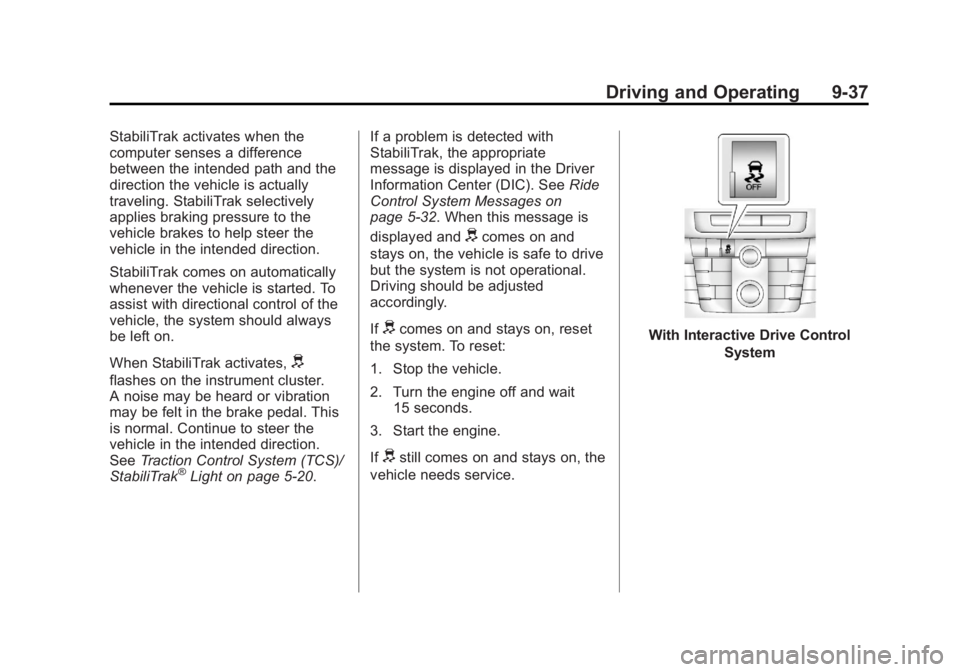
With Interactive Drive Control
System