fan k2 BUICK REGAL 2013 Owner's Guide
[x] Cancel search | Manufacturer: BUICK, Model Year: 2013, Model line: REGAL, Model: BUICK REGAL 2013Pages: 412, PDF Size: 6.06 MB
Page 193 of 412
Black plate (3,1)Buick Regal Owner Manual - 2013 - crc - 11/5/12
Climate Controls 8-3
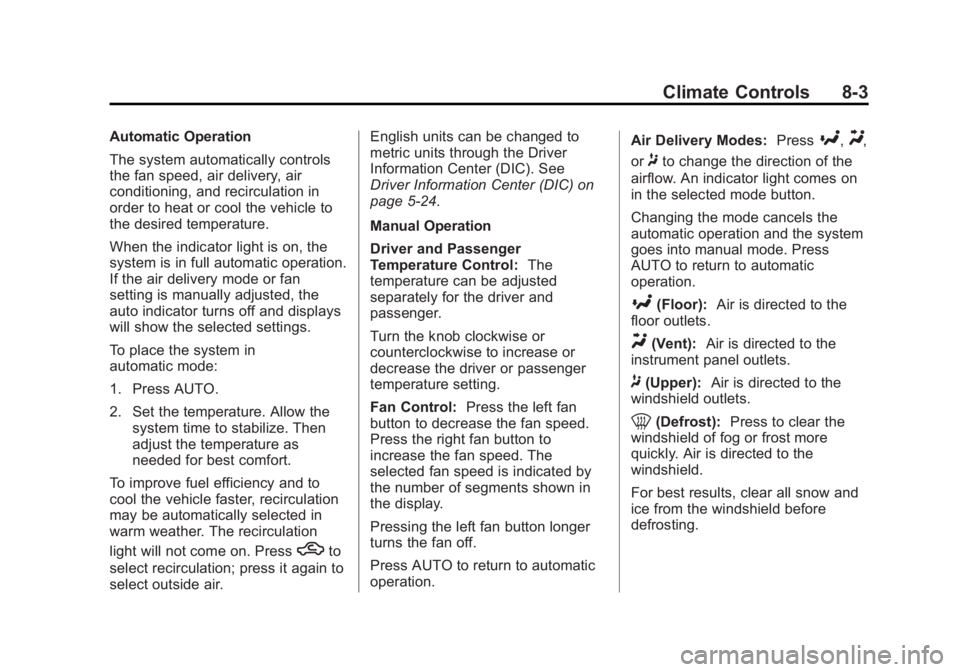
Automatic Operation
The system automatically controls
the fan speed, air delivery, air
conditioning, and recirculation in
order to heat or cool the vehicle to
the desired temperature.
When the indicator light is on, the
system is in full automatic operation.
If the air delivery mode or fan
setting is manually adjusted, the
auto indicator turns off and displays
will show the selected settings.
To place the system in
automatic mode:
1. Press AUTO.
2. Set the temperature. Allow thesystem time to stabilize. Then
adjust the temperature as
needed for best comfort.
To improve fuel efficiency and to
cool the vehicle faster, recirculation
may be automatically selected in
warm weather. The recirculation
light will not come on. Press
hto
select recirculation; press it again to
select outside air. English units can be changed to
metric units through the Driver
Information Center (DIC). See
Driver Information Center (DIC) on
page 5‑24.
Manual Operation
Driver and Passenger
Temperature Control:
The
temperature can be adjusted
separately for the driver and
passenger.
Turn the knob clockwise or
counterclockwise to increase or
decrease the driver or passenger
temperature setting.
Fan Control: Press the left fan
button to decrease the fan speed.
Press the right fan button to
increase the fan speed. The
selected fan speed is indicated by
the number of segments shown in
the display.
Pressing the left fan button longer
turns the fan off.
Press AUTO to return to automatic
operation. Air Delivery Modes:
Press
[,Y,
or
8to change the direction of the
airflow. An indicator light comes on
in the selected mode button.
Changing the mode cancels the
automatic operation and the system
goes into manual mode. Press
AUTO to return to automatic
operation.
[(Floor): Air is directed to the
floor outlets.
Y(Vent): Air is directed to the
instrument panel outlets.
8(Upper): Air is directed to the
windshield outlets.
0(Defrost): Press to clear the
windshield of fog or frost more
quickly. Air is directed to the
windshield.
For best results, clear all snow and
ice from the windshield before
defrosting.
Page 194 of 412
Black plate (4,1)Buick Regal Owner Manual - 2013 - crc - 11/5/12
8-4 Climate Controls
For eAssist vehicles, auto stops can
occur in defrost mode. In this mode,
the auto stops are shorter and less
frequent than other air delivery
modes to prevent flash fogging.
#(Comfort Air Conditioning):
Press to turn the air conditioning on
or off. The button indicator light
turns blue when the a/c is on. If the
fan is turned off or the outside
temperature falls below freezing, the
air conditioner will not run.
Press AUTO to return to automatic
operation and the air conditioner
runs as needed. When the indicator
light is on, the air conditioner runs
automatically to cool the air inside
the vehicle or to dry the air needed
to defog the windshield faster.
For eAssist vehicles, an auto stop
may occur if the climate control
system determines the a/c
compressor can be shut off and still
maintain comfort levels with minimal
windshield fogging.
#(Eco Air Conditioning, If
Equipped): Press
#to turn on the
eco air conditioning. The button
indicator light turns green when eco
a/c is on. This setting balances fuel
economy and air conditioning
comfort. In warm weather
conditions, auto stops may occur
more frequently and the vehicle
interior may be warmer as
compared to the comfort air
conditioning. This setting allows
higher humidity inside the vehicle
and window fogging before the
engine restarts.
Pressing the
0button during an
auto stop may restart the engine to
prevent window fogging. To reach
comfort levels quickly during an
auto stop, the engine will restart if:
.The air conditioner is off and
AUTO, Eco
#, or Comfort#is
selected.
.The climate control power is
turned on and the system is set
to AUTO, Eco
#, or Comfort
#mode.
.The temperature control is
adjusted cooler by more than
0.5°C (1°F).
h(Recirculation): Press to turn
on recirculation. An indicator light
comes on. Air is recirculated to
quickly cool the inside of the vehicle
or prevent outside air and odors
from entering.
Auto Defog: The climate control
system may have a sensor to
automatically detect high humidity
inside the vehicle. When high
humidity is detected, the climate
control system may adjust to
outside air supply and turn on the
air conditioner. The fan speed may
slightly increase to help prevent
fogging. If the climate control
system does not detect possible
window fogging, it returns to normal
operation. For eAssist vehicles,
when this mode is in use auto stops
Page 195 of 412
Black plate (5,1)Buick Regal Owner Manual - 2013 - crc - 11/5/12
Climate Controls 8-5
are shorter and less frequent. To
turn Auto Defog off or on, see
“Climate and Air Quality”under
Vehicle Personalization on
page 5‑34.
Rear Window Defogger
=(Rear Window Defogger):
Press to turn the rear window
defogger on or off.
The rear window defogger turns off
automatically after about
10 minutes. If turned on again, it
runs for about five minutes before
turning off. At higher speeds, the
rear window defogger may stay on
continuously.
For vehicles with heated outside
rearview mirrors, they turn on with
the rear window defogger and help
to clear fog or frost from the surface
of the mirror. See Heated Mirrors on
page 2‑16. Notice:
Do not try to clear frost
or other material from the inside
of the front windshield and rear
window with a razor blade or
anything else that is sharp. This
may damage the rear window
defogger grid and affect the
radio's ability to pick up stations
clearly. The repairs would not be
covered by the vehicle warranty.
Remote Start Climate Control
Operation (If Equipped): For
vehicles with the remote start
feature, the climate control system
may run when the vehicle is started
remotely. The system uses the
driver ’s previous settings to heat or
cool the inside of the vehicle. The
rear defog may come on during
remote start based on cold ambient
conditions. If the vehicle has heated
seats, they may come on during a
remote start. The heated seat
indicator lights do not come on
during a remote start. See Remote
Vehicle Start on page 2‑8 and
Heated Front Seats on page 3‑6.
Sensors
The solar sensor on top of the
instrument panel near the
windshield monitors the solar heat.
The climate control system uses the
sensor information to adjust the
temperature, fan speed,
recirculation, and air delivery mode
for best comfort.
If the sensor is covered, the dual
automatic climate control system
may not work properly.
Page 205 of 412
Black plate (9,1)Buick Regal Owner Manual - 2013 - crc - 11/5/12
Driving and Operating 9-9
Blizzard Conditions
Being stuck in snow can be a
serious situation. Stay with the
vehicle unless there is help nearby.
If possible, use Roadside
Assistance. SeeRoadside
Assistance Program (Mexico) on
page 13‑7 orRoadside Assistance
Program (U.S. and Canada) on
page 13‑11. To get help and keep
everyone in the vehicle safe:
.Turn on the hazard warning
flashers.
.Tie a red cloth to an outside
mirror.
{WARNING
Snow can trap engine exhaust
under the vehicle. This may
cause exhaust gases to get
inside. Engine exhaust contains
carbon monoxide (CO) which
(Continued)
WARNING (Continued)
cannot be seen or smelled. It can
cause unconsciousness and even
death.
If the vehicle is stuck in the snow:
.Clear away snow from around
the base of your vehicle,
especially any that is blocking
the exhaust pipe.
.Check again from time to
time to be sure snow does
not collect there.
.Open a window about 5 cm
(2 in) on the side of the
vehicle that is away from the
wind to bring in fresh air.
.Fully open the air outlets on
or under the instrument
panel.
.Adjust the climate control
system to a setting that
circulates the air inside the
vehicle and set the fan speed(Continued)
WARNING (Continued)
to the highest setting. See
“Climate Control Systems” in
the Index.
For more information about
carbon monoxide, see Engine
Exhaust on page 9‑26.
To save fuel, run the engine for only
short periods as needed to warm
the vehicle and then shut the engine
off and close the window most of
the way to save heat. Repeat this
until help arrives but only when you
feel really uncomfortable from the
cold. Moving about to keep warm
also helps.
If it takes some time for help to
arrive, now and then when you run
the engine, push the accelerator
pedal slightly so the engine runs
faster than the idle speed. This
keeps the battery charged to restart
the vehicle and to signal for help
with the headlamps. Do this as little
as possible to save fuel.
Page 258 of 412
Black plate (10,1)Buick Regal Owner Manual - 2013 - crc - 11/5/12
10-10 Vehicle Care
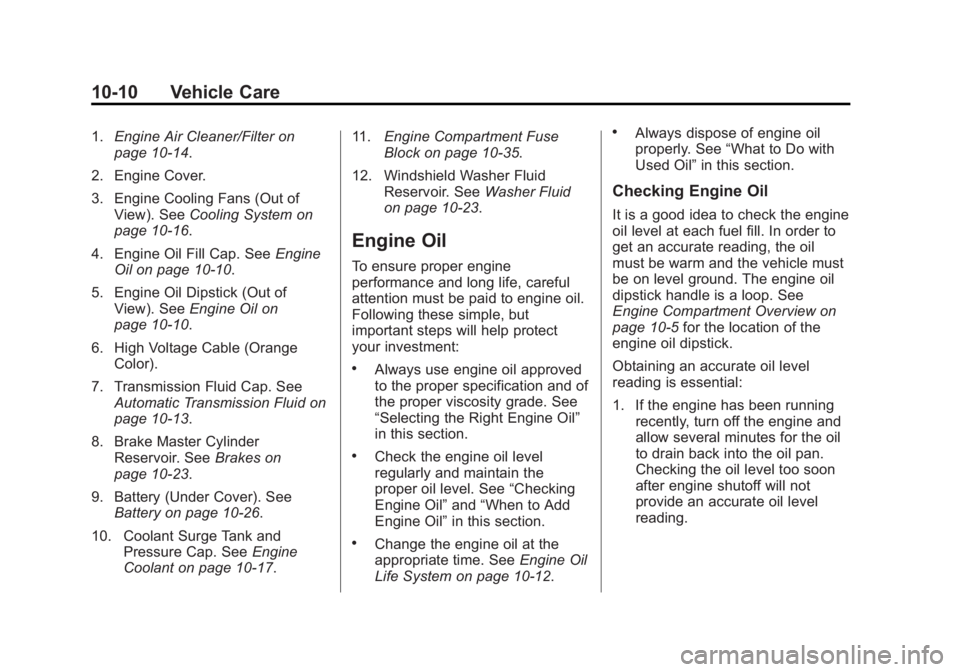
1.Engine Air Cleaner/Filter on
page 10‑14.
2. Engine Cover.
3. Engine Cooling Fans (Out of View). See Cooling System on
page 10‑16.
4. Engine Oil Fill Cap. See Engine
Oil on page 10‑10.
5. Engine Oil Dipstick (Out of View). See Engine Oil on
page 10‑10.
6. High Voltage Cable (Orange Color).
7. Transmission Fluid Cap. See Automatic Transmission Fluid on
page 10‑13.
8. Brake Master Cylinder Reservoir. See Brakes on
page 10‑23.
9. Battery (Under Cover). See Battery on page 10‑26.
10. Coolant Surge Tank and Pressure Cap. See Engine
Coolant on page 10‑17. 11.
Engine Compartment Fuse
Block on page 10‑35.
12. Windshield Washer Fluid Reservoir. See Washer Fluid
on page 10‑23.
Engine Oil
To ensure proper engine
performance and long life, careful
attention must be paid to engine oil.
Following these simple, but
important steps will help protect
your investment:
.Always use engine oil approved
to the proper specification and of
the proper viscosity grade. See
“Selecting the Right Engine Oil”
in this section.
.Check the engine oil level
regularly and maintain the
proper oil level. See “Checking
Engine Oil” and“When to Add
Engine Oil” in this section.
.Change the engine oil at the
appropriate time. See Engine Oil
Life System on page 10‑12.
.Always dispose of engine oil
properly. See “What to Do with
Used Oil” in this section.
Checking Engine Oil
It is a good idea to check the engine
oil level at each fuel fill. In order to
get an accurate reading, the oil
must be warm and the vehicle must
be on level ground. The engine oil
dipstick handle is a loop. See
Engine Compartment Overview on
page 10‑5 for the location of the
engine oil dipstick.
Obtaining an accurate oil level
reading is essential:
1. If the engine has been running recently, turn off the engine and
allow several minutes for the oil
to drain back into the oil pan.
Checking the oil level too soon
after engine shutoff will not
provide an accurate oil level
reading.
Page 264 of 412
Black plate (16,1)Buick Regal Owner Manual - 2013 - crc - 11/5/12
10-16 Vehicle Care
3. Disconnect the electricalconnector (3).
4. Remove the screws (1) on top of the engine air cleaner/filter
housing.
5. Lift the filter cover housing away from the engine air cleaner/filter
housing.
6. Pull out the filter.
7. Inspect or replace the engine air cleaner/filter.
8. Reverse Steps 2–4 to reinstall the filter cover housing.
{WARNING
Operating the engine with the air
cleaner/filter off can cause you or
others to be burned. The air
cleaner not only cleans the air; it
helps to stop flames if the engine
backfires. Use caution when
working on the engine and do not
drive with the air cleaner/filter off. Notice:
If the air cleaner/filter is
off, dirt can easily get into the
engine, which could damage it.
Always have the air cleaner/filter
in place when you are driving.
Cooling System
The cooling system allows the
engine to maintain the correct
working temperature.
When it is safe to lift the hood:
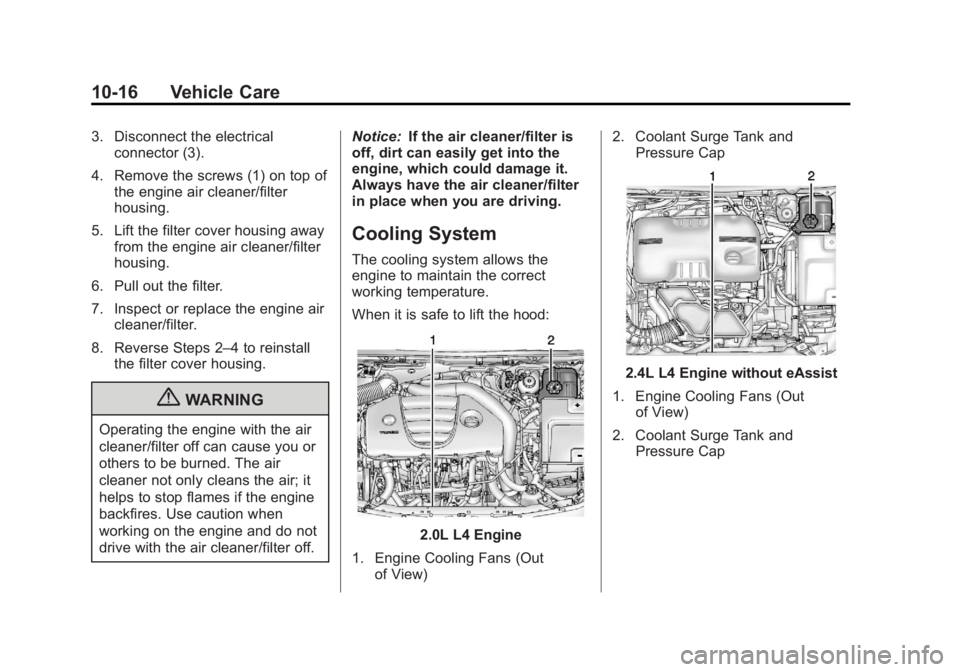
2.0L L4 Engine
1. Engine Cooling Fans (Out of View) 2. Coolant Surge Tank and
Pressure Cap
2.4L L4 Engine without eAssist
1. Engine Cooling Fans (Out of View)
2. Coolant Surge Tank and Pressure Cap
Page 265 of 412
Black plate (17,1)Buick Regal Owner Manual - 2013 - crc - 11/5/12
Vehicle Care 10-17
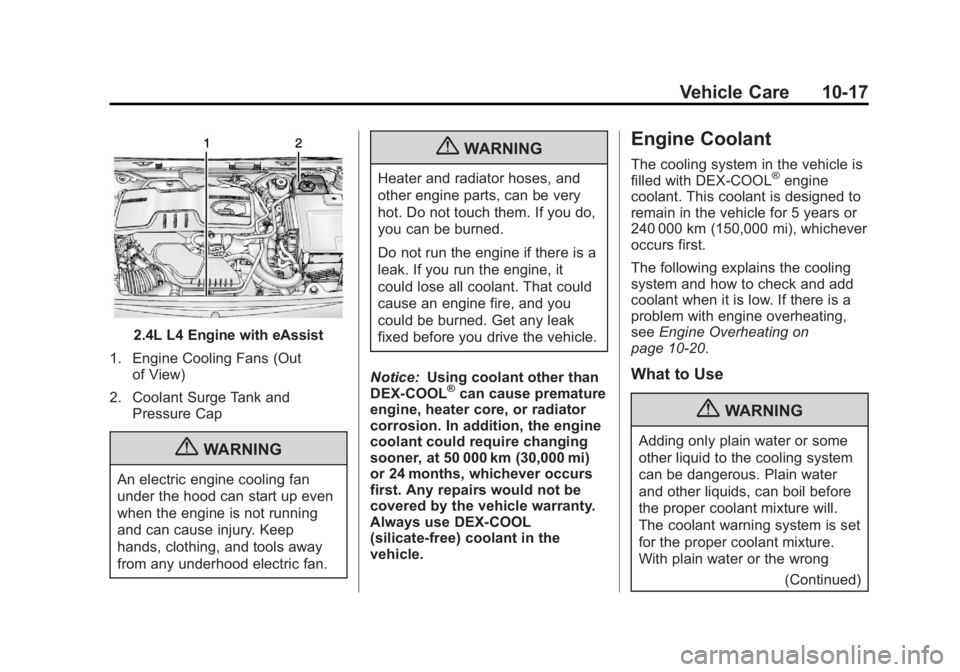
2.4L L4 Engine with eAssist
1. Engine Cooling Fans (Out of View)
2. Coolant Surge Tank and Pressure Cap
{WARNING
An electric engine cooling fan
under the hood can start up even
when the engine is not running
and can cause injury. Keep
hands, clothing, and tools away
from any underhood electric fan.
{WARNING
Heater and radiator hoses, and
other engine parts, can be very
hot. Do not touch them. If you do,
you can be burned.
Do not run the engine if there is a
leak. If you run the engine, it
could lose all coolant. That could
cause an engine fire, and you
could be burned. Get any leak
fixed before you drive the vehicle.
Notice: Using coolant other than
DEX-COOL
®can cause premature
engine, heater core, or radiator
corrosion. In addition, the engine
coolant could require changing
sooner, at 50 000 km (30,000 mi)
or 24 months, whichever occurs
first. Any repairs would not be
covered by the vehicle warranty.
Always use DEX-COOL
(silicate-free) coolant in the
vehicle.
Engine Coolant
The cooling system in the vehicle is
filled with DEX-COOL®engine
coolant. This coolant is designed to
remain in the vehicle for 5 years or
240 000 km (150,000 mi), whichever
occurs first.
The following explains the cooling
system and how to check and add
coolant when it is low. If there is a
problem with engine overheating,
see Engine Overheating on
page 10‑20.
What to Use
{WARNING
Adding only plain water or some
other liquid to the cooling system
can be dangerous. Plain water
and other liquids, can boil before
the proper coolant mixture will.
The coolant warning system is set
for the proper coolant mixture.
With plain water or the wrong
(Continued)
Page 268 of 412
Black plate (20,1)Buick Regal Owner Manual - 2013 - crc - 11/5/12
10-20 Vehicle Care
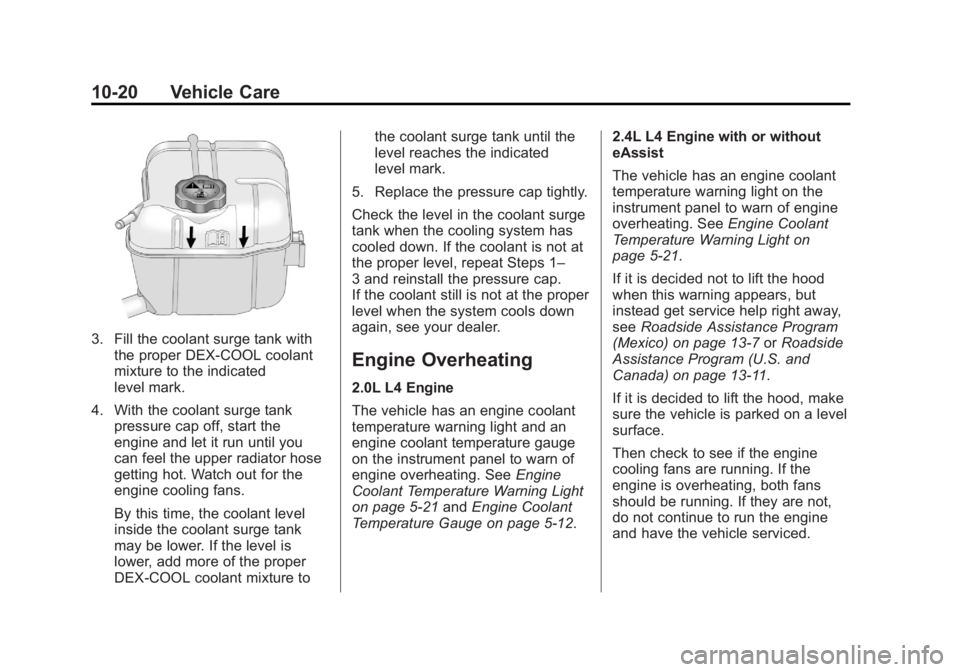
3. Fill the coolant surge tank withthe proper DEX-COOL coolant
mixture to the indicated
level mark.
4. With the coolant surge tank pressure cap off, start the
engine and let it run until you
can feel the upper radiator hose
getting hot. Watch out for the
engine cooling fans.
By this time, the coolant level
inside the coolant surge tank
may be lower. If the level is
lower, add more of the proper
DEX-COOL coolant mixture to the coolant surge tank until the
level reaches the indicated
level mark.
5. Replace the pressure cap tightly.
Check the level in the coolant surge
tank when the cooling system has
cooled down. If the coolant is not at
the proper level, repeat Steps 1–
3 and reinstall the pressure cap.
If the coolant still is not at the proper
level when the system cools down
again, see your dealer.
Engine Overheating
2.0L L4 Engine
The vehicle has an engine coolant
temperature warning light and an
engine coolant temperature gauge
on the instrument panel to warn of
engine overheating. See Engine
Coolant Temperature Warning Light
on page 5‑21 andEngine Coolant
Temperature Gauge on page 5‑12. 2.4L L4 Engine with or without
eAssist
The vehicle has an engine coolant
temperature warning light on the
instrument panel to warn of engine
overheating. See
Engine Coolant
Temperature Warning Light on
page 5‑21.
If it is decided not to lift the hood
when this warning appears, but
instead get service help right away,
see Roadside Assistance Program
(Mexico) on page 13‑7 orRoadside
Assistance Program (U.S. and
Canada) on page 13‑11.
If it is decided to lift the hood, make
sure the vehicle is parked on a level
surface.
Then check to see if the engine
cooling fans are running. If the
engine is overheating, both fans
should be running. If they are not,
do not continue to run the engine
and have the vehicle serviced.
Page 269 of 412
Black plate (21,1)Buick Regal Owner Manual - 2013 - crc - 11/5/12
Vehicle Care 10-21
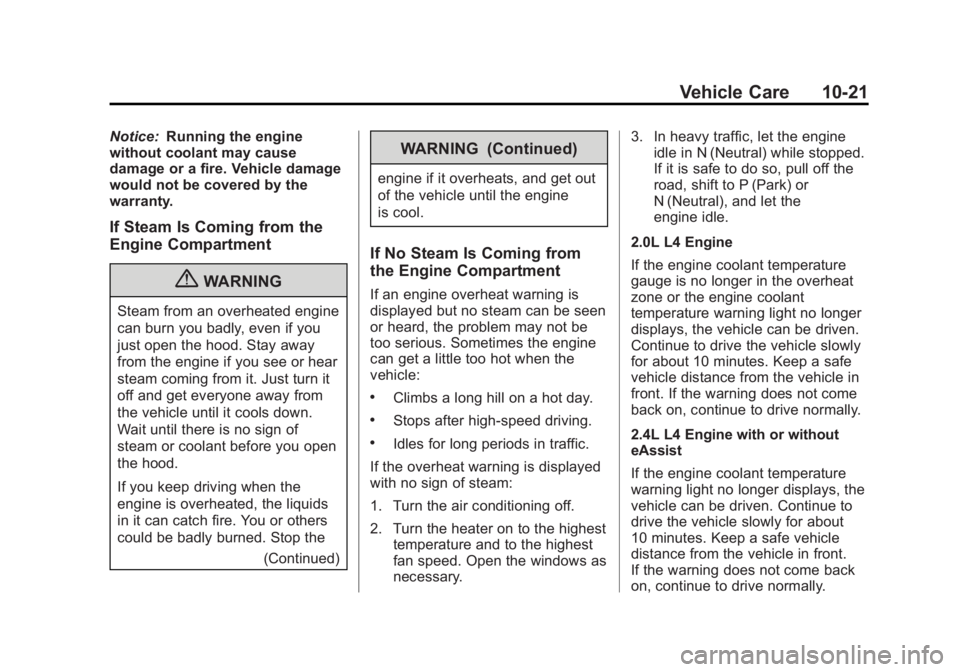
Notice:Running the engine
without coolant may cause
damage or a fire. Vehicle damage
would not be covered by the
warranty.
If Steam Is Coming from the
Engine Compartment
{WARNING
Steam from an overheated engine
can burn you badly, even if you
just open the hood. Stay away
from the engine if you see or hear
steam coming from it. Just turn it
off and get everyone away from
the vehicle until it cools down.
Wait until there is no sign of
steam or coolant before you open
the hood.
If you keep driving when the
engine is overheated, the liquids
in it can catch fire. You or others
could be badly burned. Stop the
(Continued)
WARNING (Continued)
engine if it overheats, and get out
of the vehicle until the engine
is cool.
If No Steam Is Coming from
the Engine Compartment
If an engine overheat warning is
displayed but no steam can be seen
or heard, the problem may not be
too serious. Sometimes the engine
can get a little too hot when the
vehicle:
.Climbs a long hill on a hot day.
.Stops after high-speed driving.
.Idles for long periods in traffic.
If the overheat warning is displayed
with no sign of steam:
1. Turn the air conditioning off.
2. Turn the heater on to the highest temperature and to the highest
fan speed. Open the windows as
necessary. 3. In heavy traffic, let the engine
idle in N (Neutral) while stopped.
If it is safe to do so, pull off the
road, shift to P (Park) or
N (Neutral), and let the
engine idle.
2.0L L4 Engine
If the engine coolant temperature
gauge is no longer in the overheat
zone or the engine coolant
temperature warning light no longer
displays, the vehicle can be driven.
Continue to drive the vehicle slowly
for about 10 minutes. Keep a safe
vehicle distance from the vehicle in
front. If the warning does not come
back on, continue to drive normally.
2.4L L4 Engine with or without
eAssist
If the engine coolant temperature
warning light no longer displays, the
vehicle can be driven. Continue to
drive the vehicle slowly for about
10 minutes. Keep a safe vehicle
distance from the vehicle in front.
If the warning does not come back
on, continue to drive normally.
Page 285 of 412
Black plate (37,1)Buick Regal Owner Manual - 2013 - crc - 11/5/12
Vehicle Care 10-37
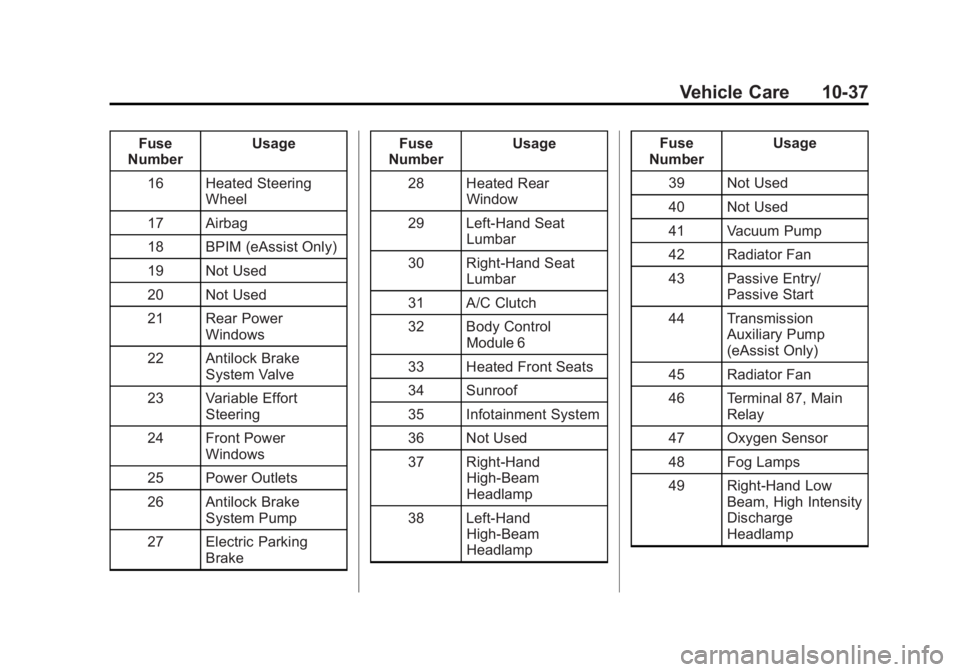
Fuse
Number Usage
16 Heated Steering Wheel
17 Airbag
18 BPIM (eAssist Only)
19 Not Used
20 Not Used
21 Rear Power Windows
22 Antilock Brake System Valve
23 Variable Effort Steering
24 Front Power Windows
25 Power Outlets
26 Antilock Brake System Pump
27 Electric Parking Brake Fuse
Number Usage
28 Heated Rear Window
29 Left-Hand Seat Lumbar
30 Right-Hand Seat Lumbar
31 A/C Clutch
32 Body Control Module 6
33 Heated Front Seats
34 Sunroof
35 Infotainment System
36 Not Used
37 Right-Hand High-Beam
Headlamp
38 Left-Hand High-Beam
Headlamp Fuse
Number Usage
39 Not Used
40 Not Used
41 Vacuum Pump
42 Radiator Fan
43 Passive Entry/ Passive Start
44 Transmission Auxiliary Pump
(eAssist Only)
45 Radiator Fan
46 Terminal 87, Main Relay
47 Oxygen Sensor
48 Fog Lamps
49 Right-Hand Low Beam, High Intensity
Discharge
Headlamp