window BUICK REGAL 2013 Owner's Guide
[x] Cancel search | Manufacturer: BUICK, Model Year: 2013, Model line: REGAL, Model: BUICK REGAL 2013Pages: 412, PDF Size: 6.06 MB
Page 152 of 412
Black plate (6,1)Buick Regal Owner Manual - 2013 - crc - 11/5/12
6-6 Lighting
Lighting Features
Entry Lighting
The headlamps, taillamps, license
plate lamps, back-up lamps, dome
lamp, and most of the interior lights
turn on briefly when
Kis pressed
on the Remote Keyless Entry (RKE)
transmitter. See Remote Keyless
Entry (RKE) System Operation on
page 2‑3. When the driver door is
opened, all control lights, Driver
Information Center (DIC) lights, and
door pocket lights turn on. After
about 30 seconds the exterior lamps
turn off, then the dome lamp and
remaining interior lights dim to off.
Entry lighting can be disabled
manually by changing the ignition
out of the OFF position, or by
pressing
Qon the RKE transmitter.
This feature can be changed. See
“Vehicle Locator Lights” under
Vehicle Personalization on
page 5‑34.
Exit Lighting
The headlamps, taillamps, parking
lamps, back-up lamps, and license
plate lamps come on at night, or in
areas with limited lighting, when the
key is removed from the ignition.
The dome lamps also come on
when the key is removed from the
ignition. The exterior lights and
dome lamps remain on after the
door is closed for a set amount of
time, then automatically turn off.
For vehicles with keyless access,
the exterior lamps and dome lamps
automatically turn on when a door is
opened after the ignition is turned
off. See Ignition Positions (Keyless
Access) on page 9‑17 orIgnition
Positions (Key Access) on
page 9‑15.
The exterior lamps turn off
immediately by turning the exterior
lamps control off.
This feature can be changed. See
Vehicle Personalization on
page 5‑34.
Battery Power Protection
The battery saver feature is
designed to protect the vehicle's
battery.
To prevent battery discharge while
driving, the following systems are
reduced automatically in two stages
and then turned off:
.Heated rear window and mirrors
.Heated seats
.Fan
In the second stage, a Driver
Information Center (DIC) message
is displayed confirming the
activation of the battery discharge
protection. See Battery Voltage and
Charging Messages on page 5‑29.
If the exterior lamps or any interior
lights are left on and the ignition is
turned off, the battery power
protection system automatically
turns the lamp off after about
10 minutes.
Page 160 of 412
Black plate (8,1)Buick Regal Owner Manual - 2013 - crc - 11/5/12
7-8 Infotainment System
Set Date Format:Depending on
the region, the following date
formats may be available: MM/DD/
YYYY, DD.MM.YYYY, or YYYY/
MM/DD.
Radio Settings
Press the Config button on the
Home Page or the CONFIG button
on the faceplate to enter the menu
options. Turn the Multifunction knob
or touch-tap the scroll bar to scroll
through the available options. Press
the Multifunction knob or press
Radio Settings to display the radio
settings menu. Press this feature to
make changes for radio information
displayed, preset pages, Auto
Volume Control, and XM Categories
Restore. See Satellite Radio on
page 7‑11 (if equipped), for more
information about XM Categories.
The Radio Settings are:
Speed Dependent Volume: Select
OFF, Low, Medium, or High
sensitivity to automatically adjust
the volume to minimize the effects
of unwanted background noise that can result from changing road
surfaces, driving speeds, or open
windows. This feature works best at
lower volume settings where
background noise is typically louder
than the sound system volume.
Startup Volume:
Press to set the
maximum volume level for startup
that will be used even if a higher
volume had been set when the radio
was turned off.
Radio Favorites: Press to select
the number of FAV pages to be
used in the system.
Add/Remove XM Categories:
Press to customize which available
XM Categories are used and
displayed in the system.
Phone Settings
See Bluetooth (Overview) on
page 7‑22 orBluetooth
(Infotainment Controls) on
page 7‑24 orBluetooth (Voice
Recognition) on page 7‑27 in the
“Phone” section for more
information on phone settings.
Vehicle Settings
See Vehicle Personalization on
page 5‑34 for more information.
Display Settings
Press the Config button on the
Home Page or the CONFIG button
on the faceplate, then select Display
Settings from the list.
The following options may display:
Dimming Mode: Press to change
the screen background. The
Automatic setting adjusts the screen
background automatically
depending on the exterior lighting
conditions.
To change the overall brightness
setting for the display, use the
vehicle interior lighting instrument
panel illumination control.
Page 166 of 412
Black plate (14,1)Buick Regal Owner Manual - 2013 - crc - 11/5/12
7-14 Infotainment System
AM
The range for most AM stations is
greater than for FM, especially at
night. The longer range can cause
station frequencies to interfere with
each other. For better radio
reception, most AM radio stations
boost the power levels during the
day, and then reduce these levels
during the night. Static can also
occur when things like storms and
power lines interfere with radio
reception. When this happens, try
reducing the treble on the radio.
SiriusXM®Satellite Radio
Service
SiriusXM satellite radio service
gives digital radio reception from
coast to coast in the 48 contiguous
United States, and in Canada. Just
as with FM, tall buildings or hills can
interfere with satellite radio signals, causing the sound to fade in and
out. In addition, traveling or standing
under heavy foliage, bridges,
garages, or tunnels may cause loss
of the SiriusXM signal for a period
of time.
Cellular Phone Usage
Cellular phone usage may cause
interference with the vehicle's radio.
This interference may occur when
making or receiving phone calls,
charging the phone's battery,
or simply having the phone on. This
interference can cause an increased
level of static while listening to the
radio. If static is received while
listening to the radio, unplug the
cellular phone and turn it off.
Backglass Antenna
The AM-FM antenna is integrated
with the rear window defogger in the
rear window. Do not scratch the
inside surface or damage the lines
in the glass. If the inside surface is
damaged, it could interfere with
radio reception. For proper radioreception, the antenna connector
needs to be properly attached to the
post on the glass.
If attaching a cell phone antenna to
the glass, attach it between the grid
lines.
Notice:
Using a razor blade or
sharp object to clear the inside
rear window can damage the rear
window antenna and/or the rear
window defogger. Repairs would
not be covered by the vehicle
warranty. Do not clear the inside
rear window with sharp objects.
Notice: Do not apply aftermarket
glass tinting with metallic film.
The metallic film in some tinting
materials will interfere with or
distort the incoming radio
reception. Any damage caused to
the backglass antenna due to
metallic tinting materials will not
be covered by the vehicle
warranty.
Page 171 of 412
Black plate (19,1)Buick Regal Owner Manual - 2013 - crc - 11/5/12
Infotainment System 7-19
USB Port
For vehicles with a USB port, the
following devices may be connected
and controlled by the infotainment
system:
.iPods
.PlaysForSure Devices (PFDs)
.USB Drives
.Zunes®
Not all iPods, PFDs, USB Drives,
and Zunes are compatible with the
infotainment system.
Playing from a USB
A USB mass storage device or
Microsoft Transfer Protocol (MTP)
device can be connected to the
USB port.
The USB port is in the center
console.
The USB icon displays when the
USB device is connected.USB MP3 Player and USB Drives
.The USB MP3 players and USB
drives connected must comply
with the USB Mass Storage
Class specification (USB MSC).
.Only USB MP3 players and USB
drives with a sector size or
512 bytes and a cluster size
smaller or equal to 32 kbytes in
the FAT32 file system are
supported.
.Hard disk drives are not
supported.
.The following restrictions apply
for the data stored on a USB
MP3 player or USB device:
‐
Maximum folder structure
depth: 11 levels.
‐ Maximum number of MP3/
WMA files that can be
displayed: 1,000
.WMA with Digital Rights
Management (DRM) from online
music shops cannot be played.
WMA files can only be played back safely if they were created
with Windows Media Player
version 8 or later.
‐
Applicable playlist extensions
are: .m3u, .pls.
‐ Playlist entries must be in the
form of relative paths.
‐ The system attribute for
folders/files that contain audio
data must not be set.
To play a USB device, do one of the
following:
.Connect the USB and it begins
to play.
.Press the Now Playing screen
button on the Home Page, then
press the SRCE button on the
faceplate repeatedly to cycle
through all of the available audio
source screens, until the USB
source screen is selected.
Page 191 of 412
Black plate (1,1)Buick Regal Owner Manual - 2013 - crc - 11/5/12
Climate Controls 8-1
Climate Controls
Climate Control Systems
Dual Automatic Climate ControlSystem . . . . . . . . . . . . . . . . . . . . . . 8-1
Air Vents
Air Vents . . . . . . . . . . . . . . . . . . . . . . 8-6
Maintenance
Air Intake . . . . . . . . . . . . . . . . . . . . . 8-6
Passenger Compartment AirFilter . . . . . . . . . . . . . . . . . . . . . . . . . 8-6
Service . . . . . . . . . . . . . . . . . . . . . . . 8-6
Climate Control Systems
Dual Automatic Climate Control System
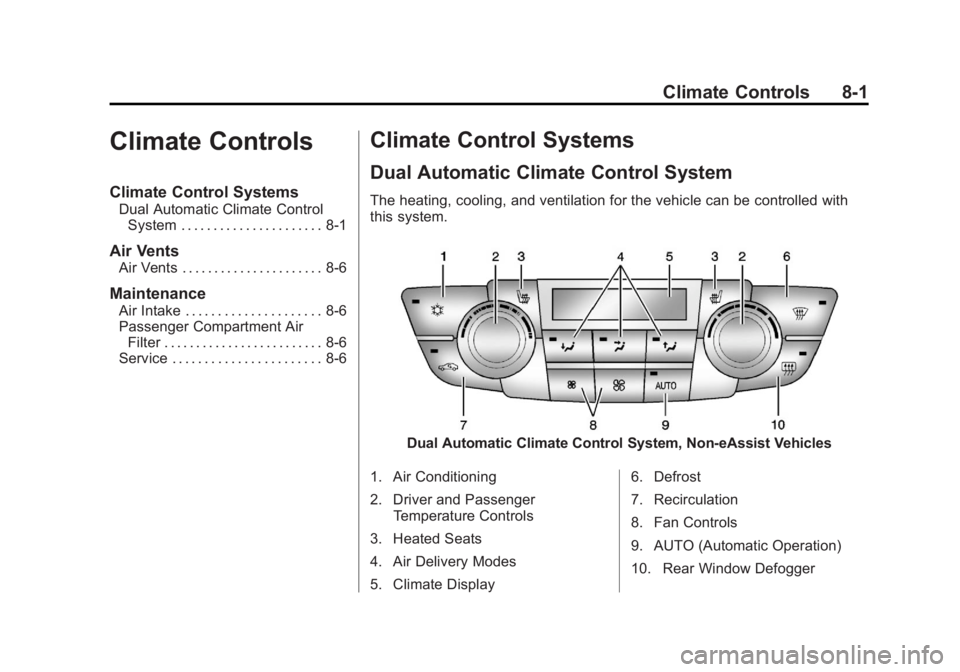
The heating, cooling, and ventilation for the vehicle can be controlled with
this system.
Dual Automatic Climate Control System, Non-eAssist Vehicles
1. Air Conditioning
2. Driver and Passenger Temperature Controls
3. Heated Seats
4. Air Delivery Modes
5. Climate Display 6. Defrost
7. Recirculation
8. Fan Controls
9. AUTO (Automatic Operation)
10. Rear Window Defogger
Page 192 of 412
Black plate (2,1)Buick Regal Owner Manual - 2013 - crc - 11/5/12
8-2 Climate Controls
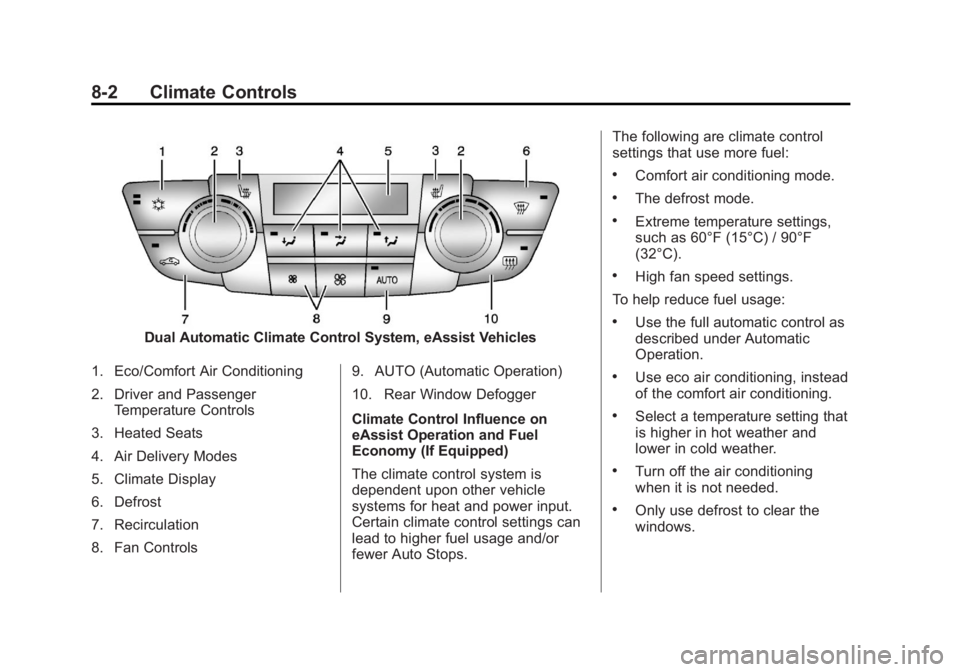
Dual Automatic Climate Control System, eAssist Vehicles
1. Eco/Comfort Air Conditioning
2. Driver and Passenger Temperature Controls
3. Heated Seats
4. Air Delivery Modes
5. Climate Display
6. Defrost
7. Recirculation
8. Fan Controls 9. AUTO (Automatic Operation)
10. Rear Window Defogger
Climate Control Influence on
eAssist Operation and Fuel
Economy (If Equipped)
The climate control system is
dependent upon other vehicle
systems for heat and power input.
Certain climate control settings can
lead to higher fuel usage and/or
fewer Auto Stops.The following are climate control
settings that use more fuel:
.Comfort air conditioning mode.
.The defrost mode.
.Extreme temperature settings,
such as 60°F (15°C) / 90°F
(32°C).
.High fan speed settings.
To help reduce fuel usage:
.Use the full automatic control as
described under Automatic
Operation.
.Use eco air conditioning, instead
of the comfort air conditioning.
.Select a temperature setting that
is higher in hot weather and
lower in cold weather.
.Turn off the air conditioning
when it is not needed.
.Only use defrost to clear the
windows.
Page 194 of 412
Black plate (4,1)Buick Regal Owner Manual - 2013 - crc - 11/5/12
8-4 Climate Controls
For eAssist vehicles, auto stops can
occur in defrost mode. In this mode,
the auto stops are shorter and less
frequent than other air delivery
modes to prevent flash fogging.
#(Comfort Air Conditioning):
Press to turn the air conditioning on
or off. The button indicator light
turns blue when the a/c is on. If the
fan is turned off or the outside
temperature falls below freezing, the
air conditioner will not run.
Press AUTO to return to automatic
operation and the air conditioner
runs as needed. When the indicator
light is on, the air conditioner runs
automatically to cool the air inside
the vehicle or to dry the air needed
to defog the windshield faster.
For eAssist vehicles, an auto stop
may occur if the climate control
system determines the a/c
compressor can be shut off and still
maintain comfort levels with minimal
windshield fogging.
#(Eco Air Conditioning, If
Equipped): Press
#to turn on the
eco air conditioning. The button
indicator light turns green when eco
a/c is on. This setting balances fuel
economy and air conditioning
comfort. In warm weather
conditions, auto stops may occur
more frequently and the vehicle
interior may be warmer as
compared to the comfort air
conditioning. This setting allows
higher humidity inside the vehicle
and window fogging before the
engine restarts.
Pressing the
0button during an
auto stop may restart the engine to
prevent window fogging. To reach
comfort levels quickly during an
auto stop, the engine will restart if:
.The air conditioner is off and
AUTO, Eco
#, or Comfort#is
selected.
.The climate control power is
turned on and the system is set
to AUTO, Eco
#, or Comfort
#mode.
.The temperature control is
adjusted cooler by more than
0.5°C (1°F).
h(Recirculation): Press to turn
on recirculation. An indicator light
comes on. Air is recirculated to
quickly cool the inside of the vehicle
or prevent outside air and odors
from entering.
Auto Defog: The climate control
system may have a sensor to
automatically detect high humidity
inside the vehicle. When high
humidity is detected, the climate
control system may adjust to
outside air supply and turn on the
air conditioner. The fan speed may
slightly increase to help prevent
fogging. If the climate control
system does not detect possible
window fogging, it returns to normal
operation. For eAssist vehicles,
when this mode is in use auto stops
Page 195 of 412
Black plate (5,1)Buick Regal Owner Manual - 2013 - crc - 11/5/12
Climate Controls 8-5
are shorter and less frequent. To
turn Auto Defog off or on, see
“Climate and Air Quality”under
Vehicle Personalization on
page 5‑34.
Rear Window Defogger
=(Rear Window Defogger):
Press to turn the rear window
defogger on or off.
The rear window defogger turns off
automatically after about
10 minutes. If turned on again, it
runs for about five minutes before
turning off. At higher speeds, the
rear window defogger may stay on
continuously.
For vehicles with heated outside
rearview mirrors, they turn on with
the rear window defogger and help
to clear fog or frost from the surface
of the mirror. See Heated Mirrors on
page 2‑16. Notice:
Do not try to clear frost
or other material from the inside
of the front windshield and rear
window with a razor blade or
anything else that is sharp. This
may damage the rear window
defogger grid and affect the
radio's ability to pick up stations
clearly. The repairs would not be
covered by the vehicle warranty.
Remote Start Climate Control
Operation (If Equipped): For
vehicles with the remote start
feature, the climate control system
may run when the vehicle is started
remotely. The system uses the
driver ’s previous settings to heat or
cool the inside of the vehicle. The
rear defog may come on during
remote start based on cold ambient
conditions. If the vehicle has heated
seats, they may come on during a
remote start. The heated seat
indicator lights do not come on
during a remote start. See Remote
Vehicle Start on page 2‑8 and
Heated Front Seats on page 3‑6.
Sensors
The solar sensor on top of the
instrument panel near the
windshield monitors the solar heat.
The climate control system uses the
sensor information to adjust the
temperature, fan speed,
recirculation, and air delivery mode
for best comfort.
If the sensor is covered, the dual
automatic climate control system
may not work properly.
Page 205 of 412
Black plate (9,1)Buick Regal Owner Manual - 2013 - crc - 11/5/12
Driving and Operating 9-9
Blizzard Conditions
Being stuck in snow can be a
serious situation. Stay with the
vehicle unless there is help nearby.
If possible, use Roadside
Assistance. SeeRoadside
Assistance Program (Mexico) on
page 13‑7 orRoadside Assistance
Program (U.S. and Canada) on
page 13‑11. To get help and keep
everyone in the vehicle safe:
.Turn on the hazard warning
flashers.
.Tie a red cloth to an outside
mirror.
{WARNING
Snow can trap engine exhaust
under the vehicle. This may
cause exhaust gases to get
inside. Engine exhaust contains
carbon monoxide (CO) which
(Continued)
WARNING (Continued)
cannot be seen or smelled. It can
cause unconsciousness and even
death.
If the vehicle is stuck in the snow:
.Clear away snow from around
the base of your vehicle,
especially any that is blocking
the exhaust pipe.
.Check again from time to
time to be sure snow does
not collect there.
.Open a window about 5 cm
(2 in) on the side of the
vehicle that is away from the
wind to bring in fresh air.
.Fully open the air outlets on
or under the instrument
panel.
.Adjust the climate control
system to a setting that
circulates the air inside the
vehicle and set the fan speed(Continued)
WARNING (Continued)
to the highest setting. See
“Climate Control Systems” in
the Index.
For more information about
carbon monoxide, see Engine
Exhaust on page 9‑26.
To save fuel, run the engine for only
short periods as needed to warm
the vehicle and then shut the engine
off and close the window most of
the way to save heat. Repeat this
until help arrives but only when you
feel really uncomfortable from the
cold. Moving about to keep warm
also helps.
If it takes some time for help to
arrive, now and then when you run
the engine, push the accelerator
pedal slightly so the engine runs
faster than the idle speed. This
keeps the battery charged to restart
the vehicle and to signal for help
with the headlamps. Do this as little
as possible to save fuel.
Page 219 of 412
Black plate (23,1)Buick Regal Owner Manual - 2013 - crc - 11/5/12
Driving and Operating 9-23
the plug-end of the cord will prevent
engine coolant heater operation at
temperatures above−18°C (0°F).
To Use the Engine Coolant
Heater
1. Turn off the engine.
2. Open the hood and unwrap the
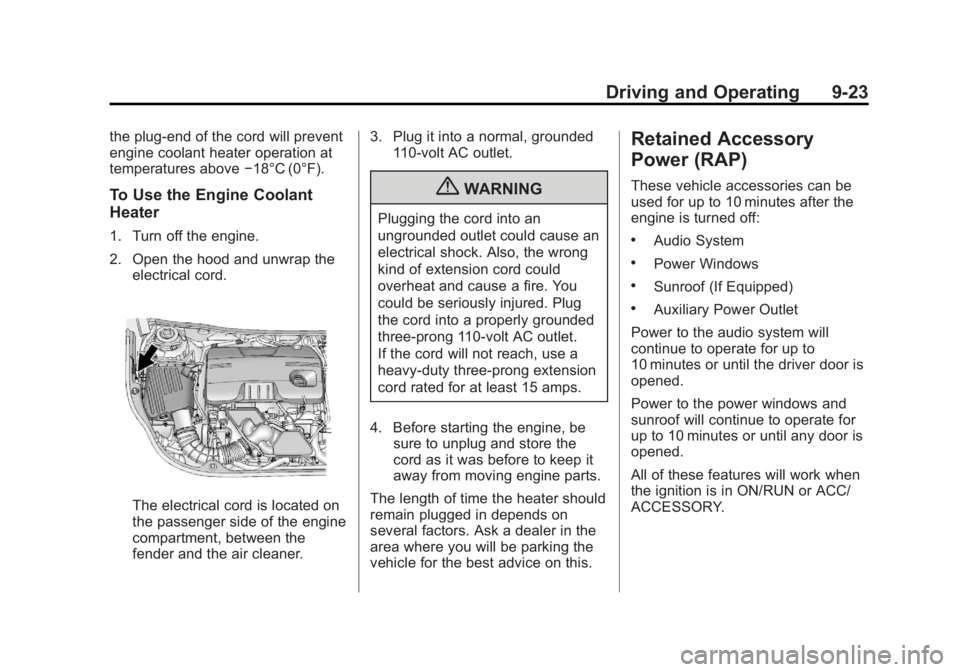
electrical cord.
The electrical cord is located on
the passenger side of the engine
compartment, between the
fender and the air cleaner. 3. Plug it into a normal, grounded
110-volt AC outlet.
{WARNING
Plugging the cord into an
ungrounded outlet could cause an
electrical shock. Also, the wrong
kind of extension cord could
overheat and cause a fire. You
could be seriously injured. Plug
the cord into a properly grounded
three-prong 110-volt AC outlet.
If the cord will not reach, use a
heavy-duty three-prong extension
cord rated for at least 15 amps.
4. Before starting the engine, be sure to unplug and store the
cord as it was before to keep it
away from moving engine parts.
The length of time the heater should
remain plugged in depends on
several factors. Ask a dealer in the
area where you will be parking the
vehicle for the best advice on this.
Retained Accessory
Power (RAP)
These vehicle accessories can be
used for up to 10 minutes after the
engine is turned off:
.Audio System
.Power Windows
.Sunroof (If Equipped)
.Auxiliary Power Outlet
Power to the audio system will
continue to operate for up to
10 minutes or until the driver door is
opened.
Power to the power windows and
sunroof will continue to operate for
up to 10 minutes or until any door is
opened.
All of these features will work when
the ignition is in ON/RUN or ACC/
ACCESSORY.