center console BUICK REGAL 2013 Owner's Manual
[x] Cancel search | Manufacturer: BUICK, Model Year: 2013, Model line: REGAL, Model: BUICK REGAL 2013Pages: 412, PDF Size: 6.06 MB
Page 21 of 412
Black plate (15,1)Buick Regal Owner Manual - 2013 - crc - 11/5/12
In Brief 1-15
4. Press the Multifunction knob toselect the next value.
5. To save the time and return to the Time Settings menu, press
the BACK button at any time or
press the Multifunction button
after adjusting the minutes.
Setting the 12/24 Hour Format
1. Press the CONFIG button and select Time and Date Settings.
2. Highlight 12/24 Hour Format.
3. Press the Multifunction knob to select the 12 hour or 24 hour
display format.
Setting the Clock (Radio with
CD and Touchscreen)
From the Time and Date Settings
screen button, press to display the
Time and Date Settings menu.
Set Time: Press + or−to increase
or decrease the Hours and Minutes
displayed on the clock. Set Date:
Press + or−to increase
or decrease the day.
Set Time Format: Press the 12 HR
screen button for standard time;
press the 24 HR screen button for
military time.
Set Date Format: Depending on
the region, the following date
formats may be available:
MM/DD/YYYY, DD.MM.YYYY,
or YYYY/MM/DD.
See Clock on page 5‑5.
Satellite Radio
Vehicles with a SiriusXM®satellite
radio tuner and a valid SiriusXM
satellite radio subscription can
receive SiriusXM programming.
SiriusXM Satellite Radio
Service
SiriusXM is a satellite radio service
based in the 48 contiguous United
States and 10 Canadian provinces. SiriusXM satellite radio has a wide
variety of programming and
commercial-free music, coast to
coast, and in digital-quality sound.
A fee is required to receive the
SiriusXM service.
Refer to:
.www.siriusxm.com or call
1-866-635-2349 (U.S.).
.www.xmradio.ca or call
1-877-209-0079 (Canada).
See Satellite Radio on page 7‑11.
Portable Audio Devices
Some vehicles have a 3.5 mm
(1/8 in) auxiliary input and a USB
port in the center console bin.
External devices such as iPods
®,
laptop computers, MP3 players, CD
changers, and USB drives may be
connected, depending on the audio
system.
See Auxiliary Devices on page 7‑18.
Page 24 of 412
Black plate (18,1)Buick Regal Owner Manual - 2013 - crc - 11/5/12
1-18 In Brief
SeeVehicle Personalization on
page 5‑34.
Ultrasonic Parking Assist
If available, this system uses
sensors on the rear bumper to
assist with parking and avoiding
objects while in R (Reverse).
It operates at speeds less than
8 km/h (5 mph). URPA uses audible
beeps to provide distance and
system information.
Keep the sensors on the vehicle's
rear bumper clean to ensure proper
operation.
See Ultrasonic Parking Assist on
page 9‑43.
Power Outlets
The accessory power outlet can be
used to plug in electrical equipment,
such as a cell phone or MP3 player.
This outlet is located under the
armrest inside the center console
storage. The outlet is powered when the
ignition is in ON/RUN or ACC/
ACCESSORY, or until the driver
door is opened within 10 minutes of
turning off the vehicle. See
Retained
Accessory Power (RAP) on
page 9‑23.
Open the protective cover to use the
accessory power outlet.
See Power Outlets on page 5‑6.
Universal Remote System
This system provides a way to
replace up to three remote control
transmitters used to activate
devices such as garage door
openers, security systems, and
home automation devices. Read the instructions completely
before attempting to program the
Universal Remote system. Because
of the steps involved, it may be
helpful to have another person
available to assist with programming
the Universal Remote system.
See
Universal Remote System on
page 5‑39.
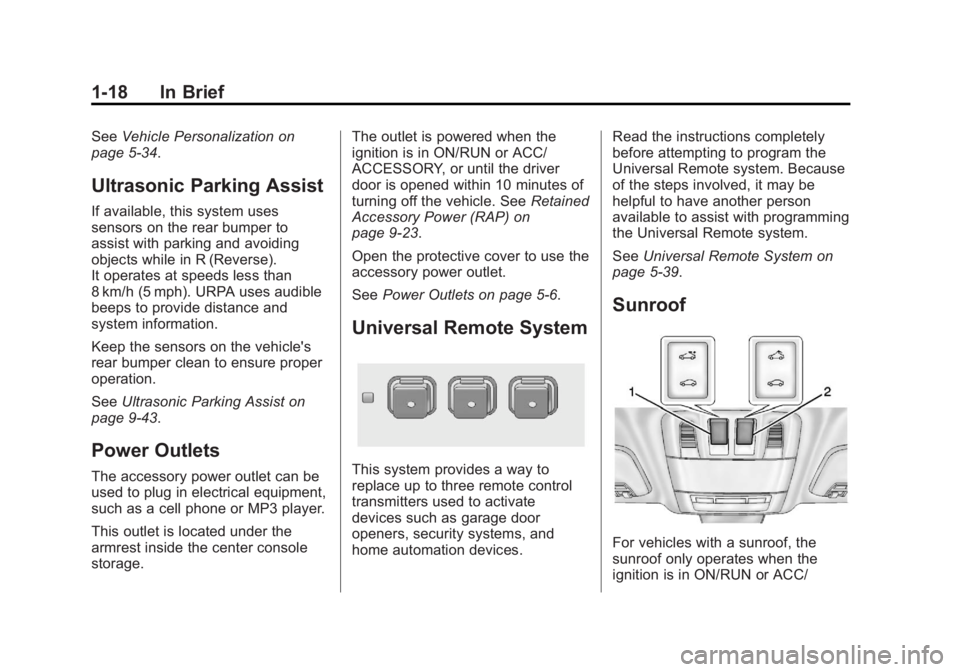
Sunroof
For vehicles with a sunroof, the
sunroof only operates when the
ignition is in ON/RUN or ACC/
Page 36 of 412
Black plate (6,1)Buick Regal Owner Manual - 2013 - crc - 11/5/12
2-6 Keys, Doors, and Windows
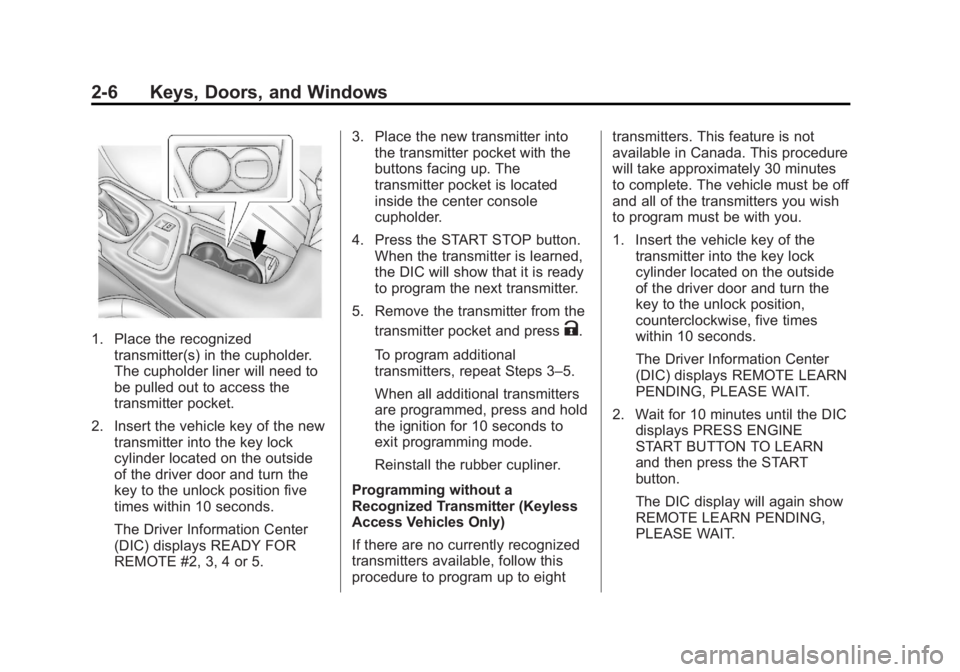
1. Place the recognizedtransmitter(s) in the cupholder.
The cupholder liner will need to
be pulled out to access the
transmitter pocket.
2. Insert the vehicle key of the new transmitter into the key lock
cylinder located on the outside
of the driver door and turn the
key to the unlock position five
times within 10 seconds.
The Driver Information Center
(DIC) displays READY FOR
REMOTE #2, 3, 4 or 5. 3. Place the new transmitter into
the transmitter pocket with the
buttons facing up. The
transmitter pocket is located
inside the center console
cupholder.
4. Press the START STOP button. When the transmitter is learned,
the DIC will show that it is ready
to program the next transmitter.
5. Remove the transmitter from the transmitter pocket and pressK.
To program additional
transmitters, repeat Steps 3–5.
When all additional transmitters
are programmed, press and hold
the ignition for 10 seconds to
exit programming mode.
Reinstall the rubber cupliner.
Programming without a
Recognized Transmitter (Keyless
Access Vehicles Only)
If there are no currently recognized
transmitters available, follow this
procedure to program up to eight transmitters. This feature is not
available in Canada. This procedure
will take approximately 30 minutes
to complete. The vehicle must be off
and all of the transmitters you wish
to program must be with you.
1. Insert the vehicle key of the
transmitter into the key lock
cylinder located on the outside
of the driver door and turn the
key to the unlock position,
counterclockwise, five times
within 10 seconds.
The Driver Information Center
(DIC) displays REMOTE LEARN
PENDING, PLEASE WAIT.
2. Wait for 10 minutes until the DIC displays PRESS ENGINE
START BUTTON TO LEARN
and then press the START
button.
The DIC display will again show
REMOTE LEARN PENDING,
PLEASE WAIT.
Page 37 of 412
Black plate (7,1)Buick Regal Owner Manual - 2013 - crc - 11/5/12
Keys, Doors, and Windows 2-7
3. Repeat Step 2 two additionaltimes. After the third time all
previously known transmitters
will no longer work with the
vehicle. Remaining transmitters
can be relearned during the next
steps.
The DIC display should now
show READY FOR REMOTE
# 1.
4. Place the new transmitter intothe transmitter pocket with the
buttons facing up. The
transmitter pocket is located
inside the center console cupholder. The cupholder liner
will need to be pulled out to
access the transmitter pocket.
5. Press the START STOP button. When the transmitter is learned,
the DIC will show that it is ready
to program the next transmitter.
6. Remove the transmitter from the transmitter pocket and press
K.
To program additional
transmitters, repeat Steps 4–6.
When all additional transmitters
are programmed, press and hold
the START STOP button for
10 seconds to exit
programming mode.
Starting the Vehicle with a Low
Transmitter Battery
If the transmitter battery is weak, the
DIC may display NO REMOTE
DETECTED when you try to start
the vehicle. The REPLACE
BATTERY IN REMOTE KEY
message may also be displayed at
this time. To start the vehicle:
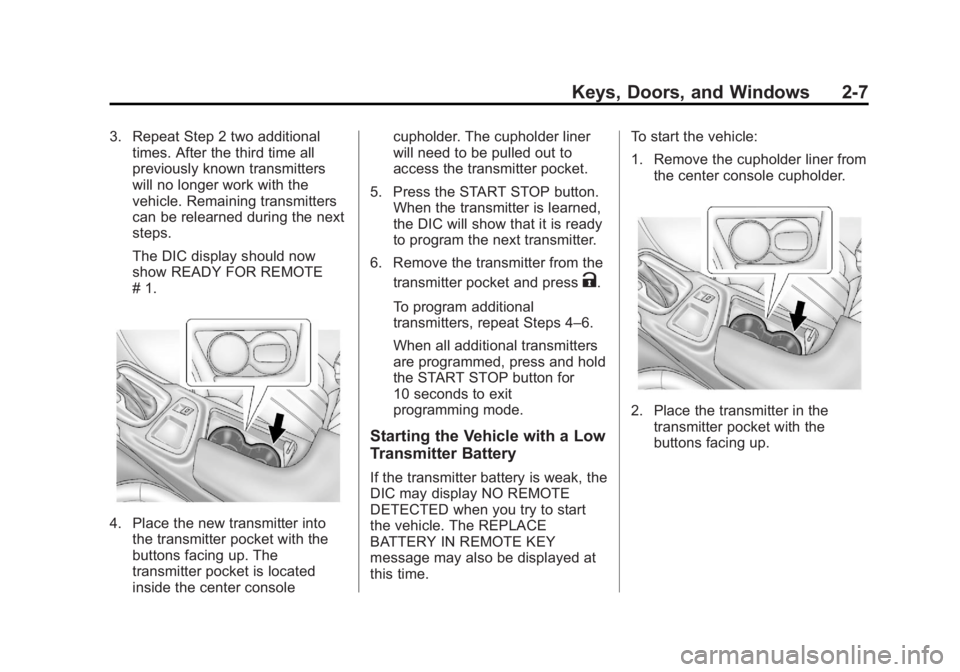
1. Remove the cupholder liner from
the center console cupholder.
2. Place the transmitter in thetransmitter pocket with the
buttons facing up.
Page 45 of 412
Black plate (15,1)Buick Regal Owner Manual - 2013 - crc - 11/5/12
Keys, Doors, and Windows 2-15
The security light in the instrument
cluster comes on when there is a
problem with arming or disarming
the theft-deterrent system.
The system has one or more
transmitters matched to an
immobilizer control unit in your
vehicle. Only a correctly matched
transmitter will start the vehicle.
If the transmitter is ever damaged,
you may not be able to start your
vehicle.
When trying to start the vehicle, the
security light comes on briefly when
the ignition is turned on.
If the vehicle does not start and the
security light stays on, there is a
problem with the system. Turn the
vehicle off and try again.If the RKE transmitter appears to be
undamaged, try another transmitter,
or place the transmitter in the
transmitter pocket in the center
console. See
“Starting the Vehicle
with a Low Transmitter Battery”
under Remote Keyless Entry (RKE)
System Operation on page 2‑3.
If the vehicle does not start with the
other transmitter or when the
transmitter is in the pocket in the
center console, your vehicle needs
service. See your dealer who can
service the theft-deterrent system
and have a new transmitter
programmed to the vehicle.
Do not leave the transmitter or
device that disarms or deactivates
the theft-deterrent system in the
vehicle.
Exterior Mirrors
Convex Mirrors
{WARNING
A convex mirror can make things,
like other vehicles, look farther
away than they really are. If you
cut too sharply into the right lane,
you could hit a vehicle on the
right. Check the inside mirror or
glance over your shoulder before
changing lanes.
The passenger side mirror is convex
shaped. A convex mirror's surface is
curved so more can be seen from
the driver seat.
Page 101 of 412
Black plate (1,1)Buick Regal Owner Manual - 2013 - crc - 11/5/12
Storage 4-1
Storage
Storage Compartments
Instrument Panel Storage . . . . . 4-1
Glove Box . . . . . . . . . . . . . . . . . . . . 4-1
Cupholders . . . . . . . . . . . . . . . . . . . 4-1
Rear Storage . . . . . . . . . . . . . . . . . 4-2
Center Console Storage . . . . . . 4-3
Additional Storage Features
Cargo Net . . . . . . . . . . . . . . . . . . . . . 4-3
Convenience Net . . . . . . . . . . . . . 4-3
Storage
Compartments
Instrument Panel Storage
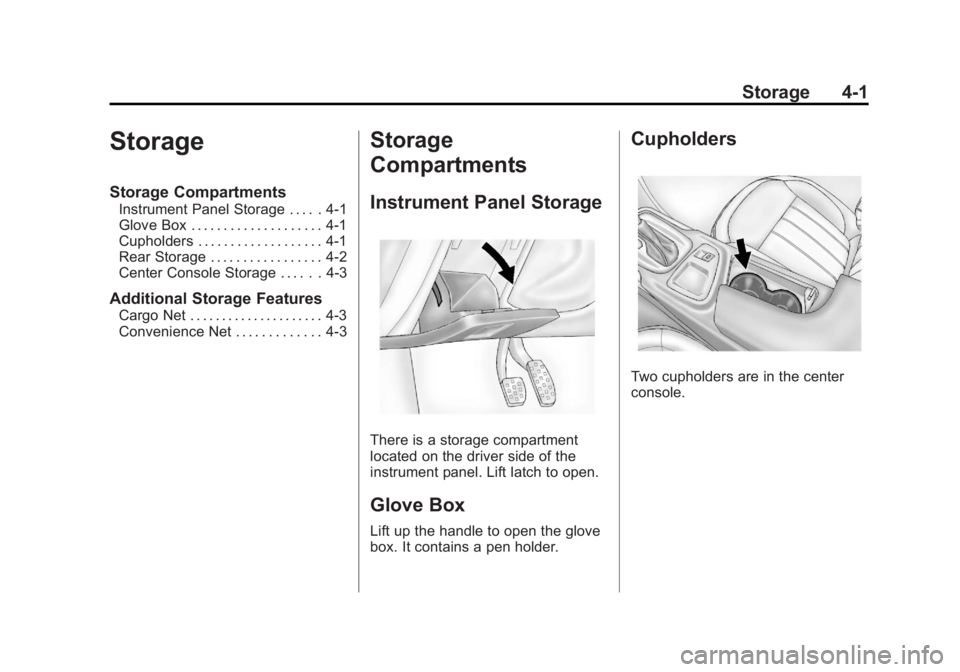
There is a storage compartment
located on the driver side of the
instrument panel. Lift latch to open.
Glove Box
Lift up the handle to open the glove
box. It contains a pen holder.
Cupholders
Two cupholders are in the center
console.
Page 103 of 412
Black plate (3,1)Buick Regal Owner Manual - 2013 - crc - 11/5/12
Storage 4-3
Center Console Storage
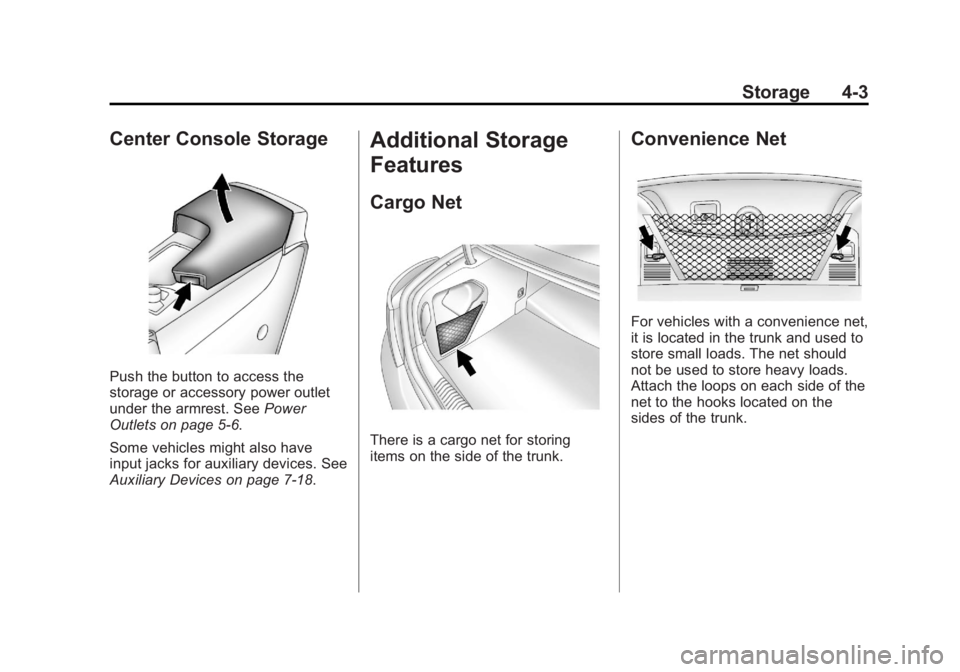
Push the button to access the
storage or accessory power outlet
under the armrest. SeePower
Outlets on page 5‑6.
Some vehicles might also have
input jacks for auxiliary devices. See
Auxiliary Devices on page 7‑18.
Additional Storage
Features
Cargo Net
There is a cargo net for storing
items on the side of the trunk.
Convenience Net
For vehicles with a convenience net,
it is located in the trunk and used to
store small loads. The net should
not be used to store heavy loads.
Attach the loops on each side of the
net to the hooks located on the
sides of the trunk.
Page 110 of 412
Black plate (6,1)Buick Regal Owner Manual - 2013 - crc - 11/5/12
5-6 Instruments and Controls
Setting the Clock (Radio with
CD and Touchscreen)
From the Time and Date Settings
screen button, press to display the
Time and Date Settings menu.
Set Time:Press + or−to increase
or decrease the Hours and Minutes
displayed on the clock.
Set Date: Press + or−to increase
or decrease the day.
Set Time Format: Press the 12 HR
screen button for standard time;
press the 24 HR screen button for
military time.
Set Date Format: Depending on
the region, the following date
formats may be available: MM/DD/
YYYY, DD.MM.YYYY, or YYYY/
MM/DD.
Power Outlets
The accessory power outlet can be
used to plug in electrical equipment,
such as a cell phone or MP3 player.
This outlet is located under the
armrest inside the center console
storage.
The outlet is powered when the
ignition is in ON/RUN or ACC/
ACCESSORY, or until the driver
door is opened within 10 minutes of
turning off the vehicle. See Retained
Accessory Power (RAP) on
page 9‑23.
Open the protective cover to use the
accessory power outlet.
Certain electrical accessories may
not be compatible with the
accessory power outlet and could
overload vehicle or adapter fuses.
If there is a problem, see your
dealer. When adding electrical equipment,
be sure to follow the installation
instructions included with the
equipment. See
Add-On Electrical
Equipment on page 9‑51.
Notice: Hanging heavy
equipment from the power outlet
can cause damage not covered
by the vehicle warranty. The
power outlets are designed for
accessory power plugs only, such
as cell phone charge cords.
Power Outlet 110 Volt Alternating
Current
The vehicle may have a power
outlet that can be used to plug in
electrical equipment with a
maximum limit of 150 watts.
Page 111 of 412
Black plate (7,1)Buick Regal Owner Manual - 2013 - crc - 11/5/12
Instruments and Controls 5-7
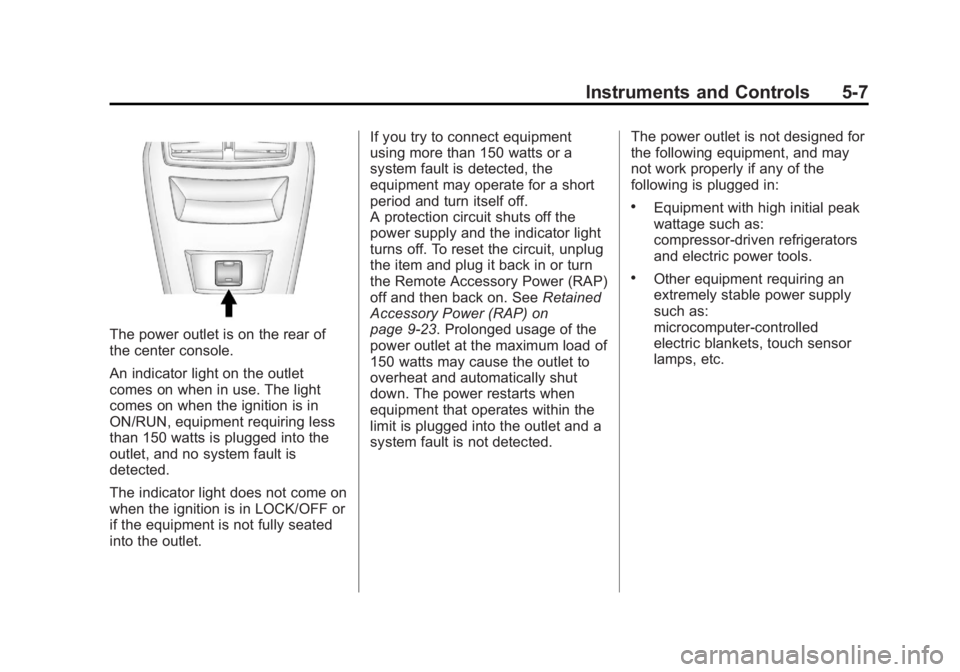
The power outlet is on the rear of
the center console.
An indicator light on the outlet
comes on when in use. The light
comes on when the ignition is in
ON/RUN, equipment requiring less
than 150 watts is plugged into the
outlet, and no system fault is
detected.
The indicator light does not come on
when the ignition is in LOCK/OFF or
if the equipment is not fully seated
into the outlet.If you try to connect equipment
using more than 150 watts or a
system fault is detected, the
equipment may operate for a short
period and turn itself off.
A protection circuit shuts off the
power supply and the indicator light
turns off. To reset the circuit, unplug
the item and plug it back in or turn
the Remote Accessory Power (RAP)
off and then back on. See
Retained
Accessory Power (RAP) on
page 9‑23. Prolonged usage of the
power outlet at the maximum load of
150 watts may cause the outlet to
overheat and automatically shut
down. The power restarts when
equipment that operates within the
limit is plugged into the outlet and a
system fault is not detected. The power outlet is not designed for
the following equipment, and may
not work properly if any of the
following is plugged in:
.Equipment with high initial peak
wattage such as:
compressor-driven refrigerators
and electric power tools.
.Other equipment requiring an
extremely stable power supply
such as:
microcomputer-controlled
electric blankets, touch sensor
lamps, etc.
Page 170 of 412
Black plate (18,1)Buick Regal Owner Manual - 2013 - crc - 11/5/12
7-18 Infotainment System
No Folder
When the CD only contains
compressed audio files without any
folders or playlists, all files are
under the root folder.
File System and Naming
The song titles, artists, albums, and
genres are taken from the file's ID3
tag and are only displayed if present
in the tag. If a song title is not
present in the ID3 tag, the radio
displays the file name as the
track name.
Preprogrammed Playlists
The radio recognizes
preprogrammed playlists; however,
there is no editing capability. These
playlists are treated as special
folders containing compressed
audio song files.Auxiliary Devices
This vehicle has an auxiliary input
jack in the center console. Possible
auxiliary audio sources include:
.Laptop computer
.MP3 player
This jack is not an audio output. Do
not plug headphones into the
auxiliary input jack. Drivers are
encouraged to set up any auxiliary
device while the vehicle is in
P (Park).
Connect a 3.5 mm (1/8 in) cable
from the auxiliary device to the
auxiliary input jack. When a device
is connected, the system
automatically begins playing audio
from the device over the vehicle
speakers.
If an auxiliary device has already
been connected, but a different
source is currently active, press the
Now Playing screen button on the
Home Page, then press Source repeatedly to cycle through all of the
available audio source screens, until
the AUX source screen is selected.
Portable devices are controlled by
using the menu system described in
Overview on page 7‑2.Using the 3.5 mm (1/8 in)
Auxiliary Input Jack
Connect a 3.5 mm (1/8 in) cable to
the 3.5 mm (1/8 in) auxiliary input
jack to use a portable audio player.
Playback of an audio device that is
connected to the 3.5 mm (1/8 in)
auxiliary input jack can only be
controlled using the controls on the
device.
Adjusting the Volume
Turn the
3/Oknob to adjust the
volume of the infotainment system
after the volume level has been set
on the portable audio device.