key battery BUICK REGAL 2016 User Guide
[x] Cancel search | Manufacturer: BUICK, Model Year: 2016, Model line: REGAL, Model: BUICK REGAL 2016Pages: 357, PDF Size: 5.37 MB
Page 139 of 357
Buick Regal Owner Manual (GMNA-Localizing-U.S./Canada/Mexico-
9159380) - 2016 - CRC - 2/23/16
138 Instruments and Controls
message is displayed, the system
will not limit wheel spin. Adjust your
driving accordingly. See your dealer
for service.
SERVICE STABILITRAK
This message displays if there is a
problem with the StabiliTrak system.
If this message appears, try to reset
the system. Stop; turn off the engine
for at least 15 seconds; then start
the engine again. If this message
still comes on, it means there is a
problem. See your dealer for
service. The vehicle is safe to drive;
however, you do not have the
benefit of StabiliTrak, so reduce
your speed and drive accordingly.
SPORT MODE ON
This message displays when using
the interactive drive control. See
Selective Ride Control0193.
TRACTION CONTROL OFF
This message displays when the
Traction Control System (TCS) is
turned off. Adjust your driving
accordingly.
TRACTION CONTROL ON
This message displays when the
Traction Control System (TCS) is
turned on.
Security Messages
THEFT ATTEMPTED
This message displays if the vehicle
detects a tamper condition.
Starting the Vehicle
Messages
JUMP START ACTIVE WAIT TO
START
This message displays while
performing an on-board jump start
of the vehicle. See “Jump Starting
(On-board with eAssist Only).”
JUMP START COMPLETE
ATTEMPT START
This message displays while
performing an on-board jump start
of the vehicle. See “Jump Starting
(On-board with eAssist Only).”
JUMP START DISABLED SEE
OWNERS MANUAL
This message displays if there is a
problem with the on-board jump
start system, or the 12 volt battery is
too low to perform an on-board jump
start. Try using jumper cables and
performing a normal jump start. See
“Jump Starting (On-board with
eAssist Only).” Take the vehicle to
your dealer for service if this
message continues to be displayed.
PRESS BRAKE TO START
This message is displayed when
attempting to start the vehicle
without first pressing the brake
pedal.
SERVICE KEYLESS START
SYSTEM
This message is displayed if there is
a problem with the pushbutton start
system. Take the vehicle to your
dealer for service.
Page 156 of 357
Buick Regal Owner Manual (GMNA-Localizing-U.S./Canada/Mexico-
9159380) - 2016 - CRC - 2/23/16
Lighting 155
exterior lamps and dome lamps
remain on after the door is closed
for a set amount of time, then
automatically turn off.
For vehicles with Keyless Access,
the exterior lamps automatically turn
on when a door is opened after the
ignition is changed to the OFF
position. The dome lamps also
come on after the ignition is
changed to the OFF position. See
Ignition Positions (Key Access)
0175 orIgnition Positions (Keyless
Access) 0177.
The exterior lamps turn off
immediately by turning the exterior
lamps control off.
This feature can be changed. See
Vehicle Personalization 0140.
Battery Power Protection
The battery saver feature is
designed to protect the vehicle's
battery. To prevent battery discharge while
driving, the following systems are
reduced automatically in two stages
and then turned off:
.
Heated rear window and mirrors
. Heated seats
. Fan
In the second stage, a Driver
Information Center (DIC) message
is displayed confirming the
activation of the battery discharge
protection. See Battery Voltage and
Charging Messages 0131.
If the exterior lamps or any interior
lights are left on and the ignition is
turned off, the battery power
protection system automatically
turns the lamp off after about
10 minutes.
Page 177 of 357
Buick Regal Owner Manual (GMNA-Localizing-U.S./Canada/Mexico-
9159380) - 2016 - CRC - 2/23/16
176 Driving and Operating
Do not turn the engine off when the
vehicle is moving. This will cause a
loss of power assist in the brake
and steering systems and disable
the airbags.
If the vehicle must be shut off in an
emergency:1. Brake using a firm and steady pressure. Do not pump the
brakes repeatedly. This may
deplete power assist, requiring
increased brake pedal force.
2. Shift the vehicle to (N) Neutral. This can be done while the
vehicle is moving. After shifting
to (N) Neutral, firmly apply the
brakes and steer the vehicle to
a safe location.
3. Come to a complete stop. Shift to P (Park). Turn the ignition to
LOCK/OFF.
4. Set the parking brake. See Parking Brake 0189.{Warning
Turning off the vehicle while
moving may cause loss of power
assist in the brake and steering
systems and disable the airbags.
While driving, only shut the
vehicle off in an emergency.
If the vehicle cannot be pulled over,
and must be shut off while driving,
turn the ignition to ACC/
ACCESSORY.
The ignition switch can bind in the
LOCK/OFF position with the wheels
turned off center. If this happens,
move the steering wheel from right
to left while turning the key to ACC/
ACCESSORY. If this does not work,
then the vehicle needs service.
1 (ACC/ACCESSORY) : This
position unlocks the steering wheel.
Some accessories can be used in
this position.
2 (ON/RUN) : The ignition switch
stays in this position when the
engine is running. This position can
be used to operate the electrical accessories, as well as to display
some warning and indicator lights.
This position can also be used for
service and diagnostics, and to
verify the proper operation of the
malfunction indicator lamp as may
be required for emission inspection
purposes.
The battery could be drained if the
key is left in the ON/RUN position
with the engine off. The vehicle
might not start if the battery is
allowed to drain for an extended
period of time.
3 (START) :
This position starts the
engine. When the engine starts,
release the key. The ignition switch
will return to ON/RUN for normal
driving.
If the ignition becomes difficult to
turn, see Keys026.
Page 180 of 357

Buick Regal Owner Manual (GMNA-Localizing-U.S./Canada/Mexico-
9159380) - 2016 - CRC - 2/23/16
Driving and Operating 179
Starting Procedure (Key Access)1. With your foot off the accelerator pedal, turn the
ignition key to START. When
the engine starts, let go of the
ignition.
The idle speed will go down as
your engine gets warm. Do not
race the engine immediately
after starting it.
Caution
Cranking the engine for long
periods of time, by returning the
ignition to the START position
immediately after cranking has
ended, can overheat and damage
the cranking motor, and drain the
battery. Wait at least 15 seconds
between each try, to let the
cranking motor cool down.
2. If the engine does not start after five to 10 seconds,
especially in very cold weather
(below −18 °C or 0 °F), it could
be flooded with too much
gasoline. Try pushing the accelerator pedal all the way to
the floor and holding it there as
you hold the key in START,
or press the START button, for
up to a maximum of
15 seconds. Wait at least
15 seconds between each try,
to allow the cranking motor to
cool down. When the engine
starts, let go of the key or
button, and the accelerator.
If the vehicle starts briefly but
then stops again, do the same
thing. This clears the extra
gasoline from the engine. Do
not race the engine
immediately after starting it.
Operate the engine and
transmission gently until the oil
warms up and lubricates all
moving parts.
Starting Procedure (Keyless
Access) 1. With the Keyless Access system, the RKE transmitter
must be in the vehicle. Press
the ENGINE START/STOP
button with the brake pedal applied. When the engine
begins cranking, let go of the
button.
The idle speed will go down as
your engine gets warm. Do not
race the engine immediately
after starting it.
If the RKE transmitter is not in
the vehicle, if there is
interference, or the RKE
battery is low, the Driver
Information Center (DIC) will
display a message. See
Remote Keyless Entry (RKE)
System Operation
028 and
Key and Lock Messages 0135.
Caution
Cranking the engine for long
periods of time, by pressing
ENGINE START/STOP
immediately after cranking has
ended, can overheat and damage
the cranking motor, and drain the
battery. Wait at least 15 seconds
between each try, to let the
cranking motor cool down.
Page 185 of 357
Buick Regal Owner Manual (GMNA-Localizing-U.S./Canada/Mexico-
9159380) - 2016 - CRC - 2/23/16
184 Driving and Operating
done properly; then it is difficult to
shift out of P (Park). To prevent
torque lock, set the parking brake
and then shift into P (Park). To find
out how, see“Shifting Into Park”
listed previously.
If torque lock does occur, the
vehicle may need to be pushed
uphill by another vehicle to relieve
the parking pawl pressure, so you
can shift out of P (Park).
Shifting out of Park
This vehicle is equipped with an
electronic shift lock release system.
The shift lock release is
designed to:
. Prevent ignition key removal
unless the shift lever is in
P (Park) with the shift lever
button fully released.
. Prevent movement of the shift
lever out of P (Park) unless the
ignition is in ON/RUN and the
brake pedal is applied. The shift lock release is always
functional except in the case of an
uncharged or low voltage (less than
9-volt) battery.
If the vehicle has an uncharged
battery or a battery with low voltage,
try charging or jump starting the
battery. See
Jump Starting - North
America (with or without eAssist)
0 289 orJump Starting - North
America (On-board with eAssist
Only) 0288.
To shift out of P (Park):
1. Apply the brake pedal.
2. Turn the ignition to ON/RUN.
3. Press the shift lever button.
4. Move the shift lever to the desired position.
If still unable to shift out of P (Park): 1. Fully release the shift lever button.
2. Hold the brake pedal down and press the shift lever button
again.
3. Move the shift lever to the desired position. If you still cannot move the shift
lever from P (Park), consult your
dealer or a professional towing
service.
Parking over Things
That Burn
{Warning
Things that can burn could touch
hot exhaust parts under the
vehicle and ignite. Do not park
over papers, leaves, dry grass,
or other things that can burn.
Page 221 of 357
Buick Regal Owner Manual (GMNA-Localizing-U.S./Canada/Mexico-
9159380) - 2016 - CRC - 2/23/16
220 Vehicle Care
Wheel Alignment and TireBalance . . . . . . . . . . . . . . . . . . . . . 272
Wheel Replacement . . . . . . . . . . 272
Tire Chains . . . . . . . . . . . . . . . . . . . 273
If a Tire Goes Flat . . . . . . . . . . . . 273
Tire Sealant and Compressor Kit . . . . . . . . . . . . . 275
Storing the Tire Sealant and Compressor Kit . . . . . . . . . . . . . 281
Tire Changing . . . . . . . . . . . . . . . . 282
Compact Spare Tire . . . . . . . . . . 287
Jump Starting
Jump Starting - North America (On-board with
eAssist Only) . . . . . . . . . . . . . . . . 288
Jump Starting - North America
(with or without eAssist) . . . . . 289
Towing
Towing the Vehicle . . . . . . . . . . . 292
Recreational VehicleTowing . . . . . . . . . . . . . . . . . . . . . . 293
Appearance Care
Exterior Care . . . . . . . . . . . . . . . . . 295
Interior Care . . . . . . . . . . . . . . . . . . 300
Floor Mats . . . . . . . . . . . . . . . . . . . . 302
General Information
For service and parts needs, visit
your dealer. You will receive
genuine GM parts and GM-trained
and supported service people.
Genuine GM parts have one of
these marks:
California Proposition
65 Warning
WARNING: Most motor vehicles,
including this one, contain and/or
emit chemicals known to the State
of California to cause cancer and
birth defects or other reproductive harm. Engine exhaust, many parts
and systems, many fluids, and
some component wear by-products
contain and/or emit these
chemicals.
See
Battery - North America 0241
and Jump Starting - North America
(with or without eAssist) 0289 or
Jump Starting - North America
(On-board with eAssist Only) 0288.
California Perchlorate
Materials Requirements
Certain types of automotive
applications, such as airbag
initiators, safety belt pretensioners,
and lithium batteries contained in
Remote Keyless Entry transmitters,
may contain perchlorate materials.
Special handling may be necessary.
For additional information, see
www.dtsc.ca.gov/hazardouswaste/
perchlorate.
Page 289 of 357
Buick Regal Owner Manual (GMNA-Localizing-U.S./Canada/Mexico-
9159380) - 2016 - CRC - 2/23/16
288 Vehicle Care
Do not mix the compact spare tire or
wheel with other wheels or tires.
They will not fit. Keep the spare tire
and its wheel together.
Caution
Tire chains will not fit the compact
spare. Using them can damage
the vehicle and the chains. Do not
use tire chains on the compact
spare.
Jump Starting
Jump Starting - North
America (On-board with
eAssist Only)
If the vehicle fails to crank, it may
be jump started by using the eAssist
battery to charge the 12-volt battery.
Use the following procedure to
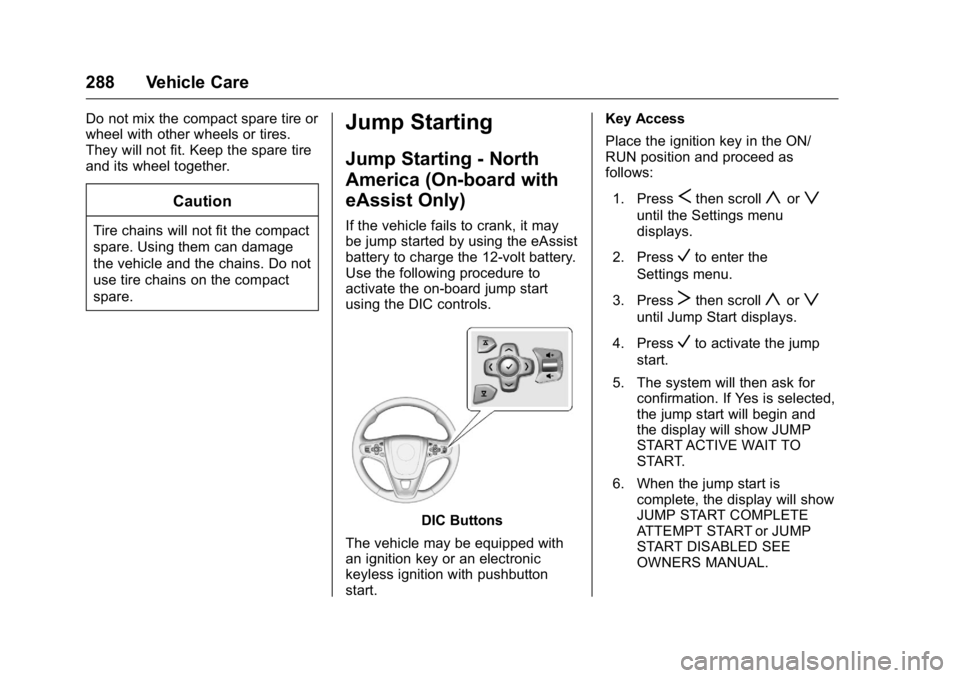
activate the on-board jump start
using the DIC controls.
DIC Buttons
The vehicle may be equipped with
an ignition key or an electronic
keyless ignition with pushbutton
start. Key Access
Place the ignition key in the ON/
RUN position and proceed as
follows:
1. Press
Sthen scrollyorz
until the Settings menu
displays.
2. Press
Vto enter the
Settings menu.
3. Press
Tthen scrollyorz
until Jump Start displays.
4. Press
Vto activate the jump
start.
5. The system will then ask for confirmation. If Yes is selected,
the jump start will begin and
the display will show JUMP
START ACTIVE WAIT TO
START.
6. When the jump start is complete, the display will show
JUMP START COMPLETE
ATTEMPT START or JUMP
START DISABLED SEE
OWNERS MANUAL.
Page 290 of 357
Buick Regal Owner Manual (GMNA-Localizing-U.S./Canada/Mexico-
9159380) - 2016 - CRC - 2/23/16
Vehicle Care 289
Keyless Access
With the brake pedal not applied,
press and hold the ENGINE START/
STOP button for more than
five seconds. This will place the
vehicle in the Service Only Mode.
Proceed as follows:1. Press
Sthen scrollyorz
until the Settings menu
displays.
2. Press
Vto enter the
Settings menu.
3. Press
Tthen scrollyorz
until Jump Start displays.
4. Press
Vto activate the jump
start.
5. The system will then ask for confirmation. If Yes is selected,
the jump start will begin and
the display will show JUMP
START ACTIVE WAIT TO
START. 6. When the jump start is
complete, the display will show
JUMP START COMPLETE
ATTEMPT START or JUMP
START DISABLED SEE
OWNERS MANUAL.
If the vehicle is started, the
on-board jump start function will be
automatically disabled. If the vehicle
cranks but does not start, the
procedure may be repeated again.
If the vehicle start is still
unsuccessful, the jump start can be
attempted using the jump starting
procedure under “Jump Starting
(with or without eAssist).” On-board
jump starting may be unavailable
due to the 12-volt battery charge
level, the eAssist battery charge
level, power capability, or an issue
with the eAssist system. In these
cases, the display will not be
available because of the power
issue, or the DIC will display JUMP
START DISABLED SEE OWNERS
MANUAL.
Jump Starting - North
America (with or without
eAssist)
For more information about the
vehicle battery, see Battery - North
America 0241.
If the battery has run down, try to
use another vehicle and some
jumper cables to start the vehicle.
Be sure to use the following steps to
do it safely.
{Warning
WARNING: Battery posts,
terminals, and related
accessories contain lead and lead
compounds, chemicals known to
the State of California to cause
cancer and birth defects or other
reproductive harm. Batteries also
contain other chemicals known to
the State of California to cause
cancer. WASH HANDS AFTER
HANDLING. SeeCalifornia
Proposition 65 Warning 0220.
Page 338 of 357
Buick Regal Owner Manual (GMNA-Localizing-U.S./Canada/Mexico-
9159380) - 2016 - CRC - 2/23/16
OnStar 337
.Obtain the Wi-Fi®hotspot name
or SSID and password,
if equipped.
Press
Qto connect to an
Advisor to:
. Verify account information or
update contact information.
. Get driving directions.
. Receive a Diagnostic check of
the vehicle's key operating
systems.
. Receive Roadside Assistance.
. Manage Wi-Fi Settings,
if equipped.
Press
>to get a priority connection
to an OnStar Advisor available
24/7 to:
. Get help for an emergency.
. Be a Good Samaritan or
respond to an AMBER Alert.
. Get assistance in severe
weather or other crisis situations
and find evacuation routes.
OnStar Services
Emergency
Emergency Services require an
active, OnStar subscription plan
(excludes Basic Plan). With
Automatic Crash Response, built-in
sensors can automatically alert a
specially trained OnStar Advisor
who is immediately connected in to
the vehicle to help.
Press
>for a priority connection to
an OnStar Advisor who can contact
emergency service providers, direct
them to your exact location, and
relay important information.
With OnStar Crisis Assist, specially
trained Advisors are available
24 hours a day, 7 days a week, to
provide a central point of contact,
assistance, and information during a
crisis.
With Roadside Assistance, Advisors
can locate a nearby service provider
to help with a flat tire, a battery
jump, or an empty gas tank.
Security
If equipped, OnStar provides these
services:
. With Stolen Vehicle Assistance,
OnStar Advisors can use GPS to
pinpoint the vehicle and help
authorities quickly recover it.
. With Remote Ignition Block,
if equipped, OnStar can block
the engine from being restarted.
. With Stolen Vehicle Slowdown,
if equipped, OnStar can work
with law enforcement to
gradually slow the vehicle down.
Navigation
OnStar navigation requires a
specific OnStar subscription plan.
Press
Qto receive Turn-by-Turn
directions or have them sent to the
vehicle’s navigation screen,
if equipped.
Turn-by-Turn Navigation
1. PressQto connect to an
Advisor.
Page 353 of 357

Buick Regal Owner Manual (GMNA-Localizing-U.S./Canada/Mexico-
9159380) - 2016 - CRC - 2/23/16
352 Index
M
MaintenanceRecords . . . . . . . . . . . . . . . . . . . . . . 317
Maintenance and Care Additional . . . . . . . . . . . . . . . . . . . . . 312
Maintenance Schedule . . . . . . . . . 305 Recommended Fluids andLubricants . . . . . . . . . . . . . . . . . . . 315
Malfunction Indicator Lamp . . . . . 116
Manual Mode . . . . . . . . . . . . . . . . . . . 187
Memory Features . . . . . . . . . . . . . . . . 11
Memory Seats . . . . . . . . . . . . . . . . . . . 54
Messages Battery Voltage and
Charging . . . . . . . . . . . . . . . . . . . . 131
Brake System . . . . . . . . . . . . . . . . 131
Compass . . . . . . . . . . . . . . . . . . . . . 132
Door Ajar . . . . . . . . . . . . . . . . . . . . . 133
Engine Cooling System . . . . . . . 133
Engine Oil . . . . . . . . . . . . . . . . . . . . 134
Engine Power . . . . . . . . . . . . . . . . 134
Fuel System . . . . . . . . . . . . . . . . . . 134
Key and Lock . . . . . . . . . . . . . . . . . 135
Object Detection System . . . . . 135
Ride Control System . . . . . . . . . . 137
Security . . . . . . . . . . . . . . . . . . . . . . 138
Starting the Vehicle . . . . . . . . . . . 138
Tire . . . . . . . . . . . . . . . . . . . . . . . . . . . 139 Messages (cont'd)
Transmission . . . . . . . . . . . . . . . . . 139
Vehicle . . . . . . . . . . . . . . . . . . . . . . . 131
Washer Fluid . . . . . . . . . . . . . . . . . 140
Window . . . . . . . . . . . . . . . . . . . . . . . 140
Mirrors Automatic DimmingRearview . . . . . . . . . . . . . . . . . . . . . . 44
Convex . . . . . . . . . . . . . . . . . . . . . . . . . 43
Folding . . . . . . . . . . . . . . . . . . . . . . . . . 44
Heated . . . . . . . . . . . . . . . . . . . . . . . . . 44
Power . . . . . . . . . . . . . . . . . . . . . . . . . . 44
Mirrors, Interior Rearview . . . . . . . . 44
Monitor System, Tire Pressure . . . . . . . . . . . . . . . . . . . . . . 262
N
NavigationOnStar®. . . . . . . . . . . . . . . . . . . . . . 337
Net, Convenience . . . . . . . . . . . . . . . 97
New Vehicle Break-In . . . . . . . . . . . 175
O
Object Detection System Messages . . . . . . . . . . . . . . . . . . . . . 135
Odometer . . . . . . . . . . . . . . . . . . . . . . . 110 Trip . . . . . . . . . . . . . . . . . . . . . . . . . . . . 111
Off-Road Recovery . . . . . . . . . . . . . . . . . . . . . 167 Oil
Engine . . . . . . . . . . . . . . . . . . . . . . . . 228
Engine Oil Life System . . . . . . . 230
Messages . . . . . . . . . . . . . . . . . . . . 134
Pressure Light . . . . . . . . . . . . . . . . 121
Older Children, Restraints . . . . . . . 75
Online Owner Center . . . . . . . . . . . 325
OnStar . . . . . . . . . . . . . . . . . . . . . . . . . 334
OnStar
®Additional
Information . . . . . . . . . . . . . . . . . . . . 340
OnStar
®Connections . . . . . . . . . . . 338
OnStar®Diagnostics . . . . . . . . . . . . 340
OnStar®Emergency . . . . . . . . . . . . 337
OnStar®Navigation . . . . . . . . . . . . . 337
OnStar®Overview . . . . . . . . . . . . . . 336
OnStar®Security . . . . . . . . . . . . . . . 337
Ordering Service Publications . . . . . . . . . . 331
Outlets Power . . . . . . . . . . . . . . . . . . . . . . . . 101
Overheating, Engine . . . . . . . . . . . . 237
P
Park
Shifting Into . . . . . . . . . . . . . . . . . . . 183
Shifting Out of . . . . . . . . . . . . . . . . 184
Parking Brake . . . . . . . . . . . . . . . . . . . . . . . . . 189