climate control BUICK REGAL 2017 User Guide
[x] Cancel search | Manufacturer: BUICK, Model Year: 2017, Model line: REGAL, Model: BUICK REGAL 2017Pages: 344, PDF Size: 4.91 MB
Page 54 of 344
Buick Regal Owner Manual (GMNA-Localizing-U.S./Canada/Mexico-
9804381) - 2017 - crc - 8/30/16
Seats and Restraints 53
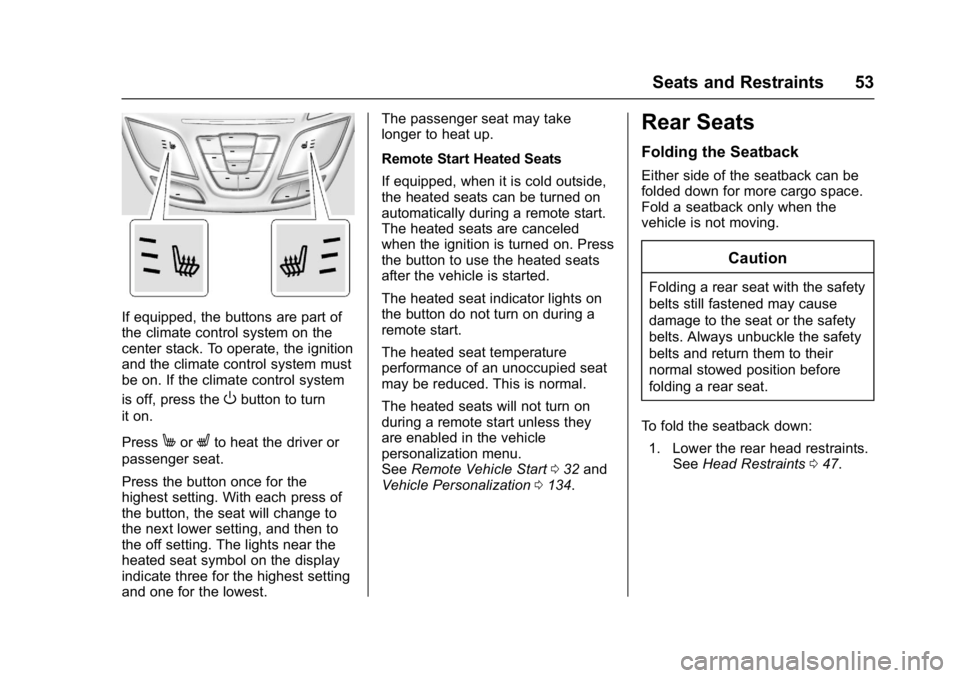
If equipped, the buttons are part of
the climate control system on the
center stack. To operate, the ignition
and the climate control system must
be on. If the climate control system
is off, press the
Obutton to turn
it on.
Press
MorLto heat the driver or
passenger seat.
Press the button once for the
highest setting. With each press of
the button, the seat will change to
the next lower setting, and then to
the off setting. The lights near the
heated seat symbol on the display
indicate three for the highest setting
and one for the lowest. The passenger seat may take
longer to heat up.
Remote Start Heated Seats
If equipped, when it is cold outside,
the heated seats can be turned on
automatically during a remote start.
The heated seats are canceled
when the ignition is turned on. Press
the button to use the heated seats
after the vehicle is started.
The heated seat indicator lights on
the button do not turn on during a
remote start.
The heated seat temperature
performance of an unoccupied seat
may be reduced. This is normal.
The heated seats will not turn on
during a remote start unless they
are enabled in the vehicle
personalization menu.
See
Remote Vehicle Start 032 and
Vehicle Personalization 0134.
Rear Seats
Folding the Seatback
Either side of the seatback can be
folded down for more cargo space.
Fold a seatback only when the
vehicle is not moving.
Caution
Folding a rear seat with the safety
belts still fastened may cause
damage to the seat or the safety
belts. Always unbuckle the safety
belts and return them to their
normal stowed position before
folding a rear seat.
To fold the seatback down: 1. Lower the rear head restraints. See Head Restraints 047.
Page 101 of 344
Buick Regal Owner Manual (GMNA-Localizing-U.S./Canada/Mexico-
9804381) - 2017 - crc - 8/30/16
100 Instruments and Controls
Cigarette Lighter
If equipped, push the lighter down
and it will pop up when it is ready to
be used. The ignition switch must
be in the ACC/ACCESSORY or ON/
RUN position to use the lighter.
Caution
Holding a cigarette lighter in while
it is heating does not let the
lighter back away from the
heating element when it is hot.
Damage from overheating can
occur to the lighter or heating
element, or a fuse could be
blown. Do not hold a cigarette
lighter in while it is heating.
It is not recommended to use the
cigarette lighter to plug in auxiliary
electrical equipment.
Ashtrays
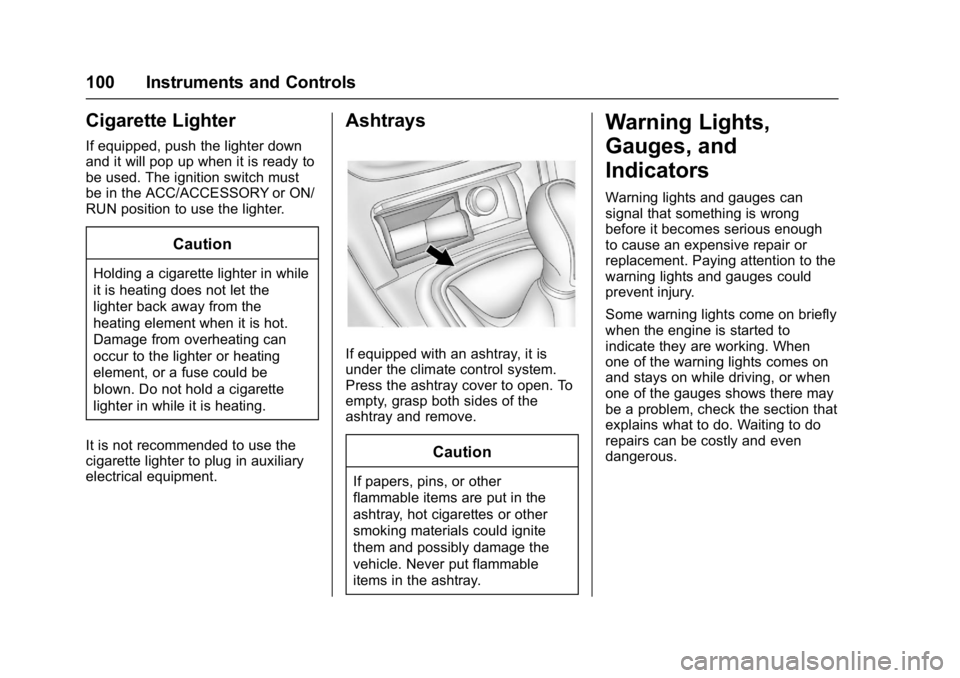
If equipped with an ashtray, it is
under the climate control system.
Press the ashtray cover to open. To
empty, grasp both sides of the
ashtray and remove.
Caution
If papers, pins, or other
flammable items are put in the
ashtray, hot cigarettes or other
smoking materials could ignite
them and possibly damage the
vehicle. Never put flammable
items in the ashtray.
Warning Lights,
Gauges, and
Indicators
Warning lights and gauges can
signal that something is wrong
before it becomes serious enough
to cause an expensive repair or
replacement. Paying attention to the
warning lights and gauges could
prevent injury.
Some warning lights come on briefly
when the engine is started to
indicate they are working. When
one of the warning lights comes on
and stays on while driving, or when
one of the gauges shows there may
be a problem, check the section that
explains what to do. Waiting to do
repairs can be costly and even
dangerous.
Page 135 of 344
Buick Regal Owner Manual (GMNA-Localizing-U.S./Canada/Mexico-
9804381) - 2017 - crc - 8/30/16
134 Instruments and Controls
Vehicle
Personalization
Use the audio system controls to
access the personalization menus
for customizing vehicle features.
The following are all possible
personalization features. Depending
on the vehicle, some may not be
available.
To access the personalization
menus:1. Press SETTINGS on the Home page on the infotainment
system display.
2. Press the desired feature to display a list of available
options.
3. Press the desired option.
4. Press to select the desired option setting.
5. Press
qBACK to return to the
previous menu.
Personalization Menus
The following list of features may be
available:
. Time and Date
. Language (Language)
. Valet Mode
. Radio
. Vehicle
. Bluetooth
. Apple CarPlay
. Android Auto
. Voice
. Display
. Rear Camera
. Return to Factory Settings
. Software Information
Each menu is detailed in the
following information.
Time and Date
Manually set the time and date. See
Clock 098.
Language (Language)
Select Language, then select from
the available language(s).
Valet Mode
To turn Valet Mode on and off, see
“Valet Mode” under“Settings” in the
infotainment manual.
Radio
To manage the radio features, see
“Radio” under“Settings” in the
infotainment manual.
Vehicle
Select and the following may
display:
. Climate and Air Quality
. Collision/Detection Systems
. Comfort and Convenience
. Lighting
. Power Door Locks
. Remote Lock, Unlock, Start
Page 136 of 344
Buick Regal Owner Manual (GMNA-Localizing-U.S./Canada/Mexico-
9804381) - 2017 - crc - 8/30/16
Instruments and Controls 135
Climate and Air Quality
Select and the following may
display:
.Auto Fan Max Speed
. Auto Defog
. Auto Rear Defog
Auto Fan Max Speed
This feature will set the maximum
auto fan speed.
Select Low, Medium, or High.
Auto Defog
When set to On, the front defog will
automatically react to temperature
and humidity conditions that may
cause fogging.
Select Off or On.
Auto Rear Defog
If equipped, this allows the Auto
Rear Defog to be turned on or off.
This feature will automatically turn
on the rear window defogger when it
is cold outside.
Select Off or On. Collision/Detection Systems
Select and the following may
display:
.
Auto Collision Preparation
. Go Notifier
. Rear Cross Traffic Alert
. Lane Change Alert
Auto Collision Preparation
This feature will turn on or off the
Forward Collision Alert (FCA) and
Forward Automatic Braking (FAB).
The Off setting disables all FCA and
FAB functions. With the Alert and
Brake setting, both FCA and FAB
are available. The Alert setting
disables FAB, but some last-second
automatic braking capability is still
provided, though less likely to occur.
See Forward Automatic Braking
(FAB) 0200.
Select Off, Alert and Brake, or Alert.
Go Notifier
This feature will give a reminder that
Adaptive Cruise Control provides
when it has brought the vehicle to a complete stop behind another
stopping vehicle, and then that
vehicle drives on.
Select Off or On. See
Adaptive
Cruise Control 0188.
Rear Cross Traffic Alert
This allows the feature to be turned
on or off.
Select Off or On. See Assistance
Systems for Parking or Backing
0 196.
Lane Change Alert
This allows the feature to be turned
on or off.
Select Off or On. See Lane Change
Alert (LCA) 0202.
Comfort and Convenience
Select and the following may
display:
. Auto Memory Recall
. Easy Exit Driver Seat
. Chime Volume
. Reverse Tilt Mirror
Page 151 of 344
Buick Regal Owner Manual (GMNA-Localizing-U.S./Canada/Mexico-
9804381) - 2017 - crc - 8/30/16
150 Climate Controls
Climate Controls
Climate Control Systems
Dual Automatic ClimateControl System . . . . . . . . . . . . . 150
Air Vents
Air Vents . . . . . . . . . . . . . . . . . . . . . 153
Maintenance
Air Intake . . . . . . . . . . . . . . . . . . . . . 154
Passenger Compartment AirFilter . . . . . . . . . . . . . . . . . . . . . . . . 154
Service . . . . . . . . . . . . . . . . . . . . . . . 154
Climate Control Systems
Dual Automatic Climate Control System
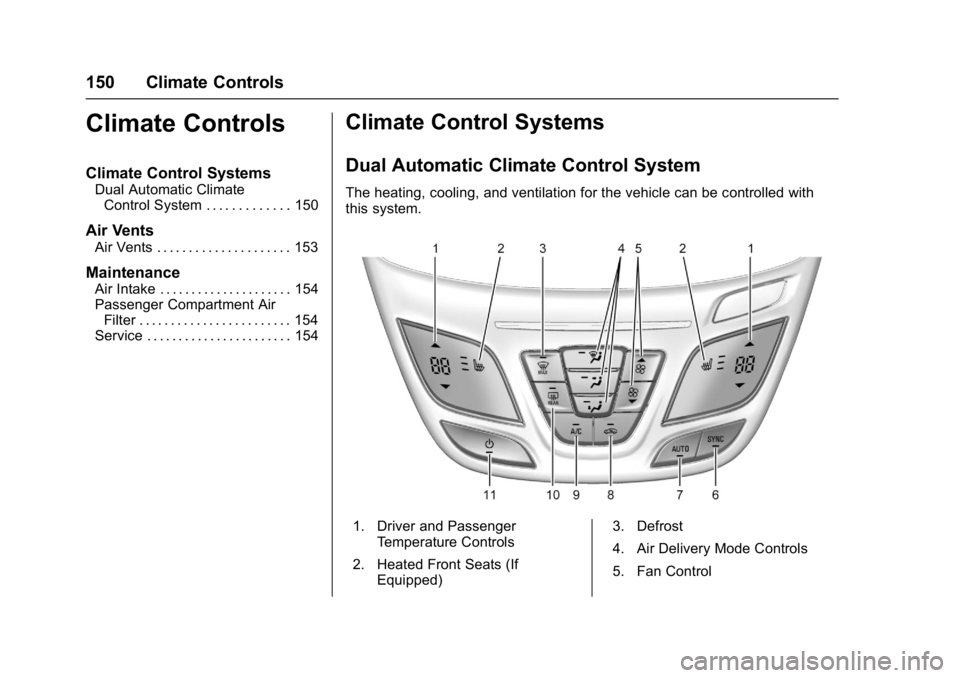
The heating, cooling, and ventilation for the vehicle can be controlled with
this system.
1. Driver and Passenger
Temperature Controls
2. Heated Front Seats (If Equipped) 3. Defrost
4. Air Delivery Mode Controls
5. Fan Control
Page 152 of 344
Buick Regal Owner Manual (GMNA-Localizing-U.S./Canada/Mexico-
9804381) - 2017 - crc - 8/30/16
Climate Controls 151
6. SYNC (SynchronizedTemperature)
7. AUTO (Automatic Operation)
8. Recirculation
9. A/C (Air Conditioning)
10. Rear Window Defogger
11. Power
Automatic Operation
The system automatically controls
the fan speed, air delivery, air
conditioning, and recirculation in
order to heat or cool the vehicle to
the desired temperature:
When AUTO is lit, all four functions
operate automatically. Each function
can also be manually set and the
setting is displayed. Functions not
manually set will continue to be
automatically controlled, even if the
AUTO indicator is not lit.
For automatic operation:
1. Press AUTO.
2. Set the temperature. Allow the system time to stabilize. Adjust
the temperature as needed for
best comfort. To improve fuel efficiency and to
cool the vehicle faster, recirculation
may be automatically selected in
warm weather. The recirculation
light will not come on when
controlled automatically. Press
@
to manually select recirculation;
press it again to select outside air.
Q/R:
The temperature can be
adjusted separately for the driver
and the passenger. Press to
increase or decrease the
temperature.
SYNC : Press to link all climate
zone settings to the driver settings.
The SYNC indicator light will turn
on. When the passenger settings
are adjusted, the SYNC indicator
light is off.
Manual Operation
O: Press to turn the fan off or on.
Q 9 R:Press to increase or
decrease the fan speed. The fan
speed setting appears on the main
display. Pressing either button
cancels automatic fan control and the fan is controlled manually. Press
AUTO to return to automatic
operation.
Air Delivery Mode Controls :
Press
X,Y, or[to change the
direction of the airflow. Any
combination of the three buttons
can be selected. The indicator light
in the button will turn on. The
current mode appears in the display
screen. Pressing any of the three
buttons cancels automatic air
delivery control and the direction of
the airflow is controlled manually.
Press AUTO to return to automatic
operation.
To change the current mode, select
one or more of the following:
X: Air is directed to the windshield
and side window vents.
Y: Air is directed to the instrument
panel outlets.
[: Air is directed to the floor
outlets.
0MAX : Clears the windshield of
fog or frost more quickly. Air is
directed to the windshield.
Page 153 of 344
Buick Regal Owner Manual (GMNA-Localizing-U.S./Canada/Mexico-
9804381) - 2017 - crc - 8/30/16
152 Climate Controls
For best results, clear all snow and
ice from the windshield before
defrosting.
A/C :Press to turn the air
conditioning system on or off. If the
climate control system is turned off
or the outside temperature falls
below freezing, the air conditioner
will not run.
Pressing this button cancels
automatic air conditioning and turns
off the air conditioner. Press AUTO
to return to automatic operation and
the air conditioner runs
automatically as needed. When the
indicator light is on, the air
conditioner runs automatically to
cool the air inside the vehicle or to
dry the air needed to defog the
windshield faster.
@: Press to turn on recirculation.
An indicator light comes on. Air is
recirculated to quickly cool the
inside of the vehicle or prevent
outside air and odors from entering.
Auto Defog : The climate control
system may have a sensor to
automatically detect high humidity
inside the vehicle. When high humidity is detected, the climate
control system may adjust to
outside air supply and turn on the
air conditioner. The fan speed may
slightly increase to help prevent
fogging. If the climate control
system does not detect possible
window fogging, it returns to normal
operation.
To turn Auto Defog off or on, see
“Climate and Air Quality”
under
Vehicle Personalization 0134.
Rear Window Defogger
=:Press to turn the rear window
defogger on or off. An indicator light
on the button comes on to show that
the rear window defogger is on.
The defogger only works when the
ignition is in ON/RUN. The defogger
turns off if the ignition is in the ACC/
ACCESSORY or LOCK/OFF
position.
The rear window defogger can be
set to automatic operation. See
“Climate and Air Quality” under
Vehicle Personalization 0134.
When Auto Rear Defog is selected,
the rear window defogger turns on automatically when the interior
temperature is cold and the outside
temperature is about 4 °C (40 °F)
and below. The auto rear defogger
turns off automatically after about
10 minutes, or after five minutes if
the outside temperature is not
as cold.
If the vehicle is equipped with
heated outside rearview mirrors,
they turn on when the rear window
defogger button is on and help to
clear fog or frost from the surface of
the mirror. See
Heated Mirrors 042.
Caution
Do not try to clear frost or other
material from the inside of the
front windshield and rear window
with a razor blade or anything
else that is sharp. This may
damage the rear window
defogger grid and affect the
radio's ability to pick up stations
clearly. The repairs would not be
covered by the vehicle warranty.
Page 154 of 344
Buick Regal Owner Manual (GMNA-Localizing-U.S./Canada/Mexico-
9804381) - 2017 - crc - 8/30/16
Climate Controls 153
MorL:If equipped, pressMorLto heat the driver or passenger seat.
See Heated Front Seats 052.
Remote Start Climate Control
Operation (If Equipped) :
If equipped with the remote start
feature, the climate control system
may run when the vehicle is started
remotely. The system uses the
driver ’s previous settings to heat or
cool the inside of the vehicle. The
rear defog may come on during
remote start based on cold ambient
conditions. If the vehicle has heated
or ventilated seats, they may come
on during a remote start.
See Remote Vehicle Start 032 and
Heated Front Seats 052.
Sensor
The solar sensor, on top of the
instrument panel near the
windshield, monitors the solar heat.
The climate control system uses the
sensor information to adjust the
temperature, fan speed,
recirculation, and air delivery mode
for best comfort.
Do not cover the sensor; otherwise
the automatic climate control system
may not work properly.
Air Vents
Use the louvers located on the air
vents to change the direction of the
airflow.
To open a vent, move the
thumbwheel to | . To close the vent,
move the thumbwheel to
9.
Operation Tips
. Keep all outlets open whenever
possible for best system
performance.
. Keep the paths under all seats
clear of objects to help circulate
the air inside the vehicle more
effectively.
. Use of non-GM approved hood
deflectors can adversely affect
the performance of the system.
Page 155 of 344
Buick Regal Owner Manual (GMNA-Localizing-U.S./Canada/Mexico-
9804381) - 2017 - crc - 8/30/16
154 Climate Controls
Maintenance
Air Intake
Clear away any ice, snow, or leaves
from the air intake at the base of the
windshield that can block the flow of
air into the vehicle.
Passenger Compartment
Air Filter
The filter removes dust, pollen, and
other airborne irritants from outside
air that is pulled into the vehicle.
The filter should be replaced as part
of routine scheduled maintenance.
SeeMaintenance Schedule 0294
for replacement intervals. For more
information, see your dealer.
Service
All vehicles have a label underhood
that identifies the refrigerant used in
the vehicle. The refrigerant system
should only be serviced by trained
and certified technicians. The air
conditioning evaporator should
never be repaired or replaced by one from a salvage vehicle.
It should only be replaced by a new
evaporator to ensure proper and
safe operation.
During service, all refrigerants
should be reclaimed with proper
equipment. Venting refrigerants
directly to the atmosphere is harmful
to the environment and may also
create unsafe conditions based on
inhalation, combustion, frostbite,
or other health-based concerns.
Page 157 of 344
Buick Regal Owner Manual (GMNA-Localizing-U.S./Canada/Mexico-
9804381) - 2017 - crc - 8/30/16
156 Driving and Operating
Trailer Towing
General TowingInformation . . . . . . . . . . . . . . . . . . 209
Conversions and Add-Ons
Add-On ElectricalEquipment . . . . . . . . . . . . . . . . . . 209
Driving Information
Distracted Driving
Distraction comes in many forms
and can take your focus from the
task of driving. Exercise good
judgment and do not let other
activities divert your attention away
from the road. Many local
governments have enacted laws
regarding driver distraction. Become
familiar with the local laws in
your area.
To avoid distracted driving, always
keep your eyes on the road, hands
on the wheel, and mind on the drive.
. Do not use a phone in
demanding driving situations.
Use a hands-free method to
place or receive necessary
phone calls.
. Watch the road. Do not read,
take notes, or look up
information on phones or other
electronic devices.
. Designate a front seat
passenger to handle potential
distractions. .
Become familiar with vehicle
features before driving, such as
programming favorite radio
stations and adjusting climate
control and seat settings.
Program all trip information into
any navigation device prior to
driving.
. Wait until the vehicle is parked
to retrieve items that have fallen
to the floor.
. Stop or park the vehicle to tend
to children.
. Keep pets in an appropriate
carrier or restraint.
. Avoid stressful conversations
while driving, whether with a
passenger or on a cell phone.
{Warning
Taking your eyes off the road too
long or too often could cause a
crash resulting in injury or death.
Focus your attention on driving.