infotainment BUICK REGAL 2017 User Guide
[x] Cancel search | Manufacturer: BUICK, Model Year: 2017, Model line: REGAL, Model: BUICK REGAL 2017Pages: 344, PDF Size: 4.91 MB
Page 140 of 344
Buick Regal Owner Manual (GMNA-Localizing-U.S./Canada/Mexico-
9804381) - 2017 - crc - 8/30/16
Instruments and Controls 139
.Calibrate Touchscreen
. Turn Display Off
Mode
Select to change the display screen
for day or night driving.
Select Auto, Day, or Night.
Calibrate Touchscreen
Select to calibrate the touchscreen,
then follow the prompts.
Turn Display Off
Select to turn the display off. Press
anywhere on the display area or any
faceplate button to turn the
display on.Rear Camera
Select and the following may
display:
. Guidance Lines
. Rear Park Assist Symbols
Guidance Lines
Select to turn Off or On. See
Assistance Systems for Parking or
Backing 0196.
Rear Park Assist Symbols
Select to turn Off or On. See
Assistance Systems for Parking or
Backing 0196.
Return to Factory Settings
Select and the following may
display:
.
Restore Vehicle Settings
. Clear All Private Data
. Restore Radio Settings Restore Vehicle Settings
This allows selection of restoring
vehicle settings.
Select Restore or Cancel.
Clear All Private Data
This allows selection to clear all
private information from the vehicle.
Select Delete or Cancel.
Restore Radio Settings
This allows selection to restore
radio settings.
Select Restore or Cancel.
Software Information
Select to view the infotainment
system current software information.
Page 150 of 344
Buick Regal Owner Manual (GMNA-Localizing-U.S./Canada/Mexico-
9804381) - 2017 - crc - 8/30/16
Infotainment System 149
Infotainment
System
Introduction
Infotainment . . . . . . . . . . . . . . . . . . 149
Introduction
Infotainment
See the infotainment manual for
information on the radio, audio
players, phone, navigation system,
and voice or speech recognition.
It also includes information on
settings.
Page 158 of 344
Buick Regal Owner Manual (GMNA-Localizing-U.S./Canada/Mexico-
9804381) - 2017 - crc - 8/30/16
Driving and Operating 157
Refer to the infotainment manual for
more information on using that
system and the navigation system,
if equipped, including pairing and
using a cell phone.
Defensive Driving
Defensive driving means“always
expect the unexpected.” The first
step in driving defensively is to wear
the safety belt. See Safety Belts
0 55.
. Assume that other road users
(pedestrians, bicyclists, and
other drivers) are going to be
careless and make mistakes.
Anticipate what they might do
and be ready.
. Allow enough following distance
between you and the driver in
front of you.
. Focus on the task of driving.
Drunk Driving
Death and injury associated with
drinking and driving is a global
tragedy.
{Warning
Drinking and then driving is very
dangerous. Your reflexes,
perceptions, attentiveness, and
judgment can be affected by even
a small amount of alcohol. You
can have a serious —or even
fatal —collision if you drive after
drinking.
Do not drink and drive or ride with
a driver who has been drinking.
Ride home in a cab; or if you are
with a group, designate a driver
who will not drink.
Control of a Vehicle
Braking, steering, and accelerating
are important factors in helping to
control a vehicle while driving.
Braking
Braking action involves perception
time and reaction time. Deciding to
push the brake pedal is perception
time. Actually doing it is
reaction time. Average driver reaction time is
about three-quarters of a second. In
that time, a vehicle moving at
100 km/h (60 mph) travels 20 m
(66 ft), which could be a lot of
distance in an emergency.
Helpful braking tips to keep in mind
include:
.
Keep enough distance between
you and the vehicle in front
of you.
. Avoid needless heavy braking.
. Keep pace with traffic.
If the engine ever stops while the
vehicle is being driven, brake
normally but do not pump the
brakes. Doing so could make the
pedal harder to push down. If the
engine stops, there will be some
power brake assist but it will be
used when the brake is applied.
Once the power assist is used up, it
can take longer to stop and the
brake pedal will be harder to push.
Page 197 of 344
Buick Regal Owner Manual (GMNA-Localizing-U.S./Canada/Mexico-
9804381) - 2017 - crc - 8/30/16
196 Driving and Operating
Warning (Continued)
Complete attention is always
required while driving, and you
should be ready to take action
and apply the brakes and/or steer
the vehicle to avoid crashes.
Audible Alert
Some driver assistance features
alert the driver of obstacles by
beeping. To change the volume of
the warning chime, see “Comfort
and Convenience” underVehicle
Personalization 0134.
Assistance Systems for
Parking or Backing
If equipped, the Rear Vision Camera
(RVC), Rear Parking Assist (RPA),
Front Parking Assist (FPA), and
Rear Cross Traffic Alert (RCTA) may
help the driver park or avoid objects.
Always check around the vehicle
when parking or backing. Rear Vision Camera (RVC)
When the vehicle is shifted into
R (Reverse), the RVC displays an
image of the area behind the vehicle
in the infotainment display.
1. View Displayed by the
Camera
1. View Displayed by theCamera
2. Corners of the Rear Bumper
Displayed images may be farther or
closer than they appear. The area
displayed is limited and objects that
are close to either corner of the
bumper or under the bumper do not
display.
A warning triangle may display to
show that RPA has detected an
object. This triangle changes from
amber to red and increases in size
the closer the object.
Page 199 of 344
Buick Regal Owner Manual (GMNA-Localizing-U.S./Canada/Mexico-
9804381) - 2017 - crc - 8/30/16
198 Driving and Operating
Rear Cross Traffic Alert (RCTA)
On vehicles with the Rear Cross
Traffic Alert (RCTA), a red warning
triangle with an arrow may also
display to warn of traffic coming
from either direction. This system
detects objects coming from up to
20 m (65 ft) from the left or right side
of the vehicle. When an object is
detected, three beeps sound from
the left or right side, depending on
the direction of the detected vehicle.
Turning the Features On or Off
TheXbutton on the center stack
is used to turn on or off Parking
Assist. The indicator light next to the
button comes on when the features
are on and turns off when the
features have been disabled. The RVC, the RCTA system,
parking assist symbols, and
guidance lines can be turned on or
off through the infotainment system:
1. On the infotainment system, press the Settings screen
button, or turn the MENU knob
to highlight Settings and
press MENU.
2. Select Rear Camera.
3. Press Rear Camera Display (if equipped), Rear Cross Traffic
Alert, Park Assist Symbols,
or Guidance Lines and then
select OFF or ON.
Assistance Systems for
Driving
If equipped, when driving the
vehicle in a forward gear, Forward
Collision Alert (FCA), Lane
Departure Warning (LDW), Side
Blind Zone Alert (SBZA), Lane
Change Alert (LCA), and/or the
Forward Automatic Braking (FAB)
System can help to avoid a crash or
reduce crash damage.
Forward Collision Alert
(FCA) System
If equipped, the FCA system may
help to avoid or reduce the harm
caused by front-end crashes. When
approaching a vehicle ahead too
quickly, FCA provides a red alert
and rapidly beeps. FCA also lights
an amber visual alert if following
another vehicle much too closely.
FCA detects vehicles within a
distance of approximately 60 m
(197 ft) and operates at speeds
above 40 km/h (25 mph). If the
vehicle has Adaptive Cruise Control
(ACC), it can detect vehicles to
distances of approximately 110 m
(360 ft) and operates at all speeds.
See Adaptive Cruise Control 0188.
{Warning
FCA is a warning system and
does not apply the brakes. When
approaching a slower-moving or
stopped vehicle ahead too rapidly,
or when following a vehicle too
(Continued)
Page 241 of 344
Buick Regal Owner Manual (GMNA-Localizing-U.S./Canada/Mexico-
9804381) - 2017 - crc - 8/30/16
240 Vehicle Care
FuseUsage
8 –
9 Fuel injection/ Ignition system
10 Engine control module
11 O2 sensor
12 Starter
13 Fuel system control module
14 Trunk release
15 MGU coolant pump (eAssist only)
16 Heated steering wheel
17 –
18 BPIM (eAssist only)
19 –
20 –
21 Rear power windows
22 ABS valve
23 Obstacle detection Fuse
Usage
24 Front power windows
25 Power outlets
26 ABS pump
27 Electric parking brake
28 Rear window defogger
29 Driver seat lumbar
30 Passenger seat lumbar
31 A/C clutch
32 Body control module 6
33 Heated front seats
34 Sunroof
35 Infotainment system
36 Adaptive cruise
37 Right high-beam headlamp
38 Left high-beam headlamp Fuse
Usage
39 AWD
40 –
41 Vacuum pump
42 Radiator fan
43 Passive entry/ Passive start
44 Transmission auxiliary pump
(eAssist only)
45 Radiator fan
46 Terminal 87/Main relay
47 O2 sensor
48 Fog lamps
49 Right low-beam HID headlamp
50 Left low-beam HID headlamp
51 Horn
52 Malfunction indicator lamp
53 Interior rearview mirror
Page 243 of 344
Buick Regal Owner Manual (GMNA-Localizing-U.S./Canada/Mexico-
9804381) - 2017 - crc - 8/30/16
242 Vehicle Care
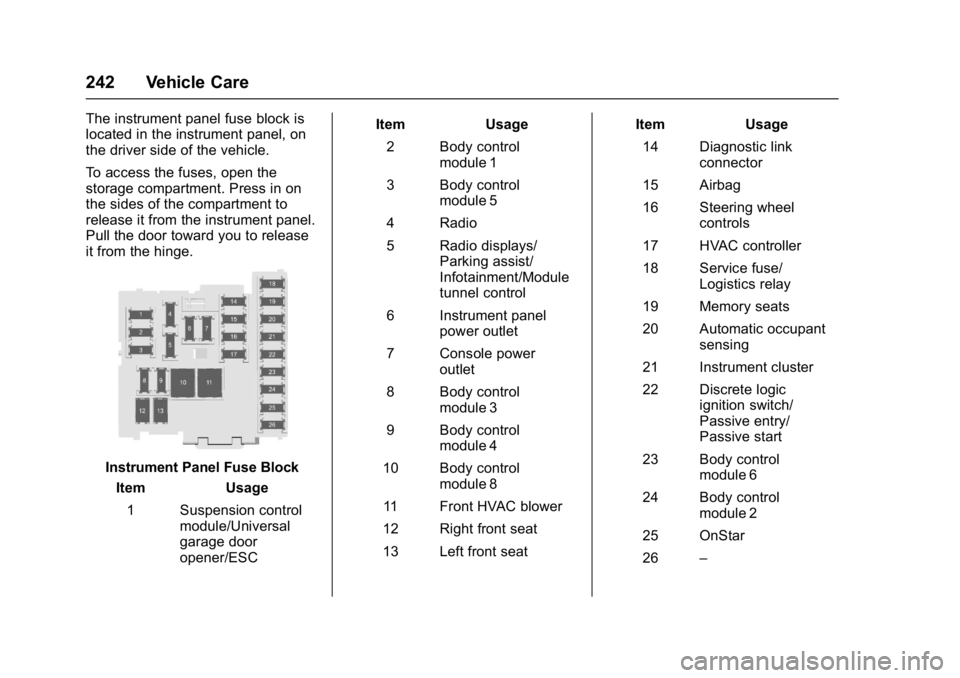
The instrument panel fuse block is
located in the instrument panel, on
the driver side of the vehicle.
To access the fuses, open the
storage compartment. Press in on
the sides of the compartment to
release it from the instrument panel.
Pull the door toward you to release
it from the hinge.
Instrument Panel Fuse BlockItem Usage
1 Suspension control module/Universal
garage door
opener/ESC Item Usage
2 Body control module 1
3 Body control module 5
4 Radio
5 Radio displays/ Parking assist/
Infotainment/Module
tunnel control
6 Instrument panel power outlet
7 Console power outlet
8 Body control module 3
9 Body control module 4
10 Body control module 8
11 Front HVAC blower
12 Right front seat
13 Left front seat Item Usage
14 Diagnostic link connector
15 Airbag
16 Steering wheel controls
17 HVAC controller
18 Service fuse/ Logistics relay
19 Memory seats
20 Automatic occupant sensing
21 Instrument cluster
22 Discrete logic ignition switch/
Passive entry/
Passive start
23 Body control module 6
24 Body control module 2
25 OnStar
26 –
Page 310 of 344
Buick Regal Owner Manual (GMNA-Localizing-U.S./Canada/Mexico-
9804381) - 2017 - crc - 8/30/16
Customer Information 309
Customer
Information
Customer Information
Customer SatisfactionProcedure . . . . . . . . . . . . . . . . . . . 309
Customer Assistance Offices . . . . . . . . . . . . . . . . . . . . . . 311
Customer Assistance for Text Telephone (TTY) Users . . . . . 312
Online Owner Center . . . . . . . . . 312
GM Mobility Reimbursement Program . . . . . . . . . . . . . . . . . . . . 313
Roadside Assistance Program . . . . . . . . . . . . . . . . . . . . 313
Scheduling Service Appointments . . . . . . . . . . . . . . . 315
Courtesy Transportation Program . . . . . . . . . . . . . . . . . . . . 315
Collision Damage Repair . . . . . 316
Service Publications Ordering Information . . . . . . . . . . . . . . . . . . 318
Radio Frequency Statement . . . . . . . . . . . . . . . . . . . 319
Reporting Safety Defects
Reporting Safety Defects tothe United States
Government . . . . . . . . . . . . . . . . . 319 Reporting Safety Defects to
the Canadian
Government . . . . . . . . . . . . . . . . . 320
Reporting Safety Defects to General Motors . . . . . . . . . . . . . 320
Vehicle Data Recording and
Privacy
Vehicle Data Recording and
Privacy . . . . . . . . . . . . . . . . . . . . . . 320
Event Data Recorders . . . . . . . . 321
OnStar
®. . . . . . . . . . . . . . . . . . . . . . 321
Infotainment System . . . . . . . . . . 322
Customer Information
Customer Satisfaction
Procedure
Your satisfaction and goodwill are
important to your dealer and to
Buick. Normally, any concerns with
the sales transaction or the
operation of the vehicle will be
resolved by your dealer's sales or
service departments. Sometimes,
however, despite the best intentions
of all concerned, misunderstandings
can occur. If your concern has not
been resolved to your satisfaction,
the following steps should be taken:
STEP ONE : Discuss your concern
with a member of dealership
management. Normally, concerns
can be quickly resolved at that level.
If the matter has already been
reviewed with the sales, service,
or parts manager, contact the owner
of your dealership or the general
manager.
STEP TWO : If after contacting a
member of dealership management,
it appears your concern cannot be
Page 323 of 344
Buick Regal Owner Manual (GMNA-Localizing-U.S./Canada/Mexico-
9804381) - 2017 - crc - 8/30/16
322 Customer Information
OnStar Terms and Conditions and
Privacy Statement on the OnStar
website.
SeeOnStar Additional Information
0 328.
Infotainment System
If the vehicle is equipped with a
navigation system as part of the
infotainment system, use of the
system may result in the storage of
destinations, addresses, telephone
numbers, and other trip information.
See the infotainment manual for
information on stored data and for
deletion instructions.
Page 336 of 344

Buick Regal Owner Manual (GMNA-Localizing-U.S./Canada/Mexico-
9804381) - 2017 - crc - 8/30/16
Index 335
Cigarette Lighter . . . . . . . . . . . . . . . . 100
Circuit Breakers . . . . . . . . . . . . . . . . 238
CleaningExterior Care . . . . . . . . . . . . . . . . . 284
Interior Care . . . . . . . . . . . . . . . . . . 289
Climate Control Systems Dual Automatic . . . . . . . . . . . . . . . 150
Clock . . . . . . . . . . . . . . . . . . . . . . . . . . . . 98
Cluster, Instrument . . . . . . . . 101, 104
Collision Damage Repair . . . . . . . 316
Compact Spare Tire . . . . . . . . . . . . 277
Compartments Storage . . . . . . . . . . . . . . . . . . . . . . . . . 92
Compass . . . . . . . . . . . . . . . . . . . . . . . . 98 Messages . . . . . . . . . . . . . . . . . . . . 126
Compressor Kit, Tire Sealant . . . 265
Connections
OnStar
®. . . . . . . . . . . . . . . . . . . . . . 325
Control Traction and ElectronicStability . . . . . . . . . . . . . . . . . . . . . 183
Control of a Vehicle . . . . . . . . . . . . . 157
Convenience Net . . . . . . . . . . . . . . . . 94
Convex Mirrors . . . . . . . . . . . . . . . . . . 41
Coolant Engine . . . . . . . . . . . . . . . . . . . . . . . . 224
Engine Temperature Gauge . . 108 Coolant (cont'd)
Engine Temperature
Warning Light . . . . . . . . . . . . . . . .116
Cooling . . . . . . . . . . . . . . . . . . . . . . . . . 150
Cooling System . . . . . . . . . . . . . . . . . 223
Engine Messages . . . . . . . . . . . . 127
Courtesy Transportation Program . . . . . . . . . . . . . . . . . . . . . . . 315
Cruise Control . . . . . . . . . . . . . . . . . . 186
Light . . . . . . . . . . . . . . . . . . . . . . . . . . .119
Messages . . . . . . . . . . . . . . . . . . . . 126
Cruise Control, Adaptive . . . . . . . . 188
Cupholders . . . . . . . . . . . . . . . . . . . . . . 92
Customer Assistance . . . . . . . . . . . 312 Offices . . . . . . . . . . . . . . . . . . . . . . . . .311
Text Telephone (TTY)Users . . . . . . . . . . . . . . . . . . . . . . . 312
Customer Information
Service PublicationsOrdering Information . . . . . . . . 318
Customer Satisfaction Procedure . . . . . . . . . . . . . . . . . . . . . 309
D
Damage Repair, Collision . . . . . . . 316
Danger, Warning, and Caution . . . . 2
Data CollectionInfotainment System . . . . . . . . . . 322 Data Collection (cont'd)
OnStar . . . . . . . . . . . . . . . . . . . . . . . 321
Data Recorders, Event . . . . . . . . . 321
Daytime Running Lamps (DRL) . . . . . . . . . . . . . . . . . . 144
Defensive Driving . . . . . . . . . . . . . . . 157
Delayed Locking . . . . . . . . . . . . . . . . . 35
Diagnostics OnStar
®. . . . . . . . . . . . . . . . . . . . . . 327
Distracted Driving . . . . . . . . . . . . . . . 156
Dome Lamps . . . . . . . . . . . . . . . . . . . 147
Door Ajar Light . . . . . . . . . . . . . . . . . . . . . .119
Ajar Messages . . . . . . . . . . . . . . . 127
Delayed Locking . . . . . . . . . . . . . . . . 35
Locks . . . . . . . . . . . . . . . . . . . . . . . . . . . 34
Power Locks . . . . . . . . . . . . . . . . . . . . 34
Drive Belt Routing, Engine . . . . . . 308
Drive Systems
All-Wheel Drive . . . . . . . . . . 179, 232
Driver Assistance Systems . . . . . 195
Driver Information Center (DIC) . . . . . . . . . . . . . 119, 122
Driving Assistance Systems . . . . . . . . . . 198
Defensive . . . . . . . . . . . . . . . . . . . . . 157
Drunk . . . . . . . . . . . . . . . . . . . . . . . . . 157
For Better Fuel Economy . . . . . . . 23