collision BUICK REGAL 2017 Owner's Guide
[x] Cancel search | Manufacturer: BUICK, Model Year: 2017, Model line: REGAL, Model: BUICK REGAL 2017Pages: 344, PDF Size: 4.91 MB
Page 199 of 344
Buick Regal Owner Manual (GMNA-Localizing-U.S./Canada/Mexico-
9804381) - 2017 - crc - 8/30/16
198 Driving and Operating
Rear Cross Traffic Alert (RCTA)
On vehicles with the Rear Cross
Traffic Alert (RCTA), a red warning
triangle with an arrow may also
display to warn of traffic coming
from either direction. This system
detects objects coming from up to
20 m (65 ft) from the left or right side
of the vehicle. When an object is
detected, three beeps sound from
the left or right side, depending on
the direction of the detected vehicle.
Turning the Features On or Off
TheXbutton on the center stack
is used to turn on or off Parking
Assist. The indicator light next to the
button comes on when the features
are on and turns off when the
features have been disabled. The RVC, the RCTA system,
parking assist symbols, and
guidance lines can be turned on or
off through the infotainment system:
1. On the infotainment system, press the Settings screen
button, or turn the MENU knob
to highlight Settings and
press MENU.
2. Select Rear Camera.
3. Press Rear Camera Display (if equipped), Rear Cross Traffic
Alert, Park Assist Symbols,
or Guidance Lines and then
select OFF or ON.
Assistance Systems for
Driving
If equipped, when driving the
vehicle in a forward gear, Forward
Collision Alert (FCA), Lane
Departure Warning (LDW), Side
Blind Zone Alert (SBZA), Lane
Change Alert (LCA), and/or the
Forward Automatic Braking (FAB)
System can help to avoid a crash or
reduce crash damage.
Forward Collision Alert
(FCA) System
If equipped, the FCA system may
help to avoid or reduce the harm
caused by front-end crashes. When
approaching a vehicle ahead too
quickly, FCA provides a red alert
and rapidly beeps. FCA also lights
an amber visual alert if following
another vehicle much too closely.
FCA detects vehicles within a
distance of approximately 60 m
(197 ft) and operates at speeds
above 40 km/h (25 mph). If the
vehicle has Adaptive Cruise Control
(ACC), it can detect vehicles to
distances of approximately 110 m
(360 ft) and operates at all speeds.
See Adaptive Cruise Control 0188.
{Warning
FCA is a warning system and
does not apply the brakes. When
approaching a slower-moving or
stopped vehicle ahead too rapidly,
or when following a vehicle too
(Continued)
Page 200 of 344
Buick Regal Owner Manual (GMNA-Localizing-U.S./Canada/Mexico-
9804381) - 2017 - crc - 8/30/16
Driving and Operating 199
Warning (Continued)
closely, FCA may not provide a
warning with enough time to help
avoid a crash. It also may not
provide any warning at all. FCA
does not warn of pedestrians,
animals, signs, guardrails,
bridges, construction barrels,
or other objects. Be ready to take
action and apply the brakes. See
Defensive Driving0157.
FCA can be disabled with the FCA
steering wheel control, or if your
vehicle is equipped with Adaptive
Cruise Control (ACC), through
vehicle personalization. See
“Collision/Detection Systems” under
Vehicle Personalization 0134.
Detecting the Vehicle Ahead
FCA warnings will not occur unless
the FCA system detects a vehicle
ahead. When a vehicle is detected,
the vehicle ahead indicator will
display green. Vehicles may not be
detected on curves, highway exit
ramps, or hills, due to poor visibility;
or if a vehicle ahead is partially
blocked by pedestrians or other
objects. FCA will not detect another
vehicle ahead until it is completely
in the driving lane.
{Warning
FCA does not provide a warning
to help avoid a crash, unless it
detects a vehicle. FCA may not
detect a vehicle ahead if the FCA
sensor is blocked by dirt, snow,
or ice, or if the windshield is
damaged. It may also not detect a
vehicle on winding or hilly roads,
or in conditions that can limit
visibility such as fog, rain,
or snow, or if the headlamps or
windshield are not cleaned or in
(Continued)
Warning (Continued)
proper condition. Keep the
windshield, headlamps, and FCA
sensors clean and in good repair.
Collision Alert
When your vehicle approaches
another detected vehicle too rapidly,
the red FCA display will come on.
Also, eight rapid high-pitched beeps
will sound from the front. When this
Collision Alert occurs, the brake
system may prepare for driver
braking to occur more rapidly which
can cause a brief, mild deceleration.
Continue to apply the brake pedal
as needed. Cruise control may be
disengaged when the Collision Alert
occurs.
Page 201 of 344
Buick Regal Owner Manual (GMNA-Localizing-U.S./Canada/Mexico-
9804381) - 2017 - crc - 8/30/16
200 Driving and Operating
Tailgating Alert
The vehicle ahead indicator will
display amber when you are
following a detected vehicle ahead
much too closely.
Selecting the Alert Timing
The Collision Alert control is on the
steering wheel. Press
3/[to set
the FCA timing to Far, Medium,
or Near, or on some vehicles, Off.
The first button press shows the
current setting on the DIC.
Additional button presses will
change this setting. The chosen
setting will remain until it is changed
and will affect the timing of both the
Collision Alert and the Tailgating
Alert features. The timing of both
alerts will vary based on vehicle
speed. The faster the vehicle speed,
the farther away the alert will occur.
Consider traffic and weather conditions when selecting the alert
timing. The range of selectable alert
timings may not be appropriate for
all drivers and driving conditions.
If your vehicle is equipped with
Adaptive Cruise Control (ACC),
changing the FCA timing setting
automatically changes the following
gap setting (Far, Medium, or Near).
Unnecessary Alerts
FCA may provide unnecessary
alerts to turning vehicles, vehicles in
other lanes, objects that are not
vehicles, or shadows. These alerts
are normal operation and the
vehicle does not need service.
Cleaning the System
If the FCA system does not seem to
operate properly, cleaning the
outside of the windshield in front of
the camera sensor behind the
rearview mirror, and cleaning the
front of the vehicle where radar
sensors are located, may correct
the issue.
Forward Automatic
Braking (FAB)
If the vehicle has Adaptive Cruise
Control (ACC), it also has FAB,
which includes Intelligent Brake
Assist (IBA). When the system
detects a vehicle ahead in your path
that is traveling in the same
direction that you may be about to
crash into, it can provide a boost to
braking or automatically brake the
vehicle. This can help avoid or
lessen the severity of crashes when
driving in a forward gear. Depending
on the situation, the vehicle may
automatically brake moderately or
hard. This forward automatic
braking can only occur if a vehicle is
detected. This is shown by the FCA
vehicle ahead indicator being lit.
See
Forward Collision Alert (FCA)
System 0198.
The system works when driving in a
forward gear between 10 km/h
(6 mph) and 180 km/h (112 mph) for
moving vehicles, or between
10 km/h (6 mph) and 55 km/h
Page 203 of 344
Buick Regal Owner Manual (GMNA-Localizing-U.S./Canada/Mexico-
9804381) - 2017 - crc - 8/30/16
202 Driving and Operating
Warning (Continued)
flow of traffic. If this occurs, take
your foot off the brake pedal and
then apply the brakes as needed.
FAB and IBA can be disabled
through vehicle personalization. See
“Collision/Detection Systems” under
Vehicle Personalization 0134.
Side Blind Zone
Alert (SBZA)
If equipped, the SBZA system is a
lane-changing aid that assists
drivers with avoiding crashes that
occur with moving vehicles in the
side blind zone (or spot) areas.
When the vehicle is in a forward
gear, the left or right side mirror
display will light up if a moving
vehicle is detected in that blind
zone. If the turn signal is activated
and a vehicle is also detected on
the same side, the display will flash
as an extra warning not to change
lanes. Since this system is part of the Lane Change Alert (LCA)
system, read the entire LCA section
before using this feature.
Lane Change Alert (LCA)
If equipped, the Lane Change Alert
(LCA) system is a lane-changing aid
that assists drivers with avoiding
lane change crashes that occur with
moving vehicles in the side blind
zone (or spot) areas or with vehicles
rapidly approaching these areas
from behind. The LCA warning
display will light up in the
corresponding outside side mirror
and will flash if the turn signal is on.
{Warning
LCA does not alert the driver to
vehicles outside of the system
detection zones, pedestrians,
bicyclists, or animals. It may not
provide alerts when changing
lanes under all driving conditions.
Failure to use proper care when
changing lanes may result in
injury, death, or vehicle damage.
(Continued)
Warning (Continued)
Before making a lane change,
always check mirrors, glance over
your shoulder, and use the turn
signals.
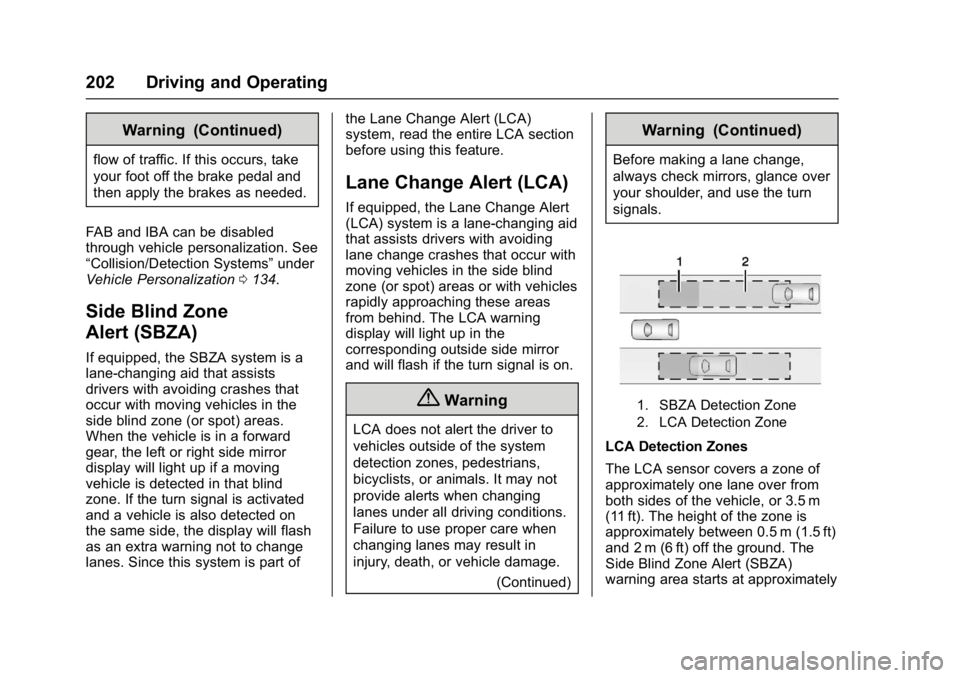
1. SBZA Detection Zone
2. LCA Detection Zone
LCA Detection Zones
The LCA sensor covers a zone of
approximately one lane over from
both sides of the vehicle, or 3.5 m
(11 ft). The height of the zone is
approximately between 0.5 m (1.5 ft)
and 2 m (6 ft) off the ground. The
Side Blind Zone Alert (SBZA)
warning area starts at approximately
Page 204 of 344
Buick Regal Owner Manual (GMNA-Localizing-U.S./Canada/Mexico-
9804381) - 2017 - crc - 8/30/16
Driving and Operating 203
the middle of the vehicle and goes
back 5 m (16 ft). Drivers are also
warned of vehicles rapidly
approaching from up to 70 m (230 ft)
behind the vehicle.
How the System Works
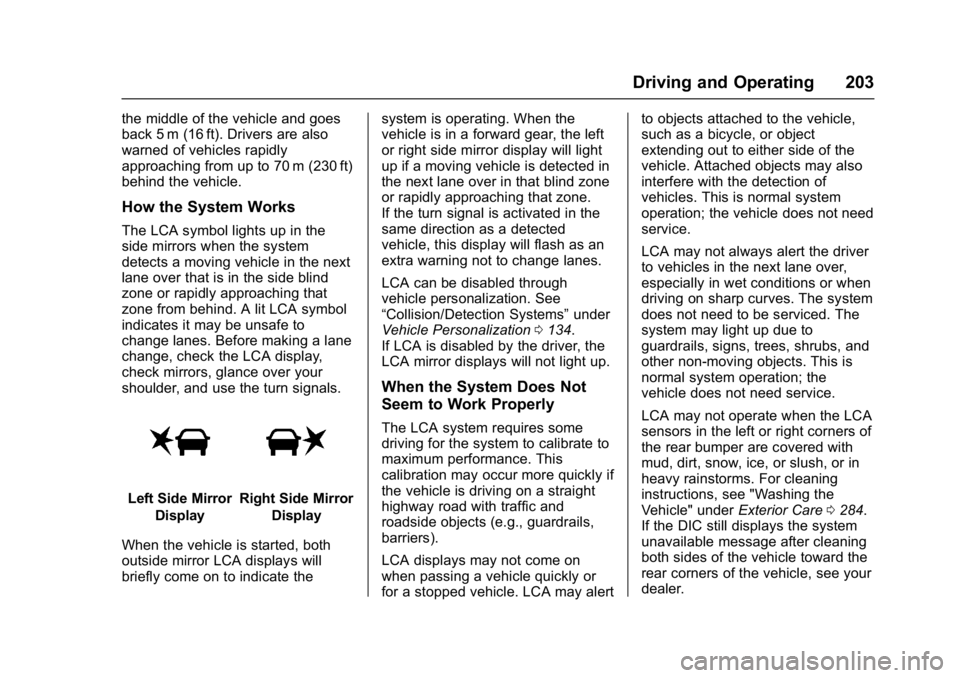
The LCA symbol lights up in the
side mirrors when the system
detects a moving vehicle in the next
lane over that is in the side blind
zone or rapidly approaching that
zone from behind. A lit LCA symbol
indicates it may be unsafe to
change lanes. Before making a lane
change, check the LCA display,
check mirrors, glance over your
shoulder, and use the turn signals.
Left Side MirrorDisplayRight Side Mirror Display
When the vehicle is started, both
outside mirror LCA displays will
briefly come on to indicate the system is operating. When the
vehicle is in a forward gear, the left
or right side mirror display will light
up if a moving vehicle is detected in
the next lane over in that blind zone
or rapidly approaching that zone.
If the turn signal is activated in the
same direction as a detected
vehicle, this display will flash as an
extra warning not to change lanes.
LCA can be disabled through
vehicle personalization. See
“Collision/Detection Systems”
under
Vehicle Personalization 0134.
If LCA is disabled by the driver, the
LCA mirror displays will not light up.
When the System Does Not
Seem to Work Properly
The LCA system requires some
driving for the system to calibrate to
maximum performance. This
calibration may occur more quickly if
the vehicle is driving on a straight
highway road with traffic and
roadside objects (e.g., guardrails,
barriers).
LCA displays may not come on
when passing a vehicle quickly or
for a stopped vehicle. LCA may alert to objects attached to the vehicle,
such as a bicycle, or object
extending out to either side of the
vehicle. Attached objects may also
interfere with the detection of
vehicles. This is normal system
operation; the vehicle does not need
service.
LCA may not always alert the driver
to vehicles in the next lane over,
especially in wet conditions or when
driving on sharp curves. The system
does not need to be serviced. The
system may light up due to
guardrails, signs, trees, shrubs, and
other non-moving objects. This is
normal system operation; the
vehicle does not need service.
LCA may not operate when the LCA
sensors in the left or right corners of
the rear bumper are covered with
mud, dirt, snow, ice, or slush, or in
heavy rainstorms. For cleaning
instructions, see "Washing the
Vehicle" under
Exterior Care0284.
If the DIC still displays the system
unavailable message after cleaning
both sides of the vehicle toward the
rear corners of the vehicle, see your
dealer.
Page 266 of 344
Buick Regal Owner Manual (GMNA-Localizing-U.S./Canada/Mexico-
9804381) - 2017 - crc - 8/30/16
Vehicle Care 265
Then seeTire Changing 0272. To
use the tire sealant and compressor
kit, see Tire Sealant and
Compressor Kit 0265.
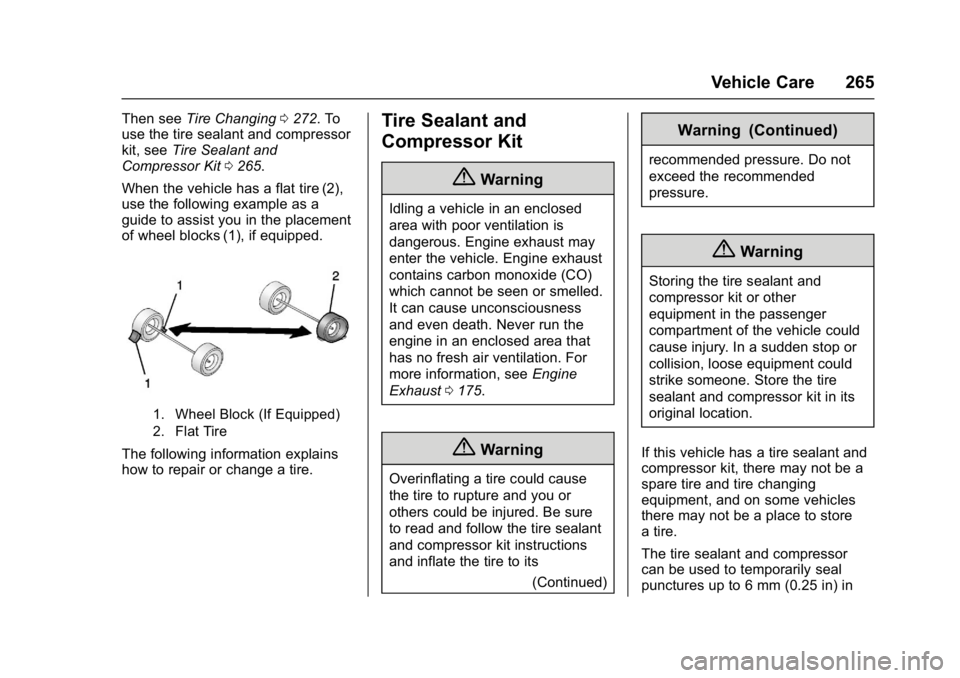
When the vehicle has a flat tire (2),
use the following example as a
guide to assist you in the placement
of wheel blocks (1), if equipped.
1. Wheel Block (If Equipped)
2. Flat Tire
The following information explains
how to repair or change a tire.
Tire Sealant and
Compressor Kit
{Warning
Idling a vehicle in an enclosed
area with poor ventilation is
dangerous. Engine exhaust may
enter the vehicle. Engine exhaust
contains carbon monoxide (CO)
which cannot be seen or smelled.
It can cause unconsciousness
and even death. Never run the
engine in an enclosed area that
has no fresh air ventilation. For
more information, see Engine
Exhaust 0175.
{Warning
Overinflating a tire could cause
the tire to rupture and you or
others could be injured. Be sure
to read and follow the tire sealant
and compressor kit instructions
and inflate the tire to its
(Continued)
Warning (Continued)
recommended pressure. Do not
exceed the recommended
pressure.
{Warning
Storing the tire sealant and
compressor kit or other
equipment in the passenger
compartment of the vehicle could
cause injury. In a sudden stop or
collision, loose equipment could
strike someone. Store the tire
sealant and compressor kit in its
original location.
If this vehicle has a tire sealant and
compressor kit, there may not be a
spare tire and tire changing
equipment, and on some vehicles
there may not be a place to store
a tire.
The tire sealant and compressor
can be used to temporarily seal
punctures up to 6 mm (0.25 in) in
Page 278 of 344
Buick Regal Owner Manual (GMNA-Localizing-U.S./Canada/Mexico-
9804381) - 2017 - crc - 8/30/16
Vehicle Care 277
Caution
Wheel covers will not fit on the
vehicle's compact spare. If you try
to put a wheel cover on the
compact spare, the cover or the
spare could be damaged.
Storing a Flat or Spare Tire
and Tools
{Warning
Storing a jack, a tire, or other
equipment in the passenger
compartment of the vehicle could
cause injury. In a sudden stop or
collision, loose equipment could
strike someone. Store all these in
the proper place.
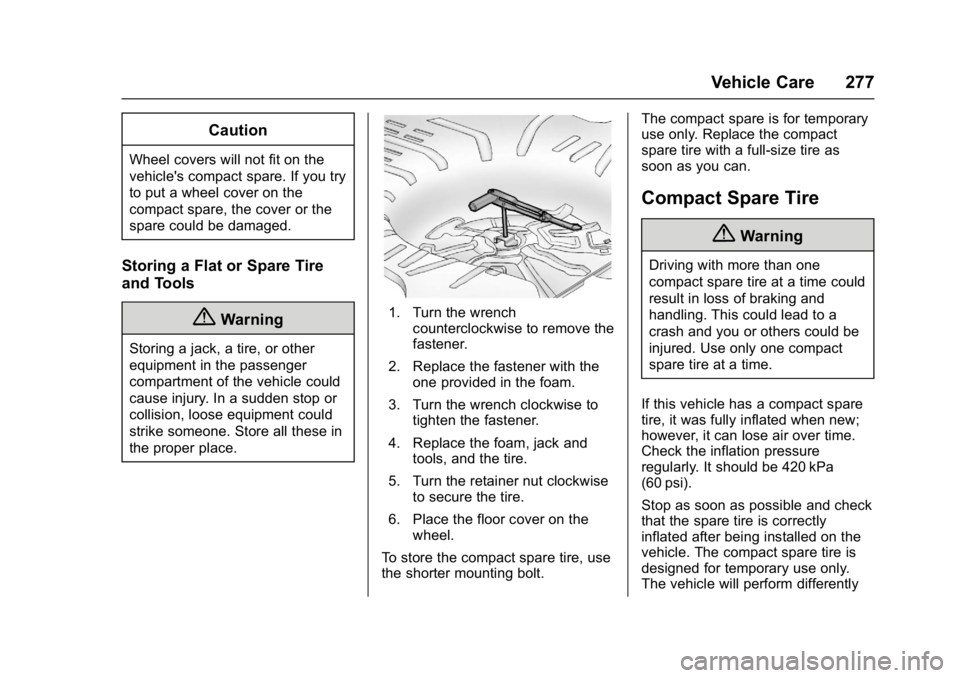
1. Turn the wrenchcounterclockwise to remove the
fastener.
2. Replace the fastener with the one provided in the foam.
3. Turn the wrench clockwise to tighten the fastener.
4. Replace the foam, jack and tools, and the tire.
5. Turn the retainer nut clockwise to secure the tire.
6. Place the floor cover on the wheel.
To store the compact spare tire, use
the shorter mounting bolt. The compact spare is for temporary
use only. Replace the compact
spare tire with a full-size tire as
soon as you can.
Compact Spare Tire
{Warning
Driving with more than one
compact spare tire at a time could
result in loss of braking and
handling. This could lead to a
crash and you or others could be
injured. Use only one compact
spare tire at a time.
If this vehicle has a compact spare
tire, it was fully inflated when new;
however, it can lose air over time.
Check the inflation pressure
regularly. It should be 420 kPa
(60 psi).
Stop as soon as possible and check
that the spare tire is correctly
inflated after being installed on the
vehicle. The compact spare tire is
designed for temporary use only.
The vehicle will perform differently
Page 310 of 344
Buick Regal Owner Manual (GMNA-Localizing-U.S./Canada/Mexico-
9804381) - 2017 - crc - 8/30/16
Customer Information 309
Customer
Information
Customer Information
Customer SatisfactionProcedure . . . . . . . . . . . . . . . . . . . 309
Customer Assistance Offices . . . . . . . . . . . . . . . . . . . . . . 311
Customer Assistance for Text Telephone (TTY) Users . . . . . 312
Online Owner Center . . . . . . . . . 312
GM Mobility Reimbursement Program . . . . . . . . . . . . . . . . . . . . 313
Roadside Assistance Program . . . . . . . . . . . . . . . . . . . . 313
Scheduling Service Appointments . . . . . . . . . . . . . . . 315
Courtesy Transportation Program . . . . . . . . . . . . . . . . . . . . 315
Collision Damage Repair . . . . . 316
Service Publications Ordering Information . . . . . . . . . . . . . . . . . . 318
Radio Frequency Statement . . . . . . . . . . . . . . . . . . . 319
Reporting Safety Defects
Reporting Safety Defects tothe United States
Government . . . . . . . . . . . . . . . . . 319 Reporting Safety Defects to
the Canadian
Government . . . . . . . . . . . . . . . . . 320
Reporting Safety Defects to General Motors . . . . . . . . . . . . . 320
Vehicle Data Recording and
Privacy
Vehicle Data Recording and
Privacy . . . . . . . . . . . . . . . . . . . . . . 320
Event Data Recorders . . . . . . . . 321
OnStar
®. . . . . . . . . . . . . . . . . . . . . . 321
Infotainment System . . . . . . . . . . 322
Customer Information
Customer Satisfaction
Procedure
Your satisfaction and goodwill are
important to your dealer and to
Buick. Normally, any concerns with
the sales transaction or the
operation of the vehicle will be
resolved by your dealer's sales or
service departments. Sometimes,
however, despite the best intentions
of all concerned, misunderstandings
can occur. If your concern has not
been resolved to your satisfaction,
the following steps should be taken:
STEP ONE : Discuss your concern
with a member of dealership
management. Normally, concerns
can be quickly resolved at that level.
If the matter has already been
reviewed with the sales, service,
or parts manager, contact the owner
of your dealership or the general
manager.
STEP TWO : If after contacting a
member of dealership management,
it appears your concern cannot be
Page 317 of 344
Buick Regal Owner Manual (GMNA-Localizing-U.S./Canada/Mexico-
9804381) - 2017 - crc - 8/30/16
316 Customer Information
and be supported by original
receipts. See your dealer for
information.
Courtesy Rental Vehicle
For an overnight warranty repair, the
dealer may provide an available
courtesy rental vehicle or provide for
reimbursement of a rental vehicle.
Reimbursement is limited and must
be supported by original receipts as
well as a signed and completed
rental agreement and meet state/
provincial, local, and rental vehicle
provider requirements.
Requirements vary and may include
minimum age requirements,
insurance coverage, credit card, etc.
Additional fees such as fuel usage
charges, taxes, levies, usage fees,
excessive mileage, or rental usage
beyond the completion of the repair
are also your responsibility.
It may not be possible to provide a
like vehicle as a courtesy rental.Additional Program
Information
All program options, such as shuttle
service, may not be available at
every dealer. Contact your dealer
for specific availability.
General Motors reserves the right to
unilaterally modify, change,
or discontinue Courtesy
Transportation at any time and to
resolve all questions of claim
eligibility pursuant to the terms and
conditions described herein at its
sole discretion.
Collision Damage Repair
If the vehicle is involved in a
collision and it is damaged, have the
damage repaired by a qualified
technician using the proper
equipment and quality replacement
parts. Poorly performed collision
repairs diminish the vehicle resale
value, and safety performance can
be compromised in subsequent
collisions.
Collision Parts
Genuine GM Collision parts are new
parts made with the same materials
and construction methods as the
parts with which the vehicle was
originally built. Genuine GM
Collision parts are the best choice to
ensure that the vehicle's designed
appearance, durability, and safety
are preserved. The use of Genuine
GM parts can help maintain the GM
New Vehicle Limited Warranty.
Recycled original equipment parts
may also be used for repair. These
parts are typically removed from
vehicles that were total losses in
prior crashes. In most cases, the
parts being recycled are from
undamaged sections of the vehicle.
A recycled original equipment GM
part may be an acceptable choice to
maintain the vehicle's originally
designed appearance and safety
performance; however, the history of
these parts is not known. Such parts
are not covered by the GM New
Vehicle Limited Warranty, and any
related failures are not covered by
that warranty.
Page 318 of 344
Buick Regal Owner Manual (GMNA-Localizing-U.S./Canada/Mexico-
9804381) - 2017 - crc - 8/30/16
Customer Information 317
Aftermarket collision parts are also
available. These are made by
companies other than GM and may
not have been tested for the vehicle.
As a result, these parts may fit
poorly, exhibit premature durability/
corrosion problems, and may not
perform properly in subsequent
collisions. Aftermarket parts are not
covered by the GM New Vehicle
Limited Warranty, and any vehicle
failure related to such parts is not
covered by that warranty.
Repair Facility
GM also recommends that you
choose a collision repair facility that
meets your needs before you ever
need collision repairs. Your dealer
may have a collision repair center
with GM-trained technicians and
state-of-the-art equipment, or be
able to recommend a collision repair
center that has GM-trained
technicians and comparable
equipment.
Insuring the Vehicle
Protect your investment in the GM
vehicle with comprehensive and
collision insurance coverage. There
are significant differences in the
quality of coverage afforded by
various insurance policy terms.
Many insurance policies provide
reduced protection to the GM
vehicle by limiting compensation for
damage repairs through the use of
aftermarket collision parts. Some
insurance companies will not
specify aftermarket collision parts.
When purchasing insurance, we
recommend that you ensure that the
vehicle will be repaired with GM
original equipment collision parts.
If such insurance coverage is not
available from your current
insurance carrier, consider switching
to another insurance carrier.
If the vehicle is leased, the leasing
company may require you to have
insurance that ensures repairs with
Genuine GM Original Equipment
Manufacturer (OEM) parts or
Genuine Manufacturer replacementparts. Read the lease carefully, as
you may be charged at the end of
the lease for poor quality repairs.
If a Crash Occurs
If there has been an injury, call
emergency services for help. Do not
leave the scene of a crash until all
matters have been taken care of.
Move the vehicle only if its position
puts you in danger, or you are
instructed to move it by a police
officer.
Give only the necessary information
to police and other parties involved
in the crash.
For emergency towing see
Roadside Assistance Program
0
313.
Gather the following information:
. Driver name, address, and
telephone number.
. Driver license number.
. Owner name, address, and
telephone number.
. Vehicle license plate number.