lock BUICK REGAL 2018 Workshop Manual
[x] Cancel search | Manufacturer: BUICK, Model Year: 2018, Model line: REGAL, Model: BUICK REGAL 2018Pages: 384, PDF Size: 5.67 MB
Page 107 of 384
Buick Regal Owner Manual (GMNA-Localizing-2nd Timed Print-U.S./Canada-
11486030) - 2018 - crc - 3/23/18
106 Seats and Restraints
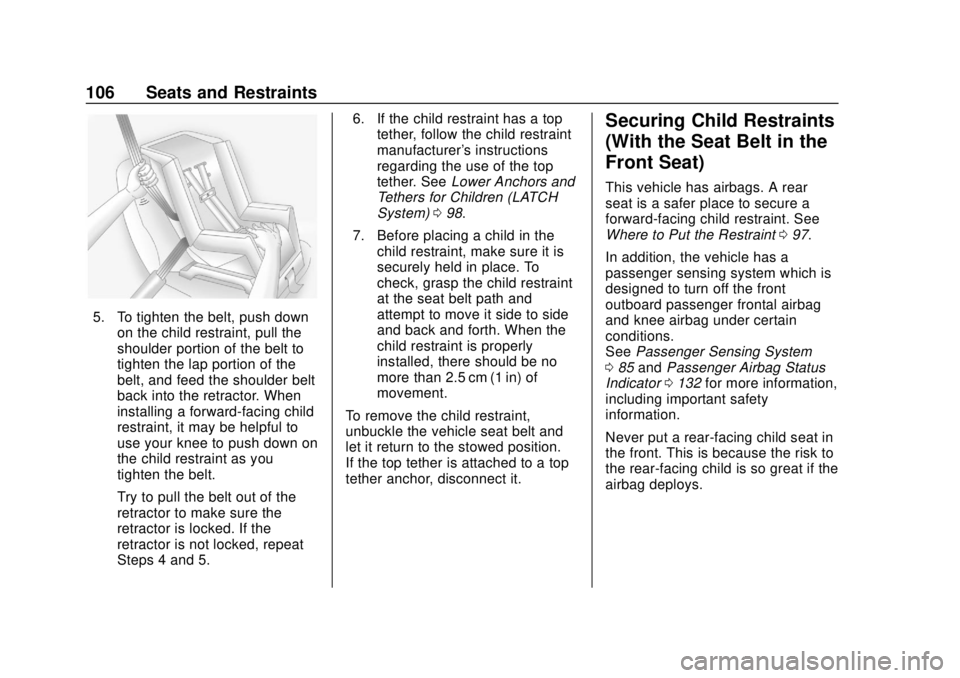
5. To tighten the belt, push downon the child restraint, pull the
shoulder portion of the belt to
tighten the lap portion of the
belt, and feed the shoulder belt
back into the retractor. When
installing a forward-facing child
restraint, it may be helpful to
use your knee to push down on
the child restraint as you
tighten the belt.
Try to pull the belt out of the
retractor to make sure the
retractor is locked. If the
retractor is not locked, repeat
Steps 4 and 5. 6. If the child restraint has a top
tether, follow the child restraint
manufacturer's instructions
regarding the use of the top
tether. See Lower Anchors and
Tethers for Children (LATCH
System) 098.
7. Before placing a child in the child restraint, make sure it is
securely held in place. To
check, grasp the child restraint
at the seat belt path and
attempt to move it side to side
and back and forth. When the
child restraint is properly
installed, there should be no
more than 2.5 cm (1 in) of
movement.
To remove the child restraint,
unbuckle the vehicle seat belt and
let it return to the stowed position.
If the top tether is attached to a top
tether anchor, disconnect it.
Securing Child Restraints
(With the Seat Belt in the
Front Seat)
This vehicle has airbags. A rear
seat is a safer place to secure a
forward-facing child restraint. See
Where to Put the Restraint 097.
In addition, the vehicle has a
passenger sensing system which is
designed to turn off the front
outboard passenger frontal airbag
and knee airbag under certain
conditions.
See Passenger Sensing System
0 85 and Passenger Airbag Status
Indicator 0132 for more information,
including important safety
information.
Never put a rear-facing child seat in
the front. This is because the risk to
the rear-facing child is so great if the
airbag deploys.
Page 109 of 384
Buick Regal Owner Manual (GMNA-Localizing-2nd Timed Print-U.S./Canada-
11486030) - 2018 - crc - 3/23/18
108 Seats and Restraints
through or around the restraint.
The child restraint instructions
will show you how.
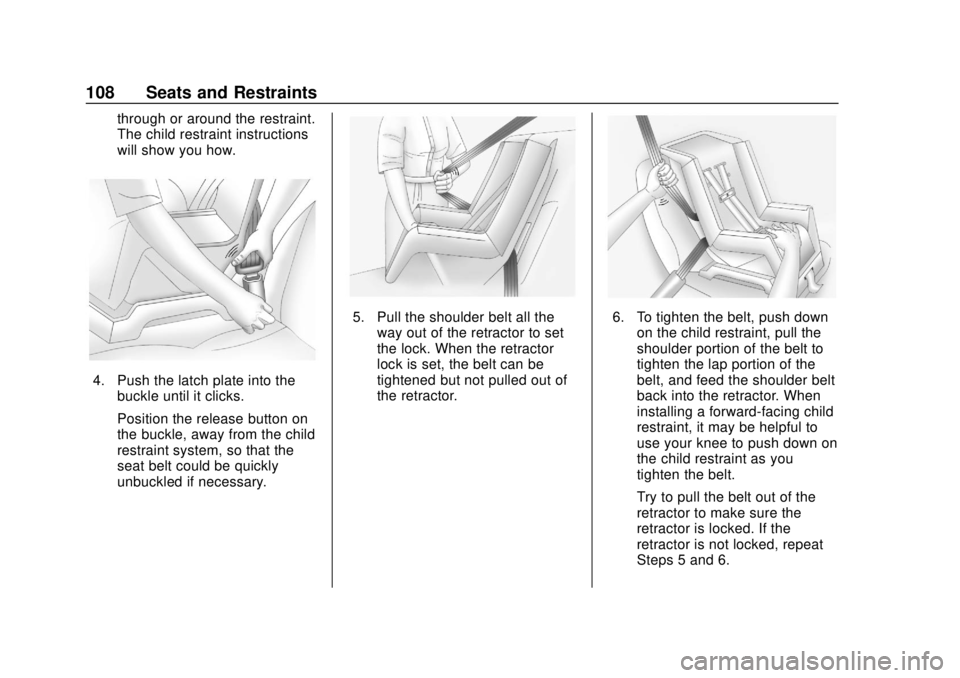
4. Push the latch plate into thebuckle until it clicks.
Position the release button on
the buckle, away from the child
restraint system, so that the
seat belt could be quickly
unbuckled if necessary.
5. Pull the shoulder belt all theway out of the retractor to set
the lock. When the retractor
lock is set, the belt can be
tightened but not pulled out of
the retractor.6. To tighten the belt, push downon the child restraint, pull the
shoulder portion of the belt to
tighten the lap portion of the
belt, and feed the shoulder belt
back into the retractor. When
installing a forward-facing child
restraint, it may be helpful to
use your knee to push down on
the child restraint as you
tighten the belt.
Try to pull the belt out of the
retractor to make sure the
retractor is locked. If the
retractor is not locked, repeat
Steps 5 and 6.
Page 110 of 384
Buick Regal Owner Manual (GMNA-Localizing-2nd Timed Print-U.S./Canada-
11486030) - 2018 - crc - 3/23/18
Seats and Restraints 109
7. Before placing a child in thechild restraint, make sure it is
securely held in place. To
check, grasp the child restraint
at the seat belt path and
attempt to move it side to side
and back and forth. When the
child restraint is properly
installed, there should be no
more than 2.5 cm (1 in) of
movement.
If the airbags are off, the off
indicator in the passenger airbag
status indicator will come on and
stay on when the vehicle is started.
If a child restraint has been installed
and the on indicator is lit, see “If the
On Indicator Is Lit for a Child
Restraint” underPassenger Sensing
System 085.
To remove the child restraint,
unbuckle the vehicle seat belt and
let it return to the stowed position.Pedestrian Protection
System
Your vehicle is equipped with a
pedestrian protection system which
is designed to lift the rear part of the
hood when a pedestrian is detected
during a frontal impact within the
approximate speed range.
When the vehicle is involved in a
frontal impact with an object or a
pedestrian, sensors in the front
bumper determine the force applied
by the object to the front bumper.
When the frontal impact speed is
approximately between 25 km/h
(15 mph) and 50 km/h (31 mph), the
pedestrian protection system lifts
the rear part of the hood to help
reduce pedestrian head injuries.
Lifting the rear part of the hood
creates more clearance between the
hood and the hard components in
the engine compartment.
In addition, the front bumper of the
vehicle was designed to help reduce
the injury to a pedestrian’s legs.
{Warning
After the hood has lifted, the hood
hinge and latch area may be hot.
Do not touch the pedestrian
protection system components.
The pedestrian protection system is
designed to lift the hood only once.
The pedestrian protection system
may not activate under the following
conditions:
. The pedestrian impact is outside
the range of the sensors located
on the front bumper.
. The sensors on the front bumper
are damaged.
. The path of the lifting hood is
blocked by snow or ice. Clear
any ice or snow from the hood
before driving.
. Winter fronts, grille covers,
or other aftermarket equipment
is attached to the bumper.
Page 118 of 384
Buick Regal Owner Manual (GMNA-Localizing-2nd Timed Print-U.S./Canada-
11486030) - 2018 - crc - 3/23/18
Instruments and Controls 117
Instruments and
Controls
Controls
Steering Wheel Adjustment . . . 118
Steering Wheel Controls . . . . . . 118
Heated Steering Wheel . . . . . . . 118
Horn . . . . . . . . . . . . . . . . . . . . . . . . . . 118
Windshield Wiper/Washer . . . . 118
Rear Window Wiper/Washer . . . . . . . . . . . . . . . . . . . . . . 119
Compass . . . . . . . . . . . . . . . . . . . . . 120
Clock . . . . . . . . . . . . . . . . . . . . . . . . . 120
Power Outlets . . . . . . . . . . . . . . . . 120
Wireless Charging . . . . . . . . . . . . 121
Warning Lights, Gauges, and
Indicators
Warning Lights, Gauges, and Indicators . . . . . . . . . . . . . . . . . . . 123
Instrument Cluster . . . . . . . . . . . . 124
Speedometer . . . . . . . . . . . . . . . . . 128
Odometer . . . . . . . . . . . . . . . . . . . . . 128
Tachometer . . . . . . . . . . . . . . . . . . . 128
Fuel Gauge . . . . . . . . . . . . . . . . . . . 129
Engine Coolant Temperature
Gauge . . . . . . . . . . . . . . . . . . . . . . 130
Seat Belt Reminders . . . . . . . . . 130 Airbag Readiness Light . . . . . . . 131
Passenger Airbag Status
Indicator . . . . . . . . . . . . . . . . . . . . 132
Charging System Light . . . . . . . 132
Malfunction Indicator Lamp (Check Engine Light) . . . . . . . . 133
Brake System Warning Light . . . . . . . . . . . . . . . . . . . . . . . . 135
Electric Parking Brake Light . . . . . . . . . . . . . . . . . . . . . . . . 135
Service Electric Parking Brake Light . . . . . . . . . . . . . . . . . . . . . . . . 135
Antilock Brake System (ABS) Warning Light . . . . . . . . . . . . . . . 136
Lane Keep Assist (LKA) Light . . . . . . . . . . . . . . . . . . . . . . . . 136
Vehicle Ahead Indicator . . . . . . 136
Traction Off Light . . . . . . . . . . . . . 137
StabiliTrak OFF Light . . . . . . . . . 137
Traction Control System (TCS)/ StabiliTrak Light . . . . . . . . . . . . . 137
Engine Coolant Temperature Warning Light . . . . . . . . . . . . . . . 138
Tire Pressure Light . . . . . . . . . . . 138
Engine Oil Pressure Light . . . . 139
Low Fuel Warning Light . . . . . . 139
Security Light . . . . . . . . . . . . . . . . . 139
High-Beam On Light . . . . . . . . . . 139
Adaptive Forward Lighting (AFL) Light . . . . . . . . . . . . . . . . . . 140 Front Fog Lamp Light . . . . . . . . . 140
Lamps On Reminder . . . . . . . . . 140
Cruise Control Light . . . . . . . . . . 140
Door Ajar Light . . . . . . . . . . . . . . . 141
Information Displays
Driver Information
Center (DIC) . . . . . . . . . . . . . . . . 141
Head-Up Display (HUD) . . . . . . 145
Vehicle Messages
Vehicle Messages . . . . . . . . . . . . 149
Engine Power Messages . . . . . 149
Vehicle Speed Messages . . . . . 150
Vehicle Personalization
Vehicle Personalization . . . . . . . 150
Universal Remote System
Universal Remote System . . . . 155
Universal Remote System Programming . . . . . . . . . . . . . . . 155
Universal Remote System Operation . . . . . . . . . . . . . . . . . . . 157
Page 119 of 384
Buick Regal Owner Manual (GMNA-Localizing-2nd Timed Print-U.S./Canada-
11486030) - 2018 - crc - 3/23/18
118 Instruments and Controls
Controls
Steering Wheel
Adjustment
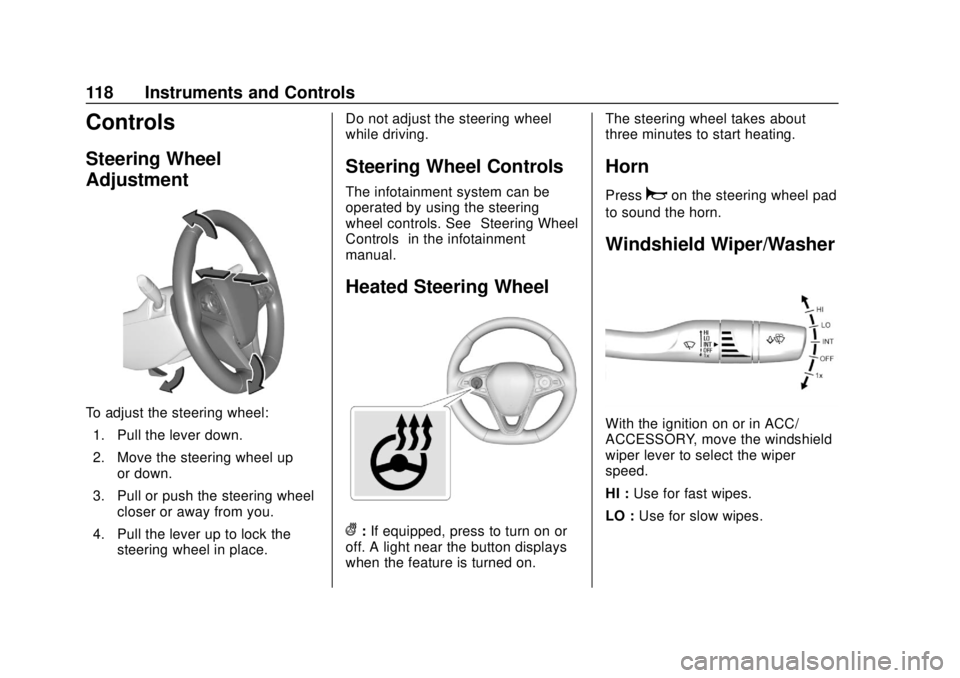
To adjust the steering wheel:1. Pull the lever down.
2. Move the steering wheel up or down.
3. Pull or push the steering wheel closer or away from you.
4. Pull the lever up to lock the steering wheel in place. Do not adjust the steering wheel
while driving.
Steering Wheel Controls
The infotainment system can be
operated by using the steering
wheel controls. See
“Steering Wheel
Controls” in the infotainment
manual.
Heated Steering Wheel
(: If equipped, press to turn on or
off. A light near the button displays
when the feature is turned on. The steering wheel takes about
three minutes to start heating.
Horn
Pressaon the steering wheel pad
to sound the horn.
Windshield Wiper/Washer
With the ignition on or in ACC/
ACCESSORY, move the windshield
wiper lever to select the wiper
speed.
HI : Use for fast wipes.
LO : Use for slow wipes.
Page 120 of 384
Buick Regal Owner Manual (GMNA-Localizing-2nd Timed Print-U.S./Canada-
11486030) - 2018 - crc - 3/23/18
Instruments and Controls 119
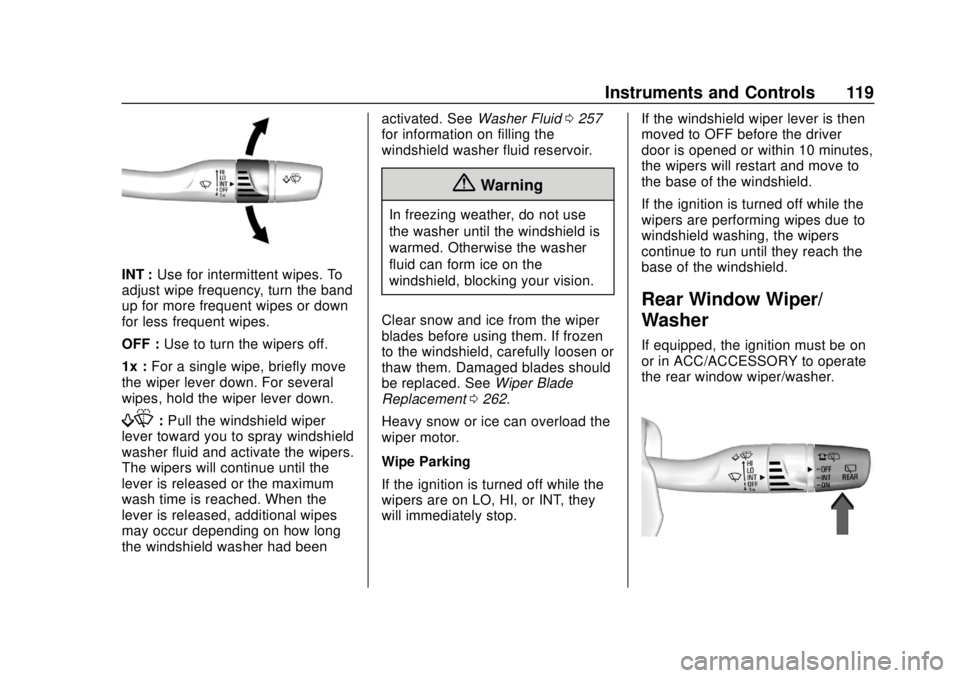
INT :Use for intermittent wipes. To
adjust wipe frequency, turn the band
up for more frequent wipes or down
for less frequent wipes.
OFF : Use to turn the wipers off.
1x : For a single wipe, briefly move
the wiper lever down. For several
wipes, hold the wiper lever down.
f: Pull the windshield wiper
lever toward you to spray windshield
washer fluid and activate the wipers.
The wipers will continue until the
lever is released or the maximum
wash time is reached. When the
lever is released, additional wipes
may occur depending on how long
the windshield washer had been activated. See
Washer Fluid0257
for information on filling the
windshield washer fluid reservoir.
{Warning
In freezing weather, do not use
the washer until the windshield is
warmed. Otherwise the washer
fluid can form ice on the
windshield, blocking your vision.
Clear snow and ice from the wiper
blades before using them. If frozen
to the windshield, carefully loosen or
thaw them. Damaged blades should
be replaced. See Wiper Blade
Replacement 0262.
Heavy snow or ice can overload the
wiper motor.
Wipe Parking
If the ignition is turned off while the
wipers are on LO, HI, or INT, they
will immediately stop. If the windshield wiper lever is then
moved to OFF before the driver
door is opened or within 10 minutes,
the wipers will restart and move to
the base of the windshield.
If the ignition is turned off while the
wipers are performing wipes due to
windshield washing, the wipers
continue to run until they reach the
base of the windshield.
Rear Window Wiper/
Washer
If equipped, the ignition must be on
or in ACC/ACCESSORY to operate
the rear window wiper/washer.
Page 121 of 384
Buick Regal Owner Manual (GMNA-Localizing-2nd Timed Print-U.S./Canada-
11486030) - 2018 - crc - 3/23/18
120 Instruments and Controls
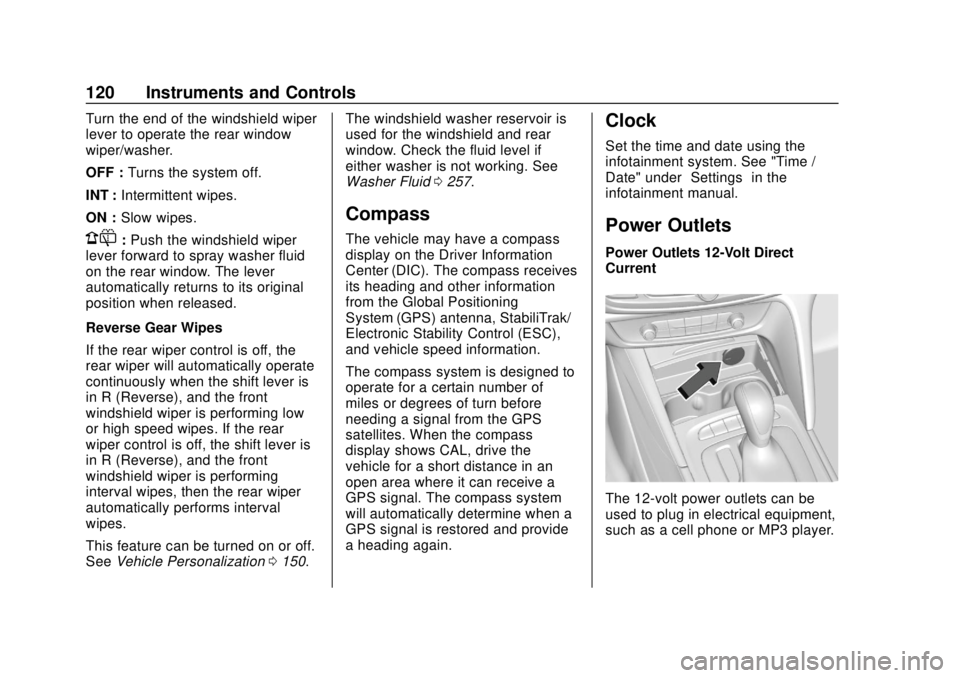
Turn the end of the windshield wiper
lever to operate the rear window
wiper/washer.
OFF :Turns the system off.
INT : Intermittent wipes.
ON : Slow wipes.
1:Push the windshield wiper
lever forward to spray washer fluid
on the rear window. The lever
automatically returns to its original
position when released.
Reverse Gear Wipes
If the rear wiper control is off, the
rear wiper will automatically operate
continuously when the shift lever is
in R (Reverse), and the front
windshield wiper is performing low
or high speed wipes. If the rear
wiper control is off, the shift lever is
in R (Reverse), and the front
windshield wiper is performing
interval wipes, then the rear wiper
automatically performs interval
wipes.
This feature can be turned on or off.
See Vehicle Personalization 0150. The windshield washer reservoir is
used for the windshield and rear
window. Check the fluid level if
either washer is not working. See
Washer Fluid
0257.
Compass
The vehicle may have a compass
display on the Driver Information
Center (DIC). The compass receives
its heading and other information
from the Global Positioning
System (GPS) antenna, StabiliTrak/
Electronic Stability Control (ESC),
and vehicle speed information.
The compass system is designed to
operate for a certain number of
miles or degrees of turn before
needing a signal from the GPS
satellites. When the compass
display shows CAL, drive the
vehicle for a short distance in an
open area where it can receive a
GPS signal. The compass system
will automatically determine when a
GPS signal is restored and provide
a heading again.
Clock
Set the time and date using the
infotainment system. See "Time /
Date" under “Settings”in the
infotainment manual.
Power Outlets
Power Outlets 12-Volt Direct
Current
The 12-volt power outlets can be
used to plug in electrical equipment,
such as a cell phone or MP3 player.
Page 137 of 384
Buick Regal Owner Manual (GMNA-Localizing-2nd Timed Print-U.S./Canada-
11486030) - 2018 - crc - 3/23/18
136 Instruments and Controls
Antilock Brake System
(ABS) Warning Light
This light comes on briefly when the
engine is started.
If the light does not come on, have it
fixed so it will be ready to warn if
there is a problem.
If the light comes on while driving,
stop as soon as it is safely possible
and turn off the vehicle. Then start
the engine again to reset the
system. If the ABS light stays on,
or comes on again while driving, the
vehicle needs service. A chime may
also sound when the light comes on
steady.
If the ABS light is the only light on,
the vehicle has regular brakes, but
the antilock brakes are not
functioning.If both the ABS and the brake
system warning light are on, the
vehicle's antilock brakes are not
functioning and there is a problem
with the regular brakes. See your
dealer for service.
See
Brake System Warning Light
0 135.Lane Keep Assist (LKA)
Light
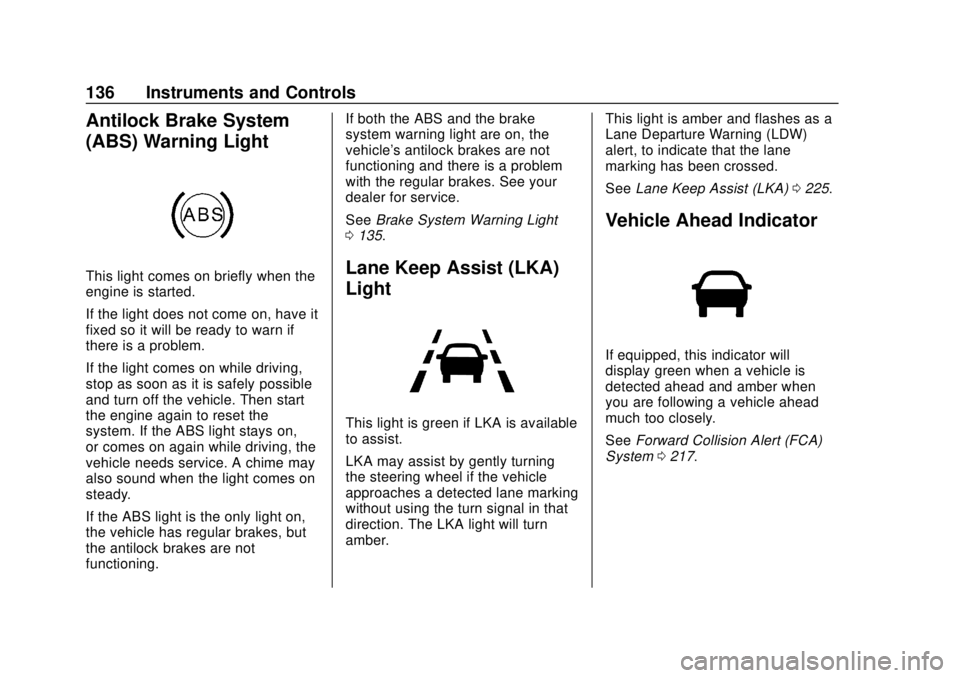
This light is green if LKA is available
to assist.
LKA may assist by gently turning
the steering wheel if the vehicle
approaches a detected lane marking
without using the turn signal in that
direction. The LKA light will turn
amber. This light is amber and flashes as a
Lane Departure Warning (LDW)
alert, to indicate that the lane
marking has been crossed.
See
Lane Keep Assist (LKA) 0225.
Vehicle Ahead Indicator
If equipped, this indicator will
display green when a vehicle is
detected ahead and amber when
you are following a vehicle ahead
much too closely.
See Forward Collision Alert (FCA)
System 0217.
Page 154 of 384
Buick Regal Owner Manual (GMNA-Localizing-2nd Timed Print-U.S./Canada-
11486030) - 2018 - crc - 3/23/18
Instruments and Controls 153
driving position when the vehicle is
shifted out of R (Reverse) or the
engine is turned off. SeeReverse
Tilt Mirrors 054.
Touch Off, On - Driver and
Passenger, On - Driver, or On -
Passenger.
Extended Hill Start Assist
This allows the duration of the Hill
Start Assist to be changed. See Hill
Start Assist (HSA) 0200.
Touch Extended Hold or
Standard Hold.
Auto Wipe in Reverse Gear
Select to set the Auto Wipe in
Reverse Gear feature on or off.
When on, and the front wipers are
on, the rear window wiper will turn
on automatically when the vehicle is
shifted into R (Reverse).
Touch Off or On.
Lighting
Touch and the following may
display:
. Vehicle Locator Lights .
Exit Lighting
. Left or Right Hand Traffic
. Adaptive Forward Lighting
Vehicle Locator Lights
This feature will flash the exterior
lamps and allows some of the
exterior lamps and most of the
interior lamps to turn on briefly
when
Kon the Remote Keyless
Entry (RKE) transmitter is pressed
to locate the vehicle.
Touch Off or On.
Exit Lighting
This allows the selection of how
long the exterior lamps stay on
when leaving the vehicle when it is
dark outside.
Touch Off, 30 Seconds, 60 Seconds,
or 120 Seconds.
Left or Right Hand Traffic
This setting adjusts the behavior of
the Adaptive Forward Lighting
feature based on what side of the
road the vehicle drives on. Touch Left Hand Traffic or Right
Hand Traffic.
Adaptive Forward Lighting
This feature allows the headlamps
to pivot horizontally to provide
greater road illumination while
turning. See
Adaptive Forward
Lighting (AFL) 0161.
Touch Off, Corner and Curve
Lighting, or Intelligent Light
Distribution.
Power Door Locks
Touch and the following may
display:
. Open Door Anti Lockout
. Auto Door Unlock
. Delayed Door Lock
Open Door Anti Lock Out
When on, this feature will keep the
driver door from locking when the
door is open. If Off is selected, the
Delayed Door Lock menu will be
available.
Touch Off or On.
Page 155 of 384
Buick Regal Owner Manual (GMNA-Localizing-2nd Timed Print-U.S./Canada-
11486030) - 2018 - crc - 3/23/18
154 Instruments and Controls
Auto Door Unlock
This allows selection of which of the
doors will automatically unlock when
the vehicle is shifted into P (Park).
Touch Off, All Doors, or Driver Door.
Delayed Door Lock
When on, this feature will delay the
locking of the doors. To override the
delay, press the power door lock
switch on the door.
Touch Off or On.
Remote Lock, Unlock, Start
Touch and the following may
display:
.Remote Unlock Light Feedback
. Remote Lock Feedback
. Remote Door Unlock
. Remote Start Auto Cool Seats
. Remote Start Auto Heat Seats
. Passive Door Unlock
. Passive Door Lock
. Remote Left in Vehicle Alert Remote Unlock Light Feedback
When on, the exterior lamps will
flash when unlocking the vehicle
with the RKE transmitter.
Touch Off or Flash Lights.
Remote Lock Feedback
This allows selection of what type of
feedback is given when locking the
vehicle with the RKE transmitter.
Touch Off, Lights and Horn, Lights
Only, or Horn Only.
Remote Door Unlock
This allows selection of which doors
will unlock when pressing
Kon the
RKE transmitter.
Touch All Doors or Driver Door.
Remote Start Auto Cool Seats
If equipped and turned on, this
feature will turn on the ventilated
seats when using remote start on
warm days.
See Heated and Ventilated Front
Seats 069 and Remote Vehicle
Start 036.
Touch Off or On. Remote Start Auto Heat Seats
If equipped and turned on, this
feature will turn on the heated seats
when using remote start on
cold days.
See
Heated and Ventilated Front
Seats 069 and Remote Vehicle
Start 036.
Touch Off or On.
Passive Door Unlock
This allows the selection of what
doors will unlock when using the
button on the driver door to unlock
the vehicle.
Touch All Doors or Driver Door.
Passive Door Lock
This allows passive locking to be
turned on or off and selects
feedback. See Remote Keyless
Entry (RKE) System Operation 030.
Touch Off, On with Horn
Chirp, or On.