lights BUICK TERRAZA 2005 Owner's Guide
[x] Cancel search | Manufacturer: BUICK, Model Year: 2005, Model line: TERRAZA, Model: BUICK TERRAZA 2005Pages: 428, PDF Size: 2.6 MB
Page 236 of 428
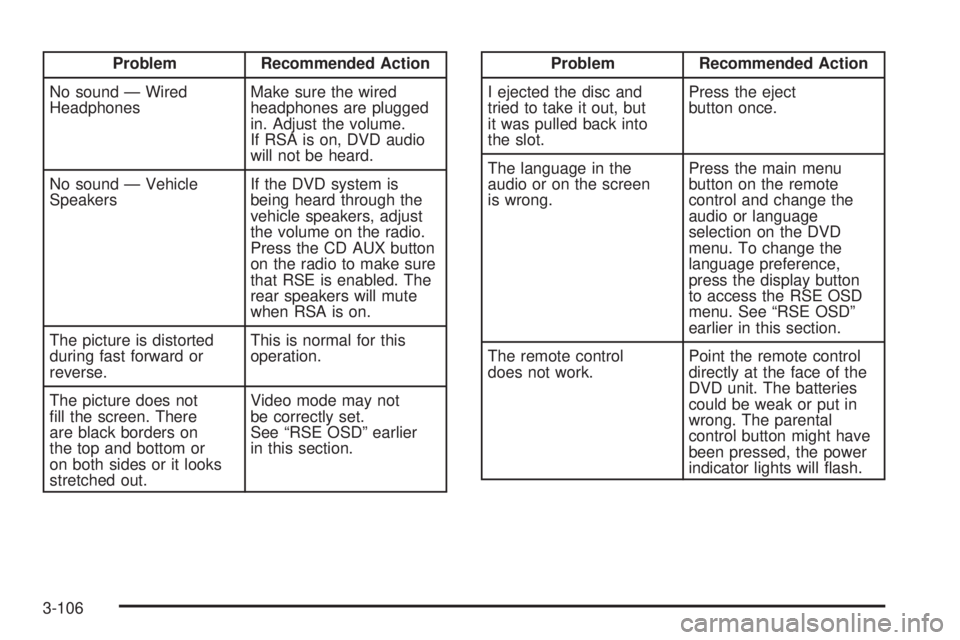
Problem Recommended Action
No sound — Wired
HeadphonesMake sure the wired
headphones are plugged
in. Adjust the volume.
If RSA is on, DVD audio
will not be heard.
No sound — Vehicle
SpeakersIf the DVD system is
being heard through the
vehicle speakers, adjust
the volume on the radio.
Press the CD AUX button
on the radio to make sure
that RSE is enabled. The
rear speakers will mute
when RSA is on.
The picture is distorted
during fast forward or
reverse.This is normal for this
operation.
The picture does not
ll the screen. There
are black borders on
the top and bottom or
on both sides or it looks
stretched out.Video mode may not
be correctly set.
See “RSE OSD” earlier
in this section.Problem Recommended Action
I ejected the disc and
tried to take it out, but
it was pulled back into
the slot.Press the eject
button once.
The language in the
audio or on the screen
is wrong.Press the main menu
button on the remote
control and change the
audio or language
selection on the DVD
menu. To change the
language preference,
press the display button
to access the RSE OSD
menu. See “RSE OSD”
earlier in this section.
The remote control
does not work.Point the remote control
directly at the face of the
DVD unit. The batteries
could be weak or put in
wrong. The parental
control button might have
been pressed, the power
indicator lights will ash.
3-106
Page 241 of 428
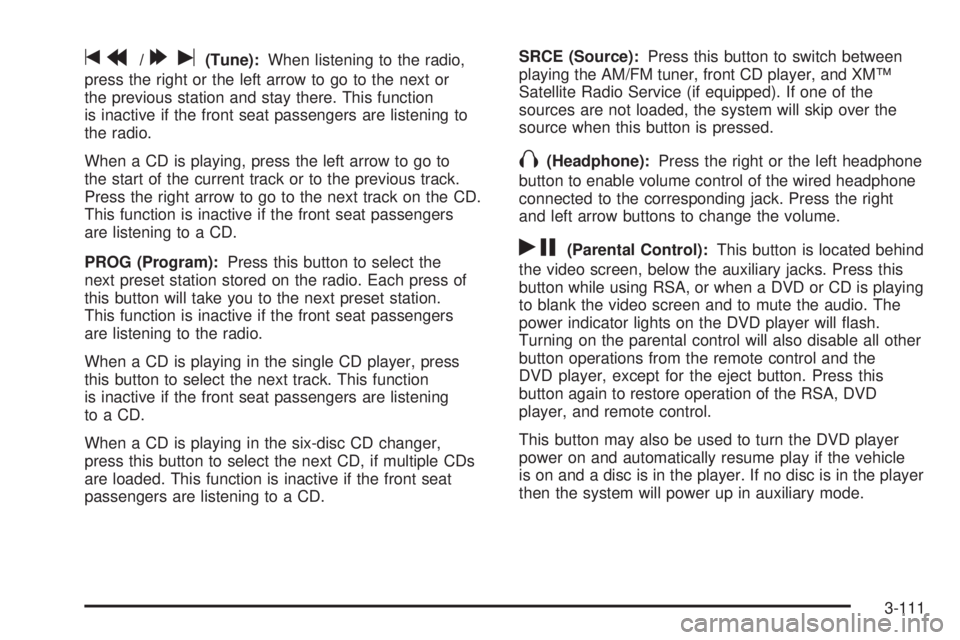
tr/[u(Tune):When listening to the radio,
press the right or the left arrow to go to the next or
the previous station and stay there. This function
is inactive if the front seat passengers are listening to
the radio.
When a CD is playing, press the left arrow to go to
the start of the current track or to the previous track.
Press the right arrow to go to the next track on the CD.
This function is inactive if the front seat passengers
are listening to a CD.
PROG (Program):Press this button to select the
next preset station stored on the radio. Each press of
this button will take you to the next preset station.
This function is inactive if the front seat passengers
are listening to the radio.
When a CD is playing in the single CD player, press
this button to select the next track. This function
is inactive if the front seat passengers are listening
to a CD.
When a CD is playing in the six-disc CD changer,
press this button to select the next CD, if multiple CDs
are loaded. This function is inactive if the front seat
passengers are listening to a CD.SRCE (Source):Press this button to switch between
playing the AM/FM tuner, front CD player, and XM™
Satellite Radio Service (if equipped). If one of the
sources are not loaded, the system will skip over the
source when this button is pressed.
X(Headphone):Press the right or the left headphone
button to enable volume control of the wired headphone
connected to the corresponding jack. Press the right
and left arrow buttons to change the volume.
rj(Parental Control):This button is located behind
the video screen, below the auxiliary jacks. Press this
button while using RSA, or when a DVD or CD is playing
to blank the video screen and to mute the audio. The
power indicator lights on the DVD player will ash.
Turning on the parental control will also disable all other
button operations from the remote control and the
DVD player, except for the eject button. Press this
button again to restore operation of the RSA, DVD
player, and remote control.
This button may also be used to turn the DVD player
power on and automatically resume play if the vehicle
is on and a disc is in the player. If no disc is in the player
then the system will power up in auxiliary mode.
3-111
Page 263 of 428
You can be temporarily blinded by approaching
headlamps. It can take a second or two, or even several
seconds, for your eyes to re-adjust to the dark. When
you are faced with severe glare, as from a driver
who does not lower the high beams, or a vehicle with
misaimed headlamps, slow down a little. Avoid
staring directly into the approaching headlamps.
Keep your windshield and all the glass on your vehicle
clean — inside and out. Glare at night is made much
worse by dirt on the glass. Even the inside of the glass
can build up a lm caused by dust. Dirty glass makes
lights dazzle and ash more than clean glass would,
making the pupils of your eyes contract repeatedly.
Remember that your headlamps light up far less
of a roadway when you are in a turn or curve. Keep
your eyes moving; that way, it is easier to pick out
dimly lighted objects. Just as your headlamps should
be checked regularly for proper aim, so should your
eyes be examined regularly. Some drivers suffer from
night blindness — the inability to see in dim light — and
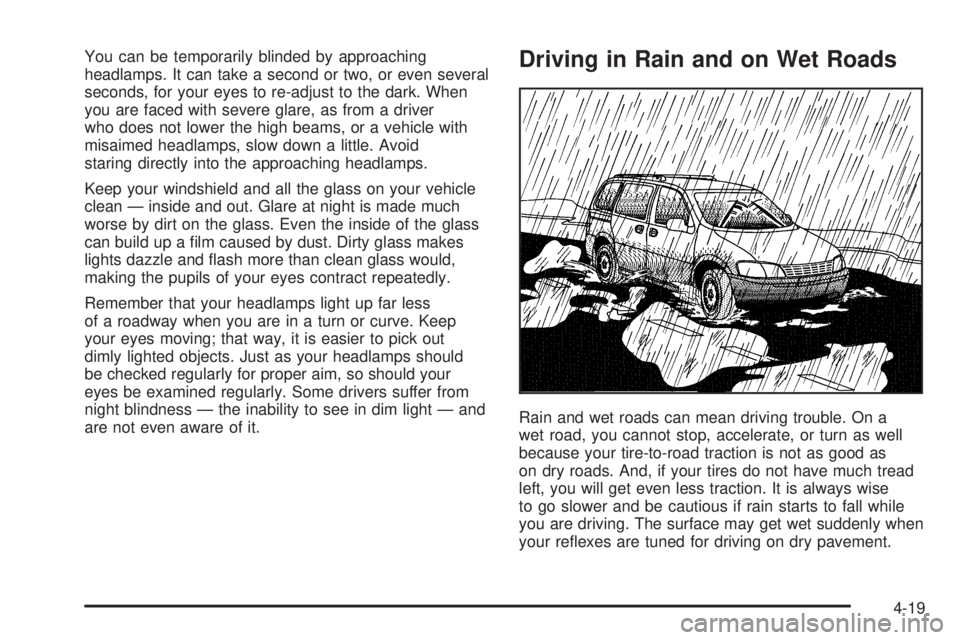
are not even aware of it.Driving in Rain and on Wet Roads
Rain and wet roads can mean driving trouble. On a
wet road, you cannot stop, accelerate, or turn as well
because your tire-to-road traction is not as good as
on dry roads. And, if your tires do not have much tread
left, you will get even less traction. It is always wise
to go slower and be cautious if rain starts to fall while
you are driving. The surface may get wet suddenly when
your reexes are tuned for driving on dry pavement.
4-19
Page 428 of 428
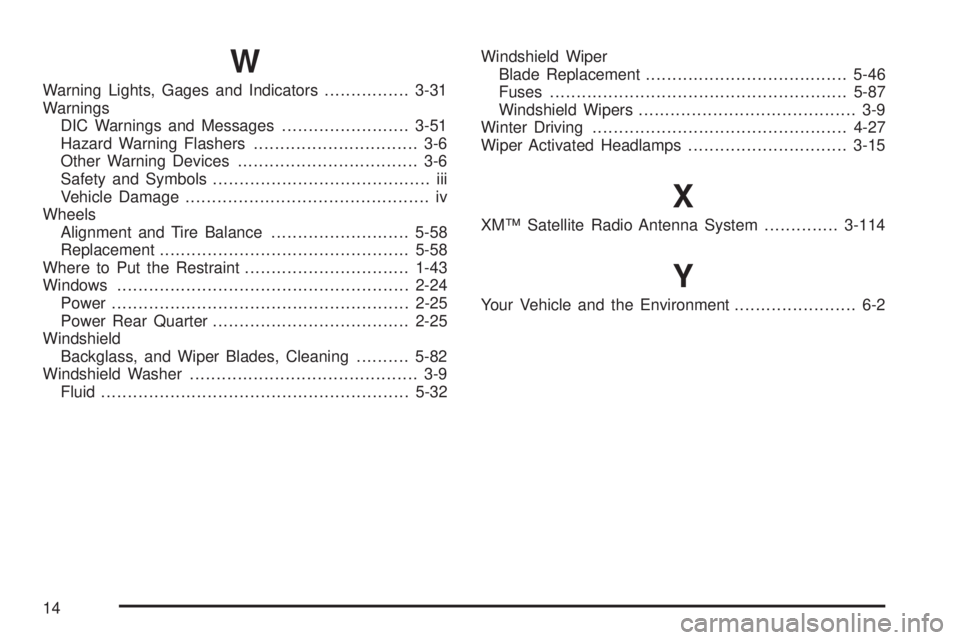
W
Warning Lights, Gages and Indicators................3-31
Warnings
DIC Warnings and Messages........................3-51
Hazard Warning Flashers............................... 3-6
Other Warning Devices.................................. 3-6
Safety and Symbols......................................... iii
Vehicle Damage.............................................. iv
Wheels
Alignment and Tire Balance..........................5-58
Replacement...............................................5-58
Where to Put the Restraint...............................1-43
Windows.......................................................2-24
Power........................................................2-25
Power Rear Quarter.....................................2-25
Windshield
Backglass, and Wiper Blades, Cleaning..........5-82
Windshield Washer........................................... 3-9
Fluid..........................................................5-32Windshield Wiper
Blade Replacement......................................5-46
Fuses........................................................5-87
Windshield Wipers......................................... 3-9
Winter Driving................................................4-27
Wiper Activated Headlamps..............................3-15
X
XM™ Satellite Radio Antenna System..............3-114
Y
Your Vehicle and the Environment....................... 6-2
14