ECO mode BUICK TERRAZA 2006 User Guide
[x] Cancel search | Manufacturer: BUICK, Model Year: 2006, Model line: TERRAZA, Model: BUICK TERRAZA 2006Pages: 454, PDF Size: 2.7 MB
Page 221 of 454
XM™ Satellite Radio Service
If your vehicle has XM™, XM™ is a satellite
radio service that is based in the 48 contiguous United
States and in Canada (if available). XM™ offers
over 100 coast-to-coast channels including music, news,
sports, talk, and children’s programming. XM™
provides digital quality audio and text information that
includes song title and artist name. A service fee is
required in order to receive the XM™ service. For more
information, contact XM™ at www.xmradio.com or
call 1-800-852-XMXM (9696).
Playing the Radio
Top Knob (Power/Volume):Press this knob to turn
the system on and off. Turn this knob to increase or to
decrease the volume.
4(Information):For RDS, press this button to change
what appears on the display while using RDS. The
display options are station name, RDS station frequency,
PTY, and the name of the program (if available).
For XM™ (if equipped), press the information button
while in XM™ mode to retrieve four different categories
of information related to the current song or channel:
Artist, Song Title, Category or PTY, Channel
Number/Channel Name.To change the default on the display, press the
information button until you see the display you want,
then hold the button for two seconds. The radio will
produce one beep and the selected display will now be
the default.
AUTO
n(Automatic Volume):With automatic
volume, the audio system will adjust automatically to
make up for road and wind noise as you drive, by
increasing the volume as vehicle speed increases.
Set the volume at the desired level. Press this button to
select AUTO VOLUME MIN, AUTO VOLUME MED,
or AUTO VOLUME MAX. Each higher setting will
provide more volume compensation at faster vehicle
speeds. To turn automatic volume off, press this button
until AUTO VOLUME OFF appears on the display.
MUTE:Press this button to silence the system. Press
this button again to turn the sound on.
This button is not available on the Radio with
Six-Disc CD.
3-83
Page 237 of 454
RPT (Repeat):Press this button to hear a track, CD, or
a folder over again.
To use repeat, do one of the following:
To repeat a track, press and release this button
until REPEAT TRACK appears on the display.
To repeat a CD, press and release this button until
REPEAT DISC appears on the display.
To repeat a folder, press and release this button
until REPEAT FOLDER appears on the display.
To turn off repeated play, press and release the RPT
button until REPEAT OFF appears on the display
MUTE:Press this button to silence the system. Press
this button again to turn the sound on.
This button is not available on the Radio with
Six-Disc CD.
tSEEKu:Press the left arrow to go to the start of
the current track, if more than 10 seconds have
played. Press the right arrow to go to the next track. If
either arrow is held or pressed more than once, the
player will continue moving backward or forward through
the CD.
4(Information):Press this button to display the artist
name and album contained in the ID3 tag.BAND:Press this button to listen to the radio when a
CD is playing. The inactive CD will remain safely
inside the radio for future listening.
CD AUX (Auxiliary):Press this button to play a CD
when listening to the radio. The CD symbol will appear
on the display when a CD is loaded.
Y(Eject):Press this button to eject a CD. Eject may
be activated with either the ignition or radio off.
UsingR(Song List) Mode (Single CD,
MP3, and Six-Disc CD)
This feature is capable of saving 20 track selections. To
save tracks into the song list feature, perform the
following steps:
1. Turn the CD player on and load it with at least
one CD.
2. Check to see that the CD player is not in song list
mode. S-LIST should not appear on the display. If
S-LIST is present, press the song list button to
turn it off.
3. Select the desired CD by pressing the numbered
pushbutton and then use the SEEK right arrow or
turn the tune knob to locate the track to be
saved. The track will begin to play.
3-99
Page 238 of 454
4. Press and hold the song list button to save the
track into memory. When song list is pressed,
one beep will be heard immediately. ADDED SONG
will appear on the display.
5. Repeat Steps 3 and 4 for saving other selections.
SONGLIST FULL will appear on the display if you try to
save more than 20 selections.
To play the song list, press the song list button. The
recorded tracks will begin to play in the order they were
saved.
Seek through the song list by using the SEEK arrows.
Seeking past the last saved track will return to the
rst saved track.
To delete tracks from the song list, perform the following
steps:
1. Turn the CD player on.
2. Press the song list button to turn song list on.
S-LIST will appear on the display.
3. Press either SEEK arrow or turn the tune knob to
select the desired track to be deleted.
4. Press and hold the song list button for two seconds.
Release the button when SONG REMOVED
appears on the display.After a track has been deleted, the remaining tracks are
moved up the list. When another track is added to the
song list, the track will be added to the end of the list.
To delete the entire song list, perform the following
steps:
1. Turn the CD player on.
2. Press the song list button to turn song list on.
S-LIST will appear on the display.
3. Press and hold the song list button for more than
four seconds. One beep will be heard. SONGLIST
EMPTY will appear on the display indicating the
song list has been deleted.
If a CD is ejected, and the song list contains saved
tracks from that CD, those tracks are automatically
deleted from the song list. Any tracks saved to the song
list again are added to the bottom of the list.
To end song list mode, press the song list button.
One beep will be heard and S-LIST will be removed
from the display.
3-100
Page 246 of 454
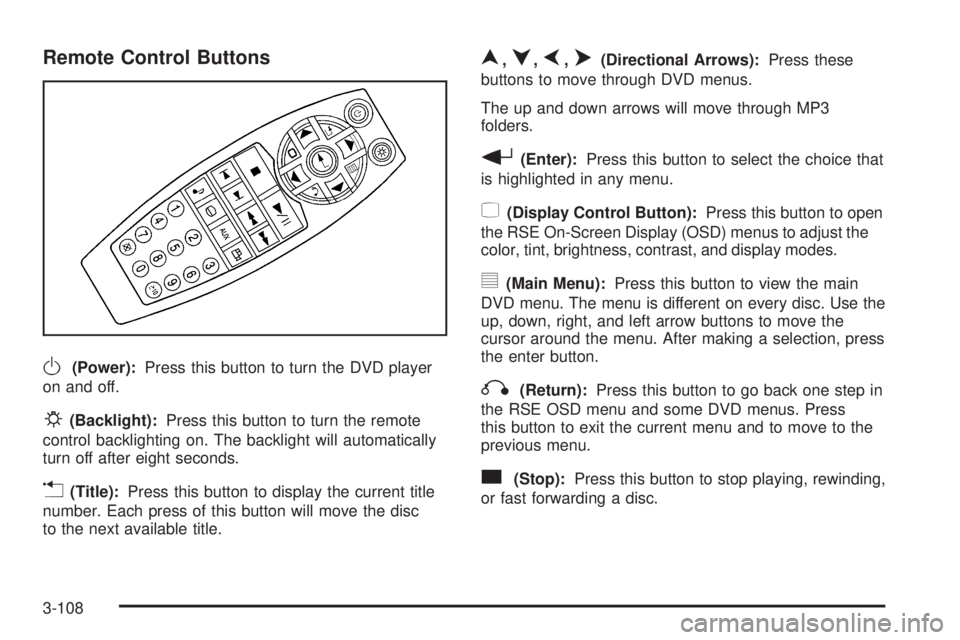
Remote Control Buttons
O(Power):Press this button to turn the DVD player
on and off.
P(Backlight):Press this button to turn the remote
control backlighting on. The backlight will automatically
turn off after eight seconds.
v(Title):Press this button to display the current title
number. Each press of this button will move the disc
to the next available title.
n,q,p,o(Directional Arrows):Press these
buttons to move through DVD menus.
The up and down arrows will move through MP3
folders.
r(Enter):Press this button to select the choice that
is highlighted in any menu.
z(Display Control Button):Press this button to open
the RSE On-Screen Display (OSD) menus to adjust the
color, tint, brightness, contrast, and display modes.
y(Main Menu):Press this button to view the main
DVD menu. The menu is different on every disc. Use the
up, down, right, and left arrow buttons to move the
cursor around the menu. After making a selection, press
the enter button.
q(Return):Press this button to go back one step in
the RSE OSD menu and some DVD menus. Press
this button to exit the current menu and to move to the
previous menu.
c(Stop):Press this button to stop playing, rewinding,
or fast forwarding a disc.
3-108
Page 249 of 454
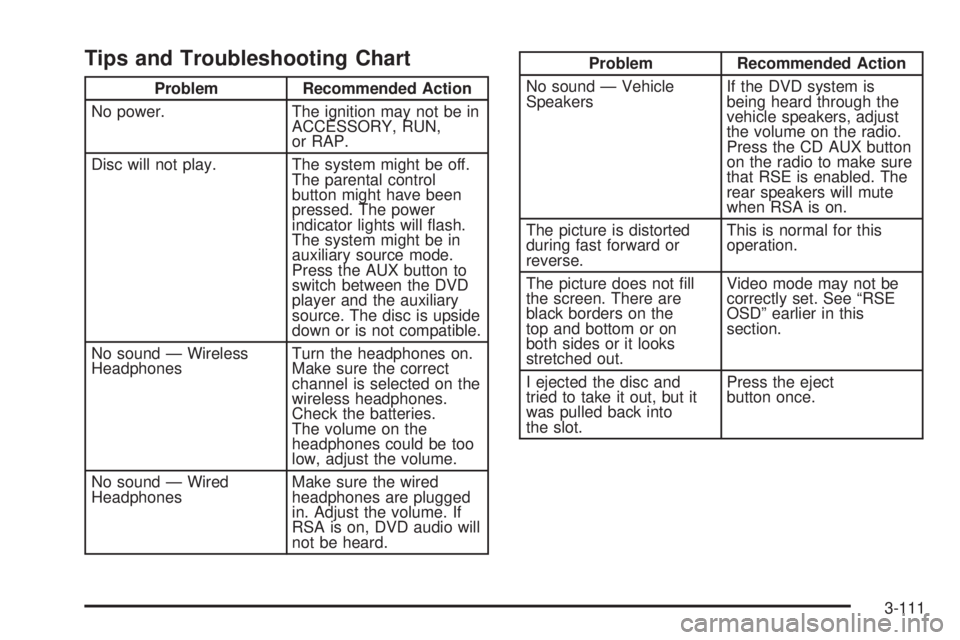
Tips and Troubleshooting Chart
Problem Recommended Action
No power. The ignition may not be in
ACCESSORY, RUN,
or RAP.
Disc will not play. The system might be off.
The parental control
button might have been
pressed. The power
indicator lights will ash.
The system might be in
auxiliary source mode.
Press the AUX button to
switch between the DVD
player and the auxiliary
source. The disc is upside
down or is not compatible.
No sound — Wireless
HeadphonesTurn the headphones on.
Make sure the correct
channel is selected on the
wireless headphones.
Check the batteries.
The volume on the
headphones could be too
low, adjust the volume.
No sound — Wired
HeadphonesMake sure the wired
headphones are plugged
in. Adjust the volume. If
RSA is on, DVD audio will
not be heard.
Problem Recommended Action
No sound — Vehicle
SpeakersIf the DVD system is
being heard through the
vehicle speakers, adjust
the volume on the radio.
Press the CD AUX button
on the radio to make sure
that RSE is enabled. The
rear speakers will mute
when RSA is on.
The picture is distorted
during fast forward or
reverse.This is normal for this
operation.
The picture does not ll
the screen. There are
black borders on the
top and bottom or on
both sides or it looks
stretched out.Video mode may not be
correctly set. See “RSE
OSD” earlier in this
section.
I ejected the disc and
tried to take it out, but it
was pulled back into
the slot.Press the eject
button once.
3-111
Page 251 of 454
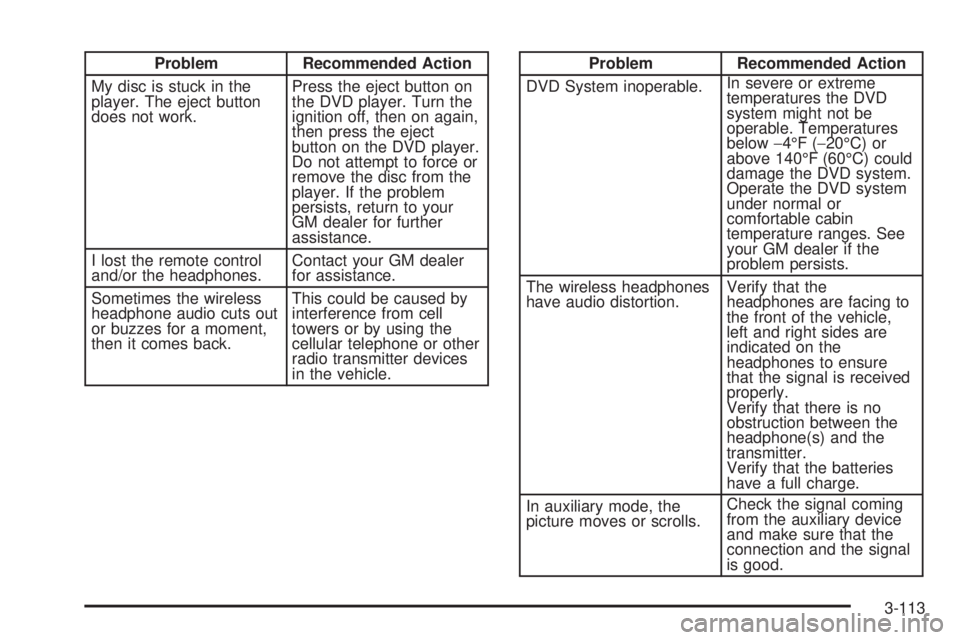
Problem Recommended Action
My disc is stuck in the
player. The eject button
does not work.Press the eject button on
the DVD player. Turn the
ignition off, then on again,
then press the eject
button on the DVD player.
Do not attempt to force or
remove the disc from the
player. If the problem
persists, return to your
GM dealer for further
assistance.
I lost the remote control
and/or the headphones.Contact your GM dealer
for assistance.
Sometimes the wireless
headphone audio cuts out
or buzzes for a moment,
then it comes back.This could be caused by
interference from cell
towers or by using the
cellular telephone or other
radio transmitter devices
in the vehicle.Problem Recommended Action
DVD System inoperable.In severe or extreme
temperatures the DVD
system might not be
operable. Temperatures
below−4°F (−20°C) or
above 140°F (60°C) could
damage the DVD system.
Operate the DVD system
under normal or
comfortable cabin
temperature ranges. See
your GM dealer if the
problem persists.
The wireless headphones
have audio distortion.Verify that the
headphones are facing to
the front of the vehicle,
left and right sides are
indicated on the
headphones to ensure
that the signal is received
properly.
Verify that there is no
obstruction between the
headphone(s) and the
transmitter.
Verify that the batteries
have a full charge.
In auxiliary mode, the
picture moves or scrolls.Check the signal coming
from the auxiliary device
and make sure that the
connection and the signal
is good.
3-113
Page 335 of 454
Overheated Engine Protection
Operating Mode
This emergency operating mode allows your vehicle to be
driven to a safe place in an emergency situation. If an
overheated engine condition exists, an overheat
protection mode which alternates ring groups of
cylinders helps prevent engine damage. In this mode, you
will notice a signicant loss in power and engine
performance. The temperature gage will indicate an
overheat condition exists. Driving extended miles (km)
and/or towing a trailer in the overheat protection mode
should be avoided.
Notice:After driving in the overheated engine
protection operating mode, to avoid engine damage,
allow the engine to cool before attempting any repair.
The engine oil will be severely degraded. Repair the
cause of coolant loss, change the oil and reset the oil
life system. SeeEngine Oil on page 5-15.
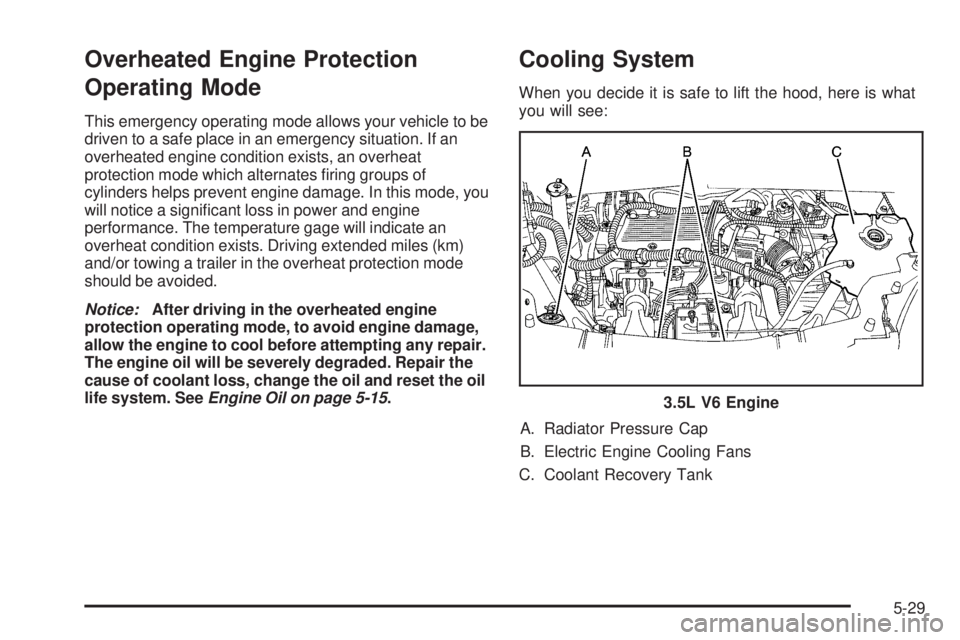
Cooling System
When you decide it is safe to lift the hood, here is what
you will see:
A. Radiator Pressure Cap
B. Electric Engine Cooling Fans
C. Coolant Recovery Tank3.5L V6 Engine
5-29
Page 365 of 454
Normal Occupant Weight:The number of occupants a
vehicle is designed to seat multiplied by 150 lbs (68 kg).
SeeLoading Your Vehicle on page 4-32.
Occupant Distribution:Designated seating positions.
Outward Facing Sidewall:The side of an
asymmetrical tire that has a particular side that faces
outward when mounted on a vehicle. The side of the tire
that contains a whitewall, bears white lettering, or
bears manufacturer, brand, and/or model name molding
that is higher or deeper than the same moldings on
the other sidewall of the tire.
Passenger (P-Metric) Tire:A tire used on passenger
cars and some light duty trucks and multipurpose
vehicles.
Recommended Ination Pressure:Vehicle
manufacturer’s recommended tire ination pressure and
shown on the tire placard. SeeInation - Tire Pressure
on page 5-60andLoading Your Vehicle on page 4-32.
Radial Ply Tire:A pneumatic tire in which the ply cords
that extend to the beads are laid at 90 degrees to the
centerline of the tread.
Rim:A metal support for a tire and upon which the tire
beads are seated.Sidewall:The portion of a tire between the tread and
the bead.
Speed Rating:An alphanumeric code assigned to a
tire indicating the maximum speed at which a tire
can operate.
Traction:The friction between the tire and the road
surface. The amount of grip provided.
Tread:The portion of a tire that comes into contact
with the road.
Treadwear Indicators:Narrow bands, sometimes
called wear bars, that show across the tread of a tire
when only 1/16 inch (1.6 mm) of tread remains.
SeeWhen It Is Time for New Tires on page 5-62.
UTQGS (Uniform Tire Quality Grading Standards):A
tire information system that provides consumers with
ratings for a tire’s traction, temperature, and treadwear.
Ratings are determined by tire manufacturers using
government testing procedures. The ratings are molded
into the sidewall of the tire. SeeUniform Tire Quality
Grading on page 5-65.
Vehicle Capacity Weight:The number of designated
seating positions multiplied by 150 lbs (68 kg) plus
the rated cargo load. SeeLoading Your Vehicle
on page 4-32.
5-59
Page 431 of 454
Flat Tire Change:Installation of a spare tire will be
covered at no charge. The customer is responsible
for the repair or replacement of the tire if not
covered by a warrantable failure.
Jump Start:No-start occurrences which require a
battery jump start will be covered at no charge.
Dealer Locator Service
In many instances, mechanical failures are covered
under Buick’s Bumper-to-Bumper warranty. However,
when other services are utilized, our Roadside
Assistance Representatives will explain any payment
obligations you might incur.
For prompt and efficient assistance when calling, please
provide the following to the Roadside Assistance
Representative:
Your name, home address, and home telephone
number.
Telephone number of your location.
Location of the vehicle.
Model, year, color, and license plate number.
Mileage, Vehicle Identication Number, and delivery
date of the vehicle.
Description of the problem.While we hope you never have the occasion to use our
service, it is added security while traveling for you
and your family. Remember, we are only a phone call
away. Buick Roadside Assistance:1-800-252-1112, text
telephone (TTY) users, call1-888-889-2438.
Buick reserves the right to limit services or
reimbursement to an owner or driver when, in Buick’s
judgement, the claims become excessive in frequency or
type of occurrence.
Roadside Assistance is not part of or included in the
coverage provided by the New Vehicle Limited Warranty.
Buick reserves the right to make any changes or
discontinue the Roadside Assistance program at any
time without notication.
Canadian Roadside Assistance
Vehicles purchased in Canada have an extensive
roadside assistance program accessible from anywhere
in Canada or the United States. Please refer to the
Warranty and Owner Assistance Information book.
7-7
Page 434 of 454
Vehicle Data Collection and Event
Data Recorders
Your vehicle, like other modern motor vehicles, has a
number of sophisticated computer systems that monitor
and control several aspects of the vehicle’s performance.
Your vehicle uses on-board vehicle computers to monitor
emission control components to optimize fuel economy,
to monitor conditions for airbag deployment and, if so
equipped, to provide anti-lock braking and to help the
driver control the vehicle in difficult driving situations.
Some information may be stored during regular
operations to facilitate repair of detected malfunctions;
other information is stored only in a crash event by
computer systems, such as those commonly called event
data recorders (EDR).
In a crash event, computer systems, such as the Airbag
Sensing and Diagnostic Module (SDM) in your vehicle
may record information about the condition of the vehicle
and how it was operated, such as data related to
engine speed, brake application, throttle position, vehicle
speed, safety belt usage, airbag readiness, airbag
performance, and the severity of a collision. If your
vehicle is equipped with StabiliTrak
®, steering
performance, including yaw rate, steering wheel angle,
and lateral acceleration, is also recorded. This
information has been used to improve vehicle crash
performance and may be used to improve crash
performance of future vehicles and driving safety.Unlike the data recorders on many airplanes, these
on-board systems do not record sounds, such as
conversation of vehicle occupants.
To read this information, special equipment is needed
and access to the vehicle or the device that stores
the data is required. GM will not access information
about a crash event or share it with others other than:
with the consent of the vehicle owner or, if the
vehicle is leased, with the consent of the lessee,
in response to an official request of police or similar
government office,
as part of GM’s defense of litigation through the
discovery process, or
as required by law.
In addition, once GM collects or receives data, GM may:
use the data for GM research needs,
make it available for research where appropriate
condentiality is to be maintained and need is
shown, or
share summary data which is not tied to a specic
vehicle with non-GM organizations for research
purposes.
7-10