light switch BUICK VERANO 2012 Owner's Manual
[x] Cancel search | Manufacturer: BUICK, Model Year: 2012, Model line: VERANO, Model: BUICK VERANO 2012Pages: 388, PDF Size: 5.26 MB
Page 9 of 388
Black plate (3,1)Buick Verano Owner Manual - 2012 - CRC - 1/10/12
In Brief 1-3
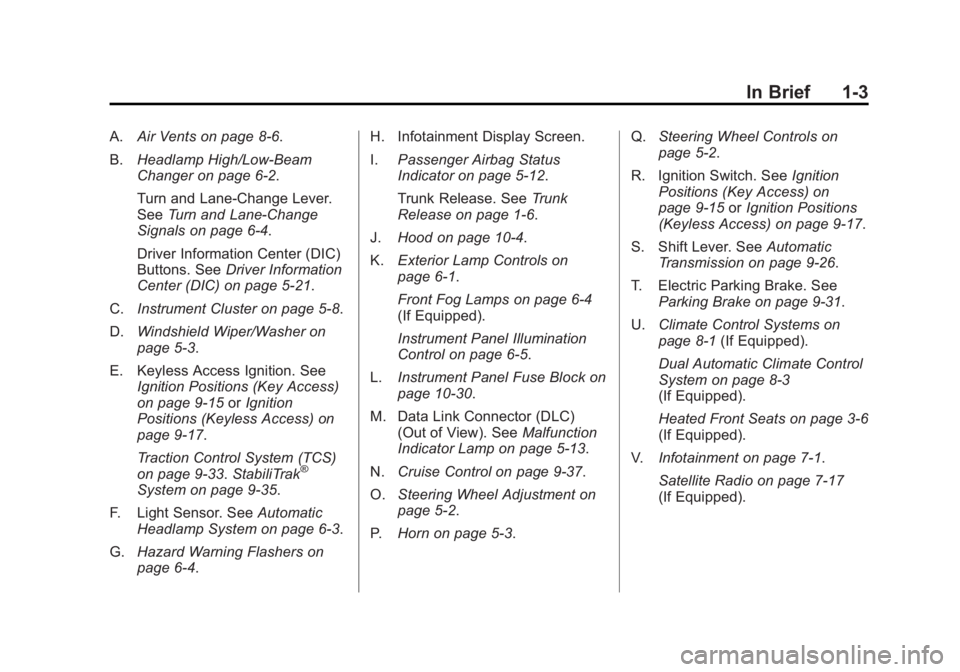
A.Air Vents on page 8‑6.
B. Headlamp High/Low-Beam
Changer on page 6‑2.
Turn and Lane-Change Lever.
See Turn and Lane-Change
Signals on page 6‑4.
Driver Information Center (DIC)
Buttons. See Driver Information
Center (DIC) on page 5‑21.
C. Instrument Cluster on page 5‑8.
D. Windshield Wiper/Washer on
page 5‑3.
E. Keyless Access Ignition. See Ignition Positions (Key Access)
on page 9‑15 orIgnition
Positions (Keyless Access) on
page 9‑17.
Traction Control System (TCS)
on page 9‑33. StabiliTrak
®
System on page 9‑35.
F. Light Sensor. See Automatic
Headlamp System on page 6‑3.
G. Hazard Warning Flashers on
page 6‑4. H. Infotainment Display Screen.
I.
Passenger Airbag Status
Indicator on page 5‑12.
Trunk Release. See Trunk
Release on page 1‑6.
J. Hood on page 10‑4.
K. Exterior Lamp Controls on
page 6‑1.
Front Fog Lamps on page 6‑4
(If Equipped).
Instrument Panel Illumination
Control on page 6‑5.
L. Instrument Panel Fuse Block on
page 10‑30.
M. Data Link Connector (DLC) (Out of View). See Malfunction
Indicator Lamp on page 5‑13.
N. Cruise Control on page 9‑37.
O. Steering Wheel Adjustment on
page 5‑2.
P. Horn on page 5‑3. Q.
Steering Wheel Controls on
page 5‑2.
R. Ignition Switch. See Ignition
Positions (Key Access) on
page 9‑15 orIgnition Positions
(Keyless Access) on page 9‑17.
S. Shift Lever. See Automatic
Transmission on page 9‑26.
T. Electric Parking Brake. See Parking Brake on page 9‑31.
U. Climate Control Systems on
page 8‑1 (If Equipped).
Dual Automatic Climate Control
System on page 8‑3
(If Equipped).
Heated Front Seats on page 3‑6
(If Equipped).
V. Infotainment on page 7‑1.
Satellite Radio on page 7‑17
(If Equipped).
Page 19 of 388
Black plate (13,1)Buick Verano Owner Manual - 2012 - CRC - 1/10/12
In Brief 1-13
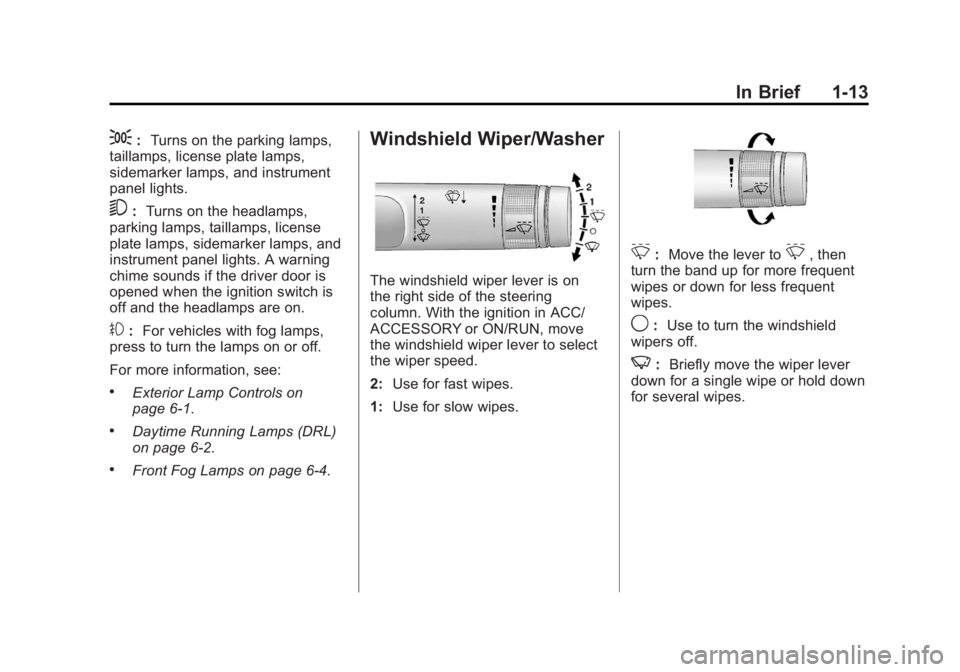
;:Turns on the parking lamps,
taillamps, license plate lamps,
sidemarker lamps, and instrument
panel lights.
5: Turns on the headlamps,
parking lamps, taillamps, license
plate lamps, sidemarker lamps, and
instrument panel lights. A warning
chime sounds if the driver door is
opened when the ignition switch is
off and the headlamps are on.
#: For vehicles with fog lamps,
press to turn the lamps on or off.
For more information, see:
.Exterior Lamp Controls on
page 6‑1.
.Daytime Running Lamps (DRL)
on page 6‑2.
.Front Fog Lamps on page 6‑4.
Windshield Wiper/Washer
The windshield wiper lever is on
the right side of the steering
column. With the ignition in ACC/
ACCESSORY or ON/RUN, move
the windshield wiper lever to select
the wiper speed.
2: Use for fast wipes.
1: Use for slow wipes.
3:Move the lever to3, then
turn the band up for more frequent
wipes or down for less frequent
wipes.
9: Use to turn the windshield
wipers off.
3: Briefly move the wiper lever
down for a single wipe or hold down
for several wipes.
Page 41 of 388
Black plate (11,1)Buick Verano Owner Manual - 2012 - CRC - 1/10/12
Keys, Doors, and Windows 2-11
Power Door Locks
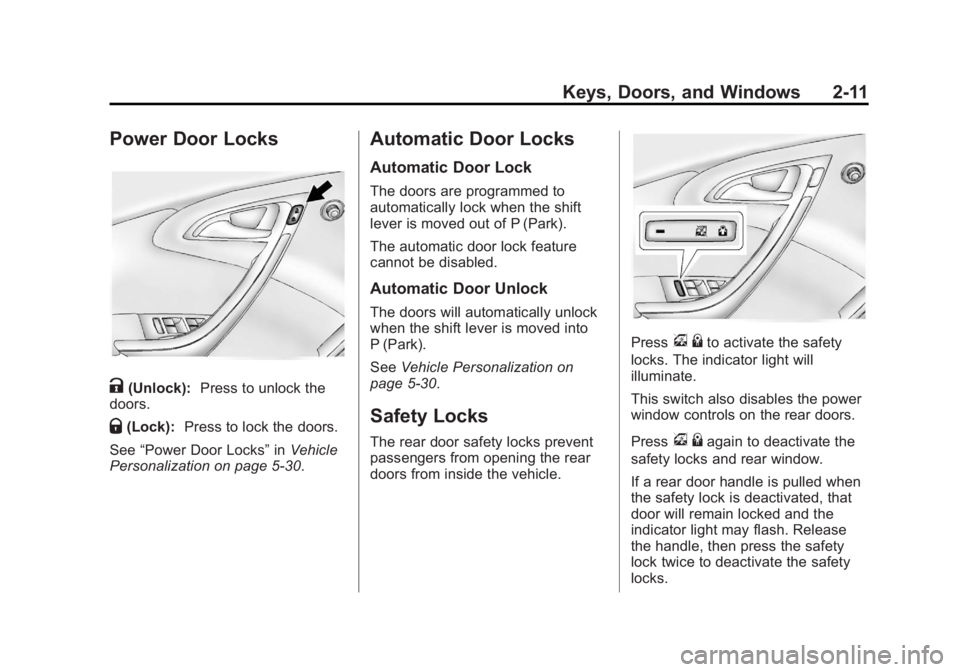
K(Unlock):Press to unlock the
doors.
Q(Lock): Press to lock the doors.
See “Power Door Locks” inVehicle
Personalization on page 5‑30.
Automatic Door Locks
Automatic Door Lock
The doors are programmed to
automatically lock when the shift
lever is moved out of P (Park).
The automatic door lock feature
cannot be disabled.
Automatic Door Unlock
The doors will automatically unlock
when the shift lever is moved into
P (Park).
See Vehicle Personalization on
page 5‑30.
Safety Locks
The rear door safety locks prevent
passengers from opening the rear
doors from inside the vehicle.
Pressv {to activate the safety
locks. The indicator light will
illuminate.
This switch also disables the power
window controls on the rear doors.
Press
v {again to deactivate the
safety locks and rear window.
If a rear door handle is pulled when
the safety lock is deactivated, that
door will remain locked and the
indicator light may flash. Release
the handle, then press the safety
lock twice to deactivate the safety
locks.
Page 46 of 388
Black plate (16,1)Buick Verano Owner Manual - 2012 - CRC - 1/10/12
2-16 Keys, Doors, and Windows
When trying to start the vehicle, the
security light comes on briefly when
the ignition is turned on.
If the engine does not start and the
security light stays on, there is a
problem with the system. Turn the
ignition off and try again.
If the RKE transmitter appears
to be undamaged, try another
transmitter. Or, you may try placing
the transmitter in the transmitter
pocket located in the center
console. See“Starting the Vehicle
with a Low Transmitter Battery”
under Remote Keyless Entry (RKE)
System Operation on page 2‑4.
If the engine does not start with
the other transmitter or when the
transmitter is in the pocket in the
center console, your vehicle needs
service. See your dealer who can
service the theft-deterrent system
and have a new transmitter
programmed to the vehicle.
Do not leave the key or device
that disarms or deactivates the
theft-deterrent system in the vehicle.Exterior Mirrors
Convex Mirrors
{WARNING
A convex mirror can make things,
like other vehicles, look farther
away than they really are. If you
cut too sharply into the right lane,
you could hit a vehicle on the
right. Check the inside mirror or
glance over your shoulder before
changing lanes.
The passenger side mirror is convex
shaped. A convex mirror's surface is
curved so more can be seen from
the driver seat.
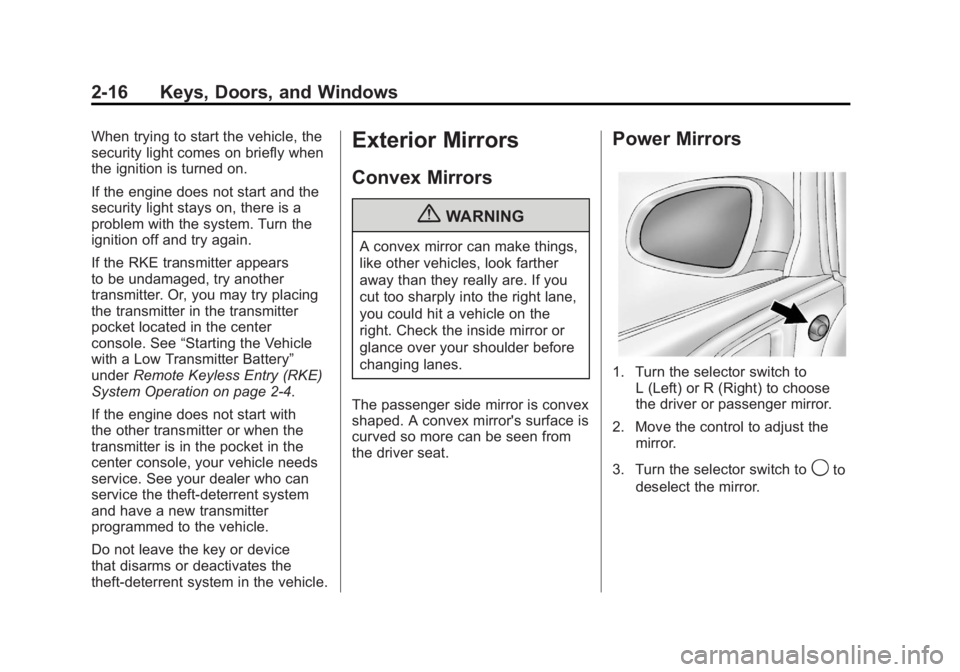
Power Mirrors
1. Turn the selector switch to L (Left) or R (Right) to choose
the driver or passenger mirror.
2. Move the control to adjust the mirror.
3. Turn the selector switch to
9to
deselect the mirror.
Page 49 of 388
Black plate (19,1)Buick Verano Owner Manual - 2012 - CRC - 1/10/12
Keys, Doors, and Windows 2-19
The switches work when the
ignition is in ON/RUN or ACC/
ACCESSORY, or in Retained
Accessory Power (RAP). See
Retained Accessory Power (RAP)
on page 9‑22.
Express Window Operation
Windows with an express-up or
down feature allow the front
windows to be lowered or raised
without holding the switch. Rear
windows only have express-down.
Pull a window switch up or push
it down all the way, release it, and
the window goes up or down
automatically. Stop the window by
pushing or pulling the switch.
Programming the Power
Windows
If the battery on the vehicle has
been recharged, disconnected, or is
not working, the windows with the
express-up feature will need to bereprogrammed for the feature to
work. Before reprogramming,
replace or recharge the vehicle's
battery.
To program each front window:
1. The ignition is in ACC/
ACCESSORY or ON/RUN,
or in RAP.
2. Press and hold the power window switch until the window
is fully open.
3. Pull the power window switch up until the window is fully closed.
4. Continue holding the switch up for approximately two seconds
after the window is completely
closed.
The window is now reprogrammed.
Repeat the process for the other
windows.
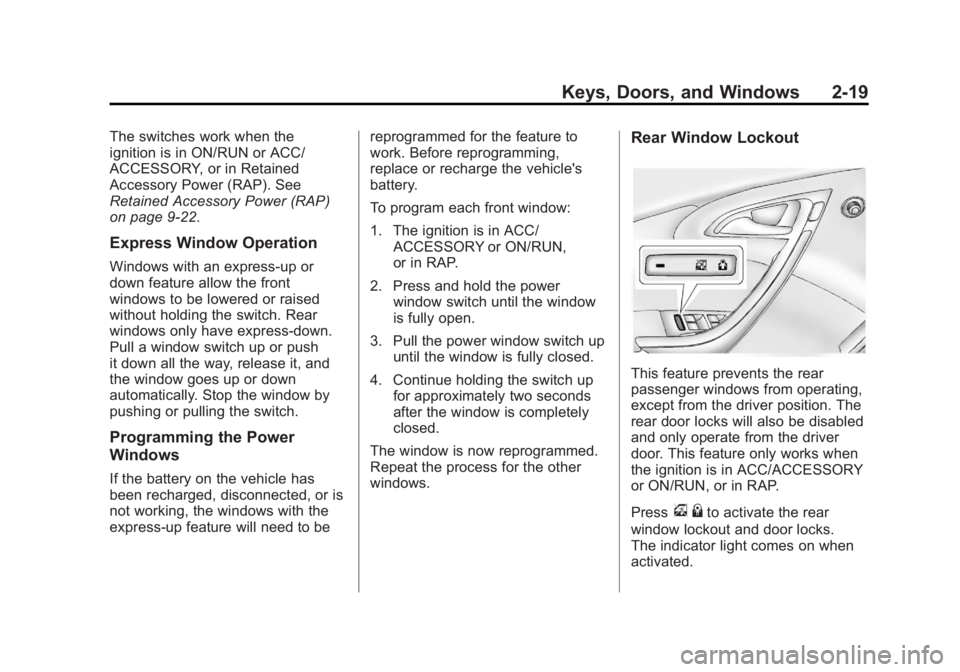
Rear Window Lockout
This feature prevents the rear
passenger windows from operating,
except from the driver position. The
rear door locks will also be disabled
and only operate from the driver
door. This feature only works when
the ignition is in ACC/ACCESSORY
or ON/RUN, or in RAP.
Press
v {to activate the rear
window lockout and door locks.
The indicator light comes on when
activated.
Page 50 of 388
Black plate (20,1)Buick Verano Owner Manual - 2012 - CRC - 1/10/12
2-20 Keys, Doors, and Windows
Pressv{to deactivate the
lockout.
If the indicator light flashes, the
feature may not be working properly.
Sun Visors
Pull the sun visor down to block
glare. Detach the sun visor from the
center mount to pivot to the side
window, or to extend along the rod,
if available.
Roof
Sunroof
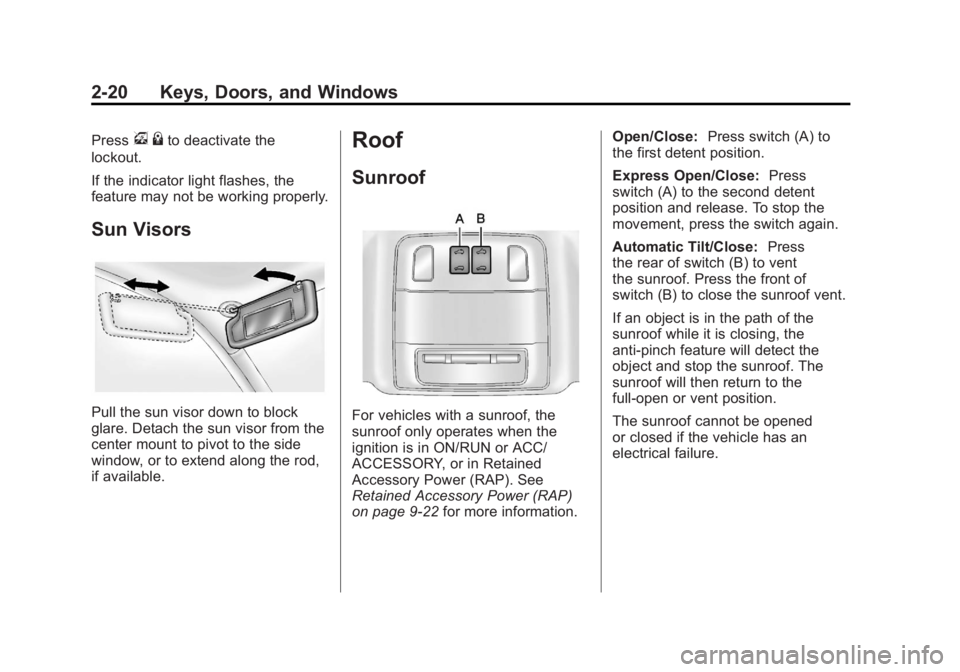
For vehicles with a sunroof, the
sunroof only operates when the
ignition is in ON/RUN or ACC/
ACCESSORY, or in Retained
Accessory Power (RAP). See
Retained Accessory Power (RAP)
on page 9‑22 for more information. Open/Close:
Press switch (A) to
the first detent position.
Express Open/Close: Press
switch (A) to the second detent
position and release. To stop the
movement, press the switch again.
Automatic Tilt/Close: Press
the rear of switch (B) to vent
the sunroof. Press the front of
switch (B) to close the sunroof vent.
If an object is in the path of the
sunroof while it is closing, the
anti-pinch feature will detect the
object and stop the sunroof. The
sunroof will then return to the
full-open or vent position.
The sunroof cannot be opened
or closed if the vehicle has an
electrical failure.
Page 146 of 388
Black plate (2,1)Buick Verano Owner Manual - 2012 - CRC - 1/10/12
6-2 Lighting
5(Headlamps):Turns the
headlamps on together with the
lamps listed below. A warning chime
sounds if the driver door is opened
when the ignition switch is off and
the headlamps are on.
.Parking Lamps
.Taillamps
.License Plate Lamps
.Instrument Panel Lights
.Sidemarker Lamps
#(Front Fog Lamps): For
vehicles with fog lamps, press to
turn the lamps on or off.
See Front Fog Lamps on page 6‑4.
When the lights are on,
;will be
lit. See Lamps On Reminder on
page 5‑21.
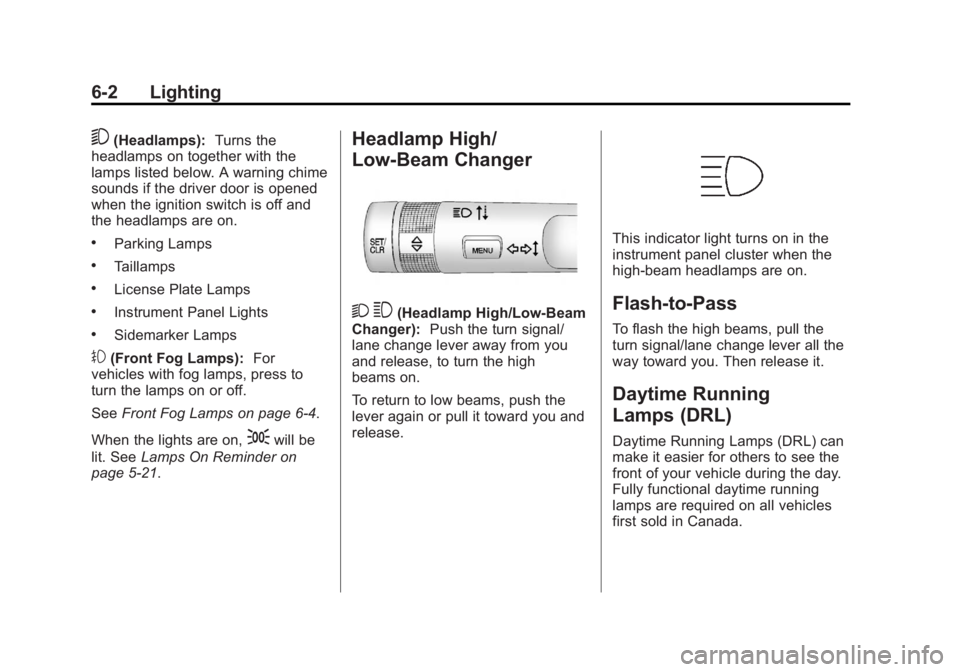
Headlamp High/
Low-Beam Changer
2 3(Headlamp High/Low-Beam
Changer): Push the turn signal/
lane change lever away from you
and release, to turn the high
beams on.
To return to low beams, push the
lever again or pull it toward you and
release.
This indicator light turns on in the
instrument panel cluster when the
high-beam headlamps are on.
Flash-to-Pass
To flash the high beams, pull the
turn signal/lane change lever all the
way toward you. Then release it.
Daytime Running
Lamps (DRL)
Daytime Running Lamps (DRL) can
make it easier for others to see the
front of your vehicle during the day.
Fully functional daytime running
lamps are required on all vehicles
first sold in Canada.
Page 159 of 388
Black plate (9,1)Buick Verano Owner Manual - 2012 - CRC - 1/10/12
Infotainment System 7-9
Vehicle Settings
SeeVehicle Personalization on
page 5‑30 for more information.
Display Settings
Press the Config button on the
Home Page or the CONFIG button
on the faceplate, then select Display
Settings from the list.
The following options may display:
Dimming Mode: Press to change
the screen background. The
Automatic setting adjusts the
screen background automatically
depending on the exterior lighting
conditions.
To change the overall brightness
setting for the display, use the
vehicle interior lighting instrument
panel illumination control.
Languages
The vehicle supports English,
French (Canadian), and Spanish.
The default language is English. Turn the TUNE/MENU knob to
highlight the language. Press
TUNE/MENU to change the display
language.
English and Metric Unit
Conversion
To change the display units between
English and metric units, see
Driver
Information Center (DIC) on
page 5‑21.
Operation
Controls
The infotainment system is
operated by using the pushbuttons,
multifunction knobs, menus shown
on the display, and steering wheel
controls, if equipped.
Turning the System On or Off
O/VOL (Power/Volume): Press to
turn the system on and off. Automatic Switch-Off
If the infotainment system has
been turned on after the ignition is
turned off, the system will turn off
automatically after 10 minutes.
Volume Control
O/VOL (Power/Volume):
Turn to
adjust the volume.
V/8(Phone/Mute): Press to
mute the infotainment system.
Press
V/8again, or turn
the
O/VOL knob to cancel mute.
Menu System (Radio with CD)
The Menu system for the uplevel
infotainment system appears
on the display screen.
Controls
The TUNE/MENU knob
and
/BACK are used to
navigate the menu system.
Page 218 of 388
Black plate (16,1)Buick Verano Owner Manual - 2012 - CRC - 1/10/12
9-16 Driving and Operating
4. Set the parking brake. SeeParking Brake on page 9‑31.
{WARNING
Turning off the vehicle while
moving may cause loss of power
assist in the brake and steering
systems and disable the airbags.
While driving, only shut the
vehicle off in an emergency.
If the vehicle cannot be pulled
over, and must be shut off while
driving, turn the ignition to ACC/
ACCESSORY.
The ignition switch can bind in the
LOCK/OFF position with the wheels
turned off center. If this happens,
move the steering wheel from right
to left while turning the key to ACC/
ACCESSORY. If this does not work,
then the vehicle needs service. B (ACC/ACCESSORY):
This
position provides power to some of
the electrical accessories. It unlocks
the steering wheel and ignition.
To move the key from ACC/
ACCESSORY to LOCK/OFF,
push in the key and then turn it to
LOCK/OFF.
C (ON/RUN): The ignition switch
stays in this position when the
engine is running. This position
can be used to operate the
electrical accessories, including the
ventilation fan and 12-volt power
outlet, as well as to display some
warning and indicator lights. This
position can also be used for
service and diagnostics, and to
verify the proper operation of the
malfunction indicator lamp as may
be required for emission inspection
purposes. The transmission is also
unlocked in this position on
automatic transmission vehicles. The battery could be drained if the
key is left in the ACC/ACCESSORY
or ON/RUN position with the engine
off. The vehicle might not start if the
battery is allowed to drain for an
extended period of time.
D (START):
This position starts the
engine. When the engine starts,
release the key. The ignition switch
will return to ON/RUN for normal
driving.
A warning tone sounds when the
driver door is opened if the ignition
is still in ACC/ACCESSORY and the
key is in the ignition.
If the ignition becomes difficult to
turn, see Keys on page 2‑2 for more
information.
Page 220 of 388
Black plate (18,1)Buick Verano Owner Manual - 2012 - CRC - 1/10/12
9-18 Driving and Operating
The transmitter must be in the
vehicle for the system to operate.
If the pushbutton start is not
working, the vehicle may be near a
strong radio antenna signal causing
interference to the keyless access
system. SeeRemote Keyless Entry
(RKE) System Operation on
page 2‑4 for more information.
To shift out of P (Park), the vehicle
must be in ACC/ACCESSORY or
ON/RUN and the brake pedal must
be applied.
Stopping the Engine/OFF (No
Indicator Lights): When the
vehicle is stopped, press the engine
START/STOP button once to turn
the engine off.
If the vehicle is in P (Park), the
ignition will turn off, and Retained
Accessory Power (RAP) will remain
active. See Retained Accessory
Power (RAP) on page 9‑22 for more
information. If the vehicle is not in P (Park),
the ignition will return to ACC/
ACCESSORY and the Driver
Information Center (DIC) will display
a message. See
Transmission
Messages on page 5‑30 for more
information. When the vehicle is
shifted into P (Park), the ignition
system will switch to OFF.
Do not turn the engine off when the
vehicle is moving. This will cause a
loss of power assist in the brake
and steering systems and disable
the airbags.
If the vehicle must be shut off in an
emergency:
1. Brake using a firm and steady pressure. Do not pump the
brakes repeatedly. This may
deplete power assist, requiring
increased brake pedal force.
2. Shift the vehicle to N (Neutral). This can be done while the
vehicle is moving. After shifting
to N (Neutral), firmly apply the
brakes and steer the vehicle to a
safe location. 3. Come to a complete stop, shift
to P (Park), and turn the ignition
to Stopping the Engine/OFF.
On vehicles with an automatic
transmission, the shift lever must
be in P (Park) to turn the ignition
switch to the Stopping the
Engine/OFF position.
4. Set the parking brake. See Parking Brake on page 9‑31.
{WARNING
Turning off the vehicle while
moving may cause loss of power
assist in the brake and steering
systems and disable the airbags.
While driving, only shut the
vehicle off in an emergency.
If the vehicle cannot be pulled over,
and must be shut off while driving,
switch the ignition to ACC/
ACCESSORY.