climate control CADILLAC ATS 2013 1.G User Guide
[x] Cancel search | Manufacturer: CADILLAC, Model Year: 2013, Model line: ATS, Model: CADILLAC ATS 2013 1.GPages: 450, PDF Size: 6.98 MB
Page 50 of 450
Black plate (20,1)Cadillac ATS Owner Manual - 2013 - CRC - 10/5/12
2-20 Keys, Doors, and Windows
Folding Mirrors
Manual Folding Mirrors
The mirrors can be folded inward
toward the vehicle to prevent
damage when going through an
automatic car wash. Push the mirror
outward to return it to the original
position.
Heated Mirrors
=
(Rear Window Defogger):
Press to heat the mirrors.
See Dual Automatic Climate Control
System (Base) on page 8‑1 orDual
Automatic Climate Control System
(Uplevel) on page 8‑5.
Interior Mirrors
Manual Rearview Mirror
To avoid the glare of the headlamps
from behind, push the tab forward
for daytime and pull it rearward for
nighttime use.
Automatic Dimming
Rearview Mirror
If equipped, the automatic dimming
rearview mirror will automatically
reduce the glare of the headlamps
from behind. The dimming feature
comes on each time the vehicle is
started.
Cleaning the Mirror
Do not spray glass cleaner directly
on the mirror. Use a soft towel
dampened with water.
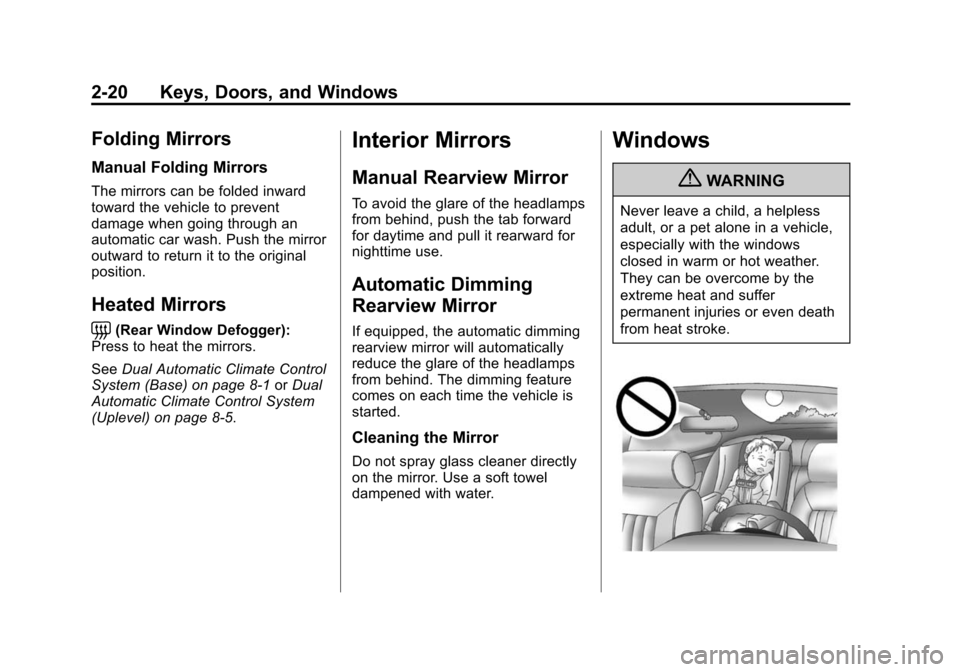
Windows
{WARNING
Never leave a child, a helpless
adult, or a pet alone in a vehicle,
especially with the windows
closed in warm or hot weather.
They can be overcome by the
extreme heat and suffer
permanent injuries or even death
from heat stroke.
Page 62 of 450
Black plate (8,1)Cadillac ATS Owner Manual - 2013 - CRC - 10/5/12
3-8 Seats and Restraints
If something has blocked the driver
seat while recalling the exit position,
the recall may stop. Remove the
obstruction; then press and hold the
appropriate manual control for the
exit feature not recalling for
two seconds. Try recalling the exit
position again. If the exit position is
still not recalling, see your dealer for
service.
Heated Front Seats
{WARNING
If you cannot feel temperature
change or pain to the skin, the
seat heater may cause burns. To
reduce the risk of burns, people
with such a condition should use
care when using the seat heater,
especially for long periods of
time. Do not place anything on
the seat that insulates against
heat, such as a blanket, cushion,
cover, or similar item. This may(Continued)
WARNING (Continued)
cause the seat heater to
overheat. An overheated seat
heater may cause a burn or may
damage the seat.
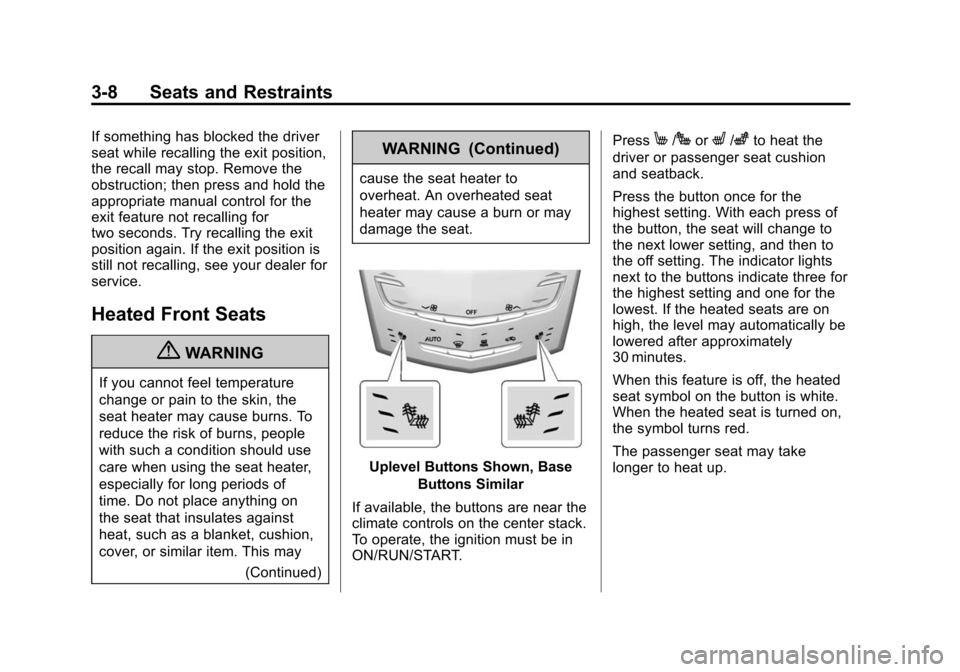
Uplevel Buttons Shown, BaseButtons Similar
If available, the buttons are near the
climate controls on the center stack.
To operate, the ignition must be in
ON/RUN/START. Press
M/JorL/zto heat the
driver or passenger seat cushion
and seatback.
Press the button once for the
highest setting. With each press of
the button, the seat will change to
the next lower setting, and then to
the off setting. The indicator lights
next to the buttons indicate three for
the highest setting and one for the
lowest. If the heated seats are on
high, the level may automatically be
lowered after approximately
30 minutes.
When this feature is off, the heated
seat symbol on the button is white.
When the heated seat is turned on,
the symbol turns red.
The passenger seat may take
longer to heat up.
Page 107 of 450
Black plate (1,1)Cadillac ATS Owner Manual - 2013 - CRC - 10/5/12
Storage 4-1
Storage
Storage Compartments
Instrument Panel Storage . . . . . 4-1
Glove Box . . . . . . . . . . . . . . . . . . . . 4-2
Armrest Storage . . . . . . . . . . . . . . 4-2
Additional Storage Features
Cargo Tie-Downs . . . . . . . . . . . . . 4-3
Roof Rack System
Roof Rack System . . . . . . . . . . . . 4-3
Storage
Compartments
Instrument Panel Storage
To access, push on the cover and
release. There is an accessory
power outlet inside. SeePower
Outlets on page 5‑7.
If equipped, there may also be
storage behind the climate control
system. Touch the bottom of the
climate control system panel until
the door automatically starts to
open. The storage area may contain
a USB port, SD card reader and
auxiliary jack. See USB Port on
page 7‑16, SD Card Reader on
page 7‑19, and Auxiliary Jack on
page 7‑20 for the base model radio
and the infotainment manual for the
uplevel model radio.
Page 108 of 450
Black plate (2,1)Cadillac ATS Owner Manual - 2013 - CRC - 10/5/12
4-2 Storage
Keep the storage area closed when
not in use.
Touch the bottom of the climate
control system panel again until the
door automatically starts to close.
Glove Box
To open the glove box, lift up on the
lever. Use the key to lock and
unlock it. The glove box may have a
compact disc player inside.
Armrest Storage
Front Armrest
Push the button and lift to access
the storage area. The storage area
may contain a USB port, SD card
reader and auxiliary jack. See USB
Port on page 7‑16, SD Card Reader
on page 7‑19, and Auxiliary Jack on
page 7‑20 for the base model radio
and the infotainment manual for the
uplevel model radio.
Rear Armrest
Pull the armrest down and lift the
cover to access the storage area.
Page 117 of 450
Black plate (7,1)Cadillac ATS Owner Manual - 2013 - CRC - 10/5/12
Instruments and Controls 5-7
Power Outlets
The accessory power outlets can be
used to plug in electrical equipment,
such as a cell phone or MP3 player.
The vehicle has two accessory
power outlets:
.Inside the front storage bin
below the climate control
system.
.On the rear of the center floor
console.
Lift the cover to access the
accessory power outlet. Certain accessory power plugs may
not be compatible with the
accessory power outlet and could
overload vehicle or adapter fuses.
If a problem is experienced, see
your dealer.
When adding electrical equipment,
be sure to follow the proper
installation instructions included with
the equipment. See
Add-On
Electrical Equipment on page 9‑75. Notice:
Hanging heavy
equipment from the power outlet
can cause damage not covered
by the vehicle warranty. The
power outlets are designed for
accessory power plugs only, such
as cell phone charge cords.
Always unplug electrical equipment
when not in use and do not plug in
equipment that exceeds the
maximum 20 amps rating.
Page 154 of 450
Black plate (44,1)Cadillac ATS Owner Manual - 2013 - CRC - 10/5/12
5-44 Instruments and Controls
CUE Infotainment System Audio
System Controls
To access the
personalization menu:
1. Press SETTINGS on the Homepage on the infotainment system
display.
2. Press Vehicle Settings.
3. Press the desired feature to display a list of available
options.
4. Press to select the desired feature setting.
5. Press the
0to return to the
previous menu.
Personalization Menus
The following list of menu items may
be available:
.Climate and Air Quality
.Collision/Detection Systems
.Comfort and Convenience
.Language
.Lighting
.Power Door Locks
.Remote Locking, Unlocking,
Starting
.Return to Factory Settings
Climate and Air Quality
Select the Climate and Air Quality
menu and the following may be
displayed:
.Auto Fan Max Speed
.Auto Defog
.Auto Rear Defog
Auto Fan Max Speed
This feature will set the maximum
auto fan speed.
Select Low, Medium, or High.
Auto Defog
This will turn auto defog on or off.
Only vehicles with the uplevel dual
automatic climate control system will
have this option.
Select Off or On. Auto Rear Defog
If equipped, this will turn auto rear
defog on or off. This feature will
automatically turn on the rear
window defogger when it is cold
outside.
Select Off or On.
Collision/Detection Systems
Select the Collision/Detection
Systems menu and the following will
be displayed (if equipped):
.Alert Type
.Auto Collision Preparation
.Park Assist
.Go Notifier
.Side Blind Zone Alert
Alert Type
This feature will set crash alerts to
beeps or seat vibrations. This
setting affects all crash alerts
including Forward Collision,
Page 207 of 450
Black plate (1,1)Cadillac ATS Owner Manual - 2013 - CRC - 10/5/12
Climate Controls 8-1
Climate Controls
Climate Control Systems
Dual Automatic Climate ControlSystem (Base) . . . . . . . . . . . . . . . 8-1
Dual Automatic Climate Control System (Uplevel) . . . . . . . . . . . . 8-5
Air Vents
Air Vents . . . . . . . . . . . . . . . . . . . . . 8-10
Maintenance
Passenger Compartment AirFilter . . . . . . . . . . . . . . . . . . . . . . . . 8-11
Service . . . . . . . . . . . . . . . . . . . . . . 8-11
Climate Control Systems
Dual Automatic Climate Control System (Base)
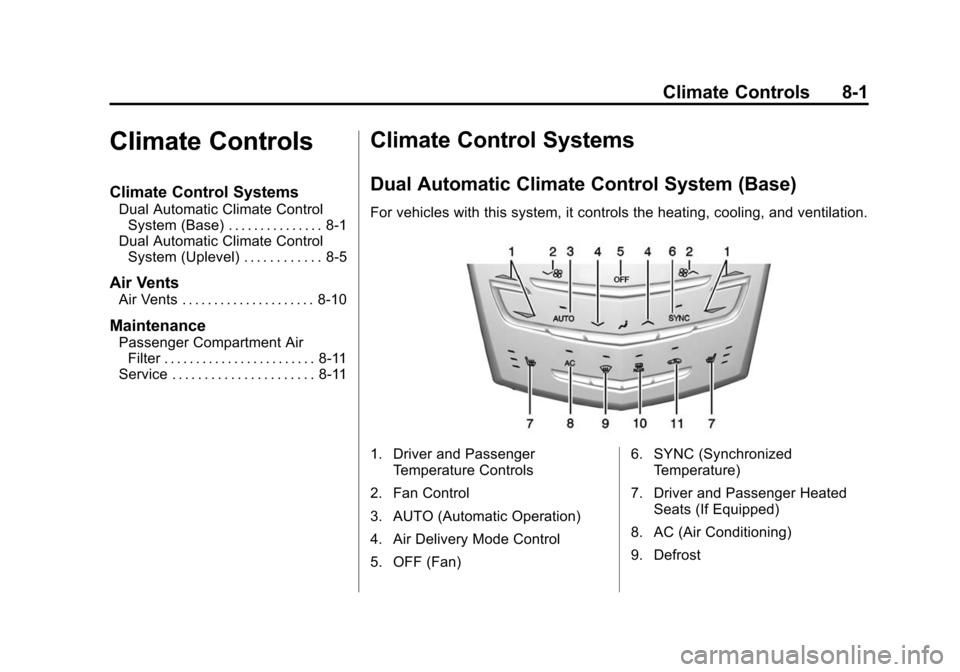
For vehicles with this system, it controls the heating, cooling, and ventilation.
1. Driver and Passenger
Temperature Controls
2. Fan Control
3. AUTO (Automatic Operation)
4. Air Delivery Mode Control
5. OFF (Fan) 6. SYNC (Synchronized
Temperature)
7. Driver and Passenger Heated Seats (If Equipped)
8. AC (Air Conditioning)
9. Defrost
Page 208 of 450
Black plate (2,1)Cadillac ATS Owner Manual - 2013 - CRC - 10/5/12
8-2 Climate Controls
10. Rear Window Defogger
11. Recirculation
Automatic Operation
The system automatically controls
the fan speed, air delivery, air
conditioning, and recirculation in
order to heat or cool the vehicle to
the desired temperature.
When the indicator light is on or
AUTO is displayed on the screen,
the system is in full automatic
operation. If the air delivery mode or
fan setting is manually adjusted, the
auto indicator turns off and the
display will show the selected
settings.
For automatic operation:
1. Press AUTO.
2. Set the temperature. Allow thesystem time to stabilize. Then
adjust the temperature as
needed for best comfort.
To improve fuel efficiency and to
cool the vehicle faster, recirculation
may be automatically selected in warm weather. The recirculation
light will not come on. Press
@to
select recirculation; press it again to
select outside air.
English units can be changed to
metric units through the instrument
cluster. See “Settings”under
Instrument Cluster on page 5‑9.
OFF (Fan): Press to turn the fan on
or off. The temperature control and
air delivery mode can still be
adjusted.
w/x(Driver and Passenger
Temperature Controls): The
temperature can be adjusted
separately for the driver and the
passenger. Press to increase or
decrease the temperature. Press
and hold to rapidly increase or
decrease the temperature.
SYNC (Synchronized
Temperature): Press SYNC to link
all climate zone settings to the
driver settings. The SYNC indicator
will be lit. Adjust the driver side
temperature control to change the
linked temperature. When the passenger settings are adjusted, the
temperatures are unlinked and the
SYNC indicator turns off.
Manual Operation
z 9or9 y(Fan Control):
Press the fan control buttons to
increase or decrease the fan speed.
Press and hold the buttons to adjust
speed more quickly. The fan speed
setting displays. Pressing either
button cancels automatic fan control
and the fan can be controlled
manually. Press AUTO to return to
automatic operation. To turn off the
fan, press OFF.
z N y(Air Delivery Mode
Control): Press the air delivery
mode buttons to change the
direction of the airflow. Selecting
any of the air delivery modes
cancels automatic air delivery
control and the direction of the
airflow can be controlled manually.
Press AUTO to return to automatic
operation.
Page 209 of 450

Black plate (3,1)Cadillac ATS Owner Manual - 2013 - CRC - 10/5/12
Climate Controls 8-3
To change the current mode, select
one of the following:
Y(Vent):Air is directed to the
instrument panel outlets.
\(Bi-Level): Air is divided
between the instrument panel
outlets and the floor outlets.
[(Floor): Air is directed to the
floor outlets, with some air to the
windshield and side windows.
-(Defog): Clears the windows of
fog or moisture. Air is directed to the
windshield, side windows and floor
outlets. Some air may go to the rear
floor outlets.
0(Defrost): Press the0button
to turn on or off. This clears the
windshield of fog or frost more
quickly. Air is directed to the
windshield and side windows, with
some air to the rear floor. A/C (Air Conditioning):
Press to
turn the air conditioning on or off.
If the fan is turned off or the outside
temperature falls below freezing, the
air conditioner will not run.
Press AUTO to return to automatic
operation and the air conditioner
runs as needed. When the indicator
light is on, the air conditioner runs
automatically to cool the air inside
the vehicle or to dry the air needed
to defog the windshield faster.
Automatic Air Recirculation:
When the AUTO indicator light is
on, the air is automatically
recirculated as needed to help
quickly cool the inside of the
vehicle.
@(Recirculation): Press to
alternate between recirculating air
inside the vehicle or pulling in
outside air. The indicator light on the
button is lit when recirculation mode
is active. This helps to quickly cool
the air inside the vehicle or prevent
outside air and odors from entering. Pressing this button cancels
automatic recirculation. Press AUTO
to return to automatic operation;
recirculation runs automatically as
needed.
Manual recirculation mode is not
available when in Defrost or Defog
modes.
Auto Defog:
The climate control
system may have a sensor to
automatically detect high humidity
inside the vehicle. When high
humidity is detected, the climate
control system may adjust to
outside air supply and turn on the
air conditioner. If the climate control
system does not detect possible
window fogging, it returns to normal
operation. To turn Auto Defog off or
on, see “Climate and Air Quality”
under Vehicle Personalization on
page 5‑43.
Page 210 of 450
Black plate (4,1)Cadillac ATS Owner Manual - 2013 - CRC - 10/5/12
8-4 Climate Controls
Rear Window Defogger
=REAR (Rear Window
Defogger): Press to turn the rear
window defogger on or off.
The rear window defogger turns
off automatically after about
10 minutes. If turned on again it
runs for about five minutes before
turning off. At higher vehicle
speeds, the rear window defogger
may stay on continuously.
The rear window defogger can be
set to automatic operation. See
“Climate and Air Quality” under
Vehicle Personalization on
page 5‑43. When Auto Rear Defog
is selected, the rear window
defogger turns on automatically
when the interior temperature is cold
and the outside temperature is
about 4°C (40°F) and below. The
auto rear defogger turns off
automatically after about
10 minutes. At higher vehicle
speeds, the rear window defogger
may stay on continuously. The upper region of gridlines on the
rear window are antenna lines and
are not intended to heat when the
defogger is activated.
The heated outside mirrors turn on
when the rear window defogger
button is on. They help to clear fog
or frost from the surface of the
mirrors.
Notice:
Do not try to clear frost
or other material from the inside
of the front windshield and rear
window with a razor blade or
anything else that is sharp. This
may damage the rear window
defogger grid and affect the
radio's ability to pick up stations
clearly. The repairs would not be
covered by the vehicle warranty. Driver and Passenger Heated
Seats (If Equipped):
PressMorL
to heat the driver or passenger seat.
SeeHeated Front Seats on
page 3‑8.
Remote Start Climate Control
Operation: For vehicles with the
remote vehicle start feature, the
climate control system may run
when the vehicle is started remotely.
The system uses the driver's
previous settings to heat or cool the
inside of the vehicle. See Remote
Vehicle Start on page 2‑9.
The rear window defogger turns on
if it is cold outside.