light CADILLAC ATS 2014 User Guide
[x] Cancel search | Manufacturer: CADILLAC, Model Year: 2014, Model line: ATS, Model: CADILLAC ATS 2014Pages: 434, PDF Size: 5.61 MB
Page 24 of 434
Black plate (18,1)Cadillac ATS Owner Manual (GMNA-Localizing-U.S./Canada/Mexico-
6014430) - 2014 - 2nd Edition - 8/23/13
1-18 In Brief
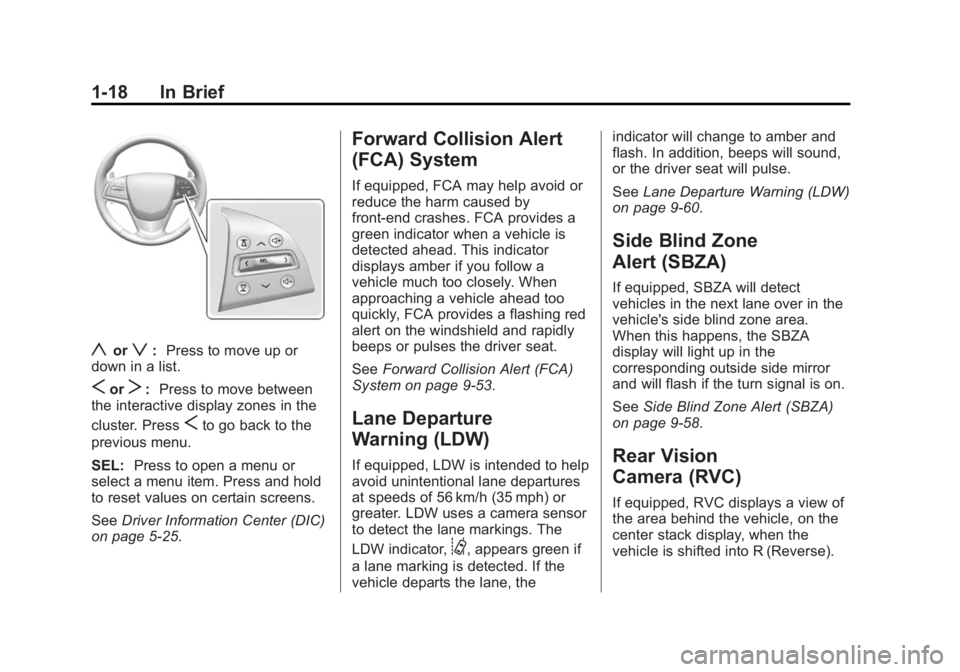
yorz:Press to move up or
down in a list.
SorT: Press to move between
the interactive display zones in the
cluster. Press
Sto go back to the
previous menu.
SEL: Press to open a menu or
select a menu item. Press and hold
to reset values on certain screens.
See Driver Information Center (DIC)
on page 5-25.
Forward Collision Alert
(FCA) System
If equipped, FCA may help avoid or
reduce the harm caused by
front-end crashes. FCA provides a
green indicator when a vehicle is
detected ahead. This indicator
displays amber if you follow a
vehicle much too closely. When
approaching a vehicle ahead too
quickly, FCA provides a flashing red
alert on the windshield and rapidly
beeps or pulses the driver seat.
See Forward Collision Alert (FCA)
System on page 9-53.
Lane Departure
Warning (LDW)
If equipped, LDW is intended to help
avoid unintentional lane departures
at speeds of 56 km/h (35 mph) or
greater. LDW uses a camera sensor
to detect the lane markings. The
LDW indicator,
@, appears green if
a lane marking is detected. If the
vehicle departs the lane, the indicator will change to amber and
flash. In addition, beeps will sound,
or the driver seat will pulse.
See
Lane Departure Warning (LDW)
on page 9-60.
Side Blind Zone
Alert (SBZA)
If equipped, SBZA will detect
vehicles in the next lane over in the
vehicle's side blind zone area.
When this happens, the SBZA
display will light up in the
corresponding outside side mirror
and will flash if the turn signal is on.
See Side Blind Zone Alert (SBZA)
on page 9-58.
Rear Vision
Camera (RVC)
If equipped, RVC displays a view of
the area behind the vehicle, on the
center stack display, when the
vehicle is shifted into R (Reverse).
Page 27 of 434
Black plate (21,1)Cadillac ATS Owner Manual (GMNA-Localizing-U.S./Canada/Mexico-
6014430) - 2014 - 2nd Edition - 8/23/13
In Brief 1-21
Performance and
Maintenance
Traction Control/
Electronic Stability
Control
The traction control system limits
wheel spin. The system is on when
the vehicle is started.
The StabiliTrak system assists with
directional control of the vehicle in
difficult driving conditions. The
system is on when the vehicle is
started.
.To turn off traction control, press
and release
gon the center
console.
iilluminates in the
instrument cluster and the
appropriate DIC message
displays. See Ride Control
System Messages on page 5-39.
.Press and releasegagain to
turn traction control back on.
.To turn off both Traction Control
and StabiliTrak, press and hold
guntilgandiilluminate in the
instrument cluster. The
appropriate DIC message
displays. See Ride Control
System Messages on page 5-39.
.Press and releasegagain to
turn on both systems.
See Traction Control/Electronic
Stability Control on page 9-33.
Tire Pressure Monitor
This vehicle may have a Tire
Pressure Monitor System (TPMS).
The low tire pressure warning light
alerts to a significant loss in
pressure of one of the vehicle's
tires. If the warning light comes on,
stop as soon as possible and inflate the tires to the recommended
pressure shown on the Tire and
Loading Information label. See
Vehicle Load Limits on page 9-11.
The warning light will remain on until
the tire pressure is corrected.
The low tire pressure warning light
may come on in cool weather when
the vehicle is first started, and then
turn off as the vehicle is driven. This
may be an early indicator that the
tire pressures are getting low and
the tires need to be inflated to the
proper pressure.
The TPMS does not replace normal
monthly tire maintenance. Maintain
the correct tire pressures.
See
Tire Pressure Monitor System
on page 10-49.
Engine Oil Life System
The engine oil life system calculates
engine oil life based on vehicle use
and displays the CHANGE ENGINE
OIL SOON message when it is time
to change the engine oil and filter.
Page 33 of 434
Black plate (3,1)Cadillac ATS Owner Manual (GMNA-Localizing-U.S./Canada/Mexico-
6014430) - 2014 - 2nd Edition - 8/23/13
Keys, Doors, and Windows 2-3
Remote Keyless Entry
(RKE) System Operation
The RKE transmitter functions may
work up to 60 m (197 ft) away from
the vehicle.
Keep in mind that other conditions,
such as those previously stated, can
impact the performance of the
transmitter.
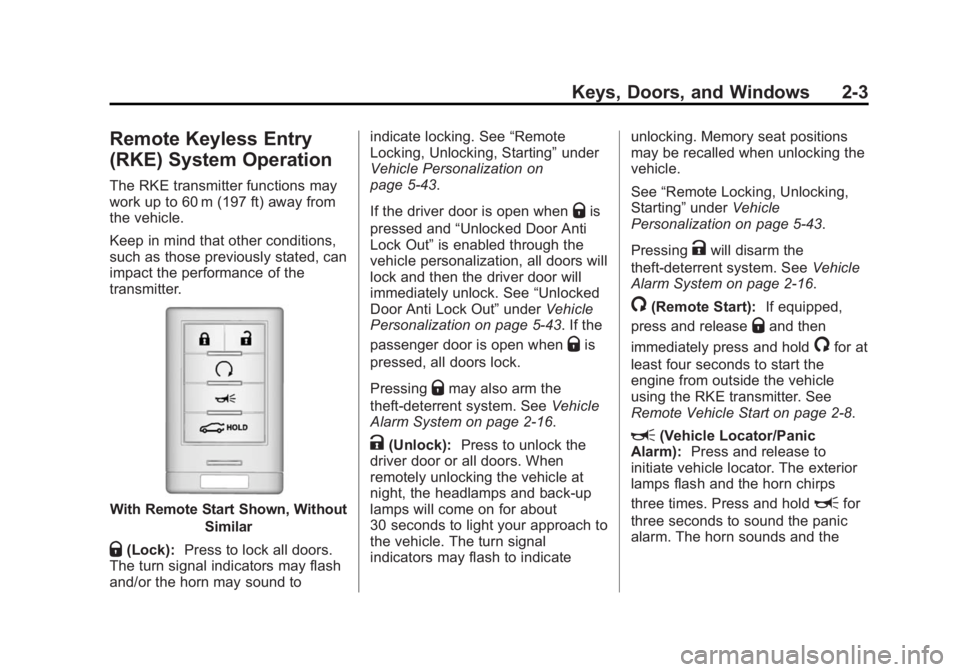
With Remote Start Shown, WithoutSimilar
Q(Lock):Press to lock all doors.
The turn signal indicators may flash
and/or the horn may sound to indicate locking. See
“Remote
Locking, Unlocking, Starting” under
Vehicle Personalization on
page 5-43.
If the driver door is open when
Qis
pressed and “Unlocked Door Anti
Lock Out” is enabled through the
vehicle personalization, all doors will
lock and then the driver door will
immediately unlock. See “Unlocked
Door Anti Lock Out” underVehicle
Personalization on page 5-43. If the
passenger door is open when
Qis
pressed, all doors lock.
Pressing
Qmay also arm the
theft-deterrent system. See Vehicle
Alarm System on page 2-16.
K(Unlock): Press to unlock the
driver door or all doors. When
remotely unlocking the vehicle at
night, the headlamps and back-up
lamps will come on for about
30 seconds to light your approach to
the vehicle. The turn signal
indicators may flash to indicate unlocking. Memory seat positions
may be recalled when unlocking the
vehicle.
See
“Remote Locking, Unlocking,
Starting” underVehicle
Personalization on page 5-43.
Pressing
Kwill disarm the
theft-deterrent system. See Vehicle
Alarm System on page 2-16.
/(Remote Start): If equipped,
press and release
Qand then
immediately press and hold
/for at
least four seconds to start the
engine from outside the vehicle
using the RKE transmitter. See
Remote Vehicle Start on page 2-8.
L(Vehicle Locator/Panic
Alarm): Press and release to
initiate vehicle locator. The exterior
lamps flash and the horn chirps
three times. Press and hold
Lfor
three seconds to sound the panic
alarm. The horn sounds and the
Page 39 of 434
Black plate (9,1)Cadillac ATS Owner Manual (GMNA-Localizing-U.S./Canada/Mexico-
6014430) - 2014 - 2nd Edition - 8/23/13
Keys, Doors, and Windows 2-9
/(Remote Vehicle Start):This
button will be on the RKE
transmitter if the vehicle has remote
start.
The climate control system will use
the previous settings during a
remote start. The rear window
defogger may come on during
remote start based on cold ambient
conditions. The rear defog indicator
light does not come on during
remote start.
If the vehicle has heated seats, they
may come on during a remote start.
See Heated Front Seats on
page 3-8.
Laws in some local communities
may restrict the use of remote
starters. For example, some laws
may require a person using remote
start to have the vehicle in view.
Check local regulations for any
requirements.
If your vehicle is low on fuel, do not
use the remote start feature. The
vehicle may run out of fuel. The RKE transmitter range may be
less while the vehicle is running.
Other conditions can affect the
performance of the transmitter. See
Remote Keyless Entry (RKE)
System on page 2-2.
Starting the Engine Using Remote
Start
1. Press and release
Qon the
RKE transmitter.
2. Immediately press and hold
/
for at least four seconds or until
the turn signal lamps flash. This
confirms the request to remote
start the vehicle has been
received. If the vehicle's lamps
are not visible, press and hold
/for at least four seconds.
During the remote start, the
doors will be locked and the
parking lamps will remain on as
long as the engine is running. The engine will shut off after
10 minutes unless a time
extension is done or the ignition
is put in ON/RUN/START.
3. Press the brake pedal and select the ON/RUN/START ignition
mode to drive the vehicle.
Extending Engine Run Time
The engine run time can also be
extended by another 10 minutes,
if during the first 10 minutes
Steps 1–2 are repeated while the
engine is still running. This provides
a total of 20 minutes.
The remote start can only be
extended once.
A maximum of two remote starts,
or a remote start with an extension,
are allowed between ignition cycles.
The vehicle's ignition must be
changed to ON/RUN/START and
then back to OFF before the remote
start procedure can be used again.
Page 42 of 434
Black plate (12,1)Cadillac ATS Owner Manual (GMNA-Localizing-U.S./Canada/Mexico-
6014430) - 2014 - 2nd Edition - 8/23/13
2-12 Keys, Doors, and Windows
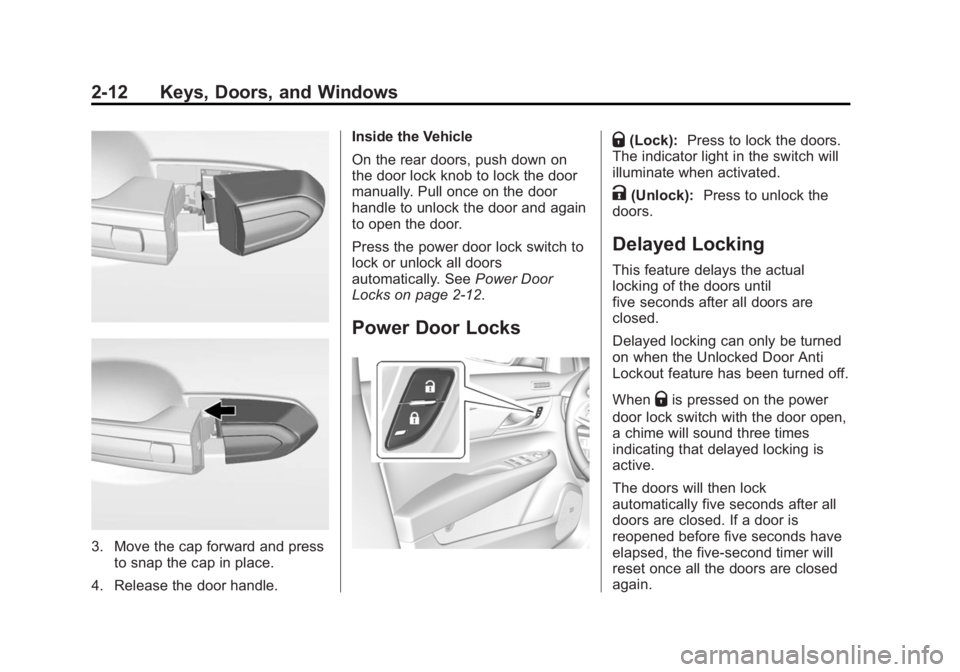
3. Move the cap forward and pressto snap the cap in place.
4. Release the door handle. Inside the Vehicle
On the rear doors, push down on
the door lock knob to lock the door
manually. Pull once on the door
handle to unlock the door and again
to open the door.
Press the power door lock switch to
lock or unlock all doors
automatically. See
Power Door
Locks on page 2-12.
Power Door Locks
Q(Lock): Press to lock the doors.
The indicator light in the switch will
illuminate when activated.
K(Unlock): Press to unlock the
doors.
Delayed Locking
This feature delays the actual
locking of the doors until
five seconds after all doors are
closed.
Delayed locking can only be turned
on when the Unlocked Door Anti
Lockout feature has been turned off.
When
Qis pressed on the power
door lock switch with the door open,
a chime will sound three times
indicating that delayed locking is
active.
The doors will then lock
automatically five seconds after all
doors are closed. If a door is
reopened before five seconds have
elapsed, the five-second timer will
reset once all the doors are closed
again.
Page 44 of 434

Black plate (14,1)Cadillac ATS Owner Manual (GMNA-Localizing-U.S./Canada/Mexico-
6014430) - 2014 - 2nd Edition - 8/23/13
2-14 Keys, Doors, and Windows
Safety Locks
The rear door safety locks prevent
passengers from opening the rear
doors from inside the vehicle.
Press
v{to activate the safety
locks on the rear doors. The
indicator light in the switch will
illuminate when activated. The rear door power windows are
also disabled. See
Power Windows
on page 2-22.
Press
v {again to deactivate the
lockout switch.
If an inside rear door handle is
being pulled at the same time the
safety lock is deactivated, only that
door will remain locked and the
indicator light may flash. Release
the handle, then press the safety
lock twice to deactivate the safety
locks.
Doors
Trunk
{Warning
Exhaust gases can enter the
vehicle if it is driven with the
liftgate or trunk/hatch open,
or with any objects that pass
through the seal between the
body and the trunk/hatch or
liftgate. Engine exhaust contains
carbon monoxide (CO) which
cannot be seen or smelled. It can
cause unconsciousness and even
death.
If the vehicle must be driven with
the liftgate or trunk/hatch open:
.Close all of the windows.
.Fully open the air outlets on
or under the instrument
panel.
(Continued)
Page 46 of 434
Black plate (16,1)Cadillac ATS Owner Manual (GMNA-Localizing-U.S./Canada/Mexico-
6014430) - 2014 - 2nd Edition - 8/23/13
2-16 Keys, Doors, and Windows
2. Reach inward through theopening to locate the emergency
trunk release handle.
3. Pull the release handle toward the front of the vehicle to open
the trunk.
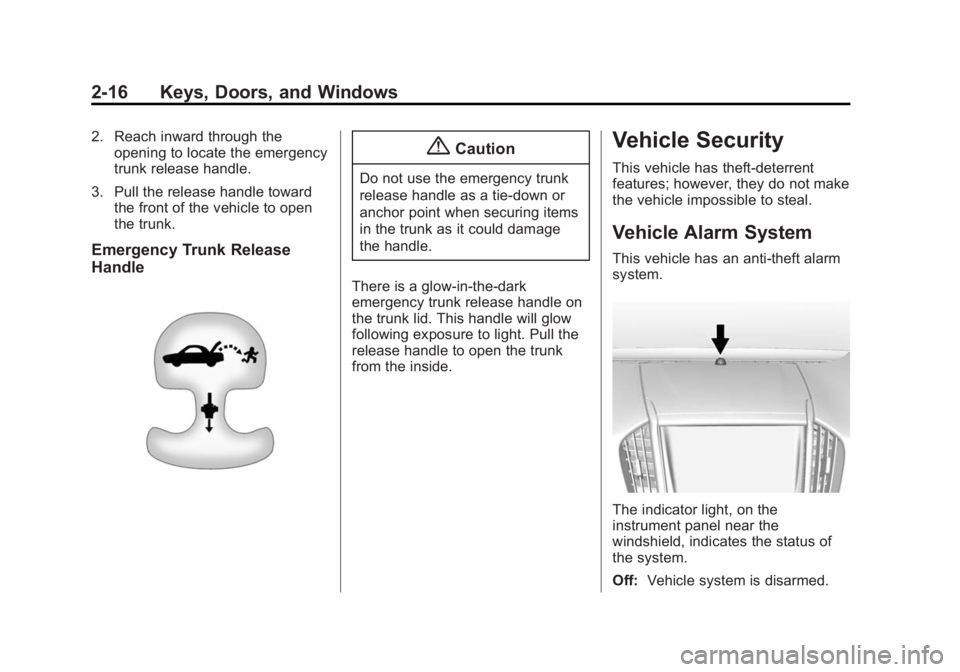
Emergency Trunk Release
Handle
{Caution
Do not use the emergency trunk
release handle as a tie-down or
anchor point when securing items
in the trunk as it could damage
the handle.
There is a glow-in-the-dark
emergency trunk release handle on
the trunk lid. This handle will glow
following exposure to light. Pull the
release handle to open the trunk
from the inside.
Vehicle Security
This vehicle has theft-deterrent
features; however, they do not make
the vehicle impossible to steal.
Vehicle Alarm System
This vehicle has an anti-theft alarm
system.
The indicator light, on the
instrument panel near the
windshield, indicates the status of
the system.
Off: Vehicle system is disarmed.
Page 47 of 434

Black plate (17,1)Cadillac ATS Owner Manual (GMNA-Localizing-U.S./Canada/Mexico-
6014430) - 2014 - 2nd Edition - 8/23/13
Keys, Doors, and Windows 2-17
On Solid:Vehicle is secured
during the delay to arm the system.
Fast Flash: Vehicle is unsecured.
A door, the hood, or the trunk
is open.
Slow Flash: Alarm system is
armed.
Arming the Alarm System
1. Turn off the vehicle.
2. Lock the vehicle in one of three ways:
.Use the RKE transmitter.
.Use the Keyless Access
system.
.With a door open, pressQ
on the interior of the door.
3. After 30 seconds the alarm system will arm, and the
indicator light will begin to slowly
flash indicating the alarm system
is operating. Pressing
Qon the
RKE transmitter a second time will bypass the 30-second delay
and immediately arm the alarm
system.
The vehicle alarm system will not
arm if the doors are locked with
the key.
If the driver door is opened without
first unlocking with the RKE
transmitter, the horn will chirp and
the lights will flash to indicate
pre-alarm. If the vehicle is not
started, or the door is not unlocked
by pressing
Kon the RKE
transmitter during the 10-second
pre-alarm, the alarm will be
activated.
The alarm will also be activated if a
passenger door, the trunk, or the
hood is opened without first
disarming the system. When the
alarm is activated, the turn signals
flash and the horn sounds for about
30-seconds. the alarm system will
then re-arm to monitor for the next
unauthorized event.
Disarming the Alarm System
To disarm the alarm system or turn
off the alarm if it has been activated,
do one of the following:
.PressKon the RKE transmitter.
.Unlock the vehicle using the
Keyless Access system.
.Start the vehicle.
To avoid setting off the alarm by
accident:
.Lock the vehicle after all
occupants have left the vehicle
and all doors are closed.
.Always unlock a door with the
RKE transmitter or use the
Keyless Access system.
Unlocking the driver door with the
key will not disarm the system or
turn off the alarm.
Page 48 of 434
Black plate (18,1)Cadillac ATS Owner Manual (GMNA-Localizing-U.S./Canada/Mexico-
6014430) - 2014 - 2nd Edition - 8/23/13
2-18 Keys, Doors, and Windows
How to Detect a Tamper
Condition
IfKis pressed on the transmitter
and the horn chirps three times, a
previous alarm occurred while the
system was armed.
If the alarm has been activated, a
message will appear on the DIC.
See Security Messages on
page 5-40.
Power Sounder and Inclination
Sensor
In addition to the standard
theft-deterrent system features, this
system may also have a power
sounder and inclination sensor.
The power sounder provides an
audible alarm which is distinct from
the vehicle’ s horn. It has its own
power source, and can sound an
alarm if the vehicle’s battery is
compromised. The inclination sensor can set off
the alarm if it senses movement of
the vehicle, such as a change in
vehicle orientation.
Immobilizer
See
Radio Frequency Statement on
page 13-15.
Immobilizer Operation
This vehicle has a passive
theft-deterrent system.
The system does not have to be
manually armed or disarmed.
The vehicle is automatically
immobilized when the vehicle is
turned off.
The immobilization system is
disarmed when the pushbutton start
is activated to enter the ACC/
ACCESSORY mode or the ON/
RUN/START mode and a valid
transmitter is present in the vehicle.
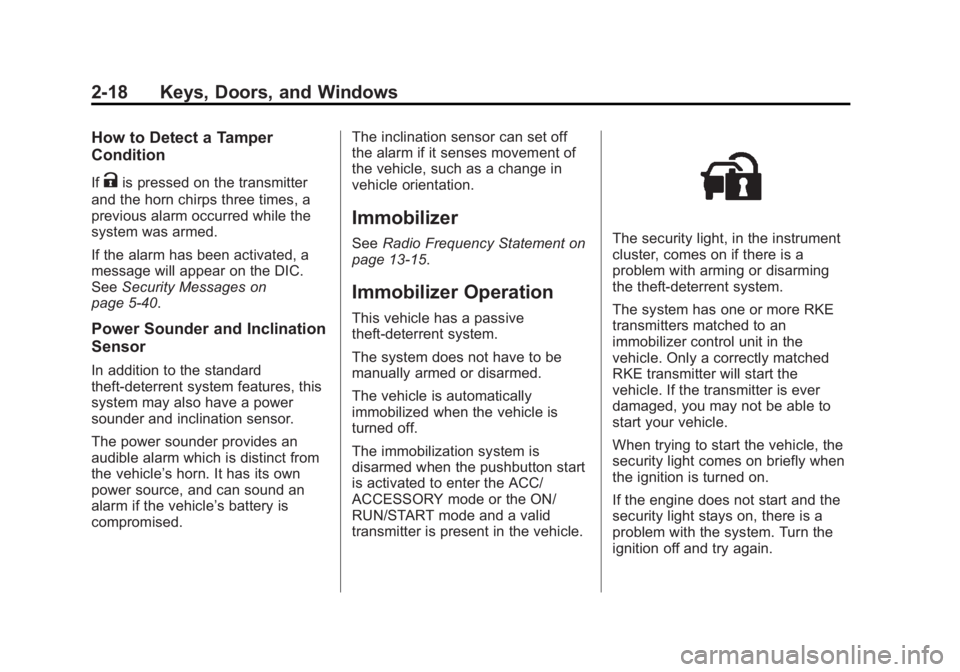
The security light, in the instrument
cluster, comes on if there is a
problem with arming or disarming
the theft-deterrent system.
The system has one or more RKE
transmitters matched to an
immobilizer control unit in the
vehicle. Only a correctly matched
RKE transmitter will start the
vehicle. If the transmitter is ever
damaged, you may not be able to
start your vehicle.
When trying to start the vehicle, the
security light comes on briefly when
the ignition is turned on.
If the engine does not start and the
security light stays on, there is a
problem with the system. Turn the
ignition off and try again.
Page 53 of 434
Black plate (23,1)Cadillac ATS Owner Manual (GMNA-Localizing-U.S./Canada/Mexico-
6014430) - 2014 - 2nd Edition - 8/23/13
Keys, Doors, and Windows 2-23
Express Window Anti-Pinch
Override
{Warning
If express override is activated,
the window will not reverse
automatically. You or others could
be injured and the window could
be damaged. Before you use
express override, make sure that
all people and obstructions are
clear of the window path.
The anti-pinch feature can be
overridden when the ignition is in
ON/RUN/START. Hold the window
switch all the way up to the second
position. The window will rise for as
long as the switch is held. Once the
switch is released, the express
mode is reactivated.
In this mode, the window can close
on an object in its path. Use care
when using the override mode.
Programming the Power
Windows
If the vehicle battery has been
recharged or disconnected, or is not
working, the front power windows
may need to be reprogrammed for
the express-up feature to work.
Before reprogramming, replace or
recharge the vehicle battery.
To program:
1. With the ignition in ON/RUN/ START or ACC/ACCESSORY,
or when RAP is active, close all
doors.
2. Press down the power window switch until the window is
fully open.
3. Pull the power window switch up until the window is fully closed.
4. Continue holding the switch up for approximately two seconds
after the window is completely
closed. The window is now reprogrammed.
Repeat the process for the other
windows.
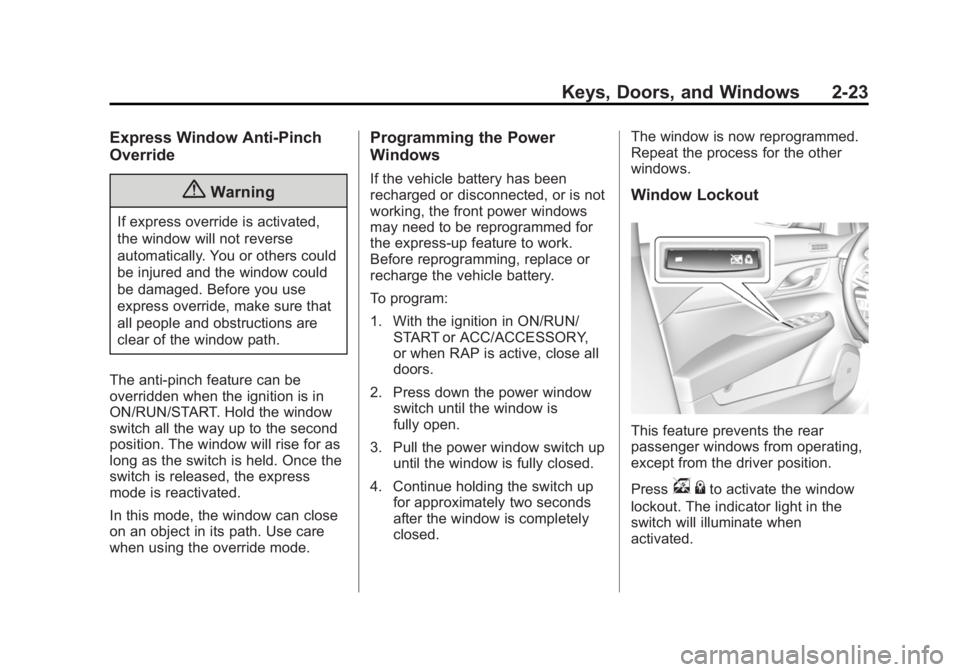
Window Lockout
This feature prevents the rear
passenger windows from operating,
except from the driver position.
Press
v
{to activate the window
lockout. The indicator light in the
switch will illuminate when
activated.