steering wheel CADILLAC ATS 2014 Owner's Guide
[x] Cancel search | Manufacturer: CADILLAC, Model Year: 2014, Model line: ATS, Model: CADILLAC ATS 2014Pages: 434, PDF Size: 5.61 MB
Page 219 of 434
Black plate (5,1)Cadillac ATS Owner Manual (GMNA-Localizing-U.S./Canada/Mexico-
6014430) - 2014 - 2nd Edition - 8/23/13
Driving and Operating 9-5
.Holding both sides of the
steering wheel allows you to turn
180 degrees without removing
a hand.
.Antilock Brake System (ABS)
allows steering while braking.
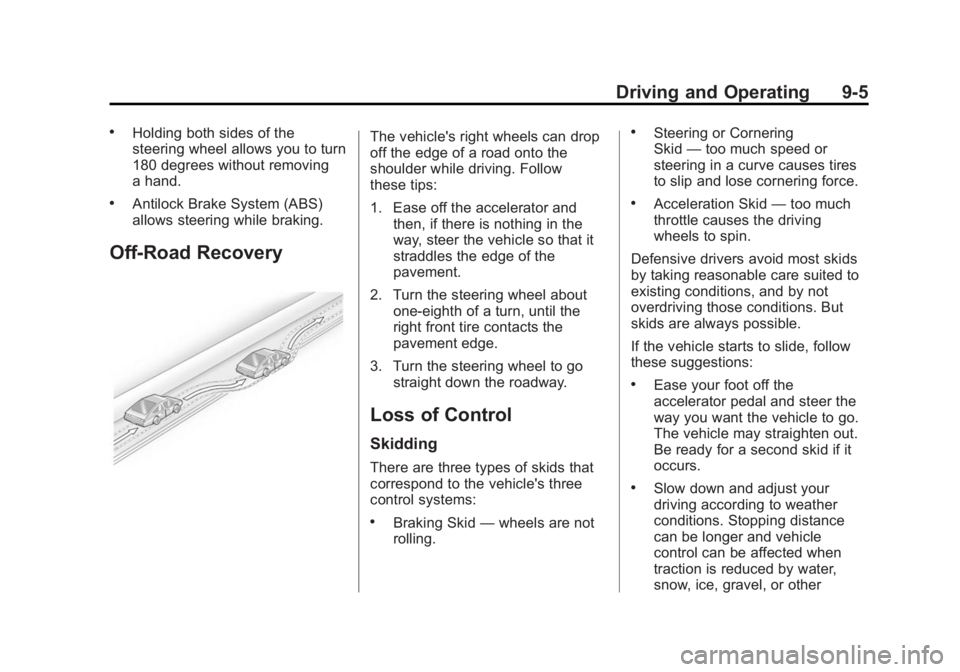
Off-Road Recovery
The vehicle's right wheels can drop
off the edge of a road onto the
shoulder while driving. Follow
these tips:
1. Ease off the accelerator andthen, if there is nothing in the
way, steer the vehicle so that it
straddles the edge of the
pavement.
2. Turn the steering wheel about one-eighth of a turn, until the
right front tire contacts the
pavement edge.
3. Turn the steering wheel to go straight down the roadway.
Loss of Control
Skidding
There are three types of skids that
correspond to the vehicle's three
control systems:
.Braking Skid —wheels are not
rolling.
.Steering or Cornering
Skid —too much speed or
steering in a curve causes tires
to slip and lose cornering force.
.Acceleration Skid —too much
throttle causes the driving
wheels to spin.
Defensive drivers avoid most skids
by taking reasonable care suited to
existing conditions, and by not
overdriving those conditions. But
skids are always possible.
If the vehicle starts to slide, follow
these suggestions:
.Ease your foot off the
accelerator pedal and steer the
way you want the vehicle to go.
The vehicle may straighten out.
Be ready for a second skid if it
occurs.
.Slow down and adjust your
driving according to weather
conditions. Stopping distance
can be longer and vehicle
control can be affected when
traction is reduced by water,
snow, ice, gravel, or other
Page 223 of 434
Black plate (9,1)Cadillac ATS Owner Manual (GMNA-Localizing-U.S./Canada/Mexico-
6014430) - 2014 - 2nd Edition - 8/23/13
Driving and Operating 9-9
Warning (Continued)
could result in a loss of braking.
Shift the transmission to a lower
gear to let the engine assist the
brakes on a steep downhill slope.
{Warning
Coasting downhill in N (Neutral)
or with the ignition off is
dangerous. This can cause
overheating of the brakes and
loss of steering. Always have the
engine running and the vehicle
in gear.
.Stay in your own lane. Do not
swing wide or cut across the
center of the road. Drive at
speeds that let you stay in your
own lane.
.Be alert on top of hills;
something could be in your lane
(stalled car, accident).
.Pay attention to special road
signs (falling rocks area, winding
roads, long grades, passing or
no-passing zones) and take
appropriate action.
Winter Driving
Driving on Snow or Ice
Drive carefully when there is snow
or ice between the tires and the
road, creating less traction or grip.
Wet ice can occur at about 0°C
(32°F) when freezing rain begins to
fall, resulting in even less traction.
Avoid driving on wet ice or in
freezing rain until roads can be
treated with salt or sand.
Drive with caution, whatever the
condition. Accelerate gently so
traction is not lost. Accelerating too
quickly causes the wheels to spin
and makes the surface under the
tires slick, so there is even less
traction.Try not to break the fragile traction.
If you accelerate too fast, the drive
wheels will spin and polish the
surface under the tires even more.
If equipped, Traction Control should
be turned on. See
Traction Control/
Electronic Stability Control on
page 9-33.
The Antilock Brake System (ABS)
improves vehicle stability during
hard stops on slippery roads, but
apply the brakes sooner than when
on dry pavement.
Allow greater following distance on
any slippery road and watch for
slippery spots. Icy patches can
occur on otherwise clear roads in
shaded areas. The surface of a
curve or an overpass can remain icy
when the surrounding roads are
clear. Avoid sudden steering
maneuvers and braking while
on ice.
See Antilock Brake System (ABS)
on page 9-29.
Page 225 of 434
Black plate (11,1)Cadillac ATS Owner Manual (GMNA-Localizing-U.S./Canada/Mexico-
6014430) - 2014 - 2nd Edition - 8/23/13
Driving and Operating 9-11
If the Vehicle Is Stuck
Slowly and cautiously spin the
wheels to free the vehicle when
stuck in sand, mud, ice, or snow.
If stuck too severely for the traction
system to free the vehicle, turn the
traction system off and use the
rocking method. SeeTraction
Control/Electronic Stability Control
on page 9-33.
{Warning
If the vehicle's tires spin at high
speed, they can explode, and you
or others could be injured. The
vehicle can overheat, causing an
engine compartment fire or other
damage. Spin the wheels as little
as possible and avoid going
above 56 km/h (35 mph).
Rocking the Vehicle to Get
it Out
Turn the steering wheel left and
right to clear the area around the
front wheels. Turn off any traction
system. Shift back and forth
between R (Reverse) and a low
forward gear, spinning the wheels
as little as possible. To prevent
transmission wear, wait until the
wheels stop spinning before shifting
gears. Release the accelerator
pedal while shifting, and press
lightly on the accelerator pedal
when the transmission is in gear.
Slowly spinning the wheels in the
forward and reverse directions
causes a rocking motion that could
free the vehicle. If that does not get
the vehicle out after a few tries, it
might need to be towed out. If the
vehicle does need to be towed out,
see Towing the Vehicle on
page 10-74.
Vehicle Load Limits
It is very important to know how
much weight the vehicle can
carry. This weight is called the
vehicle capacity weight and
includes the weight of all
occupants, cargo, and all
nonfactory-installed options.
Two labels on the vehicle show
how much weight it may
properly carry, the Tire and
Loading Information label and
the Certification label.
{Warning
Do not load the vehicle any
heavier than the Gross
Vehicle Weight Rating
(GVWR), or either the
maximum front or rear Gross
Axle Weight Rating (GAWR).
This can cause systems to
break and change the way the
(Continued)
Page 231 of 434
Black plate (17,1)Cadillac ATS Owner Manual (GMNA-Localizing-U.S./Canada/Mexico-
6014430) - 2014 - 2nd Edition - 8/23/13
Driving and Operating 9-17
to the Keyless Access system. See
Remote Keyless Entry (RKE)
System Operation on page 2-3.
To shift out of P (Park), the vehicle
must be in ON/RUN/START and the
brake pedal must be applied.
Stopping the Engine/OFF (No
Indicator Lights):When the
vehicle is stopped, press the
ENGINE START/STOP button once
to turn the engine off.
If the vehicle is in P (Park), the
ignition will turn off, and Retained
Accessory Power (RAP) will remain
active. See Retained Accessory
Power (RAP) on page 9-21.
Automatic Transmission
If the vehicle is not in P (Park), the
ignition will return to ACC/
ACCESSORY and display a
message in the Driver Information
Center (DIC). See Transmission
Messages on page 5-41. When the
vehicle is shifted into P (Park), the
ignition system will switch to OFF. Manual Transmission
If the vehicle is stationary, the
ignition will turn OFF, and Retained
Accessory Power (RAP) will remain
active. See
Retained Accessory
Power (RAP) on page 9-21.
The vehicle may have an electric
steering column lock. The lock is
activated when the vehicle is
switched to OFF and either front
door is opened. A sound may be
heard as the lock actuates or
releases. The steering column lock
may not release with the wheels
turned off center. If this happens,
the vehicle may not start. Move the
steering wheel from left to right
while attempting to start the vehicle.
If this does not work, the vehicle
needs service.
Do not turn the engine off when the
vehicle is moving. This will cause a
loss of power assist in the brake
and steering systems and disable
the airbags. If the vehicle must be shut off in an
emergency:
1. Brake using a firm and steady
pressure. Do not pump the
brakes repeatedly. This may
deplete power assist, requiring
increased brake pedal force.
2. Shift the vehicle to N (Neutral). This can be done while the
vehicle is moving. After shifting
to N (Neutral), firmly apply the
brakes and steer the vehicle to a
safe location.
3. Come to a complete stop. Shift to P (Park) with an automatic
transmission, or Neutral with a
manual transmission. Turn the
ignition to LOCK/OFF.
4. Set the parking brake. See Parking Brake (Electric) on
page 9-30 orParking Brake
(Manual) on page 9-32.
Page 240 of 434
Black plate (26,1)Cadillac ATS Owner Manual (GMNA-Localizing-U.S./Canada/Mexico-
6014430) - 2014 - 2nd Edition - 8/23/13
9-26 Driving and Operating
Downshifting the transmission in
slippery road conditions could result
in skidding; see“Skidding”under
Loss of Control on page 9-5.
{Caution
Spinning the tires or holding the
vehicle in one place on a hill
using only the accelerator pedal
may damage the transmission.
The repair will not be covered by
the vehicle warranty. If you are
stuck, do not spin the tires. When
stopping on a hill, use the brakes
to hold the vehicle in place.
While in Sport Mode, the vehicle
monitors driving behavior, and
automatically enables Performance
Shift Features when spirited driving
is detected. These features maintain
lower transmission gears to
increase available engine braking
and improve acceleration response. The vehicle will exit these features
and return to normal operation after
a short period when no spirited
driving is detected. See
Driver Mode
Control on page 9-35.Manual Mode
Driver Shift Control (DSC)
{Caution
Driving with the engine at a high
rpm without upshifting while using
Driver Shift Control (DSC), could
damage the vehicle. Always
upshift when necessary while
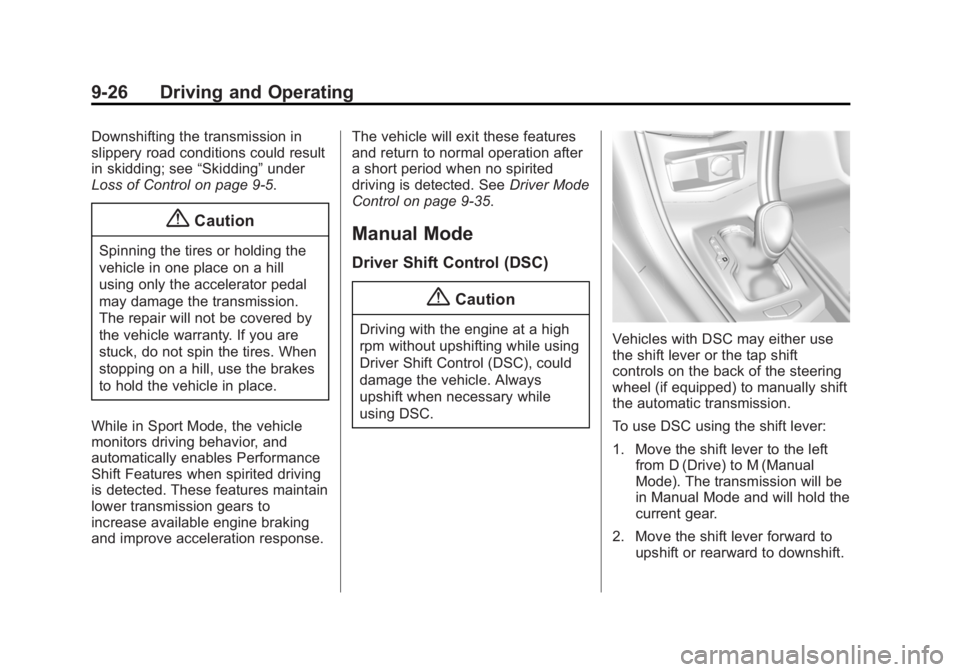
using DSC.Vehicles with DSC may either use
the shift lever or the tap shift
controls on the back of the steering
wheel (if equipped) to manually shift
the automatic transmission.
To use DSC using the shift lever:
1. Move the shift lever to the left from D (Drive) to M (Manual
Mode). The transmission will be
in Manual Mode and will hold the
current gear.
2. Move the shift lever forward to upshift or rearward to downshift.
Page 241 of 434
Black plate (27,1)Cadillac ATS Owner Manual (GMNA-Localizing-U.S./Canada/Mexico-
6014430) - 2014 - 2nd Edition - 8/23/13
Driving and Operating 9-27
3. To cancel DSC, move the shiftlever back to D (Drive).
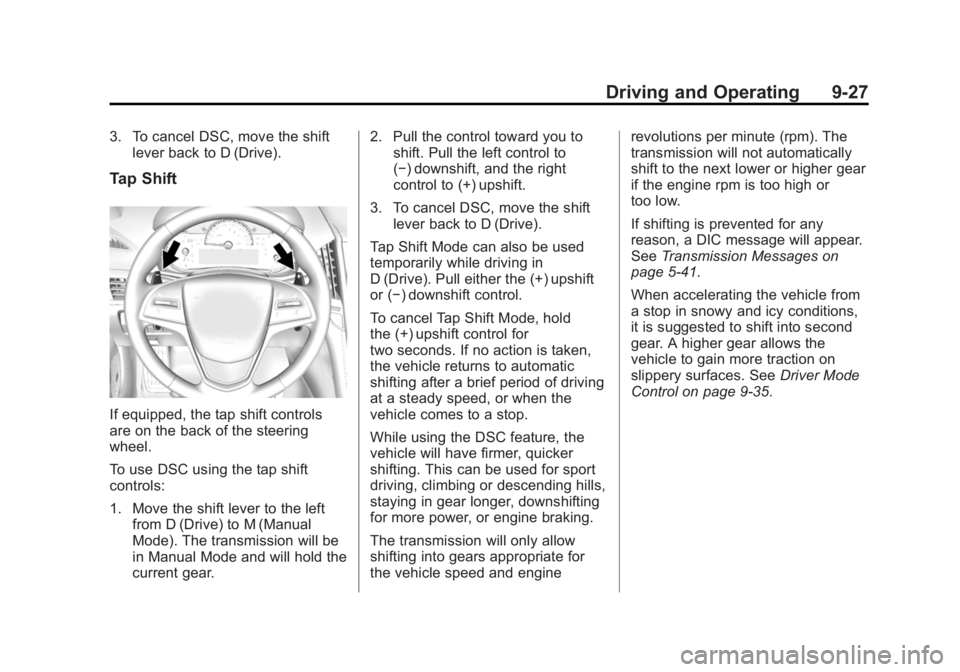
Tap Shift
If equipped, the tap shift controls
are on the back of the steering
wheel.
To use DSC using the tap shift
controls:
1. Move the shift lever to the leftfrom D (Drive) to M (Manual
Mode). The transmission will be
in Manual Mode and will hold the
current gear. 2. Pull the control toward you to
shift. Pull the left control to
(−) downshift, and the right
control to (+) upshift.
3. To cancel DSC, move the shift lever back to D (Drive).
Tap Shift Mode can also be used
temporarily while driving in
D (Drive). Pull either the (+) upshift
or (−) downshift control.
To cancel Tap Shift Mode, hold
the (+) upshift control for
two seconds. If no action is taken,
the vehicle returns to automatic
shifting after a brief period of driving
at a steady speed, or when the
vehicle comes to a stop.
While using the DSC feature, the
vehicle will have firmer, quicker
shifting. This can be used for sport
driving, climbing or descending hills,
staying in gear longer, downshifting
for more power, or engine braking.
The transmission will only allow
shifting into gears appropriate for
the vehicle speed and engine revolutions per minute (rpm). The
transmission will not automatically
shift to the next lower or higher gear
if the engine rpm is too high or
too low.
If shifting is prevented for any
reason, a DIC message will appear.
See
Transmission Messages on
page 5-41.
When accelerating the vehicle from
a stop in snowy and icy conditions,
it is suggested to shift into second
gear. A higher gear allows the
vehicle to gain more traction on
slippery surfaces. See Driver Mode
Control on page 9-35.
Page 253 of 434
Black plate (39,1)Cadillac ATS Owner Manual (GMNA-Localizing-U.S./Canada/Mexico-
6014430) - 2014 - 2nd Edition - 8/23/13
Driving and Operating 9-39
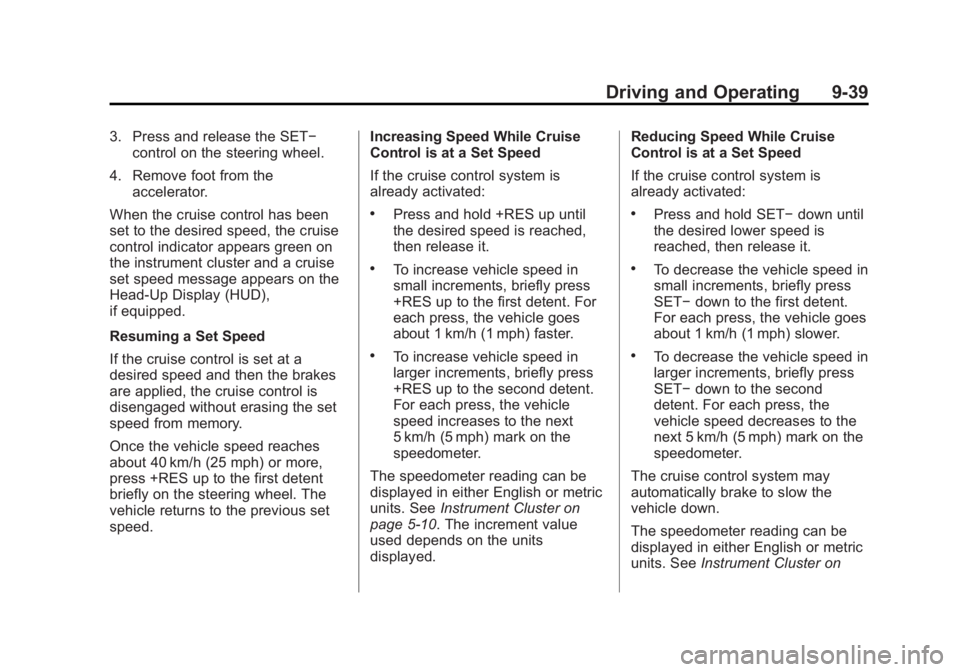
3. Press and release the SET−control on the steering wheel.
4. Remove foot from the accelerator.
When the cruise control has been
set to the desired speed, the cruise
control indicator appears green on
the instrument cluster and a cruise
set speed message appears on the
Head-Up Display (HUD),
if equipped.
Resuming a Set Speed
If the cruise control is set at a
desired speed and then the brakes
are applied, the cruise control is
disengaged without erasing the set
speed from memory.
Once the vehicle speed reaches
about 40 km/h (25 mph) or more,
press +RES up to the first detent
briefly on the steering wheel. The
vehicle returns to the previous set
speed. Increasing Speed While Cruise
Control is at a Set Speed
If the cruise control system is
already activated:
.Press and hold +RES up until
the desired speed is reached,
then release it.
.To increase vehicle speed in
small increments, briefly press
+RES up to the first detent. For
each press, the vehicle goes
about 1 km/h (1 mph) faster.
.To increase vehicle speed in
larger increments, briefly press
+RES up to the second detent.
For each press, the vehicle
speed increases to the next
5 km/h (5 mph) mark on the
speedometer.
The speedometer reading can be
displayed in either English or metric
units. See Instrument Cluster on
page 5-10. The increment value
used depends on the units
displayed. Reducing Speed While Cruise
Control is at a Set Speed
If the cruise control system is
already activated:
.Press and hold SET−
down until
the desired lower speed is
reached, then release it.
.To decrease the vehicle speed in
small increments, briefly press
SET− down to the first detent.
For each press, the vehicle goes
about 1 km/h (1 mph) slower.
.To decrease the vehicle speed in
larger increments, briefly press
SET− down to the second
detent. For each press, the
vehicle speed decreases to the
next 5 km/h (5 mph) mark on the
speedometer.
The cruise control system may
automatically brake to slow the
vehicle down.
The speedometer reading can be
displayed in either English or metric
units. See Instrument Cluster on
Page 256 of 434
Black plate (42,1)Cadillac ATS Owner Manual (GMNA-Localizing-U.S./Canada/Mexico-
6014430) - 2014 - 2nd Edition - 8/23/13
9-42 Driving and Operating
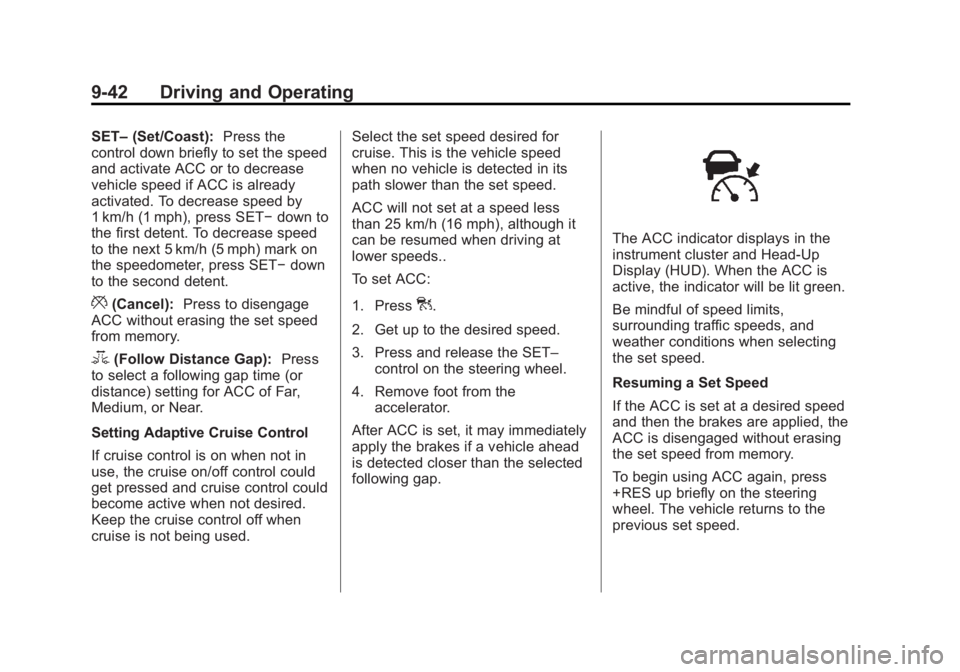
SET–(Set/Coast): Press the
control down briefly to set the speed
and activate ACC or to decrease
vehicle speed if ACC is already
activated. To decrease speed by
1 km/h (1 mph), press SET− down to
the first detent. To decrease speed
to the next 5 km/h (5 mph) mark on
the speedometer, press SET− down
to the second detent.
*(Cancel): Press to disengage
ACC without erasing the set speed
from memory.
3(Follow Distance Gap): Press
to select a following gap time (or
distance) setting for ACC of Far,
Medium, or Near.
Setting Adaptive Cruise Control
If cruise control is on when not in
use, the cruise on/off control could
get pressed and cruise control could
become active when not desired.
Keep the cruise control off when
cruise is not being used. Select the set speed desired for
cruise. This is the vehicle speed
when no vehicle is detected in its
path slower than the set speed.
ACC will not set at a speed less
than 25 km/h (16 mph), although it
can be resumed when driving at
lower speeds..
To set ACC:
1. Press
].
2. Get up to the desired speed.
3. Press and release the SET– control on the steering wheel.
4. Remove foot from the accelerator.
After ACC is set, it may immediately
apply the brakes if a vehicle ahead
is detected closer than the selected
following gap.
The ACC indicator displays in the
instrument cluster and Head-Up
Display (HUD). When the ACC is
active, the indicator will be lit green.
Be mindful of speed limits,
surrounding traffic speeds, and
weather conditions when selecting
the set speed.
Resuming a Set Speed
If the ACC is set at a desired speed
and then the brakes are applied, the
ACC is disengaged without erasing
the set speed from memory.
To begin using ACC again, press
+RES up briefly on the steering
wheel. The vehicle returns to the
previous set speed.
Page 258 of 434
Black plate (44,1)Cadillac ATS Owner Manual (GMNA-Localizing-U.S./Canada/Mexico-
6014430) - 2014 - 2nd Edition - 8/23/13
9-44 Driving and Operating
vehicle's speed and attempt to
maintain the follow distance gap
selected.
Press
3on the steering wheel to
adjust the following gap. Each press
cycles the gap button through three
settings: Far, Medium, or Near.
When pressed, the current gap
setting displays briefly on the
instrument cluster and HUD. The
gap setting will be maintained until it
is changed.
Since each gap setting corresponds
to a following time (Far, Medium,
or Near), the following distance will
vary based on vehicle speed. The
faster the vehicle speed, the further
back your vehicle will follow a
vehicle detected ahead. Consider
traffic and weather conditions when
selecting the following gap. The
range of selectable gaps may not be
appropriate for all drivers and
driving conditions.
Changing the gap setting
automatically changes the alert
timing sensitivity (Far, Medium, or Near) for the Forward Collision
Alert (FCA) feature. See
Forward
Collision Alert (FCA) System on
page 9-53.
Alerting the Driver
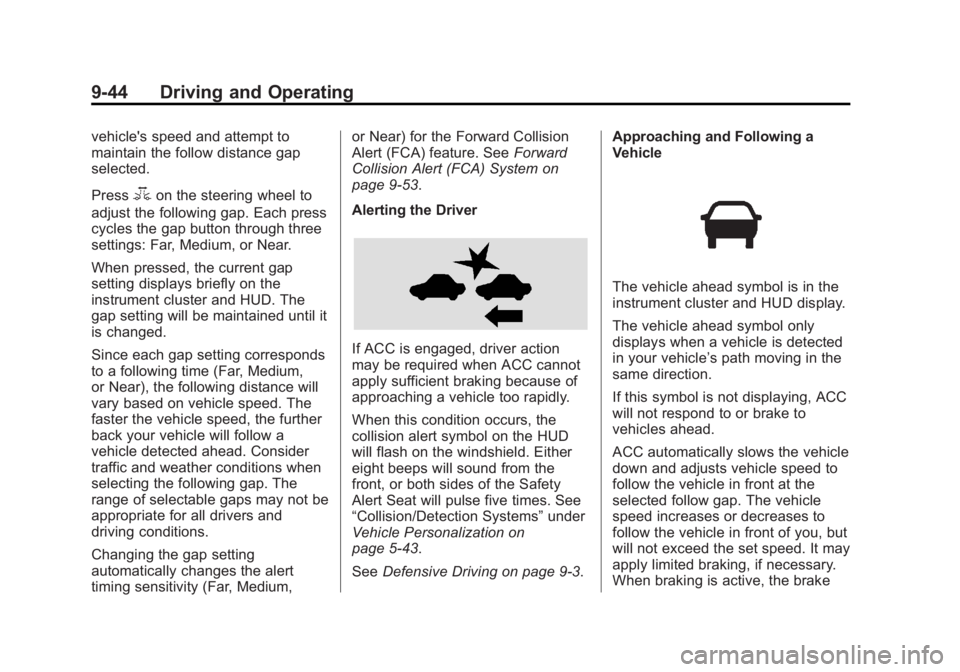
If ACC is engaged, driver action
may be required when ACC cannot
apply sufficient braking because of
approaching a vehicle too rapidly.
When this condition occurs, the
collision alert symbol on the HUD
will flash on the windshield. Either
eight beeps will sound from the
front, or both sides of the Safety
Alert Seat will pulse five times. See
“Collision/Detection Systems” under
Vehicle Personalization on
page 5-43.
See Defensive Driving on page 9-3. Approaching and Following a
Vehicle
The vehicle ahead symbol is in the
instrument cluster and HUD display.
The vehicle ahead symbol only
displays when a vehicle is detected
in your vehicle’s path moving in the
same direction.
If this symbol is not displaying, ACC
will not respond to or brake to
vehicles ahead.
ACC automatically slows the vehicle
down and adjusts vehicle speed to
follow the vehicle in front at the
selected follow gap. The vehicle
speed increases or decreases to
follow the vehicle in front of you, but
will not exceed the set speed. It may
apply limited braking, if necessary.
When braking is active, the brake
Page 267 of 434
Black plate (53,1)Cadillac ATS Owner Manual (GMNA-Localizing-U.S./Canada/Mexico-
6014430) - 2014 - 2nd Edition - 8/23/13
Driving and Operating 9-53
Turning the Features On or Off
TheXbutton to the left of the
steering wheel is used to turn on or
off the Front and Rear Parking
Assist, Rear Automatic Braking, and
Backing Warning System at the
same time. The indicator light next
to the button comes on when the
features are on and turns off when
the features have been disabled.
Turn off parking assist when towing
a trailer. The Rear Vision Camera (RVC), the
parking assist symbols, guidance
lines, and Rear Cross Traffic Alert
(RCTA) can be turned on or off
through the Settings menu on the
infotainment system:
1. On the infotainment system,
press the Settings screen
button, or turn the MENU knob
to highlight Settings and
press MENU.
2. Select Rear Camera.
3. Press Rear Camera Display, Park Assist Symbols, Guidance
Lines, or Rear Cross Traffic Alert
and then select OFF or ON.
Assistance Systems for
Driving
If equipped, when driving the
vehicle forward, Forward Collision
Alert (FCA), Lane Departure
Warning (LDW), Side Blind Zone
Alert (SBZA), and/or the Active Emergency Braking System can
help to avoid a crash or reduce
crash damage.
Forward Collision Alert
(FCA) System
If equipped, the FCA system may
help to avoid or reduce the harm
caused by front-end crashes. FCA
provides a flashing red alert on the
windshield, and rapidly beeps or
pulses the Safety Alert Seat when
approaching a vehicle directly
ahead too quickly. FCA also lights
an amber visual alert if following
another vehicle much too closely.
FCA detects vehicles within a
distance of approximately 60 m
(197 ft) and operates at speeds
above 40 km/h (25 mph). If the
vehicle has Adaptive Cruise Control
(ACC), it can detect vehicles to
distances of approximately 110 m
(360 ft) and operates at all speeds.
See
Adaptive Cruise Control on
page 9-40.