window CADILLAC ATS 2014 Owner's Manual
[x] Cancel search | Manufacturer: CADILLAC, Model Year: 2014, Model line: ATS, Model: CADILLAC ATS 2014Pages: 434, PDF Size: 5.61 MB
Page 1 of 434
Black plate (1,1)Cadillac ATS Owner Manual (GMNA-Localizing-U.S./Canada/Mexico-
6014430) - 2014 - 2nd Edition - 8/23/13
2014 Cadillac ATS Owner ManualM
In Brief. . . . . . . . . . . . . . . . . . . . . . . . 1-1
Instrument Panel . . . . . . . . . . . . . . 1-2
Initial Drive Information . . . . . . . . 1-4
Vehicle Features . . . . . . . . . . . . . 1-15
Performance and Maintenance . . . . . . . . . . . . . . . . 1-21
Keys, Doors, and Windows . . . . . . . . . . . . . . . . . . . . 2-1
Keys and Locks . . . . . . . . . . . . . . . 2-1
Doors . . . . . . . . . . . . . . . . . . . . . . . . 2-14
Vehicle Security . . . . . . . . . . . . . . 2-16
Exterior Mirrors . . . . . . . . . . . . . . . 2-19
Interior Mirrors . . . . . . . . . . . . . . . . 2-21
Windows . . . . . . . . . . . . . . . . . . . . . 2-21
Roof . . . . . . . . . . . . . . . . . . . . . . . . . . 2-24
Seats and Restraints . . . . . . . . . 3-1
Head Restraints . . . . . . . . . . . . . . . 3-2
Front Seats . . . . . . . . . . . . . . . . . . . . 3-3
Rear Seats . . . . . . . . . . . . . . . . . . . . 3-9
Safety Belts . . . . . . . . . . . . . . . . . . 3-11
Airbag System . . . . . . . . . . . . . . . . 3-19
Child Restraints . . . . . . . . . . . . . . 3-32 Storage
. . . . . . . . . . . . . . . . . . . . . . . 4-1
Storage Compartments . . . . . . . . 4-1
Additional Storage Features . . . 4-2
Instruments and Controls . . . . 5-1
Controls . . . . . . . . . . . . . . . . . . . . . . . 5-2
Warning Lights, Gauges, and
Indicators . . . . . . . . . . . . . . . . . . . . 5-8
Information Displays . . . . . . . . . . 5-25
Vehicle Messages . . . . . . . . . . . . 5-32
Vehicle Personalization . . . . . . . 5-43
Universal Remote System . . . . 5-50
Lighting . . . . . . . . . . . . . . . . . . . . . . . 6-1
Exterior Lighting . . . . . . . . . . . . . . . 6-1
Interior Lighting . . . . . . . . . . . . . . . . 6-6
Lighting Features . . . . . . . . . . . . . . 6-8
Infotainment System . . . . . . . . . 7-1
Introduction . . . . . . . . . . . . . . . . . . . . 7-1
Radio . . . . . . . . . . . . . . . . . . . . . . . . . . 7-8
Audio Players . . . . . . . . . . . . . . . . 7-12
Phone . . . . . . . . . . . . . . . . . . . . . . . . 7-20
Trademarks and License Agreements . . . . . . . . . . . . . . . . . 7-31 Climate Controls
. . . . . . . . . . . . . 8-1
Climate Control Systems . . . . . . 8-1
Air Vents . . . . . . . . . . . . . . . . . . . . . . . 8-9
Maintenance . . . . . . . . . . . . . . . . . 8-10
Driving and Operating . . . . . . . . 9-1
Driving Information . . . . . . . . . . . . . 9-2
Starting and Operating . . . . . . . 9-16
Engine Exhaust . . . . . . . . . . . . . . 9-23
Automatic Transmission . . . . . . 9-24
Manual Transmission . . . . . . . . . 9-28
Drive Systems . . . . . . . . . . . . . . . . 9-29
Brakes . . . . . . . . . . . . . . . . . . . . . . . 9-29
Ride Control Systems . . . . . . . . 9-33
Cruise Control . . . . . . . . . . . . . . . . 9-37
Driver Assistance Systems . . . 9-48
Fuel . . . . . . . . . . . . . . . . . . . . . . . . . . 9-62
Trailer Towing . . . . . . . . . . . . . . . . 9-67
Conversions and Add-Ons . . . 9-72
Page 7 of 434
Black plate (1,1)Cadillac ATS Owner Manual (GMNA-Localizing-U.S./Canada/Mexico-
6014430) - 2014 - 2nd Edition - 8/23/13
In Brief 1-1
In Brief
Instrument Panel
Instrument Panel Overview . . . . 1-2
Initial Drive Information
Initial Drive Information . . . . . . . . 1-4
Remote Keyless Entry (RKE)System . . . . . . . . . . . . . . . . . . . . . . 1-4
Remote Vehicle Start . . . . . . . . . 1-5
Door Locks . . . . . . . . . . . . . . . . . . . 1-5
Trunk . . . . . . . . . . . . . . . . . . . . . . . . . 1-6
Windows . . . . . . . . . . . . . . . . . . . . . . 1-6
Seat Adjustment . . . . . . . . . . . . . . 1-6
Memory Features . . . . . . . . . . . . . 1-7
Second Row Seats . . . . . . . . . . . 1-8
Heated Seats . . . . . . . . . . . . . . . . . 1-8
Head Restraint Adjustment . . . . 1-8
Safety Belts . . . . . . . . . . . . . . . . . . . 1-9
Passenger Sensing System . . . 1-9
Mirror Adjustment . . . . . . . . . . . . . 1-9 Steering Wheel
Adjustment . . . . . . . . . . . . . . . . . 1-10
Interior Lighting . . . . . . . . . . . . . . 1-10
Exterior Lighting . . . . . . . . . . . . . 1-11
Windshield Wiper/Washer . . . . 1-11
Climate Controls . . . . . . . . . . . . . 1-13
Transmission . . . . . . . . . . . . . . . . 1-14Vehicle Features
Radio(s) . . . . . . . . . . . . . . . . . . . . . 1-15
Satellite Radio . . . . . . . . . . . . . . . 1-15
Portable Audio Devices . . . . . . 1-15
Bluetooth
®. . . . . . . . . . . . . . . . . . . 1-16
Steering Wheel Controls . . . . . 1-16
Cruise Control . . . . . . . . . . . . . . . 1-17
Infotainment System . . . . . . . . . 1-17
Driver Information Center (DIC) . . . . . . . . . . . . . . . 1-17
Forward Collision Alert (FCA) System . . . . . . . . . . . . . . . . . . . . . 1-18
Lane Departure Warning (LDW) . . . . . . . . . . . . . 1-18 Side Blind Zone
Alert (SBZA) . . . . . . . . . . . . . . . 1-18
Rear Vision Camera (RVC) . . . . . . . . . . . . . 1-18
Ultrasonic Parking Assist . . . . 1-19
Active Emergency Braking
System . . . . . . . . . . . . . . . . . . . . . 1-19
Power Outlets . . . . . . . . . . . . . . . 1-19
Universal Remote System . . . 1-19
Sunroof . . . . . . . . . . . . . . . . . . . . . . 1-20
Performance and Maintenance
Traction Control/Electronic Stability Control . . . . . . . . . . . . 1-21
Tire Pressure Monitor . . . . . . . . 1-21
Engine Oil Life System . . . . . . 1-21
E85 or FlexFuel . . . . . . . . . . . . . . 1-22
Driving for Better Fuel Economy . . . . . . . . . . . . . . . . . . . 1-22
Roadside Service . . . . . . . . . . . . 1-23
OnStar
®. . . . . . . . . . . . . . . . . . . . . 1-23
Page 12 of 434
Black plate (6,1)Cadillac ATS Owner Manual (GMNA-Localizing-U.S./Canada/Mexico-
6014430) - 2014 - 2nd Edition - 8/23/13
1-6 In Brief
Trunk
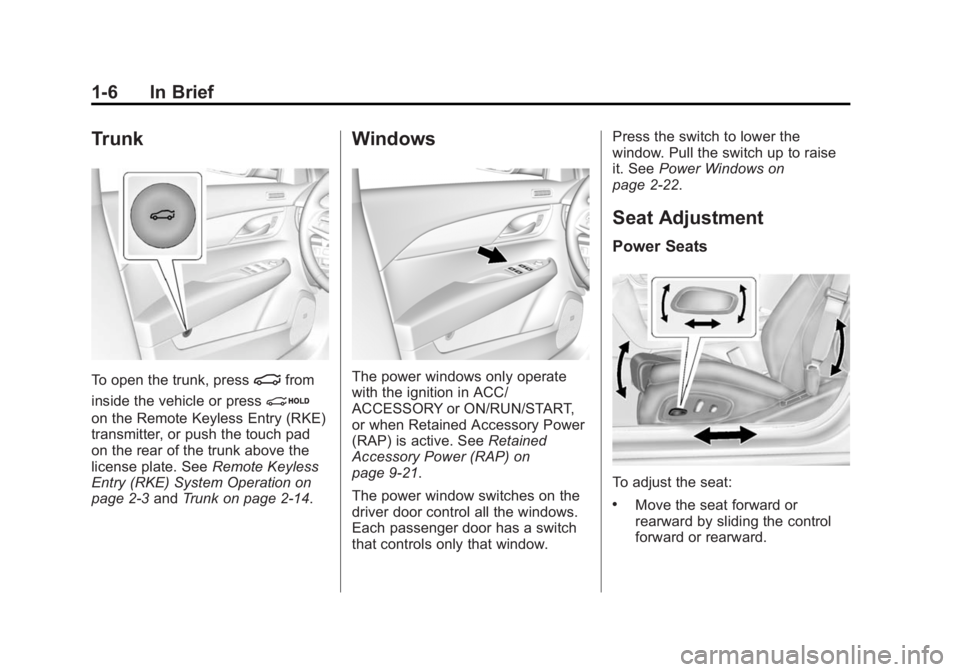
To open the trunk, press|from
inside the vehicle or press
i
on the Remote Keyless Entry (RKE)
transmitter, or push the touch pad
on the rear of the trunk above the
license plate. See Remote Keyless
Entry (RKE) System Operation on
page 2-3 andTrunk on page 2-14.
Windows
The power windows only operate
with the ignition in ACC/
ACCESSORY or ON/RUN/START,
or when Retained Accessory Power
(RAP) is active. See Retained
Accessory Power (RAP) on
page 9-21.
The power window switches on the
driver door control all the windows.
Each passenger door has a switch
that controls only that window. Press the switch to lower the
window. Pull the switch up to raise
it. See
Power Windows on
page 2-22.
Seat Adjustment
Power Seats
To adjust the seat:
.Move the seat forward or
rearward by sliding the control
forward or rearward.
Page 19 of 434
Black plate (13,1)Cadillac ATS Owner Manual (GMNA-Localizing-U.S./Canada/Mexico-
6014430) - 2014 - 2nd Edition - 8/23/13
In Brief 1-13
Climate Controls
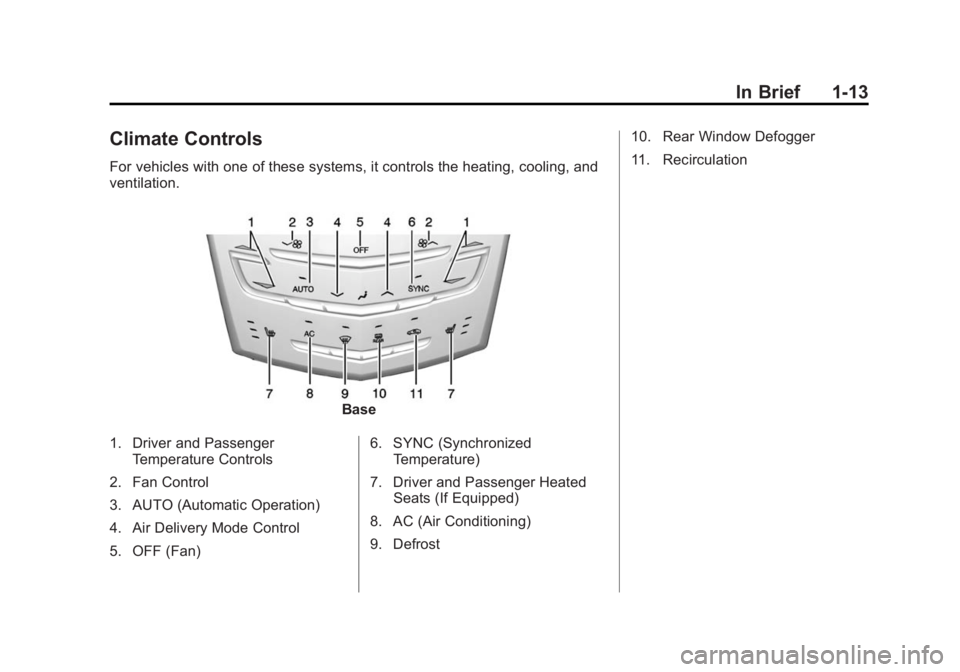
For vehicles with one of these systems, it controls the heating, cooling, and
ventilation.
Base
1. Driver and Passenger Temperature Controls
2. Fan Control
3. AUTO (Automatic Operation)
4. Air Delivery Mode Control
5. OFF (Fan) 6. SYNC (Synchronized
Temperature)
7. Driver and Passenger Heated Seats (If Equipped)
8. AC (Air Conditioning)
9. Defrost 10. Rear Window Defogger
11. Recirculation
Page 20 of 434
Black plate (14,1)Cadillac ATS Owner Manual (GMNA-Localizing-U.S./Canada/Mexico-
6014430) - 2014 - 2nd Edition - 8/23/13
1-14 In Brief
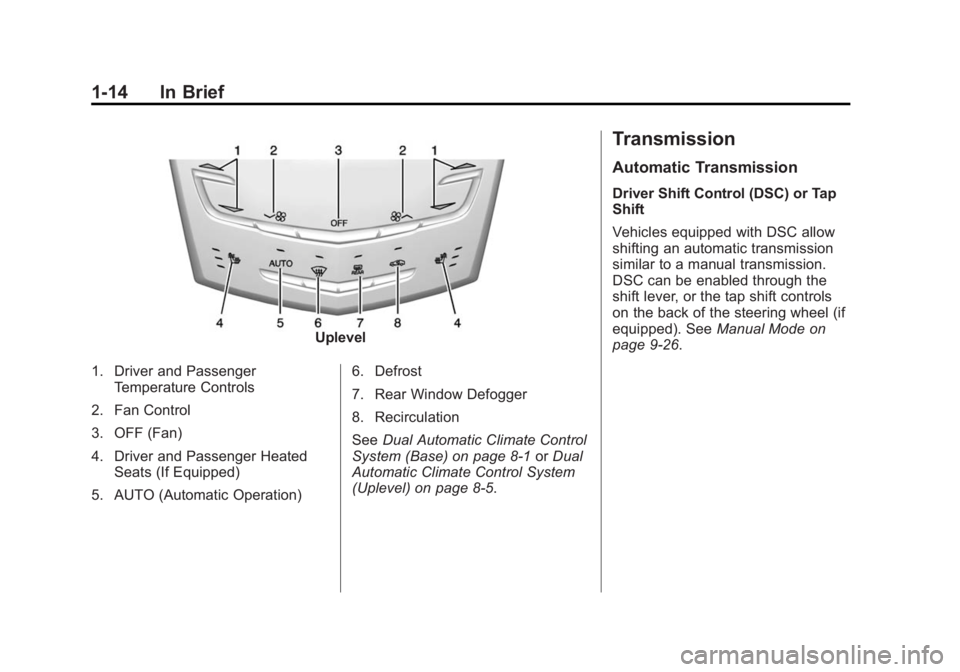
Uplevel
1. Driver and Passenger Temperature Controls
2. Fan Control
3. OFF (Fan)
4. Driver and Passenger Heated Seats (If Equipped)
5. AUTO (Automatic Operation) 6. Defrost
7. Rear Window Defogger
8. Recirculation
See
Dual Automatic Climate Control
System (Base) on page 8-1 orDual
Automatic Climate Control System
(Uplevel) on page 8-5.
Transmission
Automatic Transmission
Driver Shift Control (DSC) or Tap
Shift
Vehicles equipped with DSC allow
shifting an automatic transmission
similar to a manual transmission.
DSC can be enabled through the
shift lever, or the tap shift controls
on the back of the steering wheel (if
equipped). See Manual Mode on
page 9-26.
Page 31 of 434
Black plate (1,1)Cadillac ATS Owner Manual (GMNA-Localizing-U.S./Canada/Mexico-
6014430) - 2014 - 2nd Edition - 8/23/13
Keys, Doors, and Windows 2-1
Keys, Doors, and
Windows
Keys and Locks
Keys . . . . . . . . . . . . . . . . . . . . . . . . . . 2-1
Remote Keyless Entry (RKE)System . . . . . . . . . . . . . . . . . . . . . . 2-2
Remote Keyless Entry (RKE) System Operation . . . . . . . . . . . 2-3
Remote Vehicle Start . . . . . . . . . 2-8
Door Locks . . . . . . . . . . . . . . . . . . 2-10
Power Door Locks . . . . . . . . . . . 2-12
Delayed Locking . . . . . . . . . . . . . 2-12
Automatic Door Locks . . . . . . . 2-13
Lockout Protection . . . . . . . . . . . 2-13
Safety Locks . . . . . . . . . . . . . . . . . 2-14
Doors
Trunk . . . . . . . . . . . . . . . . . . . . . . . . 2-14
Vehicle Security
Vehicle Security . . . . . . . . . . . . . . 2-16
Vehicle Alarm System . . . . . . . 2-16
Immobilizer . . . . . . . . . . . . . . . . . . 2-18
Immobilizer Operation . . . . . . . 2-18
Exterior Mirrors
Convex Mirrors . . . . . . . . . . . . . . 2-19
Power Mirrors . . . . . . . . . . . . . . . . 2-20
Folding Mirrors . . . . . . . . . . . . . . . 2-20
Heated Mirrors . . . . . . . . . . . . . . . 2-20
Park Tilt Mirrors . . . . . . . . . . . . . . 2-20
Interior Mirrors
Interior Rearview Mirrors . . . . . 2-21
Manual Rearview Mirror . . . . . . 2-21
Automatic Dimming Rearview Mirror . . . . . . . . . . . . . . . . . . . . . . . 2-21
Windows
Windows . . . . . . . . . . . . . . . . . . . . . 2-21
Power Windows . . . . . . . . . . . . . 2-22
Sun Visors . . . . . . . . . . . . . . . . . . . 2-24
Roof
Sunroof . . . . . . . . . . . . . . . . . . . . . . 2-24
Keys and Locks
Keys
{Warning
Leaving children in a vehicle with
a Remote Keyless Entry (RKE)
transmitter is dangerous and
children or others could be
seriously injured or killed. They
could operate the power windows
or other controls or make the
vehicle move. The windows will
function with the RKE transmitter
in the vehicle, and children or
others could be caught in the path
of a closing window. Do not leave
children in a vehicle with an RKE
transmitter.
Page 32 of 434
Black plate (2,1)Cadillac ATS Owner Manual (GMNA-Localizing-U.S./Canada/Mexico-
6014430) - 2014 - 2nd Edition - 8/23/13
2-2 Keys, Doors, and Windows
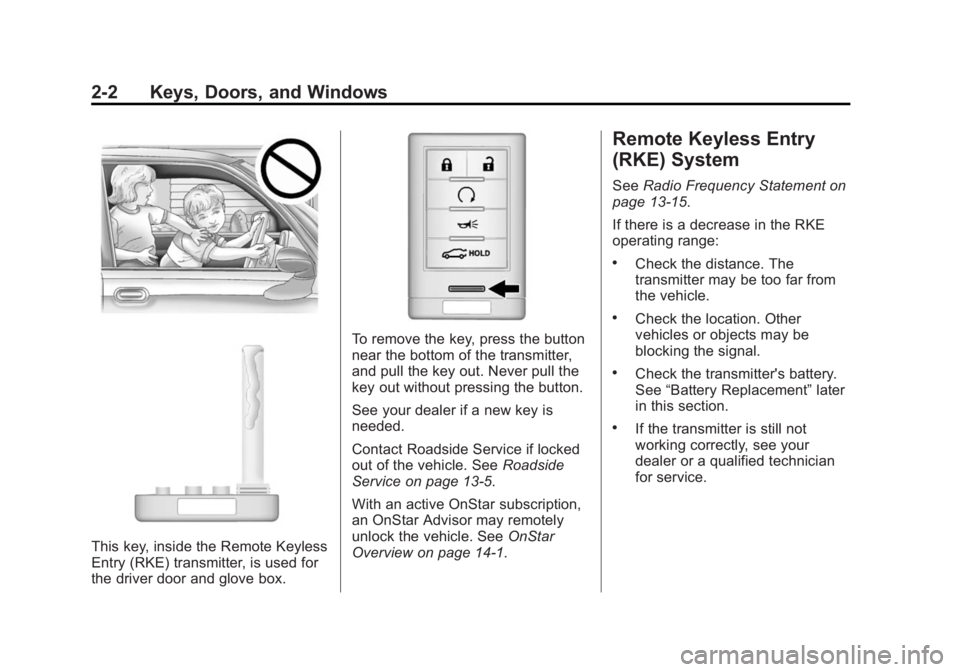
This key, inside the Remote Keyless
Entry (RKE) transmitter, is used for
the driver door and glove box.
To remove the key, press the button
near the bottom of the transmitter,
and pull the key out. Never pull the
key out without pressing the button.
See your dealer if a new key is
needed.
Contact Roadside Service if locked
out of the vehicle. SeeRoadside
Service on page 13-5.
With an active OnStar subscription,
an OnStar Advisor may remotely
unlock the vehicle. See OnStar
Overview on page 14-1.
Remote Keyless Entry
(RKE) System
See Radio Frequency Statement on
page 13-15.
If there is a decrease in the RKE
operating range:
.Check the distance. The
transmitter may be too far from
the vehicle.
.Check the location. Other
vehicles or objects may be
blocking the signal.
.Check the transmitter's battery.
See “Battery Replacement” later
in this section.
.If the transmitter is still not
working correctly, see your
dealer or a qualified technician
for service.
Page 33 of 434
Black plate (3,1)Cadillac ATS Owner Manual (GMNA-Localizing-U.S./Canada/Mexico-
6014430) - 2014 - 2nd Edition - 8/23/13
Keys, Doors, and Windows 2-3
Remote Keyless Entry
(RKE) System Operation
The RKE transmitter functions may
work up to 60 m (197 ft) away from
the vehicle.
Keep in mind that other conditions,
such as those previously stated, can
impact the performance of the
transmitter.
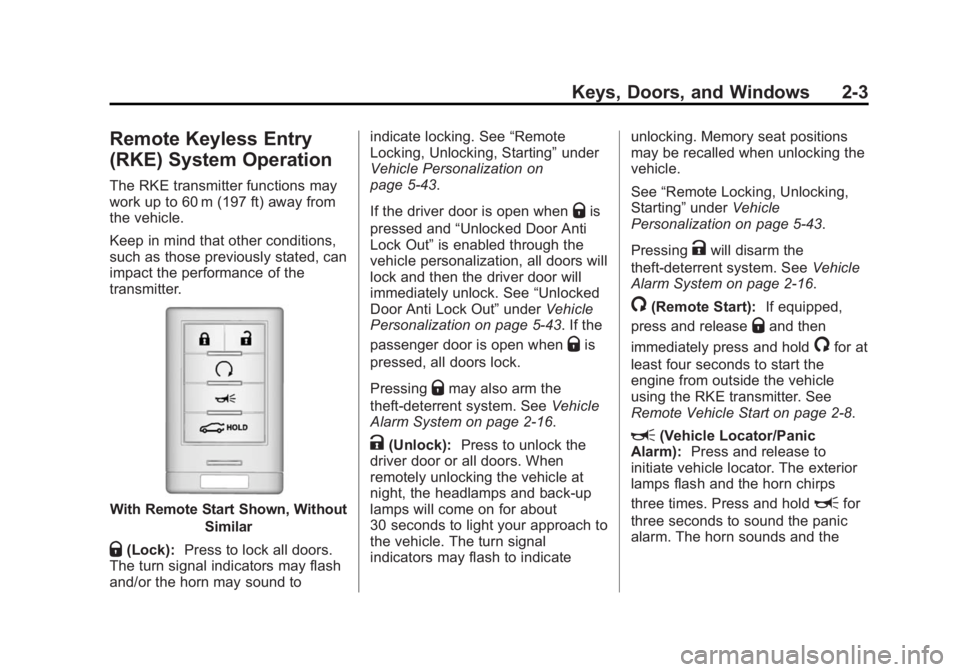
With Remote Start Shown, WithoutSimilar
Q(Lock):Press to lock all doors.
The turn signal indicators may flash
and/or the horn may sound to indicate locking. See
“Remote
Locking, Unlocking, Starting” under
Vehicle Personalization on
page 5-43.
If the driver door is open when
Qis
pressed and “Unlocked Door Anti
Lock Out” is enabled through the
vehicle personalization, all doors will
lock and then the driver door will
immediately unlock. See “Unlocked
Door Anti Lock Out” underVehicle
Personalization on page 5-43. If the
passenger door is open when
Qis
pressed, all doors lock.
Pressing
Qmay also arm the
theft-deterrent system. See Vehicle
Alarm System on page 2-16.
K(Unlock): Press to unlock the
driver door or all doors. When
remotely unlocking the vehicle at
night, the headlamps and back-up
lamps will come on for about
30 seconds to light your approach to
the vehicle. The turn signal
indicators may flash to indicate unlocking. Memory seat positions
may be recalled when unlocking the
vehicle.
See
“Remote Locking, Unlocking,
Starting” underVehicle
Personalization on page 5-43.
Pressing
Kwill disarm the
theft-deterrent system. See Vehicle
Alarm System on page 2-16.
/(Remote Start): If equipped,
press and release
Qand then
immediately press and hold
/for at
least four seconds to start the
engine from outside the vehicle
using the RKE transmitter. See
Remote Vehicle Start on page 2-8.
L(Vehicle Locator/Panic
Alarm): Press and release to
initiate vehicle locator. The exterior
lamps flash and the horn chirps
three times. Press and hold
Lfor
three seconds to sound the panic
alarm. The horn sounds and the
Page 34 of 434
Black plate (4,1)Cadillac ATS Owner Manual (GMNA-Localizing-U.S./Canada/Mexico-
6014430) - 2014 - 2nd Edition - 8/23/13
2-4 Keys, Doors, and Windows
turn signal lamps flash for
30 seconds, or until
Lis pressed
again or the vehicle is started.
i(Remote Trunk Release):
Press and hold to release the trunk.
Keyless Access Operation
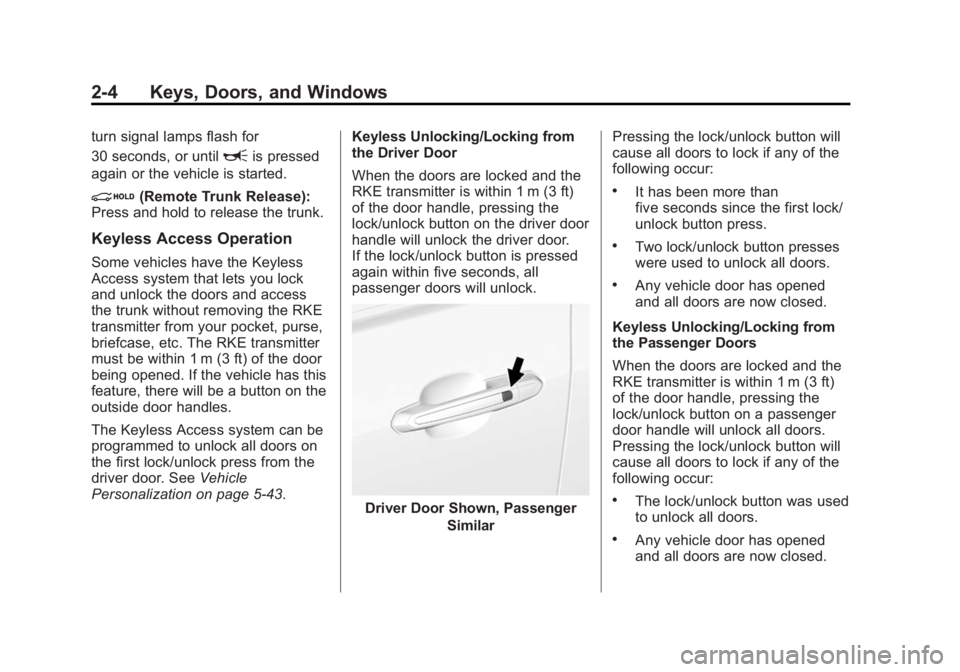
Some vehicles have the Keyless
Access system that lets you lock
and unlock the doors and access
the trunk without removing the RKE
transmitter from your pocket, purse,
briefcase, etc. The RKE transmitter
must be within 1 m (3 ft) of the door
being opened. If the vehicle has this
feature, there will be a button on the
outside door handles.
The Keyless Access system can be
programmed to unlock all doors on
the first lock/unlock press from the
driver door. See Vehicle
Personalization on page 5-43. Keyless Unlocking/Locking from
the Driver Door
When the doors are locked and the
RKE transmitter is within 1 m (3 ft)
of the door handle, pressing the
lock/unlock button on the driver door
handle will unlock the driver door.
If the lock/unlock button is pressed
again within five seconds, all
passenger doors will unlock.
Driver Door Shown, Passenger
Similar Pressing the lock/unlock button will
cause all doors to lock if any of the
following occur:
.It has been more than
five seconds since the first lock/
unlock button press.
.Two lock/unlock button presses
were used to unlock all doors.
.Any vehicle door has opened
and all doors are now closed.
Keyless Unlocking/Locking from
the Passenger Doors
When the doors are locked and the
RKE transmitter is within 1 m (3 ft)
of the door handle, pressing the
lock/unlock button on a passenger
door handle will unlock all doors.
Pressing the lock/unlock button will
cause all doors to lock if any of the
following occur:
.The lock/unlock button was used
to unlock all doors.
.Any vehicle door has opened
and all doors are now closed.
Page 35 of 434
Black plate (5,1)Cadillac ATS Owner Manual (GMNA-Localizing-U.S./Canada/Mexico-
6014430) - 2014 - 2nd Edition - 8/23/13
Keys, Doors, and Windows 2-5
Passive Locking
If equipped with Keyless Access,
this feature will lock the vehicle
several seconds after all doors are
closed, if the vehicle is off and at
least one RKE transmitter has been
removed from the interior or none
remain in the interior.
Temporary Disable Passive
Locking Feature
Temporarily disable the passive
locking by pressing and holding
K
on the interior door switch with a
door open for at least four seconds,
or until three chimes are heard.
Passive locking will then remain
disabled until
Qon the interior door
is pressed, or until the vehicle is
turned on.
To customize the doors to
automatically lock when exiting the
vehicle, see “Remote Lock, Unlock,
Start” under Vehicle Personalization
on page 5-43. Keyless Trunk Opening
Press the touch pad on the trunk
handle to open the trunk if the RKE
transmitter is within 1 m (3 ft).
Programming Transmitters to
the Vehicle
Only RKE transmitters programmed
to the vehicle will work. If a
transmitter is lost or stolen, a
replacement can be purchased and
programmed through your dealer.
The vehicle can be reprogrammed
so that lost or stolen transmitters no
longer work. Each vehicle can have
up to eight transmitters matched
to it.
Programming with a Recognized
Transmitter
A new transmitter can be
programmed to the vehicle when
there is one recognized transmitter.
To program, the vehicle must be off
and all transmitters, both currently
recognized and new, must be
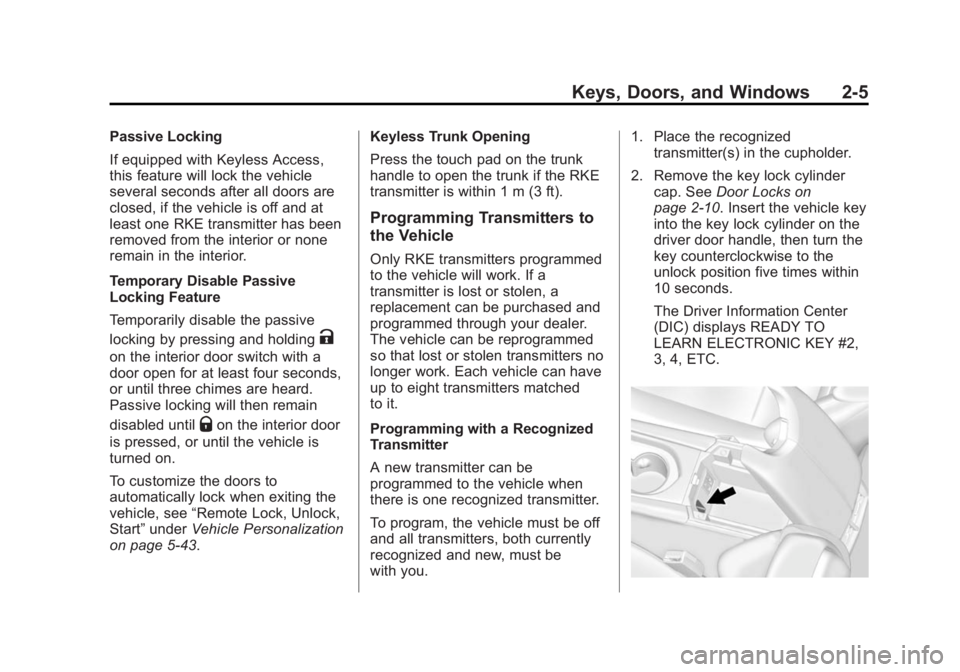
with you.1. Place the recognized
transmitter(s) in the cupholder.
2. Remove the key lock cylinder cap. See Door Locks on
page 2-10. Insert the vehicle key
into the key lock cylinder on the
driver door handle, then turn the
key counterclockwise to the
unlock position five times within
10 seconds.
The Driver Information Center
(DIC) displays READY TO
LEARN ELECTRONIC KEY #2,
3, 4, ETC.