traction control CADILLAC ATS 2016 1.G Owner's Manual
[x] Cancel search | Manufacturer: CADILLAC, Model Year: 2016, Model line: ATS, Model: CADILLAC ATS 2016 1.GPages: 348, PDF Size: 3.38 MB
Page 207 of 348
Cadillac ATS/ATS-V Owner Manual (GMNA-Localizing-MidEast-9369639) -
2016 - crc - 12/9/15
206 Driving and Operating
The indicator light for both systems
is in the instrument cluster. This
light will:
.Flash when TCS is limiting
wheel spin.
. Flash when StabiliTrak is
activated.
. Turn on and stay on when either
system is not working.
If either system fails to turn on or to
activate, a message displays in the
Driver Information Center (DIC),
and
dcomes on and stays on to
indicate that the system is inactive
and is not assisting the driver in
maintaining control. The vehicle is
safe to drive, but driving should be
adjusted accordingly.
If
dcomes on and stays on:
1. Stop the vehicle. 2. Turn the engine off and wait
15 seconds.
3. Start the engine.
4. Drive the vehicle.
If
dcomes on and stays on, the
vehicle may need more time to
diagnose the problem. If the
condition persists, see your dealer.
Turning the Systems Off
and On
Thegbutton for TCS and
StabiliTrak is on the center console
(ATS) or the steering
wheel (ATS-V).
Caution
Do not repeatedly brake or
accelerate heavily when TCS is
off. The vehicle driveline could be
damaged.
To turn off only TCS, press and
release the
gbutton. The Traction
Off light
idisplays in the
instrument cluster and the appropriate DIC message displays.
See
Ride Control System
Messages 0139.
To turn TCS on again, press and
release the
gbutton. The Traction
Off light
idisplayed in the
instrument cluster will turn off.
If TCS is limiting wheel spin when
the
gbutton is pressed, the system
will not turn off until the wheels stop
spinning.
To turn off both TCS and StabiliTrak,
press and hold the
gbutton until
the Traction Off light
iand
StabiliTrak OFF light
gcome on
and stay on in the instrument
cluster. The appropriate DIC
message displays. See Ride Control
System Messages 0139.
To turn TCS and StabiliTrak on
again, press and release the
g
button. The Traction Off lightiand
StabiliTrak OFF light
gin the
instrument cluster turn off.
Page 208 of 348
Cadillac ATS/ATS-V Owner Manual (GMNA-Localizing-MidEast-9369639) -
2016 - crc - 12/9/15
Driving and Operating 207
Adding accessories can affect the
vehicle performance. See
Accessories and
Modifications0245.
Driver Mode Control
Driver Mode Control attempts to add
a sportier feel, provide a more
comfortable ride, or assist in
different weather conditions or
terrain. This system simultaneously
changes the software calibration of
various sub-systems. Depending on
the option package, available
features, and mode selected, the
suspension, steering, and
powertrain will change calibrations
to achieve the desired mode
characteristics. If the vehicle is
equipped with Magnetic Ride
Control, selecting the various Driver
Modes adjusts the ride of the
vehicle to enhance the ride
performance for the road conditions
and the selected mode.
The Driver Mode Control has three
or four modes: Tour, Sport, Snow/
Ice, and Track (LF4 Only). Press
and release the MODE button (ATS) or press the
yorzbutton (ATS-V)
on the center console to activate the
mode menu in the cluster. The first
press of the button will show the
current mode. Subsequent presses
will scroll though the available
modes. The Tour and Sport modes
will feel similar on a smooth road.
Select a new setting whenever
driving conditions change.
Tour Mode
Use for normal city and highway
driving to provide a smooth,
soft ride.
Sport Mode
Use where road conditions or
personal preference demand a more
controlled response.
When selected, the Sport mode
indicator will display in the Driver
Information Center (DIC).
When in Sport or Track mode, the
vehicle will shift automatically but
may hold a lower gear longer than it
would in the normal driving mode
based on braking, throttle input, and vehicle lateral acceleration. See
Automatic Transmission
0198. The
steering will change to provide more
precise control. If the vehicle has
Magnetic Ride Control, the
suspension will change to provide
better cornering performance.
Competitive Driving Mode can be
accessed through this mode.
Snow/Ice Mode
Use when more traction is needed
during slippery conditions. The
transmission will use 2 (Second)
gear instead of 1 (First) gear when
accelerating from a stop. The
vehicle will upshift normally when
the vehicle is moving.
For LF4 only, Snow/Ice mode will
use a different accelerator pedal
map to optimize traction on a
slippery surface. The accelerator
pedal will reduce engine torque at
small pedal inputs. The transmission
will also shift differently to assist in
maintaining traction.
When selected, the Snow/Ice mode
indicator will display in the DIC.
Page 209 of 348
Cadillac ATS/ATS-V Owner Manual (GMNA-Localizing-MidEast-9369639) -
2016 - crc - 12/9/15
208 Driving and Operating
This feature is not intended for use
when the vehicle is stuck in sand,
mud, ice, snow, or gravel. If the
vehicle becomes stuck, seeIf the
Vehicle Is Stuck 0186.
Track Mode (LF4 Only)
Use when maximum vehicle
handling is desired. When selected,
the Track Mode indicator will display
in the DIC.
Accelerator pedal is adjusted to give
maximum control during the highest
level of spirited driving.
The automatic transmission and
steering will function similar to
Sport Mode.
The Magnetic Ride Control will be
set to the optimum level for vehicle
responsiveness.
Competitive Driving Mode can be
accessed through this mode.
Use when driving on a closed race
course or drag strip.
Vehicle systems are optimized for
maximum track performance. This mode allows entry to
Performance Traction Management
(PTM) in the Competitive
Driving Mode.
Competitive Driving Mode
(LF4 and V-Series Only)
To select this optional handling
mode, press the
Ybutton quickly
two times and the DIC will display
the appropriate message. While in
the Competitive Driving Mode, the
traction off light
iand StabiliTrak
OFF light
gwill come on in the
instrument cluster. TCS does not
limit wheel spin, the Electronic
Limited-Slip Differential (ELSD)
allows increased vehicle agility, and
more effort is required to turn the
steering wheel. See “Limited-Slip
Rear Axle (LF4 and V-Series Only)”
later in this section. Adjust your
driving accordingly.
Press the
Ybutton again, or turn
the ignition to ACC/ACCESSORY
and restart the vehicle, to turn TCS back on. The traction off light
iand
StabiliTrak OFF light
gwill go out in
the instrument cluster.
Caution
When traction control is turned
off, or Competitive Driving Mode
is active, it is possible to lose
traction.
Performance Traction
Management (V-Series Only)
Performance Traction Management
(PTM) integrates the Traction
Control, StabiliTrak, and Magnetic
Ride Control systems to provide
improved and consistent
performance when cornering. The
amount of available engine power is
based on the mode selected, track
conditions, driver skill, and the
radius of each corner.
Page 211 of 348
Cadillac ATS/ATS-V Owner Manual (GMNA-Localizing-MidEast-9369639) -
2016 - crc - 12/9/15
210 Driving and Operating
PERF TRAC 5–RACE ACTIVE
HANDLING OFF
. For use by experienced drivers
who are familiar with the track.
. Dry conditions only.
. Requires more driving skill than
in other modes.
. StabiliTrak is off and engine
power is available for maximum
cornering speed.
Press and release the TCS/
StabiliTrak
Ybutton to turn off
PTM and return to the traction
control and StabiliTrak systems. The
traction off light
iand StabiliTrak
OFF light
gwill go out.
Launch Control (LF4 and
V-Series Only)
A Launch Control feature is
available, within Competitive Driving
Mode (LF4) or Performance Traction
Management (V-Series), to allow the
driver to achieve high levels of
vehicle acceleration in a straight
line. Launch Control is a form of
traction control that manages tire spin while launching the vehicle.
This feature is intended for use
during closed course race events
where consistent zero to
60 and quarter mile times are
desirable.
Launch Control is only available
when the following criteria are met:
.
Competitive Driving Mode is
selected (LF4) or any of the
Performance Traction
Management modes are
selected (V-Series). The TCS
light comes on the instrument
panel and the appropriate DIC
message displays.
. The vehicle is not moving.
. The steering wheel is pointing
straight.
. The brake pedal must be firmly
pressed to the floor, equivalent
to a panic brake event.
. The accelerator pedal is rapidly
applied to wide open throttle. (If
the vehicle rolls due to wide
open throttle, release the
throttle, press the brake pedal more firmly, and re-apply the
accelerator to wide open
throttle.)
The Launch Control feature will
initially limit engine speed as the
driver rapidly applies the accelerator
pedal to wide open throttle. Allow
the engine rpm to stabilize.
A smooth, quick release of the
brake pedal, while maintaining the
fully pressed accelerator pedal, will
manage wheel slip.
After the vehicle is launched, the
system continues in Competitive
Driving Mode (LF4) or Performance
Traction Management (V-Series).
Competitive Driving Mode, PTM,
and Launch Control are systems
designed for a closed course race
track and not intended for use on
public roads. The systems are not
intended to compensate for lack of
driver experience or familiarity with
the race track.
Page 212 of 348

Cadillac ATS/ATS-V Owner Manual (GMNA-Localizing-MidEast-9369639) -
2016 - crc - 12/9/15
Driving and Operating 211
Limited-Slip Rear Axle
(Except LF4 and V-Series)
If equipped, the mechanical
limited-slip differential can give more
traction on snow, mud, ice, sand,
or gravel. It works like a standard
axle most of the time, but when
traction is low, this feature allows
the drive wheel with the most
traction to move the vehicle. For
vehicles with limited slip differential,
driven under severe conditions, the
rear axle fluid should be changed.
SeeCompetitive Driving Mode
(LF4 and V-Series Only) 0208 and
Maintenance Schedule 0323.
Limited-Slip Rear Axle
(LF4 and V-Series Only)
If equipped, the Electronic
Limited-Slip Differential (ELSD) is
automatically activated. ELSD
actively monitors vehicle sensors
and driver inputs to determine the
amount of change for the
conditions. With ELSD, the
vehicle has:
.
Enhanced high-speed control.
. Improved traction through
corners, allowing more
acceleration.
. More precise steering.
. Increased vehicle agility.
. Integration with StabiliTrak.
For vehicles with ELSD, driven
under severe conditions, the rear
axle fluid should be changed. See
Competitive Driving Mode (LF4 and
V-Series Only) 0208 and
Maintenance Schedule 0323.
Cruise Control
With cruise control, a speed of
about 40 km/h (25 mph) or more can
be maintained without keeping your
foot on the accelerator. Cruise
control does not work at speeds
below about 40 km/h (25 mph).
{Warning
Cruise control can be dangerous
where you cannot drive safely at
a steady speed. Do not use
cruise control on winding roads or
in heavy traffic.
Cruise control can be dangerous
on slippery roads. On such roads,
fast changes in tire traction can
cause excessive wheel slip, and
you could lose control. Do not use
cruise control on slippery roads.
If the StabiliTrak
®system begins to
limit wheel spin while using cruise
control, the cruise control
automatically disengages. See
Traction Control/Electronic Stability
Control 0205. If a collision alert
Page 215 of 348
Cadillac ATS/ATS-V Owner Manual (GMNA-Localizing-MidEast-9369639) -
2016 - crc - 12/9/15
214 Driving and Operating
Also, you may have to brake or shift
to a lower gear to keep the vehicle
speed down. If the brake pedal is
applied, cruise control will
disengage.
Ending Cruise Control
There are four ways to end cruise
control:
.Step lightly on the brake pedal.
. Shift the transmission to
N (Neutral).
. Press
*.
. Press
J.
Erasing Speed Memory
The cruise control set speed is
erased from memory if
Jis
pressed or if the ignition is
turned off.
Adaptive Cruise Control
If equipped with Adaptive Cruise
Control (ACC), it allows the driver to
select the cruise control set speed
and following gap. Read this entire
section before using this system. The following gap is the following
time between your vehicle and a
vehicle detected directly ahead in
your path moving in the same
direction. If no vehicle is detected in
your path, ACC works like regular
cruise control. ACC uses camera
and radar sensors.
If a vehicle is detected in your path,
ACC can apply acceleration or
limited, moderate braking to
maintain the selected following gap.
To disengage ACC, apply the brake.
If ACC is controlling your vehicle
speed when the Traction Control
System (TCS) or StabiliTrak System
activates, the ACC may
automatically disengage. See
Traction Control/Electronic Stability
Control
0205. When road
conditions allow ACC to be safely
used, the ACC can be turned
back on.
ACC will not engage if the TCS or
StabiliTrak electronic stability control
system is disabled.
{Warning
ACC has limited braking ability
and may not have time to slow
the vehicle down enough to avoid
a collision with another vehicle
you are following. This can occur
when vehicles suddenly slow or
stop ahead, or enter your lane.
Also see “Alerting the Driver” in
this section. Complete attention is
always required while driving and
you should be ready to take
action and apply the brakes. See
Defensive Driving 0177.
{Warning
ACC will not detect or brake for
children, pedestrians, animals,
or other objects.
Do not use ACC when:
. On winding and hilly roads
or when the sensors are
blocked by snow, ice, or dirt.
(Continued)
Page 216 of 348
Cadillac ATS/ATS-V Owner Manual (GMNA-Localizing-MidEast-9369639) -
2016 - crc - 12/9/15
Driving and Operating 215
Warning (Continued)
The system may not detect
a vehicle ahead. Keep the
entire front of the vehicle
clean.
. Visibility is low, such as in
fog, rain, or snow
conditions. ACC
performance is limited under
these conditions.
. On slippery roads where
fast changes in tire traction
can cause excessive
wheel slip.
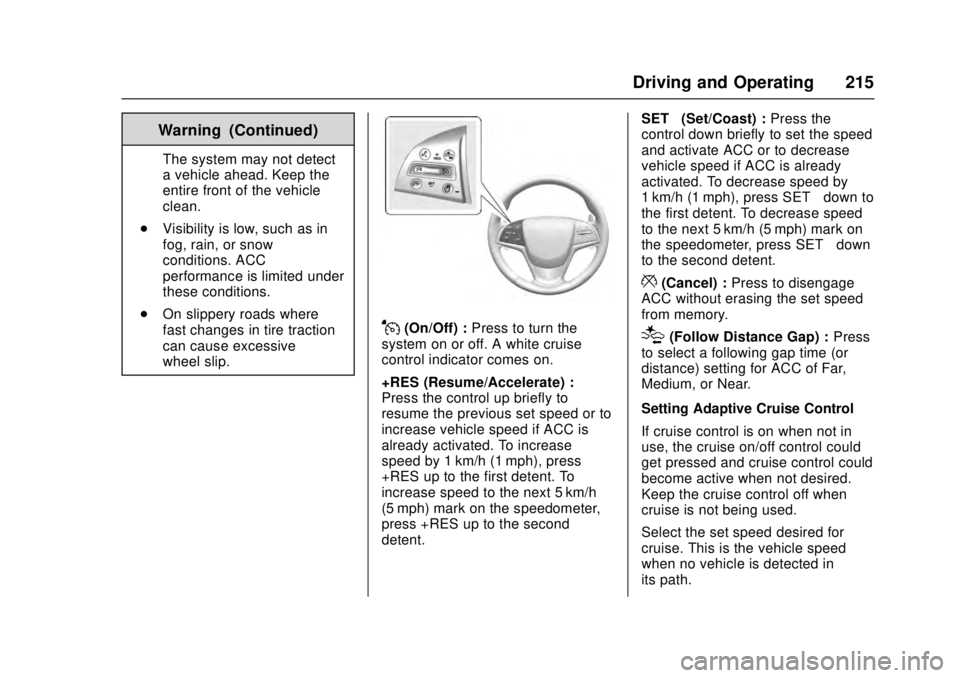
J(On/Off) : Press to turn the
system on or off. A white cruise
control indicator comes on.
+RES (Resume/Accelerate) :
Press the control up briefly to
resume the previous set speed or to
increase vehicle speed if ACC is
already activated. To increase
speed by 1 km/h (1 mph), press
+RES up to the first detent. To
increase speed to the next 5 km/h
(5 mph) mark on the speedometer,
press +RES up to the second
detent. SET–
(Set/Coast) : Press the
control down briefly to set the speed
and activate ACC or to decrease
vehicle speed if ACC is already
activated. To decrease speed by
1 km/h (1 mph), press SET− down to
the first detent. To decrease speed
to the next 5 km/h (5 mph) mark on
the speedometer, press SET− down
to the second detent.
*(Cancel) : Press to disengage
ACC without erasing the set speed
from memory.
[(Follow Distance Gap) : Press
to select a following gap time (or
distance) setting for ACC of Far,
Medium, or Near.
Setting Adaptive Cruise Control
If cruise control is on when not in
use, the cruise on/off control could
get pressed and cruise control could
become active when not desired.
Keep the cruise control off when
cruise is not being used.
Select the set speed desired for
cruise. This is the vehicle speed
when no vehicle is detected in
its path.
Page 219 of 348
Cadillac ATS/ATS-V Owner Manual (GMNA-Localizing-MidEast-9369639) -
2016 - crc - 12/9/15
218 Driving and Operating
Alert Seat will pulse five times. See
“Collision/Detection Systems”under
Vehicle Personalization 0142.
See Defensive Driving 0177.
Approaching and Following a
Vehicle
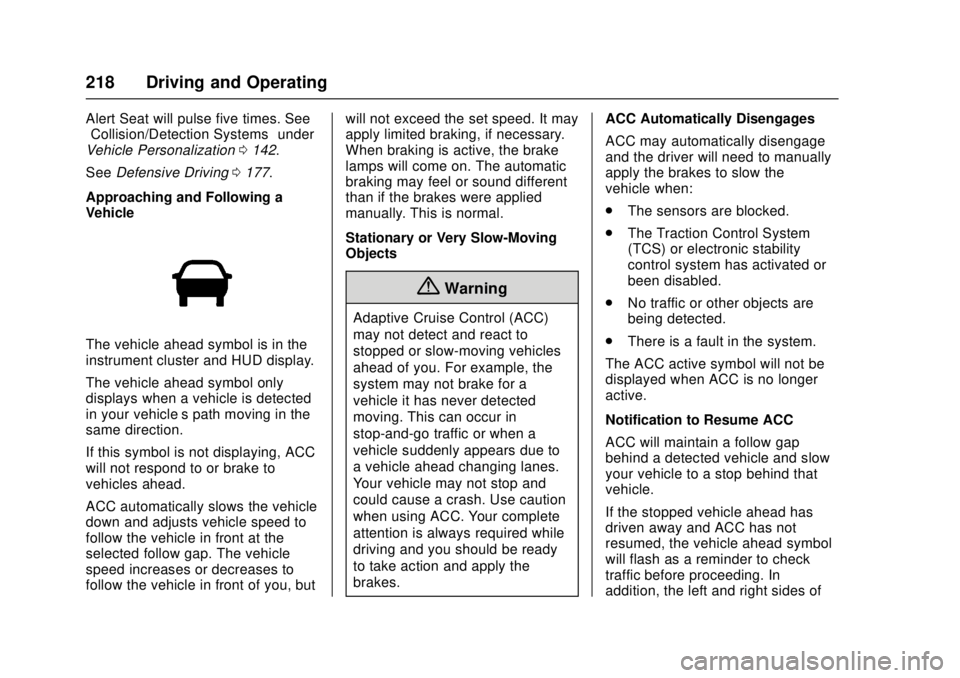
The vehicle ahead symbol is in the
instrument cluster and HUD display.
The vehicle ahead symbol only
displays when a vehicle is detected
in your vehicle’s path moving in the
same direction.
If this symbol is not displaying, ACC
will not respond to or brake to
vehicles ahead.
ACC automatically slows the vehicle
down and adjusts vehicle speed to
follow the vehicle in front at the
selected follow gap. The vehicle
speed increases or decreases to
follow the vehicle in front of you, but will not exceed the set speed. It may
apply limited braking, if necessary.
When braking is active, the brake
lamps will come on. The automatic
braking may feel or sound different
than if the brakes were applied
manually. This is normal.
Stationary or Very Slow-Moving
Objects
{Warning
Adaptive Cruise Control (ACC)
may not detect and react to
stopped or slow-moving vehicles
ahead of you. For example, the
system may not brake for a
vehicle it has never detected
moving. This can occur in
stop-and-go traffic or when a
vehicle suddenly appears due to
a vehicle ahead changing lanes.
Your vehicle may not stop and
could cause a crash. Use caution
when using ACC. Your complete
attention is always required while
driving and you should be ready
to take action and apply the
brakes.
ACC Automatically Disengages
ACC may automatically disengage
and the driver will need to manually
apply the brakes to slow the
vehicle when:
.
The sensors are blocked.
. The Traction Control System
(TCS) or electronic stability
control system has activated or
been disabled.
. No traffic or other objects are
being detected.
. There is a fault in the system.
The ACC active symbol will not be
displayed when ACC is no longer
active.
Notification to Resume ACC
ACC will maintain a follow gap
behind a detected vehicle and slow
your vehicle to a stop behind that
vehicle.
If the stopped vehicle ahead has
driven away and ACC has not
resumed, the vehicle ahead symbol
will flash as a reminder to check
traffic before proceeding. In
addition, the left and right sides of
Page 246 of 348
Cadillac ATS/ATS-V Owner Manual (GMNA-Localizing-MidEast-9369639) -
2016 - crc - 12/9/15
Vehicle Care 245
Jump Starting
Jump Starting . . . . . . . . . . . . . . . . 307
Towing the Vehicle
Towing the Vehicle . . . . . . . . . . . 310
Recreational VehicleTowing . . . . . . . . . . . . . . . . . . . . . . 311
Appearance Care
Exterior Care . . . . . . . . . . . . . . . . . 313
Interior Care . . . . . . . . . . . . . . . . . . 317
Floor Mats . . . . . . . . . . . . . . . . . . . . 320
General Information
For service and parts needs, visit
your dealer. You will receive
genuine parts and trained and
supported service people.
Accessories and
Modifications
Adding non-dealer accessories or
making modifications to the vehicle
can affect vehicle performance and
safety, including such things as
airbags, braking, stability, ride and
handling, emissions systems,
aerodynamics, durability, and
electronic systems like antilock
brakes, traction control, and stability
control. These accessories or
modifications could even cause
malfunction or damage not covered
by the vehicle warranty.
Damage to suspension components
caused by modifying vehicle height
outside of factory settings will not be
covered by the warranty.
Damage to vehicle components
resulting from modifications or the
installation or use of non-GM certified parts, including control
module or software modifications, is
not covered under the terms of the
vehicle warranty and may affect
remaining warranty coverage for
affected parts.
GM Accessories are designed to
complement and function with other
systems on the vehicle. See your
dealer to accessorize the vehicle
using genuine GM Accessories
installed by a dealer technician.
Also, see
Adding Equipment to the
Airbag-Equipped Vehicle 081.
Page 296 of 348
Cadillac ATS/ATS-V Owner Manual (GMNA-Localizing-MidEast-9369639) -
2016 - crc - 12/9/15
Vehicle Care 295
vehicle, including brake system
performance, ride and handling,
traction control, and tire
pressure monitoring
performance. GM's TPC Spec
number is molded onto the tire's
sidewall near the tire size. If the
tires have an all-season tread
design, the TPC Spec number
will be followed by MS for mud
and snow.
GM recommends replacing worn
tires in complete sets of four.
Uniform tread depth on all tires
will help to maintain the
performance of the vehicle.
Braking and handling
performance may be adversely
affected if all the tires are not
replaced at the same time.
If proper rotation and
maintenance have been done,
all four tires should wear out at
about the same time. SeeTire
Rotation 0292 for information
on proper tire rotation. However, if it is necessary to replace only
one axle set of worn tires, place
the new tires on the rear axle.
{Warning
Tires could explode during
improper service. Attempting
to mount or dismount a tire
could cause injury or death.
Only your dealer or authorized
tire service center should
mount or dismount the tires.
Winter tires with the same speed
rating as the original equipment
tires may not be available for H,
V, W, Y, and ZR speed rated
tires. Never exceed the winter
tire's maximum speed capability
when using winter tires with a
lower speed rating.
{Warning
Never drive faster than the speed
the tires are rated, regardless of
the legal speed limit. When
frequently driving the vehicle at
high speeds and/or for prolonged
periods of time, check with your
vehicle/tire dealer for the proper
type of tires to use for the specific
driving and weather conditions.
{Warning
Mixing tires of different sizes
(other than those originally
installed on the vehicle), brands,
or types may cause loss of
control of the vehicle, resulting in
a crash or other vehicle damage.
Use the correct size, brand, and
type of tire on all four wheels.