center console CADILLAC ATS 2016 1.G Owners Manual
[x] Cancel search | Manufacturer: CADILLAC, Model Year: 2016, Model line: ATS, Model: CADILLAC ATS 2016 1.GPages: 348, PDF Size: 3.38 MB
Page 25 of 348
Cadillac ATS/ATS-V Owner Manual (GMNA-Localizing-MidEast-9369639) -
2016 - crc - 12/9/15
24 In Brief
Rear Cross Traffic Alert
(RCTA) System
If equipped, the RCTA system uses
a triangle with an arrow displayed
on the RVC screen to warn of traffic
behind your vehicle that may cross
your vehicle's path while in
R (Reverse). In addition, beeps will
sound, or the driver seat will pulse.
SeeAssistance Systems for Parking
or Backing 0222.
Parking Assist
If equipped, Rear Parking
Assist (RPA) uses sensors on the
rear bumper to assist with parking
and avoiding objects while in
R (Reverse). It operates at speeds
less than 8 km/h (5 mph). RPA may
display a warning triangle on the
Rear Vision Camera screen and a
graphic on the instrument cluster to
provide the object distance. In
addition, multiple beeps or seat
pulses may occur if very close to an
object.
The vehicle may also have the Front
Parking Assist system. See
Assistance Systems for Parking
or Backing 0222.
Rear Automatic Braking
(RAB) System
If the vehicle has Adaptive Cruise
Control (ACC) it also has the RAB
system, which is designed to help
avoid or reduce the harm caused by
backing crashes when the vehicle is
shifted into R (Reverse). If the
system detects the vehicle is
backing too fast to avoid a crash
with a detected object behind your
vehicle in your path, it may
automatically brake hard to a stop.
See Assistance Systems for Parking
or Backing 0222.
Power Outlets
The accessory power outlets can be
used to plug in electrical equipment,
such as a cell phone or MP3 player. The vehicle has two accessory
power outlets:
.
Inside the front storage bin
below the climate control
system.
. On the rear of the center floor
console.
Lift the cover to access the
accessory power outlet.
See Power Outlets 0107.
Sunroof
If equipped with a sunroof, the
ignition must be in ON/RUN or ACC/
ACCESSORY, or Retained
Accessory Power (RAP) must be
active, to operate the sunroof. See
Ignition Positions 0191 and
Retained Accessory Power
(RAP) 0195.
Page 26 of 348
Cadillac ATS/ATS-V Owner Manual (GMNA-Localizing-MidEast-9369639) -
2016 - crc - 12/9/15
In Brief 25
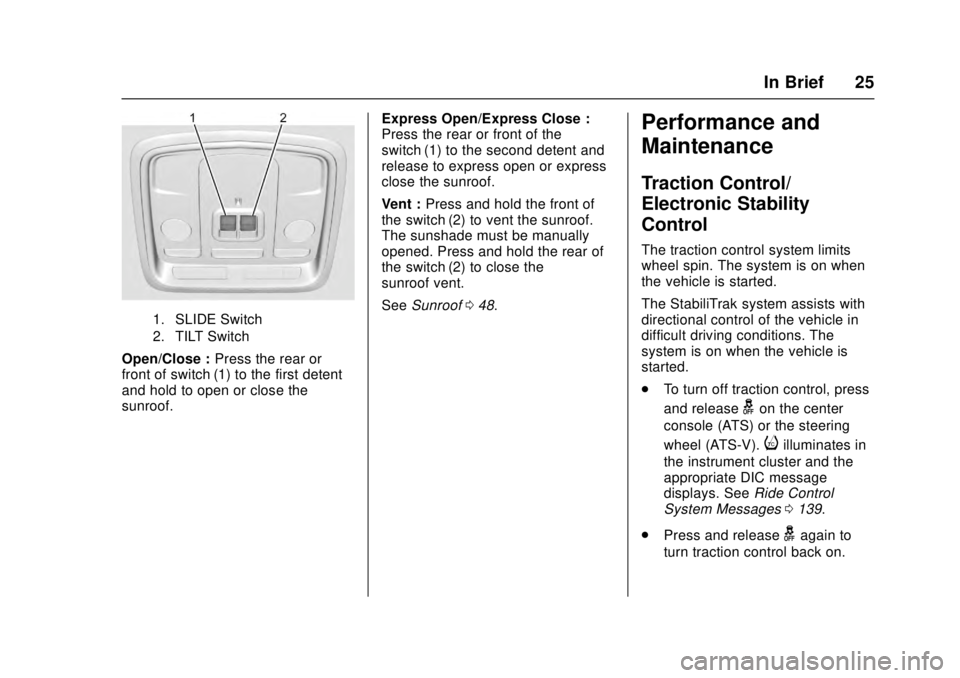
1. SLIDE Switch
2. TILT Switch
Open/Close :Press the rear or
front of switch (1) to the first detent
and hold to open or close the
sunroof. Express Open/Express Close :
Press the rear or front of the
switch (1) to the second detent and
release to express open or express
close the sunroof.
Vent :
Press and hold the front of
the switch (2) to vent the sunroof.
The sunshade must be manually
opened. Press and hold the rear of
the switch (2) to close the
sunroof vent.
See Sunroof 048.
Performance and
Maintenance
Traction Control/
Electronic Stability
Control
The traction control system limits
wheel spin. The system is on when
the vehicle is started.
The StabiliTrak system assists with
directional control of the vehicle in
difficult driving conditions. The
system is on when the vehicle is
started.
.
To turn off traction control, press
and release
gon the center
console (ATS) or the steering
wheel (ATS-V).
iilluminates in
the instrument cluster and the
appropriate DIC message
displays. See Ride Control
System Messages 0139.
. Press and release
gagain to
turn traction control back on.
Page 27 of 348
Cadillac ATS/ATS-V Owner Manual (GMNA-Localizing-MidEast-9369639) -
2016 - crc - 12/9/15
26 In Brief
.To turn off both Traction Control
and StabiliTrak, press and
hold
gon the center console
(ATS) or the steering wheel
(ATS-V) until
gandiilluminate
in the instrument cluster. The
appropriate DIC message
displays. See Ride Control
System Messages 0139.
. Press and release
gagain to
turn on both systems.
See Traction Control/Electronic
Stability Control 0205.
The vehicle has Driver Mode
Control and may have Competitive
Driving Mode. See Driver Mode
Control 0207 andCompetitive
Driving Mode (LF4 and V-Series
Only) 0208.
Tire Pressure Monitor
This vehicle may have a Tire
Pressure Monitor System (TPMS).
The low tire pressure warning light
alerts to a significant loss in
pressure of one of the vehicle's
tires. If the warning light comes on,
stop as soon as possible and inflate
the tires to the recommended
pressure shown on the Tire and
Loading Information label. See
Vehicle Load Limits 0187. The
warning light will remain on until the
tire pressure is corrected.
The low tire pressure warning light
may come on in cool weather when
the vehicle is first started, and then
turn off as the vehicle is driven. This
may be an early indicator that the
tire pressures are getting low and
the tires need to be inflated to the
proper pressure.
The TPMS does not replace normal
monthly tire maintenance. Maintain
the correct tire pressures. See
Tire Pressure Monitor
System 0288.
Engine Oil Life System
The engine oil life system calculates
engine oil life based on vehicle use
and displays the CHANGE ENGINE
OIL SOON message when it is time
to change the engine oil and filter.
The oil life system should be reset
to 100% only following an oil
change.
Resetting the Oil Life System
1. Using the DIC controls on the right side of the steering wheel,
display REMAINING OIL LIFE
on the DIC. See Driver
Information Center (DIC) 0126.
When remaining oil life is low,
the CHANGE ENGINE OIL
SOON message will appear on
the display. See Engine Oil
Messages 0134.
2. Press and hold SEL to clear the CHANGE ENGINE OIL
SOON message and reset the
oil life at 100%.
Page 33 of 348
Cadillac ATS/ATS-V Owner Manual (GMNA-Localizing-MidEast-9369639) -
2016 - crc - 12/9/15
32 Keys, Doors, and Windows
transmitter inside the vehicle.
If passive locking is enabled, the
doors may lock with the RKE
transmitter inside the vehicle. Do
not leave the RKE transmitter in an
unattended vehicle.
To customize the doors to
automatically lock when exiting the
vehicle, seeVehicle
Personalization 0142.
Temporary Disable of Passive
Locking Feature
Temporarily disable the passive
locking by pressing and holding
K
on the interior door switch with a
door open for at least four seconds,
or until three chimes are heard.
Passive locking will then remain
disabled until
Qon the interior door
is pressed, or until the vehicle is
turned on.
Keyless Trunk Opening
Press the touch pad on the trunk to
open the trunk if the RKE
transmitter is within 1 m (3 ft).
Programming Transmitters to
the Vehicle
Only RKE transmitters programmed
to the vehicle will work. If a
transmitter is lost or stolen, a
replacement can be purchased and
programmed through your dealer.
When the replacement transmitter is
programmed to this vehicle, all
remaining transmitters must also be
reprogrammed. Any lost or stolen
transmitters will no longer work
once the new transmitter is
programmed. Each vehicle can
have up to eight transmitters
programmed to it. See your dealer
to program transmitters to this
vehicle.
Starting the Vehicle with a Low
Transmitter Battery
When the vehicle is started, if the
transmitter battery is weak or if
there is interference with the signal,
the DIC may display NO REMOTE
DETECTED or NO REMOTE KEY
WAS DETECTED, PLACE KEY IN
TRANSMITTER POCKET, THEN
START YOUR VEHICLE. See Key
and Lock Messages 0135. To start the vehicle:
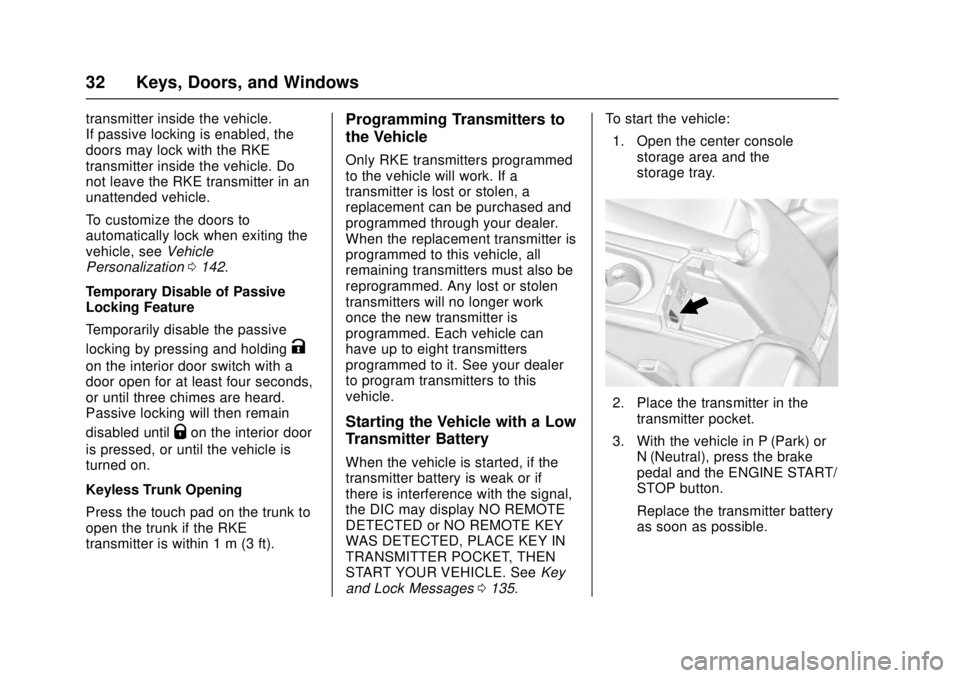
1. Open the center console storage area and the
storage tray.
2. Place the transmitter in thetransmitter pocket.
3. With the vehicle in P (Park) or N (Neutral), press the brake
pedal and the ENGINE START/
STOP button.
Replace the transmitter battery
as soon as possible.
Page 43 of 348
Cadillac ATS/ATS-V Owner Manual (GMNA-Localizing-MidEast-9369639) -
2016 - crc - 12/9/15
42 Keys, Doors, and Windows
.Unlock the vehicle using the
Keyless Access system.
. Start the vehicle.
To avoid setting off the alarm by
accident:
. Lock the vehicle after all
occupants have left the vehicle
and all doors are closed.
. Always unlock a door with the
RKE transmitter or use the
Keyless Access system.
Unlocking the driver door with the
key will not disarm the system or
turn off the alarm.
How to Detect a Tamper
Condition
IfKis pressed on the transmitter
and the horn chirps and the lights
flash three times, a previous alarm
occurred while the system was
armed.
If the alarm has been activated, a
message will appear on the DIC.
See Security Messages 0139.
Immobilizer Operation
This vehicle has a passive
theft-deterrent system.
The system does not have to be
manually armed or disarmed.
The vehicle is automatically
immobilized when the vehicle is
turned off.
The immobilization system is
disarmed when the pushbutton start
is activated to enter the ACC/
ACCESSORY mode or the ON/
RUN/START mode and a valid
transmitter is present in the vehicle.
The security light, in the instrument
cluster, comes on if there is a
problem with arming or disarming
the theft-deterrent system.
The system has one or more RKE
transmitters matched to an
immobilizer control unit in the vehicle. Only a correctly matched
RKE transmitter will start the
vehicle. If the transmitter is ever
damaged, you may not be able to
start your vehicle.
When trying to start the vehicle, the
security light comes on briefly when
the ignition is turned on. Turn the
ignition off and try again.
If the engine does not start and the
security light stays on, there is a
problem with the system.
If the vehicle will not change ignition
modes (ACC/ACCESSORY, ON/
RUN/START, OFF), and the RKE
transmitter appears to be
undamaged, try another transmitter.
Or, you may try placing the
transmitter in the transmitter pocket
located in the center console. See
Key and Lock Messages
0135.
If the ignition modes will not change
with the other transmitter, your
vehicle needs service. If the ignition
does change modes, the first
transmitter may be faulty. See your
dealer.
Page 102 of 348
Cadillac ATS/ATS-V Owner Manual (GMNA-Localizing-MidEast-9369639) -
2016 - crc - 12/9/15
Storage 101
Glove Box
To open the glove box, lift up on the
lever. Use the key to lock and
unlock it. The glove box may have a
compact disc player inside.
Cupholders
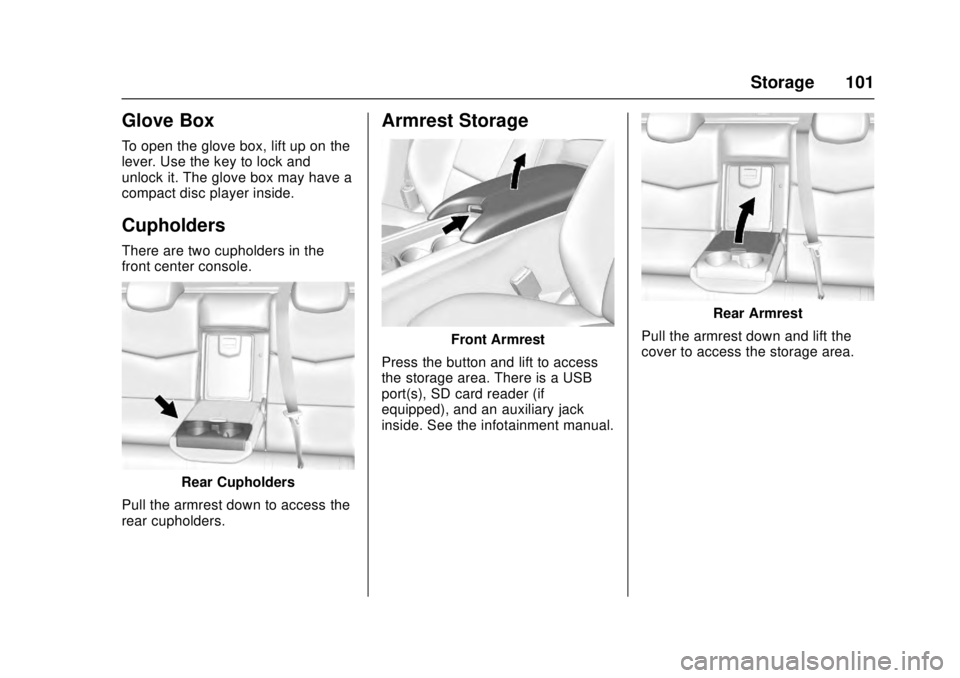
There are two cupholders in the
front center console.
Rear Cupholders
Pull the armrest down to access the
rear cupholders.
Armrest Storage
Front Armrest
Press the button and lift to access
the storage area. There is a USB
port(s), SD card reader (if
equipped), and an auxiliary jack
inside. See the infotainment manual.
Rear Armrest
Pull the armrest down and lift the
cover to access the storage area.
Page 108 of 348
Cadillac ATS/ATS-V Owner Manual (GMNA-Localizing-MidEast-9369639) -
2016 - crc - 12/9/15
Instruments and Controls 107
{Warning
In freezing weather, do not use
the washer until the windshield is
warmed. Otherwise the washer
fluid can form ice on the
windshield, blocking your vision.
Clock
The infotainment system controls
are used to access the time and
date settings through the menu
system. See“Overview”in the
infotainment manual for information
about how to use the menu system.
Setting the Time
To set the time:
1. Press the SETTINGS screen button and press Time
and Date.
2. Press Set Time and press + or −to increase or decrease
hours, minutes, and AM or PM.
Press 12Hr or 24Hr for 12 or
24 hour clock. 3. Press
}to go back to the
previous menu.
If auto timing is set, the time
displayed on the clock may not
update immediately when driving
into a new time zone.
To set the date: 1. Press the SETTINGS screen button and press Time
and Date.
2. Press Set Date and press + or −to increase or decrease
month, day, or year.
3. Press
}to go back to the
previous menu.
To set the clock display: 1. Press the SETTINGS screen button and press Time
and Date.
2. Press Clock Display and press OFF or ON to turn the clock
display off or on.
3. Press
}to go back to the
previous menu.
Power Outlets
Power Outlet 12 Volt Direct
Current
The accessory power outlets can be
used to plug in electrical equipment,
such as a cell phone or MP3 player.
The vehicle has two accessory
power outlets:
. Inside the front storage bin
below the climate control
system.
. On the rear of the center floor
console.
Lift the cover to access the
accessory power outlet.
Certain electrical accessories may
not be compatible with the
accessory power outlet and could
overload a vehicle circuit breaker or
adapter fuse. If overloaded, the
circuit breaker will reset after all
devices are disconnected or if
Retained Accessory Power (RAP) is
turned off and then back on. See
Retained Accessory Power (RAP)
0 195. Wait one minute to allow the
circuit breaker to reset before
Page 109 of 348
Cadillac ATS/ATS-V Owner Manual (GMNA-Localizing-MidEast-9369639) -
2016 - crc - 12/9/15
108 Instruments and Controls
reconnecting devices or turning
RAP back on. If the problem
continues, the issue could be within
your device. Try another known
good device to make sure the circuit
breaker is operating properly. If this
does not resolve your problem, see
your dealer.
It is possible to replace the factory
power outlet with a cigar lighter
receptacle, if desired. This requires
the factory installed circuit breaker
to be replaced with a standard
minifuse by the dealer. A minifuse
will not reset and will have to be
replace if blown.
Caution
Failure to replace the circuit
breaker with the minifuse could
overheat the cigar lighter and
damage the vehicle.
When adding electrical equipment,
be sure to follow the proper
installation instructions included with
the equipment. See Add-On
Electrical Equipment 0243.
Caution
Hanging heavy equipment from
the power outlet can cause
damage not covered by the
vehicle warranty. The power
outlets are designed for
accessory power plugs only, such
as cell phone charge cords.
Always unplug electrical equipment
when not in use and do not plug in
equipment that exceeds the
maximum 15 amps rating.
Power Outlet 220/230 Volt
Alternating Current
If equipped, this power outlet is on
the rear of the center floor console.
It can be used to plug in electrical
equipment that uses a maximum
limit of 150 watts.
An indicator light on the outlet turns
on to show it is in use. The light
comes on when the ignition is in
ON/RUN/START, equipment
requiring less than 150 watts is
plugged into the outlet, and no
system fault is detected. The indicator light does not come on
when the ignition is in LOCK/OFF or
if the equipment is not fully seated
into the outlet.
If equipment is connected using
more than 150 watts or a system
fault is detected, a protection circuit
shuts off the power supply and the
indicator light turns off. To reset the
circuit, unplug the item and plug it
back in or turn the Retained
Accessory Power (RAP) off and
then back on. See
Retained
Accessory Power (RAP) 0195. The
power restarts when equipment
using 150 watts or less is plugged
into the outlet and a system fault is
not detected.
The power outlet is not designed for
the following and may not work
properly, if this equipment is
plugged in:
. Equipment with high initial peak
wattage such as:
compressor-driven refrigerators
and electric power tools.
Page 118 of 348
Cadillac ATS/ATS-V Owner Manual (GMNA-Localizing-MidEast-9369639) -
2016 - crc - 12/9/15
Instruments and Controls 117
{Warning
If the airbag readiness light stays
on after the vehicle is started or
comes on while driving, it means
the airbag system might not be
working properly. The airbags in
the vehicle might not inflate in a
crash, or they could even inflate
without a crash. To help avoid
injury, have the vehicle serviced
right away.
If there is a problem with the airbag
system, a Driver Information Center
(DIC) message may also come on.
See Airbag System
Messages 0139.
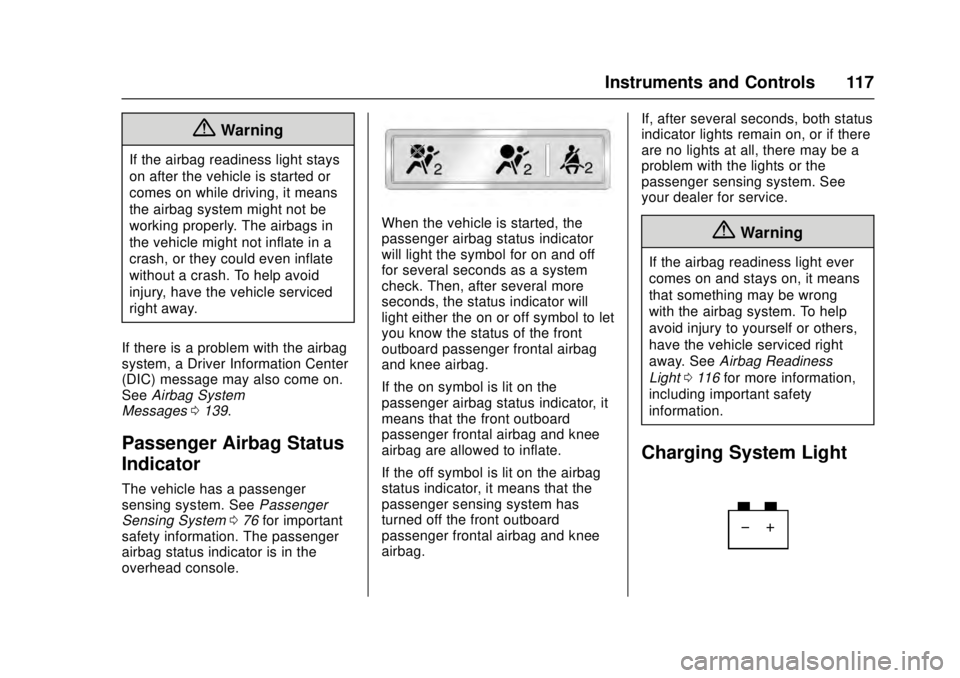
Passenger Airbag Status
Indicator
The vehicle has a passenger
sensing system. See Passenger
Sensing System 076 for important
safety information. The passenger
airbag status indicator is in the
overhead console.
When the vehicle is started, the
passenger airbag status indicator
will light the symbol for on and off
for several seconds as a system
check. Then, after several more
seconds, the status indicator will
light either the on or off symbol to let
you know the status of the front
outboard passenger frontal airbag
and knee airbag.
If the on symbol is lit on the
passenger airbag status indicator, it
means that the front outboard
passenger frontal airbag and knee
airbag are allowed to inflate.
If the off symbol is lit on the airbag
status indicator, it means that the
passenger sensing system has
turned off the front outboard
passenger frontal airbag and knee
airbag. If, after several seconds, both status
indicator lights remain on, or if there
are no lights at all, there may be a
problem with the lights or the
passenger sensing system. See
your dealer for service.{Warning
If the airbag readiness light ever
comes on and stays on, it means
that something may be wrong
with the airbag system. To help
avoid injury to yourself or others,
have the vehicle serviced right
away. See
Airbag Readiness
Light 0116 for more information,
including important safety
information.
Charging System Light
Page 207 of 348
Cadillac ATS/ATS-V Owner Manual (GMNA-Localizing-MidEast-9369639) -
2016 - crc - 12/9/15
206 Driving and Operating
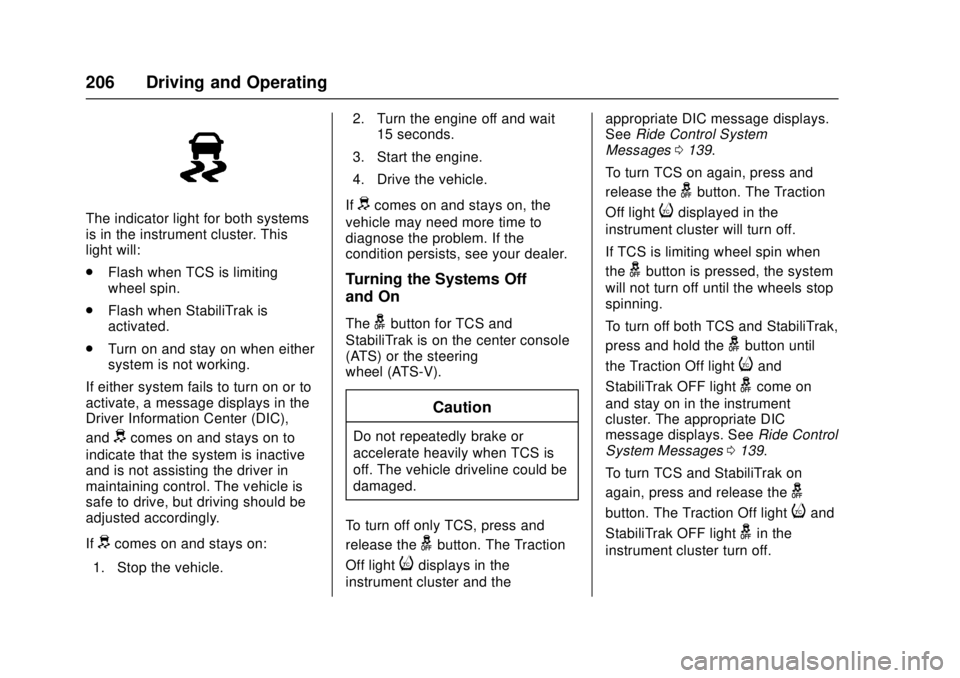
The indicator light for both systems
is in the instrument cluster. This
light will:
.Flash when TCS is limiting
wheel spin.
. Flash when StabiliTrak is
activated.
. Turn on and stay on when either
system is not working.
If either system fails to turn on or to
activate, a message displays in the
Driver Information Center (DIC),
and
dcomes on and stays on to
indicate that the system is inactive
and is not assisting the driver in
maintaining control. The vehicle is
safe to drive, but driving should be
adjusted accordingly.
If
dcomes on and stays on:
1. Stop the vehicle. 2. Turn the engine off and wait
15 seconds.
3. Start the engine.
4. Drive the vehicle.
If
dcomes on and stays on, the
vehicle may need more time to
diagnose the problem. If the
condition persists, see your dealer.
Turning the Systems Off
and On
Thegbutton for TCS and
StabiliTrak is on the center console
(ATS) or the steering
wheel (ATS-V).
Caution
Do not repeatedly brake or
accelerate heavily when TCS is
off. The vehicle driveline could be
damaged.
To turn off only TCS, press and
release the
gbutton. The Traction
Off light
idisplays in the
instrument cluster and the appropriate DIC message displays.
See
Ride Control System
Messages 0139.
To turn TCS on again, press and
release the
gbutton. The Traction
Off light
idisplayed in the
instrument cluster will turn off.
If TCS is limiting wheel spin when
the
gbutton is pressed, the system
will not turn off until the wheels stop
spinning.
To turn off both TCS and StabiliTrak,
press and hold the
gbutton until
the Traction Off light
iand
StabiliTrak OFF light
gcome on
and stay on in the instrument
cluster. The appropriate DIC
message displays. See Ride Control
System Messages 0139.
To turn TCS and StabiliTrak on
again, press and release the
g
button. The Traction Off lightiand
StabiliTrak OFF light
gin the
instrument cluster turn off.