instrument cluster CADILLAC ATS 2017 1.G Owner's Manual
[x] Cancel search | Manufacturer: CADILLAC, Model Year: 2017, Model line: ATS, Model: CADILLAC ATS 2017 1.GPages: 335, PDF Size: 3.73 MB
Page 166 of 335
Cadillac ATS/ATS-V Owner Manual (GMNA-Localizing-MidEast-10287885) -
2017 - crc - 6/16/16
CLIMATE CONTROLS 165
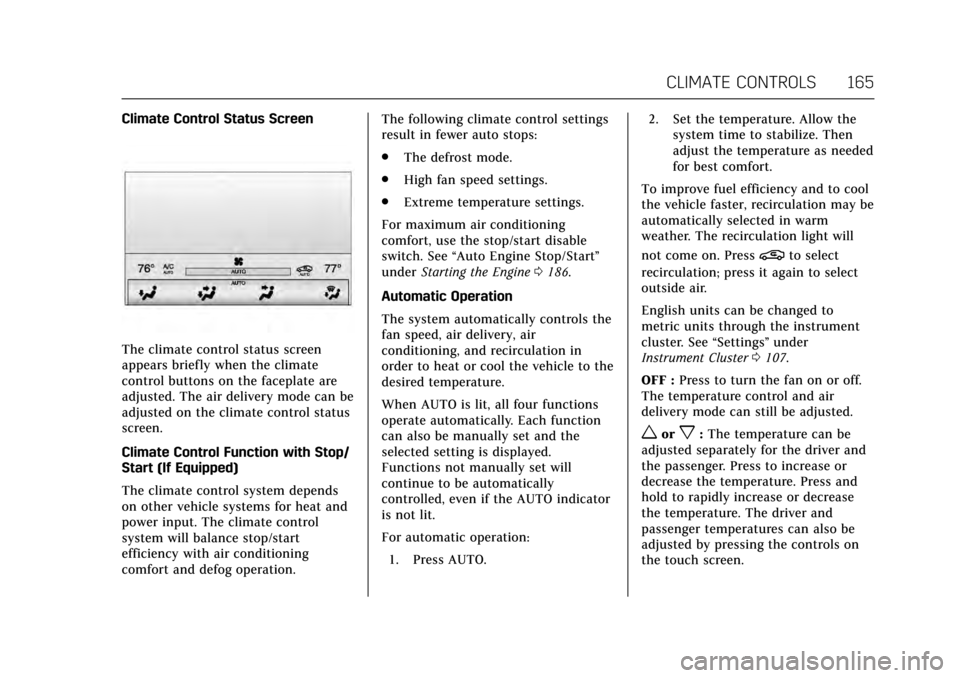
Climate Control Status Screen
The climate control status screen
appears briefly when the climate
control buttons on the faceplate are
adjusted. The air delivery mode can be
adjusted on the climate control status
screen.
Climate Control Function with Stop/
Start (If Equipped)
The climate control system depends
on other vehicle systems for heat and
power input. The climate control
system will balance stop/start
efficiency with air conditioning
comfort and defog operation.The following climate control settings
result in fewer auto stops:
.
The defrost mode.
. High fan speed settings.
. Extreme temperature settings.
For maximum air conditioning
comfort, use the stop/start disable
switch. See “Auto Engine Stop/Start ”
under Starting the Engine 0186.
Automatic Operation
The system automatically controls the
fan speed, air delivery, air
conditioning, and recirculation in
order to heat or cool the vehicle to the
desired temperature.
When AUTO is lit, all four functions
operate automatically. Each function
can also be manually set and the
selected setting is displayed.
Functions not manually set will
continue to be automatically
controlled, even if the AUTO indicator
is not lit.
For automatic operation: 1. Press AUTO. 2. Set the temperature. Allow the
system time to stabilize. Then
adjust the temperature as needed
for best comfort.
To improve fuel efficiency and to cool
the vehicle faster, recirculation may be
automatically selected in warm
weather. The recirculation light will
not come on. Press
@to select
recirculation; press it again to select
outside air.
English units can be changed to
metric units through the instrument
cluster. See “Settings”under
Instrument Cluster 0107.
OFF : Press to turn the fan on or off.
The temperature control and air
delivery mode can still be adjusted.
worx: The temperature can be
adjusted separately for the driver and
the passenger. Press to increase or
decrease the temperature. Press and
hold to rapidly increase or decrease
the temperature. The driver and
passenger temperatures can also be
adjusted by pressing the controls on
the touch screen.
Page 200 of 335

Cadillac ATS/ATS-V Owner Manual (GMNA-Localizing-MidEast-10287885) -
2017 - crc - 6/16/16
DRIVING AND OPERATING 199
The indicator light for both systems is
in the instrument cluster. This
light will:
.Flash when TCS is limiting
wheel spin.
. Flash when StabiliTrak is
activated.
. Turn on and stay on when either
system is not working.
If either system fails to turn on or to
activate, a message displays in the
Driver Information Center (DIC), and
dcomes on and stays on to indicate
that the system is inactive and is not
assisting the driver in maintaining
control. The vehicle is safe to drive,
but driving should be adjusted
accordingly.
If
dcomes on and stays on:
1. Stop the vehicle.
2. Turn the engine off and wait 15 seconds.
3. Start the engine.
4. Drive the vehicle. If
dcomes on and stays on, the
vehicle may need more time to
diagnose the problem. If the condition
persists, see your dealer.
Turning the Systems Off and On
Thegbutton for TCS and StabiliTrak
is on the center console (ATS) or the
steering wheel (ATS-V).
Caution
Do not repeatedly brake or
accelerate heavily when TCS is off.
The vehicle driveline could be
damaged.
To turn off only TCS, press and
release
g. The Traction Off lighti
displays in the instrument cluster and
the appropriate DIC message displays.
See Ride Control System
Messages 0134.
To turn TCS on again, press and
release
g. The Traction Off lighti
displayed in the instrument cluster
will turn off. If TCS is limiting wheel spin when
g
is pressed, the system will not turn off
until the wheels stop spinning.
To turn off both TCS and StabiliTrak,
press and hold
guntil the Traction
Off light
iand StabiliTrak OFF light
gcome on and stay on in the
instrument cluster. The appropriate
DIC message displays. See Ride Control
System Messages 0134.
To turn TCS and StabiliTrak on again,
press and release
g. The Traction Off
light
iand StabiliTrak OFF lightg
in the instrument cluster turn off.
Adding accessories can affect the
vehicle performance. See Accessories
and Modifications 0232.
Driver Mode Control
Driver Mode Control attempts to add
a sportier feel, provide a more
comfortable ride, or assist in different
weather conditions or terrain. This
system simultaneously changes the
software calibration of various
sub-systems. Depending on the option
package, available features, and mode
Page 202 of 335

Cadillac ATS/ATS-V Owner Manual (GMNA-Localizing-MidEast-10287885) -
2017 - crc - 6/16/16
DRIVING AND OPERATING 201
The automatic transmission and
steering will function similar to
Sport Mode.
The Magnetic Ride Control will be set
to the optimum level for vehicle
responsiveness.
Competitive Driving Mode can be
accessed through this mode.
Use when driving on a closed race
course or drag strip.
Vehicle systems are optimized for
maximum track performance.
This mode allows entry to
Performance Traction Management
(PTM) in the Competitive
Driving Mode.
Driver Mode Customization
The Engine Sound Management,
steering, and suspension drive modes
can be set to the driver’s preference.
See“Driving Mode ”under
“Personalization Menus ”in Vehicle
Personalization 0137.
The selections made in the Driving
Mode menu overwrite the main
vehicle mode selection via the buttons
or switch on the center console. In order to customize and overwrite, the
driver select one of the three settings
by touching the infotainment display.
When in the customization screen for
each system, select one of four
options:
.
Auto (Follows the mode switch)
. Engine Sound Management
. Steering
. Suspension
The default will be to follow the
vehicle mode switch settings, but the
main vehicle mode selection for the
currently selected system can be
overwritten using this menu. The
settings selected in this menu will set
the vehicle behavior in all selected
vehicle modes, and will be retained
over each ignition cycle. They do not
have to be reset each time the vehicle
is started.
Competitive Driving Mode
(FE4 Only)
To select this optional handling mode,
press
Yquickly two times and the
DIC will display the appropriate message. While in the Competitive
Driving Mode, the traction off light
i
and StabiliTrak OFF lightgwill come
on in the instrument cluster. TCS does
not limit wheel spin, the Electronic
Limited-Slip Differential (ELSD) allows
increased vehicle agility, and more
effort is required to turn the steering
wheel. See “Limited-Slip Rear Axle
(V-Series Only)” later in this section.
Adjust your driving accordingly.
Press
Yagain, or turn the ignition to
ACC/ACCESSORY and restart the
vehicle, to turn TCS back on. The
traction off light
iand StabiliTrak
OFF light
gwill go out in the
instrument cluster.
Caution
When traction control is turned off,
or Competitive Driving Mode is
active, it is possible to lose traction.
Page 206 of 335
Cadillac ATS/ATS-V Owner Manual (GMNA-Localizing-MidEast-10287885) -
2017 - crc - 6/16/16
DRIVING AND OPERATING 205
cruise control is activated, cruise
control is disengaged. SeeForward
Collision Alert (FCA) System 0218.
When road conditions allow you to
safely use it again, cruise control can
be turned back on.
If the brakes are applied, cruise
control disengages.
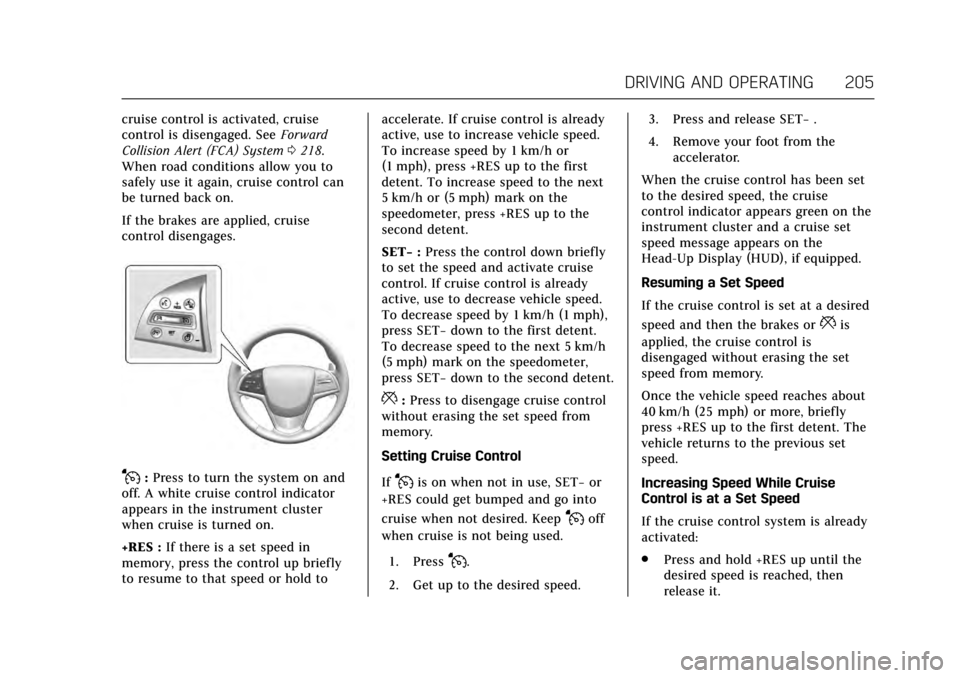
J: Press to turn the system on and
off. A white cruise control indicator
appears in the instrument cluster
when cruise is turned on.
+RES : If there is a set speed in
memory, press the control up briefly
to resume to that speed or hold to accelerate. If cruise control is already
active, use to increase vehicle speed.
To increase speed by 1 km/h or
(1 mph), press +RES up to the first
detent. To increase speed to the next
5 km/h or (5 mph) mark on the
speedometer, press +RES up to the
second detent.
SET−
:Press the control down briefly
to set the speed and activate cruise
control. If cruise control is already
active, use to decrease vehicle speed.
To decrease speed by 1 km/h (1 mph),
press SET− down to the first detent.
To decrease speed to the next 5 km/h
(5 mph) mark on the speedometer,
press SET− down to the second detent.
*:Press to disengage cruise control
without erasing the set speed from
memory.
Setting Cruise Control
If
Jis on when not in use, SET− or
+RES could get bumped and go into
cruise when not desired. Keep
Joff
when cruise is not being used.
1. Press
J.
2. Get up to the desired speed. 3. Press and release SET−
.
4. Remove your foot from the accelerator.
When the cruise control has been set
to the desired speed, the cruise
control indicator appears green on the
instrument cluster and a cruise set
speed message appears on the
Head-Up Display (HUD), if equipped.
Resuming a Set Speed
If the cruise control is set at a desired
speed and then the brakes or
*is
applied, the cruise control is
disengaged without erasing the set
speed from memory.
Once the vehicle speed reaches about
40 km/h (25 mph) or more, briefly
press +RES up to the first detent. The
vehicle returns to the previous set
speed.
Increasing Speed While Cruise
Control is at a Set Speed
If the cruise control system is already
activated:
. Press and hold +RES up until the
desired speed is reached, then
release it.
Page 207 of 335

Cadillac ATS/ATS-V Owner Manual (GMNA-Localizing-MidEast-10287885) -
2017 - crc - 6/16/16
206 DRIVING AND OPERATING
.To increase vehicle speed in small
increments, briefly press +RES up
to the first detent. For each press,
the vehicle goes about 1 km/h
(1 mph) faster.
. To increase vehicle speed in larger
increments, briefly press +RES up
to the second detent. For each
press, the vehicle speed increases
to the next 5 km/h (5 mph) mark
on the speedometer.
The speedometer reading can be
displayed in either English or metric
units. See Instrument Cluster 0107.
The increment value used depends on
the units displayed.
Reducing Speed While Cruise
Control is at a Set Speed
If the cruise control system is already
activated:
. Press and hold SET− down until
the desired lower speed is reached,
then release it.
. To decrease the vehicle speed in
small increments, briefly press
SET− down to the first detent. For
each press, the vehicle goes about
1 km/h (1 mph) slower. .
To decrease the vehicle speed in
larger increments, briefly press
SET− down to the second detent.
For each press, the vehicle speed
decreases to the next 5 km/h
(5 mph) mark on the speedometer.
The cruise control system may
automatically brake to slow the
vehicle down (ATS model only).
The speedometer reading can be
displayed in either English or metric
units. See Instrument Cluster 0107.
The increment value used depends on
the units displayed.
Passing Another Vehicle While
Using Cruise Control
Use the accelerator pedal to increase
the vehicle speed. When you take your
foot off the pedal, the vehicle will slow
down to the previously set cruise
speed. While pressing the accelerator
pedal or shortly following the release
to override cruise control, briefly
applying the SET– switch will result in
cruise control set to the current
vehicle speed. Using Cruise Control on Hills
How well the cruise control will work
on hills depends upon the vehicle
speed, load, and the steepness of the
hills. When going up steep hills, you
might have to step on the accelerator
pedal to maintain the vehicle speed.
When going downhill, the cruise
control system may automatically
brake to slow the vehicle down (ATS
model only). Also, you may have to
brake or shift to a lower gear to keep
the vehicle speed down. If the brake
pedal is applied, cruise control will
disengage.
Ending Cruise Control
There are four ways to end cruise
control:
.
Step lightly on the brake pedal.
. Shift the transmission to
N (Neutral).
. Press
*.
. Press
J.
Page 209 of 335

Cadillac ATS/ATS-V Owner Manual (GMNA-Localizing-MidEast-10287885) -
2017 - crc - 6/16/16
208 DRIVING AND OPERATING
J:Press to turn the system on or
off. A white cruise control indicator
comes on.
+RES : Press the control up briefly to
resume the previous set speed or to
increase vehicle speed if ACC is
already engaged. To increase speed by
1 km/h (1 mph), press +RES up to the
first detent. To increase speed to the
next 5 km/h (5 mph) mark on the
speedometer, press +RES up to the
second detent.
SET– :Press the control down briefly
to set the speed and activate ACC or
to decrease vehicle speed if ACC is
already engaged. To decrease speed by 1 km/h (1 mph), press SET−
down to
the first detent. To decrease speed to
the next 5 km/h (5 mph) mark on the
speedometer, press SET− down to the
second detent.
*: Press to disengage ACC without
erasing the set speed from memory.
[: Press to select a following gap
time (or distance) setting for ACC of
Far, Medium, or Near.
The speedometer reading can be
displayed in either English or metric
units. See Instrument Cluster 0107.
The increment value used depends on
the units displayed.
Setting Adaptive Cruise Control
If
Jis on when not in use, it could
get pressed and go into ACC when not
desired. Keep
Joff when cruise is
not being used.
Select the set speed desired for ACC.
This is the vehicle speed when no
vehicle is detected in its path.
ACC will not set at a speed less than
25 km/h (16 mph), although it can be
resumed when driving at lower
speeds. To set ACC:
1. Press
J.
2. Get up to the desired speed.
3. Press and release the SET– control on the steering wheel.
4. Remove your foot from the accelerator.
After ACC is set, it may immediately
apply the brakes if a vehicle ahead is
detected closer than the selected
following gap.
The ACC indicator displays in the
instrument cluster and Head-Up
Display (HUD). When the ACC is
active, the indicator turns green.
Be mindful of speed limits,
surrounding traffic speeds, and
weather conditions when selecting the
set speed.
Page 210 of 335

Cadillac ATS/ATS-V Owner Manual (GMNA-Localizing-MidEast-10287885) -
2017 - crc - 6/16/16
DRIVING AND OPERATING 209
Resuming a Set Speed
If the ACC is set at a desired speed
and then the brakes are applied, the
ACC is disengaged without erasing the
set speed from memory.
To begin using ACC again, press +RES
up briefly on the steering wheel. The
vehicle returns to the previous set
speed.
Increasing Speed While ACC is at a
Set Speed
Do one of the following:
.Use the accelerator to get to the
higher speed. Press SET– down.
Release the control and the
accelerator pedal. The vehicle will
now cruise at the higher speed.
When the accelerator pedal is
pressed, ACC will not brake
because it is overridden.
A warning message will appear on
the Driver Information Center
(DIC) and the Head-Up Display
(HUD). See Cruise Control
Messages 0128. .
Press and hold +RES up until the
desired set speed appears on the
display, then release it.
. To increase vehicle speed in small
increments, press +RES up to the
first detent. For each press, the
vehicle goes 1 km/h (1 mph)
faster.
. To increase vehicle speed in larger
increments, press +RES up to the
second detent. For each press, the
vehicle speed increases to the next
5 km/h (5 mph) mark on the
speedometer.
When it is determined that there is no
vehicle ahead inside the selected
following gap, then the vehicle speed
will increase to the set speed.
Reducing Speed While ACC is at a
Set Speed
Do one of the following:
. Use the brake to get to the desired
lower speed. Press SET– down and
release the accelerator pedal. The
vehicle will now cruise at the
lower speed. .
Press and hold SET– down until
the desired lower speed is reached,
then release it.
. To decrease the vehicle speed in
smaller increments, press SET−
down to the first detent. For each
press, the vehicle goes about
1 km/h (1 mph) slower.
. To decrease the vehicle speed in
larger increments, press SET−
down to the second detent. For
each press, the vehicle speed
decreases to the next 5 km/h
(5 mph) mark on the speedometer.
Selecting the Follow Distance
When a slower moving vehicle is
detected ahead within the selected
following gap, ACC will adjust the
vehicle's speed and attempt to
maintain the follow distance gap
selected.
Press
[on the steering wheel to
adjust the following gap. When
pressed, the current gap setting
displays briefly on the instrument
cluster and HUD. Subsequent presses
cycle the gap button through three
Page 211 of 335

Cadillac ATS/ATS-V Owner Manual (GMNA-Localizing-MidEast-10287885) -
2017 - crc - 6/16/16
210 DRIVING AND OPERATING
settings: Far, Medium, or Near. The
gap setting will be maintained until it
is changed.
Since each gap setting corresponds to
a following time (Far, Medium,
or Near), the following distance will
vary based on vehicle speed. The
faster the vehicle speed, the further
back your vehicle will follow a vehicle
detected ahead. Consider traffic and
weather conditions when selecting the
following gap. The range of selectable
gaps may not be appropriate for all
drivers and driving conditions.
Changing the gap setting
automatically changes the alert timing
sensitivity (Far, Medium, or Near) for
the Forward Collision Alert (FCA)
feature. SeeForward Collision Alert
(FCA) System 0218.
Alerting the DriverIf ACC is engaged, driver action may
be required when ACC cannot apply
sufficient braking because of
approaching a vehicle too rapidly.
When this condition occurs, the
collision alert symbol on the HUD will
flash on the windshield. Either eight
beeps will sound from the front,
or both sides of the Safety Alert Seat
will pulse five times. See “Collision/
Detection Systems” underVehicle
Personalization 0137.
See Defensive Driving 0171.
Approaching and Following a
Vehicle
The vehicle ahead indicator is in the
instrument cluster and HUD display.
The vehicle ahead indicator only
displays when a vehicle is detected in
your vehicle’s path moving in the
same direction. If this indicator is not displaying, ACC
will not respond to or brake to
vehicles ahead.
ACC automatically slows the vehicle
down and adjusts vehicle speed to
follow the vehicle in front at the
selected follow gap. The vehicle speed
increases or decreases to follow the
vehicle in front of you, but will not
exceed the set speed. It may apply
limited braking, if necessary. When
braking is active, the brake lamps will
come on. The automatic braking may
feel or sound different than if the
brakes were applied manually. This is
normal.
Stationary or Very Slow-Moving
Objects
{Warning
ACC may not detect and react to
stopped or slow-moving vehicles
ahead of you. For example, the
system may not brake for a vehicle
it has never detected moving. This
can occur in stop-and-go traffic or
(Continued)
Page 217 of 335
Cadillac ATS/ATS-V Owner Manual (GMNA-Localizing-MidEast-10287885) -
2017 - crc - 6/16/16
216 DRIVING AND OPERATING
{Warning
The camera(s) do not display
children, pedestrians, bicyclists,
crossing traffic, animals, or any
other object outside of the cameras’
field of view, below the bumper,
or under the vehicle. Shown
distances may be different from
actual distances. Do not drive or
park the vehicle using only these
camera(s). Always check behind and
around the vehicle before driving.
Failure to use proper care may
result in injury, death, or vehicle
damage.
Parking Assist
With RPA, and if equipped with FPA,
as the vehicle moves at speeds of less
than 8 km/h (5 mph) the sensors on
the bumpers may detect objects up to
2.5 m (8 ft) behind and 1.2 m (4 ft) in
front of the vehicle within a zone
25 cm (10 in) high off the ground and
below bumper level. These detection
distances may be shorter during
warmer or humid weather. Blocked sensors will not detect objects and
can also cause false detections. Keep
the sensors clean of mud, dirt, snow,
ice, and slush; and clean sensors after
a car wash in freezing temperatures.
{Warning
The Parking Assist system does not
detect children, pedestrians,
bicyclists, animals, or objects
located below the bumper or that
are too close or too far from the
vehicle. It is not available at speeds
greater than 8 km/h (5 mph). To
prevent injury, death, or vehicle
damage, even with Parking Assist,
always check the area around the
vehicle and check all mirrors before
moving forward or backing.
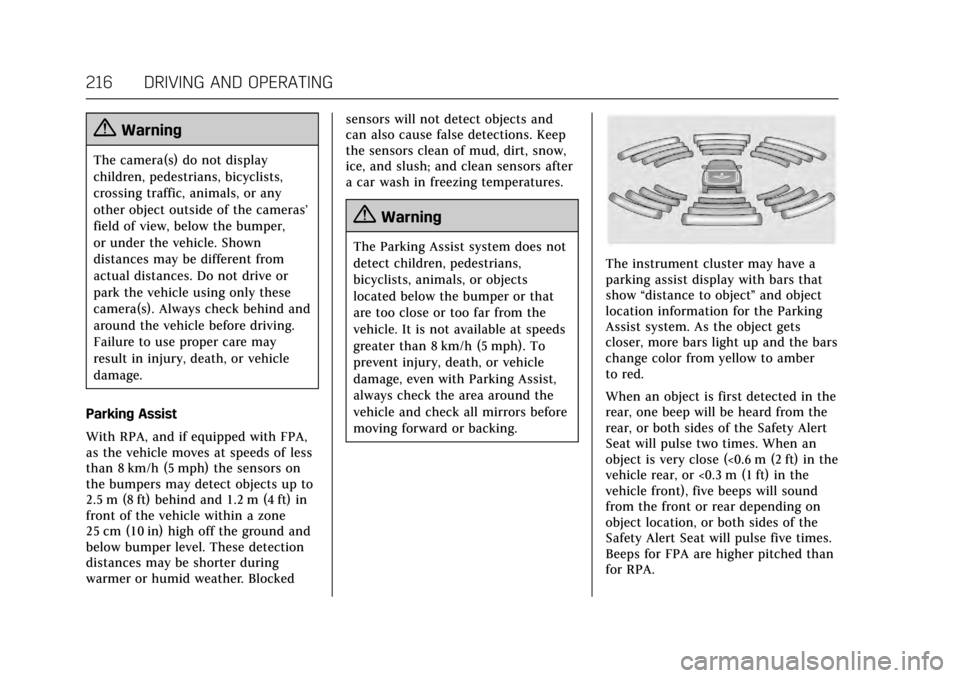
The instrument cluster may have a
parking assist display with bars that
show
“distance to object ”and object
location information for the Parking
Assist system. As the object gets
closer, more bars light up and the bars
change color from yellow to amber
to red.
When an object is first detected in the
rear, one beep will be heard from the
rear, or both sides of the Safety Alert
Seat will pulse two times. When an
object is very close (<0.6 m (2 ft) in the
vehicle rear, or <0.3 m (1 ft) in the
vehicle front), five beeps will sound
from the front or rear depending on
object location, or both sides of the
Safety Alert Seat will pulse five times.
Beeps for FPA are higher pitched than
for RPA.
Page 252 of 335
Cadillac ATS/ATS-V Owner Manual (GMNA-Localizing-MidEast-10287885) -
2017 - crc - 6/16/16
VEHICLE CARE 251
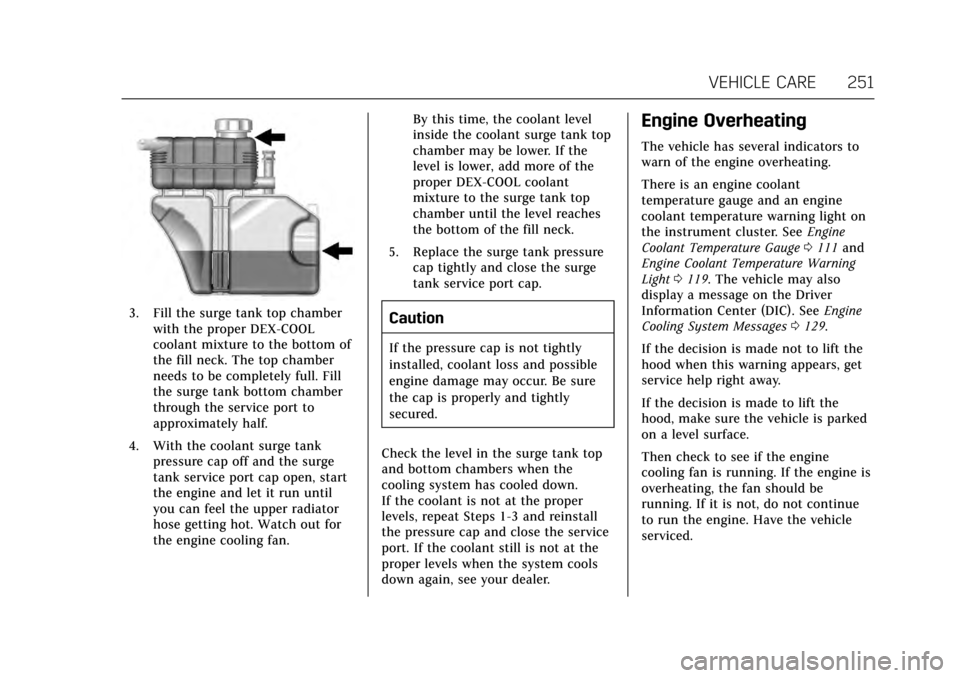
3. Fill the surge tank top chamberwith the proper DEX-COOL
coolant mixture to the bottom of
the fill neck. The top chamber
needs to be completely full. Fill
the surge tank bottom chamber
through the service port to
approximately half.
4. With the coolant surge tank pressure cap off and the surge
tank service port cap open, start
the engine and let it run until
you can feel the upper radiator
hose getting hot. Watch out for
the engine cooling fan. By this time, the coolant level
inside the coolant surge tank top
chamber may be lower. If the
level is lower, add more of the
proper DEX-COOL coolant
mixture to the surge tank top
chamber until the level reaches
the bottom of the fill neck.
5. Replace the surge tank pressure cap tightly and close the surge
tank service port cap.Caution
If the pressure cap is not tightly
installed, coolant loss and possible
engine damage may occur. Be sure
the cap is properly and tightly
secured.
Check the level in the surge tank top
and bottom chambers when the
cooling system has cooled down.
If the coolant is not at the proper
levels, repeat Steps 1-3 and reinstall
the pressure cap and close the service
port. If the coolant still is not at the
proper levels when the system cools
down again, see your dealer.
Engine Overheating
The vehicle has several indicators to
warn of the engine overheating.
There is an engine coolant
temperature gauge and an engine
coolant temperature warning light on
the instrument cluster. See Engine
Coolant Temperature Gauge 0111 and
Engine Coolant Temperature Warning
Light 0119. The vehicle may also
display a message on the Driver
Information Center (DIC). See Engine
Cooling System Messages 0129.
If the decision is made not to lift the
hood when this warning appears, get
service help right away.
If the decision is made to lift the
hood, make sure the vehicle is parked
on a level surface.
Then check to see if the engine
cooling fan is running. If the engine is
overheating, the fan should be
running. If it is not, do not continue
to run the engine. Have the vehicle
serviced.